

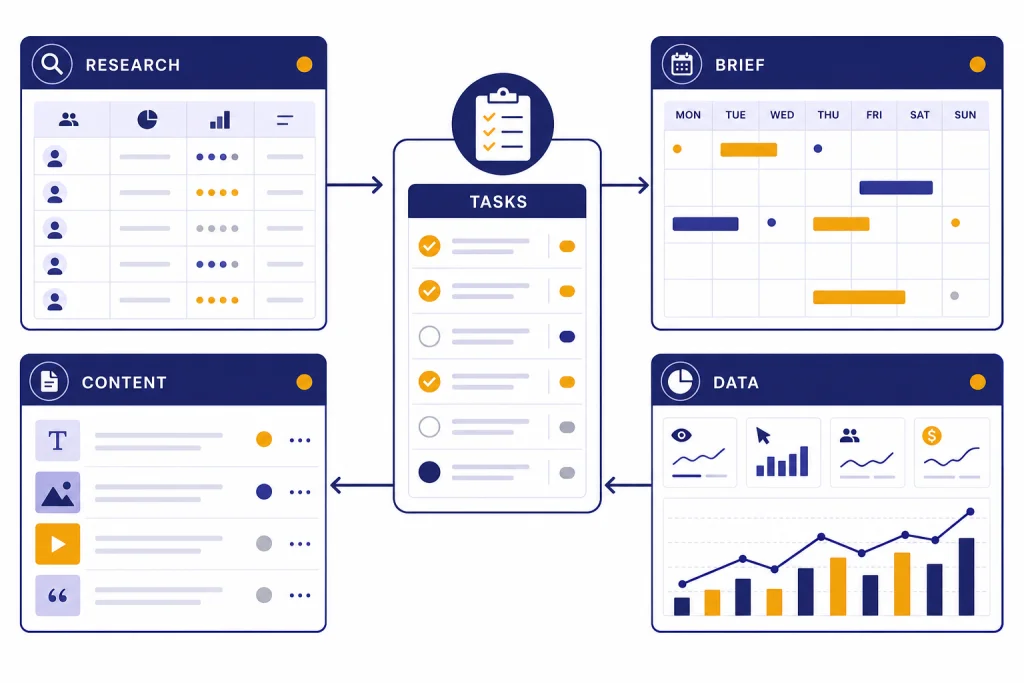
This ChatGPT tutorial for marketing shows how to build a repeatable system, not a pile of one-off prompts. The goal is practical autopilot: ChatGPT helps research your audience, plan campaigns, draft assets, repurpose content, analyze results, and remind you when repeat work is due. You still approve positioning, claims, budget, and publishing. That human review is the difference between a useful marketing workflow and low-quality AI output. Use this tutorial to create a reusable marketing command center inside ChatGPT, then expand it with files, memory, custom GPTs, data analysis, search, and scheduled tasks where they fit your team.
What marketing on autopilot means
Marketing on autopilot does not mean asking ChatGPT to run your brand without oversight. It means moving repeat work into a controlled workflow. ChatGPT can draft, compare, summarize, classify, plan, and analyze. You decide the offer, the audience, the compliance boundary, and the final version.
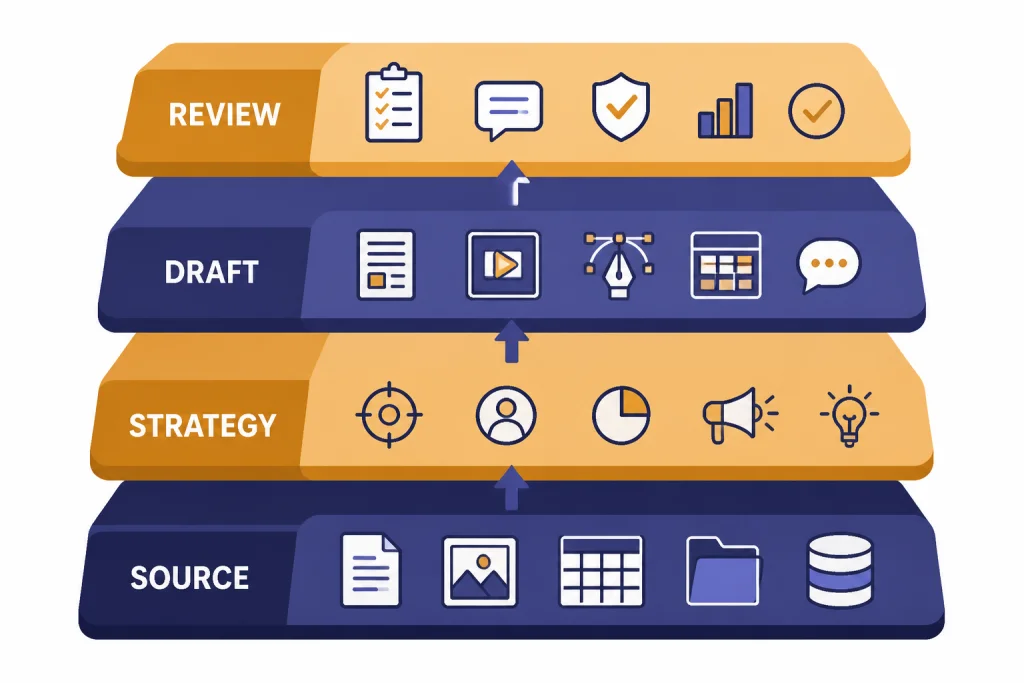
The safest version of this workflow has four layers: source material, strategy prompts, production prompts, and review prompts. Source material includes your offer, buyer notes, past campaigns, customer objections, and analytics exports. Strategy prompts turn that material into positioning and campaign plans. Production prompts create drafts for email, landing pages, ads, and social posts. Review prompts check for accuracy, unsupported claims, weak differentiation, and channel fit.
OpenAI’s product features now support several parts of this system. ChatGPT search can return timely answers with links to relevant web sources, and OpenAI says it is available to Free, Plus, Team, Edu, and Enterprise users, including logged-out free users.[3] Data analysis can create tables and charts from uploaded files, and ChatGPT can determine chart types from a dataset or follow your requested chart type.[4] Scheduled tasks can run prompts later, send push notifications or emails, and can be one-off or recurring.[1]
If you want a broader starting point before building this marketing workflow, read our beginner ChatGPT tutorial. If you already publish search content, pair this article with our SEO workflow tutorial.
Build the marketing command center
Start by creating one dedicated ChatGPT conversation, project, or custom GPT for marketing operations. Do not mix it with personal brainstorming, customer support, or finance work. The context should stay clean.
Your first job is to give ChatGPT the same briefing you would give a new marketer. Paste a compact brand brief, then ask ChatGPT to turn it into working rules. Keep the rules practical. They should define the audience, value proposition, tone, proof points, forbidden claims, competitors, preferred calls to action, and approval workflow.
Use this starter prompt:
You are my marketing operations assistant. Build a reusable marketing brief from the information below. Create sections for audience, offer, positioning, tone, proof, objections, compliance risks, channel rules, and missing information. Do not invent facts. If a proof point is weak, label it as unverified. Here is the source material: [paste brand, product, customer, and campaign notes].Once ChatGPT returns the brief, ask for a second pass: “Compress this into operating instructions that you can follow in future marketing tasks.” Save that version. If you use memory, remember that saved memories are stored separately from chat history, and OpenAI says deleting a chat does not remove saved memory from that conversation.[6] That makes memory useful for stable preferences, but risky for temporary campaigns. Put campaign-specific facts in the active workspace instead.
For repeatable work, consider a custom GPT. OpenAI describes GPTs as custom versions of ChatGPT that combine instructions, knowledge, and selected capabilities for a specific purpose.[2] OpenAI also says GPTs are available to all signed-in ChatGPT users, while creating or editing GPTs requires a paid subscription.[2] If your marketing team needs a shared assistant with approved instructions and source files, our custom GPT tutorial walks through the build process.
| Marketing asset | Put it in ChatGPT when | Use it for | Review risk |
|---|---|---|---|
| Brand brief | At setup | Voice, positioning, offer framing | Outdated positioning |
| Customer interviews | Before campaign planning | Objections, language, pain points | Overgeneralizing a small sample |
| Competitor notes | Before positioning | Differentiation and comparison | Stale or unsourced claims |
| Analytics export | After each campaign | Performance review and next actions | Bad column labels or incomplete data |
| Compliance notes | Before production | Claims review and disclosures | Legal interpretation without counsel |
Research your market before you write
Many AI marketing workflows fail because they start with copywriting. Start with research instead. Ask ChatGPT to separate known facts from assumptions, then use search or uploaded files to fill gaps.
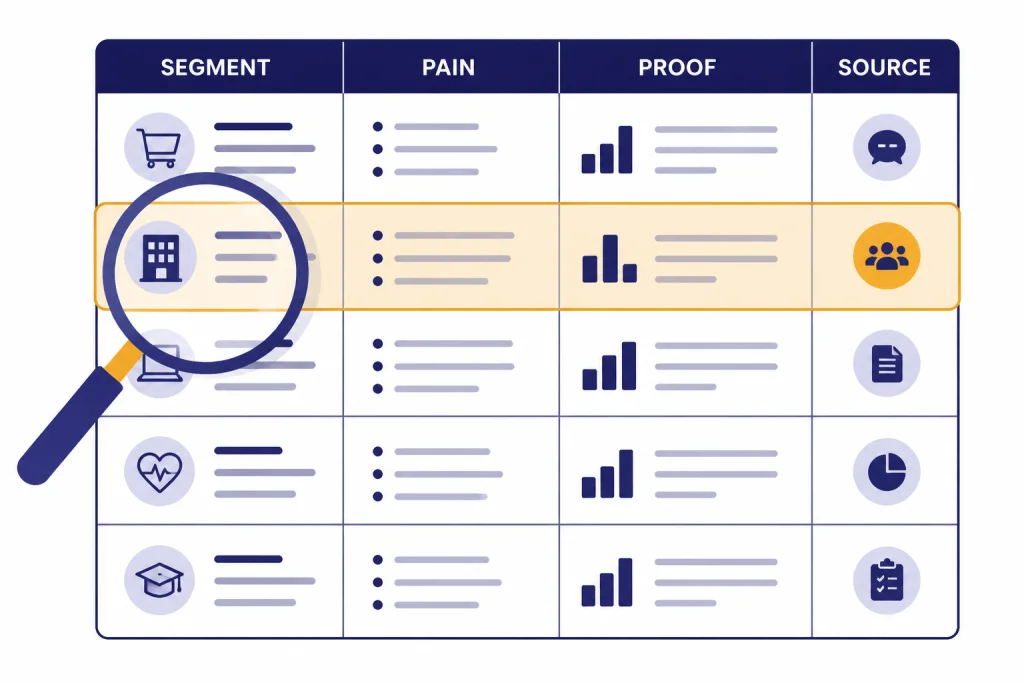
A useful research prompt has a narrow job. Do not ask, “Research my market.” Ask for a table of customer jobs, pains, triggers, buying objections, comparison criteria, and content angles. Then ask ChatGPT to mark each row as sourced, inferred, or unknown.
Using only the source material in this conversation and any web sources you cite, create a buyer research table. Columns: segment, job to be done, pain, trigger event, objection, proof needed, content angle, confidence level. Mark each row as sourced, inferred, or unknown. Do not write campaign copy yet.Use ChatGPT search when the facts are time-sensitive: competitor positioning, public pricing, product categories, regulations, events, or recent market language. OpenAI says ChatGPT search can provide timely answers with links to sources and may rewrite a query into targeted queries sent to search providers.[3] For deeper research projects, use the workflow in our deep research tutorial.
Keep a research log. For every claim you plan to use in public marketing, store the source, date accessed, and approved wording. This is especially important for comparison pages, regulated products, health claims, financial claims, and testimonials. The Federal Trade Commission says truth in advertising applies across media, including newer channels such as social media.[8]
End the research stage with a decision memo. Ask ChatGPT to summarize the audience, core problem, strongest proof, weakest proof, and the claims you should avoid. That memo becomes the guardrail for the campaign.
Turn one offer into a campaign system
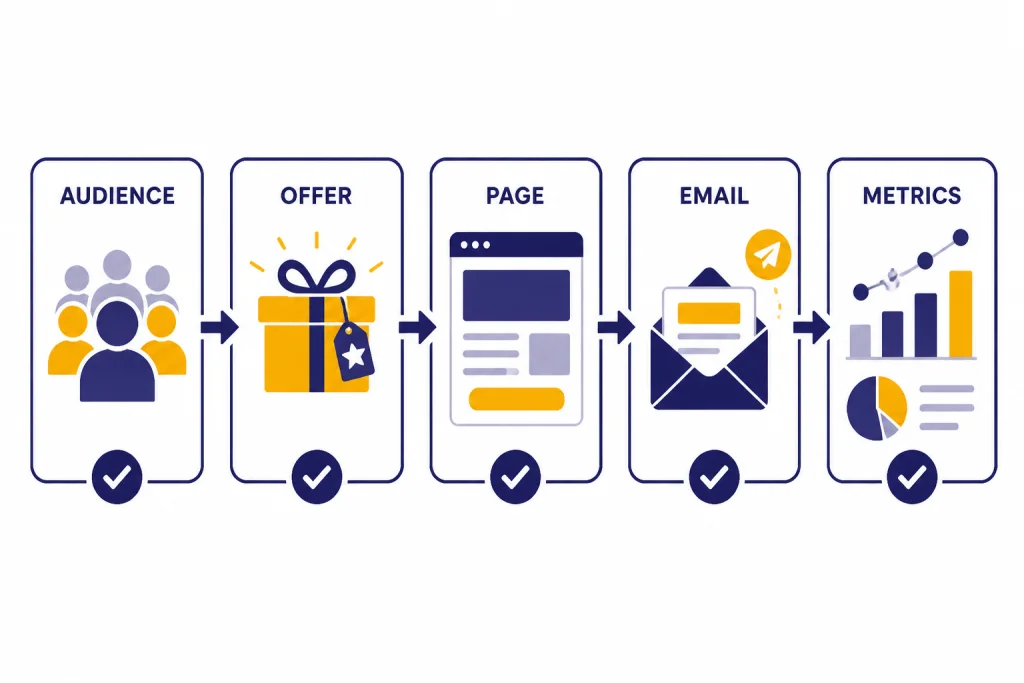
Now convert one offer into a campaign map. A campaign map shows the path from first touch to conversion. It should include the audience, promise, hook, lead magnet or offer, landing page, email sequence, retargeting angle, sales handoff, and measurement plan.
Ask ChatGPT to generate several campaign concepts, but force it to explain the strategic tradeoff behind each one. A good output tells you which campaign is best for speed, trust, education, comparison, or direct response.
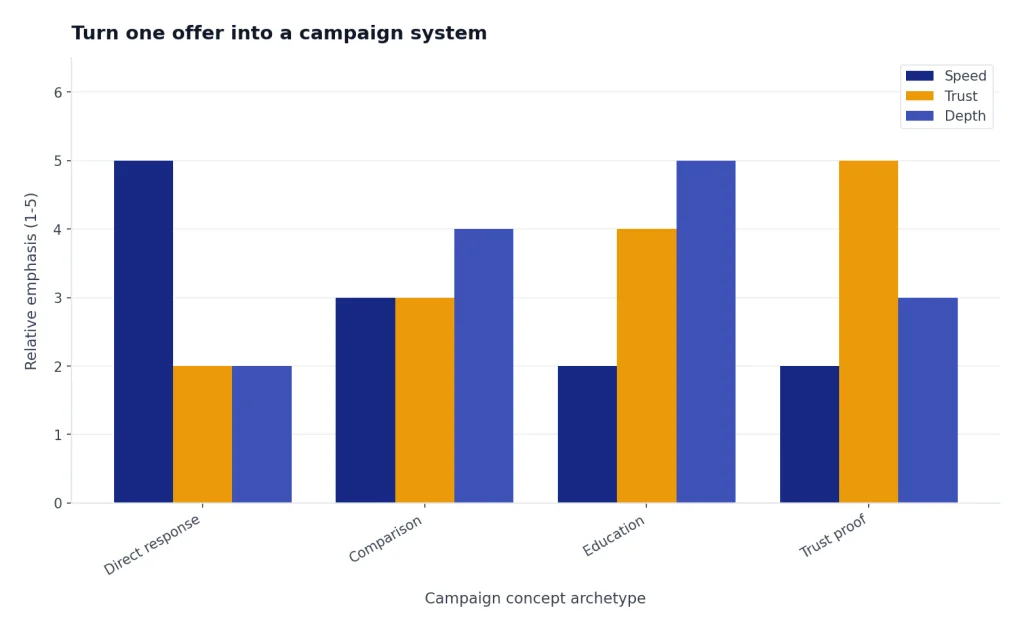
Create five campaign concepts for this offer. For each concept, include: target segment, core promise, primary objection, lead asset, landing page angle, email sequence angle, social angle, paid ad angle, success metric, and why this campaign might fail. Rank the concepts for confidence and explain the ranking.After that, choose one concept and ask ChatGPT to build the asset matrix. The matrix should list every asset you need, its owner, its status, its source material, and its approval step. This is where “autopilot” starts to feel real. ChatGPT is no longer writing random posts. It is helping you run a repeatable production line.
If your team produces long-form pages, use Canvas for structured drafting and revision. Our Canvas document workflow is a better fit for landing pages, white papers, and sales pages than a normal chat thread. If you rely on prompt libraries, build reusable templates with our ChatGPT prompt generator guide.
Campaign map prompt
Build a campaign map for [offer]. Use the approved buyer memo and brand brief above. Include stages from awareness to conversion. For each stage, list the buyer question, asset, message angle, CTA, proof needed, and review risk. Do not draft the final copy until the map is approved.When you approve the map, ask ChatGPT to create production prompts for each asset. This keeps strategy and production separate. It also gives your team a clean way to regenerate one weak asset without changing the whole campaign.
Create content with human review
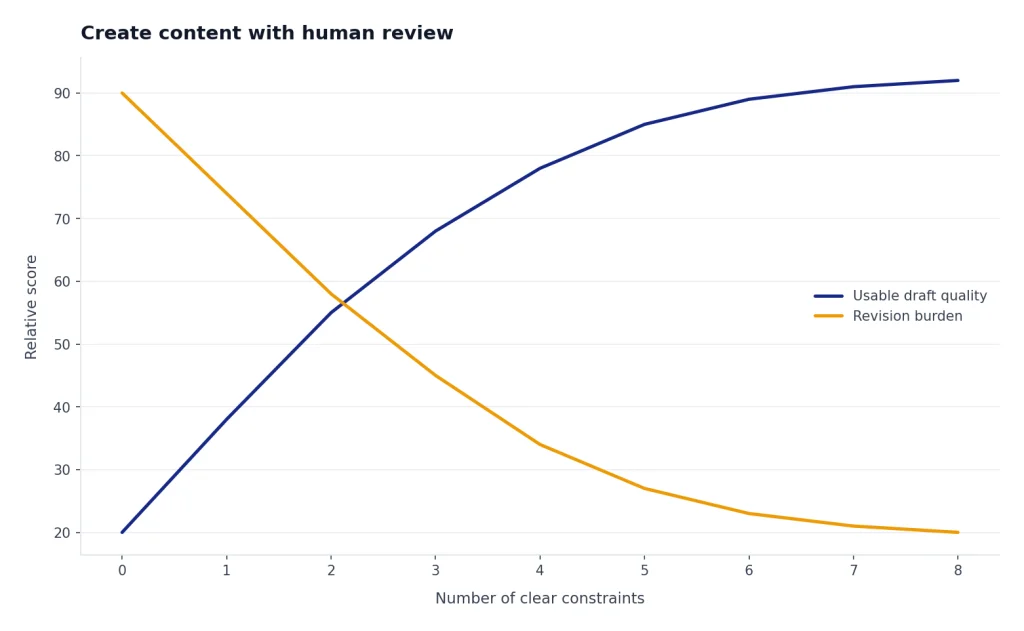
ChatGPT is strongest when you make it draft against constraints. Give it the campaign map, the source material, the channel, the conversion goal, and the review checklist. Do not ask it to “make this more exciting.” Ask it to improve clarity, specificity, proof, structure, or objection handling.
For a landing page, ask for a wireframe before copy. For email, ask for subject lines, preview text, body copy, and a plain-language reason for each email. For ads, ask for angle families rather than isolated ads. For social, ask for a distribution plan before captions.
Use this production prompt for a landing page:
Draft a landing page for the approved campaign. Use this structure: hero, problem, outcome, proof, how it works, objection handling, offer details, FAQ, final CTA. Use only approved claims. Flag any sentence that would need evidence before publishing. Write in our brand voice. Keep the copy specific and avoid hype.Then run a review prompt:
Act as a strict marketing editor. Review this draft for unsupported claims, vague benefits, overpromising, missing proof, weak CTAs, inconsistent voice, and channel mismatch. Return a table with issue, quoted phrase, why it is a problem, and revised wording.For search content, do not treat AI output as a shortcut around expertise. Google’s guidance says its ranking systems aim to reward original, high-quality content that demonstrates experience, expertise, authoritativeness, and trustworthiness, regardless of how the content is produced.[9] Google’s helpful content guidance also says systems prioritize content created to benefit people rather than content created to manipulate search rankings.[10] That means human experience, examples, product screenshots, original data, and editorial review still matter.
If you create visuals, keep the same review discipline. Use our image generation tutorial for ad concepts, thumbnails, and blog graphics. For video campaigns, pair the copy workflow with our AI video tutorial. For creator channels, our ChatGPT for YouTubers guide covers scripts, hooks, titles, and episode planning.
Analyze performance and improve the next run
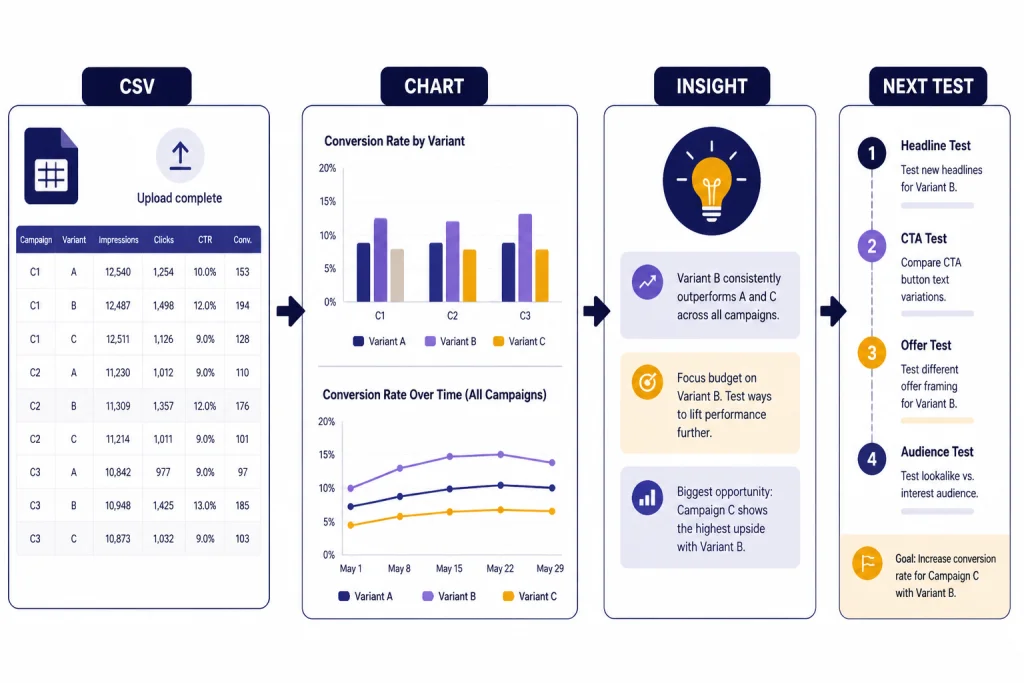
Autopilot improves only when the system learns from results. Export campaign data from your email platform, ad platform, CRM, or analytics tool. Remove private customer details you do not need. Then upload the file and ask ChatGPT to inspect the columns before drawing conclusions.
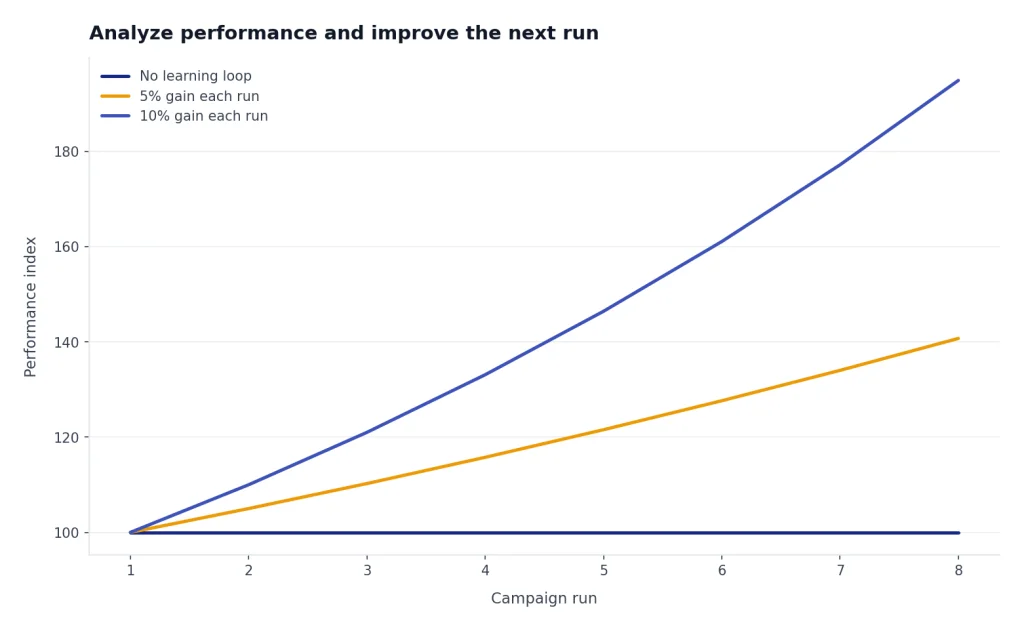
OpenAI says ChatGPT data analysis can work with uploaded Excel and CSV files.[4] OpenAI also says up to 10 files can be uploaded to a conversation, up to 20 files can be attached to a GPT as knowledge, files can be up to 512 MB, and CSV or spreadsheet files are limited to about 50 MB depending on row size.[4] Those limits make ChatGPT useful for many marketing exports, but you should still clean fields and confirm column definitions before analysis.
Inspect this campaign export before analysis. Identify each column, possible data quality problems, missing values, duplicate rows, inconsistent campaign names, and metrics that should not be compared directly. Ask clarifying questions before making recommendations.After the inspection, ask for analysis tied to decisions. Avoid vague summaries. Good questions include: Which segment converted best relative to traffic quality? Which subject line improved opens but hurt clicks? Which ad angle produced cheap leads but weak opportunities? Which landing page section should we test next?
Use a campaign retrospective prompt:
Create a campaign retrospective from this dataset and the original campaign map. Include wins, losses, metric caveats, audience learnings, copy learnings, offer learnings, recommended tests, and a revised campaign brief for the next run. Separate evidence from hypotheses.If you work heavily with spreadsheets, our data analysis tutorial and Excel prompt guide give you a stronger foundation for cleaning exports and building reporting tables.
Automate repeat marketing work
Once the workflow works manually, automate the repeat pieces. Do not automate creative judgment first. Automate reminders, checklists, briefs, recurring summaries, and review queues.
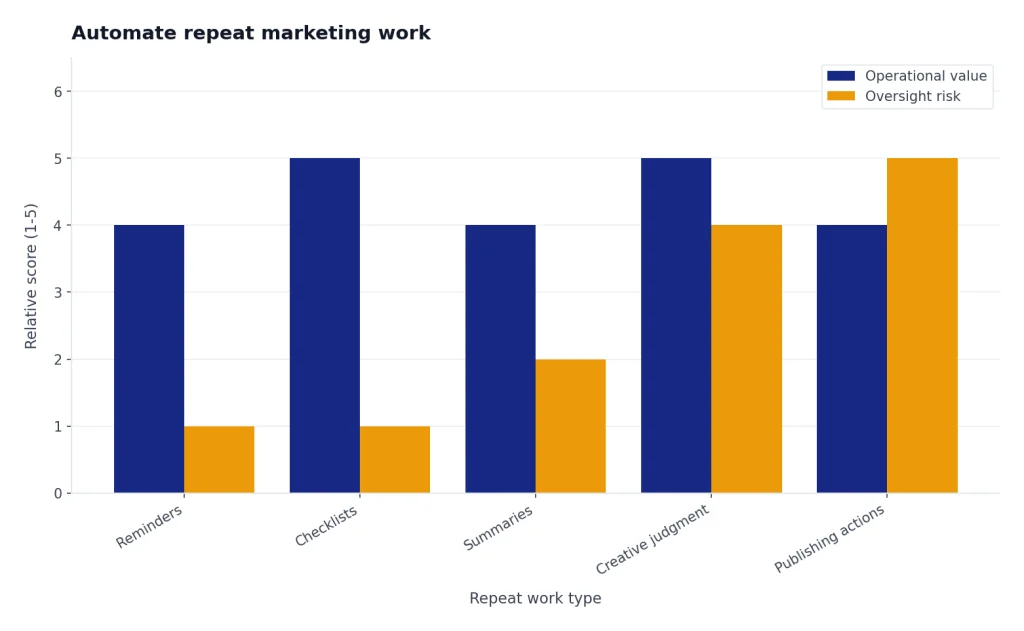
Scheduled tasks are useful for recurring marketing operations. OpenAI says tasks can trigger at specific times, can be one-off or recurring, run even when the user is not online, and notify users when complete.[1] OpenAI also says ChatGPT has a limit of 10 active tasks at any time.[1] Use that limited task budget for high-value recurring work.
Examples include a Monday campaign status prompt, a Friday performance review prompt, a monthly competitor scan, a weekly content repurposing queue, or a quarterly brand-message audit. Keep each task narrow. A scheduled task that says “manage marketing” will produce noise. A task that says “review last week’s approved campaign notes and prepare three test ideas for the landing page” is much more useful.
Use this recurring task instruction:
Every Monday at 9:00 AM, review the current campaign brief in this workspace and create a marketing operations checklist for the week. Include assets due, approvals needed, data to pull, experiments to monitor, and risks. Do not publish or send anything. Notify me with the checklist.For workflows that require external websites or apps, be more cautious. If an agent can access accounts or take actions, use confirmations and limit permissions. Our Agent Mode tutorial explains when agentic workflows make sense and when a normal checklist is safer.
Avoid common AI marketing mistakes
The fastest way to damage an AI marketing workflow is to let convenience outrun verification. Build a review checklist into every asset.
- Unsupported claims: If the draft says “best,” “fastest,” “proven,” or “guaranteed,” require evidence or remove the claim.
- Fake specificity: ChatGPT may create numbers, examples, or customer quotes that sound plausible. Treat anything not in your source material as unverified.
- Generic positioning: If the copy could fit any competitor, return to customer interviews and proof points.
- Channel mismatch: Email, search, paid social, sales decks, and landing pages need different structures.
- Disclosure problems: Influencer, affiliate, testimonial, and review campaigns need clear disclosure rules.
- Data leakage: Do not upload unnecessary personal information, confidential lists, or sensitive customer details.
For endorsements and testimonials, the FTC’s guidance emphasizes that disclosures should be clear and conspicuous, and it points marketers to its endorsement resources for reviews, influencers, and social media relationships.[8] Build this into the prompt itself: “Flag any testimonial, affiliate, review, or influencer language that may need a disclosure before publishing.”
For business workspaces, OpenAI says ChatGPT Business workspace data is excluded from training by default and encrypted in transit and at rest.[7] That is helpful, but it does not replace your own access controls, retention policy, or legal review. If you are handling regulated data or client data, ask your administrator which plan, controls, and policies apply before uploading files.
The practical rule is simple: let ChatGPT accelerate the work, but make humans accountable for truth, brand judgment, legal review, and publishing decisions.
Frequently asked questions
Can ChatGPT fully automate my marketing?
No. ChatGPT can automate drafts, summaries, reminders, analysis, and checklists, but you should keep human approval over strategy, claims, budget, and publishing. Treat it as a marketing operations assistant, not an unsupervised marketing department.
What should I upload first for a marketing workflow?
Start with a short brand brief, offer description, customer notes, and examples of past work you like. Add analytics exports only when you are ready to analyze performance. Do not upload sensitive customer data unless your plan and company policy allow it.
Should I use one chat or a custom GPT for marketing?
Use one chat or project while you are still testing the workflow. Move to a custom GPT when the instructions are stable, the files are approved, and multiple people need the same assistant. A custom GPT is best for repeatable brand and campaign rules.
Can AI-written content rank in search?
AI-assisted content can work when it is original, accurate, useful, and reviewed by someone with real expertise. Google’s guidance focuses on helpful, reliable, people-first content rather than banning AI-generated text outright.[9] Thin, generic, mass-produced pages are still a bad strategy.
How do I stop ChatGPT from inventing marketing claims?
Tell it to use only approved source material and to label anything else as a hypothesis. Add a review prompt that searches for unsupported claims, vague superlatives, missing proof, and invented examples. Keep a source log for public claims.
What is the best first automation to set up?
Start with a weekly campaign review task. Ask ChatGPT to summarize active campaigns, list approvals needed, identify missing data, and suggest the next tests. This creates operational value without letting the system publish or spend money on its own.