

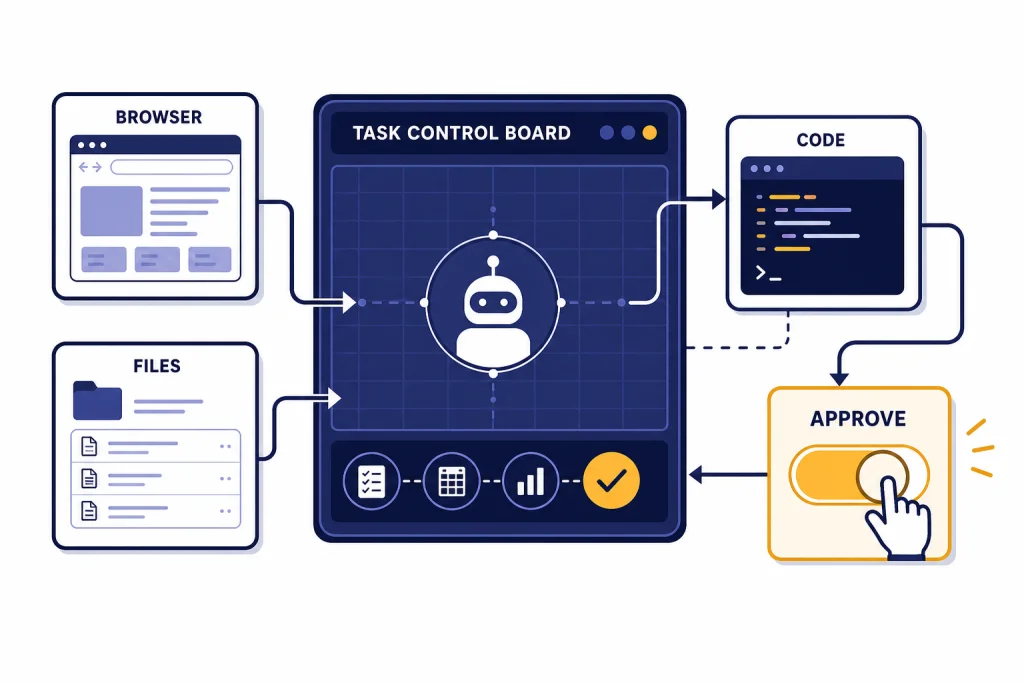
ChatGPT agent mode works best when you give it a bounded job, clear source material, and explicit approval rules. It can research, navigate websites, work with uploaded files, use apps as data sources, run code, fill out forms, and edit spreadsheets while pausing when it needs clarification or confirmation.[2] Treat it like a junior operator, not a fully autonomous employee. Your job is to define the outcome, limit the tools, watch sensitive steps, and review the final work before you rely on it. This chatgpt tutorial agent mode guide shows a practical workflow you can reuse for research, admin work, spreadsheets, booking tasks, and repeatable online projects.
What agent mode does
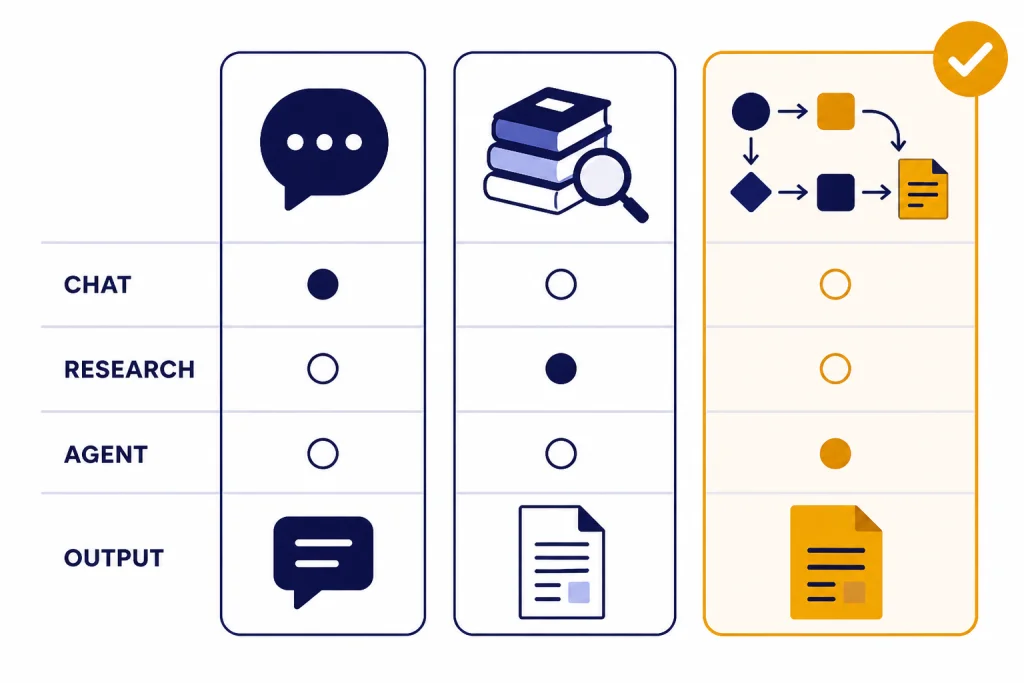
OpenAI introduced ChatGPT agent on July 17, 2025 as a system that combines research, browsing, code execution, and online actions inside ChatGPT.[1] The important difference is action. A normal chat can suggest what to do. Agent mode can take steps toward doing it, such as navigating a site, extracting information, building a spreadsheet, or preparing an editable deliverable.
Agent mode is not a magic background worker. It is a supervised workflow. OpenAI says it can pause for clarification or confirmation, and tasks usually complete in 5–30 minutes depending on complexity.[2] That timing matters. Agent mode is overkill for a one-sentence answer, but useful when a task would otherwise require you to open tabs, compare sources, copy data, and format results.
The simplest mental model is: you write the operating brief, ChatGPT runs the task in a controlled environment, and you remain the approver. If you need help with basic prompting first, start with our prompt engineering techniques guide before relying on agent mode for higher-stakes work.
Best use cases for agent mode
Use agent mode when the task has several steps, uses external information, and benefits from a final artifact. Good tasks have a visible finish line. Weak tasks are vague, open-ended, or sensitive enough that you should keep manual control.
| Task type | Good agent mode brief | Better alternative if needed |
|---|---|---|
| Research plus deliverable | “Compare these vendors, cite sources, and make a decision table.” | Use deep research for a longer evidence report. |
| Spreadsheet cleanup | “Open this CSV, normalize column names, flag missing values, and return an edited file.” | Use Code Interpreter mastery for heavy analysis. |
| Web task with approval | “Find three appointment options, but do not book without asking me.” | Use normal browsing if you only need information. |
| Document assembly | “Draft a project brief from these notes and format it for review.” | Use Canvas for document editing. |
| SEO workflow | “Collect SERP notes, cluster keywords, and prepare an outline.” | Use our ChatGPT SEO workflow for repeatable publishing systems. |
The best agent tasks also have safe boundaries. “Research these five competitors and build a comparison table” is strong. “Check my email and handle anything important” is not. The first task defines scope. The second task gives broad access, unclear authority, and too many chances for a bad action.
Agent mode also fits mixed work. For example, it can gather public pricing pages, create a spreadsheet, and draft a summary. If the spreadsheet becomes the core of the project, switch to our data analysis step-by-step tutorial for a more controlled analysis workflow.
Prepare the task before you start
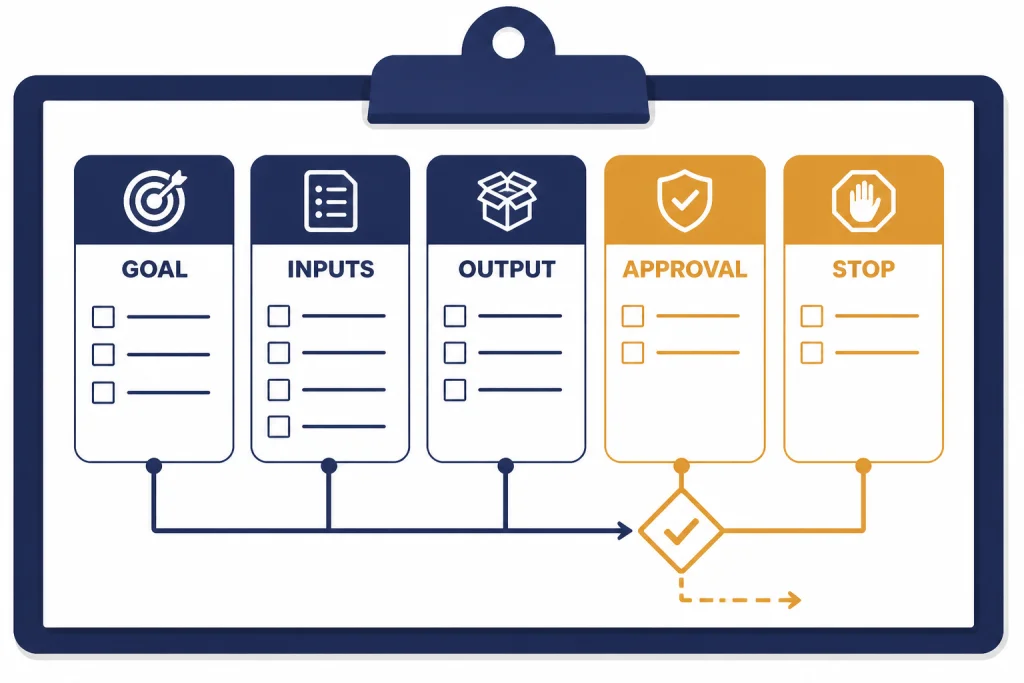
A strong agent run starts before you click the tool. Write a short task brief that tells ChatGPT what to do, what not to do, which sources to prefer, and when to stop. This reduces wasted agent requests and makes supervision easier.
Use this structure:
- Goal: State the finished outcome in one sentence.
- Inputs: List the files, sites, apps, or constraints it may use.
- Output: Specify the format, such as a table, memo, spreadsheet, checklist, or draft email.
- Approval rules: State which actions require your permission.
- Stop conditions: Tell it when to ask you instead of guessing.
For a purchasing task, the approval rule matters most. Write: “Do not purchase, subscribe, send, post, delete, or change account settings without asking me first.” For research, the source rule matters most. Write: “Use official documentation and primary sources first. If a source conflicts with another, flag the disagreement instead of blending them.”
If you plan to use connected work data, review your app access first. OpenAI says ChatGPT apps can connect to third-party applications and data sources so ChatGPT can reference information inside the conversation.[6] That can be useful, but it also means your prompt should limit which sources are relevant for the current task.
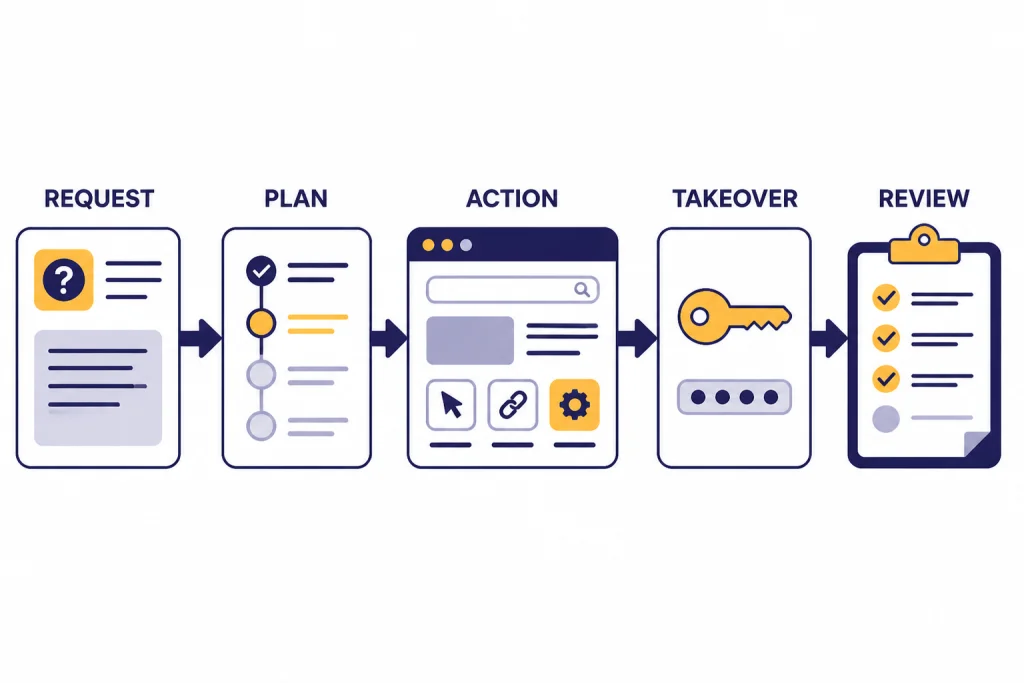
Step-by-step agent mode workflow
Start agent mode from the tools menu or by typing /agent in the composer.[2] Then paste your task brief. Do not begin with a vague request. A weak start forces the agent to infer your priorities, and inference is where many agent mistakes begin.
Start with a narrow test run
Ask for a plan before execution on important tasks. Example: “Before taking action, show me your plan and the sites or files you expect to use.” This gives you a chance to remove risky sources, narrow the scope, or add missing constraints.
Watch the first actions
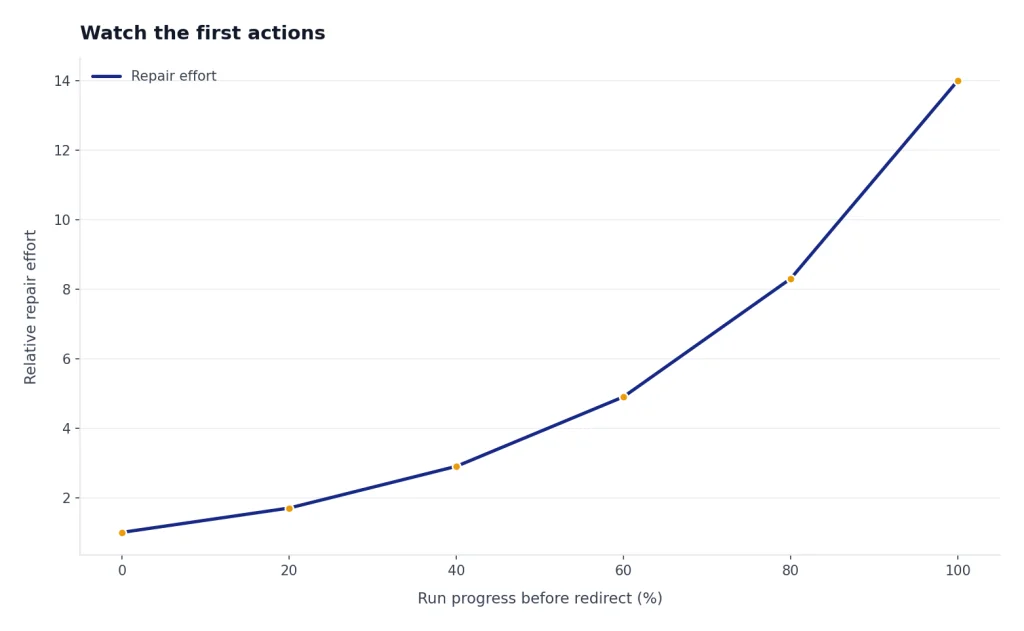
Stay present at the start. Confirm that it opens the right pages, uses the right file, and understands the output. If it starts drifting, interrupt early. It is easier to redirect the run after the first wrong step than to repair a finished deliverable built on the wrong assumption.
Use takeover for sensitive input
If a site requires login, avoid typing passwords or private information into the chat. OpenAI’s help guidance advises using takeover mode for sensitive inputs and enabling only the apps needed for the current task.[2] After the task, log out of sensitive sites if appropriate.
Review the final artifact
Do not treat the final output as automatically correct. Check cited sources, formulas, dates, totals, names, and any recommendation that affects money, health, legal obligations, or customer communication. For writing-heavy deliverables, move the draft into a stronger ChatGPT writing workflow and revise it like normal editorial work.
Prompt templates you can copy
Use these templates as starting points. Replace the bracketed text with your real task details.
Research and comparison
Use agent mode to research [topic]. Prefer official and primary sources. Compare [options] using these criteria: [criteria]. Produce a table, a short recommendation, and a list of open questions. Do not create accounts, make purchases, or contact anyone.Spreadsheet cleanup
Use agent mode to inspect the uploaded spreadsheet. Identify inconsistent columns, missing values, duplicate rows, and unusual outliers. Make a cleaned copy and summarize every change. If you are unsure whether to delete or transform data, ask before changing it.Booking or scheduling research
Find suitable options for [appointment/travel/event] using these constraints: [budget], [location], [date range], [preferences]. Return the best options with pros and cons. Do not book, pay, submit forms, or send messages without my explicit approval.Marketing operations
Research [audience or market], collect examples from public sources, and build a campaign brief. Include positioning notes, objections, channel ideas, and a draft content calendar. Ask before using connected apps or private files.For larger marketing systems, combine agent mode with our marketing on autopilot tutorial. For reusable prompt libraries, build a structured collection with the ChatGPT prompt generator.
Limits, apps, and recurring tasks
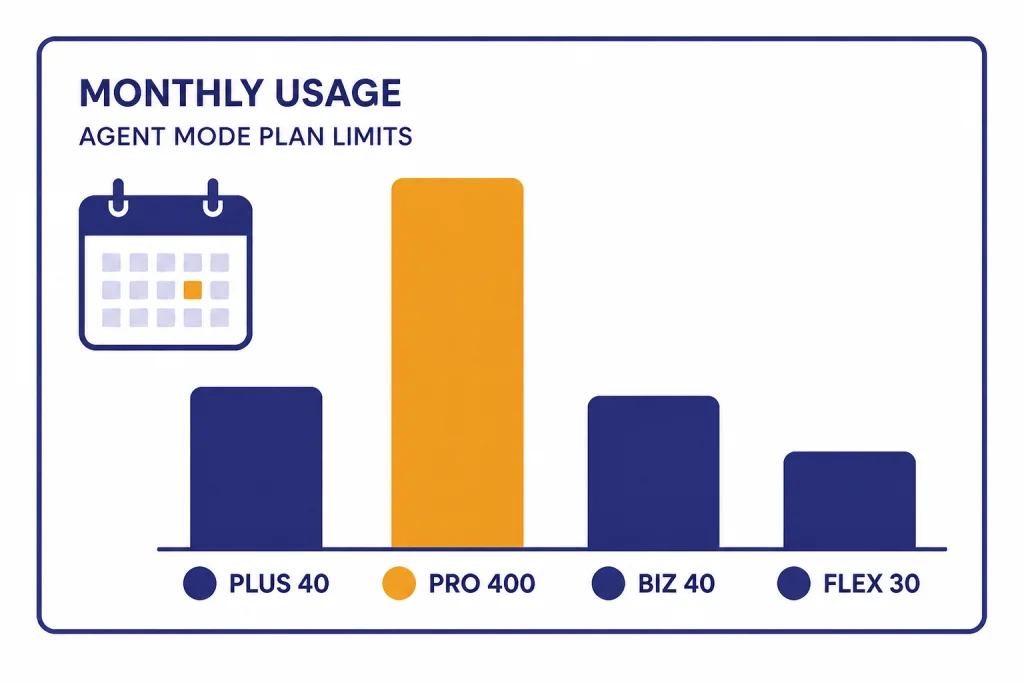
Agent mode is available on Pro, Plus, Business, Enterprise, and Edu plans in supported countries and territories.[2] OpenAI’s help documentation lists monthly agent message limits of 40 messages for Plus, 400 messages for Pro, 40 messages for Business and Enterprise, and 30 credits per message for Business and Enterprise plans using flexible pricing.[2] Only the initial user-started agent request counts toward the monthly limit; intermediate clarifications and authentication steps do not count against that limit.[2]
Plan your agent runs accordingly. Do not spend an agent request on a simple rewrite, a quick definition, or a basic brainstorm. Save it for work where the tool can perform several steps and produce a useful artifact.
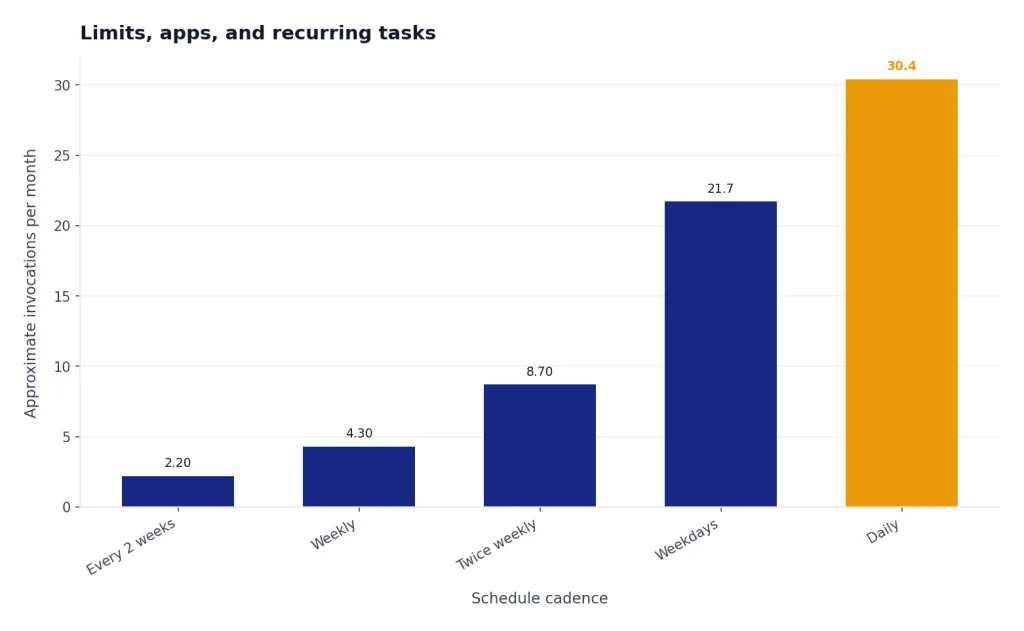
OpenAI also says each unique agent invocation counts against the monthly limit, including agent requests that are part of scheduled tasks.[2] That makes recurring tasks useful but not free. A weekly competitor scan can be worth it. A daily vague check-in may burn through your allowance without producing much value.
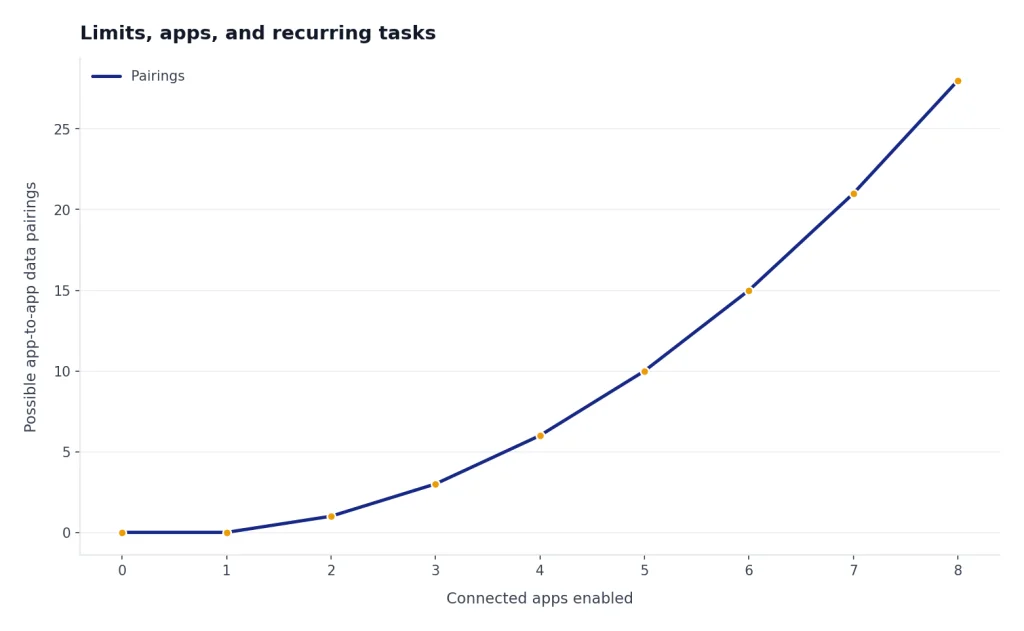
Apps and connectors deserve the same discipline. Enable only what the task needs. If the agent is researching public vendors, it probably does not need email access. If it is summarizing a folder of internal documents, it probably does not need to browse unrelated sites. Good access control is part of good prompting.
Safety checklist for agent mode
Agent mode creates more risk than a normal chat because it can interact with websites and connected data. OpenAI’s system card describes safeguards including safety training, monitors, user confirmations, watch mode for some sensitive browser contexts, terminal restrictions, and disabled memory for ChatGPT agent.[4] Safeguards help, but they do not replace user judgment.
- Do not give open-ended authority over email, files, finances, account settings, or public posts.
- Require approval before purchases, form submissions, messages, deletions, subscriptions, uploads, or permission changes.
- Use takeover mode for passwords and private credentials.
- Disconnect or disable apps that are not needed for the task.
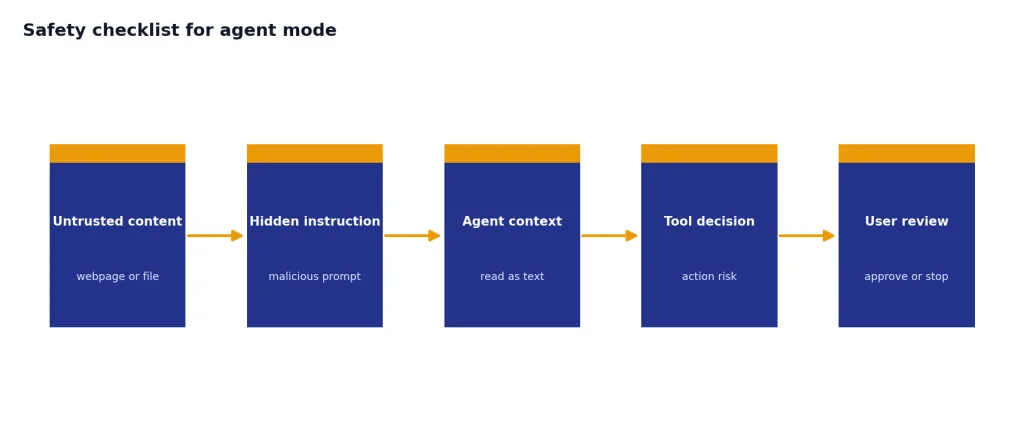
- Stop the task if the agent opens an unexpected site or follows suspicious page instructions.
- Verify final claims against the sources before acting on them.
Prompt injection is the risk most users underestimate. A webpage, document, or email can contain instructions that try to manipulate the agent. OpenAI notes that agent use can create privacy risks, including prompt injection attacks, especially when websites or apps expose sensitive information.[2] Your best defense is narrow scope, minimal access, and active supervision.
Also respect policy limits. OpenAI says users must be at least 18 years old to use ChatGPT agent, and its policy guidance warns against misleading, illegal, harmful, high-stakes, and safeguard-circumvention uses.[5] In practical terms, do not use agent mode to impersonate people, scrape restricted systems, mass-message strangers, evade website rules, or make high-impact decisions without qualified human review.
When to use another ChatGPT feature
Agent mode is powerful, but it is not always the right tool. Choose the narrowest feature that can do the job. Narrow tools are easier to supervise and often faster.
| Need | Use this instead | Why |
|---|---|---|
| Analyze one dataset | Data analysis | It keeps the work focused on files, calculations, charts, and reproducible inspection. |
| Read and summarize documents | PDF reading workflow | It is safer when you only need extraction, synthesis, or citation checking. |
| Create or revise a long document | Canvas | It gives you a better editing surface and version control for prose. |
| Browse manually with help | Atlas browsing tutorial | It keeps you in the browser while ChatGPT assists with navigation and understanding. |
| Build a repeatable assistant | Custom GPTs | It works better when you want instructions, files, and behavior reused over time. |
A good rule: use agent mode when the work requires action across tools. Use a specialized feature when the work stays inside one medium, such as a spreadsheet, document, PDF, or browser page.
Frequently asked questions
Is ChatGPT agent mode available on the Free plan?
No. OpenAI’s help documentation says agent mode is currently available on paid plans including Pro, Plus, Business, Enterprise, and Edu.[2] If you do not see it, check your plan, workspace settings, app version, and country availability.
What counts against the agent mode limit?
OpenAI says the initial user-started agent request counts against the monthly limit. Intermediate clarifications and authentication steps do not count, but each unique agent invocation does, including scheduled agent tasks.[2]
Can agent mode make purchases or send messages?
It can perform actions on your behalf in supported contexts, but you should require explicit approval before any purchase, message, post, deletion, booking, or account change. OpenAI describes user confirmations as one of the safeguards for actions that affect the state of the world.[4]
Should I connect my email or files to agent mode?
Only connect what the task truly needs. Connected apps can make agent mode more useful, but they also expand what ChatGPT can access during the task.[6] Start with the minimum access, then add more only if the agent cannot complete the job without it.
Is agent mode better than deep research?
Not always. Use deep research when the goal is a careful report with citations. Use agent mode when the goal includes action, such as navigating sites, creating files, filling forms with approval, or assembling a deliverable from several tools.
What is the safest first project for a beginner?
Start with a public research task that does not require login, payment, or private files. For example, ask it to compare public vendor pages and create a table. This lets you learn supervision without exposing sensitive accounts.