

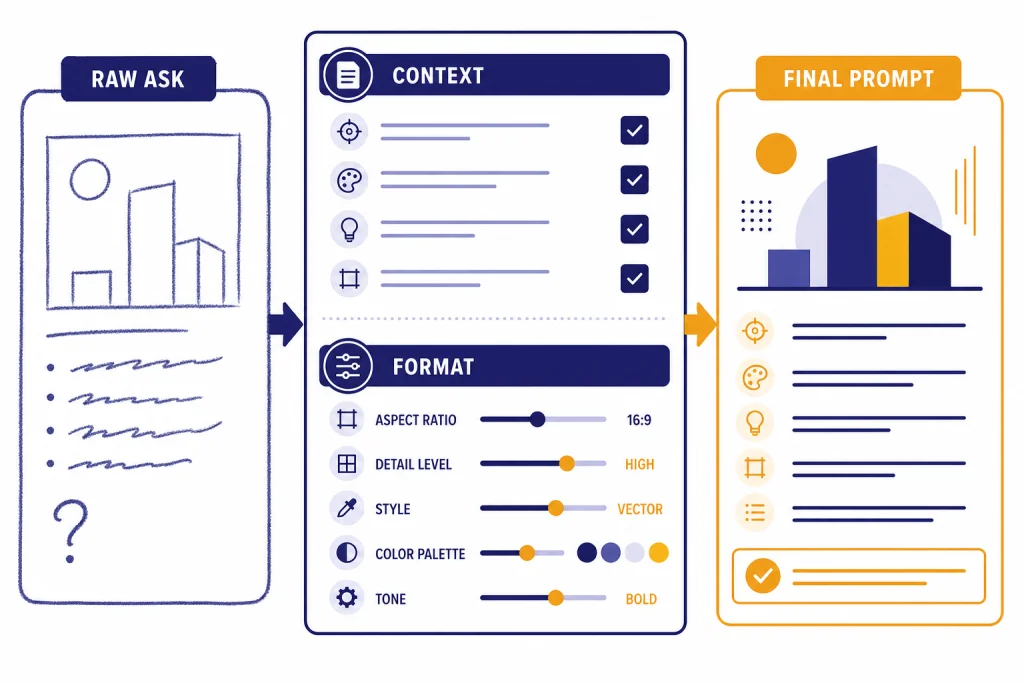
The best ChatGPT prompt generator tool is the one that turns a vague request into a clear, reusable prompt without forcing you to buy a prompt pack or learn prompt engineering first. For most everyday ChatGPT users, start with the free generator below because it is fast, works in any modern browser, and focuses on practical tasks such as writing, research, coding, summarizing, planning, and business workflows. That does not make it the universal winner for every use case. If you are optimizing production API prompts, managing a team prompt library, or buying visual prompt recipes, another tool may fit better.
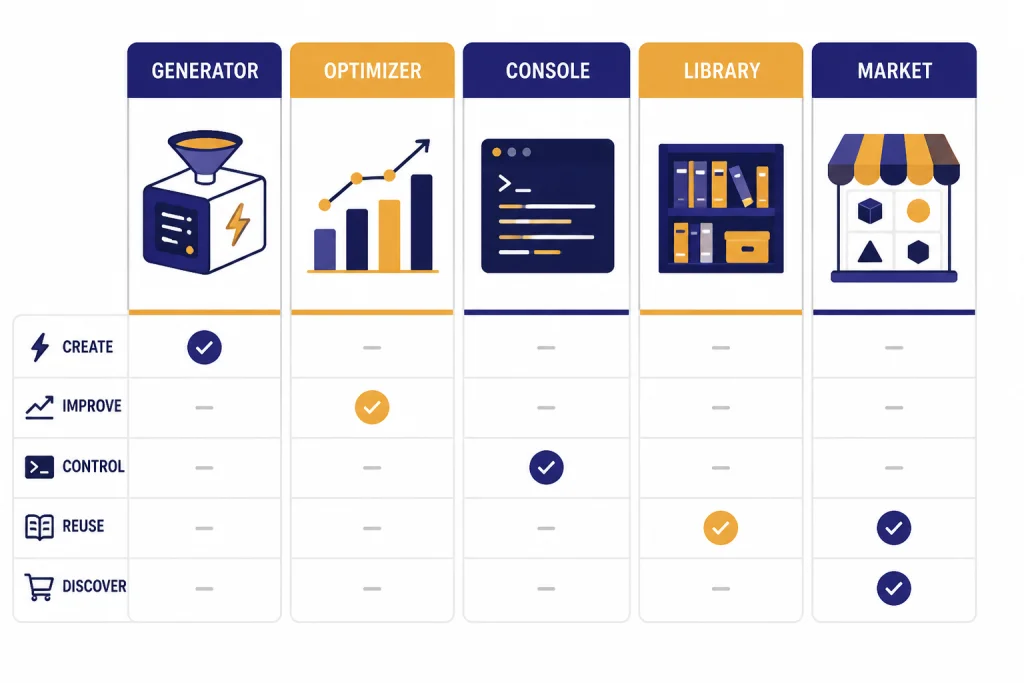
This guide now ranks the tools by category: true prompt generators and optimizers first, then template libraries, marketplaces, and visual prompt inspiration sites. Prompt generators are useful, but they are not magic. You still need to test the output, add real context, remove sensitive information, and revise the prompt after ChatGPT responds.
ChatGPT Prompt Generator
Describe what you want in plain English. We'll generate a structured, role-based prompt you can paste into ChatGPT.
Powered by GPT-5.5. One generation per click; please be patient — it's free for you, but we still pay the model.
Quick picks
If you only need a better prompt for your next ChatGPT conversation, use the generator at the top of this page. It asks for the missing pieces that usually make prompts fail: goal, audience, context, format, constraints, and examples. It is the simplest default for everyday use because it produces a prompt you can copy into ChatGPT without installing an extension, creating a marketplace account, or browsing other people’s templates.
How we evaluated the tools: we compared each option against the same practical tasks: a business writing prompt, a summarization prompt, a coding-help prompt, and a visual prompt where relevant. We looked for five things: whether the tool actually generates or improves a prompt, whether it asks for enough context, how much editing the output needs, where the tool runs, and what pricing or account friction a typical user should expect. The sample outputs below are representative illustrations of the kinds of results each tool is designed to produce, not benchmark scores or vendor screenshots.
If you are building an application, use OpenAI Prompt Optimizer or Anthropic’s Console prompting tools instead. OpenAI describes its Prompt Optimizer as a dashboard chat interface that improves a prompt using current best practices, and it can use datasets, annotations, critiques, and grader results when you are optimizing for a repeatable production task.[2] Anthropic’s prompt generator is aimed at creating high-quality prompt templates for Claude and is framed as a way to solve the blank-page problem before testing and iteration.[3]
If you want a searchable library of ready-made prompts, AIPRM, PromptBase, and PromptHero are not the same kind of product. AIPRM focuses on templates inside ChatGPT and Claude, including community prompts, verified prompts, private templates, favorites, and custom lists.[5] PromptBase is a marketplace for image, text, video, free, ChatGPT, Claude, Gemini, Sora, Veo, and other model-specific prompts.[6] PromptHero is better for visual inspiration because it lets users search prompts for image and video models.[7]
| Need | Best starting point | Tool type | Why |
|---|---|---|---|
| Write one better ChatGPT prompt | Generator on this page | True prompt generator | Fast, focused, no prompt marketplace browsing. |
| Improve production prompts | OpenAI Prompt Optimizer | Developer optimizer | Uses datasets, annotations, critiques, and graders for repeatable tasks.[2] |
| Make Claude prompts | Anthropic prompting tools | Model-specific generator and improver | Creates Claude-oriented prompt templates and supports further testing.[3] |
| Browse ChatGPT templates | AIPRM | Template library and manager | Organizes community, verified, private, favorite, and custom prompt templates.[5] |
| Buy or sell prompts | PromptBase | Marketplace | Marketplace model with free and paid prompts across many AI systems.[6] |
| Study visual prompts | PromptHero | Visual prompt search library | Search-oriented prompt inspiration for image and video generation.[7] |
What our ChatGPT prompt generator does
Our ChatGPT prompt generator turns a rough instruction into a structured prompt you can copy into ChatGPT. It is not a prompt marketplace. It does not sell premade prompts. It does not promise a universal perfect prompt. It gives you a stronger starting point for a specific job.
The tool is useful when your first request is too short. For example, ask for a blog post and ChatGPT has to guess the audience, topic depth, tone, format, source expectations, and success criteria. A better prompt names those details before the model starts. OpenAI’s ChatGPT prompt guidance says prompts should be clear, specific, and supported with enough context, and it also emphasizes iterative refinement after you review the model’s response.[1]
In practical testing, the generator’s strongest results came from everyday knowledge-work tasks: email drafts, outlines, lesson plans, code explanations, research briefs, product descriptions, interview questions, summaries, and brainstorming sessions. Its weakest results appeared when the user entered almost no context. If the input is only write a strategy, the generated prompt can still be too generic. The fix is simple: add audience, goal, constraints, and at least one example of the desired output.
Illustrative example from this page’s generator:
| Input | Generated prompt excerpt | What needed editing |
|---|---|---|
| Create a customer onboarding email for a project management app. | You are a lifecycle email strategist. Draft a friendly onboarding email for new users of a project management app. The goal is to help them create their first project in under 10 minutes. Include a clear subject line, a short welcome, three setup steps, one support link placeholder, and a low-pressure call to action. | The structure was useful, but placeholders such as the support link, product name, and brand voice still needed to be filled in by the user. |
The generator works separately from ChatGPT: create the prompt here, copy it, then paste it into ChatGPT or another assistant. It does not require an account on this site to draft a prompt. Because it runs as a page tool, you should still avoid entering private, regulated, or confidential information. Use placeholders first, then add sensitive details only in an approved environment.
If you work mostly with writing workflows, pair prompt drafting with our best AI writing tools compared in 2026. If you are summarizing long files, use the generator to write the instruction and then compare dedicated tools in our AI summarizer tools guide.
The output should still be edited. Replace placeholders. Add facts the model would not know. Remove private data. Add examples if format matters. Then paste the result into ChatGPT and treat the first answer as a draft, not a verdict.
How to use the prompt generator
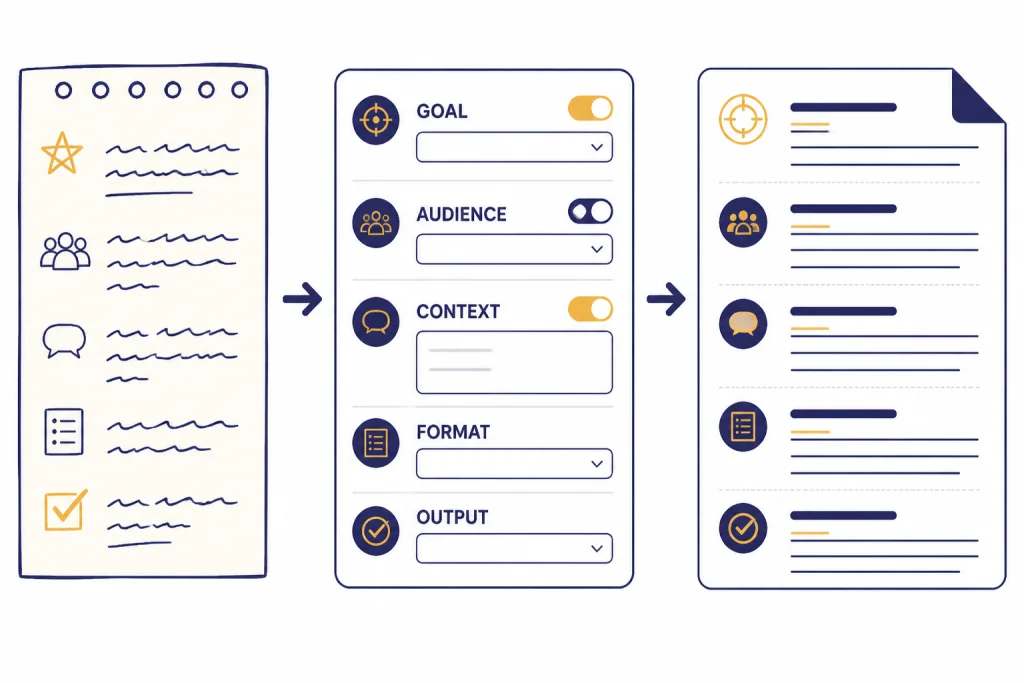
Use the tool before you open ChatGPT when you know the task but do not know how to phrase it. The best workflow is short and repeatable.
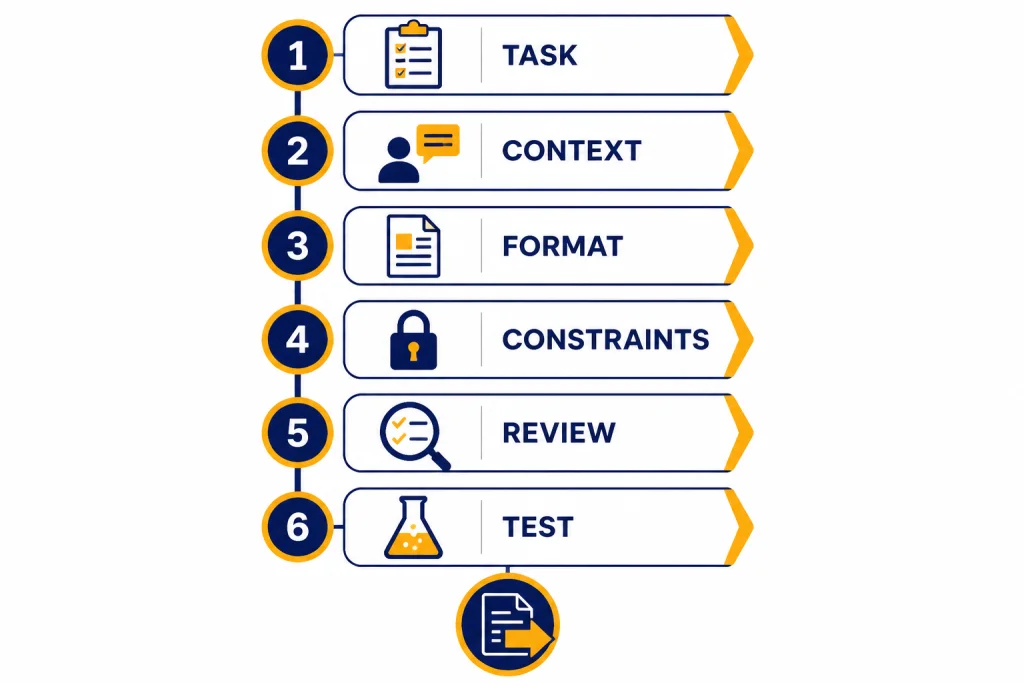
- State the task. Write the plain-language request first. Do not try to sound technical. Help me prepare for a sales call is a better start than an overbuilt prompt with fake expertise.
- Add context. Include who the output is for, what background matters, what source material you have, and what the model should assume.
- Choose the output format. Ask for a table, checklist, brief, email, JSON object, rubric, outline, or step-by-step plan. Format instructions reduce cleanup later.
- Add constraints. Name what to avoid. Examples include do not invent sources, ask clarifying questions if needed, keep the tone plain, or do not use confidential details.
- Generate and review. Read the generated prompt before copying it. If it asks for information you do not have, delete that section or replace it with a clear assumption.
- Test in ChatGPT. Paste the prompt into ChatGPT, inspect the answer, then revise the prompt based on what failed.
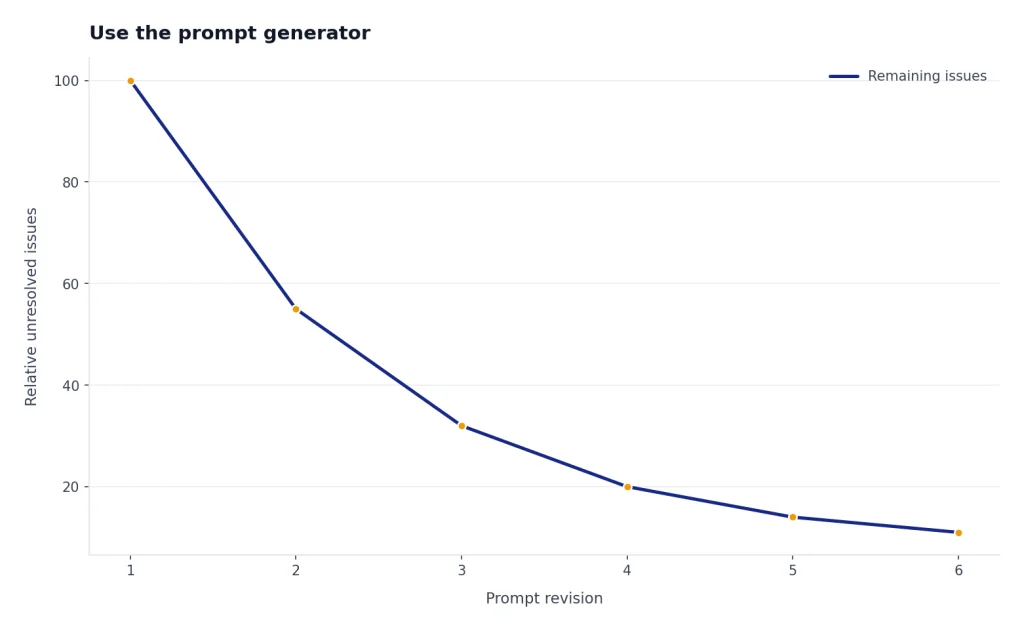
This last step matters. OpenAI’s guidance treats prompt engineering as an iterative process: start with an initial prompt, review the response, and refine the wording or context to improve the next result.[1] Microsoft gives similar practical advice for Copilot, including clear language, useful context, follow-up prompts, and awareness of limitations inside the current conversation.[8]
Here is a simple before-and-after example.
| Weak request | Generated prompt direction | Why it works better |
|---|---|---|
| Write a LinkedIn post. | Write a concise LinkedIn post for a B2B software founder announcing a customer onboarding checklist. Use a helpful tone, include a short hook, avoid hype, and end with a practical takeaway. | It names the audience, topic, voice, and output shape. |
| Explain this code. | Explain the following Python function for a junior developer. Start with a plain-English summary, then list inputs, outputs, edge cases, and one improvement. | It defines the reader and a predictable structure. |
| Summarize this article. | Summarize the pasted article for an executive who has two minutes. Include the main claim, supporting evidence, risks, and three follow-up questions. | It tells ChatGPT what to extract and how to prioritize. |
If your prompt will be used through the OpenAI API, check token size before you build a large reusable template. Our OpenAI token counter tools guide explains where token counters help, and our API cost calculator tools roundup helps estimate usage before a workflow grows.
Best ChatGPT prompt generator tools compared
Prompt tools fall into different categories, so the ranking below separates true generators from adjacent tools. A generator creates a prompt from your goal. An optimizer improves an existing prompt, often for production use. A library stores reusable templates. A marketplace sells prompts. A visual prompt site helps you study examples for image or video tools rather than writing ChatGPT instructions.
| Tool | Category | Works inside ChatGPT? | Account or access notes | Pricing and limits to check | Privacy note |
|---|---|---|---|---|---|
| ChatAI Guide prompt generator | True prompt generator | No. Copy the output into ChatGPT. | No site account required for the page tool. | Free page tool; limits may depend on site controls. | Do not enter private data; use placeholders. |
| OpenAI Prompt Optimizer | Developer prompt optimizer | No. It is for OpenAI developer workflows. | Requires access to OpenAI developer tooling. | Check current OpenAI platform terms and model usage costs. | Best for prompts and test data you are allowed to process in the OpenAI platform. |
| Anthropic prompting tools | Claude prompt generator and improver | No. It is Claude-console oriented. | Requires Anthropic Console access. | Check Anthropic’s current console and model usage terms. | Use only data approved for your Claude workflow. |
| AIPRM | Template library and manager | Yes, it is designed around ChatGPT and Claude template workflows.[5] | Requires using AIPRM’s app or extension-style workflow. | AIPRM publishes plan tiers and feature differences on its pricing page.[5] | Be careful with private prompts and shared community templates. |
| PromptBase | Prompt marketplace | No. You buy, sell, browse, or copy prompts separately. | Marketplace account may be needed for buying or selling. | Includes free and paid prompts; check each listing.[6] | Do not assume seller prompts are vetted for your data or compliance needs. |
| PromptHero | Visual prompt search library | No. It is mainly for browsing visual prompt examples. | Browsing and account features can vary. | Check current free and paid access, if any, on the site. | Copying public prompts can expose style imitation or licensing concerns. |
OpenAI Prompt Optimizer
OpenAI Prompt Optimizer is the strongest alternative when you are building a repeatable application workflow rather than asking ChatGPT one-off questions. OpenAI says the optimizer can use annotations, written feedback, grader results, and datasets, and its documentation recommends manually reviewing optimized prompts before using them in production.[2] That makes it more serious than a consumer prompt generator, but also more work.
Practical observation: it is best when you already have examples of good and bad outputs. If you only have a vague task, the optimizer can still produce a cleaner instruction, but you do not get its full value until you evaluate it against real inputs. It is not the fastest route for casual ChatGPT use.
| Test task | Representative optimized prompt direction | Where it can fail |
|---|---|---|
| Classify support tickets by urgency. | Classify each ticket as urgent, normal, or low. Use only the customer’s stated issue, return JSON with category and rationale, and flag ambiguous cases for human review. | Without labeled examples, urgency rules may stay too subjective. A team still needs test cases and review. |
Use it for customer support classification, extraction tasks, structured writing, evaluation-driven workflows, and API prompts that must behave consistently. Do not use it just to write a birthday email or a better brainstorming prompt.
Anthropic prompt generator and prompt improver
Anthropic’s Console prompting tools are best for teams that use Claude. The prompt generator creates Claude-oriented prompt templates from a task description, and Anthropic presents it as a practical way to get past a blank page before testing.[3] Anthropic also describes a prompt improver that can refine prompts, manage examples, and support prompt evaluation inside its developer console.[4]
Practical observation: the output tends to be more useful when the final assistant is Claude, because the surrounding workflow is built for Claude testing. If your final destination is ChatGPT, you may need to remove model-specific wording and retest the prompt in ChatGPT.
| Test task | Representative generated prompt direction | Where it can fail |
|---|---|---|
| Draft a policy summary for employees. | You are an internal communications assistant. Summarize the policy in plain language, list what changed, identify who is affected, and ask for clarification if the policy text is incomplete. | Good structure, but it can become too formal or too long unless you specify audience, tone, and length. |
This is not the best option if you want ChatGPT-specific phrasing. It is best when your final model is Claude or when your team already uses Anthropic Console.
AIPRM
AIPRM is closer to a prompt template management system than a plain generator. Its pricing page distinguishes community prompts from verified prompts, and it also describes private prompt templates, favorites, custom lists, tone and writing style controls, and power continue features.[5] Readers who like browser-based prompt libraries may find it useful. For a deeper look, read our AIPRM for ChatGPT review.
Practical observation: AIPRM is convenient when you want to browse prompt patterns inside a ChatGPT-like workflow, but the first template you click is rarely the final prompt you should use. Community prompts can be broad, SEO-heavy, or written for someone else’s goal. The best results come from treating the template as scaffolding and replacing the assumptions with your actual product, audience, and constraints.
| Test task | Representative template-style output | Where it can fail |
|---|---|---|
| Create an SEO article brief. | Act as an SEO strategist. Build an article brief with target audience, search intent, outline, FAQs, title options, and internal link suggestions. | It can overproduce generic SEO sections unless you supply the site’s real editorial standards and source requirements. |
The tradeoff is that templates can encourage shallow copying. A template written for another business, audience, or model may need heavy editing. Treat AIPRM as a library of starting points, not a source of final instructions.
PromptBase
PromptBase is a prompt marketplace, not primarily a generator. Its homepage lists categories for image, text, video, free, ChatGPT, Claude, Gemini, Sora, Veo, DALL·E, Stable Diffusion, and other prompt types.[6] It is useful if you want to inspect how creators package prompts for specific creative outputs, especially image and video workflows. If your work is visual, compare it with the tools in our AI image tools breakdown and AI video tools of 2026.
Practical observation: PromptBase is strongest when the listing includes examples, clear use cases, and model-specific instructions. It is weaker when a listing sells a generic paragraph with no proof that it works across inputs. Check whether you are buying a reusable method, a niche creative recipe, or merely wording you could draft yourself.
| Test task | Representative marketplace prompt style | Where it can fail |
|---|---|---|
| Generate product-description variations. | Use the supplied product features to create persuasive descriptions in several tones, with headline options, benefit bullets, and calls to action. | Marketplace prompts may not match your brand voice, compliance rules, or target model without editing. |
The downside is quality control. A paid prompt is not automatically better than a prompt you generated yourself. Before buying, read the listing carefully, look for examples, and avoid entering proprietary business data into any prompt you do not understand.
PromptHero
PromptHero is mainly useful for search and visual inspiration. It describes itself as a site for searching prompts for Midjourney, Stable Diffusion, Sora, and other generative models, with community hand-picked examples.[7] It is less useful for business writing prompts and more useful when you need to see how visual prompts are composed.
Practical observation: PromptHero helps you notice prompt ingredients: subject, style, lighting, composition, camera language, aspect-ratio hints, and negative constraints. It is not the right tool if your goal is a structured ChatGPT prompt for research, summarization, or business writing.
| Test task | Representative visual prompt style | Where it can fail |
|---|---|---|
| Create a product hero image concept. | A clean studio product photo of a reusable water bottle on a stone surface, soft daylight, minimal background, high detail, premium lifestyle aesthetic. | Visual prompt syntax does not transfer cleanly to every image or video model, and it does not replace ChatGPT task instructions. |
If you create images, do not copy prompts blindly. Visual models have different syntax, aspect-ratio controls, style conventions, and safety limits. As of May 2026, OpenAI’s current image lineup includes gpt-image-2, while video workflows may involve Sora 2 and Sora 2 Pro; prompts written for older or different systems may need adaptation.
| Rank for ChatGPT prompt work | Tool | Best for | Strength | Main caveat |
|---|---|---|---|---|
| 1 | ChatAI Guide prompt generator | Everyday ChatGPT prompts | Fast structured prompt drafting | You must still add real context and test |
| 2 | OpenAI Prompt Optimizer | Production OpenAI API prompts | Can use datasets, annotations, critiques, and graders[2] | Too heavy for casual use |
| 3 | Anthropic prompting tools | Claude prompt templates | Helps create task-specific Claude prompts[3] | Not ChatGPT-first |
| 4 | AIPRM | Template browsing and organization | Community, verified, private, favorite, and custom prompt management[5] | Templates still need adaptation |
| 5 | PromptBase | Buying, selling, and studying prompts | Broad marketplace across prompt categories[6] | Prompt quality varies |
| 6 | PromptHero | Visual prompt inspiration | Searchable image and video prompt examples[7] | Less relevant for plain ChatGPT writing tasks |
When not to use a prompt generator
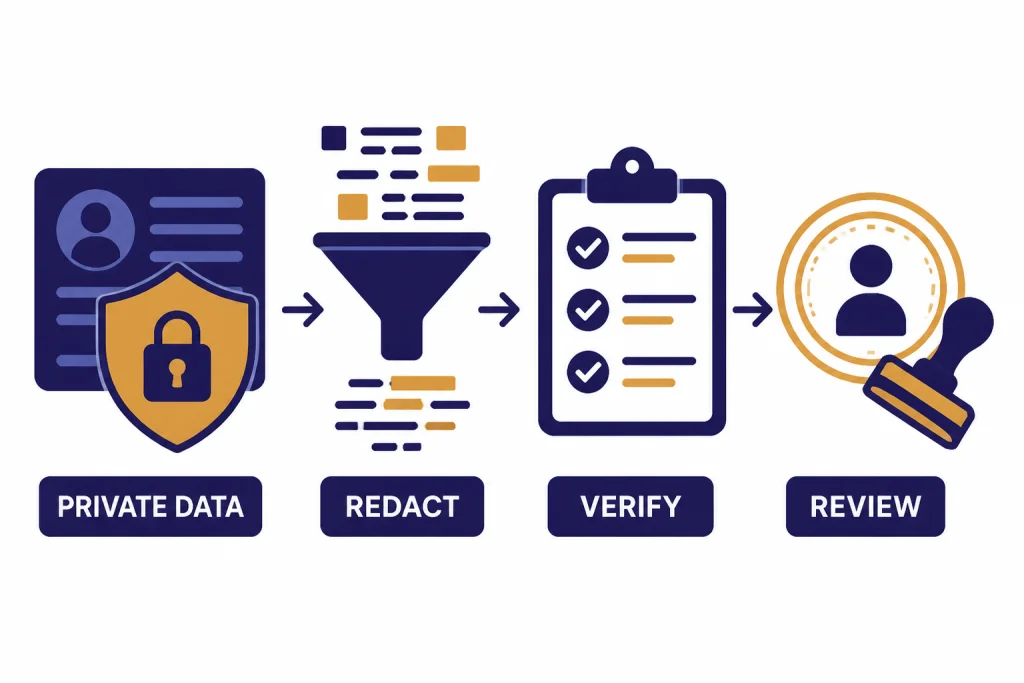
Do not use a prompt generator when the task depends on private, regulated, or highly sensitive information unless you can describe the task without exposing the data. Replace names, account numbers, student records, legal facts, health details, credentials, and unreleased business information with placeholders. Then add the real information only in the system your organization has approved for that data.
Do not use a generator to avoid understanding the task. A generated prompt can make a bad assignment look polished. It cannot decide the correct legal strategy, medical next step, hiring decision, grading policy, or security response. For education and authorship checks, use a separate evaluation workflow; our AI detectors for teachers and schools guide and plagiarism checker comparison cover that side of the process.
Do not use a generic prompt generator for coding tasks that need project context. Ask for a prompt that includes language, framework, versions, file structure, constraints, tests, and expected behavior. Then run the result through your normal development process. For coding-specific options, see our AI coding assistants of 2026.
Do not use prompt marketplaces as a substitute for verification. A prompt can produce fluent output that still contains wrong facts, weak reasoning, or invented sources. OpenAI’s own prompt optimizer documentation warns that optimized prompts should be evaluated and manually reviewed before production use because an optimized prompt can still perform worse on specific inputs.[2]
What makes a good generated prompt
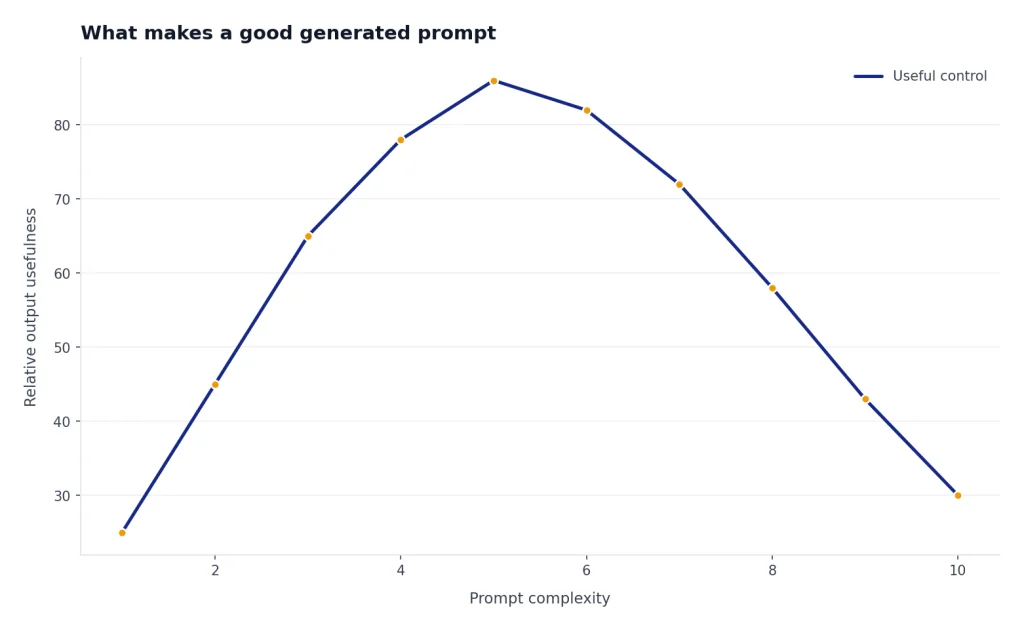
A good generated prompt is specific without being brittle. It tells ChatGPT what to do, who the answer is for, what information to use, what format to return, and what to avoid. It also leaves room for clarifying questions when the request is underspecified.
The strongest prompts usually include these elements:
- Role: The perspective the model should use, such as editor, tutor, analyst, interviewer, reviewer, or debugging assistant.
- Task: The action you want, stated as a verb.
- Context: Background information the model needs to avoid generic output.
- Audience: The reader’s knowledge level, goals, and expectations.
- Format: The structure of the answer, such as table, checklist, email, code comments, or outline.
- Constraints: Rules about length, tone, sources, forbidden claims, and what to do when information is missing.
- Examples: Sample inputs or outputs when style or structure matters.
These elements align with guidance from major AI providers. OpenAI emphasizes clarity, specificity, context, and iteration for ChatGPT prompts.[1] Microsoft’s Copilot guidance advises users to provide plain but clear instructions, context, and follow-up prompts.[8] Google’s Gemini guidance for Workspace prompts tells users to define role-like persona, task, and other prompt details when asking Gemini to write, summarize, change tone, create, and more.[9]
The danger is overprompting. A giant prompt with conflicting instructions can make output worse. If a generated prompt becomes too long, cut it back to the requirements that matter. For many tasks, a short prompt with the right context beats a long prompt full of generic rules.
How to choose the right tool
Choose based on the job, not the longest feature list. The biggest practical questions are: where will you use the prompt, how sensitive is the data, how often will you reuse it, and do you need a generated instruction or just examples to study?
- For everyday ChatGPT work: Use the generator on this page. It is fastest when you already know the task and need clearer wording.
- For repeatable API workflows: Use OpenAI Prompt Optimizer and build an evaluation habit around it.[2]
- For Claude workflows: Use Anthropic’s prompt generator or prompt improver so the prompt matches the model family you plan to use.[3]
- For teams that reuse many prompts: Use a template manager such as AIPRM, but keep your best prompts private, documented, and tested.[5]
- For creative inspiration: Browse PromptBase or PromptHero, then rewrite the prompt for your own model, brand, and output requirements.[6][7]
Most people do not need to pay for prompts. Start with a free generator, test the output, and save prompts that repeatedly work. Pay for a marketplace prompt only when it gives you a tested creative method, a niche workflow, or enough saved time to justify the purchase. Before paying, check whether the seller shows examples, names the target model, explains usage limits, and gives you more than generic wording.
Also consider where you will use the prompt. If your workflow lives inside a browser, our ChatGPT Chrome extension picks may be more useful than a standalone generator. If you mostly work from native apps, compare options in our ChatGPT desktop apps guide and ChatGPT mobile apps roundup.
As of May 2026, ChatGPT and API users may see different model names depending on product surface and account access. For general chat, current top-tier OpenAI options include gpt-5.5 and gpt-5.5-pro, while product labels such as GPT-5.5 Thinking may appear in the ChatGPT interface. A prompt generator does not remove the need to test the prompt on the exact model and tool where you will use it.
Frequently asked questions
What is a ChatGPT prompt generator tool?
A ChatGPT prompt generator tool turns a plain request into a more complete instruction for ChatGPT. It usually adds context, role, format, constraints, and follow-up rules. The goal is not to trick the model. The goal is to make your request easier for the model to understand.
Are prompt generators better than writing prompts yourself?
They are better when you are stuck, rushed, or missing structure. They are not better than careful human context. The best workflow is to generate a draft prompt, edit it with your real knowledge, then revise after seeing ChatGPT’s answer.
Should I buy ChatGPT prompts?
Most users should not start by buying prompts. Free generators and your own saved templates are usually enough. Consider buying only when the prompt represents a tested niche workflow, includes examples, names the target model, and saves enough time to justify the cost.
Can a prompt generator stop ChatGPT from hallucinating?
No. A better prompt can ask ChatGPT to cite sources, state uncertainty, or ask clarifying questions, but it cannot guarantee factual accuracy. You still need to verify important claims against reliable sources.
What is the best prompt generator for developers?
For OpenAI API workflows, OpenAI Prompt Optimizer is the best starting point because it is designed around prompt improvement, datasets, annotations, feedback, and graders.[2] For Claude workflows, Anthropic’s Console prompting tools are the more natural fit.[3] For casual coding help inside ChatGPT, a lightweight generator is usually enough.
Can I use the same prompt in ChatGPT, Claude, Gemini, and Copilot?
Usually, yes, but results can differ. The core instruction may transfer, but model-specific features, file access, workspace context, and formatting conventions vary. Test the prompt in the tool where you will actually use it.