

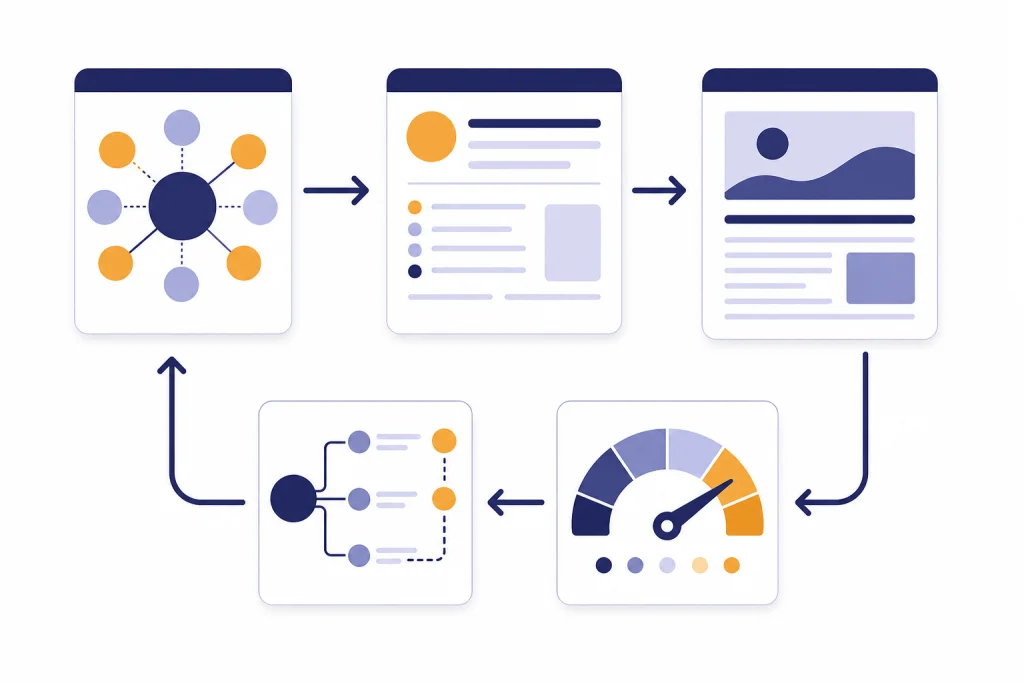
ChatGPT SEO prompts can help you rank when they turn raw search data, customer insight, and editorial judgment into better pages. They do not replace keyword research, subject-matter expertise, or human editing. The best prompts ask ChatGPT to clarify intent, find content gaps, structure an article, draft title tags, improve internal links, and prepare refresh plans. Google’s guidance still centers on helpful, reliable, people-first content, not content created only to manipulate rankings.[1] Use the prompts below as reusable workflows. Paste your keyword, audience, search results, product details, and source notes into each one, then edit the output until it reflects real experience and a clear point of view.
How to use ChatGPT SEO prompts safely
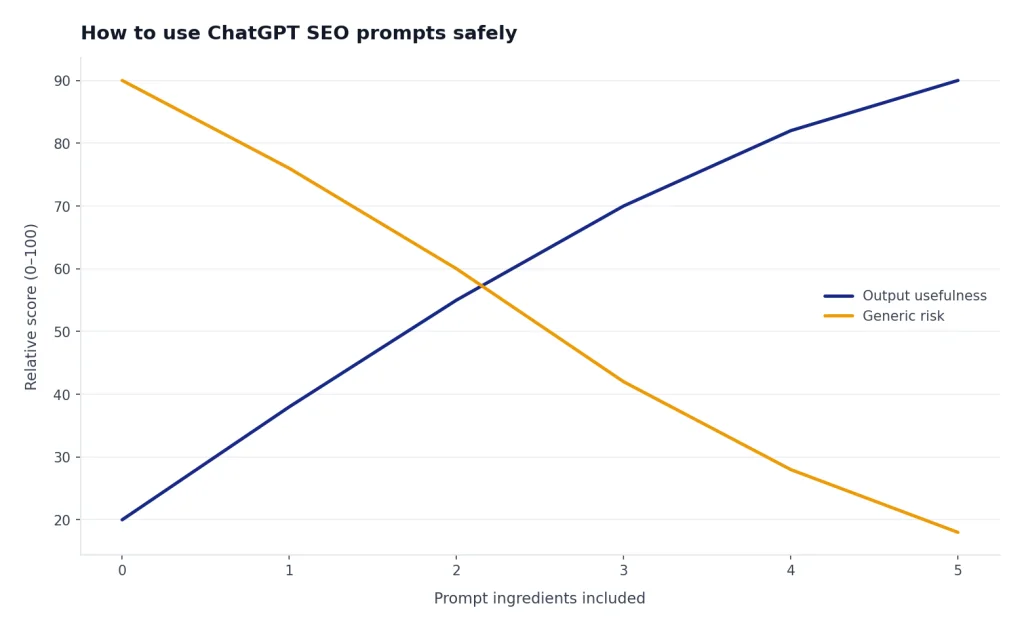
ChatGPT is strongest when you give it a narrow job and real inputs. It can group keywords, turn search intent into a brief, rewrite a title, or pressure-test a draft. It is weaker when you ask it to “write an SEO article” with no sources, no audience, and no proof. That workflow usually produces generic content that sounds polished but does not add much.
Start with a rule: ChatGPT should assist the editor, not become the editor. Google says generative AI can be useful for researching a topic and adding structure to original content, but using AI or similar tools to generate many pages without added user value may violate its scaled content abuse policy.[2] That is the line to respect. Use ChatGPT to make your thinking sharper. Do not use it to publish thin pages faster.
The most useful SEO prompts include five ingredients: your target keyword, the searcher’s likely problem, the page type you plan to create, your source material, and the action you want from the model. If you want a deeper system for saving and reusing these instructions, pair this article with our chatgpt prompt generator.
| SEO task | Weak prompt | Better prompt pattern | Human check |
|---|---|---|---|
| Keyword research | “Give me SEO keywords.” | “Cluster these queries by search intent and page type.” | Confirm volume and difficulty in your SEO tool. |
| Content brief | “Write an outline.” | “Build a brief using these SERP notes, audience pain points, and missing angles.” | Add firsthand experience, data, and examples. |
| Title tags | “Make this title SEO-friendly.” | “Draft title options that match this intent and avoid clickbait.” | Check accuracy and brand style. |
| Internal links | “Add links.” | “Suggest relevant internal links using only this approved slug list.” | Remove links that do not help the reader. |
| Refreshes | “Improve this post.” | “Audit this page against current search intent and identify sections to update.” | Validate all facts before republishing. |
Prompt set: keyword intent and SERP research
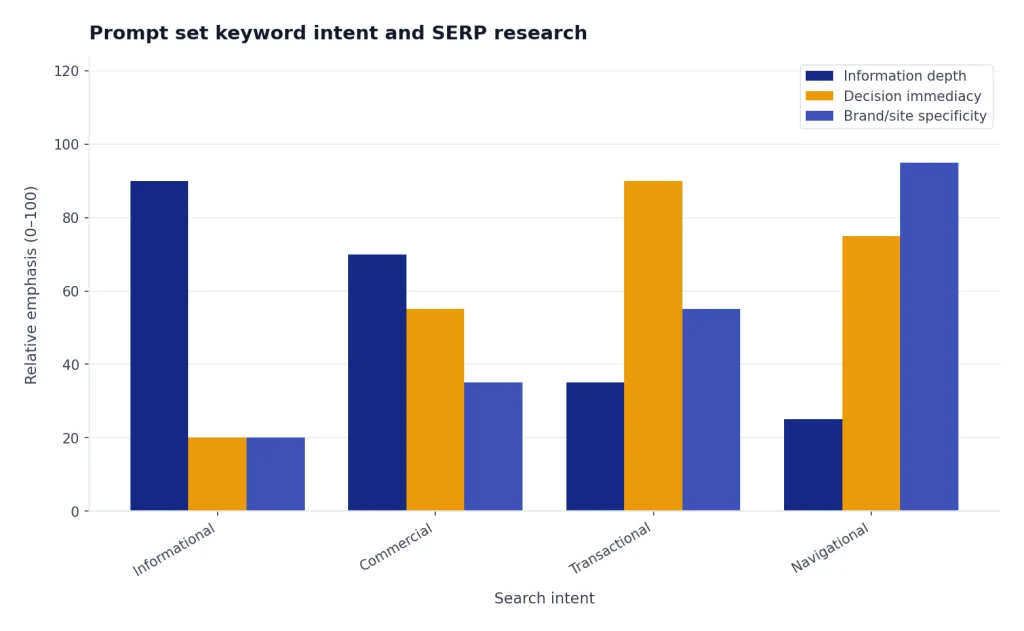
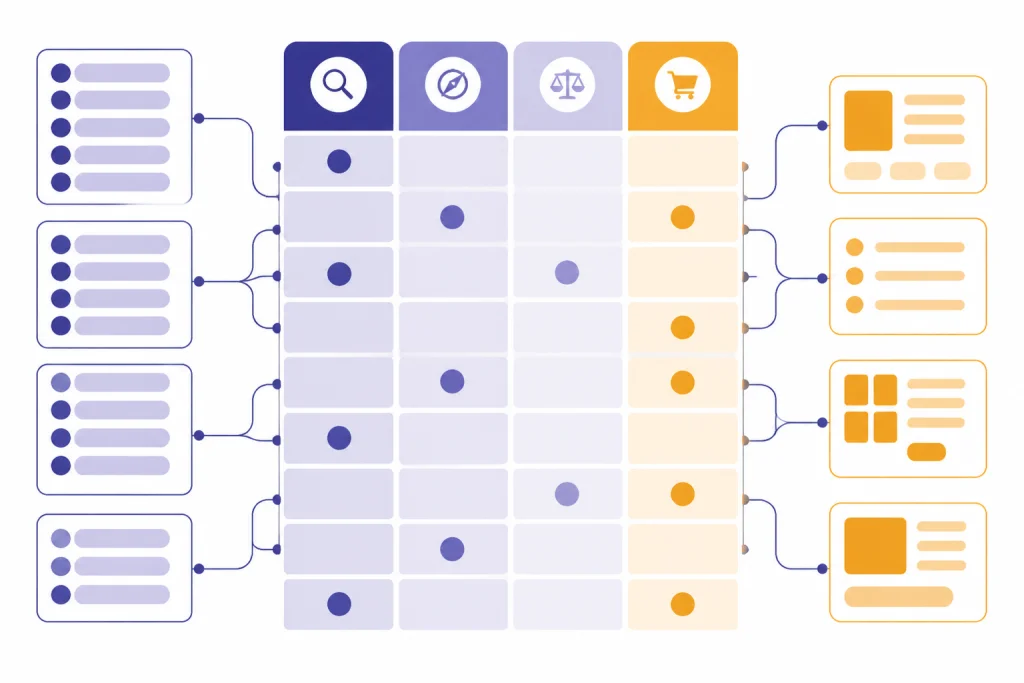
Keyword prompts should not stop at synonyms. They should help you understand what the searcher wants, what type of page can satisfy that intent, and what proof the page needs. ChatGPT can make this faster if you paste in real keyword exports, sales-call notes, customer questions, or manually collected search result observations.
If you use ChatGPT Search for live research, OpenAI says ChatGPT can search the web and provide answers with links to sources; responses that use search may include inline citations or a sources panel.[7] Still verify important claims yourself. Search results change, and ChatGPT can summarize a page without understanding your business context.
Prompt: cluster keywords by intent
You are an SEO strategist. Cluster the keyword list below by search intent.

For each cluster, return:
- Primary intent: informational, commercial, transactional, navigational, or mixed
- Likely page type: blog post, comparison page, product page, category page, tool page, or glossary page
- Searcher problem in plain English
- Best primary keyword
- Supporting keywords
- Questions the page must answer
- Risk of overlap with other clusters

Keyword list:
[PASTE KEYWORDS]

Business context:
[PASTE AUDIENCE, OFFER, LOCATION, OR NICHE]

Do not invent search volume. If volume is not provided, mark it as unknown.
Prompt: turn SERP notes into a content angle
You are helping me choose a content angle for the keyword: [KEYWORD].

Here are my notes from the current search results:
[PASTE NOTES ABOUT TOP RESULTS]

Here is what our brand can add:
[PASTE EXPERIENCE, DATA, PRODUCT KNOWLEDGE, CUSTOMER INSIGHTS, OR EXPERTISE]

Create a content angle that is distinct from the current results. Return:
- Search intent summary
- What the current results already cover
- What they under-explain
- Our strongest original angle
- Sections that would prove expertise
- Sections to avoid because they are generic
- A one-sentence promise for the page
Prompt: find questions worth answering
Act as an SEO editor. Based on the keyword and audience below, generate practical questions the article should answer.

Keyword: [KEYWORD]
Audience: [AUDIENCE]
Offer or site purpose: [CONTEXT]
Existing draft or outline: [PASTE IF AVAILABLE]

Group the questions by:
- Beginner confusion
- Buying or decision concerns
- Implementation details
- Mistakes and risks
- Comparison questions

For each question, explain why it matters to the searcher. Do not add filler questions.
This prompt is useful before you draft. It catches missing subtopics before the page is live. It also helps you decide whether a question deserves its own section, a short FAQ answer, or a separate article.
Prompt set: outlines, briefs, and originality
A good SEO outline is not a list of headings copied from competitors. It is a plan for satisfying the searcher better than the available pages. Google recommends content that provides original information, reporting, research, or analysis, and that gives a substantial, complete description of the topic.[1] Your brief should force those elements into the article before anyone starts drafting.
Use ChatGPT to build the first structure. Then add what only your team knows: examples from customer work, product screenshots, expert review, test results, or editorial judgment. If you are creating prompts across several departments, our ChatGPT Business Prompts for Owners can help you adapt this workflow for broader operations.
Prompt: build a human-first SEO brief
Create an SEO content brief for this page.

Target keyword: [KEYWORD]
Secondary keywords: [KEYWORDS]
Audience: [AUDIENCE]
Search intent: [INTENT]
Business goal: [GOAL]
Source notes: [PASTE NOTES]
Original expertise available: [PASTE WHAT WE CAN ADD]
Internal pages we may link to: [PASTE APPROVED SLUGS OR TITLES]

Return:
- Recommended page type
- Reader promise
- Draft title tag options
- H2 and H3 outline
- Notes for each section explaining what to include
- Original examples to create
- Claims that need citations
- Internal link opportunities
- Sections that should not be included
- Editorial checklist before publishing
Prompt: add originality before drafting
Review this outline for originality risk.

Outline:
[PASTE OUTLINE]

Competitor or SERP notes:
[PASTE NOTES]

Our available expertise:
[PASTE EXPERIENCE, DATA, OPINIONS, EXAMPLES, CUSTOMER QUESTIONS]

Identify:
- Sections that are likely generic
- Sections that need firsthand detail
- Places to add examples, tables, screenshots, or data
- Claims that need sources
- A stronger point of view for the introduction
- A better section order if the current order follows competitor patterns too closely
Prompt: create an editor’s assignment
Turn this SEO brief into a clear writing assignment for a human writer.

Brief:
[PASTE BRIEF]

The assignment must include:
- Target reader
- Search intent
- What the article must help the reader do
- Required sources or proof points
- Original examples to include
- Tone and style rules
- What not to say
- Final deliverables

Write it as instructions for a professional writer, not as public-facing copy.
This is where ChatGPT becomes especially helpful for teams. A brief can be SEO-heavy. A writing assignment should be readable, specific, and easy to execute. For more reusable prompt-building patterns, see our Best ChatGPT Prompt Generator Tools comparison.

Prompt set: title tags, meta descriptions, and on-page structure
On-page prompts work best when they improve clarity, not when they stuff keywords. Google’s SEO starter guide recommends using paragraphs and sections with headings to help users navigate pages.[3] Google also says snippets are primarily created from page content, though it may use the meta description element when that description is more accurate than other page text.[5] That means title tags and meta descriptions matter, but they must reflect the page honestly.
Prompt: draft title tags without clickbait
You are an SEO editor. Draft title tag options for this page.

Target keyword: [KEYWORD]
Search intent: [INTENT]
Page promise: [PROMISE]
Brand or site name: [BRAND]
Audience: [AUDIENCE]
Avoid: [CLICKBAIT, UNSUPPORTED CLAIMS, TERMS TO AVOID]

Return a table with:
- Title option
- Angle
- Best-fit search intent
- Why it may earn clicks
- Risk or concern

Keep each title accurate. Do not promise rankings, income, legal outcomes, medical outcomes, or anything the page cannot prove.
Prompt: write meta descriptions that match the page
Write meta description options for this page.

Page title: [TITLE]
Target keyword: [KEYWORD]
Reader problem: [PROBLEM]
What the page includes: [DETAILS]
What makes it useful: [DIFFERENTIATOR]

Return options for:
- Direct informational style
- Practical how-to style
- Comparison style
- Beginner-friendly style

Each option must be accurate, specific, and free of hype. Do not use exclamation marks.
Prompt: improve heading hierarchy
Audit this heading structure for SEO and reader clarity.

Target keyword: [KEYWORD]
Audience: [AUDIENCE]
Current headings:
[PASTE H1, H2, AND H3 STRUCTURE]

Return:
- Headings that are unclear
- Headings that duplicate each other
- Missing sections based on search intent
- Sections that should be combined
- A revised H2/H3 structure
- Notes on where examples, tables, or FAQs would help

Do not add headings just to include keywords. Prioritize reader navigation.
If your page includes data tables, formulas, or spreadsheet examples, adapt the same structure with our ChatGPT Excel Prompts for Power Users. The useful pattern is the same: give ChatGPT messy source material and ask for a clearer structure.
Prompt set: internal links and content refreshes
Internal linking prompts need boundaries. Do not ask ChatGPT to invent URLs. Give it an approved list of pages, then ask it to recommend links only where the reader would benefit. Google says descriptive internal anchor text can help both people and Google make sense of a site and find pages more easily.[4] That is the standard for every link suggestion.
Prompt: suggest internal links from an approved list
You are an SEO editor. Suggest internal links for this draft using only the approved page list.

Draft:
[PASTE DRAFT]

Approved internal pages:
[PASTE PAGE TITLES, SLUGS, AND SHORT DESCRIPTIONS]

Return a table with:
- Exact sentence or section where the link belongs
- Recommended anchor text
- Target page slug
- Why the link helps the reader
- Whether the link is essential or optional

Rules:
- Do not invent URLs.
- Do not repeat the same anchor text.
- Do not add links that interrupt the reader.
- Do not link every keyword mention.
For this article, that means linking to related prompt libraries only where they extend the reader’s workflow. For example, SEO teams that repurpose blog ideas into platform posts can use chatgpt social media prompts for every platform. Teams that build video content around search demand can use ChatGPT for YouTubers. Service teams that mine support tickets for SEO ideas can adapt ChatGPT Customer Service Prompts and Templates.
Prompt: refresh an underperforming page
Audit this existing page for an SEO refresh.

Target keyword: [KEYWORD]
Current page draft or exported text: [PASTE TEXT]
Current title and meta description: [PASTE]
Search Console notes: [PASTE QUERIES, CLICKS, IMPRESSIONS, CTR, POSITION IF AVAILABLE]
Current SERP notes: [PASTE MANUAL OBSERVATIONS]
Business changes since publication: [PASTE]

Return:
- Search intent that the page currently satisfies
- Search intent it misses
- Outdated sections
- Thin sections
- New sections to add
- Sections to remove
- Better internal links
- Title and meta description tests
- Facts that need rechecking
- Priority order for edits
Search Console is useful here because its Performance report shows how a site performs in Google Search results, including queries, traffic changes, mobile queries, and pages with high or low click-through rate.[6] Paste those observations into ChatGPT, but keep the final diagnosis human. A low click-through rate might mean the title is weak. It might also mean the page ranks for the wrong intent.
Prompt: build a content decay action plan
Create a content refresh plan from these page notes.

Page URL or slug: [PAGE]
Original target keyword: [KEYWORD]
Current performance notes: [PASTE]
Known issues: [PASTE]
Competitor or SERP changes: [PASTE]
Available new proof: [PASTE DATA, SCREENSHOTS, EXPERIENCE, PRODUCT CHANGES]

Return:
- Likely reason performance changed
- Edits that can be made quickly
- Edits that require expert input
- New examples or tables to create
- Internal links to add or remove
- Whether the page should be merged, rewritten, expanded, or left alone
- Success metrics to monitor after updating
A workflow that turns prompts into publishable SEO content
Prompts are most valuable when they fit into a repeatable workflow. Do not run one prompt and publish the answer. Move from research to brief to draft to edit to measurement. Each step should narrow the task and add more evidence.
- Collect inputs. Export keywords, gather customer questions, save current SERP observations, and list internal pages.
- Cluster intent. Use ChatGPT to group terms by problem, not just wording.
- Choose the page type. Decide whether the query deserves a guide, comparison, landing page, tool, glossary entry, or update to an existing page.
- Create the brief. Ask ChatGPT for a structured plan, then add original examples and required sources.
- Draft with constraints. Give the model a section at a time, or use the brief as a writer assignment.
- Edit for usefulness. Remove generic claims, verify facts, add firsthand detail, and improve readability.
- Optimize on-page elements. Use prompts for titles, meta descriptions, headings, internal links, and FAQ coverage.
- Measure and refresh. Review Search Console data after publication and update pages when intent shifts.
This workflow also works outside blog posts. A real estate team can turn listing questions into neighborhood pages with ChatGPT Real Estate Prompts for Agents. An HR team can turn hiring questions into employer-brand content with chatgpt hr prompts for hiring and onboarding. A sales team can turn objections into comparison pages with ChatGPT Sales Prompts for Closers.
Prompt: final SEO quality check
Act as a strict SEO editor. Review this draft before publication.

Target keyword: [KEYWORD]
Search intent: [INTENT]
Draft:
[PASTE DRAFT]
Source list:
[PASTE SOURCES]
Internal links used:
[PASTE LINKS]

Audit for:
- Whether the lead answers the query quickly
- Whether the article satisfies the search intent
- Generic paragraphs that should be cut or rewritten
- Unsupported factual claims
- Missing examples or proof
- Weak headings
- Internal links that feel forced
- FAQ questions that duplicate the body
- Title and meta description improvements

Return edits in priority order. Be direct.
Mistakes to avoid with ChatGPT SEO prompts
The biggest mistake is asking ChatGPT to create final SEO content from a keyword alone. A keyword is not a brief. It does not contain audience nuance, source requirements, product truth, legal limits, brand voice, or current search results.
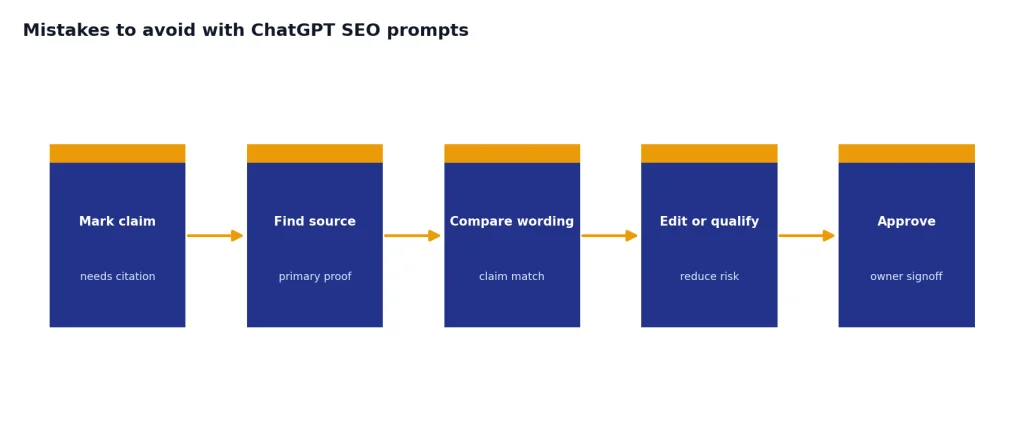
Another mistake is treating AI fluency as accuracy. Smooth phrasing can hide weak facts. Mark claims that need citations during the brief stage. Then check them before publication. This matters more in legal, finance, health, education, and employment topics. If you work in a regulated area, adapt the careful review patterns in our ChatGPT Legal Prompts instead of using generic SEO copy prompts.
Do not copy competitor structure section for section. Use search results to understand what readers expect, then build a better answer from your own expertise. A page that only paraphrases what already ranks gives searchers little reason to choose it.
Do not over-optimize anchor text. Internal links should be clear and useful. Repeating the same exact-match anchor across a page looks mechanical and often reads poorly. Good anchors describe the destination in natural language.
Do not publish AI drafts without a named owner. Someone should be responsible for accuracy, tone, examples, and final judgment. ChatGPT can accelerate the process, but accountability stays with the publisher.
Frequently asked questions
Can ChatGPT SEO prompts really help a page rank?
Yes, if the prompts improve research, structure, clarity, and usefulness. They cannot guarantee rankings. Search performance depends on the page, the site, competition, links, technical health, freshness, and whether the content satisfies the query.
What is the best ChatGPT prompt for SEO?
The best prompt is usually a brief-building prompt that includes the keyword, audience, search intent, source notes, and original expertise. That gives ChatGPT enough context to produce a useful plan. A vague prompt like “write an SEO article” is rarely good enough.
Is AI-generated content bad for SEO?
AI-generated content is not automatically bad. Google’s guidance warns against using generative AI to create many pages without adding value for users.[2] The safer approach is to use ChatGPT for research support, outlines, drafting assistance, and editing, then add human expertise and fact-checking.
Should I use ChatGPT for keyword research?
Use ChatGPT to cluster keywords, infer intent, and generate content angles. Do not rely on it for search volume, ranking difficulty, or live SERP facts unless you have a verified source. Use an SEO tool, Search Console, or manual search review for the data layer.
Can ChatGPT write title tags and meta descriptions?
Yes. It is useful for drafting variations, matching the page promise to search intent, and avoiding repetitive phrasing. Review every title and description for accuracy because Google may generate snippets from page content instead of using your meta description.[5]
How often should I refresh SEO content with ChatGPT?
Refresh content when search intent changes, facts become outdated, competitors cover important new angles, or Search Console data shows declining visibility or weak click-through rate. ChatGPT can help audit the page and suggest edits. A human editor should decide which changes are valid.