

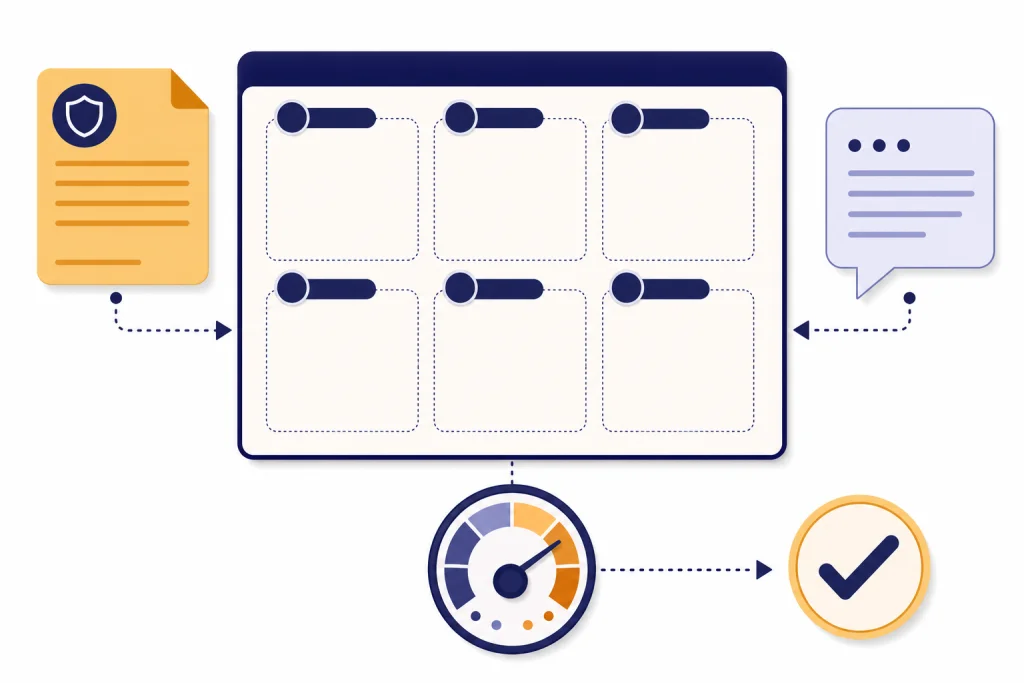
ChatGPT customer service prompts work best when they give the model a clear role, the customer’s message, the relevant policy, the desired tone, and the exact output format. The templates below help support teams draft replies faster without sounding robotic, skipping policy checks, or hiding cases that need a human decision. Use them for email, chat, social replies, escalation summaries, refund language, retention saves, and internal QA. Treat every draft as a starting point: a support rep should verify facts, order details, legal wording, and promises before sending anything to a customer.
How to use these prompts safely
Use ChatGPT as a drafting assistant, not as the final authority on your policies. Customer service work often involves refunds, billing disputes, warranties, health or safety concerns, account access, legal threats, and personal data. Those are not good places for unsupervised automation.
OpenAI’s prompt guidance emphasizes clear, specific instructions and enough context for the model to understand the task.[1] That matters more in support than in many other workflows. A vague prompt such as “reply to this customer” can produce a friendly but risky answer. A stronger prompt tells ChatGPT what the customer asked, what your company policy allows, what the agent has already checked, and what the reply must avoid.
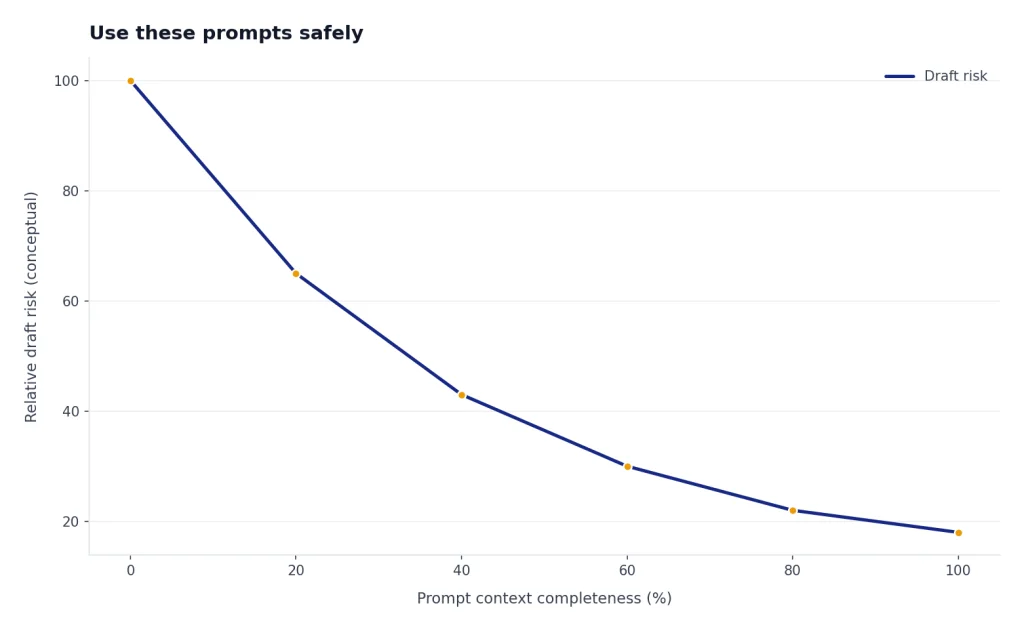
Before you paste a real ticket into ChatGPT, remove unnecessary personal data. Keep only the facts needed to draft the response. If your company uses OpenAI’s business offerings such as ChatGPT Business, ChatGPT Enterprise, ChatGPT Edu, or the API platform, OpenAI says business inputs and outputs are not used for training by default.[3] That is useful, but it does not replace your company’s privacy policy, data retention rules, or customer consent obligations.
If you are building reusable support prompts from scratch, start with a system like our chatgpt prompt generator so each template has the same role, context, and output structure. For multilingual queues, pair this library with ChatGPT translation prompts for quality output so agents can preserve policy meaning and tone across languages.
The customer service prompt structure that works
A good customer service prompt is a small brief. It should make ChatGPT behave less like a generic writer and more like a careful support teammate. The structure below works for most tickets.
| Prompt part | What to include | Why it matters |
|---|---|---|
| Role | “You are a customer support specialist for [company].” | Sets the frame and avoids generic marketing copy. |
| Customer context | Message, order type, plan, issue, history, and sentiment. | Helps the draft respond to the real situation. |
| Policy facts | Refund window, warranty rule, shipping promise, escalation criteria. | Keeps the answer aligned with what the business can do. |
| Tone | Calm, concise, apologetic, firm, warm, or executive. | Prevents over-apology or defensive language. |
| Constraints | Do not promise exceptions, do not mention internal tools, do not blame the customer. | Reduces avoidable risk. |
| Output format | Email, chat reply, internal note, macro, bullet summary, or escalation brief. | Makes the response usable without another rewrite. |
OpenAI also recommends placing instructions at the beginning of the prompt and using separators such as triple quotes to separate instructions from source text.[2] That is especially helpful for support tickets because it tells ChatGPT which text is your instruction and which text came from the customer.
You are a customer support specialist for [COMPANY]. Draft a reply to the customer using the policy and ticket context below.

Requirements:
- Be clear, calm, and human.
- Acknowledge the customer’s problem in the first sentence.
- Do not promise anything outside the policy.
- Ask for missing information only if it is necessary.
- End with the next step.

Policy:
"""
[PASTE RELEVANT POLICY]
"""

Ticket context:
"""
[PASTE CUSTOMER MESSAGE AND KNOWN FACTS]
"""

Output format:
[EMAIL / CHAT REPLY / INTERNAL NOTE]
One common failure mode is asking for “a nicer reply” without stating what is actually allowed. That can lead to a polished answer that offers an exception, a timeline, or compensation the agent cannot approve. Add a review step to catch unsupported promises before the draft reaches the customer.
Illustrative bad draft: “I’m sorry about the delay. We’ll refund the shipping fee and make sure this never happens again.”
Why it is risky: The refund and guarantee may not be approved, and “never happens again” is an absolute promise.
Improved draft: “I’m sorry your order is taking longer than expected. I’m checking the shipment status now and will follow up with the confirmed delivery update. If the order qualifies for a shipping-fee review under our policy, I’ll include that in the next message.”
Copy-paste customer service prompt library
Use these ChatGPT customer service prompts as templates. Replace the bracketed text before you run them. If the issue touches legal, medical, tax, safety, chargeback, harassment, discrimination, or regulatory matters, ask ChatGPT for a draft only and route the final answer to the right owner. For adjacent workflows, ChatGPT Business Prompts for Owners can help with operations language, while ChatGPT Sales Prompts for Closers is better suited to pre-sale or renewal conversations than support disputes.
First response to a new support ticket
Draft a first-response email for this new support ticket.

Goal: Acknowledge the issue, show that we understood it, and set the next step.
Tone: Warm, concise, competent.
Avoid: Long explanations, blame, policy speculation, and generic phrases like “we value your business.”

Known facts:
- Company: [COMPANY]
- Product or service: [PRODUCT]
- Customer type: [NEW / EXISTING / VIP / TRIAL]
- Current status: [WHAT YOU KNOW]

Customer message:
"""
[PASTE MESSAGE]
"""

Write the reply in plain English. If information is missing, ask only for the minimum needed to proceed.
Apology for a mistake
Write a customer apology for the situation below.

The apology must:
- Take responsibility without overexplaining.
- State what happened in one clear sentence.
- Say what we are doing now.
- Avoid legal admissions, sarcasm, and defensive language.
- End with a specific next step.

Situation:
"""
[DESCRIBE ERROR]
"""

Customer impact:
"""
[DESCRIBE IMPACT]
"""

Approved remedy:
"""
[REFUND / CREDIT / REPLACEMENT / FIX / OTHER]
"""
For apology prompts, watch for two extremes: over-admitting fault when the facts are still unclear, or sounding evasive when the company did make a mistake. The best draft acknowledges the practical impact, names the approved remedy, and avoids legal conclusions.
Refund request within policy
Draft a refund approval message.

Policy:
"""
[PASTE REFUND POLICY]
"""

Ticket details:
"""
[PASTE RELEVANT FACTS]
"""

Requirements:
- Confirm the refund was approved or explain the approval step still required.
- Give the expected timing only if it is in the policy.
- Thank the customer without sounding scripted.
- Do not offer additional compensation unless it is listed in the policy.
Refund request outside policy
Draft a firm but respectful reply declining a refund request.

Policy:
"""
[PASTE REFUND POLICY]
"""

Customer request:
"""
[PASTE MESSAGE]
"""

Requirements:
- Acknowledge the customer’s frustration.
- Explain the policy in simple language.
- Do not sound punitive.
- Offer any approved alternative, such as troubleshooting, store credit, an account review, or a manager review.
- Do not invent exceptions.
Angry customer de-escalation
Rewrite this support reply to de-escalate an angry customer.

Customer emotion: [ANGRY / DISAPPOINTED / ANXIOUS / CONFUSED]
Desired tone: Calm, direct, respectful.
Rules:
- Do not mirror the customer’s hostility.
- Do not argue about intent.
- Start by naming the practical issue, not the emotion.
- Give one next step.
- Keep it short enough for a live chat response.

Draft or context:
"""
[PASTE DRAFT OR TICKET]
"""
Illustrative rewrite example:
Customer: “This is ridiculous. I’ve contacted you three times and nobody fixes the login issue.”
Weak reply: “We understand your frustration and apologize for the inconvenience. Please try resetting your password again.”
Improved reply: “You’ve already had to contact us three times about the same login issue, so I’m going to move this to a deeper account review instead of asking you to repeat the same reset step. Please send the account email you use to sign in, and we’ll check the access logs next.”
What changed: The improved version names the repeat-contact problem, avoids a canned apology, and gives one concrete next step.
Technical troubleshooting reply
Create a troubleshooting reply for this support issue.

Product: [PRODUCT]
Issue: [ISSUE]
Customer skill level: [BEGINNER / INTERMEDIATE / ADVANCED]
Known environment: [DEVICE / BROWSER / APP VERSION / OS]
Already tried: [STEPS]

Requirements:
- Give steps in the safest order.
- Ask for screenshots or logs only if needed.
- Explain why each step matters in plain language.
- Include a stop condition: when the customer should reply instead of continuing.

Customer message:
"""
[PASTE MESSAGE]
"""
Billing dispute response
Draft a billing support reply.

Important: Do not say the charge is valid unless the evidence below supports it. Do not request full card numbers or sensitive payment data.

Billing facts:
"""
[PLAN, BILLING DATE, AMOUNT, INVOICE STATUS, ACCOUNT EMAIL]
"""

Customer message:
"""
[PASTE MESSAGE]
"""

Approved options:
"""
[REFUND REVIEW / INVOICE COPY / CANCEL RENEWAL / PLAN CHANGE / ESCALATE TO BILLING]
"""

Write a clear reply that explains the next step and what information, if any, the customer should provide.
Social media complaint
Write a public social media reply to this customer complaint.

Channel: [X / INSTAGRAM / FACEBOOK / LINKEDIN / TIKTOK]
Brand voice: [VOICE]
Rules:
- Do not discuss private account details publicly.
- Acknowledge the issue.
- Move the conversation to a private support channel.
- Keep the response short.

Complaint:
"""
[PASTE POST OR COMMENT]
"""

Include a private-message version the agent can send after the customer replies.
Public replies should be brief and privacy-safe. If your team also publishes support updates on social channels, use chatgpt social media prompts for every platform to keep incident posts and comment replies consistent. When repeated tickets should become help-center articles, remove customer details first, then use chatgpt seo prompts that help you rank to turn the pattern into searchable support content.
Adapt prompts by tone and channel
Customer support tone should change by channel. Email can carry more context. Live chat needs speed. Social replies need privacy boundaries. Executive escalations need a brief and factual style. A single prompt can handle these differences if you tell ChatGPT the channel, audience, and constraints.
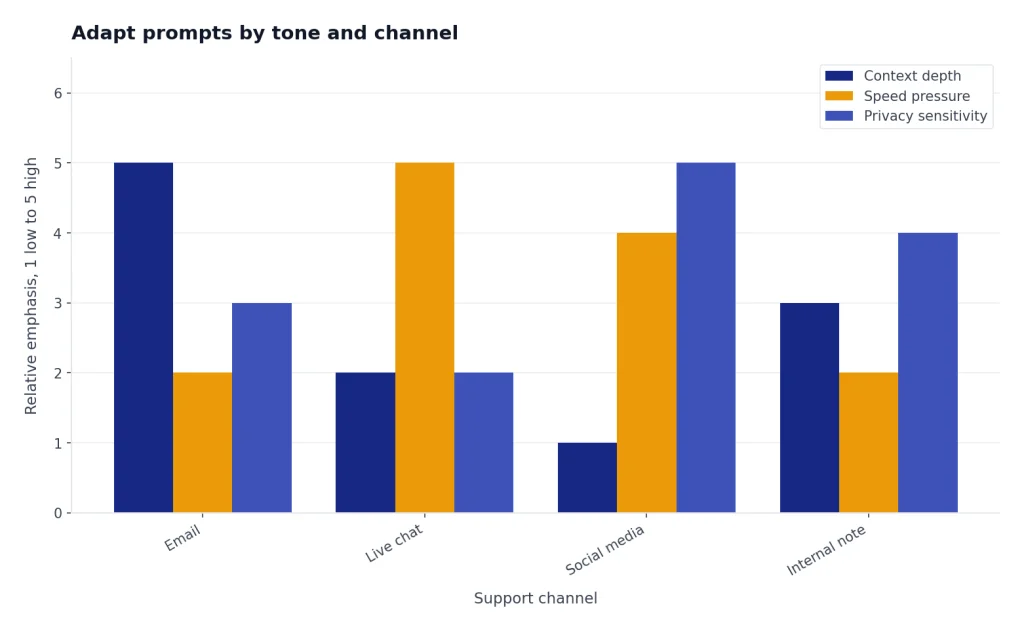
| Channel | Best output | Prompt instruction to add |
|---|---|---|
| Complete reply with greeting and sign-off | “Use short paragraphs and include the next step before the closing.” | |
| Live chat | Short conversational messages | “Write in chat-sized chunks and ask one question at a time.” |
| Phone follow-up | Recap of what was discussed | “Summarize the call, decision, owner, and next action.” |
| Social media | Public-safe acknowledgment | “Do not include private details; invite the customer to a secure channel.” |
| Internal note | Agent-facing summary | “Use bullets for facts, risks, and recommended next action.” |
Rewrite the reply below for [CHANNEL].

Audience: [CUSTOMER / INTERNAL AGENT / MANAGER / PUBLIC SOCIAL AUDIENCE]
Tone: [CALM / FRIENDLY / FORMAL / FIRM / APOLOGETIC]
Length: [SHORT / MEDIUM / DETAILED]

Keep:
- The policy meaning.
- The approved next step.
- Any required compliance language.

Improve:
- Clarity.
- Empathy.
- Sentence length.
- Channel fit.

Draft:
"""
[PASTE DRAFT]
"""
For teams that track support tags in spreadsheets, ChatGPT Excel Prompts for Power Users can help summarize exported ticket data, find repeat issues, and choose QA samples without exposing unnecessary customer details.
Escalation and handoff prompts
The safest support prompt is sometimes the one that tells the agent not to answer. Escalate when the customer asks for something outside policy, threatens legal action, reports a safety issue, describes account compromise, requests sensitive personal data changes, or shows repeated frustration after troubleshooting.
Zendesk’s escalation guidance says escalation should be offered when the AI agent cannot guide the customer to self-service resources, and it recommends considering what the AI can do before escalation to make the handoff more efficient.[4] In practical terms, the best ChatGPT handoff prompt does not just say “send this to a human.” It creates a useful packet for the next person.
Create an internal escalation summary for a human support agent.

Use this structure:
- Customer issue:
- Customer goal:
- Relevant account or order facts:
- Steps already tried:
- Policy or technical blockers:
- Customer sentiment:
- Risk level:
- Recommended next owner:
- Suggested next reply:

Ticket thread:
"""
[PASTE THREAD]
"""

Rules:
- Do not hide uncertainty.
- Mark facts as “confirmed” only if the ticket proves them.
- Do not recommend a refund, credit, legal response, or account action unless supported by the policy below.

Policy:
"""
[PASTE POLICY]
"""
You can also ask ChatGPT to detect escalation risk before an agent replies. This should support the agent’s judgment, not replace queue rules or manager review.
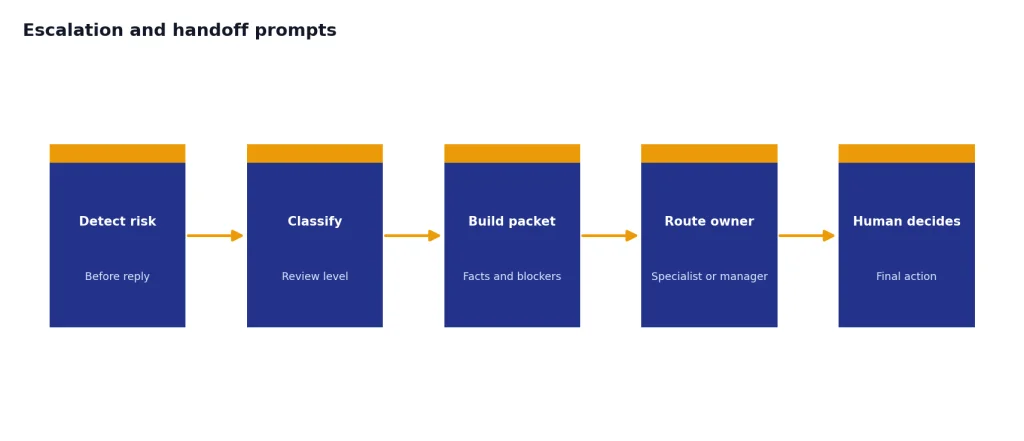
Review this ticket for escalation risk.

Classify the ticket as one of these:
- Safe to answer with standard support reply.
- Needs specialist review.
- Needs manager review.
- Needs legal, security, billing, or compliance review.

Explain the reason in one sentence. Then list the exact sentence from the customer that triggered the classification.

Ticket:
"""
[PASTE TICKET]
"""
For policy-sensitive work, legal teams should set the escalation rules. Our ChatGPT Legal Prompts guide can help teams understand legal drafting boundaries, but it is not a substitute for counsel. HR-related support queues should coordinate with the guidance in chatgpt hr prompts for hiring and onboarding when employee data or workplace policy is involved.
Quality control prompts for support managers
Support managers can use ChatGPT to review drafts before they become macros. This is often safer than using it to answer customers directly. The manager supplies the policy, a sample ticket, and the proposed reply, then asks ChatGPT to flag unclear language, missing steps, tone problems, and unsupported promises.
Audit this customer support reply before it becomes a saved macro.

Check for:
- Unsupported promises.
- Missing policy context.
- Confusing wording.
- Overly robotic language.
- Privacy risks.
- Missing escalation triggers.
- Any sentence that could increase customer frustration.

Policy:
"""
[PASTE POLICY]
"""

Customer scenario:
"""
[PASTE SAMPLE SCENARIO]
"""

Proposed macro:
"""
[PASTE MACRO]
"""

Return:
- Pass or revise.
- Highest-risk sentence.
- Suggested rewrite.
- Notes for agent training.
A good review workflow has three gates: the model flags issues, an experienced support lead decides which edits are valid, and the final macro is tested on a few real or anonymized tickets before rollout. Do not let a single clean rewrite become a saved response until it has been checked against edge cases.
Another useful review is a tone consistency check. This prompt helps keep agents from sounding either too casual or too corporate.
Compare these support replies against our voice guide.

Voice guide:
"""
[PASTE VOICE GUIDE]
"""

Replies:
"""
[PASTE REPLIES]
"""

For each reply, identify:
- One sentence that matches the voice guide.
- One sentence that does not match.
- A cleaner rewrite.
- Whether the reply is ready to send.
Managers can also ask ChatGPT to turn repeated issues into agent coaching. Keep the analysis focused on the workflow, not on blaming individual agents.
Analyze these anonymized support tickets for coaching opportunities.

Look for patterns in:
- Missing information collection.
- Slow escalation.
- Policy confusion.
- Tone problems.
- Repeated customer questions after the first reply.

Tickets:
"""
[PASTE ANONYMIZED TICKETS]
"""

Return a coaching plan with practical examples and a revised macro if one would help.
A simple workflow for teams
Do not roll out a prompt library by dropping a document into Slack and hoping agents use it well. Turn the prompts into a small operating system for support work.
- Start with ticket categories. Pick the queues that repeat often and have clear policies, such as shipping status, password resets, appointment changes, basic troubleshooting, or refund eligibility.
- Create approved policy snippets. Give agents short, current policy blocks they can paste into prompts. This is better than asking ChatGPT to infer policy from memory.
- Separate drafts from final replies. Require an agent review before sending. The human should check facts, tone, promises, and edge cases.
- Build macros only after review. Use ChatGPT to improve a draft, then have a manager approve the final language.
- Track what gets escalated. If the same prompt keeps producing cases that need manager review, the prompt or the underlying policy may be unclear.
- Refresh prompts when policies change. A good prompt library can still become dangerous if it uses old return windows, outdated plan names, or retired product steps.
For solo operators, this can be as simple as a saved note with your policy blocks and favorite prompts. For larger teams, assign one owner to maintain the prompt library and one reviewer from support leadership. If you want broader workflow ideas outside support queues, see chatgpt productivity prompts for daily workflow.
The goal is not to make every reply sound the same. The goal is to help agents move faster while preserving judgment. ChatGPT can draft, summarize, compare, and rewrite. Your team still owns the decision.
Frequently asked questions
Can I paste customer tickets directly into ChatGPT?
You should remove unnecessary personal data first. Keep only the details needed to draft or summarize the response. Follow your company’s privacy, security, and retention rules before using any AI tool with customer information.
What is the best ChatGPT prompt for customer service?
The best prompt includes the customer message, relevant policy, desired tone, constraints, and output format. A short prompt can work for simple rewrites, but support tickets usually need more context. Use the structure in this guide as your default template.
Can ChatGPT handle angry customers?
ChatGPT can help rewrite a response so it is calmer, clearer, and less defensive. It should not decide refunds, account actions, legal responses, or safety steps on its own. Use it to draft, then have a trained support rep review the final message.
Should customer service prompts include company policies?
Yes. Do not expect ChatGPT to know your current refund rules, warranty limits, shipping promises, or escalation paths. Paste the relevant policy section into the prompt and tell ChatGPT not to invent exceptions.
How do I keep AI-generated replies from sounding robotic?
Give ChatGPT a tone target and a bad-example rule. For example, tell it to avoid canned phrases, long apologies, and vague statements. You can also ask it to rewrite the draft in shorter sentences with one clear next step.
When should a ChatGPT support draft be escalated?
Escalate when the issue is outside policy, involves legal or safety risk, requires account-security action, or shows repeated customer frustration. Also escalate when the model’s draft depends on facts you cannot verify. A good handoff prompt should summarize the issue, what was tried, and what the next owner needs to decide.