

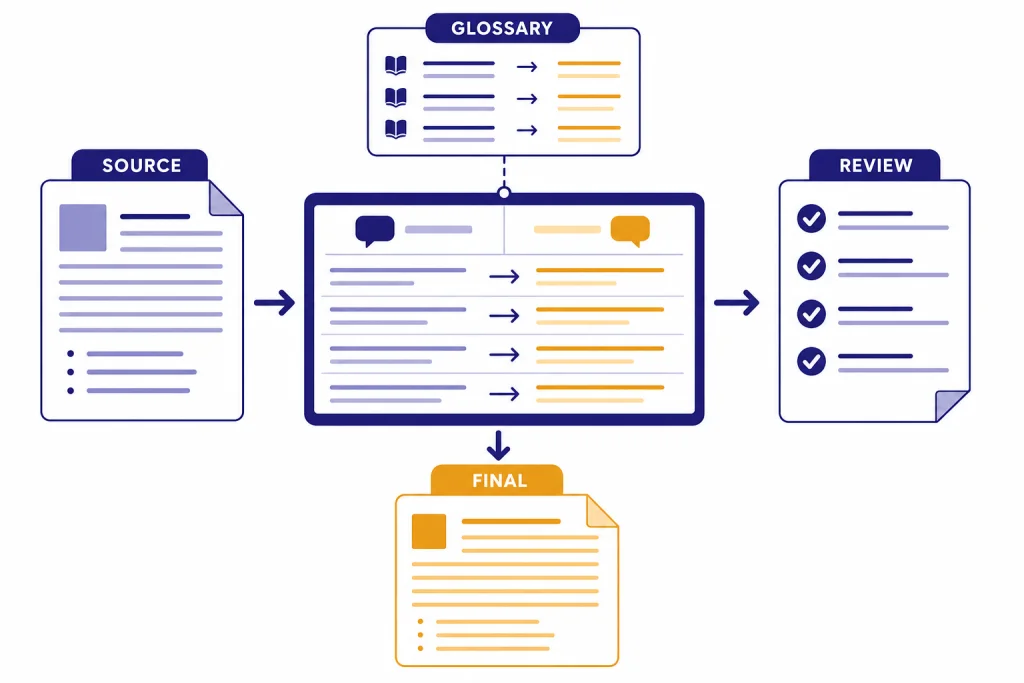
This ChatGPT tutorial translation workflow shows how to use ChatGPT as a structured translation assistant, not a one-click replacement for a professional translator. The strongest results come from giving ChatGPT a clear brief, glossary, audience, format rules, and review process before asking for the final target-language copy. Use it for drafts, bilingual comparisons, tone adaptation, terminology checks, and localization notes. Do not use it as the only reviewer for legal, medical, financial, immigration, safety, or high-stakes content. For those cases, use ChatGPT to prepare materials and questions, then send the result to a qualified human translator or reviewer.
What this workflow does
ChatGPT can translate, explain, rewrite, and compare language in the same conversation. That makes it useful for a translation workflow because you can move beyond “translate this” and ask for a draft, a glossary check, a tone pass, a cultural note, and a final clean version. OpenAI also lets logged-in users change ChatGPT’s interface language and lists supported languages in its Help Center, but interface language support is not the same as certified translation quality for every language pair.[1]
The key is to treat ChatGPT as a language workbench. You supply context. It produces a draft. You inspect the draft against the source. You ask targeted questions. Then you decide whether the output is ready, needs a human reviewer, or should not be used at all.
This workflow works best for everyday business writing, educational materials, customer support drafts, product descriptions, internal notes, travel text, social captions, and first-pass localization. It also helps bilingual users compare alternatives and learn why one phrase sounds more natural than another. If you need broader ChatGPT basics first, start with what is ChatGPT? the complete beginner explanation or a general chatgpt tutorial.
Use extra caution with low-resource languages, regional dialects, idioms, gendered language, and culturally sensitive material. Machine translation research has found that GPT-based systems can be stronger on high-resource languages and weaker on low-resource languages.[6] Separate research has also documented gender-bias problems in ChatGPT machine translation for Bengali and other low-resource languages.[7]
Build the translation brief
A translation brief is the most important part of the workflow. It tells ChatGPT what to preserve, what to adapt, and what to ignore. Without a brief, ChatGPT may produce a fluent translation that misses the purpose of the text.
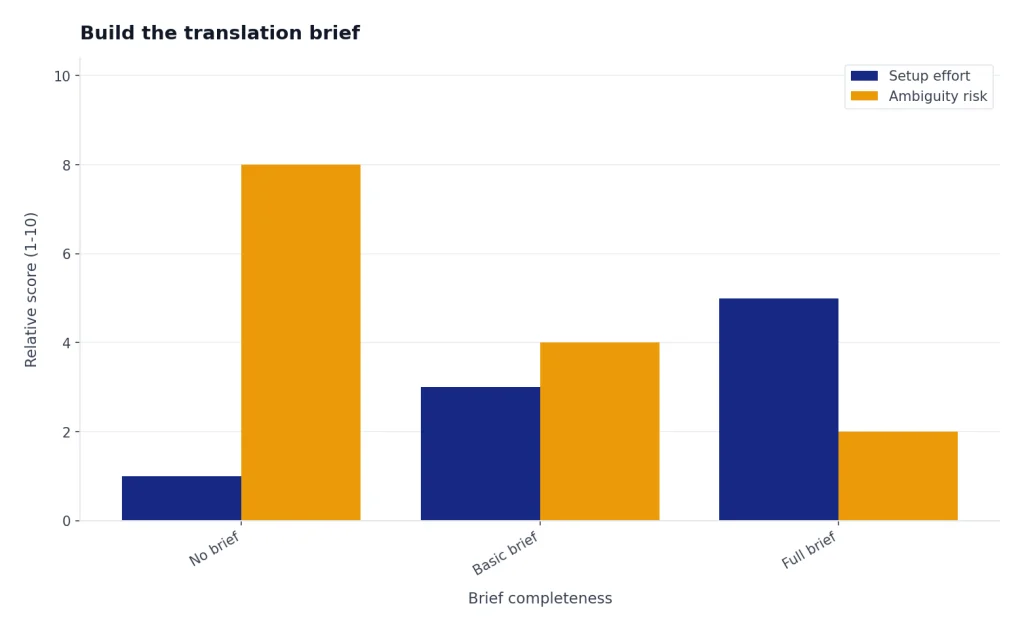
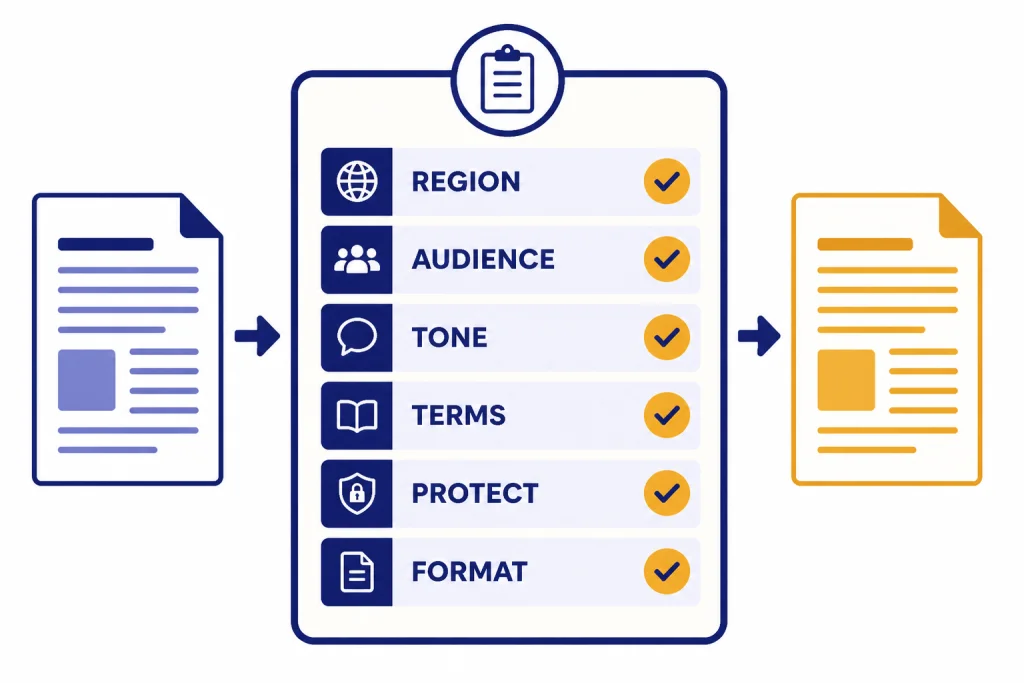
Start by naming the source language, target language, region, audience, tone, subject area, and output format. Add terminology that must stay consistent. Add words that should not be translated, such as product names, legal names, course titles, brand names, SKUs, and quoted text. If the copy needs to fit a layout, tell ChatGPT to keep headings, bullets, placeholders, and line breaks intact.
Here is the basic brief I use for most translation tasks:
You are helping me translate text from [SOURCE LANGUAGE] to [TARGET LANGUAGE] for readers in [REGION].
Audience: [WHO WILL READ IT]
Purpose: [WHAT THE TEXT MUST DO]
Tone: [FORMAL / FRIENDLY / TECHNICAL / PLAIN LANGUAGE]
Keep unchanged: [NAMES, TERMS, PLACEHOLDERS, URLS]
Terminology: [SOURCE TERM] = [TARGET TERM]
Formatting: Preserve headings, bullets, tables, variables, and line breaks.
Output: First give the translation only. Then give a short list of translation notes.
Do not skip the “keep unchanged” line. It prevents needless translation of product names and placeholders. It is also useful for marketing, SEO, code snippets, spreadsheets, subtitles, and legal templates. If you often translate structured documents, pair this workflow with this guide to chatgpt tutorial canvas for document drafting and revision.
| Brief field | Why it matters | Example instruction |
|---|---|---|
| Region | Controls vocabulary, formality, and spelling | Translate into Mexican Spanish, not generic Spanish. |
| Audience | Sets reading level and assumptions | Write for first-time software users. |
| Tone | Prevents over-formal or overly casual output | Use warm but professional customer-support language. |
| Terminology | Keeps repeated terms consistent | Always translate “workspace” as “espacio de trabajo.” |
| Protected text | Stops accidental changes to names or variables | Do not translate text inside curly braces. |
| Format | Reduces cleanup work after translation | Preserve Markdown headings and bullet indentation. |
Translate in controlled passes
One large prompt can work for short text, but a controlled pass workflow produces better results for important copy. Ask ChatGPT to perform one job at a time: understand the source, translate, localize, check terminology, and produce the final version. This slows the process down in a useful way. It gives you places to catch errors before they become polished mistakes.
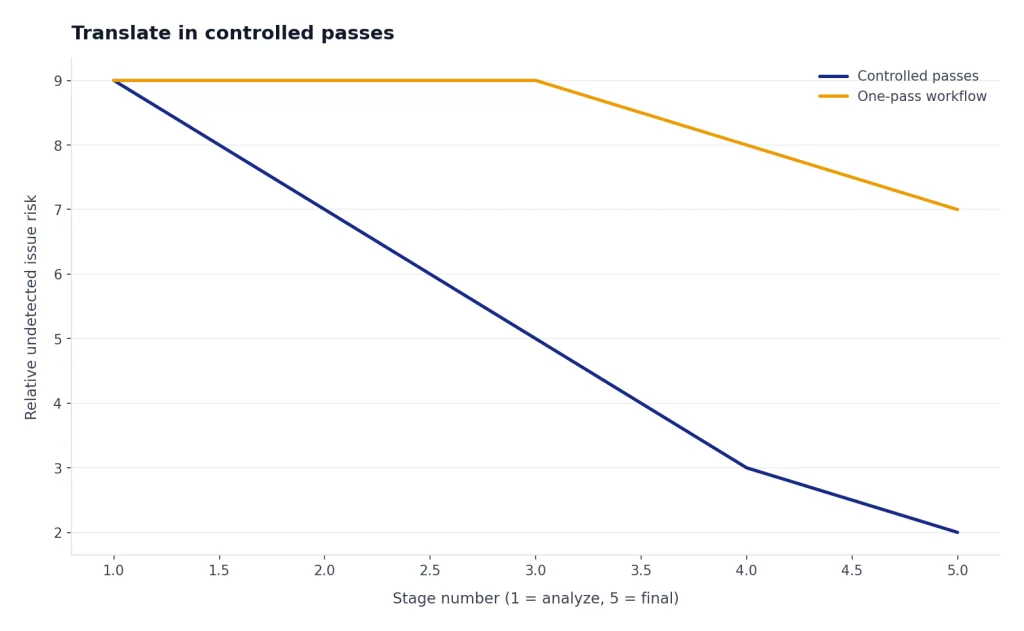
Begin with a source analysis pass. Ask ChatGPT to identify ambiguous phrases, idioms, acronyms, names, measurements, tone, and any content that may need localization. Do not ask for the final translation yet. This pass helps you see where the model may struggle.
Next, ask for a faithful draft. A faithful draft should preserve meaning, structure, and intent. It does not need to sound like final marketing copy. Then ask for a natural-language pass that improves flow for the target audience while preserving meaning. Finally, ask for a diff-style review that lists what changed between the faithful draft and the natural version.
Use this sequence:
- Analyze the source for ambiguity and terminology.
- Create a faithful translation.
- Create a natural localized version.
- Compare the natural version against the source.
- Produce a final clean version with no notes.
This is not only about accuracy. It also helps with accountability. When ChatGPT explains ambiguous phrases and localization choices, you can send those notes to a client, colleague, or native-language reviewer. For more advanced prompting patterns, see prompt engineering techniques that actually work and advanced prompt engineering techniques 2026.
Here is a compact controlled-pass prompt:
Translate the text below using a controlled workflow.
Step A: List ambiguous terms, idioms, names, numbers, measurements, and formatting rules.
Step B: Produce a faithful translation.
Step C: Produce a natural version for [TARGET REGION].
Step D: List any meaning changes or assumptions.
Step E: Wait for my approval before giving the final clean version.

Text:
[PASTE SOURCE]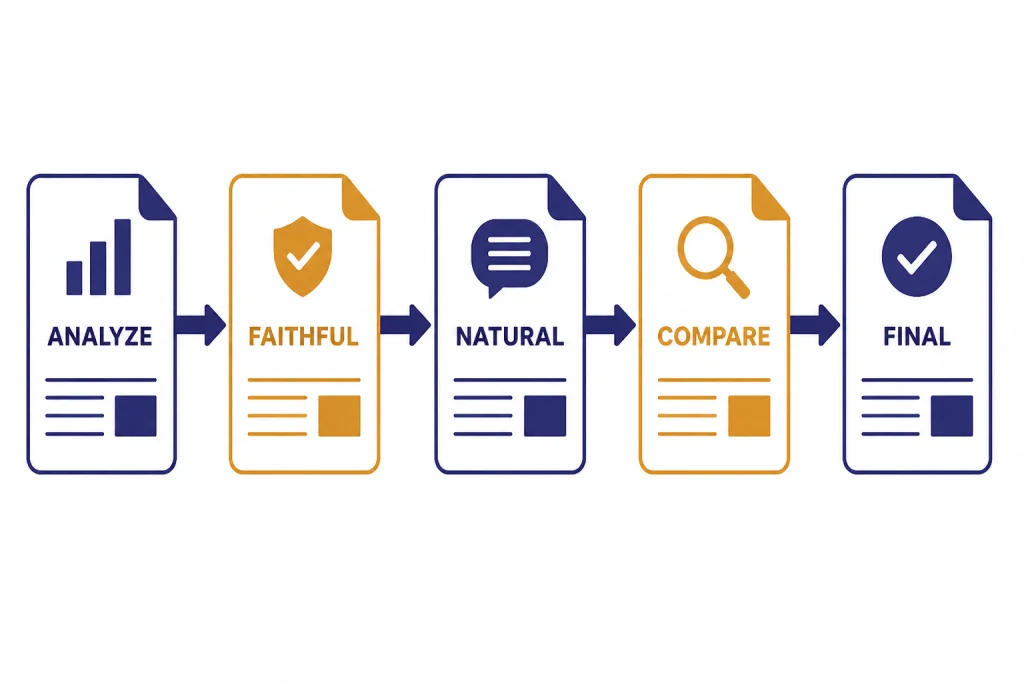
Use files, voice, and record mode
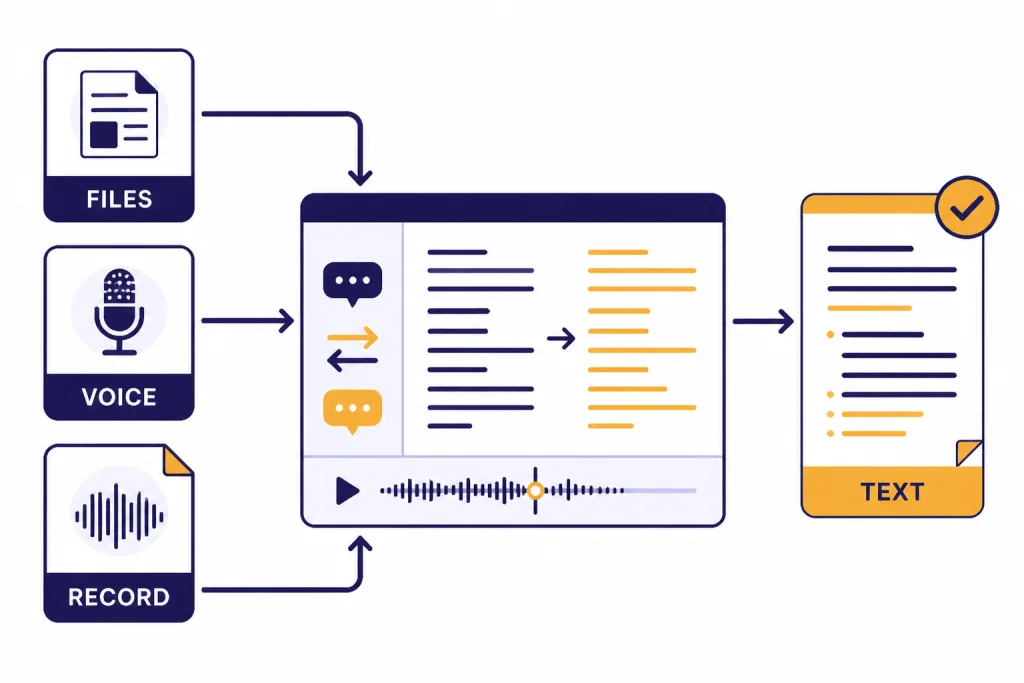
ChatGPT translation becomes more useful when the source text is not a clean paragraph. You may have a PDF, a spreadsheet, a screenshot, a presentation, or spoken notes. OpenAI’s File Uploads FAQ says ChatGPT can work with common text files, spreadsheets, presentations, and documents, and describes use cases such as comparing documents, rewriting a document in a particular style, and extracting specific sections.[2]
For files, ask ChatGPT to extract the text before translating it. Then ask it to show any sections it could not read clearly. This is important for scanned PDFs, images inside presentations, tables, footnotes, and text with unusual formatting. If the file contains tables, tell ChatGPT whether to preserve the original table structure or convert it into clean paragraphs.
For voice, use ChatGPT for practice, interpretation rehearsal, and pronunciation questions rather than final certified translation. OpenAI’s Voice Mode FAQ says voice conversations are available with GPTs, but Voice mode does not yet support tools such as image generation, file uploads, or the Code Interpreter.[3] That means a file-heavy translation job should usually happen in a regular chat, not inside voice mode.
ChatGPT Record can transcribe and summarize recordings such as meetings, brainstorms, or voice notes, according to OpenAI’s Help Center.[4] OpenAI also says Record mode works best in English today and that accuracy for other languages can vary.[4] Use it to create a transcript you can review, then translate the reviewed transcript in a separate step.
If your translation source is a PDF, combine this article with the chatgpt tutorial pdf breakdown. If you are translating survey responses or multilingual spreadsheet fields, use the workflow in our take on chatgpt tutorial data analysis to clean and group the data before translation.
| Input type | Best ChatGPT use | Watch for |
|---|---|---|
| Plain text | Direct brief, draft, and review workflow | Ambiguous pronouns, idioms, and tone |
| PDF or document | Extract, preserve structure, then translate | Missing text, headers, footnotes, and tables |
| Spreadsheet | Translate fields while protecting IDs and formulas | Broken columns, inconsistent terminology |
| Voice note | Transcribe, review, then translate | Speaker names, accents, background noise |
| Screenshot | Read visible text and explain context | Small fonts and cropped labels |
Run quality checks before you publish
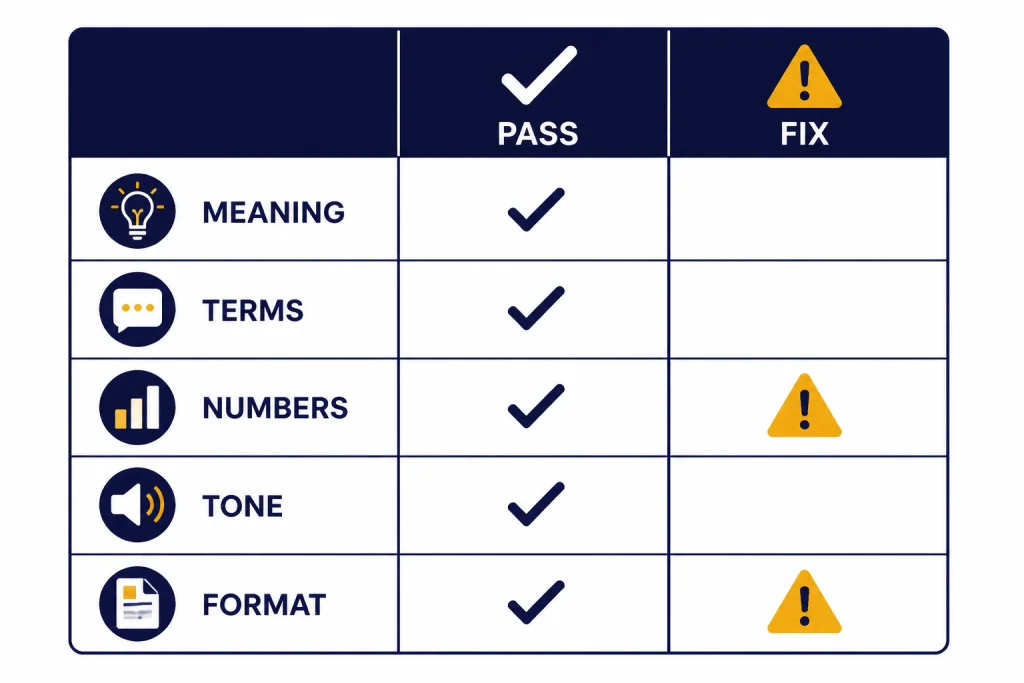
A fluent translation can still be wrong. Quality control should check meaning, terminology, names, numbers, formatting, tone, and cultural fit. Ask ChatGPT to review against the source, not just polish the target text. Polishing alone can hide errors.
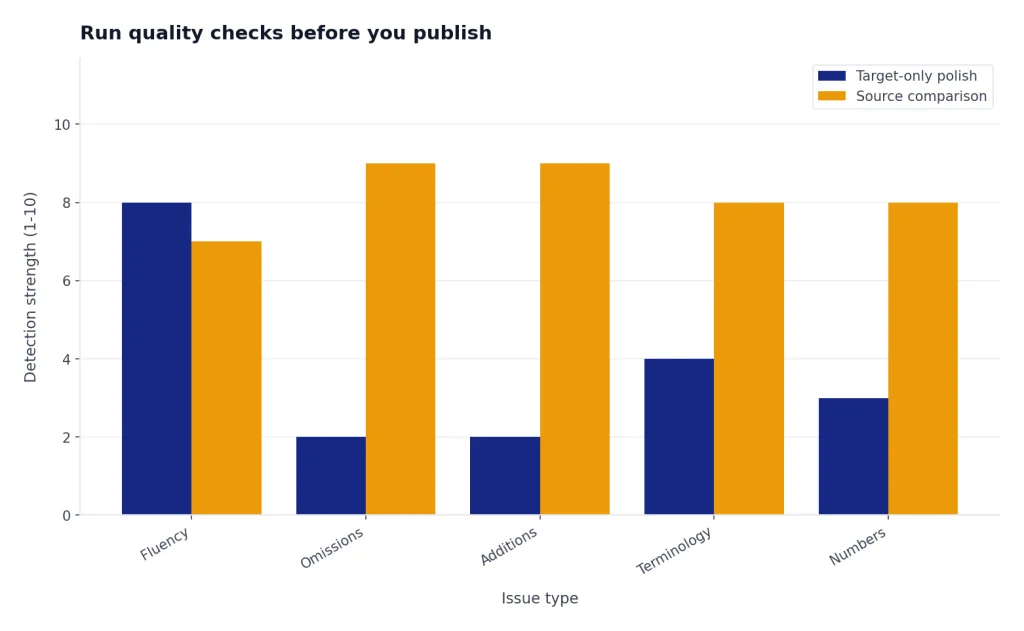
Use a separate quality-check prompt after you have a draft:
Review this translation against the source.
Check for: missing meaning, added meaning, wrong terminology, inconsistent names, changed numbers, tone mismatch, formatting breaks, and cultural issues.
Return a table with columns: Issue, Source phrase, Translation phrase, Severity, Recommended fix.
Do not rewrite the whole translation yet.

Source:
[PASTE SOURCE]

Translation:
[PASTE TRANSLATION]
Then ask for a clean revision only after you approve the fixes. This prevents ChatGPT from quietly rewriting sections that were already correct. If the text is long, review it in sections. Keep section labels stable so you can compare source and target later.
For high-stakes work, add a human review stage. A qualified reviewer should understand the source language, target language, subject matter, and legal or professional context. ChatGPT can prepare the reviewer packet: source text, draft translation, glossary, unresolved questions, and a list of risky passages.
Use this review table to decide how much human oversight you need:
| Content type | ChatGPT role | Human review level |
|---|---|---|
| Internal notes | Draft and summarize | Light review by the sender |
| Blog or marketing copy | Draft, localize, and compare tone | Native speaker review before publishing |
| Customer support article | Translate and enforce glossary | Product expert plus native speaker review |
| Contract, policy, consent, or medical text | Prepare questions and rough reference draft | Qualified professional translator or counsel |
| Public safety instructions | Highlight ambiguity and terminology risks | Professional translation and domain review |
Bias is part of quality control. Ask ChatGPT to flag gendered assumptions, default masculine or feminine terms, and places where the target language requires a formality, gender, or honorific choice that the source does not specify. This is especially important in hiring, healthcare, education, customer support, and identity-related content.
Reusable translation prompts
Save prompts for the translation tasks you repeat. A reusable prompt should include a role, the language pair, the audience, protected terms, format rules, and an instruction to disclose uncertainty. If you build a larger prompt library, use chatgpt prompt generator or the dedicated chatgpt translation prompts for quality output collection as a companion.
Prompt for a faithful translation
Translate from [SOURCE LANGUAGE] to [TARGET LANGUAGE].
Keep the meaning as close as possible to the source.
Preserve formatting, headings, bullets, placeholders, numbers, and names.
If a phrase is ambiguous, mark it with [AMBIGUOUS] and explain after the translation.
Prompt for a localized version
Rewrite the translation for readers in [REGION].
Keep the same meaning, but make the wording natural for local readers.
Adapt idioms only when needed.
Do not change facts, offers, prices, dates, names, or legal claims.
After the rewrite, list any localization choices you made.
Prompt for glossary enforcement
Check the translation against this glossary.
If a glossary term is missing, inconsistent, or mistranslated, return a correction table.
Do not rewrite unrelated sentences.

Glossary:
[PASTE GLOSSARY]

Translation:
[PASTE TRANSLATION]
Prompt for bilingual review
Compare the source and translation sentence by sentence.
Find missing meaning, added meaning, tone mismatch, and terminology errors.
Return only issues that could affect reader understanding or brand quality.
Use this format: Issue | Why it matters | Suggested fix.
If you translate recurring material for a team, consider a custom GPT with your style guide, glossary, and review checklist. Use our take on chatgpt tutorial custom gpts for setup steps. If your translation work is part of content production, connect it to this guide to chatgpt tutorial writing and the chatgpt tutorial seo breakdown.
Handle private and sensitive text carefully
Translation often involves private material: contracts, employee messages, medical notes, immigration documents, customer complaints, transcripts, and unpublished business plans. Do not paste sensitive text into ChatGPT unless you understand your account’s data settings, workspace policy, and legal obligations.
OpenAI says it may use content from individual services such as ChatGPT to train models, and that users can opt out of training through the privacy portal or ChatGPT data controls.[5] OpenAI also says Temporary Chat does not appear in history, does not use or create memories, and is not used to train models.[5] Business, Enterprise, and API products have different default data-use rules from individual consumer services, according to the same OpenAI policy page.[5]
For client work, use a written policy. Decide what may be pasted, what must be anonymized, what requires client permission, and what cannot be processed with an AI tool. Replace names, addresses, account numbers, case IDs, and private facts with placeholders before translation when possible. Keep a local mapping file outside ChatGPT if you need to restore the original names later.
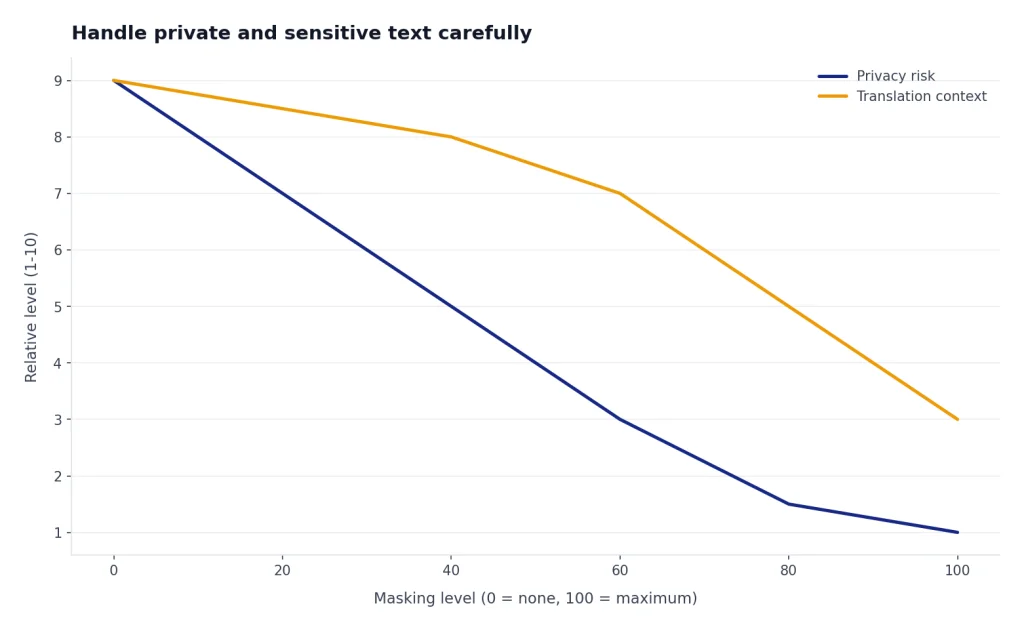
A simple privacy-safe translation pattern looks like this:
- Remove or mask personally identifying details.
- Translate the masked text.
- Run terminology and meaning checks.
- Restore sensitive details outside ChatGPT.
- Send the result to a qualified reviewer when the content is high stakes.
Do not use memory for client-specific translation instructions unless your team has approved that practice. If you rely on saved preferences for personal language learning, review this guide to chatgpt tutorial memory so you understand how persistent context can affect later chats.
Frequently asked questions
Is ChatGPT good enough for professional translation?
ChatGPT can be useful for drafts, comparisons, glossary checks, and localization suggestions. It should not be the only reviewer for high-stakes professional translation. Use a qualified human reviewer when errors could create legal, financial, medical, safety, or reputational harm.
What is the best prompt for ChatGPT translation?
The best prompt includes the source language, target language, region, audience, tone, protected terms, glossary, formatting rules, and review instructions. Ask for ambiguity notes before the final translation. This gives you more control than a simple “translate this” prompt.
Can ChatGPT preserve formatting while translating?
Yes, it can often preserve headings, bullets, Markdown, tables, and placeholders if you explicitly ask. You should still inspect the result, especially for spreadsheets, legal templates, subtitles, and code-like text. Tell ChatGPT which parts must remain unchanged.
Can I upload a PDF and ask ChatGPT to translate it?
You can use file uploads for many document workflows, including extracting and transforming document text, depending on your plan and file type.[2] For a PDF, first ask ChatGPT to extract the text and flag unreadable sections. Then translate the reviewed text instead of assuming every page was read perfectly.
Should I ask ChatGPT for a literal or natural translation?
Ask for both when the text matters. Start with a faithful translation so you can check meaning. Then ask for a natural localized version and a short explanation of any changes.
How do I reduce translation hallucinations?
Use a glossary, protect names and numbers, ask for ambiguity notes, and require a source-versus-translation review. Do not ask ChatGPT to fill missing context unless you clearly mark it as an assumption. For long text, translate and review in sections.