

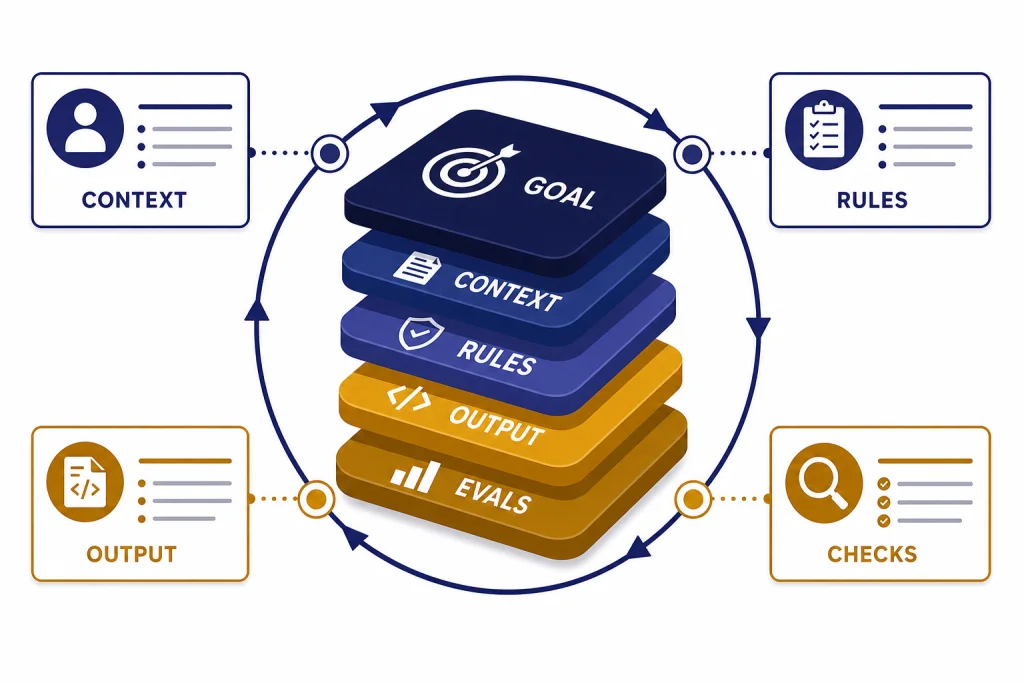
Advanced prompt engineering techniques in 2026 are less about magic phrases and more about designing reliable work systems. A strong prompt now defines the goal, context, constraints, output contract, verification method, and tool boundaries. It also changes based on the model behavior you need: fast drafting, careful reasoning, structured extraction, agentic tool use, or long-running project work. This guide gives you a practical framework you can reuse in ChatGPT, Custom GPTs, API workflows, research projects, coding tasks, and content production. Start with the stack, then add context architecture, verification, examples, tool rules, and evaluation loops.
The advanced prompt stack
OpenAI describes prompt engineering as writing effective instructions so a model consistently generates content that meets your requirements.[1] For advanced work, that definition is the baseline. The real skill is designing the whole stack around the prompt.
Think of a prompt as a compact specification. It should tell the model what role to take, what task to complete, what material to trust, what constraints matter, what format to return, and how to check its own work. If one of those layers is missing, the model fills the gap with assumptions.
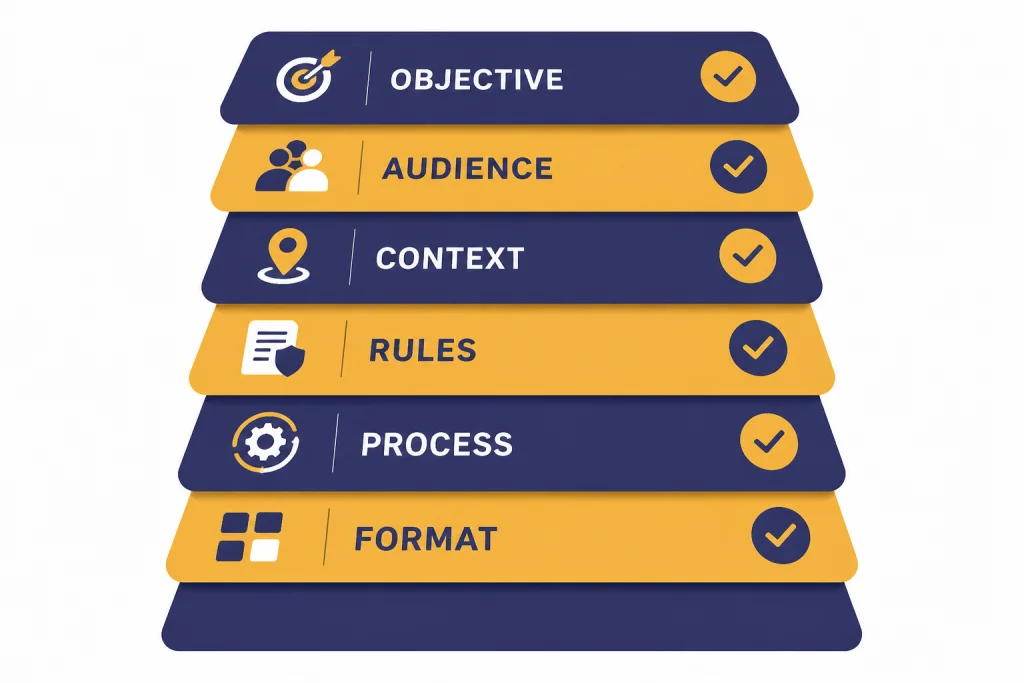
A reliable advanced prompt usually includes these layers:
- Objective: the business, creative, research, or technical outcome.
- Audience: who will use the answer and what they already know.
- Source context: files, notes, links, data, policies, examples, or pasted material.
- Constraints: exclusions, tone, length, format, jurisdiction, risk limits, or assumptions.
- Procedure: the work pattern the model should follow, such as compare, extract, rewrite, debug, critique, or plan.
- Output contract: the exact fields, sections, table columns, or JSON shape you need.
- Quality gate: how the model should check completeness before answering.
This is the difference between asking ChatGPT to “write a launch plan” and asking it to produce a launch plan for a specific audience, based only on an approved brief, with assumptions separated, risks ranked, and next actions grouped by owner. If you need a beginner refresher before using this guide, start with prompt engineering techniques that actually work.
Choose model behavior before wording
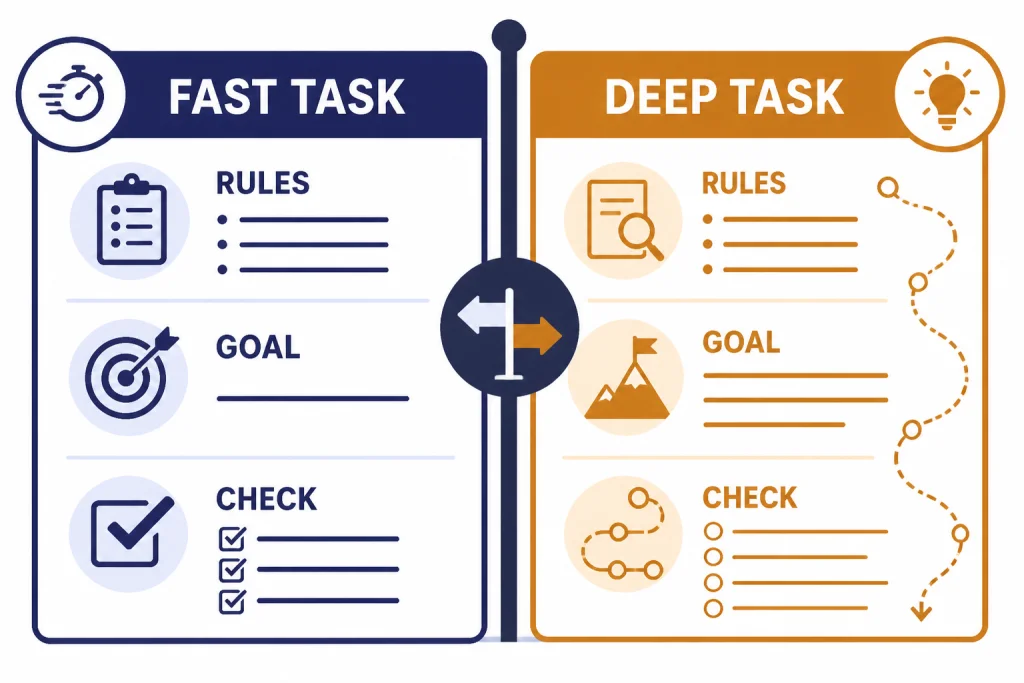
Advanced prompting starts with a decision about behavior. Some tasks need speed and precise formatting. Some need deep reasoning. Some need tool calls. Some need a reusable assistant with memory and project context. A single prompt style will not fit all of those jobs.
OpenAI notes that different model types, including reasoning models and GPT models, can need different prompting approaches.[1] Its reasoning guidance says reasoning models often perform best with simple, direct prompts, and that asking them to “think step by step” may be unnecessary or even counterproductive because they reason internally.[2]
Use this decision rule. If the task is routine, format-sensitive, and based on supplied context, write a detailed procedural prompt. If the task is ambiguous, strategic, mathematical, or multi-step, define the goal and success criteria, then let the model choose the path. Ask for a concise rationale or decision summary, not hidden chain-of-thought.
| Task type | Best prompt style | What to avoid | Useful internal link |
|---|---|---|---|
| Drafting and editing | Clear voice rules, audience, examples, and revision criteria | Vague taste words like better or punchier | writing workflow tutorial |
| Research synthesis | Source boundaries, claim types, uncertainty labels, and citation rules | Letting the model blend sources without attribution | deep research project guide |
| Data analysis | Dataset description, column meanings, hypothesis, and output tables | Asking for conclusions before cleaning assumptions | data analysis step by step |
| Coding | Environment, files, expected behavior, tests, and failure logs | Pasting errors without the surrounding code path | coding with ChatGPT guide |
| Agentic tasks | Goal, tool boundaries, approval points, stop conditions, and logs | Giving broad permission to act without checkpoints | agent mode tutorial |
Build a context architecture
Most weak advanced prompts fail because the context is messy, not because the instruction is too short. Context architecture means arranging the material so the model can separate rules, facts, examples, and variable inputs.
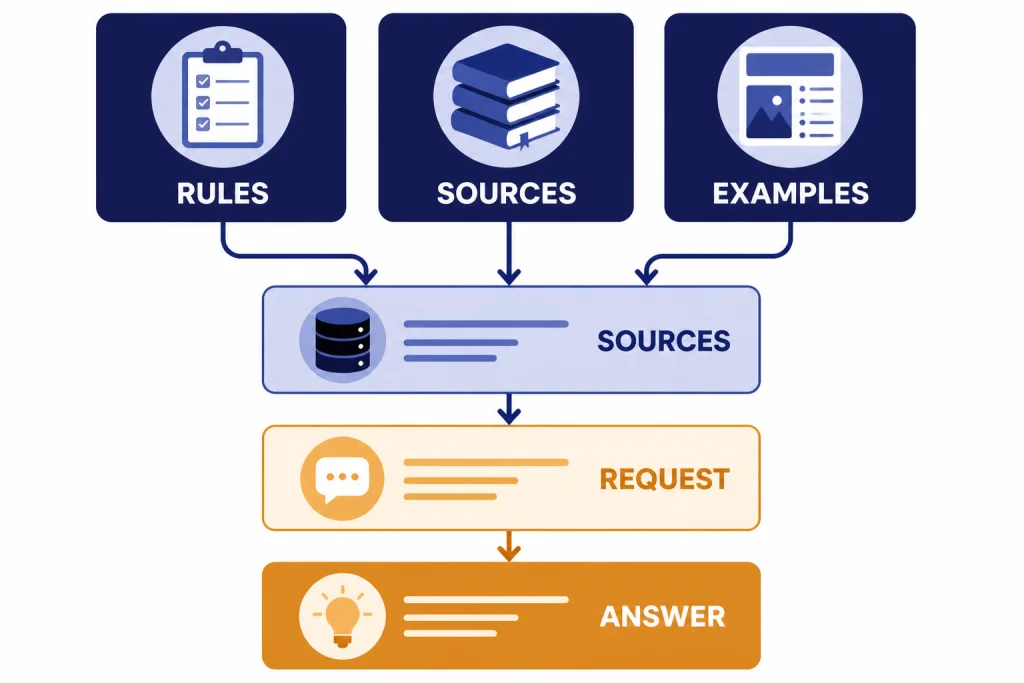
OpenAI recommends using Markdown headings, lists, and XML tags to mark boundaries and hierarchy inside prompts.[1] Use that advice literally. Put stable instructions first. Put reusable examples next. Put source material in clearly labeled blocks. Put the user’s current request at the end.
A clean context pack looks like this:
- Project rules: voice, policy, scope, and definitions.
- Reference material: pasted sources, notes, transcripts, tables, or files.
- Task brief: what must be done now.
- Output contract: what the answer must look like.
- Uncertainty rule: what to do when the source material is incomplete.
In ChatGPT, projects can also help keep long-running work organized. OpenAI says project memory keeps ChatGPT focused by drawing context from conversations within the same project rather than from unrelated projects.[7] That makes projects useful for recurring work such as an editorial calendar, a coding migration, a market research folder, or a course build. For a deeper setup walkthrough, use ChatGPT memory power-user tips and build your own Custom GPT.
The key habit is separation. Never mix instructions, source text, and your own commentary in one unmarked blob. If you paste a transcript, label it as transcript. If you paste your preferred output, label it as example. If you add a constraint, put it under rules.
Make outputs verifiable
An advanced prompt should not merely ask for a good answer. It should define how a good answer can be checked. This matters for research summaries, legal-adjacent analysis, financial spreadsheets, API outputs, technical documentation, and any workflow where silent errors are costly.
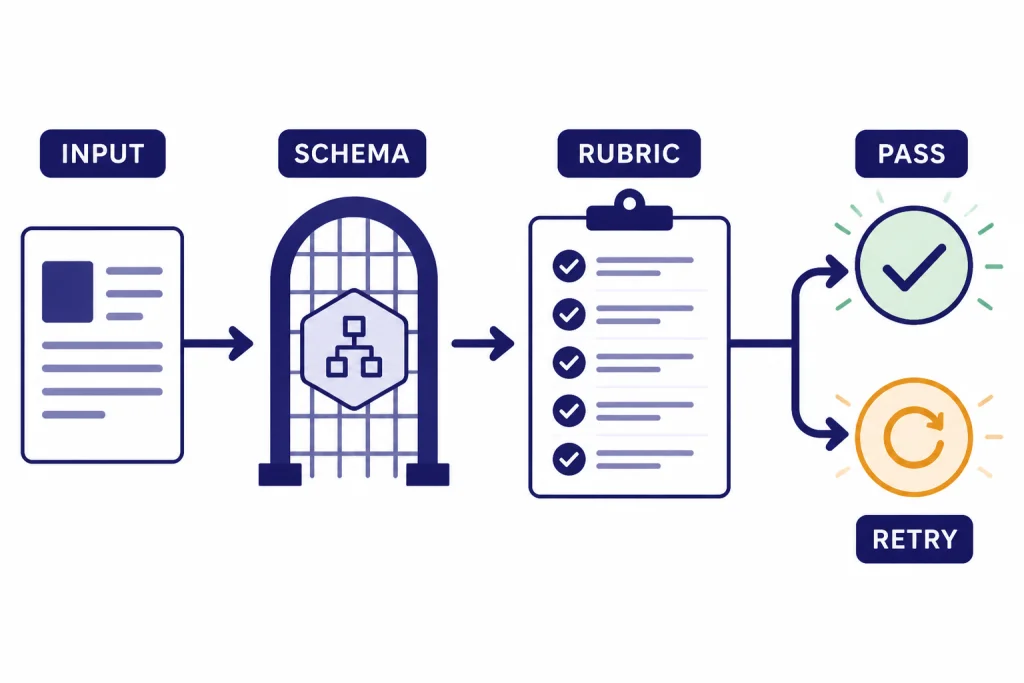
Use a verification layer in plain language for ChatGPT work. Ask the model to separate supported facts from assumptions, list missing inputs, flag conflicts, and run a final checklist before responding. For example: “Before finalizing, confirm that every recommendation maps to one supplied source, every risk has a mitigation, and every open question is listed under Unknowns.”
For API workflows, use structured output rather than hoping the model follows a prose format. OpenAI says Structured Outputs can be used through function calling or through a JSON schema response format, and that Structured Outputs ensure schema adherence in a way JSON mode alone does not.[3] This is the right approach when a model response will feed a database, form, chart, ticketing system, or application UI.
Verification prompts work best when they name the failure modes. Do not say “make sure it is accurate.” Say “reject claims not present in the source,” “mark estimates as estimates,” “do not invent missing dates,” or “return NEEDS_REVIEW if the input is insufficient.” If you work with files, PDFs, or spreadsheets, pair this method with PDF reading and summarizing or Excel prompts for power users.
Decompose complex work into prompt chains
One large prompt can work, but prompt chains are easier to inspect. A prompt chain breaks a complex job into stages. Each stage produces an artifact that the next stage uses. This gives you checkpoints and makes errors easier to catch.
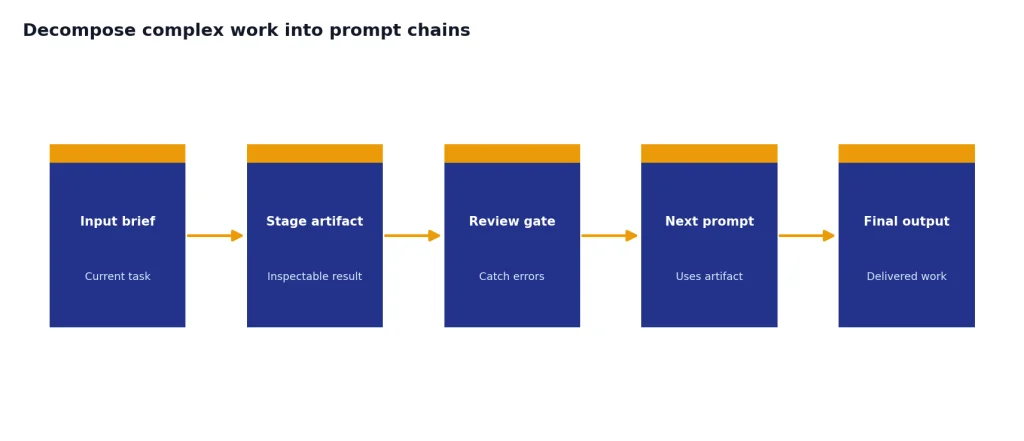
A good content chain might be: brief extraction, audience analysis, outline, draft, critique, rewrite, final formatting. A research chain might be: question map, source collection, evidence table, synthesis, counterargument scan, final answer. A coding chain might be: reproduce bug, identify likely cause, propose patch, write tests, implement, review diff.
Do not chain prompts just to make the workflow look sophisticated. Chain when the task has distinct decisions. Keep it as a single prompt when the task is small, low-risk, and easy to verify. If you are building reusable workflows, ChatGPT Prompt Generator: Build Your Own Library is a useful companion.
Use artifacts, not vibes
Each stage should create a tangible artifact: a table, checklist, schema, outline, diff, decision memo, or list of unknowns. Avoid stages that produce only general commentary. The artifact should be specific enough that another person could review it before the workflow continues.
Use examples, counterexamples, and test cases
Examples teach format and judgment. Counterexamples teach boundaries. Test cases reveal whether the prompt survives real inputs. Together, they make advanced prompts more stable.
Use examples when the desired output has a style, classification boundary, or non-obvious structure. Use counterexamples when the model tends to overdo something. For instance, if you are prompting for concise executive summaries, include one good summary and one rejected summary that is too long, too speculative, or too sales-heavy.
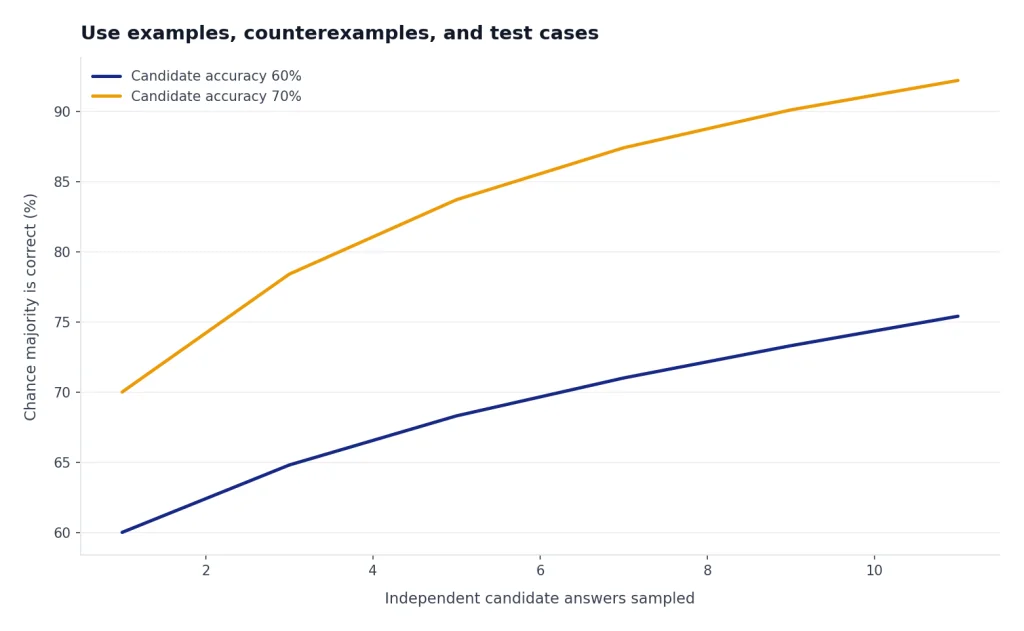
Self-consistency is another useful idea for difficult reasoning tasks. The original self-consistency paper proposed sampling multiple reasoning paths and choosing the most consistent answer, and reported gains across arithmetic and commonsense benchmarks.[8] In day-to-day ChatGPT use, you can adapt the concept without asking for hidden reasoning: ask the model to generate several candidate answers, compare them against the same rubric, and return the strongest final answer with a brief justification.
Build a small test set for any prompt you plan to reuse. Include a normal input, an edge case, an incomplete input, and an input that should be refused or escalated. If the prompt only works on your perfect example, it is not production-ready.
Prompt for tools and agents
Tool-aware prompting is a separate skill. When the model can browse, search files, run code, call functions, or operate an agent, your prompt must define when to use tools and when not to use them.
OpenAI describes function calling as a way for models to interface with external systems and access data outside their training data.[4] It also recommends describing the purpose of each function and parameter, using the system prompt to state when functions should be used, and enabling strict mode when you need reliable schema adherence.[4]
For ChatGPT, the same principle applies in plain English. If you want web research, say what sources count, what date range matters, and how citations should be handled. If you want file analysis, tell ChatGPT which file is authoritative. If you want code execution, define the expected artifacts: charts, cleaned files, formulas, or error explanations. For web-heavy workflows, see browse the web with Atlas. For tool-heavy automation, see get the most from Agent Mode.
Use approval gates for actions. A safe agent prompt says: “Draft the plan first. Do not send, publish, purchase, delete, or modify anything without approval.” That sentence is more useful than a long personality description.
Optimize prompts for reuse and performance
Advanced prompt engineering also includes operational design. If you run prompts through the API, repeated instructions and large schemas can affect latency and cost. OpenAI says Prompt Caching can reduce latency by up to 80% and input token costs by up to 90%, and that caching is available for prompts containing 1024 tokens or more.[5]
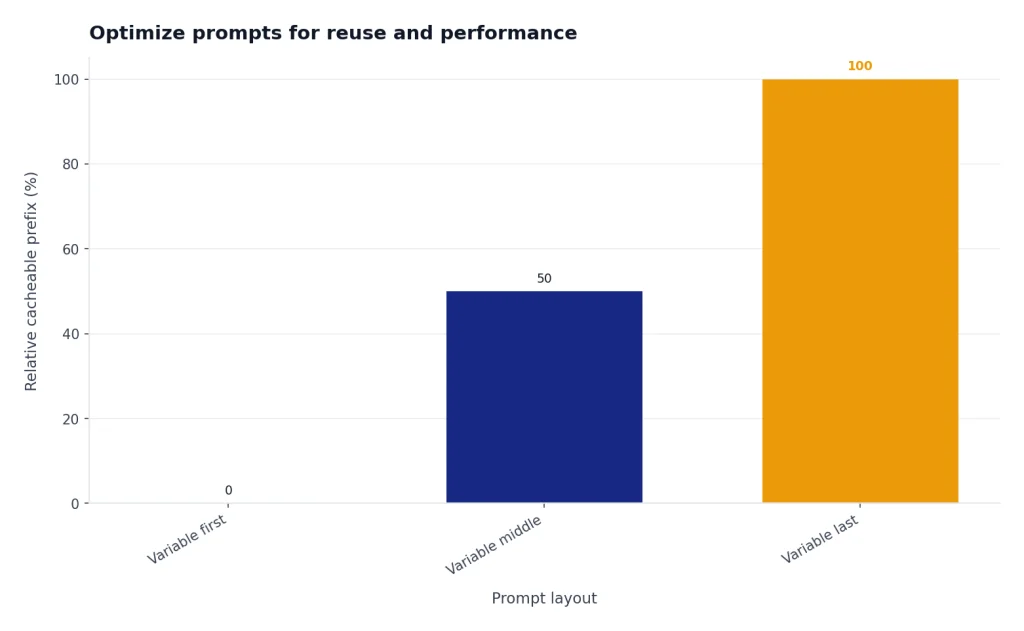
The practical lesson is simple: put stable content at the beginning and variable content at the end. Stable content includes role, rules, schemas, examples, and long background instructions. Variable content includes the user’s current question, uploaded snippet, account details, or row of data. OpenAI’s prompt caching guidance also says cache hits require exact prefix matches, so moving dynamic text into the prefix can reduce cache effectiveness.[5]
Even if you never touch the API, this structure helps. Reusable prompts become easier to maintain. Teams can compare versions. You can keep a prompt library with stable templates and swap in only the current task. If you want formal training around this habit, use our prompt engineering course.
Reusable advanced prompt template
Use this template when a task matters enough to design instead of improvise. Delete any section that does not apply. The goal is not to make every prompt long. The goal is to make every important instruction explicit.
<role>
You are a [domain] assistant helping [audience] achieve [outcome].
</role>

<objective>
Complete this task: [specific task].
The answer will be used for: [decision, document, code, plan, analysis].
</objective>

<context>
Use only the information below unless I explicitly ask for outside knowledge.
[Paste sources, notes, files, data descriptions, or links.]
</context>

<constraints>
- Do not invent missing facts.
- Separate facts, assumptions, and recommendations.
- Ask for clarification if the missing input changes the answer.
- Follow this tone: [tone].
- Exclude: [things to avoid].
</constraints>

<process>
First identify the relevant inputs.
Then produce the requested output.
Before finalizing, check the output against the quality gate.
Do not reveal hidden reasoning. Provide only a brief rationale when useful.
</process>

<output_format>
Return:
1. Summary
2. Main output
3. Assumptions
4. Risks or open questions
5. Next actions
</output_format>

<quality_gate>
Before answering, verify that every claim is supported by the supplied context or marked as an assumption.
</quality_gate>
For creative work, replace the output format with a style brief and revision rubric. For coding, replace it with environment, files, expected behavior, tests, and constraints. For research, replace it with source rules, citation requirements, and uncertainty labels. For SEO work, combine this template with our SEO workflow tutorial.
Troubleshooting advanced prompts
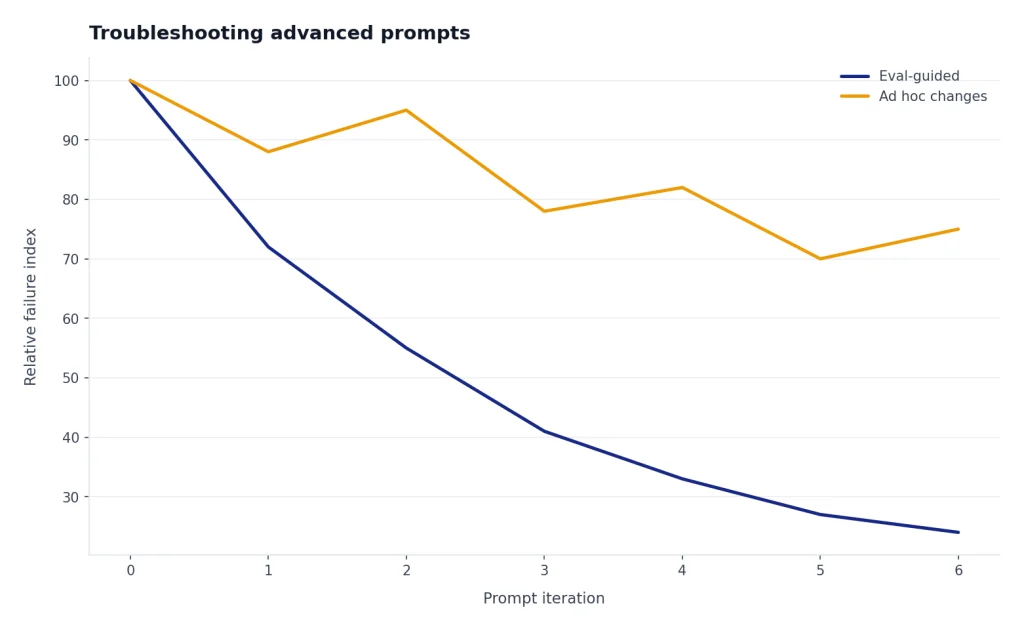
When an advanced prompt fails, fix the system before blaming the model. Most failures come from ambiguous goals, conflicting instructions, missing context, weak output contracts, or no evaluation step.
- The answer is generic: add audience, use case, source material, and decision criteria.
- The answer ignores constraints: move constraints closer to the top and turn them into explicit do and do-not rules.
- The format drifts: use a table, schema, or labeled sections instead of prose instructions.
- The model invents facts: require source-grounded claims and an Unknowns section.
- The response is too long: define length by use case, not by taste. Ask for an executive summary plus appendix.
- The workflow breaks across turns: summarize the current state before continuing, or move the work into a ChatGPT project.
- The prompt works once but not later: create test cases and run the same prompt against varied inputs.
OpenAI recommends building evals to measure prompt behavior when you iterate or change model versions.[1] Its evaluation guidance defines evals as structured tests for measuring model performance, which helps address the variability of generative AI systems.[6] For serious workflows, your prompt is not finished until you can test it.
Frequently asked questions
What are advanced prompt engineering techniques?
Advanced prompt engineering techniques are methods for making model outputs reliable, testable, and reusable. They include structured context, explicit constraints, output contracts, examples, counterexamples, prompt chaining, tool rules, and evaluation loops.
Is chain-of-thought prompting still recommended?
Not as a universal rule. OpenAI’s reasoning guidance says reasoning models perform internal reasoning and that prompts such as “think step by step” may not help.[2] A better pattern is to define the goal, success criteria, and desired final format, then ask for a brief rationale if the user needs one.
How long should an advanced prompt be?
It should be long enough to remove ambiguity and short enough to maintain. A short prompt is fine for a simple task. A high-stakes or reusable prompt should include role, context, constraints, output format, and a quality gate.
Do examples improve every prompt?
No. Examples help when style, structure, or classification boundaries are hard to describe. They can hurt when they conflict with your rules or when the model overfits to the example instead of solving the current task.
What is the best way to test a prompt?
Create a small eval set with normal inputs, edge cases, incomplete inputs, and failure cases. Run the same prompt against the set after every meaningful change. Track whether the output meets your rubric, not whether it merely sounds good.
Can I use the same prompt in ChatGPT and the API?
Often yes, but you should adapt the format. ChatGPT prompts can use natural language and project context. API prompts should be stricter about message roles, schemas, tool definitions, caching structure, and evaluation.