

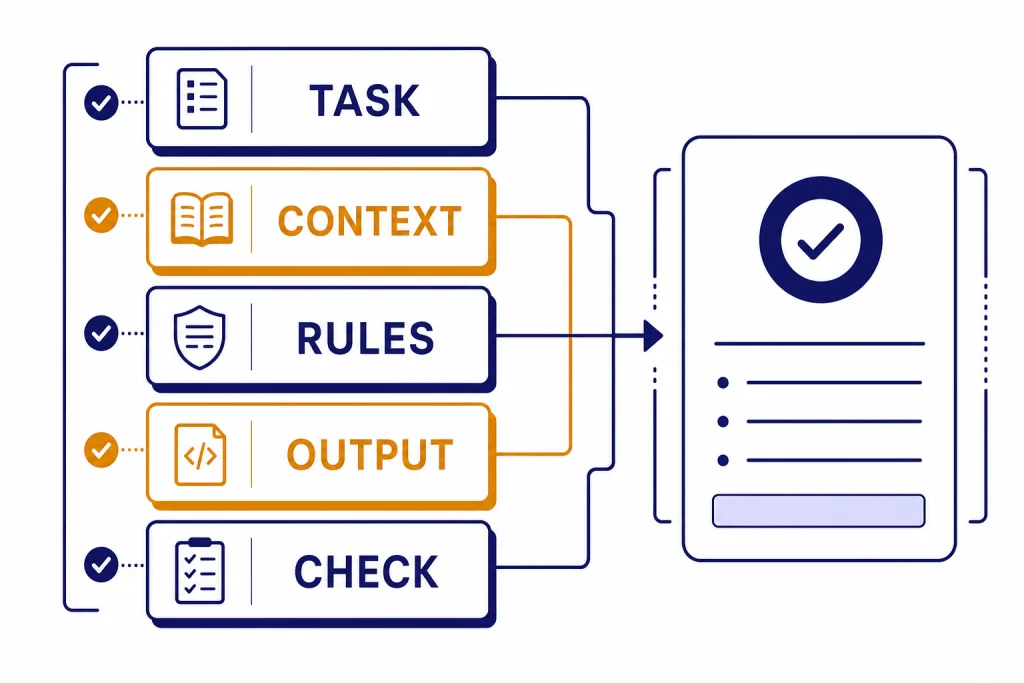
The prompt engineering techniques that actually work are the ones that reduce ambiguity. Give ChatGPT a clear task, useful context, a target format, examples when the pattern matters, and a way to check the result. Avoid magic phrases. Avoid giant prompts full of competing rules. The best prompts read like a good work order: what to do, what to use, what to avoid, and what finished looks like. This guide gives you a reusable prompt framework, practical examples, a comparison table, and a testing checklist you can use for writing, research, coding, data analysis, SEO, and everyday ChatGPT workflows.
What actually works in prompt engineering
Prompt engineering works when it improves communication between your intent and the model’s task. OpenAI defines prompt engineering as writing effective instructions so a model consistently generates content that meets your requirements.[1] That definition is useful because it moves the focus away from tricks and toward consistency.
The practical goal is simple. Your prompt should answer four questions before ChatGPT has to guess:
- What is the task?
- What context should the model use?
- What constraints matter?
- What should the final answer look like?
Most bad outputs come from one missing piece. If the model writes too broadly, the task was vague. If it invents facts, the context was weak. If it gives the wrong layout, the format was not specified. If it sounds off-brand, the audience and tone were not defined.
This is why prompt engineering is not the same as collecting clever one-liners. A prompt library can help, and a ChatGPT prompt generator can speed up template building, but the durable skill is diagnosing what the model did not know from your instructions.
OpenAI’s own guidance also warns that different model types may need different prompting. Its prompt engineering docs say some techniques, such as message roles, work broadly, while reasoning and GPT-style models may respond best to different instruction styles.[1] Treat that as a reason to test prompts, not as a reason to memorize every model-specific phrase.
The prompt anatomy to use first
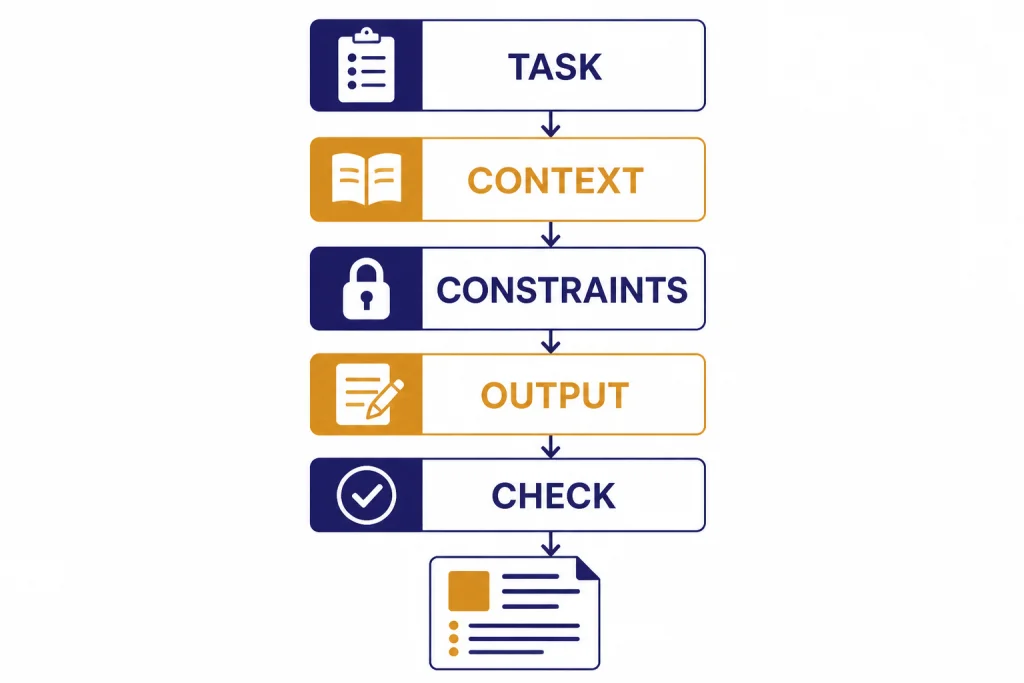
Start with a compact prompt structure before you add advanced techniques. The structure below works for most ChatGPT tasks because it puts the job, source material, constraints, and output contract in separate places.
Task: [State the job in one sentence.]
Context: [Paste the relevant facts, audience, source text, data, or goal.]
Constraints: [List what to include, avoid, preserve, verify, or assume.]
Output: [Define the exact format, length, sections, table columns, or file-ready result.]
Check: [Ask for a brief self-check against the constraints before the final answer, when useful.]
This anatomy prevents the model from treating everything as equal. It also gives you an easy editing path. If the answer is factually thin, improve the context. If it is too long, tighten the output line. If it ignores requirements, move them into constraints and make them specific.
For example, compare these two prompts:
Weak prompt: Write a marketing email for my course.
Better prompt: Task: Write a launch email for a beginner Excel course. Context: The audience is small business owners who waste time cleaning spreadsheets. The course teaches formulas, pivot tables, and repeatable reporting workflows. Constraints: Use plain language, avoid hype, include one concrete pain point in the opening, and do not mention discounts. Output: 150-180 words, subject line plus email body.
The better prompt does not rely on a secret phrase. It gives ChatGPT enough information to make good tradeoffs. If you are working on spreadsheet tasks, pair this structure with Excel prompt examples for power users. If you are learning broader workflows, our step-by-step data analysis tutorial shows how the same anatomy applies to files, charts, and cleanup tasks.
Prompt engineering techniques compared
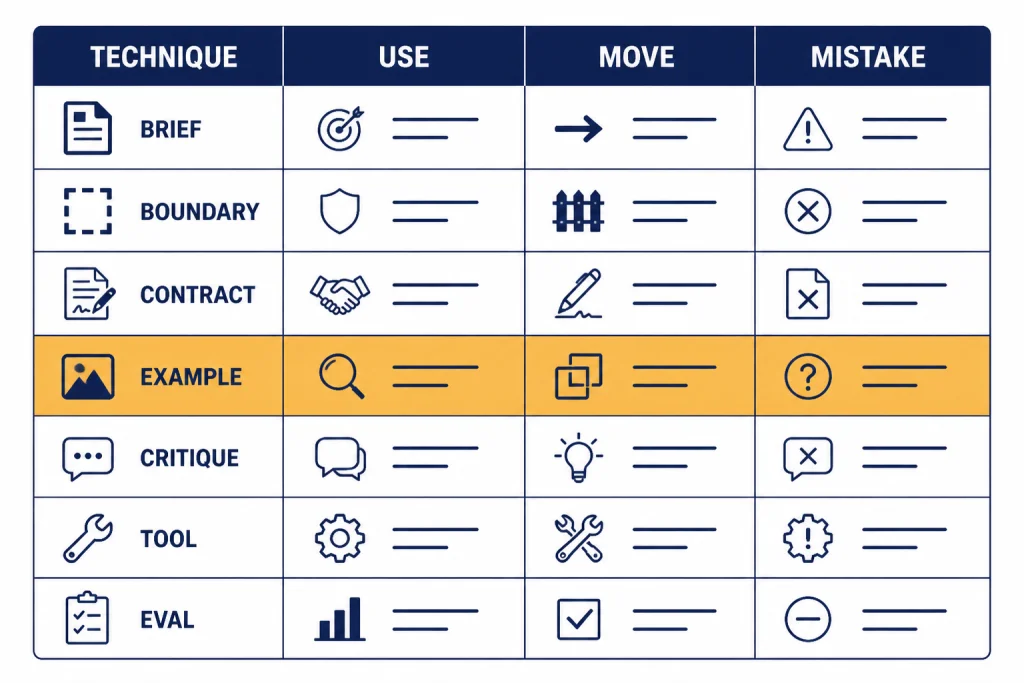
Use the technique that matches the failure you are seeing. Do not make every prompt longer by default. A short, precise prompt is better than a long prompt with redundant rules.
| Technique | Best use | Prompt move | Common mistake |
|---|---|---|---|
| Task brief | General writing, planning, editing, summaries | State the job, audience, goal, and success criteria | Asking for “better” without defining better |
| Context boundaries | Summaries, extraction, document review, research notes | Place source text under a clear label or delimiter | Mixing instructions and source text in one paragraph |
| Output contract | Tables, JSON, briefs, checklists, reusable formats | Name sections, columns, fields, and length limits | Expecting the model to infer the layout |
| Few-shot examples | Style transfer, classification, extraction, rewriting | Show input and output pairs that match the desired pattern | Giving examples that conflict with the current task |
| Critique loop | Editing, strategy, debugging, quality control | Ask for weaknesses, fixes, and then a revised version | Accepting the first answer when quality matters |
| Tool-aware prompting | Files, browsing, code, data, APIs, agent workflows | Tell the model when to use tools and how to report results | Asking the model to guess facts it should retrieve |
| Eval set | Repeated business workflows and production prompts | Test the prompt against representative cases | Changing prompts based on one impressive answer |
OpenAI’s prompt engineering guide recommends building evals so you can measure prompt behavior as you iterate or change model versions.[1] That matters because a prompt can improve one example while making another example worse.
Write better task briefs
A task brief is the shortest useful description of the job. It should include the action, object, audience, and success condition. This is the highest-leverage prompt engineering technique for everyday ChatGPT use.
Use this formula:
Act on [input] to produce [output] for [audience], optimized for [success condition].Here are concrete versions:
- Turn these meeting notes into a decision log for an operations manager, optimized for fast follow-up.
- Rewrite this landing page section for skeptical first-time buyers, optimized for clarity over persuasion.
- Analyze this CSV column list and propose a cleaning plan for a junior analyst, optimized for reproducibility.
- Review this Python function for a senior engineer, optimized for correctness and maintainability.
The audience line matters. A beginner needs definitions. An executive needs risk and decision points. A developer needs edge cases. A customer needs plain language. If you omit the audience, ChatGPT will choose an average reader, which may not match the job.
For writing work, combine the task brief with tone and source constraints. Our tutorial on writing better content with ChatGPT goes deeper on voice, outlines, and revision prompts. For coding, use a task brief that includes environment, expected behavior, failing case, and constraints; the coding tutorial for ChatGPT covers that workflow in detail.
Bad task briefs often use vague verbs: improve, optimize, enhance, fix, make professional. Replace them with observable actions: shorten, compare, extract, rank, rewrite, debug, convert, cite, outline, classify, or validate. The model can execute observable verbs more reliably.
Separate context from instructions
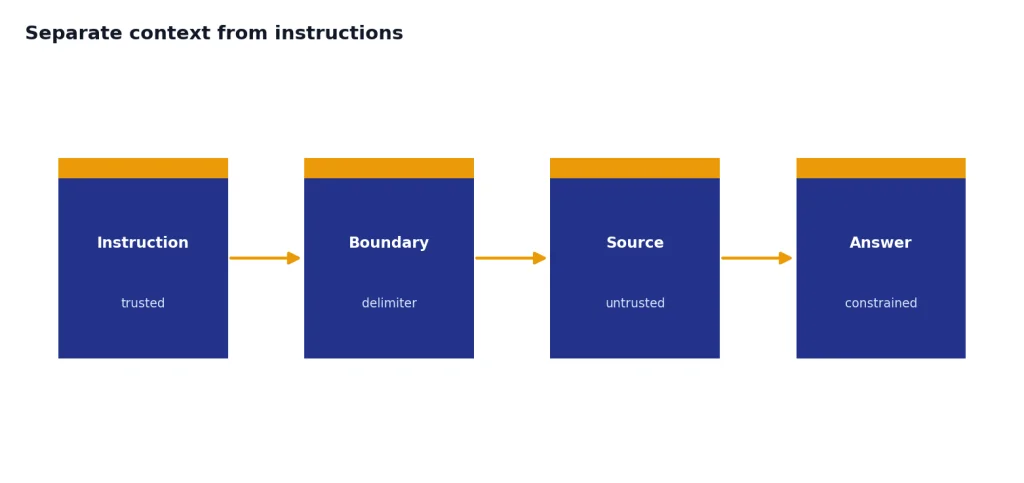
Context boundaries help ChatGPT tell the difference between what you want it to do and what material it should use. OpenAI’s help guidance recommends placing instructions at the beginning and using separators such as ### or triple quotes to separate instructions from context.[2] OpenAI’s API documentation also says Markdown headers, lists, and XML tags can help mark logical boundaries in prompts.[1]
Use boundaries when you paste a document, transcript, article draft, dataset description, legal clause, or support ticket. Do not just paste text after a request and hope the model infers which parts are source material.
Task: Summarize the source text for a customer support lead.
Rules:
- Use only the source text.
- Do not add causes that are not stated.
- Separate confirmed facts from open questions.

Source text:
"""
[paste ticket thread here]
"""

Output:
- Summary
- Confirmed facts
- Open questions
- Suggested reply
This pattern is especially useful for PDF and research workflows. If the model must summarize a long report, first define whether you want an executive summary, issue list, timeline, extraction table, or critique. Then paste or attach the source. For document-heavy work, see our PDF reading and summarizing workflow and academic research tutorial.
Context boundaries also reduce prompt injection risk in everyday terms. If a pasted document contains instructions like “ignore previous directions,” your prompt should make clear that the pasted material is untrusted source text, not a new instruction. This does not solve every security problem, but it gives the model a clearer hierarchy.
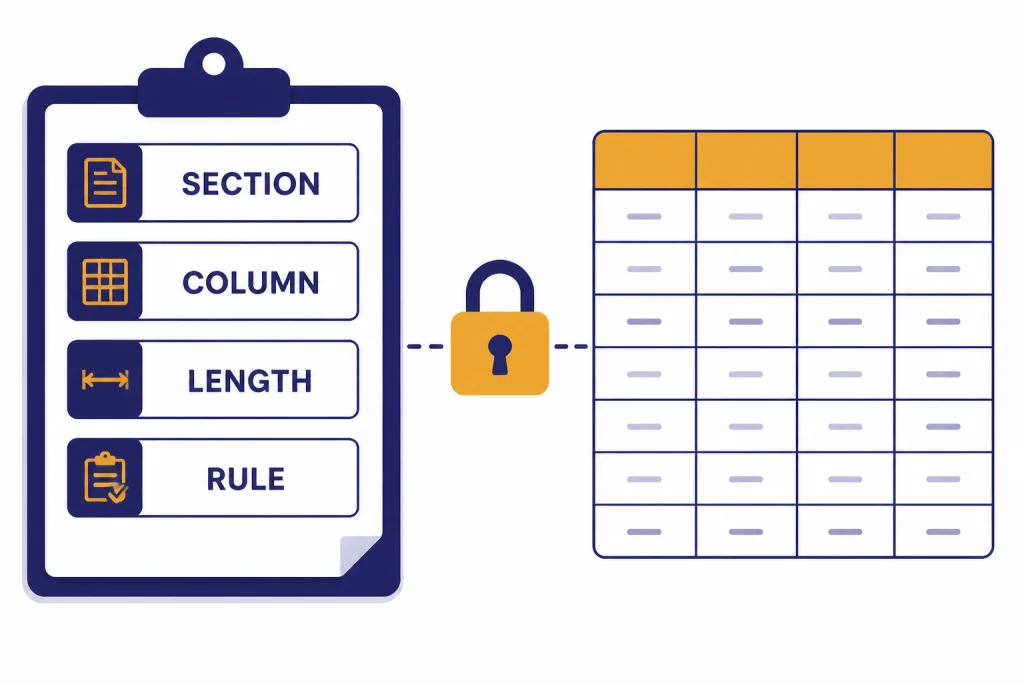
Control the output format
Format control is one of the most reliable prompt engineering techniques because it narrows the model’s choices. Tell ChatGPT the sections, order, length, table columns, bullet style, and any fields that must be present.
Use this when you need a result you can paste into a document, spreadsheet, email, CMS, code editor, or task tracker. A format prompt can be simple:
Return a table with these columns:
1. Issue
2. Evidence from the source
3. Severity: Low, Medium, or High
4. Recommended fix

After the table, add a 3-bullet executive summary.
For API applications, structured output should not depend only on wording. OpenAI’s Structured Outputs feature is designed to make model responses adhere to a developer-supplied JSON Schema, and the docs say it reduces the need for strongly worded prompts to achieve consistent formatting.[3] OpenAI introduced Structured Outputs on August 6, 2024.[4]
In ChatGPT, you can still use a lighter version of the idea. Ask for a strict shape even if you are not using an API schema:
Output exactly these sections:
## Recommendation
## Why this is the best option
## Risks
## Next steps

Keep each section under 80 words.
If the answer still drifts, make the format more concrete. Ask for a table. Set allowed labels. Define section names. Ask ChatGPT to leave a field blank rather than invent information. For SEO work, this helps keep briefs consistent; our ChatGPT SEO workflow applies the same idea to keyword maps, outlines, and content QA.
Use examples without overfitting the answer
Examples teach the pattern. They are useful when the desired output is hard to explain abstractly. Use examples for classification, extraction, brand voice, rewrite style, support replies, naming conventions, code comments, and data labeling.
The clean pattern is input-output pairs:
Classify each customer message as Billing, Bug, Feature Request, or Account Access.

Example 1
Input: "I was charged twice this month."
Output: Billing

Example 2
Input: "The export button freezes after I select CSV."
Output: Bug

Now classify:
[paste new messages]
Keep examples representative. If all examples are short, the model may mishandle long inputs. If the examples include edge cases, label them clearly. If your current task differs from the examples, explain the difference before asking for the answer.
Do not use examples as a substitute for rules. If a style example uses short sentences, say “use short sentences.” If an example avoids claims without evidence, say “do not add claims not supported by the source.” The rule makes the lesson explicit.
Examples are also useful for translation and localization because they show how formal, idiomatic, or literal the output should be. For that workflow, use our ChatGPT translation prompts with examples from your own terminology, not generic examples from the web.
Ask for critique and revision
One-pass prompting is fine for low-stakes tasks. For important work, use a critique loop. Ask ChatGPT to produce a draft, identify weaknesses against your criteria, and revise the draft.
Draft the answer first.
Then evaluate it against these criteria:
- Accurate to the source
- Clear for a nontechnical reader
- No unsupported claims
- Includes the required sections

After the critique, provide a revised final version.
The key is to give the critique criteria before the model writes the final answer. Otherwise, you may get generic feedback. Strong criteria include factual support, missing edge cases, audience fit, completeness, formatting, risk, and actionability.
For editing, ask for the critique separately before revision:
Do not rewrite yet. First, list the 5 most important problems in this draft, ranked by impact. For each problem, quote the phrase that causes it and explain the fix in one sentence.Then ask for the rewrite using only the approved fixes. This keeps the model from changing everything at once. It is especially useful in Canvas document workflows, where you may want targeted edits rather than a full rewrite.
Adjust for model and task type
Not every model or task benefits from the same prompt style. OpenAI’s reasoning best practices say reasoning models often perform best with straightforward prompts, and that telling them to “think step by step” may not improve performance and can sometimes hurt it.[5] That is a major shift from older prompt folklore.
Use direct prompts for reasoning-heavy tasks. State the problem, give the data, define the answer format, and ask for the conclusion. If you need an explanation, ask for a concise rationale or assumptions, not a hidden reasoning transcript.
For creative tasks, give style, audience, constraints, and examples. For research tasks, give sources and ask for uncertainty handling. For coding tasks, give environment, expected behavior, failing input, and tests. For data work, give column meanings, sample rows, and the desired output artifact.
Tool-aware prompting matters when ChatGPT can browse, read files, run code, or call external functions. OpenAI’s function calling docs describe tool calling as a way for models to access external systems and data outside their training data.[6] In plain English, do not ask the model to guess what a tool can verify.
Try this tool-aware pattern:
Use the available file/data tools when needed. Do not estimate values from memory.
When you use a tool, summarize what you checked.
If the data is missing or ambiguous, ask a clarifying question before concluding.
For files and analysis, the Code Interpreter mastery tutorial is the natural next step. For web-heavy work, use the Deep Research project workflow when you need source gathering, synthesis, and citations instead of a quick answer.
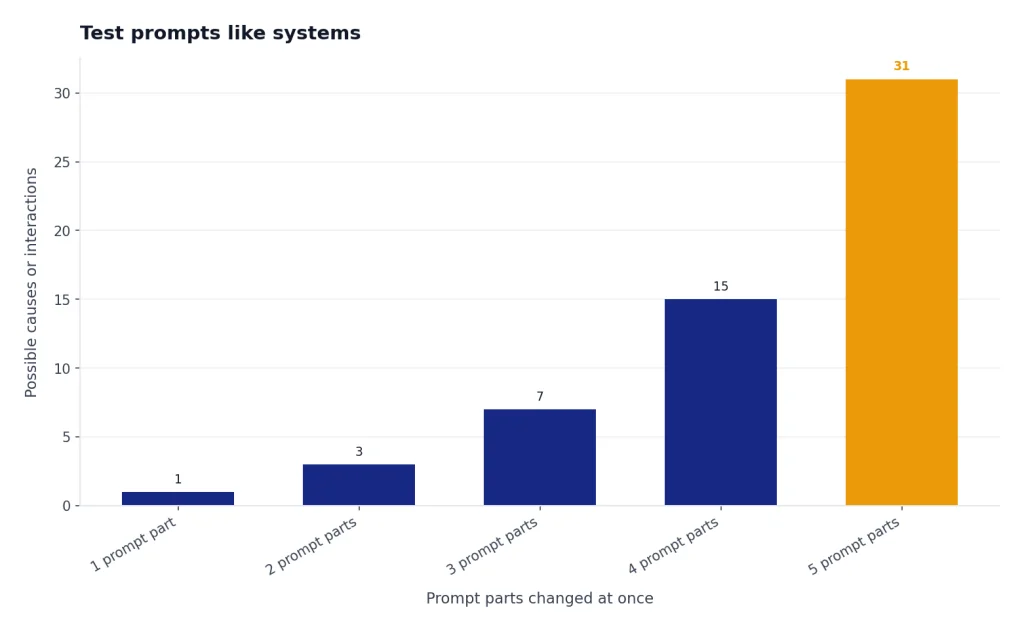
Test prompts like systems
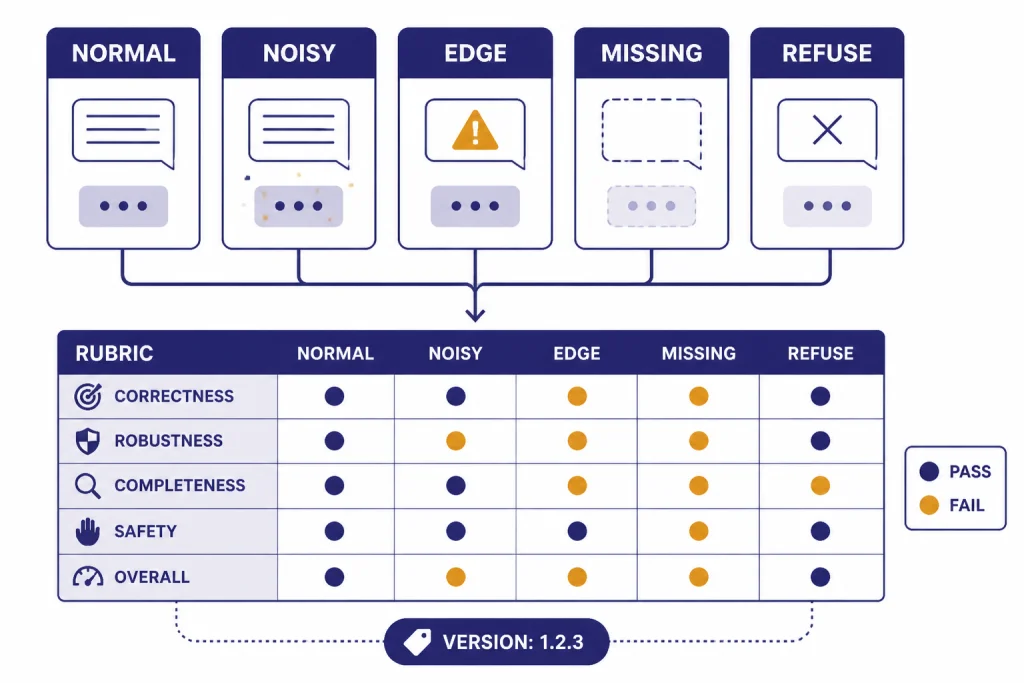
A prompt that works once is not finished. A reusable prompt should work across normal cases, edge cases, and messy inputs. This is where prompt engineering becomes actual engineering.
OpenAI’s prompting docs describe prompt objects with versioning and templating for reuse across a project.[7] OpenAI’s evals guide also focuses on testing prompts with datasets so you can measure behavior rather than rely on impressions.[8] You do not need a full production eval system for personal use, but you should borrow the habit.
Create a small test set for any prompt you reuse. Include:
- A normal example that should pass easily.
- A long example with extra noise.
- An edge case with missing information.
- A case where the correct response is to ask a question.
- A case where the model should refuse to invent or overclaim.
Then score the output against a short rubric:
| Criterion | Pass question | Fix if it fails |
|---|---|---|
| Task fit | Did it do the exact requested job? | Rewrite the task line with a stronger verb. |
| Source discipline | Did it stay within the provided context? | Add “use only the source” and require uncertainty notes. |
| Format | Did it follow the requested structure? | Use named sections, columns, or a schema-like template. |
| Audience fit | Would the target reader understand it? | Add audience knowledge level and tone constraints. |
| Edge handling | Did it ask when information was missing? | Add a rule for missing, conflicting, or ambiguous inputs. |
When a prompt fails, change one thing at a time. If you change the task, examples, and format all at once, you will not know what improved the answer. Save strong prompts in a prompt library or a Custom GPT when the workflow repeats. The Custom GPT tutorial explains when a saved instruction set is better than pasting the same prompt every time.
If you want to go beyond these basics, read our advanced prompt engineering techniques guide. Start here first, though. Clear task briefs, context boundaries, output contracts, examples, critique loops, tool awareness, and small eval sets solve more real problems than elaborate prompt formulas.
Frequently asked questions
What is the best prompt engineering technique?
The best technique is a clear task brief with context, constraints, and an output format. It works because it removes the most common reasons ChatGPT guesses. Add examples, critique, or tools only when the task needs them.
Does “think step by step” still work?
It depends on the model and task. OpenAI’s reasoning guidance says some reasoning models do not need that instruction and may perform worse with it.[5] A safer pattern is to ask for a concise answer, assumptions, checks, or a brief rationale.
How long should a prompt be?
A prompt should be as long as needed to define the job and no longer. Short prompts work for simple tasks. Longer prompts are useful when you need source context, examples, strict formatting, or edge-case rules.
Are prompt templates worth using?
Yes, if you treat them as starting points. A template saves time, but you still need to adapt the task, audience, context, and output format. The best templates are modular, so you can remove parts that do not apply.
How do I stop ChatGPT from making things up?
Give it source material, separate that source from the instructions, and tell it what to do when information is missing. Ask it to label uncertainty instead of filling gaps. For current facts, use browsing or research workflows rather than relying on memory.
When should I use a Custom GPT instead of a prompt?
Use a Custom GPT when the same instructions, files, tone, or workflow will be reused many times. Use a normal prompt when the task is occasional or changes heavily each time. A saved setup helps consistency, but it still needs testing with real examples.