

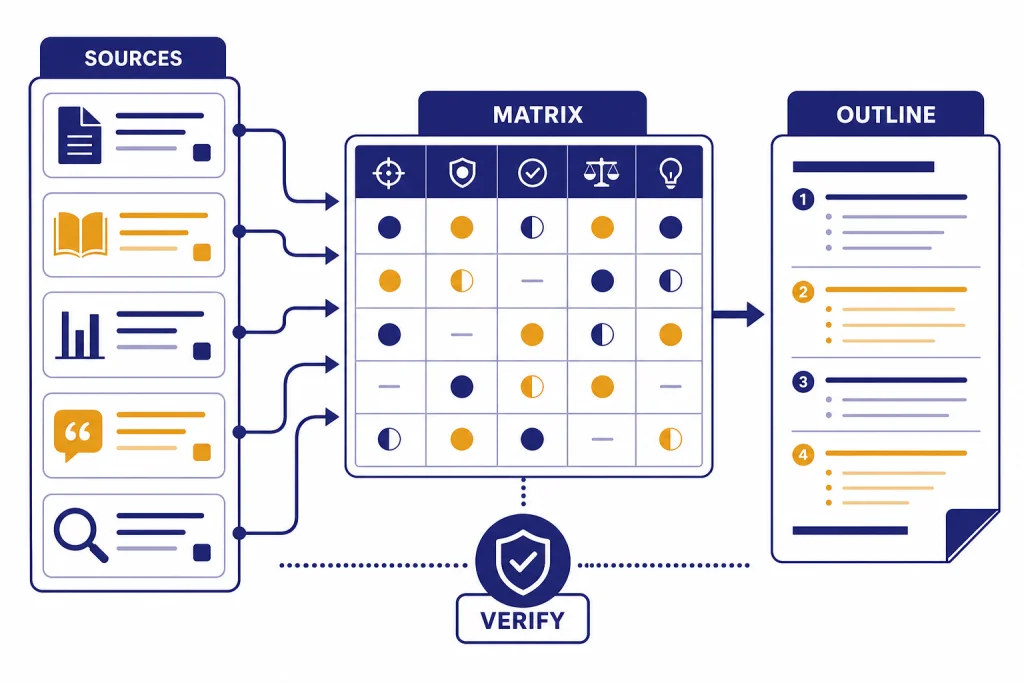
This ChatGPT tutorial for research shows how to use AI as a research assistant without turning it into an unverified source. The safest workflow is simple. Define a narrow question, ask ChatGPT to help map the field, use search or deep research only when you need source-backed discovery, read the original papers yourself, and make ChatGPT explain, compare, organize, or test your understanding. Do not let it invent citations, replace your judgment, or write claims you cannot verify. Used well, ChatGPT can speed up academic research while keeping you responsible for evidence, attribution, and final interpretation.
The research workflow that works best
Use ChatGPT as a research partner, not as an authority. It is good at turning messy questions into searchable concepts, comparing arguments, explaining methods, drafting outlines, and helping you find gaps in your notes. It is not a substitute for databases, journal articles, books, field expertise, or your institution’s academic integrity rules.
OpenAI’s own guidance says ChatGPT can produce incorrect or misleading outputs, including fabricated quotes, studies, citations, or references, and recommends verifying important information from reliable sources.[1] That warning matters more in academic research than in casual use. A fluent paragraph with a fake citation can look more polished than a rough but honest note. Your job is to prefer the honest note.
A reliable workflow has six phases: frame the question, generate search terms, collect sources, read and extract evidence, synthesize patterns, then write with transparent attribution. ChatGPT can help at every phase, but each phase needs a different prompt style. If you are new to prompting, start with prompt engineering techniques that actually work before building longer research workflows.
| Research task | Best ChatGPT role | Human check required |
|---|---|---|
| Choosing a topic | Question coach | Confirm scope, course fit, and feasibility |
| Finding literature | Search assistant and keyword generator | Open every source and verify bibliographic details |
| Reading papers | Explainer and note organizer | Compare summaries against the paper |
| Reviewing evidence | Matrix builder | Check that claims match the source text |
| Working with datasets | Analysis assistant | Inspect code, assumptions, and outputs |
| Drafting prose | Editor and structure coach | Write final claims in your own accountable voice |
Start with a precise research question
Most weak AI-assisted research starts with a broad prompt. “Research climate policy” gives ChatGPT too much room to generalize. “Help me refine a research question about municipal heat action plans in large U.S. cities after 2020” gives it boundaries. The narrower prompt produces better keywords, better inclusion criteria, and a clearer path to evidence.
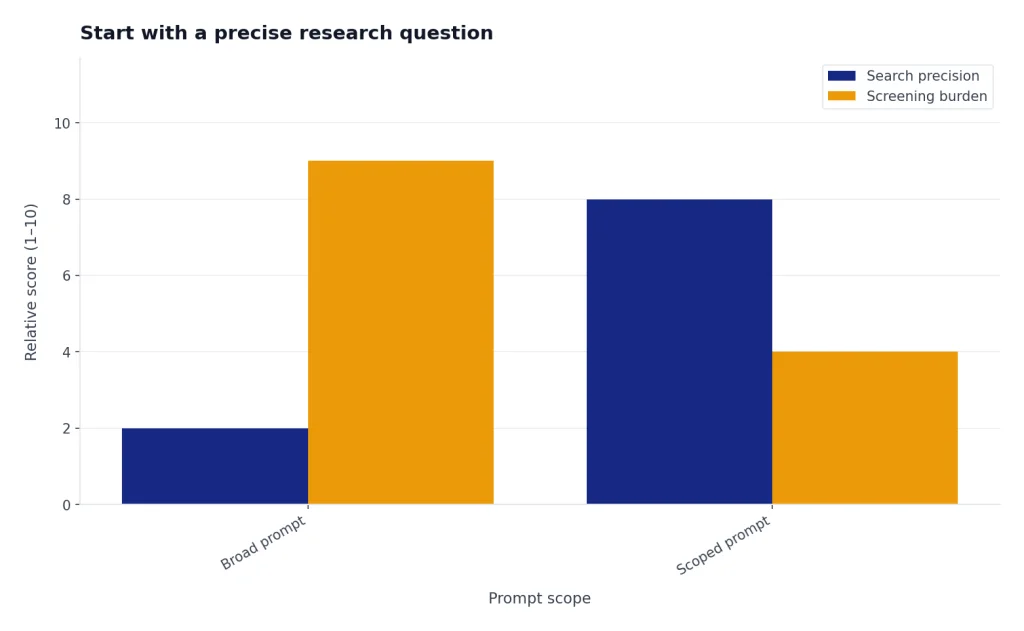
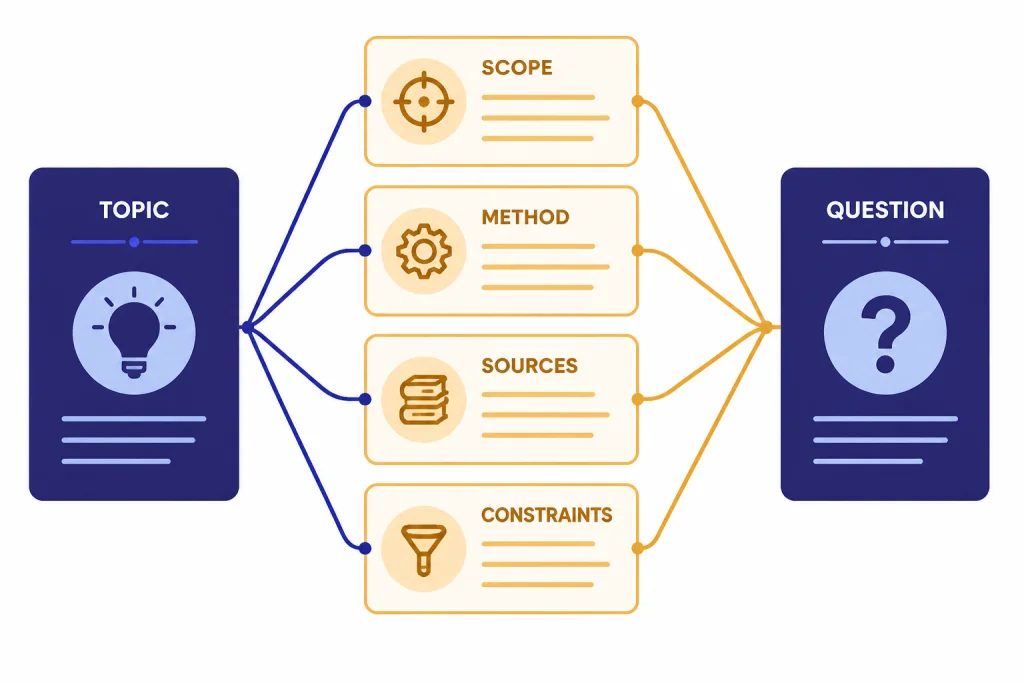
Begin by asking ChatGPT to interrogate the topic instead of answering it. Tell it your course level, field, assignment type, time frame, preferred methods, and sources you are required to use. Then ask for candidate research questions, not conclusions. This keeps the tool in a planning role.
I am writing a 3,000-word undergraduate literature review in sociology. My broad topic is remote work and gender inequality. Help me turn this into 5 researchable questions. For each question, include the likely population, time frame, key variables, and search terms. Do not make factual claims yet.After you get options, push back. Ask which question is too broad, which is most feasible, and which would require data you probably cannot access. A good research question should make you feel constrained in a useful way. It should tell you what to exclude.
For a larger project, save your scope statement and reuse it. ChatGPT Memory can help preserve preferences across conversations, but research projects often need deliberate boundaries rather than vague personalization. If you use Memory, pair it with the workflow in our ChatGPT memory tutorial so old context does not distort a new assignment.
Find and screen sources without losing control
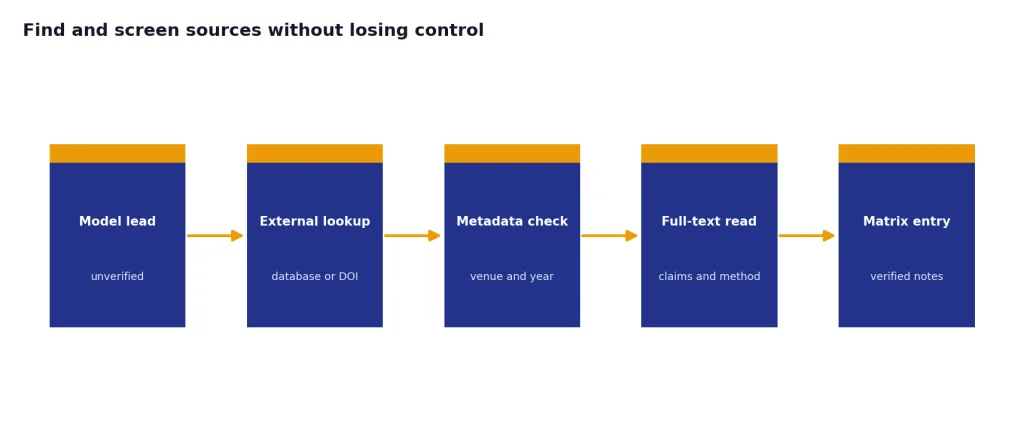
Source discovery is where ChatGPT is useful and risky at the same time. Use it to create search strings, identify disciplines that study your topic, and compare source types. Do not copy a bibliography unless you have opened and verified every item.
ChatGPT search can provide timely answers with links to web sources, and responses that use search may include inline citations or a sources panel.[2] That helps when you need current policy pages, organization reports, or recent public data. It still does not remove the need to inspect the source yourself.
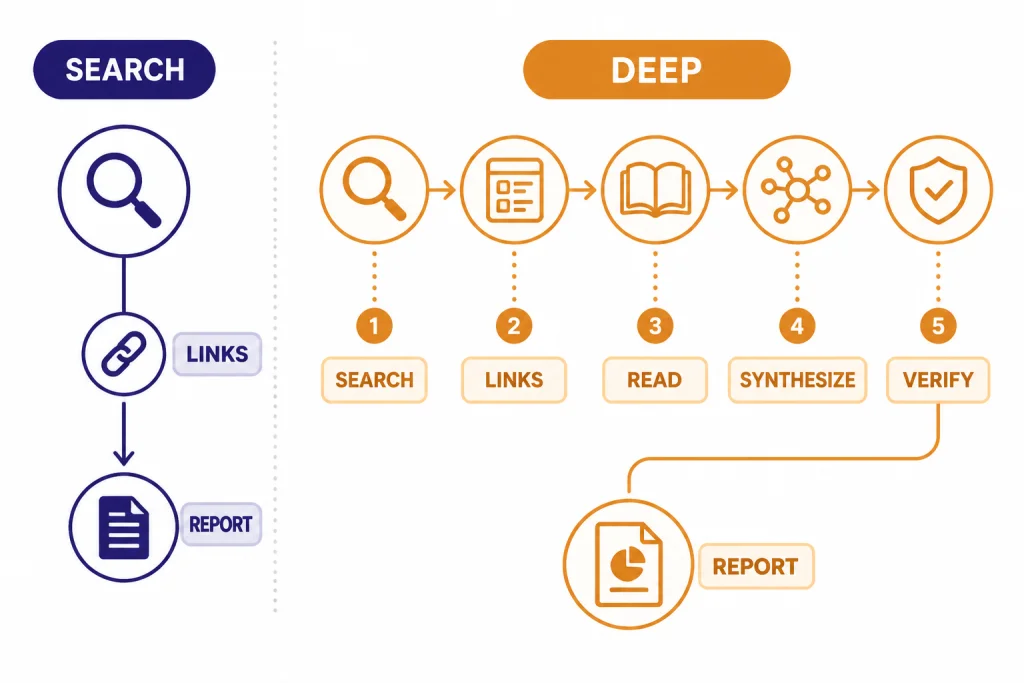
Deep research is better for complex, multi-source tasks. OpenAI describes it as a way to plan, research, and synthesize complex questions into a documented report, with source selection that can include the public web, uploaded files, specific sites, and connected apps.[3] It can also produce a structured report with citations or source links for verification.[3] For a full long-form workflow, use the ChatGPT deep research tutorial after you understand the lighter process in this article.
For academic work, ask ChatGPT to separate search strategy from source judgment. The prompt below keeps it from pretending that a source is credible before you have read it.
Generate a search plan for this research question: [paste question]. Include database keywords, synonyms, Boolean strings, likely journals, government or NGO source types, and exclusion criteria. Do not list specific articles unless you can provide a working source link and explain why the source type is appropriate.When ChatGPT returns sources, create a screening table. Include title, author, publication venue, year, method, population, evidence type, and relevance. Then open each source outside ChatGPT. If a citation cannot be found in a database, library catalog, DOI resolver, publisher page, or stable institutional repository, treat it as unverified.
If your project requires web research, you may also benefit from the ChatGPT Atlas browsing guide. Use browser-based assistance for navigation and note capture, but keep the same rule: the source, not the model, carries the evidence.
Read papers with structured prompts
Do not ask ChatGPT to “summarize this paper” and stop there. A generic summary often hides the parts you most need to evaluate: research design, sample, assumptions, limitations, and the exact claim supported by the evidence.
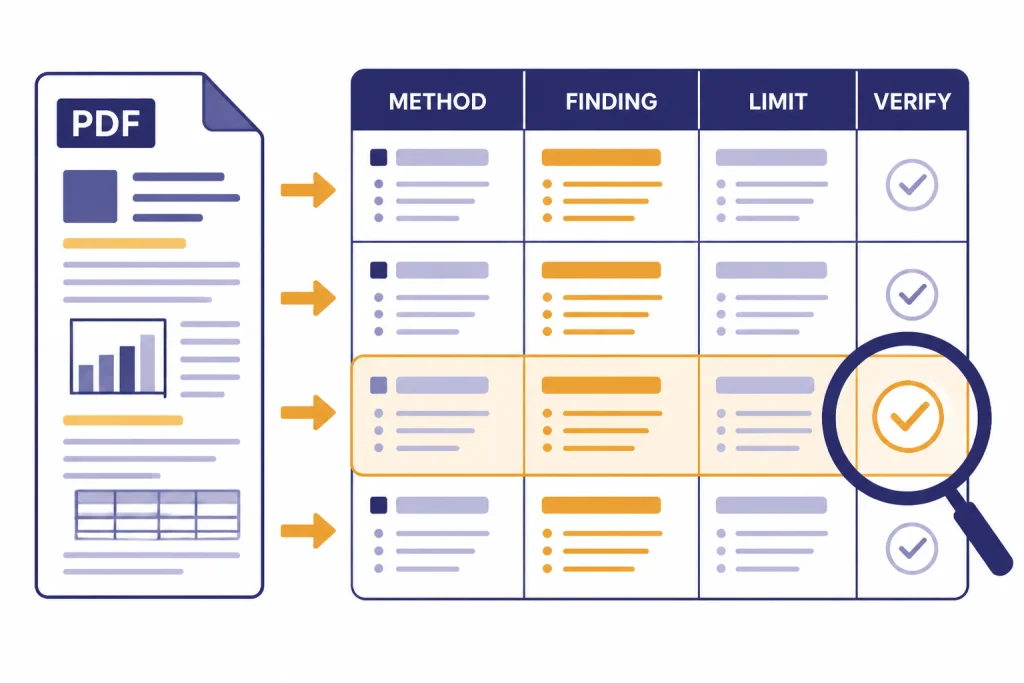
Use a structured reading prompt. Ask for a table with separate fields for research question, thesis, method, data, key findings, limitations, useful quotations to verify, and questions for follow-up reading. If you upload the paper, ask ChatGPT to distinguish what the paper explicitly states from what it infers.
OpenAI says file uploads can support synthesis and transformation tasks such as comparing documents, applying a framework from one document to another, and summarizing a complicated research paper in simpler terms.[5] That makes uploaded PDFs useful for first-pass comprehension. It does not make the summary authoritative.
Read the uploaded article for a literature review. Return a table with these columns: research question, theory, method, data/sample, finding, limitation, exact page or section to verify, and how this source relates to my project. Use “not stated” when the article does not provide an item.The “not stated” instruction is important. It reduces filler. It also makes missing information visible. If ChatGPT cannot identify a sample or method, you know where to read more carefully.
For PDFs, ask for section-level help before asking for synthesis. A good sequence is abstract, introduction, methods, findings, discussion, limitations. If you need a dedicated workflow for long documents, use our PDF reading and summarizing tutorial.
Build a literature review from evidence, not vibes
A literature review is not a pile of summaries. It is an argument about how existing research fits together. ChatGPT can help you see patterns, but only after you feed it accurate notes.
Build an evidence matrix first. Each row should represent a source. Each column should represent a feature that matters to your question: theory, method, sample, geography, time period, key finding, limitation, and relevance to your argument. Then ask ChatGPT to compare rows. Do not ask it to remember articles from scratch.
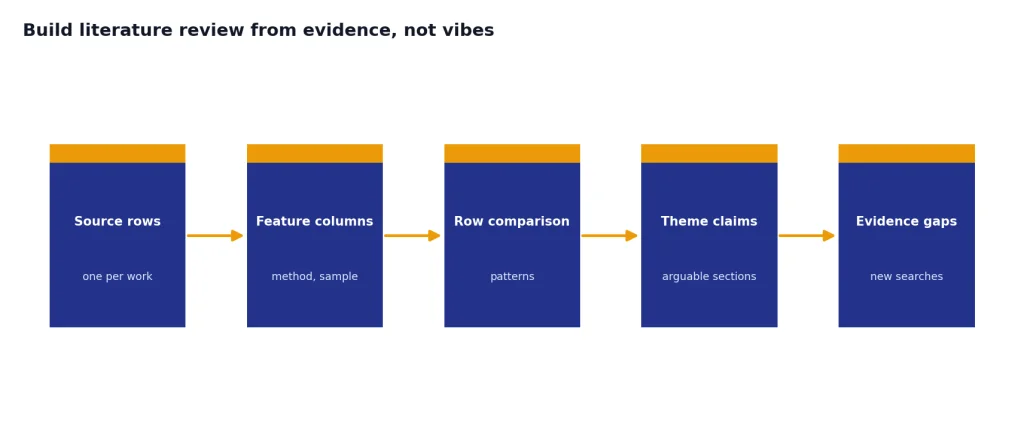
Using only the evidence matrix below, identify 4 themes for a literature review. For each theme, list the sources that support it, sources that complicate it, and one unresolved question. Do not add sources or claims that are not in the matrix.This prompt forces traceability. If ChatGPT proposes a theme, it must point back to your matrix. If the theme is interesting but weakly supported, you can go back to the databases and find better evidence.
When you move from matrix to outline, use claim-first headings. Weak heading: “Studies about telework.” Strong heading: “Telework flexibility reduces commute burdens but can intensify unpaid household labor.” The strong version is arguable. It tells you what evidence each paragraph must prove.
Canvas can help when the review becomes a long document with moving parts. Draft the outline, ask for gaps, revise sections, and keep comments near the text. For that workflow, see our ChatGPT Canvas tutorial.
Use files, data, and notes safely
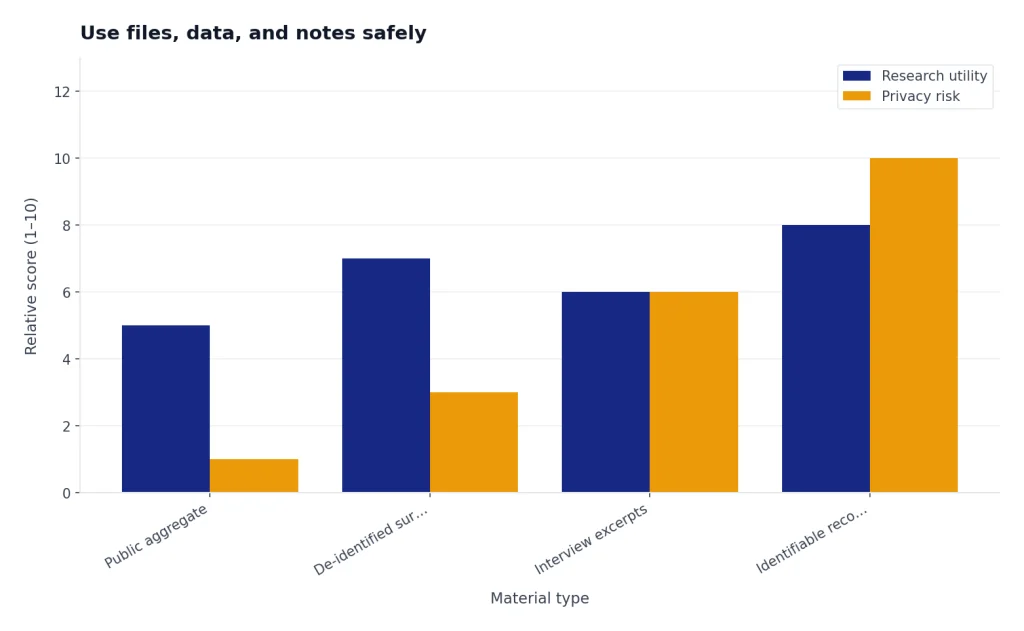
Academic research often involves spreadsheets, survey exports, coded interviews, bibliographies, or lab notes. ChatGPT can help organize and analyze these materials, but you need a clear data-handling plan before you upload anything.
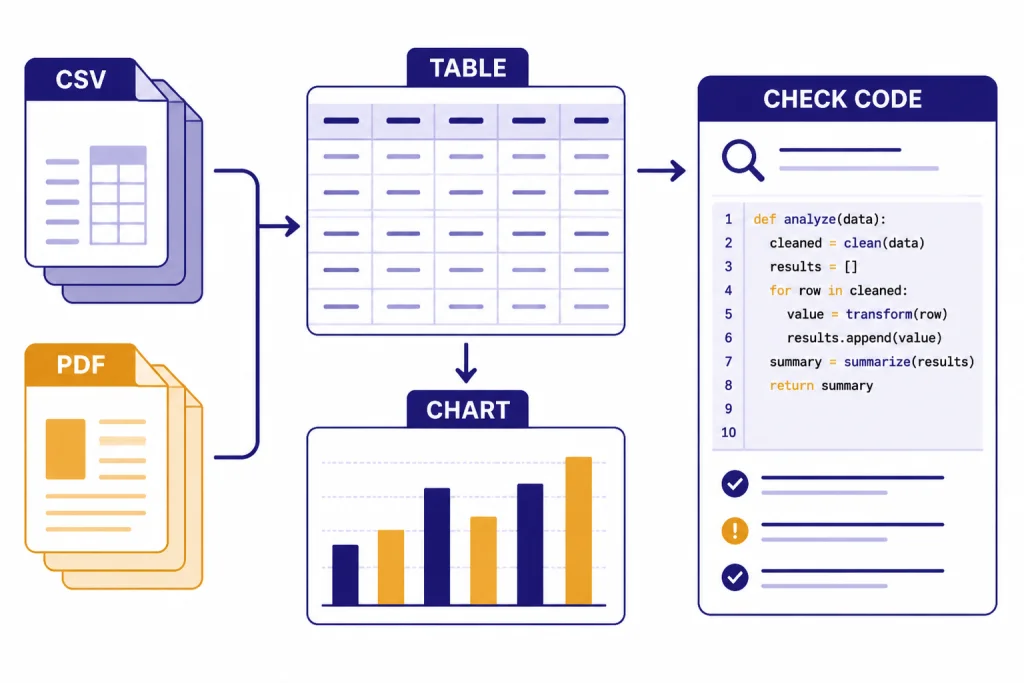
OpenAI’s data analysis help says ChatGPT can create static and interactive tables and charts from uploaded data, and can analyze file formats including Excel, CSV, PDF, and JSON.[4] The same help article says ChatGPT uses pandas for analysis and Matplotlib for charts, and lets users inspect the analysis through a view-analysis link.[4] If you are doing statistical or spreadsheet-heavy work, pair this article with our data analysis tutorial or the more code-focused Code Interpreter guide.
Use ChatGPT for reproducible tasks. Ask it to clean column names, identify missing values, create descriptive statistics, draft code, or explain an output. Avoid asking it to make a causal claim unless your design supports one.
I uploaded a CSV from my survey project. First, inspect the columns and create a data dictionary. Then list missing-value issues and possible coding problems. Do not run inferential statistics until I approve the cleaning plan.For sensitive research, be conservative. OpenAI says individual services such as ChatGPT may use content to train models, and that users can opt out so new conversations are not used to train models.[6] It also says Temporary Chat does not appear in history, does not use or create memories, and is not used to train models.[6] Those controls do not replace your IRB, data-use agreement, supervisor instructions, or institutional privacy rules.
Before uploading files, remove direct identifiers, check consent language, and confirm whether your institution permits third-party AI tools for the material. If the answer is unclear, do not upload the data.
Write, cite, and disclose AI use correctly
There are two separate issues: citing sources and disclosing AI assistance. ChatGPT can help you draft or revise, but the scholarship you cite should usually be the original article, book, dataset, archive, or report you actually read. Do not cite ChatGPT as the source for a factual claim that came from a paper. Cite the paper.
If you quote, paraphrase, or incorporate AI-generated content itself, follow the required style guide and your instructor’s policy. APA provides guidance for citing ChatGPT and AI-generated text in its style materials.[7] MLA’s updated guidance recommends naming the AI tool and model in the version element when citing generative AI output.[8] The Chicago Manual of Style says users should credit ChatGPT and similar tools when using generated text, often in text or a note rather than a bibliography entry unless a public URL is available.[9]
A simple disclosure note is often clearer than a strained citation. Example: “I used ChatGPT to generate search terms, organize source notes, and revise sentence clarity. All scholarly claims and citations were checked against the original sources.” Adjust this to your institution’s rules. Some assignments ban AI use. Some allow brainstorming but not drafting. Some require prompt logs.
When drafting, keep ChatGPT away from unsupported claims. Give it your outline, thesis, and verified notes. Ask it to improve structure, find missing transitions, or flag places where evidence is weak. Do not ask it to invent a paragraph and then hunt for sources afterward. That reverses the research process.
If you use ChatGPT for prose revision, compare the output with your own meaning. Academic writing should become clearer, not more generic. For style and structure practice beyond research papers, use the ChatGPT writing tutorial.
Reusable prompts for academic research
Save prompts by research phase. A reusable library keeps you from improvising under deadline pressure. You can also turn a strong workflow into a custom assistant later with our custom GPT tutorial.
Topic narrowing prompt
Act as a research methods tutor. My broad topic is [topic]. Ask me up to 7 questions that will help narrow the topic by population, time period, geography, theory, method, and available sources. Do not answer the research question yet.Keyword expansion prompt
For this research question, generate search terms in 5 groups: core concept, synonyms, related theories, population terms, and exclusion terms. Include 3 Boolean search strings for academic databases.Source screening prompt
Evaluate this source for relevance to my research question. Use only the bibliographic record and abstract I provide. Return: likely relevance, method, population, key terms, reasons to include, reasons to exclude, and what I must verify in the full text.Methods explainer prompt
Explain the method section of this article to a graduate student outside the field. Identify the design, sample, variables or materials, procedure, analysis method, assumptions, and limitations. Separate facts stated in the article from your interpretation.Synthesis prompt
Using only these verified source notes, propose a literature review structure. Each section must have an arguable claim, supporting sources, conflicting sources, and a transition to the next section.Common mistakes to avoid
- Asking for final answers too early. Start with planning, keywords, and questions. Conclusions come after evidence.
- Trusting formatted citations. A citation can look perfect and still be fake. Verify every source.
- Letting ChatGPT flatten disagreement. Ask for competing interpretations, minority findings, and methodological limitations.
- Uploading sensitive data casually. Remove identifiers and follow institutional rules before using any AI tool with research materials.
- Using AI prose as a substitute for understanding. If you cannot explain a paragraph aloud, you are not ready to submit it.
- Skipping disclosure. When rules require disclosure, be specific about how you used AI.
The best academic use of ChatGPT is disciplined. It helps you ask better questions, read more actively, and organize evidence. It should leave a paper that is more transparent, not less.
Frequently asked questions
Can I use ChatGPT for academic research?
Yes, if your instructor, institution, journal, or research supervisor allows it. Use it for brainstorming, search planning, summarizing, organizing notes, explaining methods, and revising prose. Do not use it to fabricate sources, hide AI assistance, or replace required reading.
Can ChatGPT find peer-reviewed articles?
It can help you search for them, especially when search or deep research is enabled. You still need to confirm each article in a database, library catalog, publisher page, DOI system, or trusted repository. Never assume a formatted citation is real.
Should I cite ChatGPT in my bibliography?
Cite or acknowledge ChatGPT when your required style guide or assignment policy says to do so. Usually, you should cite original scholarly sources for factual claims and disclose ChatGPT as assistance when it helped with process, drafting, or analysis. Follow the exact rules for your course or publication.
Is it safe to upload research data to ChatGPT?
It depends on the data, your plan, your settings, and your institution’s rules. Do not upload identifiable human-subjects data, confidential records, proprietary datasets, or restricted materials unless you have explicit permission. When in doubt, anonymize, aggregate, or do the analysis locally.
What is the best prompt for summarizing a research paper?
Ask for a structured extraction table rather than a general summary. Include fields for research question, method, data, findings, limitations, and page or section to verify. Tell ChatGPT to write “not stated” when the paper does not provide an answer.
Can ChatGPT write my literature review?
It can help outline and revise a literature review, but you should build the review from verified source notes. A strong literature review makes an evidence-based argument about the field. If ChatGPT writes from memory or unverified sources, the result is not reliable enough for academic submission.