

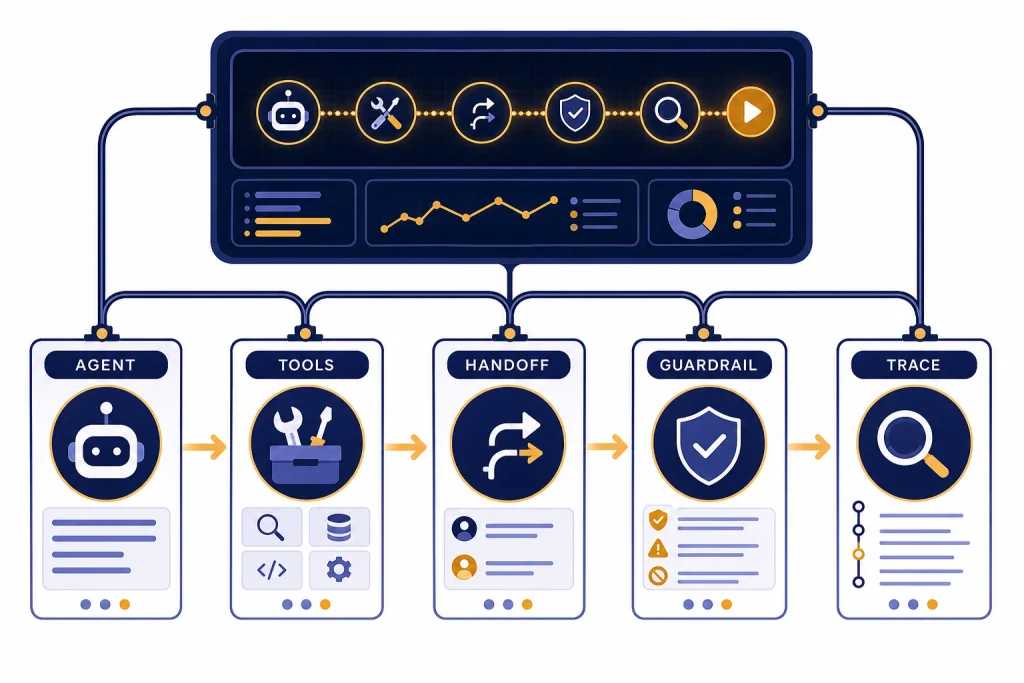
The OpenAI Agents SDK is OpenAI’s code-first framework for building agentic applications that call tools, delegate work across specialist agents, validate inputs and outputs, and expose traces for debugging. It is best for developers who want to own orchestration in application code instead of relying only on a hosted visual builder. Start with the SDK when your agent needs custom business logic, private tools, structured handoffs, sessions, streaming, guardrails, or production observability. Use direct API calls when the task is a simple request-response workflow. Use Agent Builder when a visual workflow editor and hosted deployment path matter more than code-level control. This guide covers the architecture, install commands, first run, TypeScript equivalent, a complete workflow, and production decisions behind the OpenAI Agents SDK.
What the OpenAI Agents SDK is
The OpenAI Agents SDK is a developer framework for building agents in code. OpenAI introduced it as part of a broader agent-building release on March 11, 2025, alongside the Responses API, built-in tools, and observability features for tracing agent workflows.[1]
OpenAI describes the SDK as a way to orchestrate single-agent and multi-agent workflows. Its job is not to replace your application. Its job is to manage the agent loop, tool calls, handoffs, validation, and trace data that otherwise become custom glue code in every agent project.[1]
The SDK is most useful when an application needs more than one model call. A support assistant may need to classify a request, call an order-status API, hand off refund questions to another specialist, block unsafe requests, and return a structured answer. You can implement all of that manually with API calls, but the SDK gives you named primitives for the recurring parts.
This is why the SDK belongs beside other OpenAI developer surfaces rather than inside ChatGPT alone. If you are comparing company-level releases and product direction, see our broader OpenAI History and OpenAI News pages. If you are choosing between platform deployment options, our Azure OpenAI Service vs OpenAI API guide is the more relevant companion.

How the SDK fits into OpenAI’s agent stack
The Agents SDK sits above the model APIs and below your application experience. OpenAI’s platform docs describe agents as applications that plan, call tools, collaborate across specialists, and keep enough state to finish multi-step work.[2]
That position matters. The SDK is not a hosted chatbot by itself. It is also not only a prompt wrapper. It gives your backend a structured way to run an agent, pass tools, continue state, inspect results, and decide what happens when a workflow fails.
OpenAI’s own docs separate three paths. Use the OpenAI client libraries when you want direct model requests. Use the Agents SDK when your application owns orchestration, tool execution, approvals, and state. Use Agent Builder when you want OpenAI’s hosted visual workflow editor and ChatKit path.[2]
That split is practical. A developer building a lightweight summarizer may not need the SDK. A team building an internal procurement agent that calls multiple systems probably does. A product team prototyping a workflow with non-engineering stakeholders may prefer OpenAI Agent Builder first, then move selected logic into code if the workflow needs deeper customization.
Core building blocks
The SDK uses a small set of primitives. OpenAI’s SDK docs describe agents as language models configured with instructions and tools, plus optional runtime behavior such as handoffs, guardrails, and structured outputs.[3]
| Building block | What it does | Use it when |
|---|---|---|
| Agent | Defines a specialist with instructions, model configuration, tools, guardrails, and optional handoffs. | You need a named role such as refund support, policy reviewer, or research planner. |
| Runner | Executes the agent workflow and returns the result. | You want the SDK to manage model turns, tool calls, and handoffs during a run. |
| Tools | Let the agent search, retrieve files, call functions, or use hosted capabilities. | The answer depends on data or actions outside the model. |
| Handoffs | Transfer control from one agent to another specialist. | Different agents should own different classes of work. |
| Guardrails | Validate user input, tool calls, or final output. | You need policy checks, schema checks, approval gates, or safety boundaries. |
| Tracing | Records the execution path for debugging and monitoring. | You need to see which model call, tool call, handoff, or guardrail caused a result. |
| Sessions and state | Carry conversation or workflow context across turns. | The user may continue a task instead of starting from scratch every request. |
Think of the agent as the contract, the runner as the runtime, and tools as the agent’s allowed actions. Handoffs split responsibility. Guardrails define boundaries. Traces explain what happened after the fact. Sessions and your own persistence layer determine what the agent remembers between requests.
This vocabulary is useful because agent systems tend to fail in familiar ways. The model may choose the wrong tool. A tool may return unexpected data. A specialist may receive too much context. A final answer may violate a business rule. The SDK gives each of those problems a place in the architecture.

Setup and first run
OpenAI’s platform docs point developers to both Python and TypeScript SDK repositories for installation, issues, examples, and language-specific reference details.[2] The Python quickstart shows a path that starts with a project environment, installs the SDK package, sets an API key, defines an agent, and runs it through the runner.[4]
For Python, install the openai-agents package in a virtual environment. Pin the package through your lockfile for production, and re-check the SDK docs when upgrading because agent, tool, and tracing APIs can evolve.
mkdir agents-sdk-demo
cd agents-sdk-demo
python3 -m venv .venv
source .venv/bin/activate
python -m pip install --upgrade pip
python -m pip install openai-agents
export OPENAI_API_KEY='sk-your-key-here'
On Windows PowerShell, the environment step is usually:
py -m venv .venv
..venvScriptsActivate.ps1
py -m pip install --upgrade pip
py -m pip install openai-agents
$env:OPENAI_API_KEY='sk-your-key-here'
Create first_agent.py:
import asyncio
from agents import Agent, Runner

agent = Agent(
    name='Policy Helper',
    model='gpt-5.5',
    instructions='Answer internal policy questions clearly. Ask for clarification when the request is ambiguous.'
)

async def main():
    result = await Runner.run(agent, 'Can a contractor access the staging dashboard?')
    print(result.final_output)

if __name__ == '__main__':
    asyncio.run(main())
Run it:
python first_agent.pyExpected output will vary because the model is generating an answer, but a healthy run should print a short policy-style response rather than an authentication error. An illustrative output is:
Contractors should not be granted staging dashboard access by default. If access is required, ask for the sponsoring employee, approval record, scope, and expiration date before proceeding.For TypeScript, use the @openai/agents package. A minimal project looks like this:
mkdir agents-sdk-ts-demo
cd agents-sdk-ts-demo
npm init -y
npm install @openai/agents
npm install -D typescript tsx @types/node
export OPENAI_API_KEY='sk-your-key-here'
mkdir src
Create src/index.ts:
import { Agent, run } from '@openai/agents';

const agent = new Agent({
  name: 'Policy Helper',
  model: 'gpt-5.5',
  instructions: 'Answer internal policy questions clearly. Ask for clarification when the request is ambiguous.'
});

const result = await run(agent, 'Can a contractor access the staging dashboard?');
console.log(result.finalOutput);
Run the TypeScript example with:
npx tsx src/index.tsThis first run only proves that your local environment, package install, model access, and API key are working. It does not make the agent useful yet. The next step is to add the data and actions that the agent is allowed to use.
Do not start by giving the agent every possible tool. Start with one narrow task. Define the answer format. Add one function tool or hosted tool. Run a few test cases. Then decide whether the task needs more tools, a separate specialist, a session store, streaming output, or a guardrail.

If you are still exploring prompts, the OpenAI Playground is a better first stop. If you are debugging failed requests or rate-limit problems while wiring the SDK into a backend, keep our OpenAI API Errors reference nearby.
Tools, handoffs, and orchestration
Tools are where an agent becomes application-specific. In the Python SDK API surface for the Responses model path, OpenAI’s tools documentation currently lists hosted tools such as WebSearchTool, FileSearchTool, CodeInterpreterTool, HostedMCPTool, ImageGenerationTool, and ToolSearchTool.[5] The SDK also supports function tools, which let you wrap your own Python functions as callable tools.[5]
A function tool is the right choice when your app owns the action. Examples include checking an order, creating a ticket, quoting an internal policy, validating a form, or requesting approval from a human reviewer. A hosted tool is the right choice when the capability is supplied by the OpenAI platform, such as file retrieval or web search.
Here is a small pattern for a controlled business tool:
from agents import Agent, function_tool

@function_tool
def lookup_policy(topic: str) -> str:
    '''Return the approved policy summary for a known topic.'''
    approved = {
        'contractor access': 'Contractors need sponsor approval and time-limited access.',
        'expense approval': 'Expenses above the team limit require manager approval.'
    }
    return approved.get(topic.lower(), 'No approved policy summary found for that topic.')

agent = Agent(
    name='Policy Helper',
    model='gpt-5.5',
    instructions='Use lookup_policy before answering policy questions. Do not invent policy.',
    tools=[lookup_policy]
)
Handoffs solve a different problem. They let one agent delegate a task to another agent. OpenAI’s handoff docs describe the pattern as useful when different agents specialize in distinct areas, such as order status, refunds, or FAQs.[6]
A good handoff design has clear ownership. The triage agent should decide who owns the next step. The specialist agent should know its domain, its tools, and its stopping point. Avoid chains where every agent can hand off to every other agent. That design becomes difficult to test and harder to explain in traces.

Use agents as tools when the first agent should keep ownership of the final answer but ask a specialist for help. Use handoffs when the specialist should take over the conversation. That distinction keeps routing behavior predictable.
The following end-to-end example combines a function tool, a triage-to-refund handoff, an input guardrail, and trace inspection. It uses toy data so you can see the pattern without connecting a real commerce system. In production, replace the in-memory dictionary with authenticated service calls and human approval for any side effect.
import asyncio
from agents import (
    Agent,
    Runner,
    function_tool,
    input_guardrail,
    GuardrailFunctionOutput,
    InputGuardrailTripwireTriggered,
    trace,
)

ORDERS = {
    'A100': {'status': 'delivered', 'amount': 49, 'refund_allowed': True},
    'B200': {'status': 'in_transit', 'amount': 120, 'refund_allowed': False},
}

@function_tool
def lookup_order(order_id: str) -> dict:
    '''Look up a single order record by ID.'''
    return ORDERS.get(order_id.upper(), {'error': 'order not found'})

@function_tool
def create_refund_review(order_id: str, reason: str) -> str:
    '''Create a human review ticket instead of issuing a refund automatically.'''
    return 'Created refund review ticket for order ' + order_id.upper()

@input_guardrail
async def block_secret_requests(ctx, agent, user_input: str) -> GuardrailFunctionOutput:
    lowered = user_input.lower()
    blocked = 'api key' in lowered or 'password' in lowered
    return GuardrailFunctionOutput(
        output_info={'blocked_reason': 'secret_request' if blocked else None},
        tripwire_triggered=blocked,
    )

refund_agent = Agent(
    name='Refund Specialist',
    model='gpt-5.5',
    instructions=(
        'Handle refund questions. Always call lookup_order first. '
        'Never issue money directly. If a refund may be appropriate, call create_refund_review.'
    ),
    tools=[lookup_order, create_refund_review],
)

triage_agent = Agent(
    name='Support Triage',
    model='gpt-5.5',
    instructions=(
        'Classify the user request. If it is about a refund, hand off to Refund Specialist. '
        'For other support questions, answer briefly or ask for the missing order ID.'
    ),
    handoffs=[refund_agent],
    input_guardrails=[block_secret_requests],
)

async def main():
    try:
        with trace('support-refund-demo'):
            result = await Runner.run(
                triage_agent,
                'I want a refund for order A100 because it arrived damaged.'
            )
        print(result.final_output)
        print('Inspect the trace named support-refund-demo in the OpenAI traces dashboard.')
    except InputGuardrailTripwireTriggered:
        print('Request blocked by input guardrail.')

if __name__ == '__main__':
    asyncio.run(main())
A typical successful run should show a refund-support answer and mention that a review ticket was created, not that money was automatically sent. In the trace, inspect four things together: the input guardrail result, the triage decision, the handoff to Refund Specialist, and the two function-tool calls. If the final answer is wrong, the trace tells you whether the problem was routing, tool data, instructions, or output wording.

Guardrails, tracing, and production safety
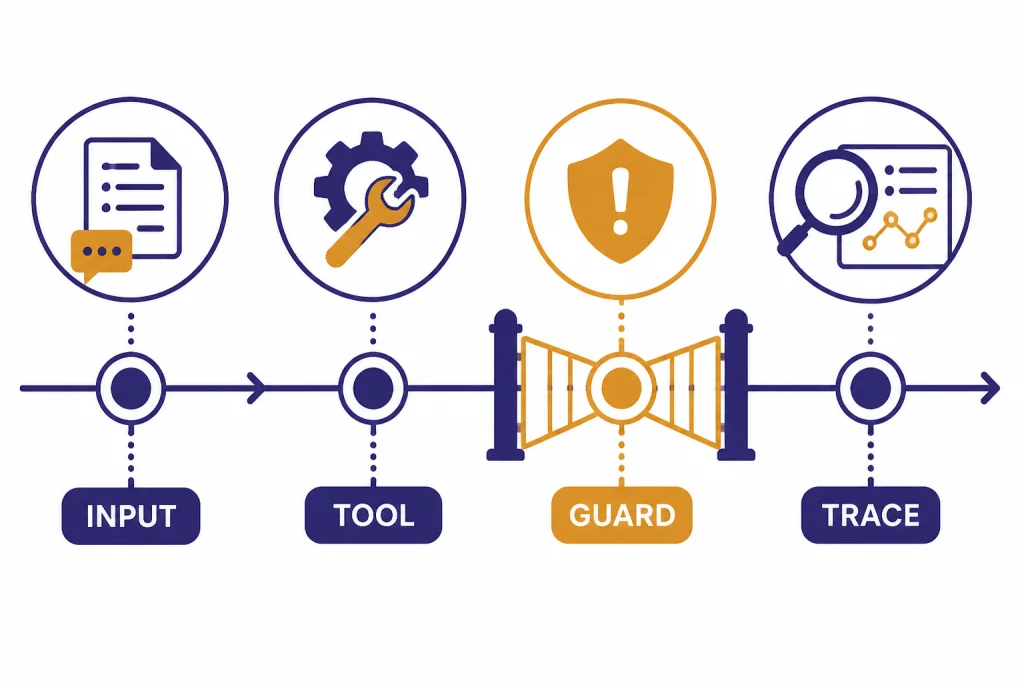
Guardrails are checks around the workflow. OpenAI’s guardrails docs distinguish input guardrails, output guardrails, and tool guardrails; the docs also note that tool guardrails are the better choice when you need checks around each custom function-tool call in workflows that include managers, handoffs, or delegated specialists.[7]
Use input guardrails for requests that should not enter the workflow. Use output guardrails for final answers that must match a policy or schema. Use tool guardrails for risky function calls, such as sending an email, updating a database, issuing a refund, changing permissions, or calling an external system.
Tracing is the other production requirement. OpenAI’s tracing docs say the SDK records events during an agent run, including LLM generations, tool calls, handoffs, guardrails, and custom events. The same docs say tracing is enabled by default and can be disabled globally, in code, or for a single run.[8]
Traces are not just a developer convenience. They are how teams answer hard questions after a bad result. Did the classifier send the user to the wrong specialist? Did a tool return stale data? Did the agent ignore the tool output? Did a guardrail run too late? A trace gives you the execution path instead of forcing you to infer it from the final message.
Production safety also means deciding what must never be delegated fully to the model. Put destructive actions behind explicit approval steps. For example, let the agent draft a refund, permission change, customer email, or database update, but require a human or deterministic service policy to approve it before execution. Treat tool permissions as a security boundary, not as a prompt preference.
Be careful with secrets and PII in traces. Do not pass raw API keys, passwords, access tokens, unnecessary personal data, or regulated records into prompts or tool outputs. Redact or hash identifiers where possible, keep trace retention aligned with your privacy policy, and disable or narrow tracing for workflows that handle highly sensitive payloads.
Production teams should also monitor platform health. If an agent suddenly fails across otherwise stable code, check the OpenAI Status Page before rewriting orchestration logic.
Model and provider choices
The model layer should follow the workflow, not the other way around. OpenAI’s models documentation for the SDK recommends the OpenAIResponsesModel path for OpenAI-only applications and describes OpenAIChatCompletionsModel as a separate path for Chat Completions-style usage.[9]
As of May 2026, the current top OpenAI chat model family includes gpt-5.5 and gpt-5.5-pro. Many agent workflows do not need the top model for every step. You can often use a smaller or lower-latency model for triage, validation, or formatting, and reserve a stronger model for reasoning-heavy specialist work. For multimodal agent workflows, choose the relevant current model family as well: gpt-image-2 for image generation tasks and sora-2-pro for video generation tasks where those capabilities are part of the product.
For many applications, the right first decision is simple. Use one model path for the first working version. Add separate models only after you know which part of the workflow needs a different latency, quality, or cost profile. For example, a triage agent may not need the same model as a specialist that writes a final legal-style answer.
The SDK also documents ways to integrate non-OpenAI providers, including default client configuration, per-run model providers, and per-agent model configuration. OpenAI’s docs caution that third-party adapter layers can vary in feature support and request semantics, so teams should validate structured outputs, tool calling, usage reporting, and Responses-specific behavior before shipping.[9]
Model choice also affects cost. The SDK itself is not a separate pricing tier; OpenAI’s launch post says the Responses API is not charged separately and that tokens and tools are billed at standard rates on the pricing page.[1] For current model-by-model costs, use our OpenAI API Pricing guide rather than assuming an agent run costs the same as one chat completion.
If your application processes large offline workloads, the SDK may not be the only relevant API. Some teams pair agent workflows with background processing. For that path, compare the agent design with the OpenAI Batch API before committing every task to interactive orchestration.
When to use the SDK vs alternatives
The SDK is powerful, but it is not always the simplest choice. Use this comparison as a starting point.
| Option | Best fit | Tradeoff |
|---|---|---|
| Direct OpenAI API call | Single-step tasks, simple tool use, narrow backend endpoints. | You write your own loop, state handling, retries, and observability. |
| OpenAI Agents SDK | Code-first agent apps with tools, specialists, handoffs, guardrails, sessions, streaming, and traces. | Your team owns backend architecture, deployments, and application logic. |
| Agent Builder | Visual workflow design, versioned flows, and collaboration with non-engineers. | Less code-level control than owning the full orchestration path. |
| ChatGPT or Operator-style products | End-user productivity tasks where OpenAI hosts the experience. | Not the right surface for embedding custom backend workflows in your app. |
OpenAI introduced AgentKit on October 6, 2025, with Agent Builder, Connector Registry, and ChatKit as building blocks for designing, deploying, and optimizing agents. Agent Builder is described as a visual canvas for composing logic with nodes, connecting tools, and configuring guardrails.[10]
That makes Agent Builder a workflow product and the Agents SDK a developer framework. They overlap, but they do not serve the same primary user. If product managers and operations teams need to see and edit the flow, start with the OpenAI Agent Builder breakdown. If engineers need a backend library with custom tools and deployment control, start with the SDK.
Do not confuse the SDK with OpenAI Operator. Operator-style computer-use agents focus on taking actions in computer interfaces. The Agents SDK is broader. It can coordinate tools and specialists in your own application architecture, whether or not a browser or computer interface is involved.
Production checklist
A production agent needs more than a clever prompt. Use this checklist before exposing an SDK-based workflow to real users.
- Define the job. Write the agent’s responsibility in one paragraph. If the paragraph contains several unrelated jobs, split the design.
- Pin versions and document upgrades. Lock
openai-agentsor@openai/agents, record the model names you rely on, and test before upgrading SDK or model versions. - Limit tools. Give each agent only the tools it needs. Keep dangerous actions behind deterministic validation or human approval.
- Design sessions and state deliberately. Decide what lives in the SDK session, what lives in your application database, and what should be re-fetched from source systems every turn. Do not rely on conversation memory for authoritative business state.
- Use streaming where latency matters. Stream user-visible text for long responses, but keep tool results, approvals, and final state transitions synchronized on the server.
- Set retries, timeouts, and cancellation. Wrap external tools with timeouts. Retry transient network failures with backoff. Do not blindly retry non-idempotent actions such as payments, refunds, emails, or record updates.
- Plan for rate limits. Use queues, concurrency limits, graceful degradation, and clear user messages when the application reaches model or tool limits.
- Design handoffs deliberately. Make each specialist own a domain. Avoid circular delegation unless you have a strong reason and tests for it.
- Validate inputs and outputs. Use guardrails for blocked requests, structured outputs, and high-risk tool calls.
- Protect secrets and PII in traces. Redact sensitive values before they enter prompts, tool outputs, logs, or trace metadata. Restrict trace access to the developers and operators who need it.
- Inspect traces. Treat trace review as part of development, not only incident response. Save representative traces for regression review.
- Test failure cases. Include missing data, ambiguous requests, invalid tool returns, user prompt injection, downstream API timeouts, handoff loops, and guardrail trips.
- Create evals before launch. Build a small golden set of real tasks with expected tool use, expected handoff behavior, blocked inputs, and accepted final outputs. Run it after prompt, tool, model, or SDK changes.
- Budget for tool use. Agent runs can include multiple model turns and tool calls. Estimate cost from actual traces, not from the first prompt.
- Log business outcomes. Model traces explain the run. Product metrics explain whether the run solved the user’s problem.
For multimodal workflows, the SDK may be only one layer. If the agent needs to inspect uploaded images, pair this guide with our OpenAI Vision API reference. If the agent is part of a larger enterprise platform decision, revisit OpenAI and Microsoft and the Azure deployment tradeoffs before choosing infrastructure.
Frequently asked questions
Is the OpenAI Agents SDK an API?
No. It is an SDK that helps you build agent workflows in code. It uses OpenAI APIs underneath, but it gives you higher-level primitives for agents, tools, handoffs, guardrails, sessions, and tracing.
Do I need the Agents SDK for every OpenAI app?
No. A simple prompt-response app can use direct API calls. The SDK becomes useful when your workflow needs tool execution, multi-step state, specialist agents, validation, streaming, approvals, or observability.
How is the Agents SDK different from Agent Builder?
The Agents SDK is code-first. Agent Builder is a visual workflow surface for composing and versioning agent flows. Use the SDK when engineers need backend control; use Agent Builder when a hosted visual editor is the better collaboration surface.
Can the SDK use tools?
Yes. It can use hosted tools and developer-defined function tools. Function tools are often the most important part of a real deployment because they connect the agent to your databases, APIs, approval systems, and business logic.
Are handoffs required?
No. Start with one agent when one role can own the task. Add handoffs only when distinct specialists make the workflow clearer, safer, or easier to test.
Does the SDK add a separate OpenAI fee?
OpenAI has not published a separate subscription price for the SDK itself. OpenAI’s launch materials say the Responses API is billed through standard token and tool pricing rather than a separate Responses API charge.[1]
[need shortcode fix]