

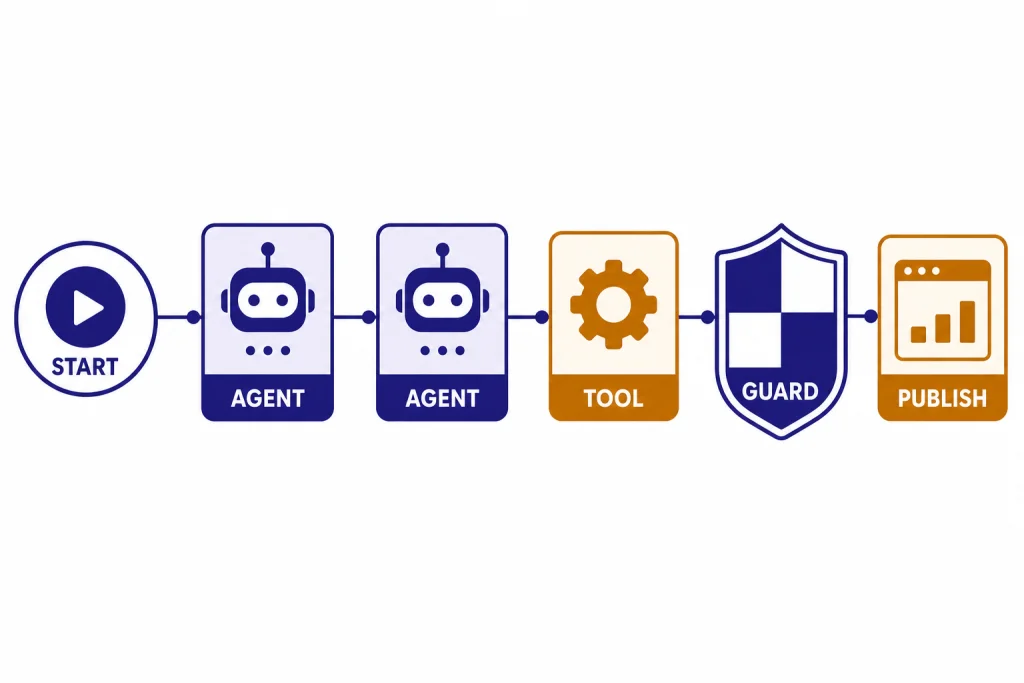
OpenAI Agent Builder is a visual workspace for creating AI agent workflows without starting from a blank codebase. It lets developers assemble agents, tools, logic, guardrails, typed inputs, and outputs on a canvas, then preview runs, publish a versioned workflow, and deploy it through ChatKit or exported Agents SDK code.[1] It is part of OpenAI’s AgentKit, which OpenAI introduced on October 6, 2025, and Agent Builder remains labeled beta in OpenAI’s developer documentation.[2] This guide explains what Agent Builder does, how to build a first workflow, where it fits next to GPT Builder and the Agents SDK, and what safety checks matter before production.
What OpenAI Agent Builder is
OpenAI Agent Builder is a beta tool in the OpenAI developer platform for visually assembling multi-step agent workflows. OpenAI describes it as a canvas where builders can start from templates, drag nodes into a workflow, define typed inputs and outputs, preview runs with live data, and then deploy the result through ChatKit or downloaded SDK code.[1]
The keyword is workflow. Agent Builder is not just a prompt editor. A workflow can include one or more agents, model settings, retrieval steps, guardrails, external tools, conditional branches, loops, human approval, and state. That makes it closer to an orchestration editor than a simple chatbot builder.

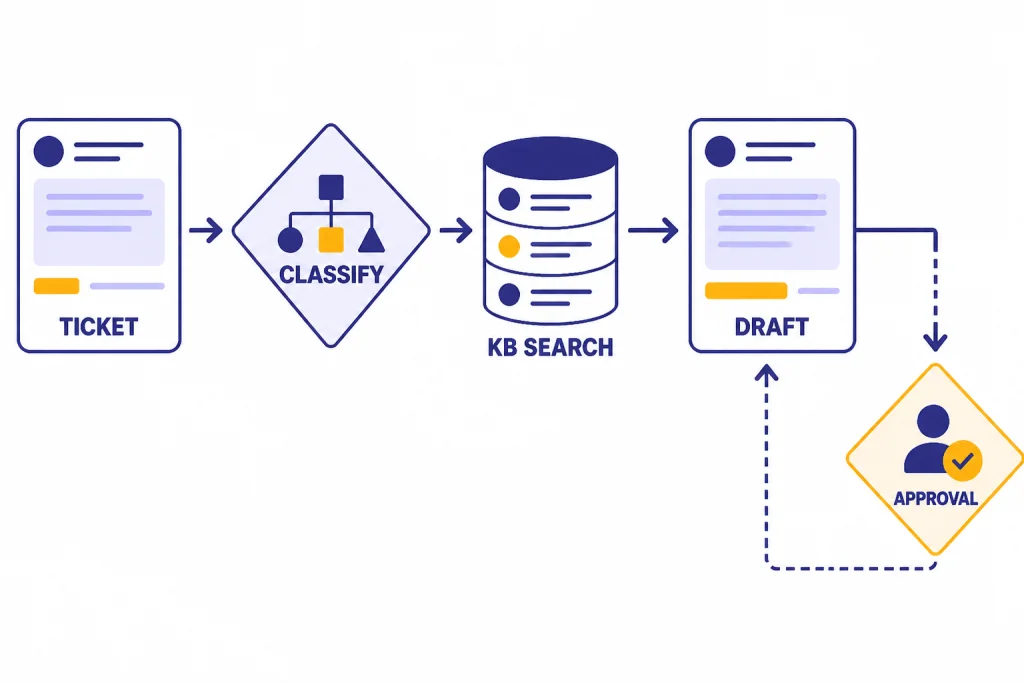
A simple customer support agent might use one node to classify the user’s request, another to search a policy knowledge base, another to draft a reply, and a final approval step before sending anything that changes an account. A research assistant might route fact-finding questions to file search and open-ended analysis to a more capable model. The canvas makes those steps visible.
For background on the company and product direction behind these launches, see our OpenAI history and OpenAI and Microsoft explainers. Agent Builder matters because it moves agent development from scattered prompts and glue code into a versioned product surface that teams can review together.
Where Agent Builder fits in OpenAI’s agent stack
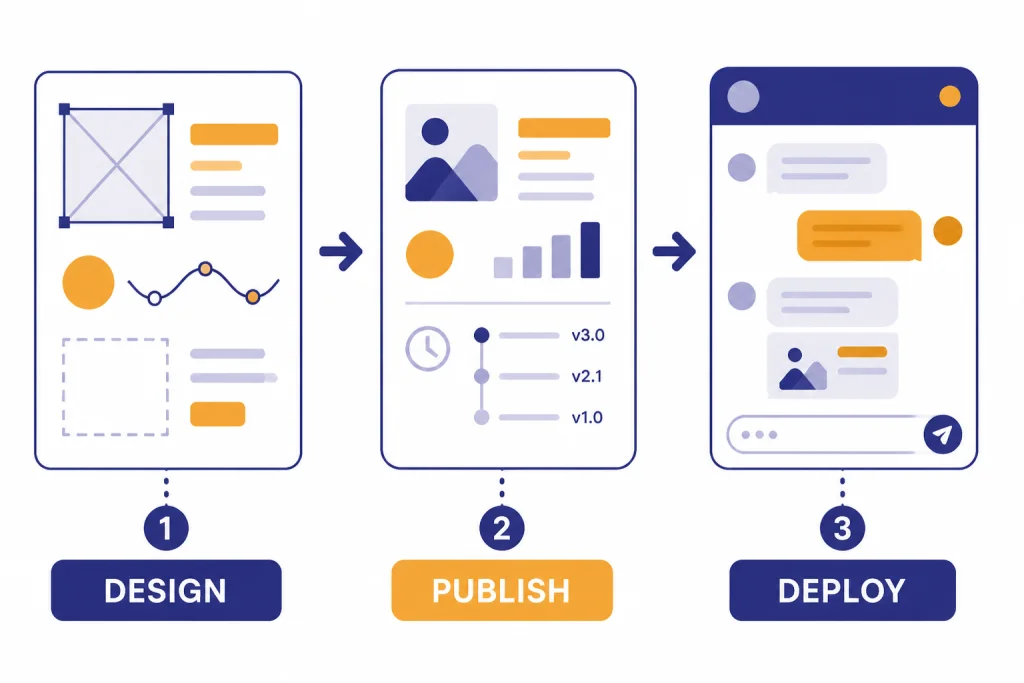
Agent Builder is part of AgentKit, OpenAI’s set of tools for building, deploying, and optimizing agents. OpenAI’s AgentKit announcement grouped Agent Builder with ChatKit, Connector Registry, Evals improvements, and reinforcement fine-tuning features.[2] In practical terms, Agent Builder is the visual build surface.
OpenAI’s agent documentation frames the stack this way: use Agent Builder to create workflows, use ChatKit to embed the agent workflow in a product interface, and use Evals features to observe and improve performance.[5] If you want code-first orchestration instead, OpenAI points developers to the Agents SDK.[10] Our OpenAI Agents SDK guide covers that path in more depth.
This matters because many teams confuse Agent Builder with GPT Builder. GPT Builder creates custom GPTs inside ChatGPT. Agent Builder creates deployable workflows for applications that use the OpenAI platform. OpenAI’s help center says GPTs are custom versions of ChatGPT that can combine instructions, knowledge, and selected capabilities, while API-built assistants are developer integrations that live outside ChatGPT.[9]
Agent Builder also differs from the OpenAI Playground. The Playground is useful for testing prompts, models, and API calls. Agent Builder is for mapping a full workflow that may include multiple nodes and deployment options.
The parts of an Agent Builder workflow
Agent Builder workflows are built from nodes and connections. OpenAI’s node reference groups the available building blocks into core nodes, tool nodes, logic nodes, and data nodes.[3] Each connection becomes a typed edge, so downstream nodes receive expected properties rather than an unstructured blob of text.[1]
Core nodes
Core nodes include Start, Agent, and Note nodes. The Start node defines workflow inputs. In chat workflows, it appends user input to the conversation history and exposes input_as_text as an input variable.[3] The Agent node is where you define instructions, tools, model configuration, and attached evaluations.[3] Note nodes are comments for humans reviewing the workflow.
Tool nodes
Tool nodes connect the agent to capabilities beyond the model. OpenAI lists File search, Guardrails, and MCP among the tool nodes in Agent Builder.[3] File search retrieves information from vector stores, Guardrails can check inputs or outputs for misuse patterns, and MCP connects to external services or custom tool servers.
Logic and data nodes
Logic nodes handle control flow. OpenAI’s node reference includes If/else, While, and Human approval nodes.[3] Data nodes include Transform and Set state, which help reshape outputs and preserve values across the workflow.[3] These are the pieces that turn a prompt into an application flow.

Build your first agent workflow
The easiest first project is a support triage agent. It has a clear input, a bounded knowledge source, a measurable output, and an obvious escalation point. Avoid starting with an agent that can spend money, edit production data, or send external messages without review.
Define the job in one sentence
Write the workflow’s purpose before touching the canvas. A good first version is: “Classify an incoming support question, search approved help documents, draft a concise answer, and ask for human approval when account action is needed.” That sentence gives you the node map.
Create the workflow skeleton
- Add a Start node for the user’s question.
- Add an Agent node that classifies the request into a small set of categories.
- Add an If/else node that routes billing, technical, and policy questions differently.
- Add File search for approved help content.
- Add an Agent node that drafts the answer using only retrieved material.
- Add a Human approval node before any reply that includes account changes, refunds, or sensitive guidance.
This pattern uses the core Agent Builder idea: a workflow combines agents, tools, and control-flow logic into a deployable object.[1] It also creates places where product, support, legal, and engineering can review behavior without reading an entire custom orchestration service.
Use structured outputs early
Do not let the classifier produce freeform prose if the next node needs a category. Give it a constrained schema such as billing, technical, policy, or escalate. OpenAI’s safety guidance recommends structured outputs because they reduce channels that prompt injections can use to smuggle instructions downstream.[6]
Add knowledge deliberately
If the workflow needs company-specific information, use File search with a vector store rather than pasting large policy text into every prompt. OpenAI’s File search documentation says the tool retrieves information from a knowledge base of uploaded files through semantic and keyword search.[8] Keep the knowledge base narrow for the first version. A small, approved set of help articles is easier to test than a whole company drive.
Preview with real edge cases
OpenAI says Agent Builder’s Preview feature lets you run the workflow interactively, attach sample files, and observe each node’s execution.[1] Use that preview with messy inputs. Test short questions, angry messages, vague requests, policy exceptions, and attempts to make the agent ignore instructions.
Deploy, test, and price the workflow
When the workflow behaves well in preview, publish it. OpenAI says publishing creates a new major version that acts as a snapshot, and developers can create new versions or specify older versions in API calls.[1] Versioning is important because agent changes can affect user experience, compliance, cost, and support volume.
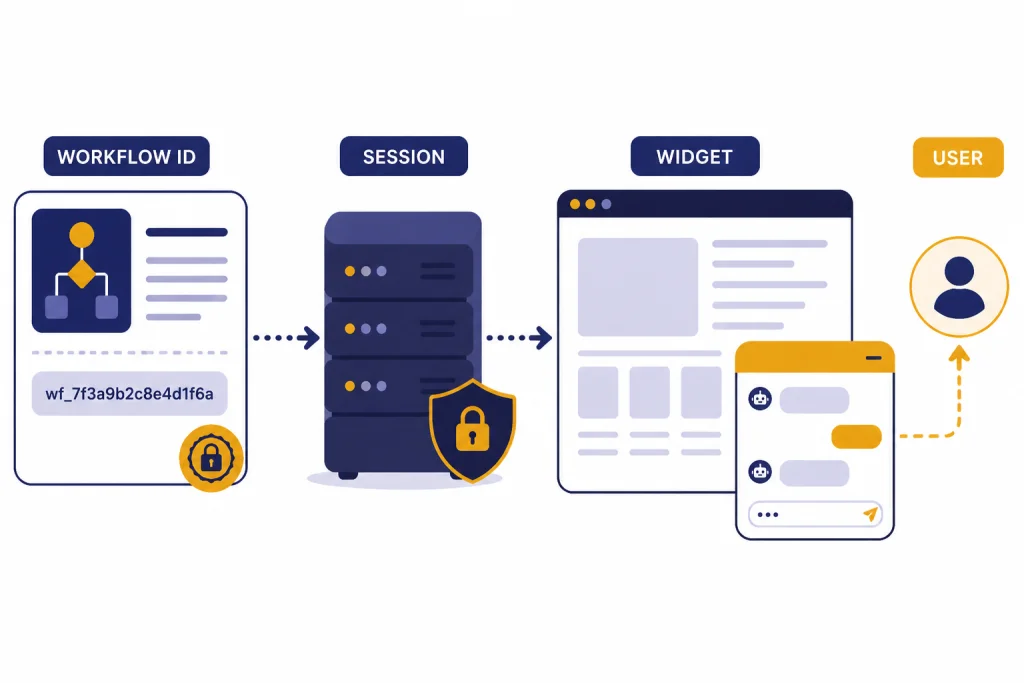
For deployment, OpenAI describes two paths. The recommended path is ChatKit, where you pass the workflow ID into a frontend chat integration. The advanced path is to copy the workflow code and use the Agents SDK to run and customize the agent experience yourself.[1] ChatKit’s documentation says its recommended integration embeds a chat widget, customizes the look and feel, and lets OpenAI host and scale the backend from Agent Builder.[4]

Cost depends on the models, tools, storage, and data processed by the workflow. OpenAI’s AgentKit announcement says Agent Builder, ChatKit, and Evals are included with standard API model pricing.[2] OpenAI’s pricing page also lists AgentKit usage and says ChatKit file and image uploads include 1 GB per account per month, then cost $0.10 per GB-day beyond the free tier.[7] OpenAI’s retrieval documentation separately lists vector store storage as free up to 1 GB across stores and $0.10 per GB per day beyond that.[8]
OpenAI has not published an official public workflow-node cap for Agent Builder in the sources reviewed for this article. If you are building a large production workflow, check the platform docs and the OpenAI status page before a launch or migration.
Agent Builder vs. GPT Builder, Agents SDK, and API code
Use Agent Builder when you want a visual, versioned workflow for a product agent. Use GPT Builder when you want a custom assistant inside ChatGPT. Use the Agents SDK when you want code-first orchestration. Use direct API code when your application has custom architecture that does not fit a visual workflow.
| Option | Best for | Main build surface | Deployment fit |
|---|---|---|---|
| Agent Builder | Multi-step product agents with visible workflow logic | Visual canvas with nodes, typed edges, preview, publishing, and versioning[1] | ChatKit or exported Agents SDK code[1] |
| GPT Builder | Custom GPTs used inside ChatGPT | ChatGPT GPT editor with instructions, knowledge, and selected capabilities[9] | ChatGPT, not an external website embed[9] |
| Agents SDK | Code-first agent apps with handoffs, tools, streaming, and tracing | Python or TypeScript SDK documentation and code[10] | Custom app infrastructure |
| Direct OpenAI API code | Highly custom systems that need full application control | Your own backend and API calls | Any architecture your team maintains |
The difference is not skill level alone. A strong engineering team may still prefer Agent Builder because product managers and policy reviewers can inspect the workflow. A solo developer may prefer the Agents SDK because the project already lives in code. If you are choosing between OpenAI-hosted deployment and a Microsoft cloud environment, compare this with our Azure OpenAI Service vs OpenAI API guide.
Agent Builder also pairs with broader platform choices. If your workflow needs image understanding, review our OpenAI Vision API guide. If cost is the main constraint, compare model and tool expenses in our OpenAI API pricing breakdown.
Safety checks before you ship
Agent workflows can fail in ways that simple chat prompts do not. OpenAI’s safety documentation calls out prompt injection and private data leakage as key risks when building agents.[6] This is especially important when the workflow reads untrusted text, calls tools, or accesses private data.
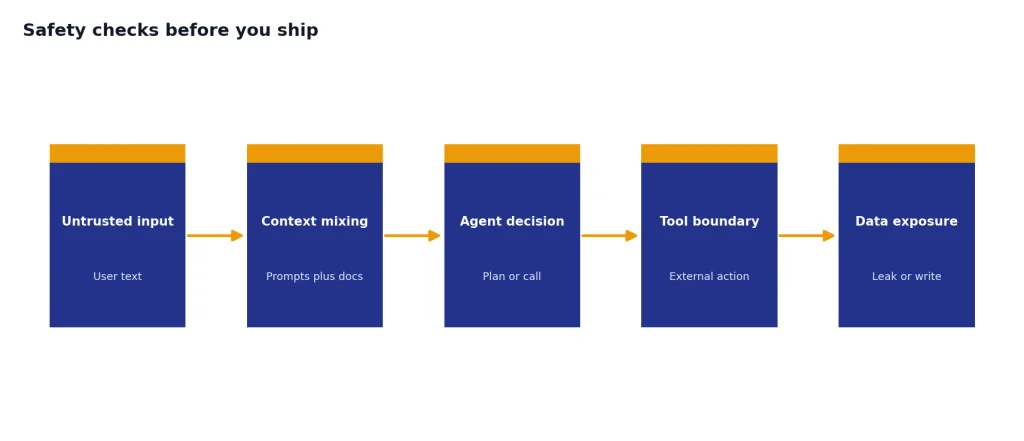
Use a few baseline rules. Do not place untrusted user input directly into developer messages. Use structured outputs between nodes. Add guardrails for user inputs. Keep tool approvals on for sensitive MCP operations. Add Human approval nodes before workflows send messages, write records, or make irreversible changes. OpenAI’s safety guidance recommends these mitigations and notes that agents can still make mistakes even with safeguards.[6]
Evaluate the workflow before and after publishing. OpenAI says Agent Builder can run trace graders from the Evaluate area, where builders can select traces and run custom graders to assess workflow performance.[1] Build a small eval set from real support tickets, expected answers, prohibited behaviors, and escalation cases.
Also decide what the agent should never do. Examples include disclosing raw customer records, inventing refund policies, changing subscriptions without confirmation, or sending data to an unapproved external system. If the workflow touches production users, route incidents through the same operational process you use for OpenAI API errors, logging, and support escalation.
When Agent Builder is the right choice
Agent Builder is a good fit when the workflow is more complex than one prompt but still understandable as a diagram. It works well for support triage, internal knowledge assistants, onboarding helpers, research routing, policy-guided drafting, and workflows where human approval is part of the design.
It is not the right fit for every agent. OpenAI’s agent documentation says voice agents are not supported in Agent Builder.[5] If you need low-level control over latency, streaming, custom memory, specialized infrastructure, or a non-chat interface, start with the Agents SDK or direct API calls instead.
For most teams, the best path is incremental. Build a narrow workflow in Agent Builder. Preview it with hard cases. Publish a version. Deploy it to a limited internal audience through ChatKit. Add evals. Expand only after you have traces, costs, and failure modes you can inspect.
That is the practical value of the openai agent builder: it gives teams a shared surface for designing agents before they become production systems. It does not remove the need for engineering review, safety work, or cost monitoring. It makes those tasks easier to see.
Frequently asked questions
Is OpenAI Agent Builder the same as GPT Builder?
No. GPT Builder creates custom GPTs for use inside ChatGPT, while Agent Builder creates deployable agent workflows for applications built on the OpenAI platform.[9][1] If you want an assistant your team uses in ChatGPT, use GPT Builder. If you want a workflow behind a product interface, consider Agent Builder.
Do I need to code to use Agent Builder?
You can design and preview workflows visually, but production deployment still requires technical work. OpenAI’s docs describe deployment through ChatKit or by copying workflow code and using the Agents SDK.[1] A developer should review authentication, logging, security, and cost controls before launch.
Can Agent Builder connect to company files?
Yes, through File search and vector stores. OpenAI’s File search documentation says models can retrieve information from uploaded knowledge bases using semantic and keyword search.[8] Keep access narrow and test for data leakage before exposing the workflow to users.
Can I deploy an Agent Builder workflow on my website?
Yes. OpenAI’s Agent Builder docs say you can pass a workflow ID into ChatKit or use exported code with the Agents SDK.[1] ChatKit is the simpler route when the product experience is an embedded chat interface.[4]
How much does OpenAI Agent Builder cost?
OpenAI says AgentKit tools are included with standard API model pricing.[2] Usage may still create costs through model tokens, tool use, storage, and uploaded files. OpenAI’s pricing page lists ChatKit file and image uploads at 1 GB free per account per month and $0.10 per GB-day beyond that.[7]
Is Agent Builder safe enough for production?
It can be part of a production process, but it is not a safety guarantee by itself. OpenAI warns that agent workflows face risks such as prompt injection and private data leakage.[6] Use structured outputs, guardrails, tool approvals, human review, evals, and monitoring before expanding access.