

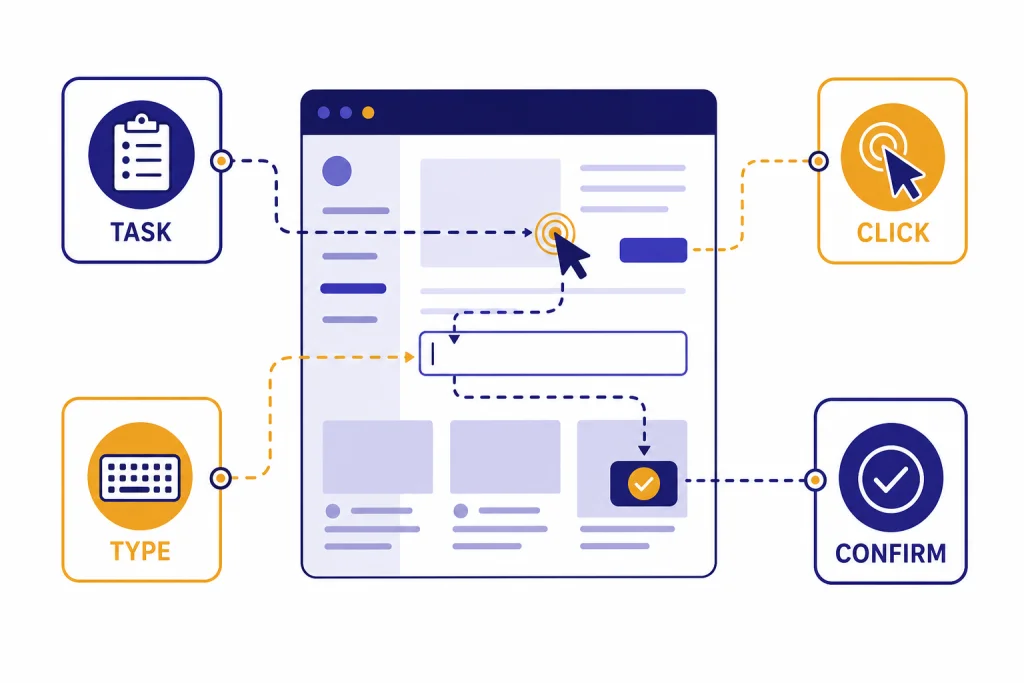
OpenAI Operator was OpenAI’s first public computer-use agent: a research preview that could browse websites, click buttons, type into fields, and complete web tasks from a user’s instructions. OpenAI introduced Operator on January 23, 2025, and later moved its core functionality into ChatGPT agent on July 17, 2025.[1] By April 2026, Operator is best understood as the foundation for OpenAI’s broader agent strategy, not as a standalone product. The important idea behind Operator is still active: AI systems can use visual browser interfaces instead of waiting for every service to expose a clean API. That makes Operator a key step in the history of practical AI agents.
What OpenAI Operator is
OpenAI Operator was a research preview of an AI agent that could go to the web and perform tasks for a user. Instead of only answering with text, it interacted with a remote browser. It could click, scroll, type, read page content, and ask the user to take over when a task required a login, CAPTCHA, sensitive field, or confirmation.
OpenAI announced Operator on January 23, 2025. The launch was limited: OpenAI said U.S. ChatGPT Pro users could access it at operator.chatgpt.com during the research preview.[1] OpenAI’s Help Center also described Operator as available to ChatGPT Pro users who were at least 18 years old.[3]
The product did not remain separate for long. OpenAI’s Operator release notes say the standalone Operator experience was deprecated on August 1, 2025, stayed accessible until August 31, 2025, and had its functionality folded into the newer ChatGPT agent experience.[4] That means the phrase “openai operator” now usually refers to the original research preview, the underlying computer-use model family, or the agent behavior now present in ChatGPT agent.
This shift fits OpenAI’s broader movement from chat-only systems toward agentic systems. For background on that company arc, see our OpenAI History timeline. For the product-building side, our OpenAI Agents SDK guide and OpenAI Agent Builder overview explain the developer tools that sit closer to today’s agent stack.

How Operator used a computer
Operator was powered by OpenAI’s Computer-Using Agent, usually shortened to CUA. OpenAI described CUA as a model that combined GPT-4o’s vision capabilities with advanced reasoning through reinforcement learning.[2] In practice, that meant the model looked at browser screenshots, reasoned about the visible interface, and chose the next action.
The interaction loop was simple in concept. Operator received a user goal. It viewed the browser. It chose an action such as clicking a button, typing text, scrolling, or waiting. The environment returned a new screenshot. Operator repeated the loop until the task was done, blocked, or handed back to the user.
OpenAI’s later API documentation uses the same pattern for the computer-use tool. The developer supplies an environment that can execute actions and capture screenshots. The model returns computer actions such as click(x,y) or type(text). The developer’s code executes those actions and sends back screenshots so the model can continue.[9]
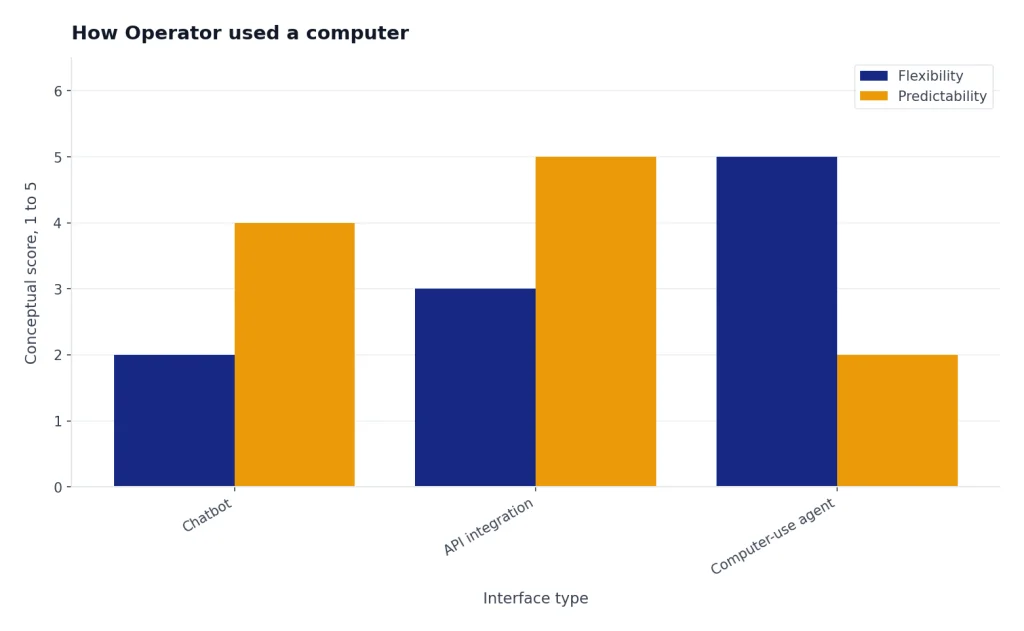
This is different from a standard chatbot and different from a traditional software integration. A chatbot writes instructions. An API integration calls a known endpoint. A computer-use agent operates a graphical interface that was designed for humans. That is more flexible, but also more error-prone.
OpenAI reported that the original CUA model reached 38.1% on OSWorld, 58.1% on WebArena, and 87.0% on WebVoyager at launch.[2] Those numbers showed meaningful progress, but also made the limitation clear: browser tasks were easier for the system than full operating-system tasks.

| Benchmark | What it tested | OpenAI CUA result | Human result, where published |
|---|---|---|---|
| OSWorld | Full computer-use tasks across operating-system environments | 38.1%[2] | 72.4%[2] |
| WebArena | Browser tasks on realistic web environments | 58.1%[2] | 78.2%[2] |
| WebVoyager | Web navigation tasks across popular websites | 87.0%[2] | OpenAI did not publish a human figure in the table.[2] |
What Operator could and could not do
Operator was designed for web tasks that involve a visible sequence of steps. OpenAI’s examples included filling out forms, booking travel, ordering groceries, and creating memes.[3] Those examples matter because they share a common structure: the agent can inspect a page, decide the next step, and work through an interface without a custom integration.
The best Operator tasks were repetitive, browser-based, and reversible. A good example would be finding three appointment options, comparing product availability, or filling a draft form that the user reviews before submission. A poor example would be making an irreversible financial decision, sending sensitive messages, deleting records, or navigating a custom internal tool with high business impact.
OpenAI’s Help Center said Operator could run multiple tasks in parallel, but with dynamic limits on simultaneous tasks and open conversations.[3] It also said Operator could save reusable workflows as saved tasks, which made it more useful for repeat errands.[3]
The limitations were not small. OpenAI said Operator could not reliably handle many complex or specialized tasks, including detailed slideshows, intricate calendar systems, and non-standard web interfaces.[3] That caveat is central. Operator was not a dependable replacement for a trained assistant. It was an early agent that could sometimes reduce effort when the task was clear and the stakes were low.
For users, the right way to think about Operator was “supervised delegation.” You gave it a goal, watched its progress, supplied missing information, and confirmed important steps. If the task touched money, accounts, legal rights, health, employment, or private data, the user needed to stay close. That advice still applies to modern agent mode in ChatGPT.

Operator vs. ChatGPT agent vs. API computer use
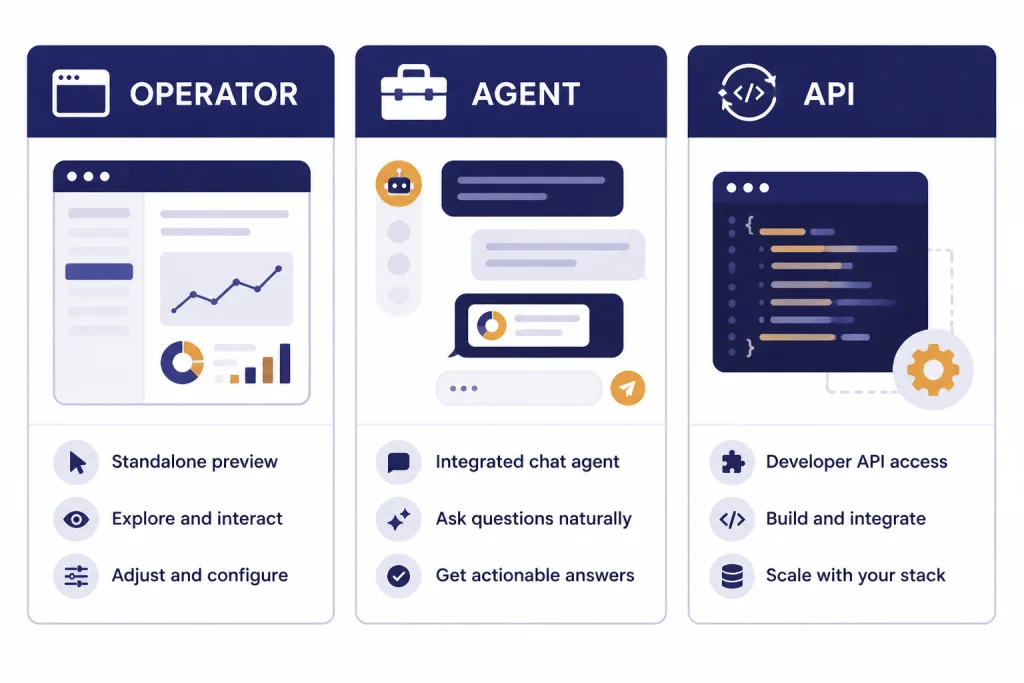
The easiest way to understand Operator in 2026 is to separate the product, the consumer successor, and the developer tool. Operator was the original standalone research preview. ChatGPT agent is the consumer-facing successor. The OpenAI API computer-use tool is the developer-facing way to build similar loops into custom software.
OpenAI introduced ChatGPT agent on July 17, 2025, describing it as a unified agentic system that combined Operator’s website interaction, deep research’s synthesis, and ChatGPT’s conversational fluency.[7] OpenAI’s Help Center later stated directly that Operator functionality is integrated into ChatGPT agent mode and that the Operator website is no longer accessible.[8]
For developers, the relevant term is usually not Operator. It is computer use. OpenAI’s API documentation identifies computer-use-preview as the model for the computer-use tool and says the feature is available through the Responses API, not Chat Completions.[9] If you are building software rather than using ChatGPT, start with that documentation and our OpenAI API Errors and OpenAI API pricing explainers.
| Option | Primary user | Main interface | Status by April 2026 | Best use |
|---|---|---|---|---|
| Operator | Early ChatGPT Pro testers | Standalone browser agent at operator.chatgpt.com | Deprecated on August 1, 2025, with access ending August 31, 2025.[4] | Historical reference for OpenAI’s first public computer-use agent |
| ChatGPT agent | ChatGPT users on paid plans | Agent mode inside ChatGPT | OpenAI says Operator functionality is integrated into ChatGPT agent mode.[8] | Consumer and workplace tasks that combine browsing, files, code, and connectors |
| API computer use | Developers | Responses API with computer-use-preview | OpenAI documents it as a beta computer-use feature in the API.[9] | Custom agent workflows in controlled browser or virtual-machine environments |
Safety, privacy, and human control
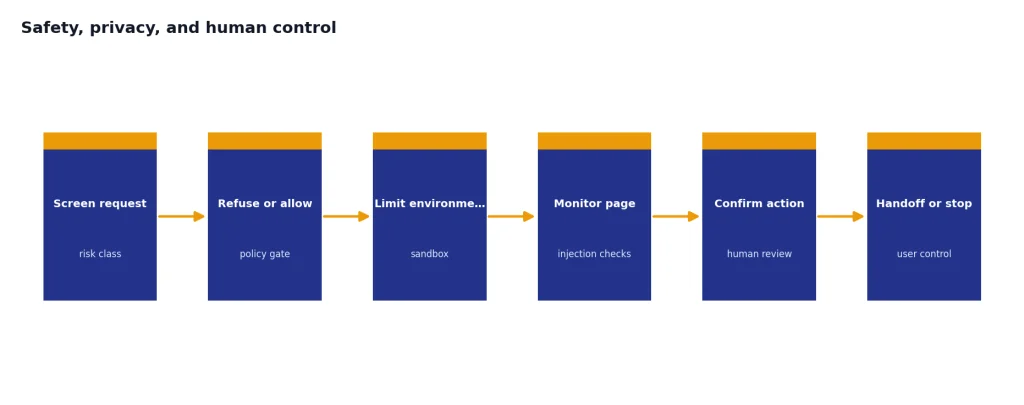
Operator raised safety questions because it could act, not just answer. A model that clicks and types can make mistakes with real consequences. It can misunderstand a page, follow a malicious instruction hidden on a website, or perform the right action in the wrong account.
OpenAI’s Operator System Card identified harmful tasks, model mistakes, and prompt injections as specific risk areas.[5] The same system card described mitigations such as proactive refusals for high-risk tasks, confirmation prompts before critical actions, and active monitoring systems.[5]
The Help Center version was more practical. It said Operator used user confirmations for high-impact actions, refusal patterns for disallowed tasks, prompt injection monitoring, and watch mode requiring user supervision on certain sites.[3] It also said Operator should pause when it encountered a password field or other login step, letting the user take over.[3]
Privacy also depended on screenshots. Operator needed screenshots to see the browser window and decide what to do. OpenAI said Operator chats, browsing history, and screenshots were retained until the user deleted them, and that deleted chats and associated screenshots would be deleted from OpenAI systems within 90 days.[3]
The most important practical rule is still simple: do not treat an agent as a silent background worker for sensitive tasks. Watch it. Use separate accounts when possible. Avoid giving it broad access to private systems. Log out when done. Keep high-impact final decisions in human hands. If an agent task fails because OpenAI is down, check the OpenAI status page before assuming the workflow is broken.
Why prompt injection mattered more for Operator
Prompt injection is more serious for a computer-use agent than for a normal chatbot. A chatbot might summarize a malicious web page incorrectly. An agent might read hidden instructions on a page and then take actions in the browser. That makes the surrounding controls as important as the model.
OpenAI’s API computer-use documentation reflects this risk. It describes safety checks for malicious instruction detection, irrelevant domain detection, and sensitive domain detection.[9] It also recommends sandboxed environments and cautions against trusting the beta model in fully authenticated or high-stakes environments.[9]
Why Operator mattered for OpenAI
Operator mattered because it moved OpenAI from “models that answer” toward “models that operate.” That is a different product category. It requires browser infrastructure, safety policies, user controls, enterprise permissions, reliability engineering, and a clear way to recover from mistakes.
It also clarified the difference between agent demos and useful agents. A demo can show a model ordering groceries. A useful agent must handle messy real pages, changing layouts, login interruptions, partial failures, user preferences, and confirmation flows. Operator exposed those hard edges early.
The May 23, 2025 Operator update also showed how quickly the stack was changing. OpenAI said it upgraded Operator with a new CUA model based on a version of OpenAI o3, improving persistence, accuracy, and task success.[4] OpenAI separately published an addendum for OpenAI o3 Operator, saying the model used the same multi-layered safety approach as the earlier Operator system and was fine-tuned with additional computer-use safety data.[6]
That evolution helps explain why Operator was folded into ChatGPT agent. A standalone browser agent was useful as a preview, but users usually want one assistant that can chat, research, browse, analyze files, use code, and take action. OpenAI described ChatGPT agent as exactly that kind of unified system.[7]
Operator also has strategic importance. It sits near several major OpenAI themes: consumer agents, enterprise automation, developer tooling, and cloud infrastructure. For company context, read our guide to OpenAI’s CTO and leadership team, our analysis of OpenAI and Microsoft, and our comparison of Azure OpenAI Service vs OpenAI API. For the browser angle, see our ChatGPT Atlas launch coverage.
The bottom line is that Operator was not the final form. It was a public test of a computer-use pattern that now runs through OpenAI’s agent products. Its legacy is the idea that an AI system can work through the same imperfect interfaces people use every day, while still needing tight supervision, careful permissions, and clear human review.
Frequently asked questions
Is OpenAI Operator still available?
No. OpenAI’s release notes say Operator was deprecated on August 1, 2025, and remained accessible only until August 31, 2025.[4] OpenAI’s Help Center now says Operator functionality is integrated into ChatGPT agent mode and that the Operator website is no longer accessible.[8]
What model powered Operator?
OpenAI said Operator was powered by Computer-Using Agent, or CUA, which combined GPT-4o vision capabilities with advanced reasoning through reinforcement learning.[2] In May 2025, OpenAI said it upgraded Operator with a new CUA model based on a version of OpenAI o3.[4]
What replaced Operator?
ChatGPT agent replaced the standalone Operator experience for ChatGPT users. OpenAI introduced ChatGPT agent on July 17, 2025, as a unified agentic system combining Operator-style web interaction, deep research, and ChatGPT conversation.[7] Developers can also build computer-use workflows through the Responses API with computer-use-preview.[9]
Could Operator use my own computer?
Operator used a remote browser environment rather than directly taking over a user’s personal desktop. The API version is different: developers provide an environment, such as a browser or virtual machine, that can execute model-suggested actions and return screenshots.[9] In both cases, the model needs visual feedback to decide what to do next.
Was Operator safe for purchases and financial tasks?
Operator was not something to run unsupervised for high-stakes actions. OpenAI described safeguards such as confirmations, refusals, monitoring, and watch mode, but also said those safeguards did not remove all risks.[3] Users should personally review purchases, account changes, messages, and financial actions before they happen.
Why did OpenAI shut down the separate Operator site?
OpenAI folded Operator into ChatGPT agent because a general agent needs more than browser control. ChatGPT agent combines web interaction with research, code execution, files, connectors, and normal conversation.[7] That made a separate Operator product less necessary.