


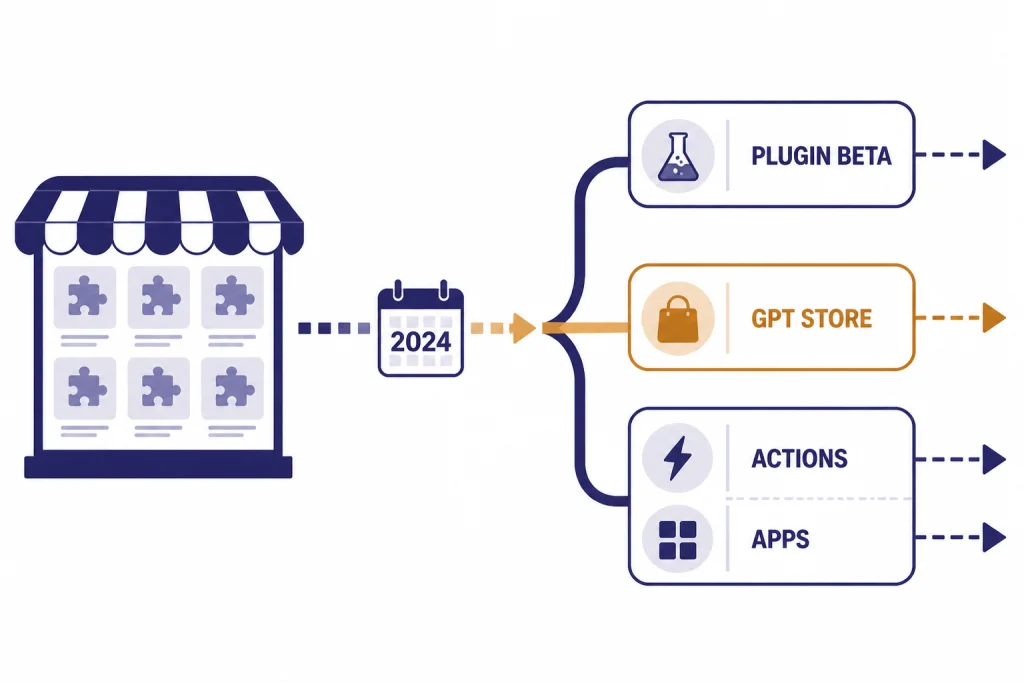
The best ChatGPT plugins in 2026 are not the old Plugin Store entries. OpenAI deprecated plugins after the original beta, and new plugin conversations stopped on March 19, 2024, with existing plugin conversations ending on April 9, 2024.[2] The useful idea survived: ChatGPT can still work with outside tools, live data, files, and services through GPTs, GPT Actions, and Apps in ChatGPT. This guide separates the legacy plugins worth remembering from the modern replacements worth using now. For most readers, the best choices are ChatGPT apps for mainstream services, custom GPTs for repeat workflows, and GPT Actions for private or technical integrations.
What counts as a ChatGPT plugin now
In everyday speech, people still use “ChatGPT plugins” to mean anything that extends ChatGPT beyond a plain text chat. Officially, that wording is legacy. OpenAI introduced ChatGPT plugins on March 23, 2023, as a way for ChatGPT to access recent information, run computations, and use third-party services.[1] OpenAI later moved the ecosystem toward GPTs, actions, and apps.
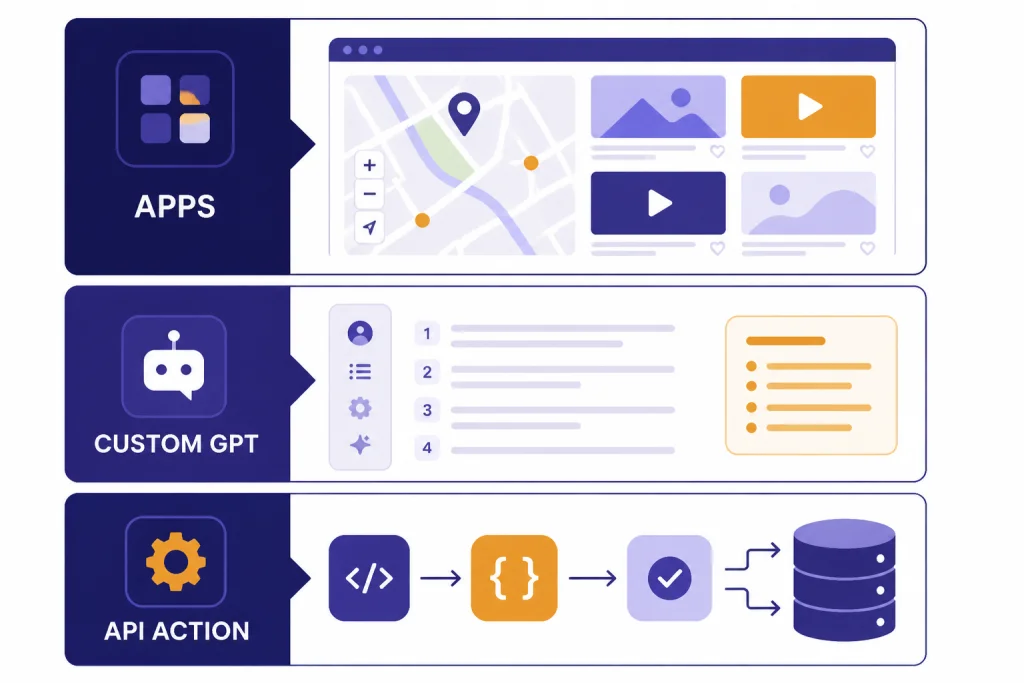
The modern stack has several layers. GPTs are custom versions of ChatGPT with instructions, knowledge, capabilities, and sometimes actions. OpenAI launched the GPT Store on January 10, 2024, and said users had already created more than 3 million custom GPTs at that point.[3] GPT Actions let a custom GPT call external REST APIs from natural language.[6] Apps in ChatGPT are the newer, more visible product layer. OpenAI says apps can include interactive in-chat experiences, search connected services, run deep research, sync knowledge, and take write actions with confirmation.[4]
That means the answer to “what are the best ChatGPT plugins?” depends on what you are trying to do. If you want a public travel or design integration, start with apps. If you want a reusable writing, coding, research, or tutoring workflow, start with GPTs. If you need ChatGPT to query your own API or internal system, look at GPT Actions. If you mainly want browser controls, prompt libraries, or sidebars, a separate chatgpt chrome extension may be more practical.
Best modern ChatGPT plugin replacements
Use this shortlist as a practical starting point. It is organized by job, not by brand popularity. The old Plugin Store trained users to look for a named add-on first. The modern ChatGPT experience works better when you start with the task and then pick the right extension layer.
Best for mainstream services: Apps in ChatGPT
Apps in ChatGPT are the closest modern replacement for the old consumer plugin idea. OpenAI introduced apps in ChatGPT and the Apps SDK on October 6, 2025, describing them as apps that users can call by name or discover when ChatGPT suggests them in context.[5] The launch group included Booking.com, Canva, Coursera, Figma, Expedia, Spotify, and Zillow, with OpenAI saying availability depended on market and service coverage.[5]
Choose apps when you want an interactive experience inside the chat. Examples include browsing lodging options, building a slide deck from an outline, exploring a course, or using a map-style result. Apps are also the cleanest path for nontechnical users because the connection flow, permissions screen, and directory live inside ChatGPT.
Best for repeat personal workflows: custom GPTs
Custom GPTs are best when your “plugin” is really a saved workflow. A writing coach, resume reviewer, classroom worksheet helper, spreadsheet explainer, or coding assistant does not always need a third-party service. It may only need stable instructions, example files, and a clear scope. If your workflow is prompt-heavy, compare dedicated prompt tools in Best ChatGPT Prompt Generator Tools before building a large custom GPT.
OpenAI’s help content describes GPTs as custom versions of ChatGPT that combine instructions, knowledge, capabilities, apps, actions, and version history.[9] That flexibility is why GPTs replaced many simple plugins. They are easier to share, easier to update, and easier for nondevelopers to create.
Best for private data and internal systems: GPT Actions
GPT Actions are the best fit when ChatGPT needs to call a specific API. OpenAI describes GPT Actions as API integrations stored inside custom GPTs that can retrieve data or take action in another application.[6] A support team might use one to look up order status. A finance team might query a warehouse. A product team might file issues into its project tracker.
Actions are powerful, but they require more care than public GPTs. Authentication, rate limits, confirmation steps, and logging matter. If you are already estimating API spend for a custom integration, keep an OpenAI API pricing reference and an API cost calculator tools comparison nearby.
Best for research: GPTs, apps, and summarizers together
Research use cases rarely fit one tool. A public research GPT may help shape the question. A connected app may search files or services. A summarizer may compress long PDFs or transcripts. For academic workflows, pair this guide with Best AI Research Tools for Academics and Best AI Summarizer Tools for Long Documents.
Best for coding: coding GPTs and developer tools
For coding, “plugin” usually means repository context, terminal-like actions, issue tracker access, or code review. A GPT with actions can help if your team has clear APIs. A coding assistant may be better if you need editor-native autocomplete, repository indexing, and pull request workflows. See best AI coding assistants of 2026 for that separate category.
Legacy ChatGPT plugins worth remembering
The legacy Plugin Store is gone, but some early plugins still matter because they defined the categories users expect from ChatGPT extensions. OpenAI’s original plugin announcement named Expedia, FiscalNote, Instacart, KAYAK, Klarna, Milo, OpenTable, Shopify, Slack, Speak, Wolfram, and Zapier as the first third-party plugins, along with OpenAI-hosted browsing and code interpreter plugins.[1] The strongest legacy ideas were not the logos. They were the workflows.
| Legacy plugin category | Representative names | Why it mattered | Modern replacement |
|---|---|---|---|
| Computation and structured knowledge | Wolfram | It showed how ChatGPT could hand off math, data, and factual computation to a specialized engine. | Custom GPTs with tools, data analysis, or external actions. |
| Automation | Zapier | It connected ChatGPT to business apps and made natural-language automation feel accessible. | GPT Actions, apps, or external automation platforms. |
| Travel search | Expedia and KAYAK | It let ChatGPT search live travel inventory instead of giving generic itinerary advice. | Apps in ChatGPT for travel brands and direct travel sites. |
| Local commerce | OpenTable and Instacart | It turned conversation into reservations, shopping lists, and order-style tasks. | Apps with interactive results and confirmation-based write actions. |
| Shopping comparison | Klarna and Shopify | It made product discovery more conversational. | Retail apps, shopping GPTs, and direct merchant search. |
| Workplace knowledge | Slack | It pointed toward searchable company context inside ChatGPT. | Apps with file search, sync, or enterprise knowledge controls. |
| Language learning | Speak | It showed that plugins could support focused tutoring, not only transactions. | Education GPTs and interactive learning apps. |
Wolfram and Zapier remain the most important legacy examples conceptually. Wolfram represented tool-assisted reasoning. Zapier represented cross-app action. Travel, restaurant, shopping, and workplace plugins showed that ChatGPT could become a front end for existing services. Those patterns now appear across apps, GPTs, and actions instead of a separate Plugin Store.
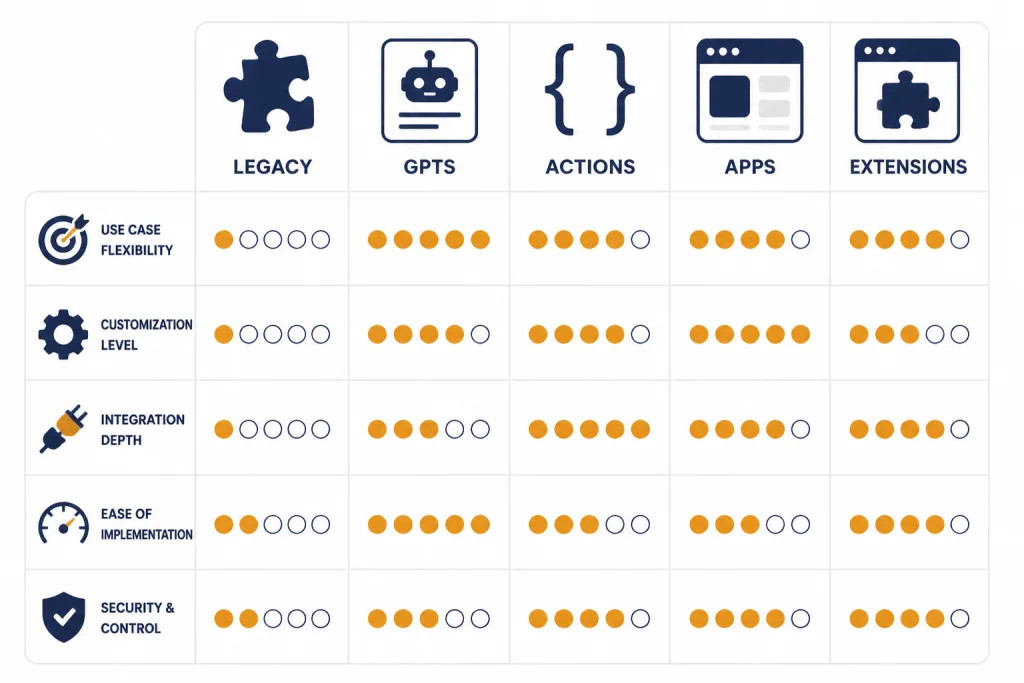
ChatGPT plugins, GPTs, actions, and apps compared
The table below is the fastest way to decide what kind of “plugin” you actually need. It also explains why old plugin lists can mislead readers in 2026. A legacy plugin name may be historically useful, but the current product path is usually different.
| Extension type | Status in 2026 | Best for | Who should use it | Main caution |
|---|---|---|---|---|
| Legacy ChatGPT plugins | Deprecated after the original beta. | Historical reference and migration planning. | Readers trying to understand old tutorials or workflows. | Do not rely on old Plugin Store instructions. |
| Custom GPTs | Current ChatGPT feature. | Repeat workflows, tutoring, writing, research, and internal helpers. | Individuals, teams, educators, and creators. | Quality varies widely across public GPTs. |
| GPT Actions | Current developer integration path. | Calling APIs, retrieving private data, and taking controlled actions. | Developers and technical teams. | Needs authentication, testing, and safe action design. |
| Apps in ChatGPT | Current app layer and directory model. | Interactive service integrations, connected data, and in-chat UI. | Most nontechnical users and service partners. | Availability can depend on plan, region, workspace settings, and partner support. |
| Browser extensions | Outside ChatGPT’s official extension system. | Prompt libraries, page summaries, sidebars, exports, and UI shortcuts. | Power users who work in the browser all day. | They can see browser data, so permissions matter. |
How to choose the right option
Start with the action you want ChatGPT to perform. If the task is mostly instruction-following, use a custom GPT. If the task needs a known consumer service, check the ChatGPT app directory. If the task needs your private API, build or commission a GPT Action. If the task is mostly about the browser interface, use an extension instead.
For writing, do not assume a plugin is better than a focused writing tool. Many writing workflows need tone controls, citation habits, templates, and export options more than they need live service integration. Compare broader options in best AI writing tools compared in 2026. For resumes, a purpose-built resume product may beat a general GPT; see ai resume builder tools compared for that use case.
For education, separate assistance from detection. A teacher may use a GPT for lesson planning, a summarizer for reading packets, and a detector only as a limited signal. If academic integrity is the real question, use Best AI Detectors for Teachers and Schools and Best Plagiarism Checkers rather than a plugin roundup.
For media creation, plugins are usually not the right frame. Image, voice, and video tools have their own interfaces, rights terms, export formats, and editing controls. Compare those categories separately in Best AI Image Tools, best AI voice tools and voice cloning software, and best AI video tools of 2026.
For mobile and desktop use, the app shell matters as much as the extension. A great GPT is less useful if you cannot access it where you work. If device support is your main concern, read Best ChatGPT Mobile Apps or Best ChatGPT Desktop Apps.
Privacy and safety checklist
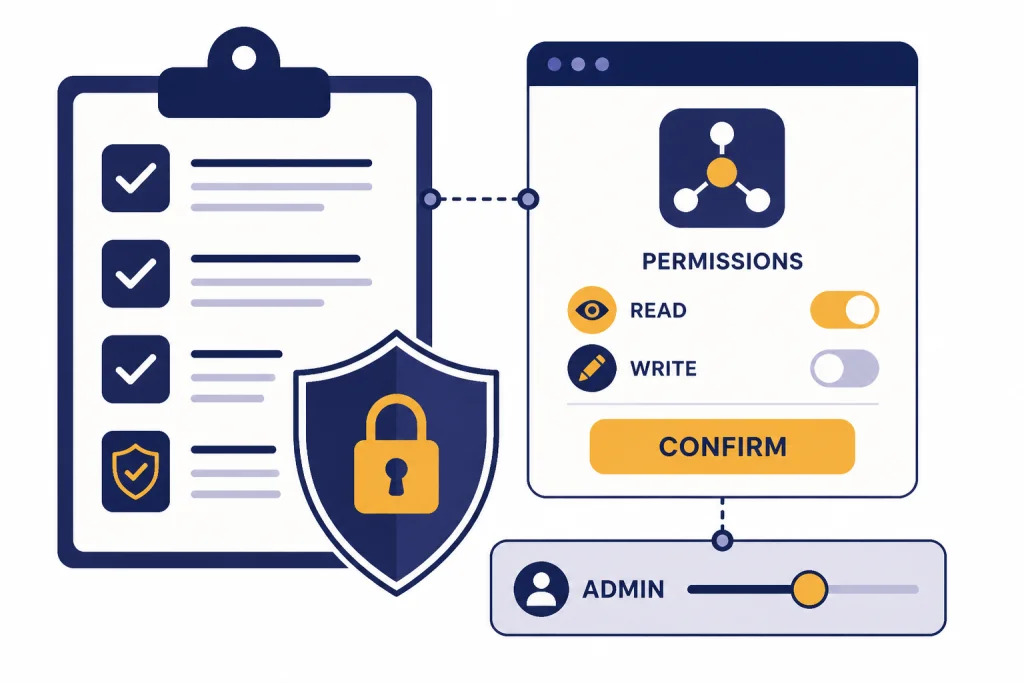
Plugins were exciting because they gave ChatGPT reach. That reach is also the risk. Any extension that can read files, search connected accounts, call APIs, or create records deserves a permission review before you use it for real work.
- Check the source. Prefer official apps, verified builders, known vendors, or internal GPTs managed by your organization.
- Read the permission screen. Do not connect an app until you understand which account, files, services, or actions it can access.
- Separate read access from write access. Searching a document store is different from creating tickets, sending messages, updating records, or placing orders.
- Use confirmations for external actions. OpenAI says apps with write actions must request confirmation before proceeding with external actions.[4]
- Use workspace controls where available. OpenAI says Business apps are enabled by default, while Enterprise and Edu apps are disabled by default until admins enable them.[4]
- Avoid sensitive data in public GPTs. Treat public GPTs as untrusted unless your organization has reviewed the builder, policy, and data flow.
- Test with harmless examples first. Before connecting production data, test with dummy records or low-risk files.
For browser extensions, add a separate permissions check. A Chrome extension may interact with the page, your clipboard, your tabs, or your browsing context depending on its design. That risk is different from an official ChatGPT app permission prompt.
Developer path: GPT Actions and Apps SDK
Developers should treat “plugin” as a product decision, not only a technical decision. If you need a private workflow inside one custom GPT, GPT Actions may be enough. If you want a richer, reusable app experience inside ChatGPT, the Apps SDK is the more modern path.
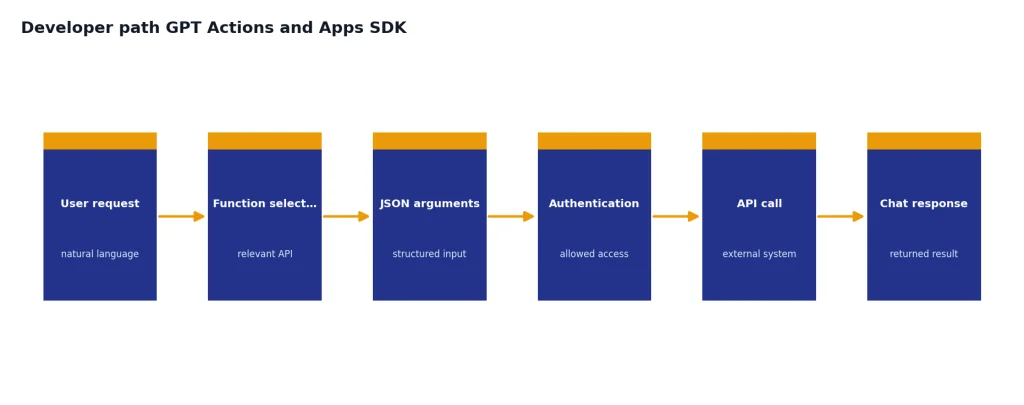
GPT Actions work by mapping natural language to API calls. OpenAI says actions use function calling to decide which API call is relevant, generate the needed JSON input, and execute the API call.[6] OpenAI’s action authentication documentation lists no authentication, API key authentication, and OAuth as supported options.[7] That makes actions practical for internal tools, but they still need ordinary production engineering.
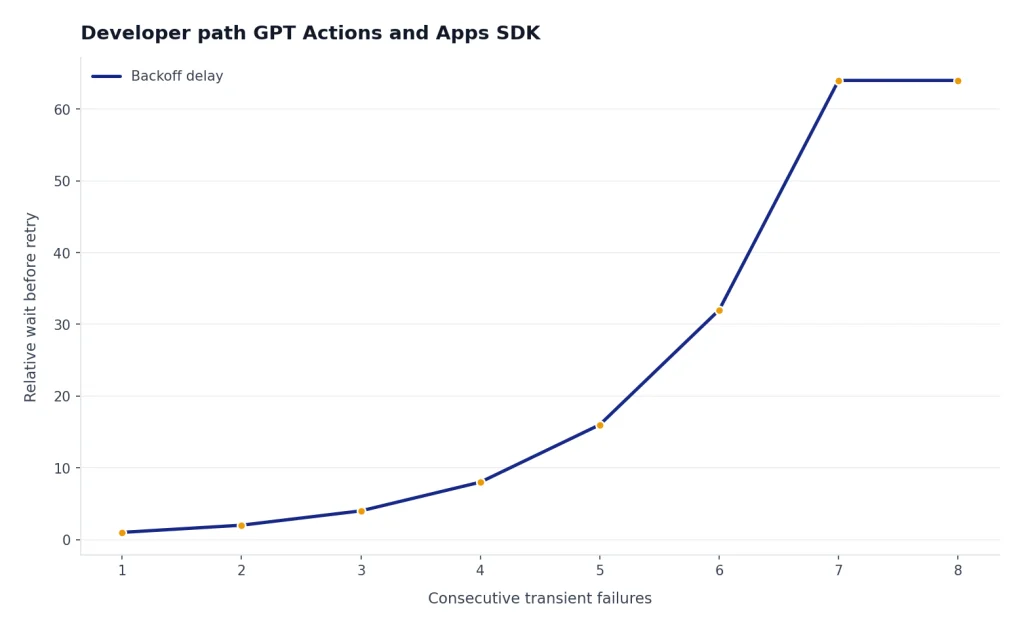
OpenAI’s production notes for GPT Actions recommend rate limiting and say ChatGPT respects HTTP 429 responses and dynamically backs off after repeated 429 or 500 responses in a short period.[8] The same production notes state that API calls during the actions experience time out if they exceed a 45-second round trip.[8] Those limits matter when you connect ChatGPT to slow databases, long-running jobs, or third-party APIs with unpredictable latency.
The Apps SDK fits a different goal. OpenAI says Apps in ChatGPT are powered by the Apps SDK, built on the Model Context Protocol, and can include both app logic and interface design.[5] Use that route when the user experience needs cards, maps, playlists, forms, previews, or other interactive elements inside the chat.
A simple rule works: build a GPT Action when the output can be plain data returned to ChatGPT. Build an app when the user needs to inspect, select, manipulate, or confirm structured results in a visible interface. Build neither if a normal API client, automation workflow, or website integration would be clearer.
Plugin-like alternatives outside ChatGPT
Some of the best ChatGPT plugin replacements do not live inside ChatGPT. Browser extensions, desktop apps, mobile apps, automation platforms, and dedicated AI tools can be better when they own the full workflow.
Use a browser extension when the task is tied to web pages. Examples include summarizing the current page, rewriting selected text, capturing prompts, exporting chats, or opening a sidebar next to a document. Use a desktop app when you want global shortcuts, local file workflows, or a system-level launcher. Use a mobile app when voice, camera, notifications, or on-the-go capture matter.
Use a dedicated tool when the output format is specialized. Translation tools need terminology controls and bilingual review. Plagiarism checkers need source matching. Token counters need model-aware estimates. For those categories, see best AI translation tools tested, OpenAI Token Counter Tools, and the related tool roundups across this site.
The old plugin question was “Which add-on should I install?” The better 2026 question is “Where should this workflow live?” If it belongs in the conversation, use an app, GPT, or action. If it belongs in your browser, editor, phone, or production system, use a tool built for that environment.
Frequently asked questions
Are ChatGPT plugins still available?
The original ChatGPT plugins are no longer the current extension system. OpenAI stopped new plugin conversations on March 19, 2024, and existing plugin conversations ended on April 9, 2024, according to Zapier’s migration notice about the ChatGPT plugin sunset.[2] Use GPTs, GPT Actions, and Apps in ChatGPT instead.
What replaced ChatGPT plugins?
Custom GPTs replaced many simple plugin workflows. GPT Actions replaced many API-call workflows. Apps in ChatGPT replaced much of the consumer-facing plugin experience, especially where the user benefits from interactive cards, maps, playlists, or connected service data.
What is the best ChatGPT plugin replacement for most users?
For most users, Apps in ChatGPT are the closest replacement because they live inside the ChatGPT interface and have a directory, connection flow, and app-specific capabilities. For personal repeat workflows, a custom GPT is often better. For private company systems, GPT Actions are usually the right starting point.
Can I build my own ChatGPT plugin now?
You should not build for the old plugin system. Build a custom GPT with actions if you need API access, or use the Apps SDK if you want a richer app experience inside ChatGPT. OpenAI says developers can build apps with the Apps SDK and submit apps for publication to the ChatGPT app directory.[4]
Were Wolfram and Zapier the best legacy ChatGPT plugins?
They were two of the most important legacy examples because they represented different strengths. Wolfram showed how ChatGPT could use an external computation engine. Zapier showed how ChatGPT could connect to many business workflows through automation.
Are public GPTs safe to use?
Public GPTs can be useful, but you should treat them as third-party software. Review the builder, requested capabilities, connected actions, and data you plan to share. Avoid uploading sensitive personal, legal, medical, financial, or company data unless your organization has approved the GPT and its data flow.