

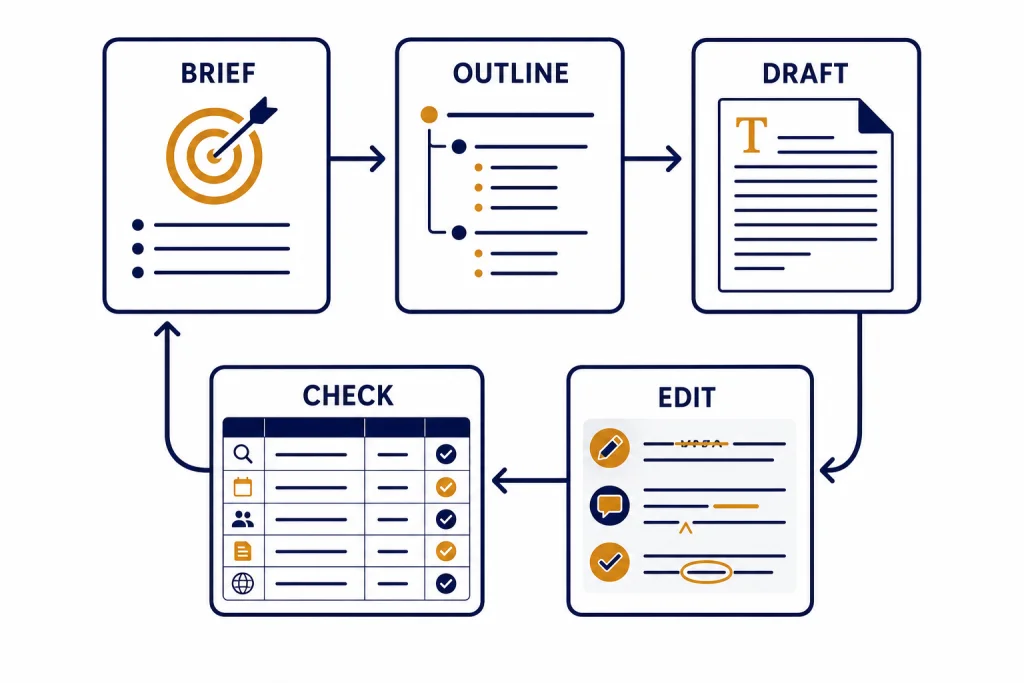
ChatGPT can help you write better content when you treat it like a structured writing partner, not a magic first-draft machine. The best workflow starts with a clear brief, gives ChatGPT source material, asks for a rough draft, then uses targeted revision passes for structure, clarity, voice, and accuracy. This chatgpt tutorial writing guide shows you how to build that workflow for blog posts, emails, landing pages, scripts, newsletters, and internal documents. You will learn what to put in the prompt, when to use Canvas, when to verify claims, and how to create reusable writing prompts that improve over time.
What ChatGPT is good at in writing
ChatGPT is useful at the parts of writing that benefit from iteration. It can turn scattered notes into an outline, generate alternative angles, simplify dense paragraphs, produce examples, rewrite for a different audience, and critique a draft against a rubric. It is less useful when you ask it to invent facts, mimic a writer without enough samples, or publish a final answer without human judgment.
OpenAI’s own prompt guidance emphasizes clear instructions, specific context, desired format, and examples. Those basics matter more than clever prompt tricks. If you are new to prompting, pair this tutorial with our broader guide to prompt engineering techniques, then return here for the writing-specific workflow.
The core rule is simple. Do not ask, “Write an article about remote work.” Ask for a specific asset, for a specific reader, with a specific goal, using specific source material, in a specific format. OpenAI’s prompt engineering help page recommends being specific about context, outcome, length, format, and style, and it also recommends separating instructions from source text with clear delimiters such as triple quotes.[1]
This distinction changes the quality of the output. A vague prompt makes ChatGPT guess your reader, purpose, evidence, and structure. A strong prompt turns the model into an assistant working inside your editorial system.
Start with a writing brief
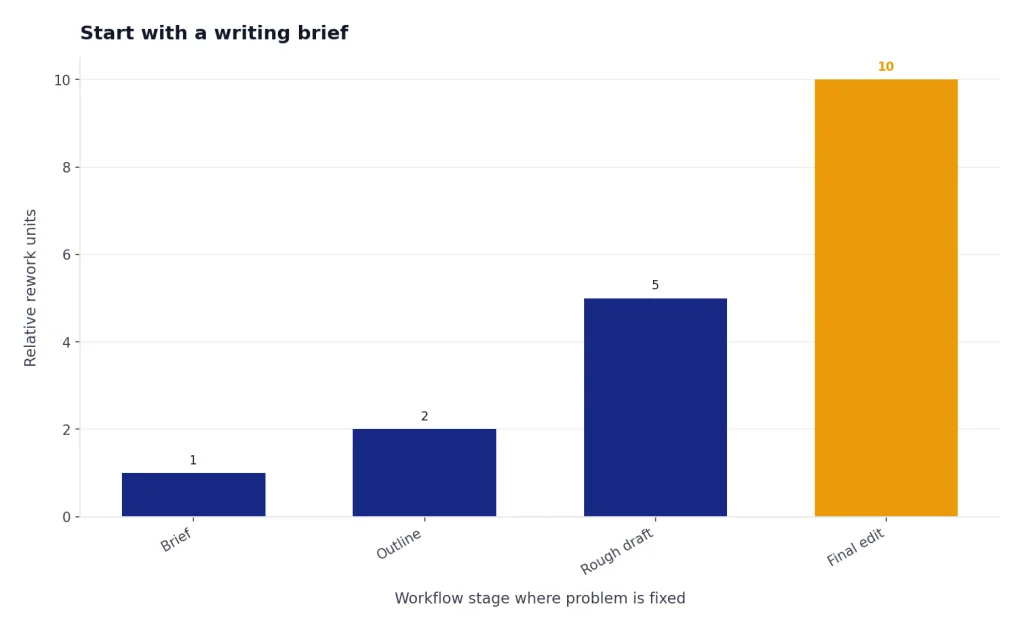
A writing brief is the control panel for the whole project. It tells ChatGPT what the piece must accomplish before it starts generating prose. Spend a few minutes on the brief and you will save several rounds of cleanup later.
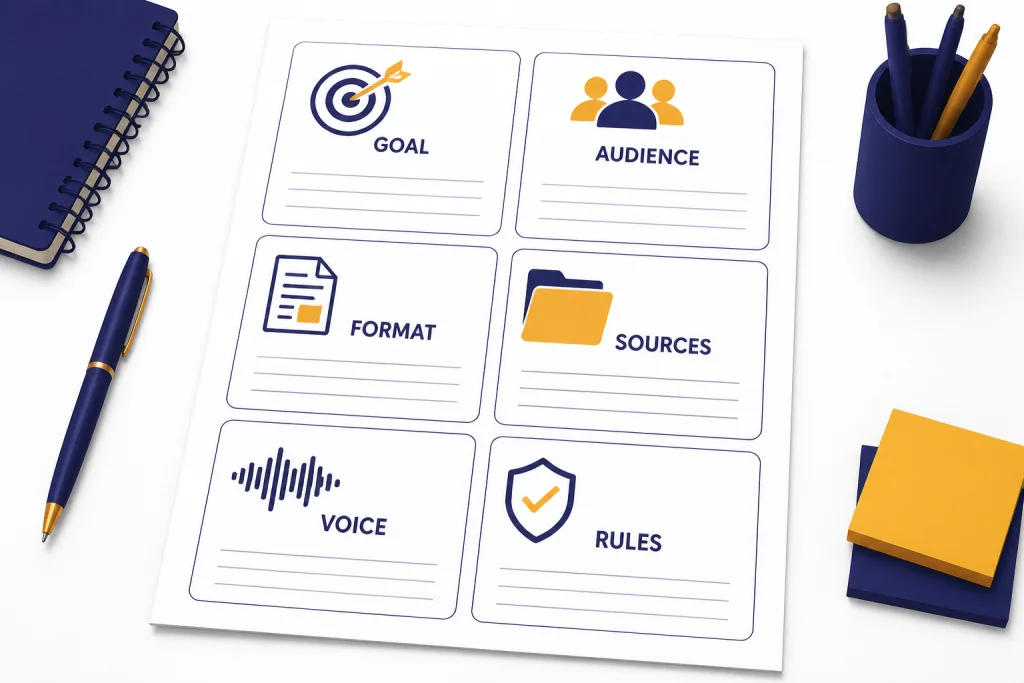
Use this structure for most writing tasks:
- Goal: what the piece should make the reader understand, believe, or do.
- Audience: who the reader is and what they already know.
- Asset type: blog post, email, landing page, memo, script, social post, or report.
- Source material: notes, interview transcript, product page, data, screenshots, PDFs, or links.
- Voice: plain, technical, friendly, executive, concise, skeptical, or instructional.
- Constraints: required sections, claims to avoid, terms to use, terms to ban, and formatting rules.
Here is a reusable prompt you can adapt:
You are my writing editor. Help me create a strong first draft from the brief below.

Goal: [what this content should accomplish]
Audience: [who will read it]
Asset type: [blog post, email, memo, script, landing page, etc.]
Voice: [plain, expert, practical, concise, etc.]
Source material: """
[paste notes, quotes, outline, product details, or research]
"""
Constraints:
- Do not invent facts.
- Flag missing information instead of guessing.
- Use short paragraphs.
- Give me an outline first, not the full draft.
The last line is important. Ask for the outline first. You can fix the structure before ChatGPT writes paragraphs. That keeps the draft from drifting. If you are working with long PDFs or source documents, use our PDF reading and summarizing tutorial before drafting so the source material is cleaner.
Choose the right ChatGPT workspace
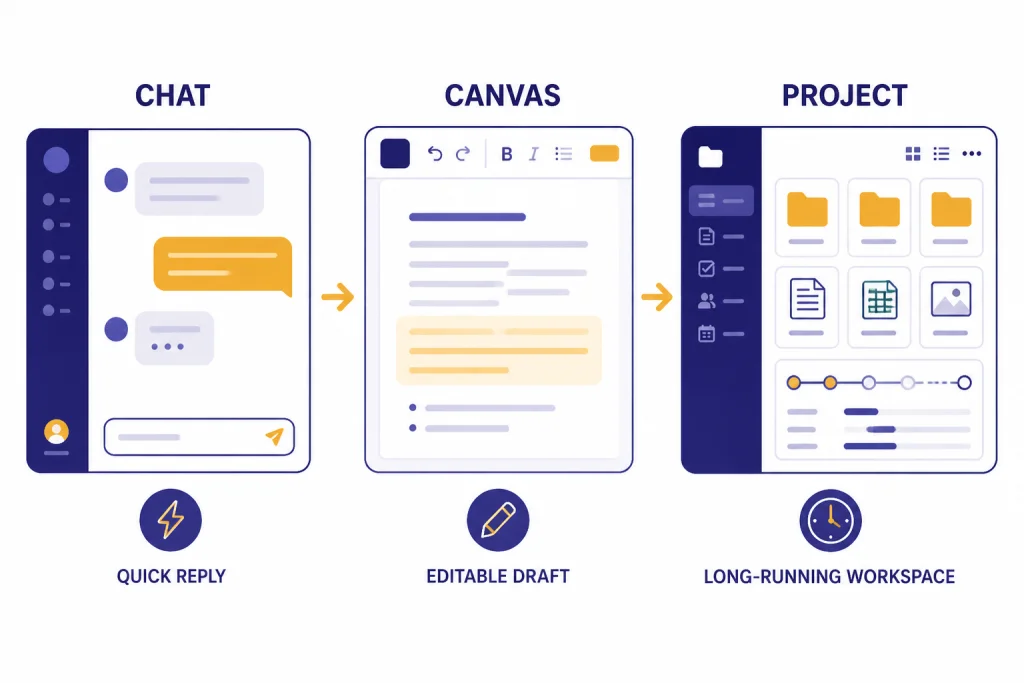
For quick copy, a normal chat is enough. For serious writing, use the workspace that matches the task. ChatGPT has several features that can support writing workflows, including Projects, file uploads, Memory, Search, and Canvas. Projects are designed to keep chats, uploaded reference files, and custom instructions together for long-running work such as writing and research.[3]
OpenAI says ChatGPT supports common file extensions for text files, spreadsheets, presentations, and documents, including XLSX, XLS, CSV, TSV, DOCX, PPTX, PDF, and TXT. It also says Google Docs files are not currently supported directly, so you should export them to another supported format first.[4]
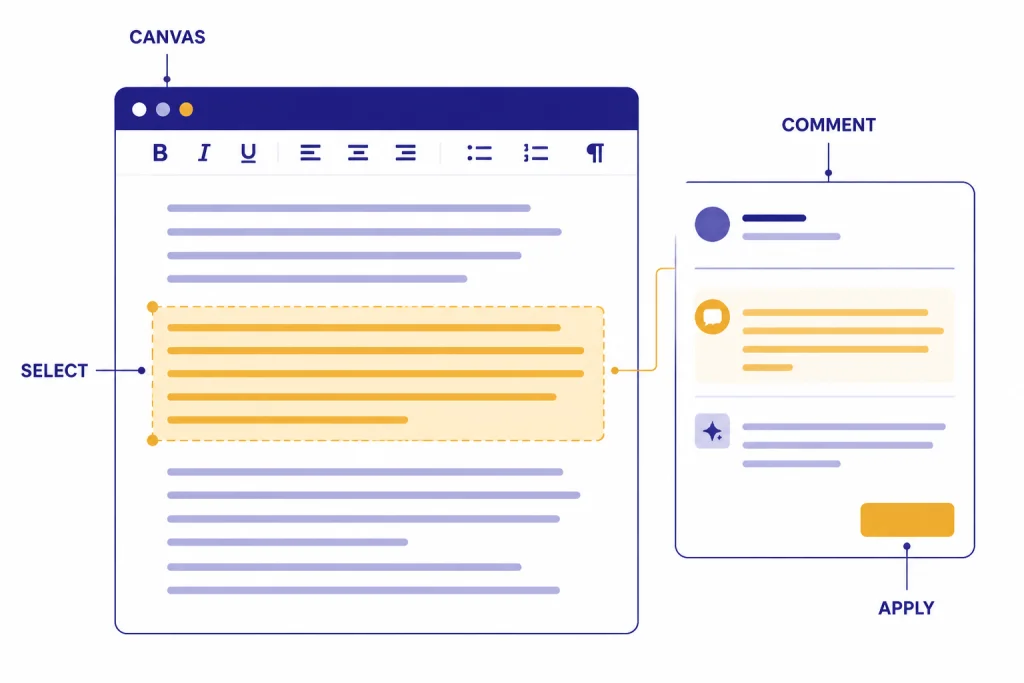
Canvas is useful when the writing project needs editing and revision rather than a single chat response. OpenAI describes Canvas as an interface for writing and coding projects that require editing and revisions. It can open when ChatGPT generates longer content, and OpenAI says users can ask directly to “use canvas” or open a blank canvas.[2]
| Writing situation | Best setup | Why it helps |
|---|---|---|
| Short email or headline options | Normal chat | Fast iteration with low setup. |
| Article, guide, or report | Canvas | You can revise sections without losing sight of the full draft. |
| Recurring brand or client work | Project | Keep reference files, tone rules, and related chats together. |
| Content based on PDFs or decks | File upload plus chat or Canvas | Use source files as context instead of relying on memory. |
| Current events, statistics, or product facts | Search or Deep Research | Current claims need sources and verification. |
| Personal voice preferences | Memory, used carefully | Store broad preferences, not full templates or private drafts. |
Memory can help with broad writing preferences, but it is not a substitute for a brief. OpenAI says Memory is intended for high-level preferences and details, not exact templates or large blocks of verbatim text.[7] If you want a repeatable setup for one client, publication, or course, use a Project and project instructions. Our ChatGPT memory tutorial explains when memory helps and when it gets in the way.
Draft with revision passes
The best ChatGPT writing workflow is not “prompt once and publish.” Use passes. Each pass gives ChatGPT one job, which makes the output easier to judge.
First pass: outline
Ask for a structure before prose. Tell ChatGPT to list the audience question answered by each section. This forces the outline to serve the reader instead of filling space.
Create an outline for this article. For each section, include:
- the reader question it answers
- the main point
- the evidence or example needed
- what should not be covered in that section
Second pass: rough draft
Once the outline works, ask for a rough draft. Make it clear that the draft should be practical and incomplete where facts are missing. This prevents the model from smoothing over gaps.
Write the rough draft from the approved outline. Use only the source material provided. If a claim needs evidence that is not in the source, write [NEEDS SOURCE] instead of inventing support.Third pass: reader value
Ask ChatGPT to critique the draft as the target reader. This is where it can spot thin sections, missing examples, and vague advice.
Review this draft as the target reader. Identify sections that feel generic, unsupported, repetitive, or too abstract. Suggest concrete examples that would make each weak section more useful.Fourth pass: edit
Now revise for clarity, not more content. Ask for shorter sentences, stronger verbs, and fewer throat-clearing phrases. If you write for search, this is also where you can align headings with intent. For a dedicated search workflow, use our ChatGPT SEO tutorial.
Final pass: publish checklist
Before publishing, ask for a checklist rather than another rewrite. The checklist should identify factual claims, missing citations, unclear transitions, and sections that need human review.
Edit for voice, clarity, and structure
Editing with ChatGPT works best when you separate voice from structure. If you ask it to “make this better,” it may rewrite too aggressively. Give it a narrow edit task.
For structure, ask:
Analyze the structure of this draft. Do not rewrite yet. Tell me where the argument jumps, where sections repeat, and where the reader needs a clearer transition.For clarity, ask:
Rewrite this section for clarity. Keep the meaning. Use shorter sentences, remove filler, and preserve any technical terms that are necessary.For voice, give ChatGPT samples. Do not say “make it sound like me” with no evidence. Paste a few short examples and ask it to infer practical rules.
Study the writing samples below. Extract the voice rules as a checklist. Then rewrite the draft using those rules without copying phrases from the samples.

Samples: """
[paste your samples]
"""
Canvas is especially useful here because you can highlight one paragraph and ask for a local edit. OpenAI says Canvas lets users select part of the content, provide guidance on that selected section, directly edit the content, and use basic Markdown formatting such as bold, italic, headers, bullet points, and numbered lists.[2] For a deeper walkthrough, see our ChatGPT Canvas tutorial.
Fact-check claims before publishing
ChatGPT can write fluent prose that still contains wrong facts. OpenAI says ChatGPT can produce incorrect or misleading outputs, including fabricated quotes, studies, citations, or references, and recommends verifying important information from reliable sources.[6] Treat this as a publishing rule, not a minor caveat.
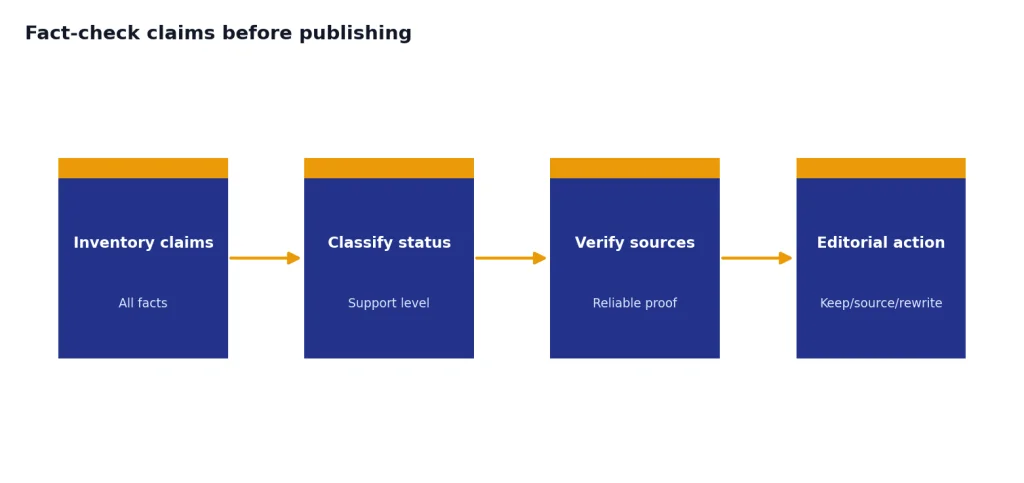
Use a source pass for any draft that includes dates, prices, legal claims, medical claims, financial claims, product comparisons, statistics, quotes, or current information. Ask ChatGPT to create a fact table:
Create a fact-check table for this draft. Include every factual claim that needs verification. Columns: claim, why it matters, source needed, current source if available, and recommended action.If your version of ChatGPT has Search enabled, use it for current or niche facts. OpenAI says ChatGPT can automatically search the web when a question may benefit from web information, and search answers may include inline citations and a Sources panel.[5] For heavier research tasks, use Deep Research when the answer needs multiple sources and a more formal evidence trail.
Do not ask ChatGPT to “add sources” after it has already invented unsupported claims. Instead, make it separate the draft into supported, unsupported, and opinion-based statements. Then decide what to remove, source, or rewrite.
A simple rule works well: if a fact would embarrass you if wrong, verify it outside the draft. If you are writing marketing copy, this includes performance claims, customer numbers, feature lists, and competitor comparisons. For campaign work, combine this tutorial with our ChatGPT marketing workflow so the creative draft and the proof layer stay separate.
Build a reusable prompt library
Once a prompt works, save it. A prompt library turns a one-off ChatGPT session into a repeatable writing system. Organize prompts by job, not by clever name.
Useful prompt categories include:
- Brief builder: turns notes into a complete content brief.
- Outline critic: finds missing sections and weak flow.
- Draft generator: writes from an approved outline and source packet.
- Voice extractor: turns samples into a style checklist.
- Section editor: rewrites one passage without changing meaning.
- Fact-check table: identifies claims that need verification.
- Repurposer: converts a finished asset into an email, script, or social post.
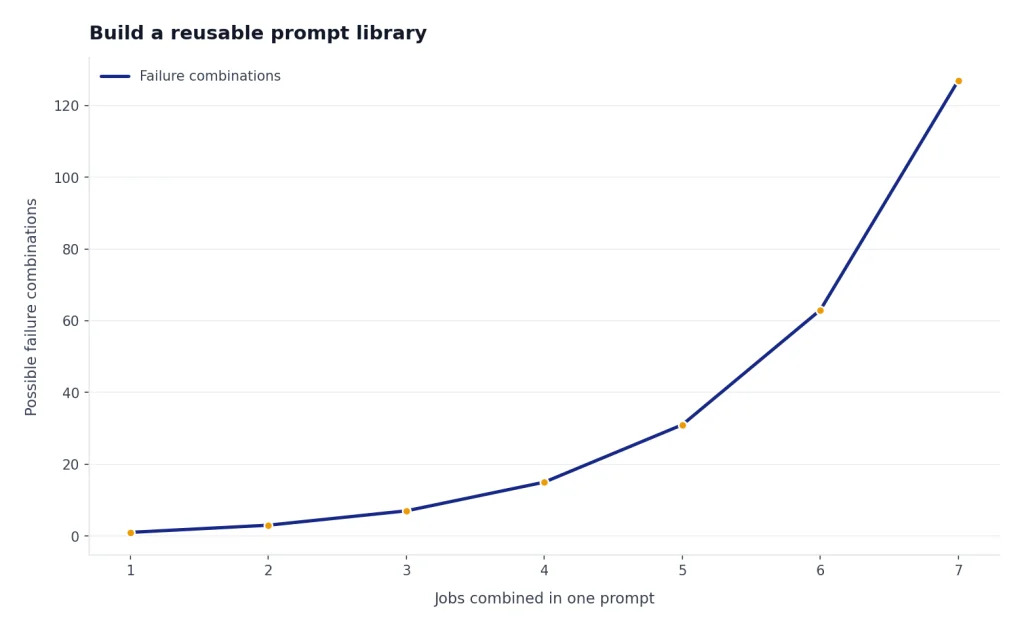
Keep each prompt modular. A giant prompt that tries to brief, draft, edit, fact-check, and repurpose at once is hard to debug. Smaller prompts let you see which part of the workflow is failing.
You can store prompts in a document, a Project, or a custom GPT. If your writing process is stable and you want a guided interface for teammates, our custom GPT tutorial is the better next step. If you want a flexible library you can copy into any chat, use our ChatGPT prompt generator guide.
Use this template for every prompt in the library:
Prompt name: [job it performs]
Best used for: [asset type]
Inputs needed: [brief, sources, draft, examples]
Prompt:
[paste prompt]
Quality check:
[how to know the output worked]
Common failure:
[what to watch for]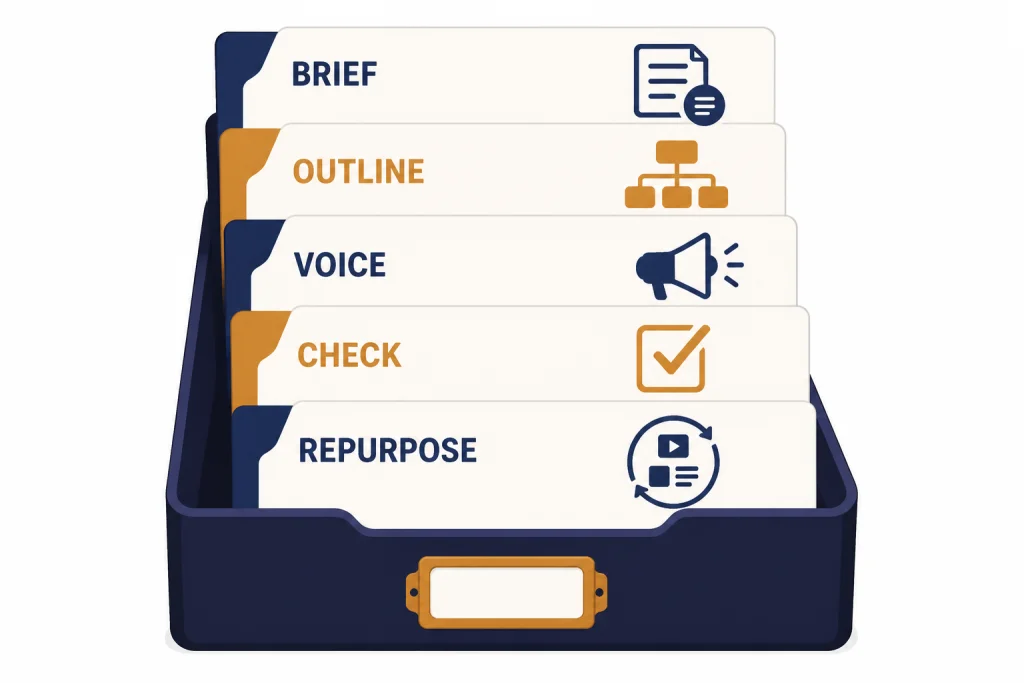
Common mistakes to avoid
The most common mistake is asking for polished prose too early. Drafts fail when the brief is vague, the source material is thin, or the outline is weak. Fix those layers before asking for style.
Another mistake is overusing tone adjectives. “Professional, friendly, clear, engaging, concise, and persuasive” sounds useful, but it gives ChatGPT too many vague targets. Replace adjectives with rules. Say “use direct sentences,” “avoid jokes,” “define technical terms on first use,” or “lead each section with the answer.”
Do not let ChatGPT remove your judgment. The model can suggest structure and language, but you still own the argument, evidence, taste, and ethics of the final piece. This matters most in regulated fields, client work, and content that represents a person’s lived experience.
Finally, do not use the same workflow for every format. A YouTube script needs spoken rhythm and retention beats, so start with our ChatGPT for YouTubers guide. A translation workflow needs meaning preservation and localization checks, so use our ChatGPT translation tutorial. A data-heavy article needs tables, calculations, and source review, so use the data analysis tutorial before writing the narrative.
The practical standard is not whether ChatGPT wrote the content. The standard is whether the final content is accurate, useful, original, and edited by a responsible human. Use ChatGPT to speed up the thinking and drafting process, but keep editorial control.
Frequently asked questions
Can ChatGPT write a full article for me?
Yes, ChatGPT can draft a full article, but you should not treat the first draft as publish-ready. Use it to create structure, generate wording options, and identify gaps. You still need to verify facts, edit for voice, and make sure the piece says something useful.
What is the best prompt for writing with ChatGPT?
The best prompt is a clear brief with audience, goal, format, source material, voice, and constraints. Ask for an outline first, then approve or revise that outline before requesting a draft. This produces better results than a single broad request.
Should I use Canvas for writing?
Use Canvas when the draft is long enough that you need to revise sections in place. It is helpful for articles, reports, scripts, and documents that require multiple edits. For short headlines or email options, a normal chat is usually faster.
How do I make ChatGPT match my writing style?
Give it samples and ask it to extract a style checklist before rewriting. The checklist should cover sentence length, paragraph style, tone, vocabulary, and formatting. Avoid asking it to copy exact phrases from your samples.
Can ChatGPT write SEO content?
Yes, but SEO content still needs search intent, original information, and accurate sourcing. ChatGPT can help turn an outline into readable sections and generate title or meta description options. It should not replace keyword research, editorial judgment, or source verification.
How do I stop ChatGPT from making things up?
Tell it to use only the provided source material and to mark missing evidence instead of guessing. Then run a fact-check pass that lists every claim needing verification. For current information, use Search or another reliable source workflow before publishing.