

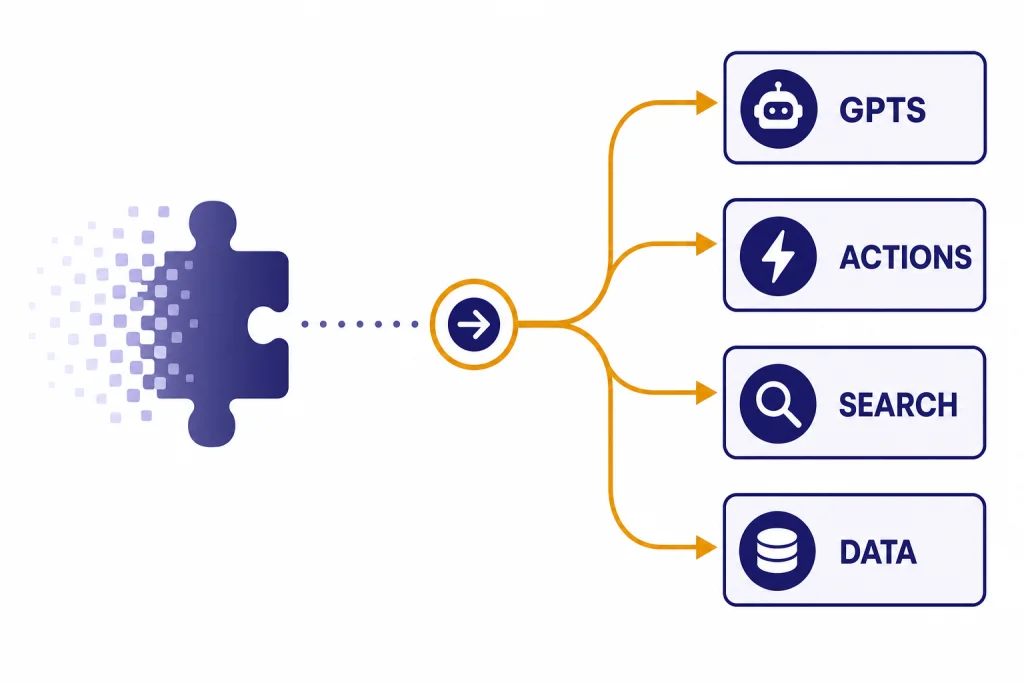
ChatGPT Plugins were OpenAI’s first attempt to let ChatGPT use outside tools, search the web, run code, and call third-party services. They are now a legacy feature. OpenAI marked plugins as deprecated, and third-party reporting from plugin vendors shows the shutdown happened in stages: new plugin conversations stopped on March 19, 2024, and existing plugin conversations stopped working on April 9, 2024.[1][2] The replacement is not one feature. It is a mix of GPTs, GPT Actions, built-in Search, Data Analysis, file upload, and newer app integrations. This guide explains what changed, what still exists under a new name, and what to use if an old plugin workflow no longer works.
What happened to ChatGPT Plugins
ChatGPT Plugins did not disappear because one vendor shut down. They were retired as a platform layer inside ChatGPT. OpenAI’s original plugin announcement now carries a deprecation note, which means the legacy plugin system is no longer the path OpenAI wants users or developers to rely on.[1]
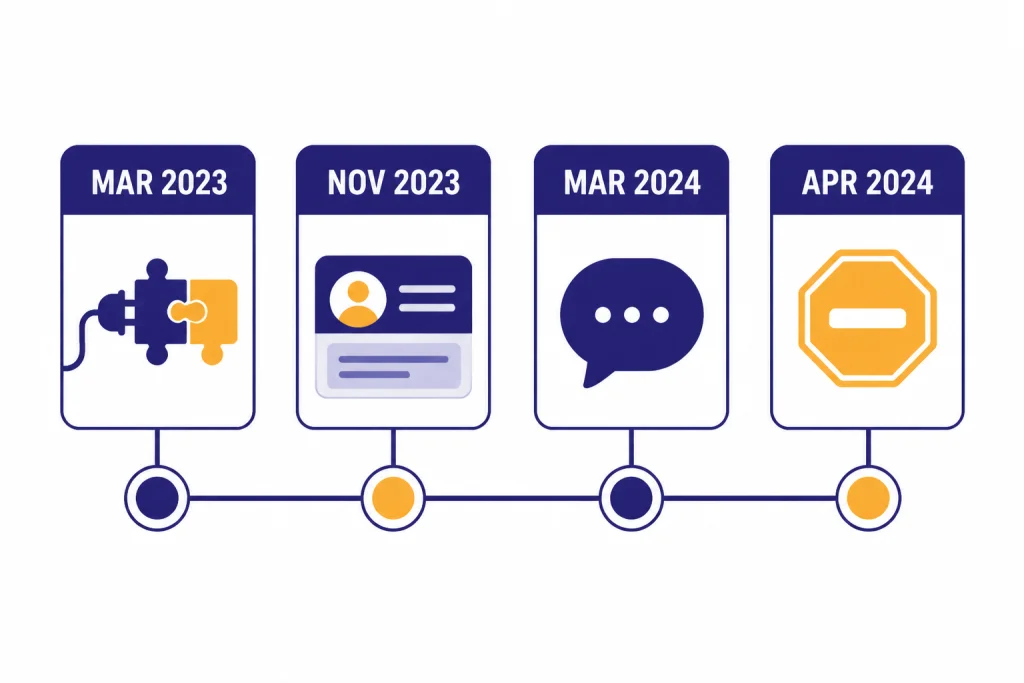
The shutdown happened after OpenAI introduced GPTs and the GPT Store. Zapier, one of the original plugin partners, told users that OpenAI would disable new conversations with its ChatGPT plugin on March 19, 2024, and that plugin conversations would stop working on April 9, 2024.[2] Techopedia reported the same two-date schedule and described GPTs as the replacement path.[3]
As of March 8, 2026, the practical answer is simple: ChatGPT Plugins are legacy, not an active feature. You should not expect to find the old Plugin Store, install a legacy plugin, or revive an old plugin chat. If you see old screenshots that mention the Plugins dropdown, they reflect a retired interface.
The naming can be confusing because many plugin jobs still exist. Web lookup now lives in ChatGPT Search and related browsing features. Code execution became Data Analysis. Third-party API calls moved toward GPT Actions and app integrations. Custom workflows moved into GPTs. If you are rebuilding an old plugin setup, start with ChatGPT Search, ChatGPT File Upload, and the GPT Store review before looking for a one-to-one plugin clone.
Why OpenAI retired the plugin model
OpenAI has not published a single official post that says, in plain language, “we retired plugins because of these exact reasons.” The available record points to a broader product shift. Plugins were launched as an experimental system. GPTs arrived later as a more user-facing way to package instructions, knowledge, and tools into a reusable assistant.[4] The GPT Store then gave users a central place to find those custom assistants.[5]
The original plugin design solved a real limitation. ChatGPT could generate text, but it could not reliably fetch current data, perform controlled actions, or access private information without a tool layer. OpenAI described plugins as tools for language models that could help ChatGPT access up-to-date information, run computations, or use third-party services.[1]
The same tool layer also created complexity. Users had to choose plugins, enable them, understand which one was active, and trust that each external service handled data appropriately. Builders had to expose an API, write a manifest, maintain authentication, and design around unpredictable natural-language requests. OpenAI also identified safety concerns early, including prompt injection, spam, fraud, and misuse of information sent to a plugin.[1]
GPTs changed the packaging. Instead of making users think in terms of a plugin attached to a chat, a GPT can define a whole assistant: instructions, conversation starters, knowledge files, capabilities, and external actions.[6] That is easier for many nontechnical users to understand. It also gives builders a single place to describe behavior and tool access. For broader task automation, users should also compare newer agent-style features such as ChatGPT Operator, because that category is closer to “do this on my behalf” than the old plugin picker ever was.
How legacy plugins worked
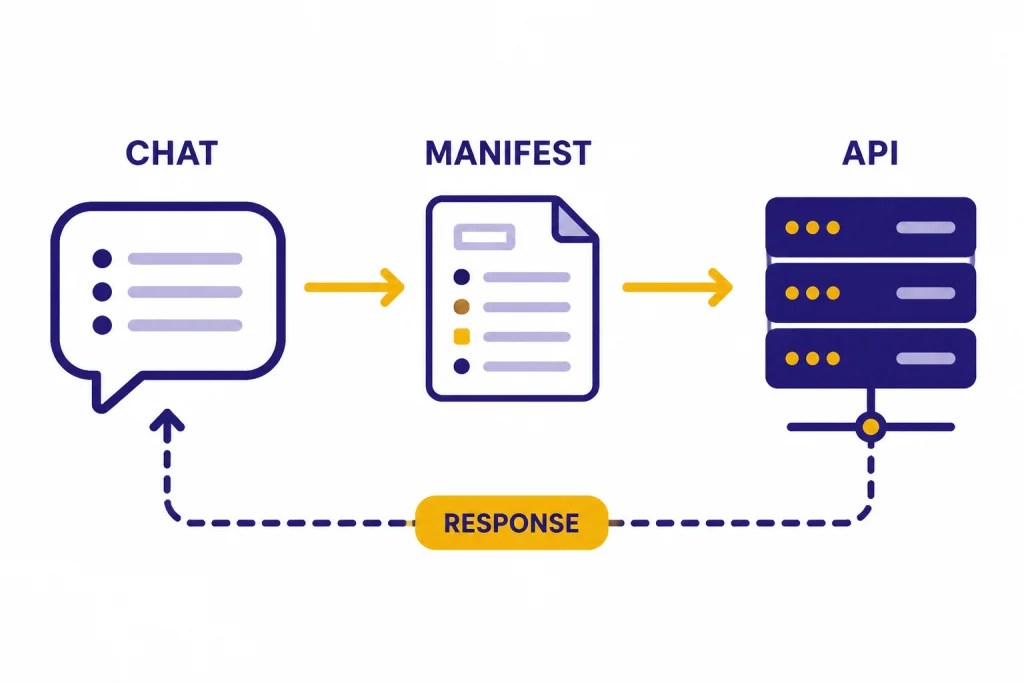
A legacy ChatGPT plugin was a bridge between ChatGPT and an outside service. The service exposed an API. The plugin supplied metadata that explained what the API could do. ChatGPT used that description to decide when to call the service and how to shape a request. OpenAI’s original post described third-party plugins as being defined by a manifest file with a machine-readable description of the plugin’s capabilities and instructions for the model.[1]
For users, the experience felt like installing a mini-app inside ChatGPT. A travel plugin could search flights. A shopping plugin could retrieve products. A productivity plugin could send data to another workflow. OpenAI’s first named plugin partners included Expedia, Instacart, KAYAK, Klarna, OpenTable, Shopify, Slack, Wolfram, and Zapier.[1]
OpenAI also used the plugin era to test built-in capabilities. The original announcement said OpenAI hosted a web browser plugin and a code interpreter plugin, and it open-sourced a retrieval plugin that developers could self-host.[1] Those ideas mattered. They became part of the way people now expect ChatGPT to work: search the web, analyze files, run code, and draw from custom knowledge. For deeper coverage of today’s code and file workflow, see our Code Interpreter tutorial and ChatGPT web browsing guide.
The weak point was that plugins were bolted onto a chat. A user had to know which plugin to select before asking. The model had to decide when to invoke it. The plugin had to return data in a form the model could use. If any link in that chain was vague, expired, rate-limited, or blocked by authentication, the user saw a failure that felt like a ChatGPT failure even when the outside service caused it.
What replaced ChatGPT Plugins
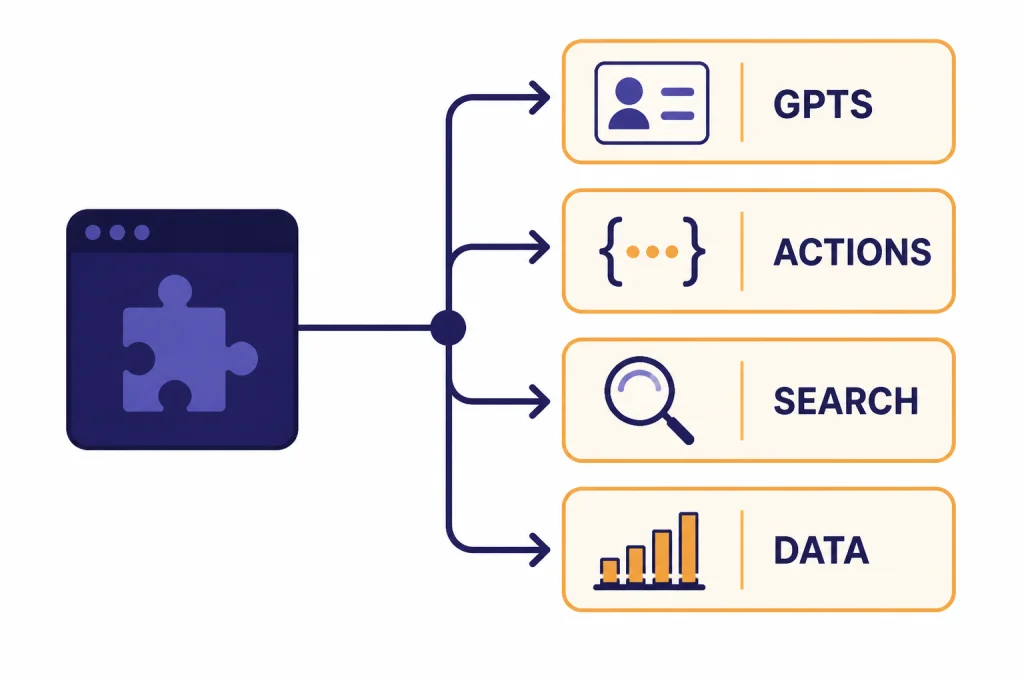
No single button replaced the old Plugin Store. The replacement depends on what you used the plugin for. In practice, most plugin use cases moved into four buckets: GPTs, GPT Actions, ChatGPT Search, and built-in analysis tools.
| Old plugin job | Current replacement | Best fit | Important difference |
|---|---|---|---|
| Search current web pages | ChatGPT Search | News, sources, local facts, recent information | Search can run automatically or be selected from tools, and responses include citations when search is used.[8] |
| Run calculations or analyze uploaded data | Data Analysis and file upload | Spreadsheets, charts, transformations, code-based work | The tool is built into ChatGPT rather than installed from a store. |
| Create a specialized assistant | GPTs | Reusable workflows, writing helpers, tutors, internal assistants | GPTs combine instructions, knowledge, and capabilities in one assistant.[6] |
| Call an outside API | GPT Actions | Business systems, databases, ticketing tools, workflow triggers | Actions use API schemas and authentication inside a custom GPT.[7] |
| Find public assistants made by others | GPT Store | Discovering task-specific GPTs | OpenAI launched the GPT Store on January 10, 2024, for Plus, Team, and Enterprise users.[5] |
GPTs are the closest everyday replacement. OpenAI introduced GPTs on November 6, 2023, as custom versions of ChatGPT that can combine instructions, extra knowledge, and skills such as web searching, image creation, or data analysis.[4] If you once used a plugin because you wanted “ChatGPT, but specialized,” a GPT is usually where to start.
GPT Actions are the closest developer replacement. OpenAI’s Actions documentation describes them as a way for ChatGPT users to interact with external applications through RESTful API calls using natural language.[7] A builder supplies an API schema, configures authentication, and writes instructions. ChatGPT then decides when an action is relevant and converts the user’s request into the structured API call.
Search is the closest replacement for browsing plugins. OpenAI’s ChatGPT Search help page says Search is available in ChatGPT on the web and in desktop and mobile apps, and that ChatGPT can search automatically when a question benefits from web information.[8] If your old plugin was mainly a way to avoid stale answers, the ChatGPT Search breakdown is the modern feature to learn.
Some use cases moved beyond plugins entirely. Voice, vision, image search, video understanding, and scheduled tasks are no longer best described as “plugins.” They are platform features. If your older plugin workflow involved images or media, compare ChatGPT Vision, ChatGPT Image Search, ChatGPT transcribe audio, and ChatGPT Tasks instead.
What users should do now
If you only remember the old Plugin Store, do not spend time trying to restore it. Treat the plugin name as a historical clue. Ask what job the plugin performed, then choose the current ChatGPT feature that matches that job.
- For current facts: use Search or ask ChatGPT to search the web. Search responses include inline citations when web search is used.[8]
- For documents: upload the file directly, or use a GPT with knowledge if the same reference material should be reused.
- For spreadsheets and calculations: use Data Analysis rather than looking for a Wolfram-style or spreadsheet plugin.
- For repeatable workflows: create or find a GPT that already has instructions, files, and tools configured.
- For third-party accounts: use a GPT, app integration, or Action only if you trust the external service that receives your data.
Be careful with old plugin lists. Many articles from 2023 ranked plugins by category, but those rankings are now mainly archival. A plugin that was excellent in 2023 may have no live ChatGPT equivalent in 2026. The brand may have moved to its own GPT, its own app, a browser extension, or no ChatGPT integration at all.
Also check privacy expectations. OpenAI’s GPT help page says GPT builders cannot view individual conversations users have with their GPTs, but it also warns that GPTs can be integrated with apps and external APIs, and relevant parts of your input may be sent to the third-party service.[9] That is the same practical risk users had with plugins: once a tool connects to an outside service, your prompt may leave the ChatGPT environment for that task.
If you are organizing long-running work, a GPT is not always the right container. A project may be better if you need multiple conversations, shared files, and ongoing context. See ChatGPT Projects for that workflow. If your issue is personalization rather than tools, ChatGPT Custom Instructions may solve more with less setup.
What developers should do now
Developers should not build for the legacy plugin protocol. Build for GPT Actions, the OpenAI API, or your own application surface. Which path you choose depends on who controls the user experience.
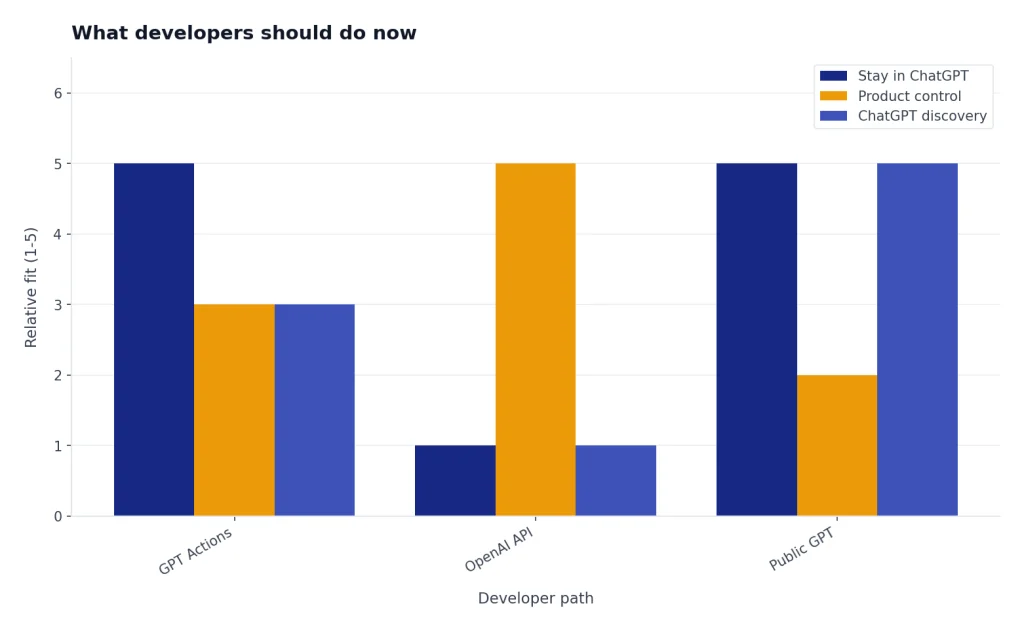
Use GPT Actions when the user should stay inside ChatGPT. OpenAI’s Actions documentation says Actions are stored in Custom GPTs and connect ChatGPT to third-party services through RESTful APIs.[7] This is the natural replacement for “let ChatGPT call my service.” It requires a clear API, a schema, authentication design, and testing inside the GPT builder.
Use the OpenAI API when you are building a product outside ChatGPT. OpenAI’s GPT help page draws a clear boundary: GPTs are no-code assistants built and used inside ChatGPT, while API-built assistants are developer-built integrations inside an external website or service.[9] If you need full control over UI, logging, permissions, billing, or workflow orchestration, the API is usually the better foundation. Our OpenAI API pricing guide can help you estimate the cost side of that decision.
Use a public GPT when distribution inside ChatGPT matters more than deep product control. The GPT Store gives users a place to find custom assistants, but store discovery is not the same as owning a customer relationship. A public GPT can be useful for education, lightweight support, and lead-in workflows. It is less suitable for mission-critical software that needs guaranteed uptime, audit trails, or complex account management.
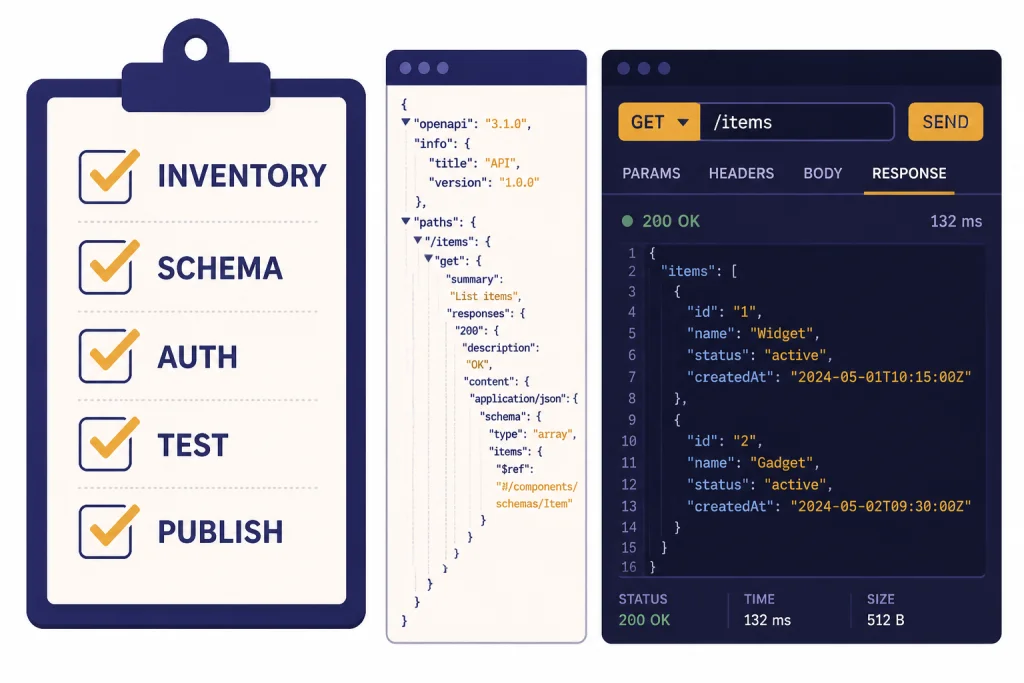
A practical migration plan starts with inventory. List each legacy plugin endpoint, authentication flow, user action, and failure mode. Then decide whether the replacement is a GPT instruction, a knowledge file, a built-in capability, an Action, or an external app. Do not recreate every old feature by default. Many plugin-era designs existed only because ChatGPT did not yet have Search, Data Analysis, or stronger native file handling.
- Identify the user job the plugin performed.
- Remove any feature now covered by built-in ChatGPT tools.
- Move stable reference content into GPT knowledge or your own retrieval system.
- Expose only necessary operations through a narrow API schema.
- Choose no auth, API key auth, or OAuth based on the risk of the action.
- Test prompts that should call the action and prompts that should not.
- Document what data is sent outside ChatGPT.
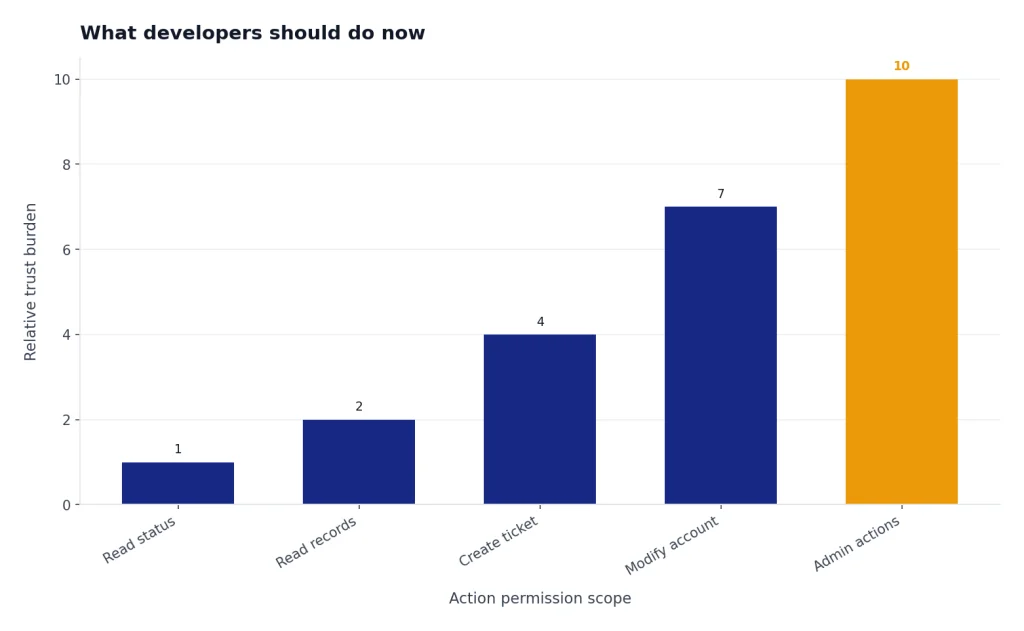
The best replacement is often smaller than the old plugin. A tightly scoped Action that retrieves an order status is easier to trust than a broad Action that can read and modify an entire account. The plugin era rewarded broad demos. The GPT era rewards narrower permissions and clearer user expectations.
Frequently asked questions
Can I still use ChatGPT Plugins?
No. ChatGPT Plugins are a legacy feature. OpenAI’s original plugin page now says plugins have been deprecated, and vendor notices show plugin conversations stopped working in April 2024.[1][2] Use GPTs, Search, Data Analysis, or GPT Actions instead.
What was the difference between plugins and GPTs?
A plugin was mainly a tool connection. A GPT is a packaged assistant that can include instructions, conversation starters, knowledge, and capabilities.[6] GPTs can also connect to external APIs through Actions, which is why they replaced many plugin-style workflows.
Did the Code Interpreter plugin go away?
The old plugin label went away, but the capability did not disappear. OpenAI’s original plugin post described Code Interpreter as an OpenAI-hosted plugin that could use Python and handle file uploads and downloads.[1] Today, users generally encounter that kind of work through Data Analysis and file upload rather than through the old Plugin Store.
Are GPT Actions the same as plugins?
No. They solve a similar problem, but the structure is different. GPT Actions live inside Custom GPTs and use API schemas plus authentication settings to connect with external services.[7] Legacy plugins were installed from the old Plugin Store and attached to chats through the plugin interface.
Why do old plugin articles still rank in search results?
Many plugin articles were written during the 2023 beta period, when plugins were new and widely covered. Those posts may still describe useful categories, but the installation steps are outdated. Check whether the vendor now offers a GPT, an app integration, a browser extension, or a standalone product.
What should I use instead of a web browsing plugin?
Use ChatGPT Search. OpenAI says ChatGPT can search the web automatically when your question benefits from web information, and you can also choose Search from the tool picker.[8] For source-heavy research, ask for citations and verify the linked pages yourself.