

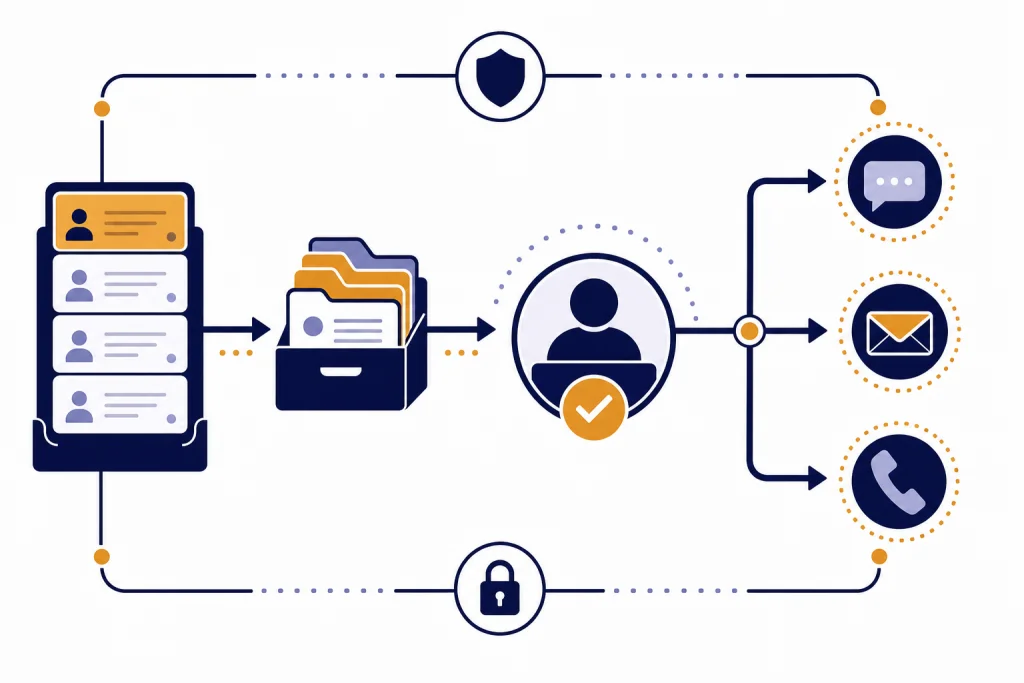
ChatGPT customer service works best when you treat it as a governed helpdesk layer, not a magic replacement for support agents. Start with a narrow set of repeatable questions, connect the system to approved help content, route risky requests to humans, and measure resolution quality before you expand. A small team can begin with ChatGPT Business for internal drafting and agent assistance. A product team that needs a public chatbot should use the API, retrieval, logging, and escalation controls. The goal is simple: answer routine questions faster while keeping ownership, refunds, account access, medical, legal, safety, and angry-customer edge cases under human review.
What you are building
A ChatGPT customer service helpdesk is a support workflow that uses ChatGPT or the OpenAI API to classify tickets, retrieve approved answers, draft replies, summarize conversations, and trigger human escalation. It should not invent policies. It should not make account decisions without controls. It should not answer from memory when the answer depends on your current terms, inventory, warranty, shipping rules, or billing system.
The safest first version is an internal assistant for agents. It reads a ticket, finds the relevant policy, drafts a reply, and leaves the final send button to a trained support person. This gives you value quickly because agents spend less time searching, rewriting, and summarizing. It also gives you review data before customers ever see automated replies.
The next version can automate low-risk questions. Good candidates include order status explanations, password reset instructions, return-window summaries, product setup steps, and basic troubleshooting. Bad candidates include chargebacks, threat reports, legal complaints, medical advice, financial decisions, employment disputes, insurance eligibility, and any case where a wrong answer could deny access to a critical service. OpenAI’s usage policies prohibit automation of high-stakes decisions in sensitive areas without human review.[8]
Think of the system as a queue manager plus a writing assistant. The durable asset is not the prompt. The durable asset is the operating model: a clean knowledge base, clear escalation rules, ticket metadata, audit logs, and a quality review loop.
OpenAI’s own support operations article describes a shift beyond using AI only as a chatbot for deflecting tickets. The article frames support as a system of interactions, evaluations, internal tools, and feedback loops that improve over time.[9]
More use cases for support teams
For larger teams, ChatGPT can connect to support data and internal knowledge. OpenAI’s Help Scout app page says ChatGPT can query and summarize Help Scout conversations and threads, draft replies for issues such as refunds or bugs, and review patterns across conversations.[10]
Help center maintenance is often overlooked. Support teams see repeated confusion before product and marketing teams do. OpenAI’s Help Scout app examples include turning conversations into a help center article outline and finding refund patterns that could reduce ticket volume.[10] That is a good model for content operations: use tickets as evidence, not as copy to publish unchanged.
Escalation prep is useful because engineers, finance teams, and trust teams need structured facts. ChatGPT can rewrite a rambling ticket into a concise internal escalation. It can separate observed facts from customer claims and list what evidence is still missing.
Quality review helps managers coach consistently. Ask ChatGPT to score whether a reply answered the actual question, followed policy, acknowledged emotion, and gave a clear next step. Use the output as a coaching aid, not as the only basis for performance management.
Trend analysis turns support from a reactive queue into a signal source. A manager can ask for recurring themes by tag, customer segment, plan, or product area. OpenAI says ChatGPT apps can reference internal knowledge, and its prompt examples include drafting updates, synthesizing documents, and generating tables from connected information.[11]

Choose your ChatGPT customer service setup
You have three practical ways to use ChatGPT for customer service. The right choice depends on whether the AI is helping your agents, speaking directly to customers, or operating inside a larger product. If you are still learning the basics, review what you are building before you commit engineering time.
| Setup | Best use | What you control | Main limitation |
|---|---|---|---|
| ChatGPT Business workspace | Internal agent assist, saved prompts, shared GPTs, team collaboration | Workspace access, members, roles, billing, and shared support workflows | It is separate from API usage, so it is not the same as a custom public chatbot |
| OpenAI API helpdesk integration | Customer-facing chat, ticket routing, product workflows, CRM actions | App logic, retrieval, logs, rate handling, escalation, and support UI | You own the engineering, testing, monitoring, and incident response |
| Hybrid model | Agent assist first, selected automation later | Human review for risky tickets and API automation for safe repeat questions | Requires a clear boundary between drafts, automation, and final decisions |
ChatGPT Business is a self-serve workspace for organizations that want shared ChatGPT access, centralized billing, admin controls, usage visibility, and spend controls.[1] OpenAI’s help center states that standard ChatGPT seats include ChatGPT and Codex access, use a fixed per-user monthly billing model, and require a minimum of two standard seats.[1]
OpenAI’s business pricing page lists Business ChatGPT and Codex at $20 per user per month when billed annually, includes access to more than 60 apps, and describes Enterprise as custom pricing with expanded security, data residency, support, and account-management options.[2] If budget is the main question, compare this with ChatGPT Plus price in 2026 and OpenAI API pricing before you buy seats or start an integration.
OpenAI’s Help Center says that for most countries, ChatGPT Business pricing is USD $25 per user per month on monthly billing or USD $20 per user per month on annual billing; it also notes a USD $5 per month reduction announced on April 2, 2026.[12]
Use ChatGPT Business when agents need help writing, summarizing, and searching internal guidance. Use the API when your customer needs a real-time answer inside your website, app, email queue, or helpdesk platform. OpenAI’s help center says a ChatGPT Business subscription does not include API usage and that API usage is billed separately.[1]
Design the ticket workflow
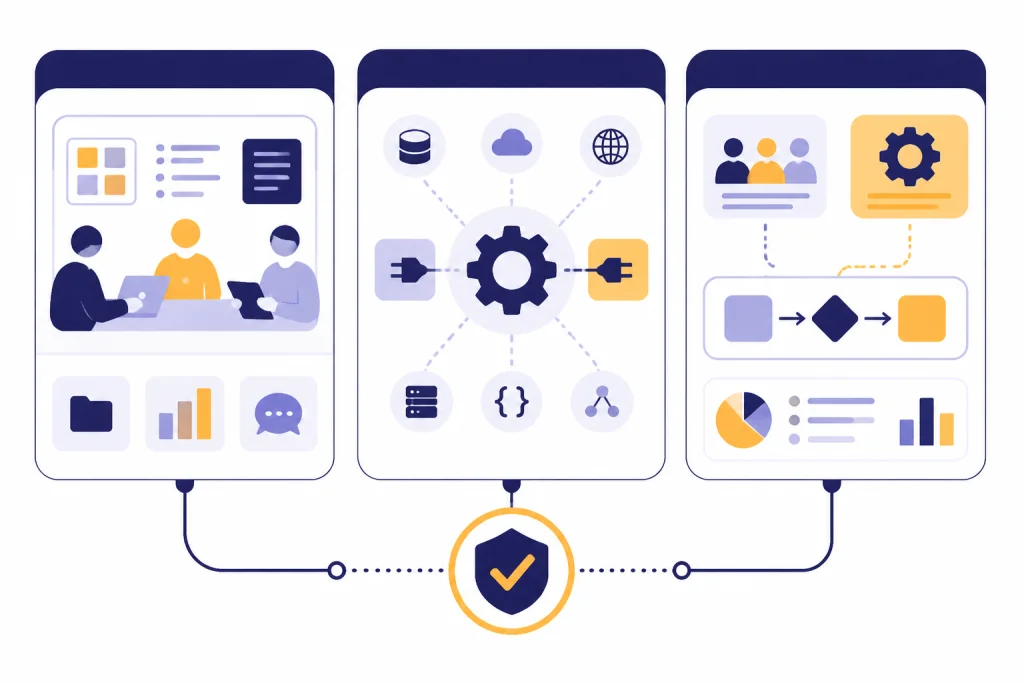
A support AI should have a predictable path from intake to resolution. The workflow below is a practical baseline for ecommerce, SaaS, creator businesses, agencies, local services, and B2B support desks.
- Intake: capture the customer message, channel, account state, language, product, order, and urgency.
- Classification: tag the issue type, sentiment, risk level, and required system access.
- Retrieval: search approved support articles, internal policy pages, product docs, and prior templates.
- Draft: write an answer that cites the policy source internally and asks for missing information when needed.
- Action: either create a human-reviewed draft, send an approved low-risk reply, or call a business system through a controlled tool.
- Escalation: hand off cases involving anger, identity, refunds outside policy, safety, legal threats, regulatory language, or low confidence.
- Logging: store the prompt, retrieved sources, output, decision, agent edits, customer rating, and final resolution status.
The API path is more flexible because your application can decide which tools the model may use. OpenAI’s Responses API supports text and image inputs, generated text or JSON outputs, built-in tools such as file search and web search, and function calling for access to your own systems.[5] That matters for customer service because the model should not simply answer. It should gather context, check your policies, choose a safe path, and return structured data your helpdesk can use.
For example, an order-status request should not be answered from a generic policy article. The assistant should classify the request, call an order lookup function, verify the customer is authorized to see that order, and then draft a short update. A refund request should retrieve the refund policy, check the order date, inspect exceptions, and escalate when the case falls outside the approved rule.
If you build this in the API, plan for errors before launch. Rate limits, timeouts, invalid requests, and overloaded downstream systems will happen. Keep a human fallback and log request IDs so engineers can troubleshoot production failures. OpenAI recommends logging request IDs in production deployments for more efficient troubleshooting with support.[5] For implementation details, keep OpenAI API Errors close to your runbook.

Prepare the knowledge base
Your answers are only as reliable as your source material. Before you automate anything, clean the documents agents already use. Remove duplicate policies. Mark outdated pages. Split long documents into focused topics. Put effective dates on shipping rules, refund rules, warranty limits, product compatibility, privacy terms, and escalation criteria.
A good support knowledge base has four layers. Public answers cover the wording customers can see. Internal policy notes explain exceptions and approval limits. Product data provides structured details such as plan names, SKUs, regions, and supported devices. System data provides live account, order, subscription, or ticket status. Do not blur these layers. A customer-facing answer should not reveal internal fraud rules or private account data.
OpenAI’s file search tool can retrieve information from files and return output through the Responses API, with the hosted retrieval work managed by OpenAI.[6] That can help a team move faster, but retrieval still needs governance. Decide who can upload files. Decide which files are authoritative. Decide when stale files expire. Decide how agents report a bad source.
For visual support, consider whether screenshots, invoices, damaged-product photos, or setup images are part of your workflow. If your use case requires image understanding, review the OpenAI Vision API and keep image handling separate from general chat until you have privacy rules for uploads.
The most common knowledge-base mistake is adding too much. Start with the top issues that produce repetitive tickets. Then add the policies that agents already trust. If a document is ambiguous for a human, it will be ambiguous for the AI. Fix the source before tuning the prompt.

Write prompts and handoff rules
Prompting for support is less about clever wording and more about boundaries. The system should know its role, sources, tone, refusal rules, escalation rules, and output format. A good support prompt tells the model to prefer retrieved policy over general knowledge, ask for missing facts, never promise exceptions, and escalate when confidence is low.
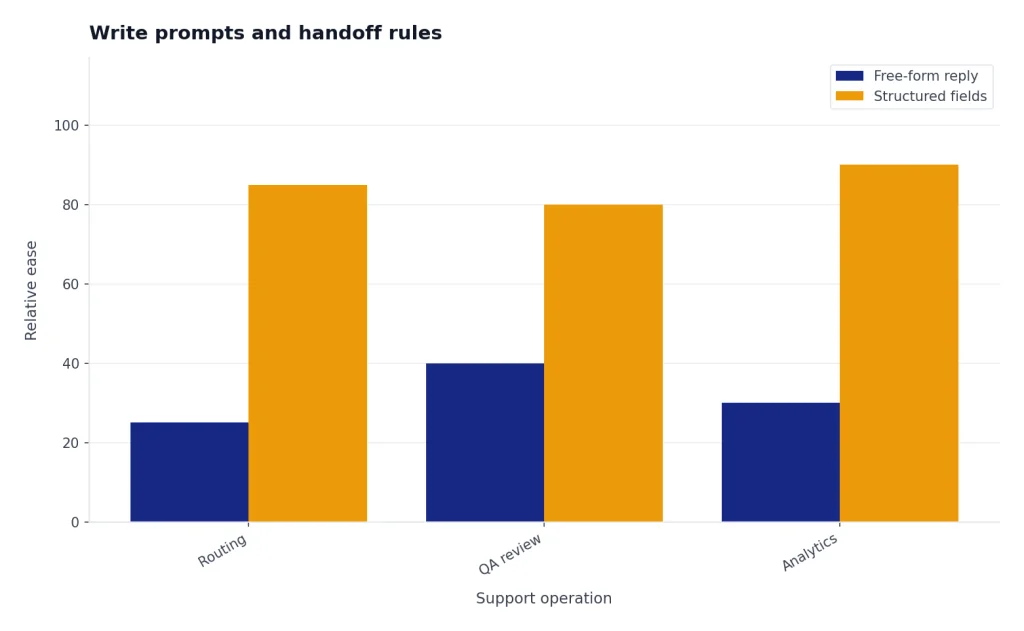
Use structured outputs where possible. A draft reply is useful, but a support operation also needs fields such as issue_type, confidence, risk_level, escalation_reason, source_ids, next_action, and customer_visible_reply. Structured data makes routing, QA, and analytics easier than reading free-form paragraphs after the fact.
Here is a compact pattern you can adapt for an internal agent assistant:
You are a customer support drafting assistant.
Use only approved support sources and verified account facts.
If the policy is missing, unclear, or risky, escalate.
Do not invent refunds, delivery dates, warranties, discounts, or legal commitments.
Return: issue_type, risk_level, missing_info, escalation_needed, draft_reply, and source_notes.
Handoff rules should be explicit. Escalate when the customer mentions fraud, safety, self-harm, harassment, discrimination, legal action, regulatory complaints, chargebacks, account takeover, minors, medical issues, employment, credit, insurance, law enforcement, or government benefits. OpenAI’s usage policies call out privacy protections and prohibit automation of high-stakes decisions in sensitive areas without human review.[8]
If your team wants someone to own prompt quality, treat it as an operations role, not a novelty role. The person should understand support policy, QA, data handling, and escalation. For training paths, see prompt engineering certification. For hiring and role design, compare prompt engineering jobs and prompt engineering salary in 2026.
Store prompts in a shared support playbook. Review them when policies change. If your company has multiple brands, regions, or product lines, create variants instead of forcing one generic prompt to cover every case.
Ticket summary prompt
You are assisting a customer support agent. Summarize this ticket in five fields: customer issue, timeline, actions already taken, customer sentiment, and recommended next step. Do not invent facts. If a fact is missing, write “missing.”
Escalation prompt
Prepare an internal escalation for engineering. Include expected behavior, actual behavior, reproduction steps, customer impact, affected account details, evidence, and unresolved questions. Separate confirmed facts from assumptions.
QA review prompt
Review this agent reply against the support policy and tone guide. Return: strengths, risks, missing information, policy concerns, and a revised version. Do not criticize the agent personally. Focus on coaching and customer outcome.
Measure cost, quality, and risk
Do not judge a ChatGPT customer service project only by ticket deflection. Deflection can hide bad outcomes if customers give up, reopen tickets, or accept wrong answers. Measure speed, accuracy, agent edit distance, escalation precision, customer satisfaction, first-contact resolution, reopen rate, refund error rate, and policy compliance.
Cost has two layers. ChatGPT Business is seat-based for standard workspace users, while API usage is billed separately.[1] The API pricing page lists model and tool prices by usage, including token-based model pricing and separate tool pricing for web search.[4] For large offline workloads such as summarizing old tickets or classifying a backlog, compare the OpenAI Batch API, because batch processing can be cheaper for work that does not need an immediate answer.
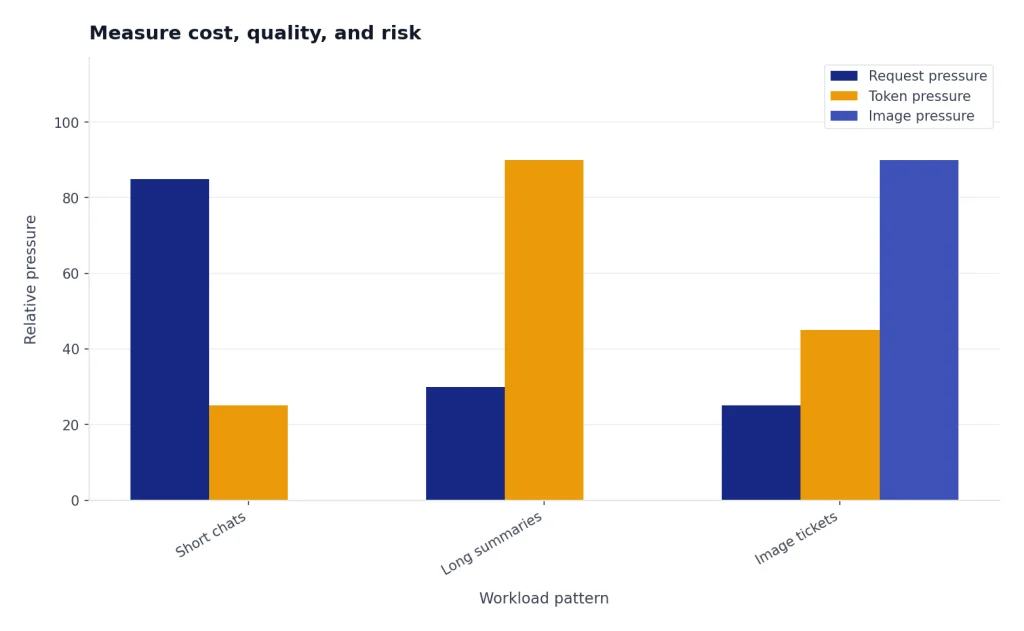
Rate limits also affect cost and reliability planning. OpenAI’s rate-limit guide says limits are measured in five ways: requests per minute, requests per day, tokens per minute, tokens per day, and images per minute.[7] That means a helpdesk can fail from too many requests, too many tokens, or too many image jobs even when the other counters look safe.
Create a weekly review set. Sample answered tickets from each issue type. Mark whether the AI used the right source, followed policy, escalated correctly, matched brand tone, and avoided unsupported promises. Track the agent’s edits. If agents repeatedly rewrite the same part of the answer, your prompt or source material is wrong.
Use a simple scorecard before expanding automation:
| Metric | Healthy signal | What to do when it fails |
|---|---|---|
| Source match | The reply is grounded in the right policy or account fact | Fix retrieval, rename documents, or remove stale files |
| Escalation quality | Risky cases reach humans before a customer-visible decision | Add trigger phrases, lower confidence thresholds, and audit edge cases |
| Agent edit distance | Agents make light edits instead of rewriting from scratch | Revise prompt format, tone examples, and source snippets |
| Reopen rate | Customers do not return because the first answer was incomplete | Ask better clarifying questions and improve troubleshooting flows |
| Policy error rate | The assistant does not promise exceptions or unsupported remedies | Lock down refund, warranty, billing, and legal language |
Managers should also track agent experience. If ChatGPT reduces repetitive writing but adds review anxiety, the process needs adjustment. If agents over-trust drafts, the training needs adjustment. The operating goal is balanced assistance: less busywork, more attention to judgment.
Secure the helpdesk before launch
Support teams handle personal data. That makes privacy and access control part of the product, not an afterthought. Limit what the AI can see. Mask sensitive fields when they are not needed. Separate customer-visible content from internal notes. Keep administrative tools away from draft-only assistants.
OpenAI says business data from ChatGPT Business, ChatGPT Enterprise, ChatGPT for Healthcare, ChatGPT Edu, ChatGPT for Teachers, and the API Platform is not used to train models by default.[3] OpenAI also states that business users own and control inputs and outputs where allowed by law.[3] These commitments help, but they do not replace your own privacy review, data-processing agreements, retention policy, or sector-specific obligations.
For ChatGPT Business, OpenAI says workspace data is not used for training and that Business is governed by OpenAI’s business terms and enterprise privacy policies.[1] For Enterprise, OpenAI’s pricing page describes additional controls such as SCIM, Enterprise Key Management, user analytics, domain verification, role-based access controls, data residency, and priority support.[2] If you need zero data retention, BAAs, invoice billing, purchase orders, or custom legal terms, OpenAI’s help center points teams toward contracted offerings rather than self-serve ChatGPT Business.[1]
Build your own safety checklist before launch. Decide who can edit prompts. Decide who can publish knowledge-base files. Decide what logs are retained. Decide when a human must approve an answer. Decide how customers can reach a person. Decide how you will pause automation during an incident.
Roll out without breaking support
Roll out in phases. First, use ChatGPT only for internal summaries and drafts. Next, add classification and suggested macros. Then allow automated replies for a narrow group of low-risk tickets. Only after the system performs well should you connect tools that make account changes, issue credits, cancel subscriptions, or update records.
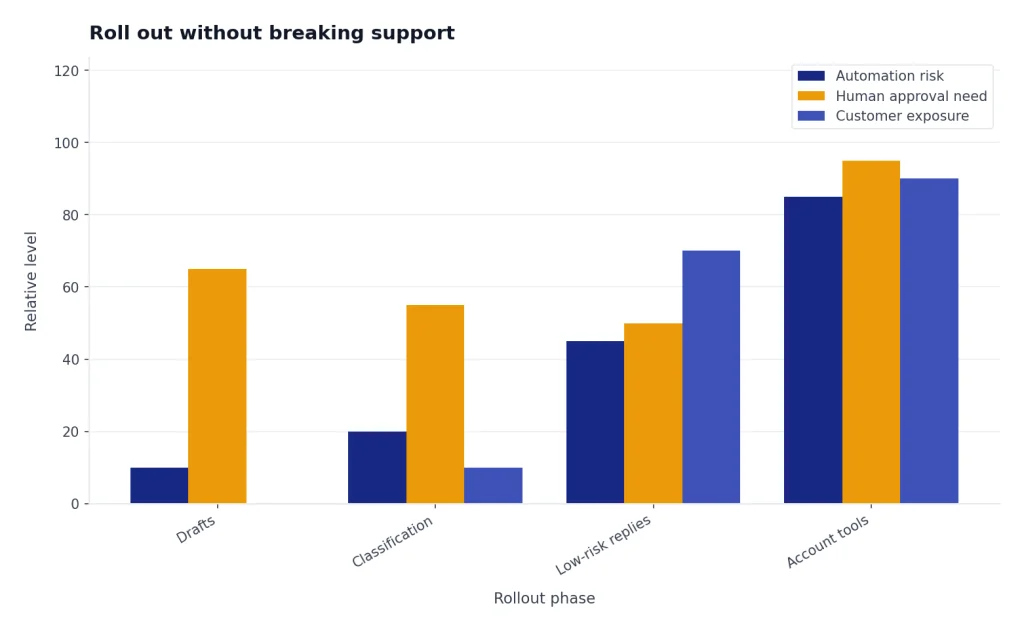
Start with one queue. Pick a queue with high volume, clear policies, and low downside. Product setup, shipping explanations, appointment preparation, and basic SaaS onboarding are better first choices than billing disputes or account security. If the queue needs strong domain expertise, train support leads before you train the model.
Before you expand, create a small evaluation set. Pick real historical tickets that represent common issues, edge cases, angry customers, policy ambiguity, and escalations. Ask experienced agents to create ideal summaries and replies. Then compare ChatGPT-assisted outputs against those examples.
Train the team. Teach agents how to provide context, how to challenge the draft, and how to spot hallucinated facts. Make it normal to reject the AI output. A support culture that treats ChatGPT as a junior drafting assistant will make better decisions than one that treats it as an oracle.
Write a launch runbook. It should include supported intents, banned intents, escalation triggers, fallback copy, known failure modes, owner names, monitoring dashboards, and rollback steps. If your business uses ChatGPT for sales, onboarding, or content production as well as support, keep those systems separate. A marketing assistant should not have the same permissions as a customer account assistant. For adjacent business workflows, see how to use ChatGPT to make money online and the chatgpt business plan generator.
Finally, tell agents what the system is for. It is not there to grade them or replace judgment. It is there to reduce repetitive work, improve consistency, and make policy easier to apply. The best implementations let agents correct the assistant, flag bad sources, and improve the workflow over time.
Frequently asked questions
Can ChatGPT replace customer service agents?
It can replace some repetitive drafting and answering work, but it should not replace human judgment across the whole support desk. Use it for summaries, suggested replies, routing, and low-risk questions first. Keep humans in charge of exceptions, complaints, account security, and sensitive decisions.
Should I use ChatGPT Business or the OpenAI API for support?
Use ChatGPT Business when your agents need a shared internal workspace for drafting, analysis, and team knowledge. Use the OpenAI API when you need a customer-facing chatbot, CRM integration, ticket automation, retrieval, and custom business logic. OpenAI says ChatGPT Business and API usage are separate, with API usage billed independently.[1]
What support tickets should not be automated?
Do not fully automate legal threats, medical advice, financial decisions, employment issues, insurance decisions, account takeover, fraud, safety reports, or angry escalation cases. These should route to trained staff. Your AI can still summarize the case and gather facts for the human agent.
How do I stop ChatGPT from making up support policies?
Make the assistant answer only from approved sources and verified account data. Add instructions to ask for missing information and escalate when the source is unclear. Review samples weekly and fix the knowledge base when the model repeatedly uses the wrong policy.
Can ChatGPT handle multilingual customer service?
Yes, but you should test each supported language with real tickets and native reviewers. Policies, tone, and legal wording can shift when translated. For important markets, maintain approved templates and localized policy pages instead of relying only on live translation.
What is the best first project for ChatGPT customer service?
Start with agent-assist drafts for a high-volume, low-risk queue. Good examples include shipping explanations, onboarding questions, appointment preparation, password reset guidance, and product setup. This creates measurable value while keeping humans responsible for final answers.