


The OpenAI Embeddings API turns text into numerical vectors so software can compare meaning instead of matching exact words. Developers use it for semantic search, retrieval-augmented generation, clustering, recommendations, anomaly detection, duplicate detection, and lightweight classification. The current OpenAI embedding models are `text-embedding-3-small` and `text-embedding-3-large`, with default vector sizes of 1,536 and 3,072 dimensions respectively.[2] The API is simple to call, but production quality depends on good chunking, stable model choice, metadata design, evaluation, and cost controls. This guide explains how embeddings work, when to use them, what the main OpenAI models cost, and how to build a reliable vector workflow.
What the Embeddings API does
The embeddings api accepts text and returns an array of floating-point numbers. That array is the vector representation of the input. Text with similar meaning tends to land near other similar text in the model’s vector space. This lets an application ask, “Which stored records are closest to this query?” instead of relying only on keywords.
The endpoint is POST /v1/embeddings. The request requires an input value and a model value, and it can optionally include dimensions, encoding_format, and user fields.[1] The output is not a sentence, answer, JSON object, or tool call. It is a vector that your application stores, indexes, compares, and later uses to retrieve relevant records.
Embeddings are best understood as a search and ranking primitive. They do not replace a reasoning model. In a typical retrieval-augmented generation system, embeddings find the most relevant chunks, then a model from the OpenAI Responses API reads those chunks and writes the final answer.
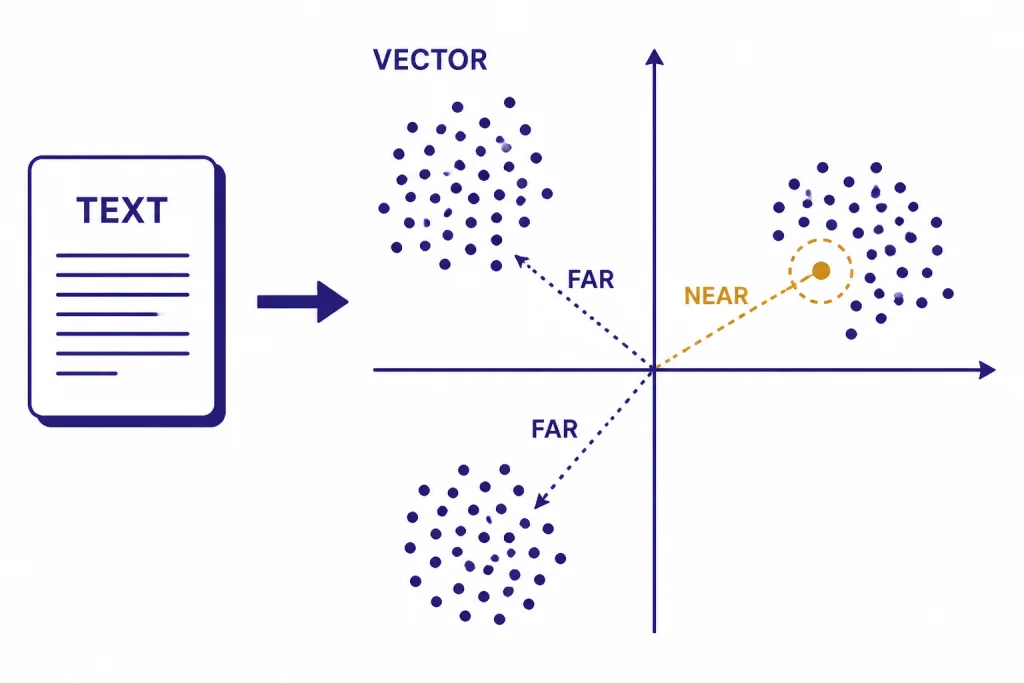
How vectors power semantic search
Semantic search has two phases. First, you embed your documents, product records, support articles, code snippets, or other source text and store those vectors. Second, when a user submits a query, you embed the query and compare that query vector with the stored vectors.
OpenAI’s embeddings documentation lists search, clustering, recommendations, anomaly detection, diversity measurement, and classification as common uses for embeddings.[2] The same mechanism supports all of them. You compare distances between vectors, then treat nearby vectors as semantically related.
OpenAI recommends cosine similarity for comparing embedding vectors, and its help center states that OpenAI embeddings are normalized to length 1.[7] That matters because normalized vectors make dot product a faster way to compute the same ranking as cosine similarity in many implementations. Your vector database may expose this as cosine, dot product, inner product, or Euclidean distance. Check the database documentation and keep the metric consistent across indexing and querying.

A simple semantic search flow looks like this:
- Split source content into useful chunks.
- Create one embedding per chunk.
- Store each vector with the original text and metadata.
- Embed the user query at runtime.
- Return the nearest chunks and pass them into a generation model if needed.
Keyword search still has a place. Exact terms, IDs, legal citations, part numbers, and short proper nouns often benefit from lexical matching. Many production systems use hybrid retrieval: keyword search narrows or boosts candidates, while embeddings handle semantic similarity.
Models, dimensions, and pricing
OpenAI currently documents two third-generation embedding models: text-embedding-3-small and text-embedding-3-large.[2] The small model is the usual starting point because it is cheaper and compact. The large model is the higher-quality option when retrieval quality matters more than index size or embedding cost.
By default, text-embedding-3-small returns 1,536 dimensions and text-embedding-3-large returns 3,072 dimensions.[2] OpenAI’s API reference says the optional dimensions parameter is supported in text-embedding-3 and later models, so you can request a shorter vector when your storage layer or latency budget requires it.[1]
| Model | Default dimensions | Listed price | Best fit |
|---|---|---|---|
text-embedding-3-small | 1,536 | $0.02 per 1M tokens | Most search, RAG, classification, and recommendation workloads |
text-embedding-3-large | 3,072 | $0.13 per 1M tokens | Higher-recall search, multilingual retrieval, and harder ranking tasks |
OpenAI’s model pages list text-embedding-3-small at $0.02 per 1M tokens and text-embedding-3-large at $0.13 per 1M tokens.[3][4] For wider cost planning across OpenAI services, use our OpenAI API pricing reference or estimate a workload with the OpenAI API cost calculator.
OpenAI announced text-embedding-3-small and text-embedding-3-large on January 25, 2024.[6] In that announcement, OpenAI reported that text-embedding-3-small improved average MIRACL score from 31.4% to 44.0% versus text-embedding-ada-002, and improved average MTEB score from 61.0% to 62.3%.[6] OpenAI also reported text-embedding-3-large at 54.9% on MIRACL and 64.6% on MTEB in the same release.[6] Treat those benchmark figures as starting context, not a substitute for testing on your own documents and user queries.

Core use cases for embeddings
The embeddings api is useful when you need to compare meaning at scale. It is less useful when you need the model to write, reason, call a tool, follow a strict schema, or inspect non-text media.
Semantic search
Semantic search lets a user type “reset my login device” and retrieve an article titled “Change your multi-factor authentication method.” The words differ, but the meaning overlaps. This is the most common embedding use case.
Retrieval-augmented generation
RAG uses embeddings to find supporting context before a generation model answers. This keeps the answer grounded in your own data and reduces the need to place an entire corpus into the prompt. It also makes updates easier because you can re-index changed documents instead of fine-tuning a model for every content update.
Clustering and deduplication
Embedding vectors can group related support tickets, reviews, bug reports, or survey responses. They can also detect near-duplicates that use different wording. This is useful before summarization, analytics, triage, or data cleanup.
Recommendations
You can embed product descriptions, lessons, help articles, job postings, or user interests, then recommend records close to a known item or profile. Embeddings work best here when the text captures the real decision factors. Sparse or generic descriptions produce weak recommendations.
Classification by nearest label
For lightweight classification, embed category descriptions and compare an incoming record against those labels. This can work well for stable taxonomies. For strict JSON output, multi-field extraction, or auditable labels, pair retrieval with structured outputs or a classification prompt.
Embeddings are not the right tool for every API job. Use the OpenAI Vision API for image understanding, function calling for tool execution, and the OpenAI Moderation API for safety checks before storing or displaying user-generated text.
How to call the API
The API call is short. The important design work happens before and after the call: cleaning text, choosing chunk boundaries, storing metadata, and evaluating retrieval quality. OpenAI’s reference shows that the request body requires input and model.[1]
from openai import OpenAI

client = OpenAI()

response = client.embeddings.create(
    model='text-embedding-3-small',
    input='A support article about resetting multi-factor authentication.'
)

vector = response.data[0].embedding
print(len(vector))
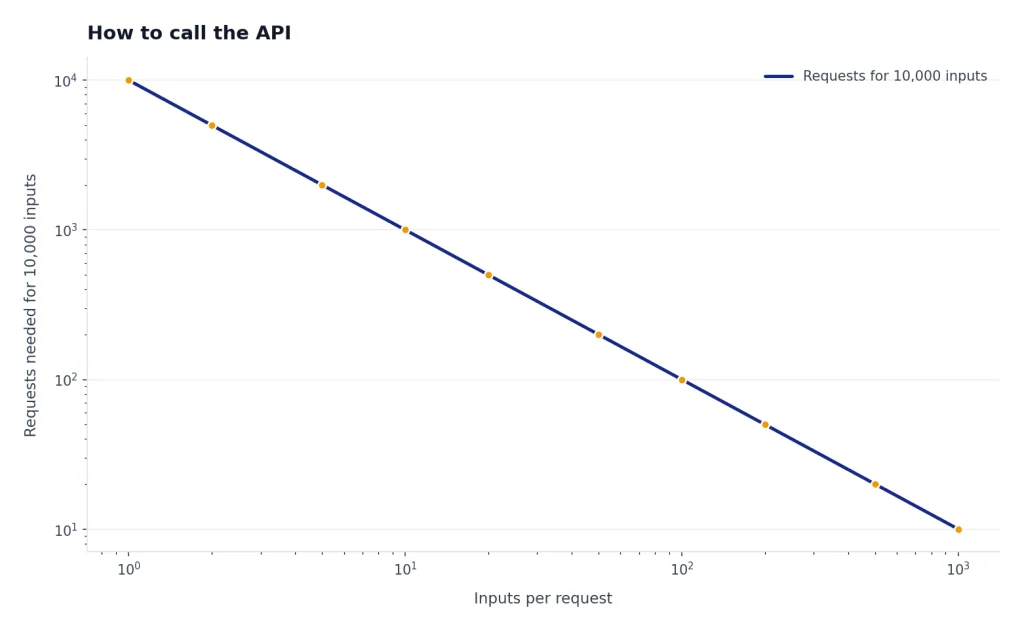
For multiple inputs, send an array of strings. Batching inputs into one request can reduce overhead, but each input still needs a stable ID in your own storage layer so you can map a returned vector back to its text, source document, URL, tenant, permissions, and update time.
texts = [
    'How to reset MFA for an account.',
    'How to change a billing contact.',
    'How to export audit logs.'
]

response = client.embeddings.create(
    model='text-embedding-3-small',
    input=texts
)

vectors = [item.embedding for item in response.data]
The response includes usage information, so log token usage by job, tenant, or feature. If you also use chat, image, audio, or realtime endpoints, keep embeddings spend separate from generation spend. The operational profile is different: embeddings are often front-loaded during indexing, while generation costs usually track live user traffic.
Build a production embedding pipeline
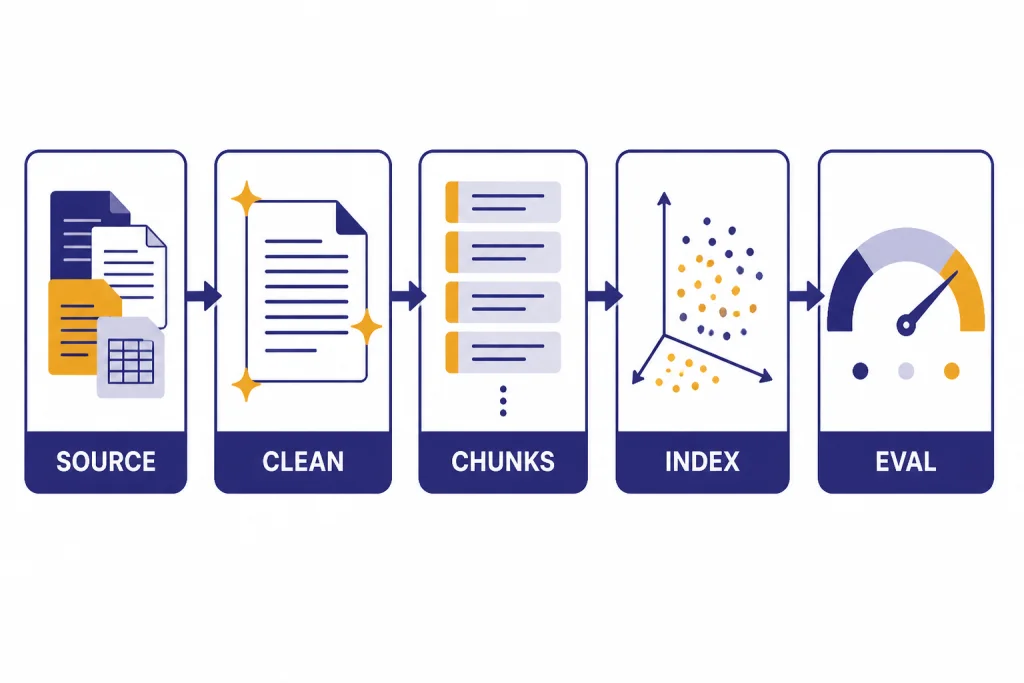
A production embedding system needs repeatability. You should be able to delete an index, rebuild it, compare the new index against the old one, and explain which source text produced each retrieved result.
Start with source preparation. Remove boilerplate navigation, duplicated footers, tracking text, and unrelated page furniture. Keep headings and document structure when they help meaning. For long documents, chunk by semantic boundaries such as headings, sections, paragraphs, or transcript turns. Fixed-size chunks are easy, but they can split an answer across boundaries.
Store metadata with every vector. At minimum, keep source ID, chunk ID, title, source URL or path, timestamp, model name, dimension count, checksum, and access-control fields. Access control is not optional. A vector search result should never surface a chunk the current user is not allowed to read.
Evaluate retrieval before you connect it to a generation model. Build a small test set of real questions and expected source chunks. Track recall at a chosen cutoff, false positives, latency, and user-visible failures. If the retrieval layer cannot find the right context, a stronger generation model will often produce a confident but unsupported answer.
For API reliability, follow general OpenAI API best practices for production. Add retries with backoff, keep a dead-letter queue for failed indexing jobs, and log enough request metadata to debug failures without exposing sensitive content. If an endpoint returns a hard error, use our OpenAI API errors guide to separate bad input, authentication, rate limit, and server-side issues.
Limits, costs, and batch processing
OpenAI’s Embeddings API reference states that input must not exceed the model’s maximum input tokens, listed there as 8,192 tokens for all embedding models.[1] The same reference says any input array must be 2,048 dimensions or less and that all embedding models enforce a maximum of 300,000 tokens summed across all inputs in a single request.[1] The wording in the reference is unusual because it uses “dimensions” in the array-size sentence; rely on the official reference rather than guessing beyond it.
Those limits shape chunking. Do not embed whole manuals, policy binders, transcripts, or knowledge bases as single inputs. Smaller chunks usually improve retrieval because the nearest vector maps to a precise passage instead of a broad document. The tradeoff is more vectors, more storage, and more index maintenance.
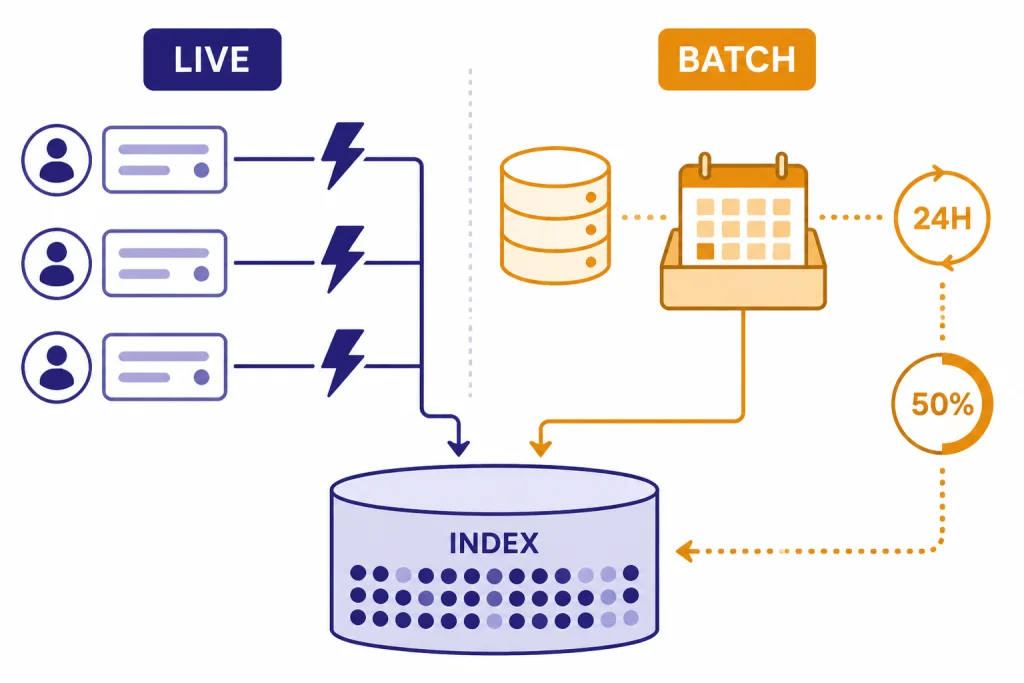
For large offline indexing jobs, consider the OpenAI Batch API. OpenAI’s Batch API guide says it supports /v1/embeddings, offers 50% lower costs than synchronous APIs, and has a 24-hour turnaround window.[8] The Batch API reference also says /v1/embeddings batches are restricted to a maximum of 50,000 embedding inputs across all requests in the batch.[8]
| Workload | Recommended path | Why |
|---|---|---|
| Live user query | Synchronous Embeddings API | The user is waiting for search results. |
| Nightly content indexing | Batch API | The job can wait and may qualify for lower cost. |
| Emergency document update | Synchronous API for changed chunks | Fresh content matters more than discount pricing. |
| Full corpus rebuild | Batch API plus validation run | The workload is large, repeatable, and non-interactive. |
Do not overlook storage costs. A 3,072-dimensional vector takes more index space than a 1,536-dimensional vector, before metadata, replicas, and database overhead. Smaller requested dimensions can help when your database, memory budget, or latency target is the bottleneck. Test the effect on your own retrieval set before changing dimension size in production.

Security, privacy, and data retention
Embeddings often contain sensitive source text indirectly. A vector is not the original document, but it is derived from the original document and should be treated as application data. Protect your vector database with the same tenant boundaries, deletion workflows, audit controls, and backup policies you use for the source records.
OpenAI’s platform data controls page states that, as of March 1, 2023, data sent to the OpenAI API is not used to train or improve OpenAI models unless you explicitly opt in.[9] The same page says abuse monitoring logs are generated by default for API feature usage and retained for up to 30 days unless legally required longer.[9] If your workload has stricter retention requirements, review OpenAI’s current platform controls and your contract terms before sending regulated data.
Also think about deletion. If a customer deletes a document, delete the corresponding chunks and vectors. If a permission changes, update the metadata filter immediately. If you change embedding models, keep old and new vectors in separate indexes until the migration is complete. Mixing vectors from different models in one index usually breaks similarity assumptions.
Common mistakes to avoid
The first mistake is embedding content before cleaning it. Navigation links, cookie banners, repeated disclaimers, and unrelated boilerplate can dominate similarity. Clean text before chunking.
The second mistake is choosing a model once and never evaluating it. Benchmark scores are helpful, but your content may have specialized terms, short queries, multilingual records, or noisy user language. Build a retrieval test set and rerun it after changes to chunking, dimensions, metadata filters, and model choice.
The third mistake is treating embeddings as memory. Embeddings help find stored text, but they do not preserve every fact in a way a model can quote. Store the original text and pass retrieved passages into the generation step.
The fourth mistake is ignoring metadata. Vector similarity alone cannot know whether a user has access to a document, whether a policy has expired, or whether a result belongs to the right product line. Use filters before or during retrieval, then rerank if needed.
The fifth mistake is using embeddings when fine-tuning is the better answer. If your goal is to change model behavior, style, or task execution, read the OpenAI fine-tuning guide. If your goal is to retrieve changing knowledge, embeddings are usually the better starting point.
Frequently asked questions
What is the OpenAI Embeddings API?
The OpenAI Embeddings API is an endpoint that converts text into vectors. Applications use those vectors to compare semantic similarity, retrieve related records, cluster text, recommend items, or classify records by nearest examples. It returns numbers, not generated text.
Which embedding model should I start with?
Start with text-embedding-3-small for most production prototypes because it is cheaper and returns smaller default vectors than text-embedding-3-large.[2][3] Move to text-embedding-3-large if your evaluation set shows that recall or ranking quality is not good enough.
Do I need a vector database?
For a small prototype, you can store vectors in a file or relational database and compare them in memory. For many records, concurrent users, metadata filters, or low-latency retrieval, use a vector database or a database with vector indexing. OpenAI’s Embeddings FAQ recommends a vector database for searching over many vectors quickly.[7]
Can embeddings replace full-text search?
Not always. Embeddings are strong for semantic similarity, but exact keyword search can be better for IDs, citations, error codes, names, and short literal strings. Many systems combine keyword search and vector search, then rerank the combined candidates.
How are embeddings different from fine-tuning?
Embeddings help retrieve relevant information from an external store. Fine-tuning changes a model’s behavior on a task or style. If your knowledge changes often, embeddings are usually easier to update because you can re-index documents instead of training a new model.
Does ChatGPT Plus include Embeddings API access?
ChatGPT plans and API billing are separate products. If you are unsure how Plus relates to developer access, see Does ChatGPT Plus Include API Access?. For API work, you need an API account, a project, billing setup when required, and an API key.