

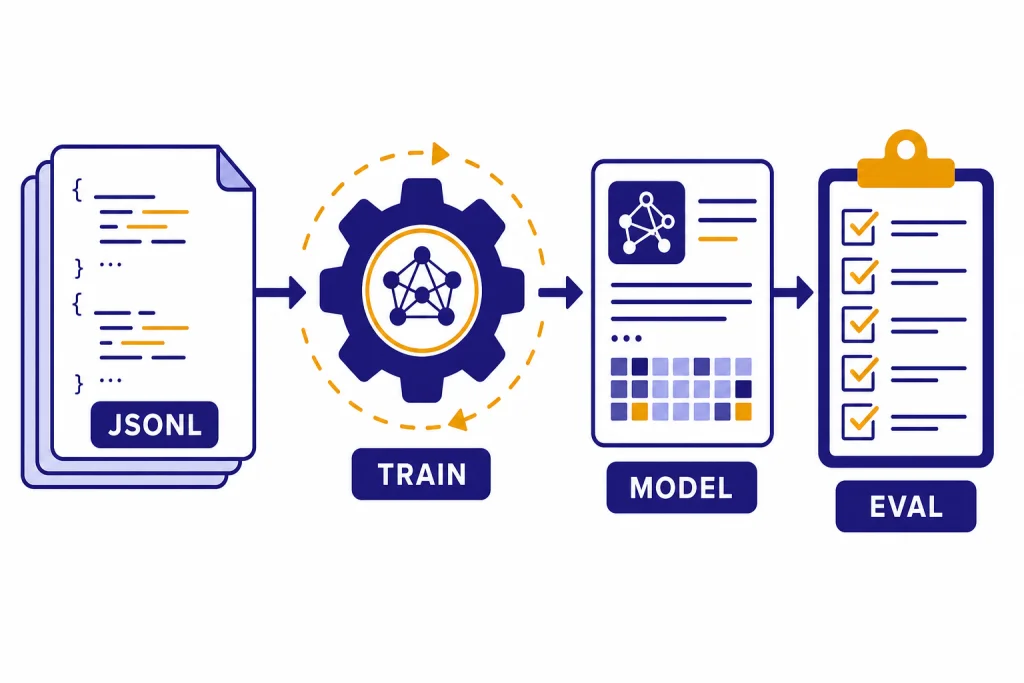
Fine-tuning lets you customize an OpenAI model with examples from your own task, so it can produce more consistent outputs than prompting alone. It is not the same as training a GPT model from scratch. You start with an existing supported model, upload a JSONL dataset, create a fine-tuning job, evaluate the result, and then call the new fine-tuned model through the API. This fine tuning guide explains when it is worth doing, which methods OpenAI supports, how to prepare training data, how pricing works, and how to move a custom model into production without turning a data experiment into an expensive maintenance problem.
What OpenAI fine-tuning does
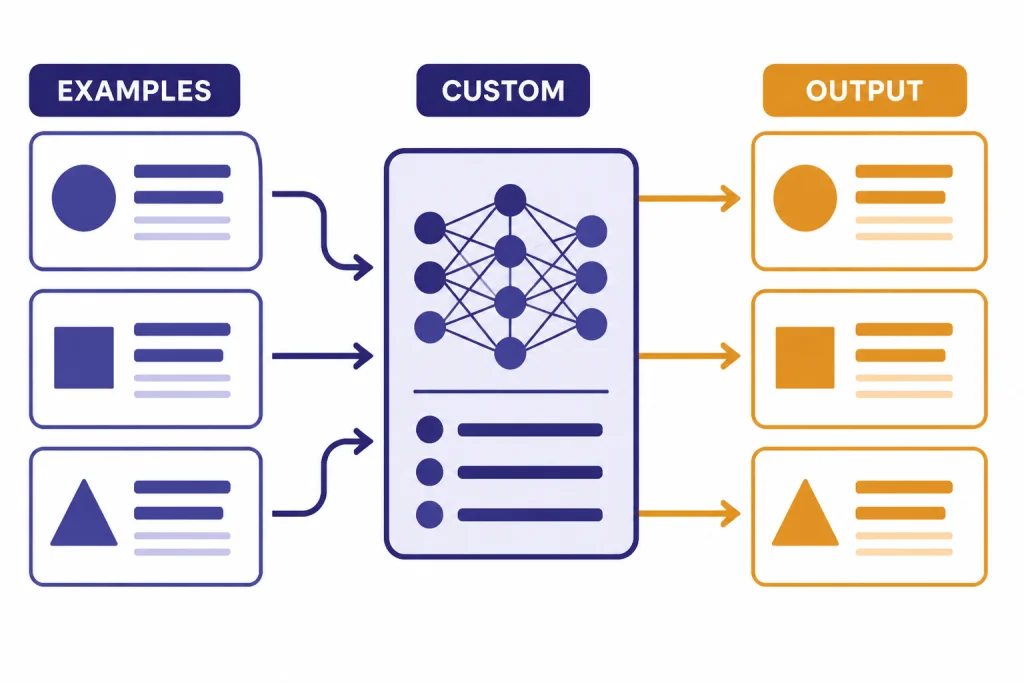
OpenAI fine-tuning changes the behavior of a supported base model by training it on examples that match the inputs and outputs you want in production. The practical goal is narrower than “make a smarter model.” You are teaching a model a repeatable pattern: a classification rubric, a response style, a strict output shape, domain phrasing, tool-call behavior, or a task-specific decision rule.
OpenAI describes the optimization workflow as a loop: build evals, prompt the model, fine-tune when useful, test against representative data, adjust the prompt or dataset, and repeat.[1] That sequence matters. Fine-tuning without evals gives you no reliable way to tell whether the custom model is better, worse, or just different.
A fine-tuned model is still called through the API. After training finishes, you use the fine-tuned model ID with the Responses API or Chat Completions API in the same general way you call a base model.[2] If you are still deciding which endpoint to build on, start with our Responses API guide. If your application relies on schema-safe JSON, pair fine-tuning with structured outputs instead of expecting fine-tuning alone to enforce every field.
Fine-tuning also does not replace retrieval. If the model needs current facts, product records, customer account data, or a changing policy library, use retrieval, embeddings, or tools. Fine-tuning is better for stable behavior. For vector search patterns, see our OpenAI embeddings API guide.
When fine-tuning is worth it
Fine-tuning is worth considering when the base model can almost do the task, but you need more consistency across many similar requests. It works best when you can define “good” outputs and collect examples that represent the real production distribution.
OpenAI lists several benefits over prompting alone: you can provide more examples than fit in a single context window, use shorter prompts at scale, avoid including proprietary examples in every request, and train a smaller model to perform well on a focused task.[1] Those benefits are strongest when the task repeats often enough to justify the training work.
Good candidates include support-ticket classification, extraction into a company-specific schema, rewriting text in a regulated house style, converting messy user messages into normalized tool calls, and ranking multiple acceptable responses by preference. Weak candidates include one-off analysis, live knowledge lookup, broad reasoning improvement, and tasks where the expected answer changes every day.
| Problem | Use fine-tuning? | Better first step |
|---|---|---|
| The model ignores a recurring format rule even after strong prompting. | Yes, if you have representative examples. | Write evals, then train on correct outputs. |
| The model needs private records or fresh catalog data. | No, not as the main solution. | Use retrieval, tools, or database lookups. |
| The prompt is long because it includes many examples. | Often yes. | Fine-tune to reduce repeated examples. |
| The output must match a strict JSON schema. | Sometimes. | Use structured outputs, then fine-tune for task behavior. |
| The model must call a known function with the right arguments. | Often yes. | Combine fine-tuning with function calling. |
If your main issue is reliability under production load, also review OpenAI API best practices for production. Fine-tuning improves behavior, but it does not automatically solve retries, rate limits, logging, eval gates, or fallback design.
Fine-tuning methods and supported models
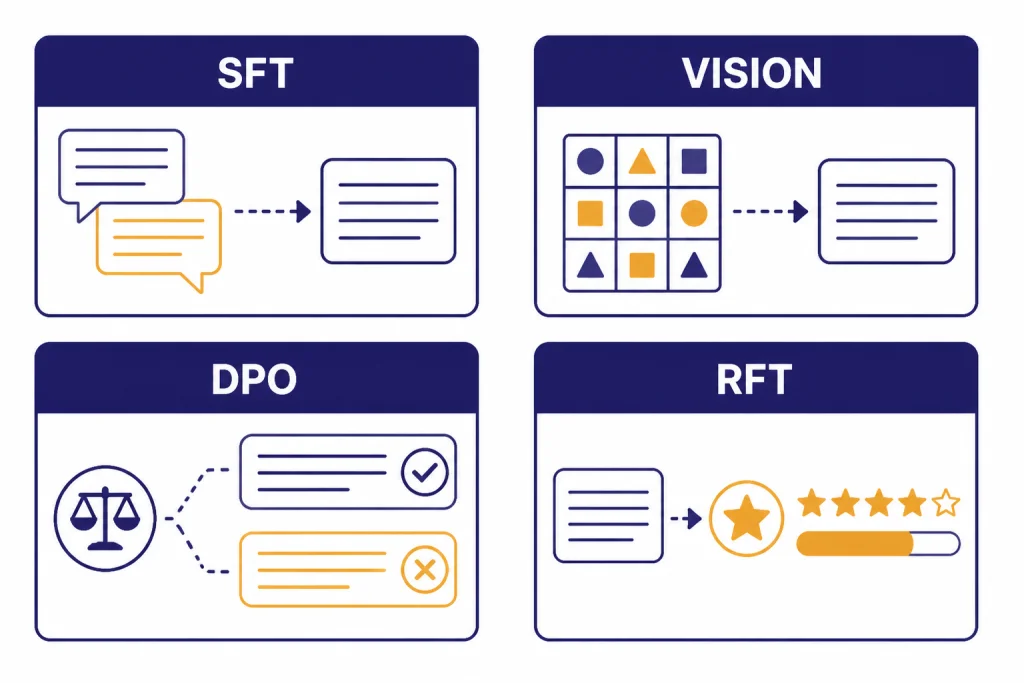
OpenAI currently documents four fine-tuning methods: supervised fine-tuning, vision fine-tuning, direct preference optimization, and reinforcement fine-tuning.[1] Each method expects different training data, so pick the method before you collect examples.
| Method | Training signal | Best fit | Documented model support |
|---|---|---|---|
| Supervised fine-tuning | Prompt plus known-good assistant response | Classification, extraction, format control, style, instruction-following fixes | gpt-4.1-2025-04-14, gpt-4.1-mini-2025-04-14, gpt-4.1-nano-2025-04-14[1] |
| Vision fine-tuning | Image input plus desired response | Image classification and better instruction following on visual tasks | gpt-4o-2024-08-06[6] |
| Direct preference optimization | Prompt, preferred output, and non-preferred output | Tone, summarization focus, subjective response preferences | gpt-4.1-2025-04-14, gpt-4.1-mini-2025-04-14, gpt-4.1-nano-2025-04-14[1] |
| Reinforcement fine-tuning | Generated output plus grader signal | Complex expert-graded reasoning tasks | o4-mini-2025-04-16[1] |
For most teams, supervised fine-tuning is the starting point. It uses examples of the input you expect and the answer you want. Direct preference optimization is useful when “better” is comparative: one answer is more helpful, more concise, more on-brand, or more focused than another. Vision fine-tuning is for image-input tasks, not image generation. Reinforcement fine-tuning is for specialized reasoning workflows with graders and should not be the first experiment for a normal API integration.
If model choice is still open, compare base-model tradeoffs before collecting data. Our GPT models comparison and context window comparison can help you decide whether a stronger prompt, a smaller model, or a custom model is the right path.
How to prepare training data
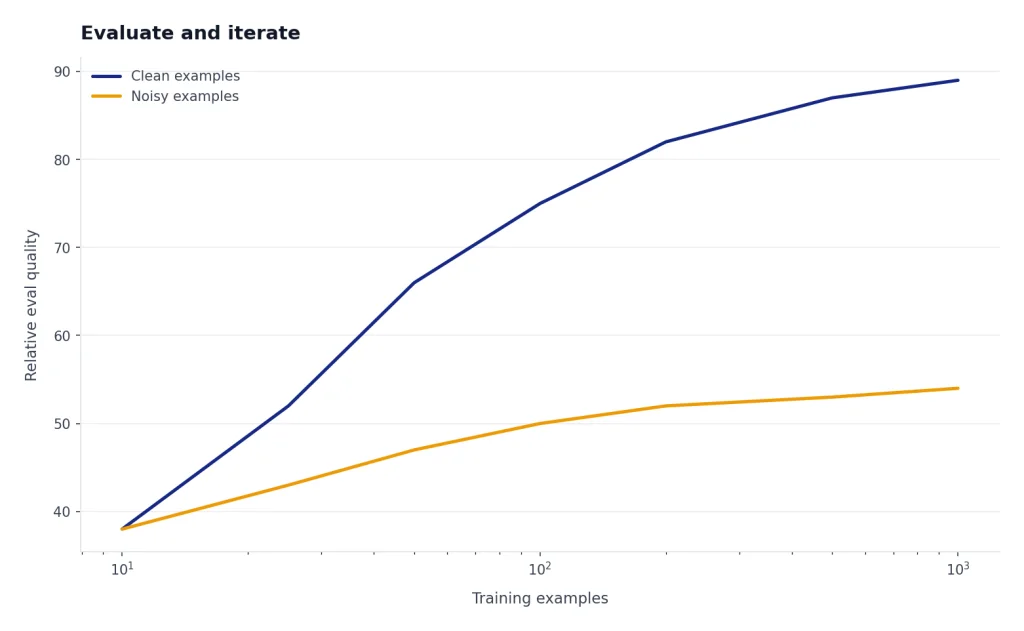
Training data decides most of the outcome. OpenAI’s supervised fine-tuning guide says the minimum number of examples is 10, that improvements are often seen with 50 to 100 examples, and that a good starting point is 50 well-crafted demonstrations.[2] Treat those as practical starting numbers, not a guarantee. Bad examples scale bad behavior.
Use production-shaped data. If your users ask short, misspelled questions, include short, misspelled questions. If your assistant must call tools, include examples with the same function signatures and argument style used in production. If your model must refuse certain requests, include realistic refusal and escalation examples in the right proportion.
OpenAI requires fine-tuning training data to be uploaded as JSONL, with the file uploaded for the fine-tune purpose.[3] In supervised chat-style fine-tuning, each line is a complete JSON object with a messages array. Keep one full training example per line.
{"messages":[{"role":"system","content":"You classify inbound software support tickets into one label: BILLING, BUG, ACCESS, or FEATURE."},{"role":"user","content":"I was charged twice after upgrading my workspace yesterday."},{"role":"assistant","content":"BILLING"}]}
{"messages":[{"role":"system","content":"You classify inbound software support tickets into one label: BILLING, BUG, ACCESS, or FEATURE."},{"role":"user","content":"The export button spins forever on the reports page."},{"role":"assistant","content":"BUG"}]}
For DPO, each JSONL example includes an input prompt, a preferred output, and a non-preferred output.[5] This is better than supervised fine-tuning when the task depends on ranking quality rather than copying a single canonical answer.
{"input":{"messages":[{"role":"user","content":"Summarize this refund policy for a customer."}]},"preferred_output":[{"role":"assistant","content":"You can request a refund within 30 days if the plan has not been used heavily."}],"non_preferred_output":[{"role":"assistant","content":"Refunds are sometimes possible depending on policy details."}]}OpenAI’s best-practices guide recommends splitting examples into training and test portions. The training set is used for the fine-tuning job, while the test set supports evals and validation metrics.[4] Do not train on your entire dataset just because the upload succeeds. A small holdout set is the easiest way to catch overfitting.
Also keep the prompt format consistent. OpenAI recommends including the instructions and prompts that worked best before fine-tuning in every training example, especially when you have fewer than 100 examples.[4] If you omit the real system prompt during training but use it in production, you are asking the model to learn one distribution and serve another.

How to run a fine-tuning job
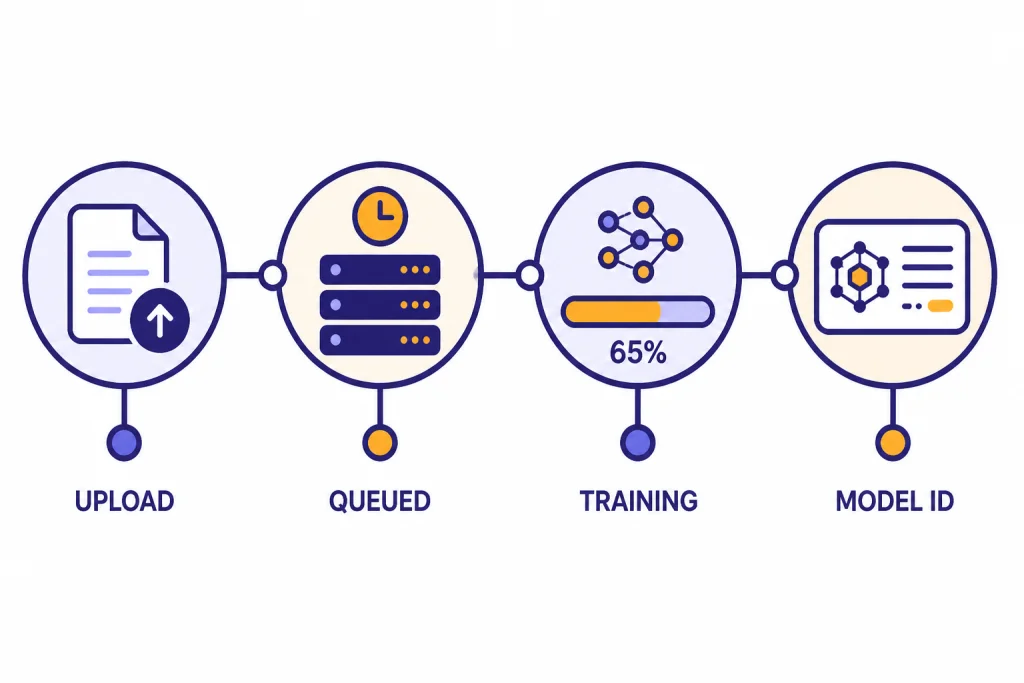
The API flow is simple. You upload a file, create a fine-tuning job, monitor the job, and then use the resulting model ID. The fine-tuning job creation endpoint is POST /v1/fine_tuning/jobs.[3] The required fields include the model name and the uploaded training file ID.[3]
from openai import OpenAI

client = OpenAI()

training_file = client.files.create(
    file=open("support_labels.jsonl", "rb"),
    purpose="fine-tune"
)

job = client.fine_tuning.jobs.create(
    training_file=training_file.id,
    model="gpt-4.1-mini-2025-04-14",
    method={"type": "supervised"}
)

print(job.id)
You can also create jobs in the dashboard. The dashboard path is useful for first experiments because it makes job status, checkpoints, and metrics easier to inspect. The API path is better once fine-tuning becomes part of a repeatable release process.
OpenAI’s API reference exposes endpoints to list jobs, retrieve a job, list events, list checkpoints, and cancel a job.[3] Use those endpoints in automation. A fine-tuning job should be tracked like a deploy: dataset version, base model, method, hyperparameters, validation file, eval result, and final model ID.
After a successful job, call the fine-tuned model ID from your normal inference path. If your app streams text to users, the custom model can still sit inside a streaming architecture. See our streaming API guide for response delivery patterns. If the model calls tools, review function calling in the OpenAI API before encoding tool behavior in your examples.
Costs, limits, and billing checks
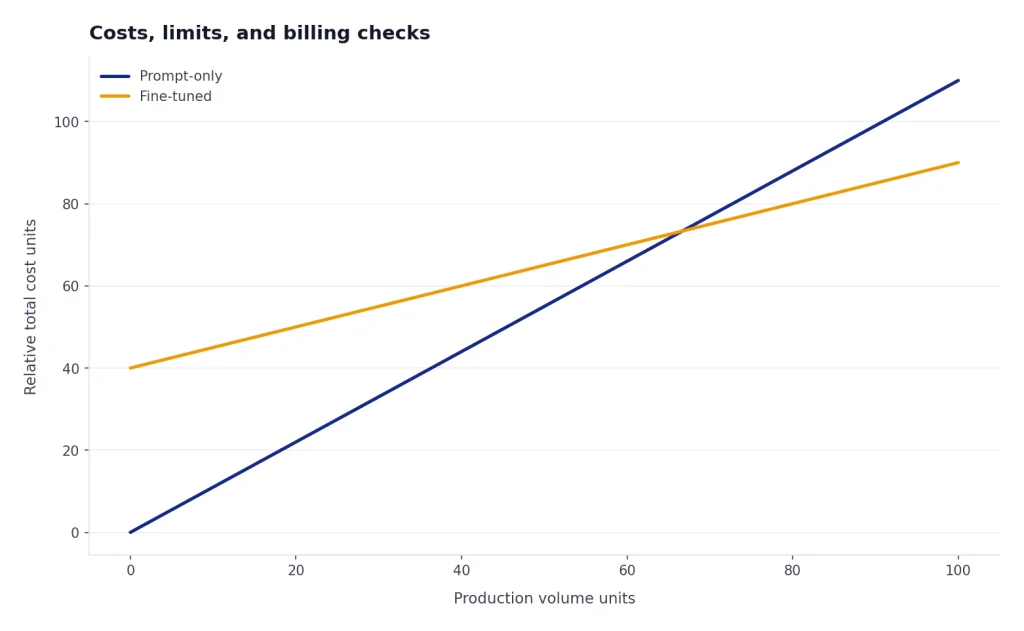
Fine-tuning has two cost centers: training and inference. Training is the one-time cost to create the custom model. Inference is the ongoing cost every time you call that fine-tuned model.
OpenAI’s pricing page lists fine-tuning prices per 1 million tokens. As of this article’s publication date, gpt-4.1-2025-04-14 fine-tuning is listed at $25.00 for training, $3.00 for input, $0.75 for cached input, and $12.00 for output per 1 million tokens.[7] gpt-4.1-mini-2025-04-14 is listed at $5.00 for training, $0.80 for input, $0.20 for cached input, and $3.20 for output per 1 million tokens.[7] gpt-4.1-nano-2025-04-14 is listed at $1.50 for training, $0.20 for input, $0.05 for cached input, and $0.80 for output per 1 million tokens.[7]
For older fine-tunable models, OpenAI lists gpt-4o-2024-08-06 at $25.00 for training, $3.75 for input, $1.875 for cached input, and $15.00 for output per 1 million tokens.[7] It lists gpt-4o-mini-2024-07-18 at $3.00 for training, $0.30 for input, $0.15 for cached input, and $1.20 for output per 1 million tokens.[7]
| Model | Training | Input | Cached input | Output |
|---|---|---|---|---|
gpt-4.1-2025-04-14 | $25.00 / 1M tokens | $3.00 / 1M tokens | $0.75 / 1M tokens | $12.00 / 1M tokens |
gpt-4.1-mini-2025-04-14 | $5.00 / 1M tokens | $0.80 / 1M tokens | $0.20 / 1M tokens | $3.20 / 1M tokens |
gpt-4.1-nano-2025-04-14 | $1.50 / 1M tokens | $0.20 / 1M tokens | $0.05 / 1M tokens | $0.80 / 1M tokens |
gpt-4o-2024-08-06 | $25.00 / 1M tokens | $3.75 / 1M tokens | $1.875 / 1M tokens | $15.00 / 1M tokens |
gpt-4o-mini-2024-07-18 | $3.00 / 1M tokens | $0.30 / 1M tokens | $0.15 / 1M tokens | $1.20 / 1M tokens |
OpenAI lists o4-mini-2025-04-16 reinforcement fine-tuning training at $100.00 per hour, with inference pricing of $4.00 input, $1.00 cached input, and $16.00 output per 1 million tokens.[7] That hourly training price makes reinforcement fine-tuning a different budgeting exercise from normal supervised fine-tuning.
Before you run a job, estimate both phases. Multiply the number of training tokens by the training price, then estimate the production request volume against the fine-tuned inference prices. Our OpenAI API pricing guide and API cost calculator can help with the second step.
Fine-tuning can reduce cost when it lets you move from a larger base model to a smaller custom model or shorten repeated prompts. It can increase cost when you train repeatedly without eval gates or when the fine-tuned model’s inference price is higher than the base model you were using. If you batch offline workloads, check whether the OpenAI Batch API fits the inference side of your workflow.
How to evaluate and iterate
Do not ship a fine-tuned model because the first few playground examples look good. Create a baseline before training, run the same eval after training, and compare the custom model to the base model and the best prompted version.
For classification and extraction, use exact-match, F1, field-level accuracy, or human review on disagreements. For style and summarization, use preference review with a written rubric. For tool calling, measure correct tool selection, valid arguments, missing arguments, and unsafe calls. For safety-sensitive applications, run adversarial and policy tests before release. The OpenAI moderation API can help screen user inputs or generated outputs, but it is not a substitute for task-specific evaluation.
If quality is weak, improve the dataset before changing every parameter. OpenAI recommends checking data quality, adding examples for remaining failure modes, balancing the distribution of examples, ensuring examples contain all information needed for the response, and checking agreement among labelers.[4] In many teams, cleaning 50 examples does more than adding 500 noisy ones.
Hyperparameters should come later. OpenAI recommends initially training without specifying hyperparameters so the platform can choose defaults based on dataset size, then adjusting if you observe problems.[4] If the model does not follow the training data enough, increasing epochs can help. If the model becomes too narrow or repetitive, reducing epochs can help. If it is not converging, a learning-rate adjustment may be appropriate.
Use checkpoints when a model improves early and then starts overfitting. OpenAI creates full model checkpoints at the end of each training epoch and currently saves checkpoints for the last three epochs of a job.[2] Test those checkpoints against your holdout set before assuming the final checkpoint is best.

Production checklist
A fine-tuned model should go through the same release process as code. Store the dataset version, validation set, base model, method, job ID, final model ID, eval score, review date, and owner. If you cannot reproduce the training run, you cannot safely debug a regression.
- Version the data. Keep training and holdout files in source control or an internal data registry.
- Keep prompts stable. Use the same system and developer instructions in training examples that you expect to use in production.
- Protect sensitive data. Remove secrets, passwords, unnecessary personal data, and records you do not have permission to use.
- Monitor behavior. Log model ID, prompt version, latency, token usage, refusal rate, schema failures, and human escalations.
- Add fallbacks. Route failures to a base model, a simpler deterministic rule, or a human review queue.
- Plan retraining. Fine-tuned behavior can age when product rules, users, or policies change.
OpenAI states that API data is not used to train or improve OpenAI models unless you explicitly opt in, and its data-controls table lists /v1/fine_tuning/jobs as not used for training OpenAI models, with abuse monitoring retention of 30 days and application state retained until deleted.[8] That does not remove your own compliance duties. Treat uploaded training files as production data assets.
Also prepare for normal API errors. Fine-tuned model IDs can be mistyped, jobs can fail validation, files can be malformed, and production calls can still hit rate limits or transient errors. Keep our OpenAI API errors reference nearby when you automate fine-tuning jobs or deploy a new custom model.
Frequently asked questions
Is fine-tuning the same as training my own GPT from scratch?
No. Fine-tuning starts from an existing OpenAI model and adapts it with examples. You do not create a new foundation model, choose the architecture, or train on internet-scale data. The result is a custom model ID that you call through the API.
How many examples do I need for OpenAI fine-tuning?
OpenAI says supervised fine-tuning requires at least 10 examples, often shows improvements with 50 to 100 examples, and recommends starting with 50 well-crafted demonstrations.[2] The right number depends on the task. Quality, coverage, and consistency matter more than raw volume.
Should I fine-tune or use retrieval?
Use fine-tuning for stable behavior and repeated patterns. Use retrieval when the model needs facts that change, private documents, product catalogs, or account-specific data. Many production systems use both: retrieval supplies facts, while fine-tuning improves how the model formats and applies them.
Can fine-tuning make the model always return valid JSON?
Fine-tuning can make JSON-style output more consistent, but it should not be your only enforcement layer. Use structured outputs or schema validation when the application requires valid fields every time. Fine-tuning is best used to teach task behavior inside that structure.
Can I fine-tune a model with images?
Yes, for supported vision fine-tuning workflows. OpenAI documents vision fine-tuning for gpt-4o-2024-08-06, with image inputs in JSONL examples.[6] OpenAI also documents limits for image datasets, including a maximum of 50,000 image-containing examples, at most 10 images per example, and a 10 MB maximum per image.[6]
Does OpenAI use my fine-tuning data to train its own models?
OpenAI says API data is not used to train or improve OpenAI models unless you explicitly opt in.[8] Its data-controls documentation also lists fine-tuning jobs as not used for training OpenAI models.[8] You should still avoid uploading secrets or data you are not authorized to process.