


No. ChatGPT Plus does not include API access. Plus is a paid subscription for the ChatGPT web app, while the OpenAI API is a separate developer platform with separate billing, usage limits, API keys, and pricing.[1][3] If you already pay for ChatGPT Plus, you can still create an OpenAI API account, but your Plus payment does not cover API calls. You must add billing details or credits on the API platform before building apps that call OpenAI models programmatically.[4]
Short answer
ChatGPT Plus is not an API plan. It is a subscription for using ChatGPT through the ChatGPT web app and related ChatGPT interfaces. OpenAI describes Plus as enhanced access to the ChatGPT web app for $20 per month, billed monthly, and states that API usage is separate and billed independently.[1] OpenAI’s ChatGPT pricing page also lists Plus at $20 per month and describes it as a consumer ChatGPT plan with expanded access and features.[2]
The API is different. It is for developers who want to send requests from code, apps, automations, websites, internal tools, or backend services. It uses API keys, platform billing, model-specific pricing, and rate limits. If you want the detailed buyer’s-guide version, read our ChatGPT API vs ChatGPT Plus comparison after this article.
The practical answer is simple. Keep Plus if you want to chat, upload files, use voice, create custom GPTs, and work inside ChatGPT. Add API billing if you want to build software that calls OpenAI models directly.

Why Plus and the API are separate
OpenAI runs ChatGPT and the API platform as separate products. Its billing help article says the ChatGPT platform and the API platform operate as separate platforms, with charges and billing history typically viewed separately in each place.[3] That is why a ChatGPT Plus receipt does not appear as an API credit balance, and an API usage charge does not upgrade your ChatGPT account to Plus.
This separation matters because the products solve different problems. ChatGPT Plus gives one person a richer ChatGPT experience. The API gives a developer or company a programmable service. API usage can come from one script, a production web app, a background job, a support bot, a spreadsheet workflow, or a product feature used by many end users.
OpenAI also has a help article for people who want to “move” a ChatGPT subscription to the API. The answer is that API service is billed and managed separately from ChatGPT, and users can upgrade API service to pay-as-you-go by adding a payment method in API billing settings.[4] In other words, there is no subscription conversion step. You set up API billing as its own account or organization.
This distinction is the source of most confusion around chatgpt plus api access. The same OpenAI login can sometimes be used across products, but the entitlements are not the same. A login is identity. A subscription is a product plan. An API key is a developer credential. Billing for each environment follows its own rules.
What each one includes
ChatGPT Plus includes expanded access inside ChatGPT. OpenAI’s ChatGPT pricing page lists Plus as including everything in Free plus extended limits, voice mode with video and screensharing, access to deep research and multiple reasoning models, tasks and custom GPTs, and opportunities to try new features.[2] Those are app features. They are not the same as being able to call OpenAI models from your own code.
API access includes the ability to create API keys and send requests to OpenAI endpoints. OpenAI’s developer quickstart tells users to create an API key, export it as an environment variable, install an SDK, and run an API call through the Responses API.[7] If you are building with the API for the first time, our Responses API documentation and examples guide is the next place to go.
| Question | ChatGPT Plus | OpenAI API |
|---|---|---|
| Main purpose | Use ChatGPT as an individual productivity app | Build software that calls OpenAI models |
| Billing | Monthly ChatGPT subscription | Separate platform billing based on API usage |
| Price structure | Plus is listed at $20 per month | Model-specific token, tool, audio, image, or other usage pricing |
| Access method | ChatGPT interface | API keys, SDKs, HTTPS requests, and developer console |
| Best for | Writing, analysis, brainstorming, file work, and personal workflows | Apps, automations, agents, batch jobs, internal tools, and product features |
| Does it include the other? | No included API usage | No included ChatGPT Plus subscription |
The table is the main decision point. If you are only asking ChatGPT questions in a browser, Plus may be enough. If you are writing code that sends prompts and receives structured responses, you need the API.

How to get API access if you already have Plus
You do not need to cancel ChatGPT Plus to use the API. You also do not need to buy Plus to use the API. Treat them as separate accounts under the same broader OpenAI ecosystem.
- Go to the OpenAI platform and sign in with the account you want to use for development.
- Create an API key in the developer dashboard. OpenAI’s quickstart says the key is used to securely access the API and should be stored safely.[7]
- Complete phone verification if OpenAI requires it for your first API key. OpenAI’s help center says phone verification is required when generating the first API key on platform.openai.com for security reasons.[9]
- Add API billing details or credits. OpenAI’s help article says API service can be upgraded to pay-as-you-go by adding a payment method in API billing settings.[4]
- Install an SDK or send a direct HTTPS request. OpenAI’s quickstart shows the official SDK flow and a basic Responses API request using an environment variable named
OPENAI_API_KEY.[7]
Do not paste API keys into a frontend app, public GitHub repository, shared notebook, or client-side JavaScript. OpenAI’s production best practices say API keys should not be hard-coded in a codebase and should be exposed through environment variables or a secret management service.[11] For a deeper production checklist, use our OpenAI API best practices for production guide.
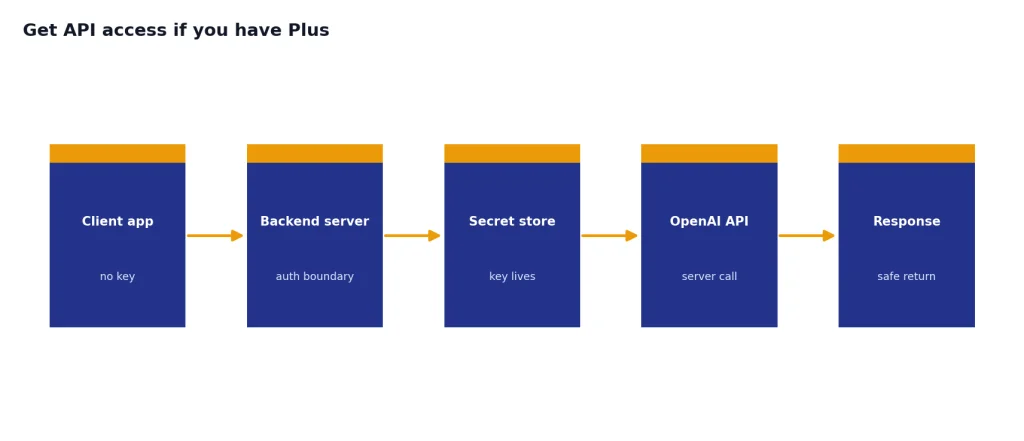
A minimal server-side JavaScript test looks like this. The model name below follows the style shown in OpenAI’s quickstart examples, but always confirm current model availability in the API docs before shipping production code.[7]
import OpenAI from "openai";

const client = new OpenAI({
  apiKey: process.env.OPENAI_API_KEY
});

const response = await client.responses.create({
  model: "gpt-5",
  input: "Write a one-sentence summary of API billing."
});

console.log(response.output_text);
If you are trying to find a no-cost path, read our Free OpenAI API Key article. Free trials and access rules can change, and they are not the same thing as a Plus subscription.

How API billing and pricing work
API billing is usage-based. OpenAI’s pricing documentation lists model prices per 1 million tokens for text models, with separate input, cached input, and output rates for many models.[5] OpenAI’s public API pricing page lists the same style of model-specific pricing and describes GPT-5, GPT-5 mini, and GPT-5 nano as separate API pricing options.[6]
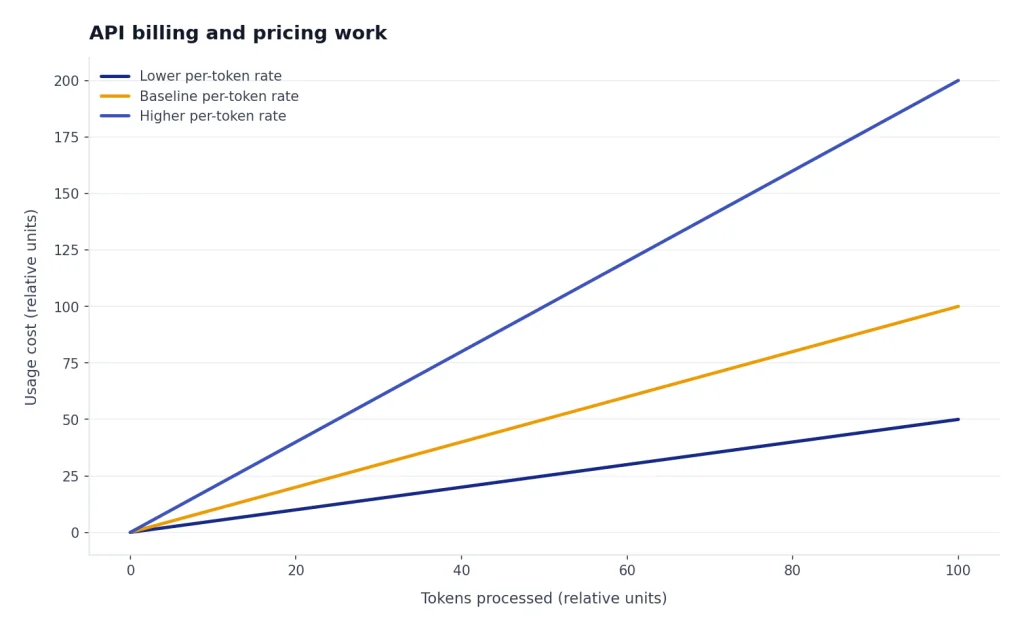
For example, OpenAI’s API pricing documentation lists GPT-5 at $1.25 per 1 million input tokens and $10.00 per 1 million output tokens; GPT-5 mini at $0.25 per 1 million input tokens and $2.00 per 1 million output tokens; and GPT-5 nano at $0.05 per 1 million input tokens and $0.40 per 1 million output tokens.[5] Use those numbers only as a snapshot. Check live pricing before you estimate a production budget.
OpenAI’s prepaid billing help says new API accounts are enrolled in prepaid billing, the minimum credit purchase is $5, the default purchase is $10, the minimum auto-recharge amount is $5, and purchased credits expire after 1 year.[8] That is very different from ChatGPT Plus, where the user pays a recurring subscription price for app access.
API costs depend on workload shape. A short classification job with a small model may cost very little. A long agent workflow that reads files, searches, calls tools, and writes long answers can cost much more. Use an estimator before launch; our OpenAI API cost calculator is built for that planning step. For model-by-model details, see our OpenAI API pricing breakdown.
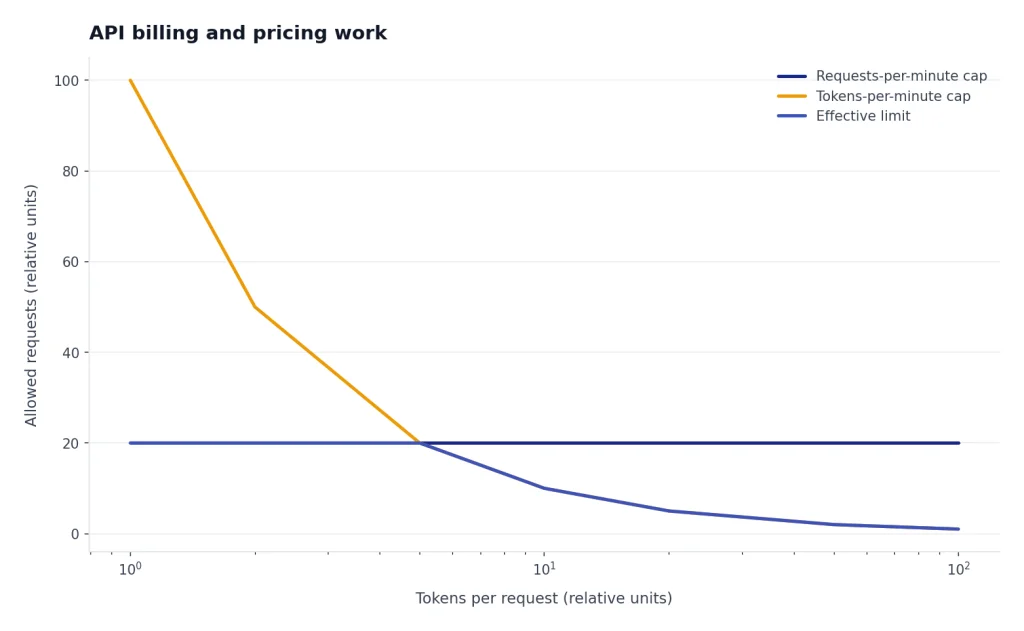
Rate limits are also separate from Plus message limits. OpenAI’s rate-limit documentation says API rate limits are measured by requests per minute, requests per day, tokens per minute, tokens per day, and images per minute.[10] The same documentation says limits are defined at the organization and project level, vary by model, and can include usage limits on monthly spend.[10]

Common mix-ups to avoid
Mix-up 1: “I have Plus, so my API calls should be free”
They are not free because Plus does not include API usage. OpenAI states that API usage is separate and billed independently from ChatGPT Plus.[1] If your code sends API requests, those requests belong to API billing.
Mix-up 2: “The API playground is part of ChatGPT Plus”
The platform tools are part of the developer platform, not the ChatGPT Plus subscription. They may use the same account identity, but usage and billing are tied to the API platform. Watch for which site you are on: ChatGPT for the app, platform.openai.com for developer work.
Mix-up 3: “Buying API credits upgrades ChatGPT”
API credits do not buy Plus features. OpenAI says ChatGPT billing and API billing are managed in separate systems, so charges and billing history are typically viewed separately.[3] If you want Plus features in ChatGPT, subscribe to Plus. If you want programmatic access, set up API billing.
Mix-up 4: “A custom GPT is the same as an API app”
A custom GPT is configured inside ChatGPT. An API app is software you control that sends requests through OpenAI’s developer platform. If your project needs strict JSON, schema validation, tool calls, or backend integrations, read our guides to structured outputs and function calling.
Mix-up 5: “All models available in ChatGPT are automatically available in the API”
Do not assume model access is identical across ChatGPT and the API. OpenAI treats ChatGPT plans and API model availability as separate product surfaces. Before building around a model, confirm it on the platform models or pricing page, then test your account’s actual access.
Which one you should use
Use ChatGPT Plus if your work happens inside the ChatGPT interface. It is a good fit for drafting, research assistance, spreadsheet reasoning, file analysis, brainstorming, coding help, voice conversations, and personal productivity. You pay for the app experience, not for a developer quota.
Use the OpenAI API if your work needs automation or integration. The API is the right tool when a server needs to summarize support tickets, classify inbound leads, generate structured records, analyze uploaded images, power a chatbot, stream responses to a custom UI, or run scheduled batch jobs. If speed matters in your product interface, read our guide to streaming responses with the OpenAI API. If you are processing large asynchronous workloads, review our OpenAI Batch API explainer.
Use both if you are both a person and a builder. Many developers keep Plus for interactive thinking and debugging, then use the API for production code. That is normal. Just budget them separately, secure your keys, monitor usage, and handle failures. When something breaks, our OpenAI API errors guide can help you sort authentication, billing, rate-limit, and request-format problems.
The cleanest rule is this: ChatGPT Plus is for using OpenAI through ChatGPT. The API is for putting OpenAI models inside your own software.
Frequently asked questions
Does ChatGPT Plus give me an API key?
No. ChatGPT Plus does not give you an API key by itself. You create API keys on the OpenAI platform, and OpenAI’s quickstart says those keys are used to access the API securely.[7]
Do I need ChatGPT Plus to use the OpenAI API?
No. API access is separate from ChatGPT Plus. You need an OpenAI platform account, an API key, and API billing or eligible credits, not a Plus subscription.
Can I transfer my Plus payment to API credits?
OpenAI says the API service is billed and managed separately from ChatGPT.[4] There is no standard conversion from a Plus subscription into API credits. Set up API billing separately if you want programmatic access.
Why did I get charged for the API if I already pay for Plus?
Because API usage is billed independently. OpenAI’s help center states that ChatGPT and API billing are managed in separate systems.[3] Check the platform billing dashboard for API charges and the ChatGPT plan page for Plus charges.
Is the API cheaper than ChatGPT Plus?
It depends on usage. Light API workloads can cost less than a monthly subscription, while heavy workflows can cost much more. Estimate tokens, model choice, tools, and traffic before you choose.
Can I use the same login for ChatGPT and the API?
Often, yes, but that does not merge the plans. The account identity may be the same while billing, usage history, and product access remain separate. Always check whether you are in ChatGPT or the OpenAI platform before assuming a feature is included.