

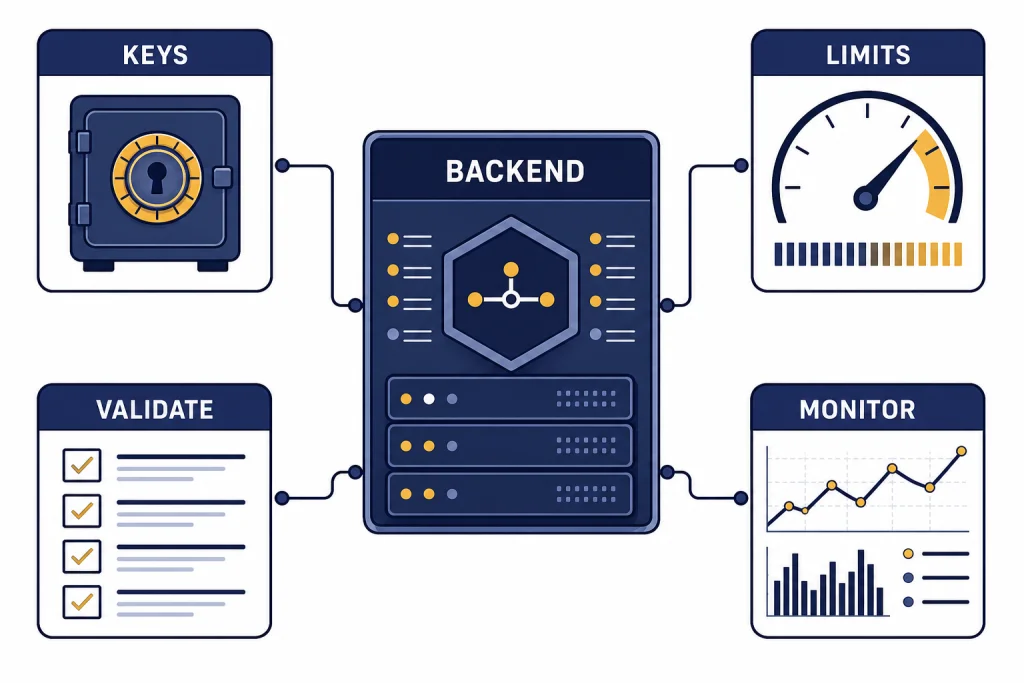
The best practices for API production work with OpenAI are simple to state and easy to skip: keep keys out of clients, route every request through your backend, design for retries and rate limits, validate model output, log token and cost data, and test changes before deployment. Treat the model as a powerful but probabilistic dependency, not as a normal deterministic library. Production quality comes from the envelope around each call: authentication, input validation, model selection, timeouts, fallbacks, observability, safety checks, and clear ownership. This guide gives you a practical production checklist for the OpenAI API, with patterns you can apply before traffic, spend, or compliance risk starts to scale.
Build a production envelope before the first request
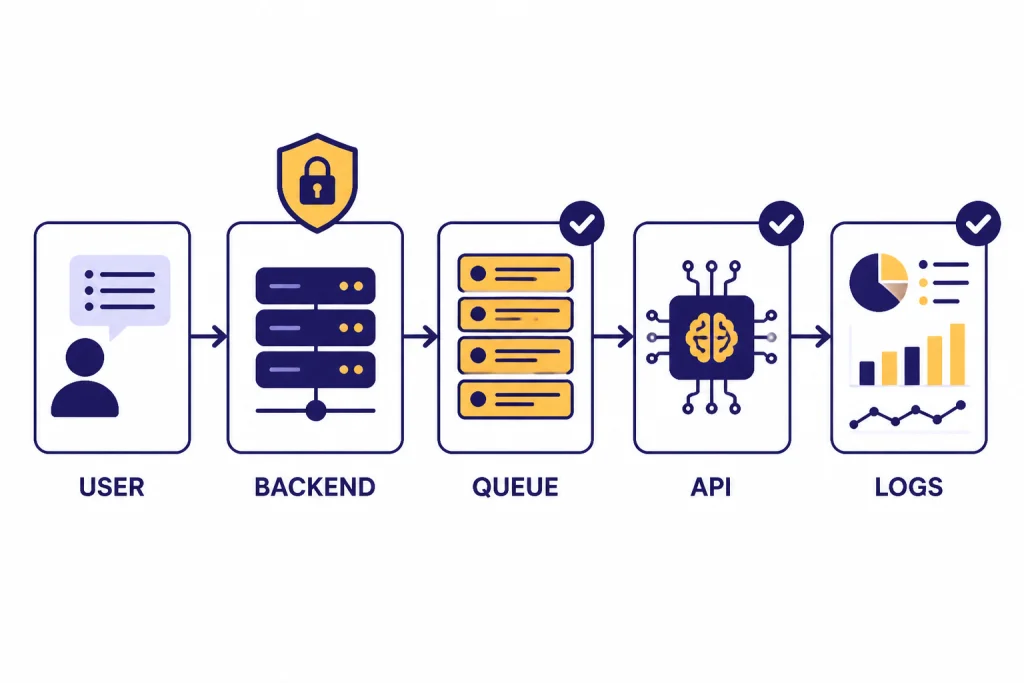
A production OpenAI API integration should never be a direct call from a browser, mobile app, or untrusted client. Put a backend service in front of the OpenAI API. That backend should authenticate your user, validate inputs, choose the model and endpoint, enforce per-user quotas, attach safety identifiers where appropriate, handle retries, log usage, and return only the output your product needs.
OpenAI’s own production guidance covers the move from prototype to production, including organization setup, billing limits, API keys, staging projects, rate limits, latency, and architecture choices.[1] Treat that guidance as the baseline. Your product-specific layer should add the controls OpenAI cannot know: your users, your threat model, your acceptable latency, your domain rules, and your business budget.
The useful mental model is an “API envelope.” The model call sits inside a wrapper that controls everything around it. The wrapper should decide whether the request is allowed, whether it needs retrieval, whether it can run asynchronously, whether it needs moderation, what schema the response must satisfy, how long the request may run, and what to do when the call fails.
| Layer | Production responsibility | Common mistake |
|---|---|---|
| Client | Collect user intent and show progress | Calling OpenAI directly from the browser |
| Backend gateway | Authenticate, authorize, validate, and meter requests | Passing raw user input straight to a model |
| Model orchestration | Select endpoint, model, tools, schema, timeout, and retry policy | Using one large model for every task |
| Post-processing | Validate JSON, enforce business rules, and redact sensitive fields | Trusting natural-language output as final data |
| Observability | Log request IDs, latency, token usage, errors, and eval outcomes | Only looking at failures after users complain |
Choose the right API surface for the job
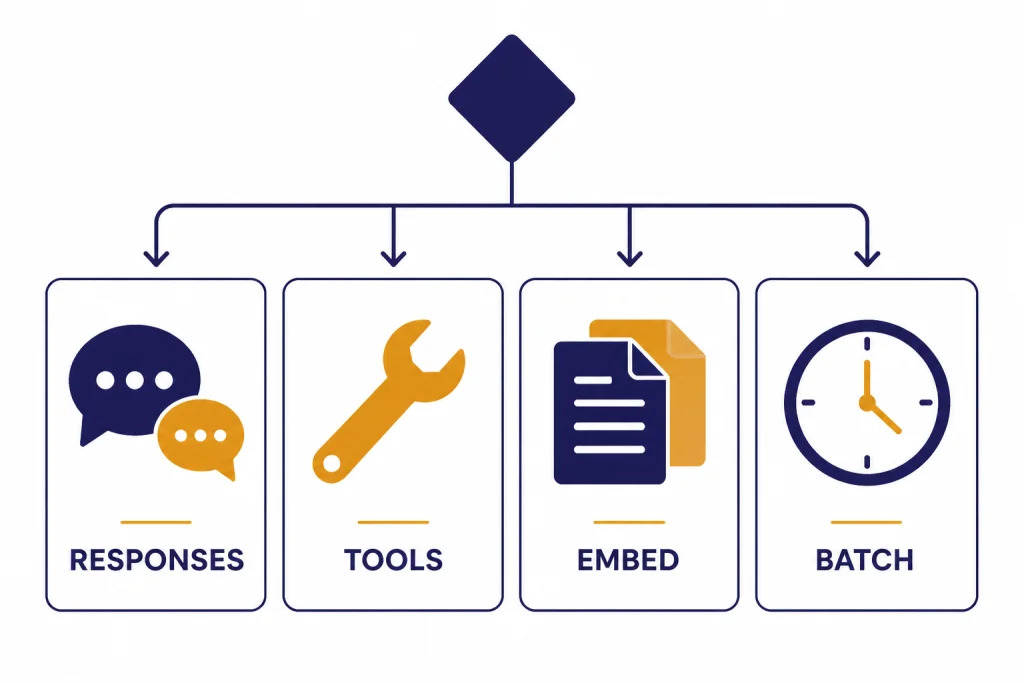
Start new text, vision, tool, and multimodal workflows with the OpenAI Responses API unless you have a specific reason to use another endpoint. OpenAI describes the Responses API as its advanced interface for generating model responses, with support for text and image inputs, text outputs, conversation state, built-in tools, and function calling.[4]
Use function calling when the model needs to ask your application to perform an action or fetch data. OpenAI’s function calling guide describes tool calling as a multi-step exchange in which the model requests a tool call, your application executes it, and your application returns the tool result for the model to continue.[6] That pattern is safer than asking the model to invent facts or pretend it has accessed your database.
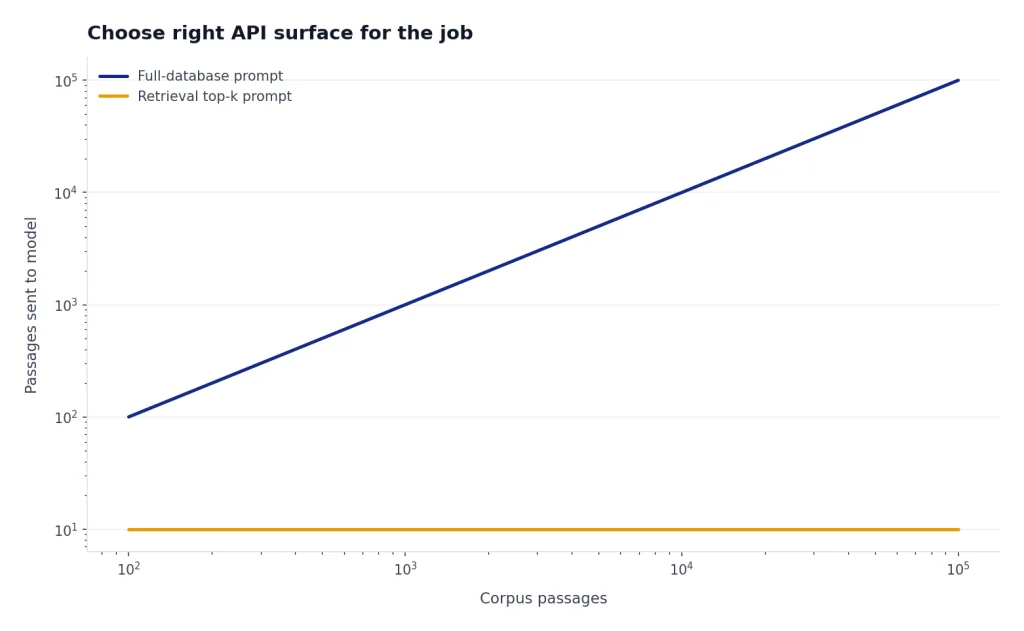
Use embeddings when you need semantic search, deduplication, clustering, or retrieval. A retrieval system should return a small, relevant set of source passages to the model instead of dumping a full database into the prompt. For deeper implementation details, see our OpenAI Embeddings API guide.
Use the Batch API for jobs that do not need an immediate response, such as nightly enrichment, large-scale classification, backfills, embedding generation, or offline analysis. OpenAI’s Batch API reference says batch completions are returned within 24 hours for a 50% discount, and OpenAI’s pricing page also describes the Batch API as asynchronous work over 24 hours with 50% savings.[9][10] For a cost-focused walkthrough, use the OpenAI Batch API breakdown.
| Use case | Prefer | Why |
|---|---|---|
| Interactive assistant, summarizer, classifier, or multimodal workflow | Responses API | Unified interface for inputs, tools, state, and outputs |
| App action or database lookup | Function calling | Lets your code execute trusted actions outside the model |
| Search over private documents | Embeddings plus retrieval | Limits context to relevant material |
| Offline high-volume work | Batch API | Trades immediacy for lower cost and asynchronous throughput |
| Real-time voice or low-latency interaction | Realtime API | Designed for streaming, interactive experiences |
Secure keys, projects, and data flows
API key security is the first production requirement. OpenAI says API keys should not be shared, should not be deployed in client-side environments such as browsers or mobile apps, and should not be committed to repositories.[2] Use environment variables or a secret manager, rotate keys when needed, and assign separate keys to separate projects or services.
Separate staging from production. OpenAI’s production guidance recommends separate projects as you scale so you can isolate development and testing, limit access to production, and set custom rate and spend limits per project.[1] That separation also makes incident response cleaner. If a staging key leaks, you should not have to rotate the key that powers your live application.
Do not put personal user identifiers, raw secrets, session tokens, or unneeded private data into prompts. If you need a stable user reference for abuse monitoring or user-level controls, use a server-side identifier that does not expose personal information. OpenAI’s safety checks documentation recommends stable hashed identifiers when using the safety_identifier parameter for individual users.[11]
Security also includes output handling. Never let a model response directly execute code, change permissions, send money, delete records, or contact a user without a deterministic policy layer. The model can propose an action. Your backend should verify the action against rules, permissions, and confirmation requirements.
Make model outputs predictable enough to ship
Natural language is useful for people. It is a poor contract between services. When your application needs structured data, use structured outputs, function calling, or a post-processing validator. OpenAI’s structured outputs guide says structured outputs are available through function calling and through structured response formats, with the right choice depending on whether you need the model to call tools or simply return structured data.[5]
Define the smallest schema that solves the job. Use enums for known categories. Use booleans for binary decisions. Use arrays with limits when multiple items are possible. Include an explicit “unknown” or “needs_review” value when the model may not have enough evidence. This is better than forcing false certainty.
Validate every structured response before using it. JSON that parses is not automatically safe. Check required fields, allowed values, numeric ranges, references to real records, and consistency with the user’s permissions. If validation fails, retry with a narrower repair prompt, route to a fallback model, or send the item to review.
For user-facing text, set style and safety boundaries in system or developer instructions. For business workflows, keep the model’s role narrow. A support triage model should classify and summarize. It should not invent refunds, write policy, and update billing records in the same unconstrained response.
For advanced schema design, see our guide to structured outputs with the OpenAI API. If your production issue is a failing request or malformed response, pair it with our OpenAI API Errors reference.
Control rate limits, cost, and latency together
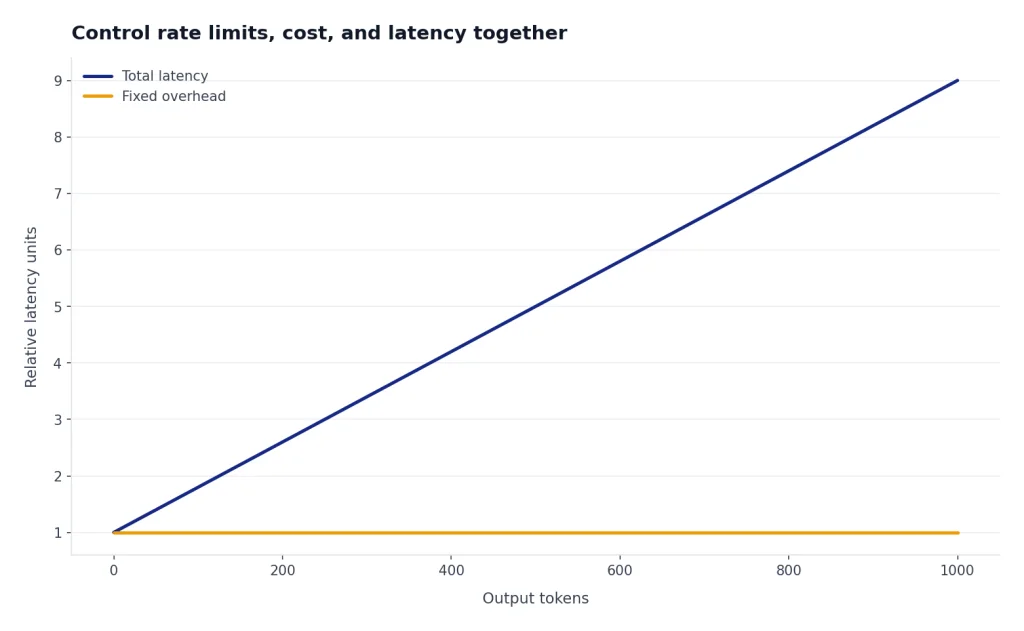
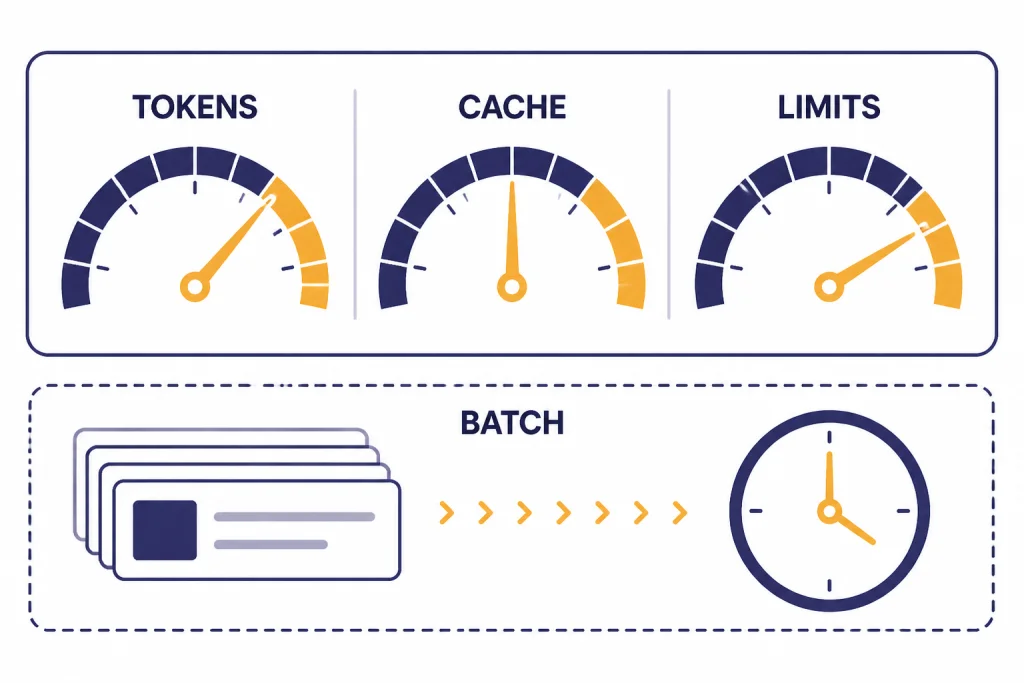
Rate limits, cost, and latency are connected. A prompt that asks for too much output costs more, takes longer, and consumes more token capacity. A workflow that makes too many sequential calls increases user wait time and increases the chance of hitting request limits.
OpenAI’s rate limit guide says limits are measured in five ways: requests per minute, requests per day, tokens per minute, tokens per day, and images per minute.[3] Your application should track its own use along similar lines. Track per-user requests, per-feature tokens, per-model spend, timeout rates, retry rates, and queue depth. Do not rely only on a monthly bill.
Use smaller and faster models where they pass your evals. OpenAI’s latency guidance says smaller models usually run faster and cheaper, and that the main factor in inference speed is model size.[7] Route simple tasks such as classification, extraction, formatting, and guardrail checks to the cheapest model that meets your quality bar. Reserve larger models for tasks that clearly need them. For model selection, compare options in all GPT models compared side by side.
Reduce output length before you chase deeper optimizations. OpenAI’s latency guide notes that generating tokens is often the highest-latency step, and reducing output tokens can reduce latency materially.[7] In practice, this means asking for concise answers, using schemas instead of prose when possible, setting reasonable output caps, and avoiding chain-of-thought style verbosity in user-visible responses.
Take advantage of caching when your prompts have stable prefixes. OpenAI’s prompt caching documentation recommends placing static content such as instructions and examples at the beginning of the prompt and variable user-specific content at the end.[8] This matters for production systems with repeated instructions, tool definitions, schemas, or long policy context.
Use streaming when the user is waiting. OpenAI’s latency guidance identifies streaming as a key way to make users wait less, because the user can begin reading before the full response is complete.[7] For implementation patterns, see our guide to streaming responses with the OpenAI API.
Use a calculator before launch. Estimate tokens for common paths, worst-case paths, retries, and background jobs. Our OpenAI API cost calculator can help you turn assumptions into a budget before the first invoice surprises you.
Design for failures, retries, and fallbacks
Production systems should expect transient failures. The right behavior is not infinite retrying. It is bounded retrying with exponential backoff, jitter, idempotency where possible, and user-visible recovery states when the workflow cannot finish.
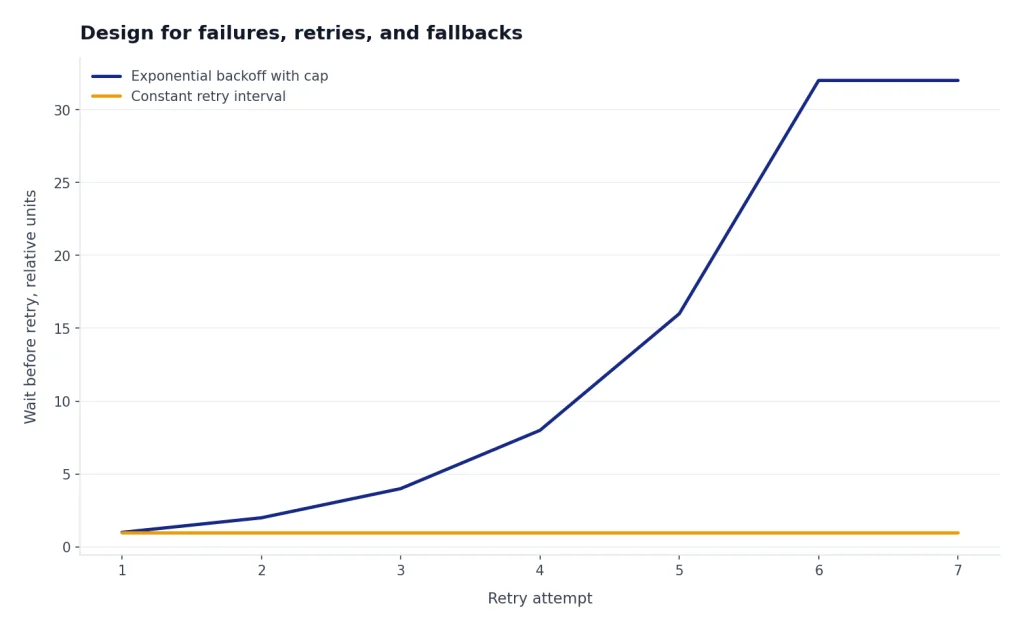
OpenAI’s rate limit guide recommends automatic retries with random exponential backoff for rate limit errors, and it also warns that unsuccessful requests contribute to per-minute limits.[3] That means retry policy must be conservative. If every worker retries aggressively at the same time, your system can turn a temporary limit into a larger outage.
Set timeouts at every layer: client, backend, queue worker, and OpenAI request. Use circuit breakers when a downstream path starts failing. For interactive flows, degrade gracefully. You might return a shorter answer, switch to a cached result, ask the user to try again, or queue the job for later instead of blocking the whole product.
Build idempotency into actions. If a model calls a tool to create a support ticket, send an idempotency key tied to the original user request. If the OpenAI call retries, the downstream ticket system should not create duplicates. The same principle applies to emails, payments, tasks, CRM updates, and data writes.
Keep fallbacks explicit. A fallback can be a smaller response, a different model, a non-AI rule, a cached answer, or a human review queue. Do not silently degrade quality in a way that breaks user trust. If the result is incomplete, say so.
Test, monitor, and improve after launch
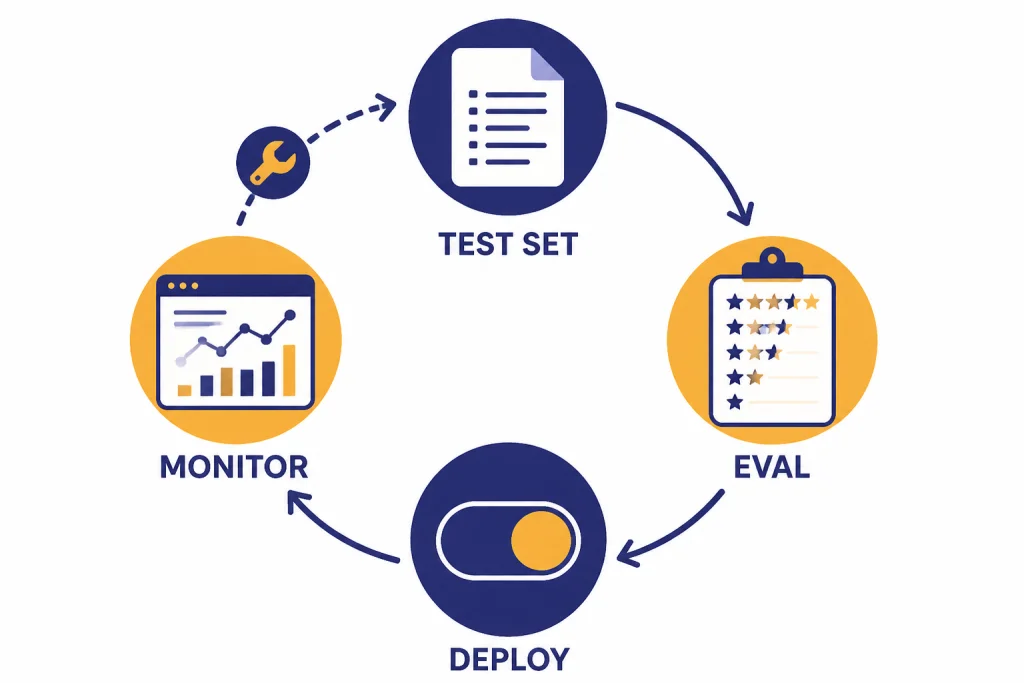
Every production prompt is code. Version it. Review it. Test it. Roll it out gradually. A prompt change can alter accuracy, latency, refusal behavior, tool use, and cost. Treat it with the same caution you would apply to a database migration or ranking algorithm change.
Create eval sets from real product cases. Include easy examples, common examples, adversarial examples, edge cases, and past failures. OpenAI’s Evals API reference describes evals as a way to create, manage, and run evaluations, including graders and data source configurations.[13] Use evals to compare prompt versions, model choices, retrieval settings, and schema changes before deployment.
Monitor production quality, not only uptime. Log whether the response validated, whether a tool call succeeded, whether the user edited the output, whether a human reviewer rejected it, and whether the user repeated the request. These signals can be more useful than a generic thumbs-up button.
Monitor costs with source-of-truth billing data. OpenAI’s usage costs reference says the Costs endpoint or the Costs tab in the Usage Dashboard is recommended for financial purposes because it reconciles to billing invoices.[15] Your internal logs should still estimate feature-level cost, but finance and reconciliation should use the billing source of truth.
Keep a changelog for prompts, tools, models, retrieval indexes, and safety settings. When a metric changes, you need to know what changed with it. Without release history, teams waste time debating whether the model, prompt, index, user mix, or traffic pattern caused the issue.
Add safety and compliance controls
Production API use needs safety controls that match the risk of the product. OpenAI’s safety best practices recommend measures such as the Moderation API, adversarial testing, human review where appropriate, input constraints, output limits, user reporting, and clear communication of limitations.[11] For content filtering patterns, see our OpenAI Moderation API guide.
High-stakes uses need extra review. OpenAI’s usage policies restrict or require safeguards for sensitive areas such as legal, medical, financial, employment, housing, education, migration, law enforcement, national security, and other high-impact contexts.[14] If your system affects rights, access, eligibility, money, health, or safety, involve legal, compliance, domain experts, and human review before launch.
Understand data retention before you send production data. OpenAI’s data controls documentation says that, as of March 1, 2023, data sent to the OpenAI API is not used to train or improve OpenAI models unless the customer explicitly opts in.[12] The same document says abuse monitoring logs are retained for up to 30 days by default unless longer retention is legally required.[12]
Do not treat retention controls as a substitute for data minimization. Send only what the model needs. Redact secrets and unnecessary personal data. Avoid storing full prompts and responses in your own logs unless you need them and can protect them. If you use third-party tools, retrieval systems, or external services, review their retention and access controls too.
Production checklist
Use this checklist before moving an OpenAI API feature from prototype to production.
- All OpenAI calls go through your backend, not directly from a browser or mobile app.
- API keys are stored in a secret manager or environment variables, never in client code or repositories.
- Staging and production use separate projects, keys, limits, and monitoring.
- Inputs are validated, length-limited, and stripped of unnecessary sensitive data.
- Prompts, schemas, retrieval settings, and tool definitions are versioned.
- Structured data uses structured outputs, function calling, or strict validation.
- Every request has a timeout, retry policy, and clear failure path.
- Rate-limit handling uses bounded backoff with jitter.
- Costs are estimated before launch and monitored after launch.
- Latency is measured by feature and user path, not only by average API response time.
- Offline work uses batch processing where the user does not need an immediate answer.
- Safety checks, moderation, and human review are applied where risk requires them.
- Eval sets cover common cases, edge cases, adversarial inputs, and known failures.
- Production logs capture enough data to debug quality, cost, latency, and errors without over-collecting sensitive content.
The short version is this: build the control plane before the model becomes critical infrastructure. A strong production API integration is not just a prompt. It is a governed, observable, testable service that happens to call a model.
Frequently asked questions
What is the most important OpenAI API production best practice?
The most important practice is to put a secure backend layer between your users and the OpenAI API. That layer should protect the API key, validate requests, enforce limits, choose the right model or endpoint, handle errors, and log usage. Without it, every other control is weaker.
Should I use the Responses API for new production apps?
For most new text, tool, and multimodal workflows, yes. OpenAI describes the Responses API as its advanced interface for model responses, with support for text and image inputs, tools, state, and function calling.[4] Use another endpoint only when your use case clearly calls for it.
How should I handle OpenAI API rate limits?
Track request and token usage, keep per-user and per-feature limits, and use bounded retries with exponential backoff and jitter. OpenAI warns that failed requests still count against per-minute limits, so aggressive retry loops can make rate-limit problems worse.[3] If work is not time-sensitive, move it to the Batch API.
How do I reduce OpenAI API costs in production?
Use the smallest model that passes your evals, reduce unnecessary output tokens, cache stable prompt prefixes, and batch offline work. The Batch API can be a strong fit for asynchronous jobs because OpenAI describes it as 50% discounted with a 24-hour processing window.[9] Also monitor cost by feature, not just at the organization level.
Do I need structured outputs?
You need structured outputs when the response will drive code, data storage, search filters, analytics, or workflow decisions. Free-form text is fine for a user-facing explanation, but it is fragile as a service contract. Validate every structured response before using it.
Does OpenAI train on API data by default?
OpenAI’s data controls documentation says API data has not been used to train or improve OpenAI models since March 1, 2023, unless the customer explicitly opts in.[12] You should still minimize the data you send, understand retention controls, and protect your own logs.