

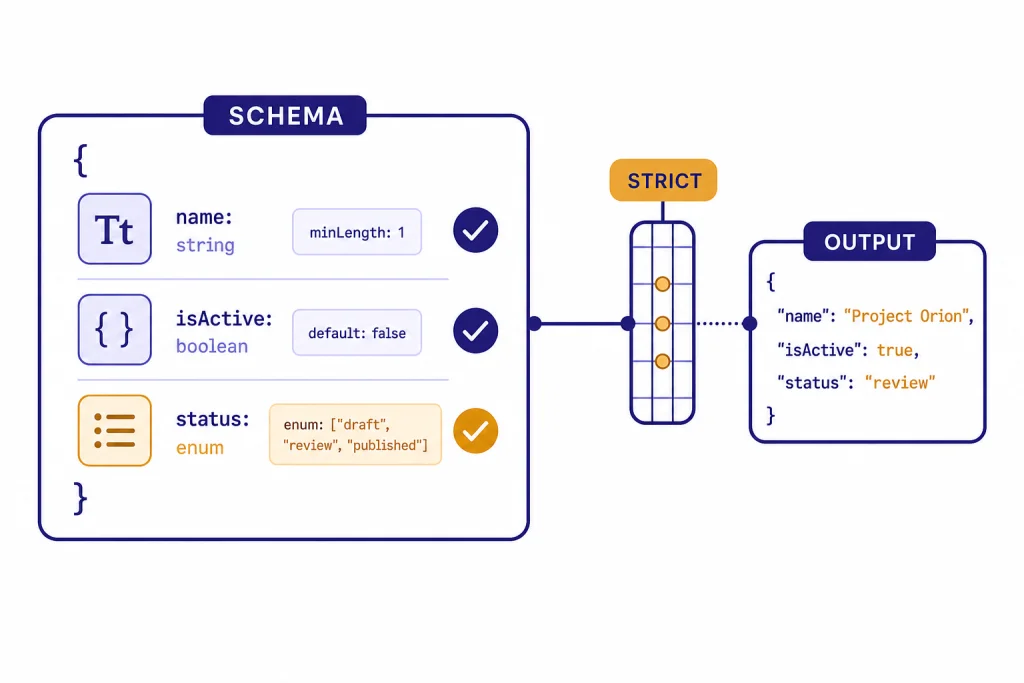
Structured outputs let you make the OpenAI API return data that matches a JSON Schema instead of hoping a prompt produces parseable JSON. Use them when your app needs predictable fields, enums, arrays, and typed values for downstream code. In current OpenAI docs, structured outputs are available through schema-based text formatting for model replies and through strict function schemas for tool calls.[1] They are not a replacement for validation, product logic, or safety handling. They are a contract between your application and the model output layer. This guide explains how the feature works, where it fits beside JSON mode and function calling, and how to design schemas that survive production traffic.
What structured outputs are
Structured outputs are an OpenAI API feature that makes a model response conform to a JSON Schema you provide. OpenAI describes the feature as a way to ensure responses adhere to a supplied schema, including required keys and valid enum values.[1] That matters when the result feeds a database write, queue job, analytics pipeline, UI component, or another API call.
The practical shift is simple. Instead of asking the model, “Return JSON with fields named title, priority, and due_date,” you define those fields in a schema and make the schema part of the API request. Your code can then parse the response as data, not as prose that happens to look like data.
OpenAI introduced Structured Outputs in the API on August 6, 2024, and described them as model outputs that reliably adhere to developer-supplied JSON Schemas.[2] The launch post used gpt-4o-2024-08-06 as the headline model and reported 100% reliability on OpenAI’s complex JSON schema-following evals, compared with less than 40% for gpt-4-0613 in that same comparison.[2] Treat those as historical launch benchmarks, not a guarantee that every value will be correct in your application or that gpt-4o is the current best model choice.
Use structured outputs when format correctness is the failure mode you want to reduce. Do not use them as your only defense against bad facts, unsafe user input, malicious prompts, or invalid business decisions. A schema can require a priority field and restrict it to low, medium, or high. It cannot prove that the model chose the right priority.
How structured outputs work
At request time, you send a schema with the model call. With strict schema adherence enabled, the API constrains the shape of the output so the model returns only the structure your schema allows. OpenAI’s docs state that unsupported JSON Schema features will produce an error when strict structured outputs are enabled.[1]
The feature solves a narrower problem than many developers expect. It improves structural reliability. It does not make the model deterministic in meaning, remove the need for application validation, or guarantee that extracted values are true. If a user submits unrelated text, the model may still try to fill the required fields unless your instructions tell it how to represent “not found” or “not applicable.” OpenAI specifically recommends giving instructions for user-generated input that cannot produce a valid response.[1]
A good mental model is “typed output from an uncertain reader.” The schema can force the response into a typed envelope. Your application still decides whether the envelope contains acceptable data.

Two ways to use structured outputs
There are two common patterns. Use structured text output when you want the assistant’s answer itself to be JSON. Use strict function calling when you want the model to call your code with schema-valid arguments. OpenAI’s structured output docs separate those cases: structured response format for model replies, and function calling when you connect the model to tools, functions, or data in your system.[1]
1. Structured response data
Use this pattern for extraction, classification, routing, scoring, entity detection, UI state, and other cases where the model’s final answer should be data. In the Responses API, the response format is configured under text.format, and the API reference describes json_schema as the format that enables structured outputs.[3] If you are moving from Chat Completions, OpenAI’s migration guide notes that structured output configuration moved from response_format to text.format in Responses.[5]
from openai import OpenAI

client = OpenAI()

response = client.responses.create(
    model="gpt-5.5",
    input=(
        "Extract the ticket title, severity, and whether it blocks launch: "
        "Payment page returns 500 for all users."
    ),
    text={
        "format": {
            "type": "json_schema",
            "name": "support_ticket",
            "strict": True,
            "schema": {
                "type": "object",
                "properties": {
                    "title": {"type": "string"},
                    "severity": {
                        "type": "string",
                        "enum": ["low", "medium", "high"]
                    },
                    "blocks_launch": {"type": "boolean"}
                },
                "required": ["title", "severity", "blocks_launch"],
                "additionalProperties": False
            }
        }
    }
)

print(response.output_text)
This example uses gpt-5.5, a current May 2026 general-purpose choice for high-quality structured replies. For cheaper or lower-latency extraction, test smaller current models such as the GPT-5.x mini or nano variants against your own fixtures. The older gpt-4o-2024-08-06 model remains useful as a historical reference because OpenAI used it in the original structured outputs launch materials and model documentation.[2][7] In production, keep the schema definition near the type definition your code uses so the JSON Schema and your application model do not drift apart.
2. Strict function arguments
Use this pattern when the model should call a tool, not merely return a JSON object to the user. Function calling lets the model choose a function and generate arguments. Strict mode uses structured outputs so the generated arguments match the function schema. OpenAI’s function calling guide says strict mode requires additionalProperties: false for each object and requires all fields in properties to be marked as required.[4] For a deeper explanation of tool calls, see our function calling in OpenAI API explained guide.
Choose function calling for actions: create an invoice, search inventory, retrieve a customer, or schedule a job. Choose structured response data for analysis: label a support ticket, extract fields from a document, or produce a typed summary.

Structured outputs vs. JSON mode vs. function calling
Structured outputs are easy to confuse with JSON mode because both produce JSON. The difference is schema adherence. OpenAI’s docs say JSON mode ensures valid JSON, while structured outputs ensure the output matches your schema when supported.[1] JSON mode is still useful for older model or compatibility paths, but it is the weaker contract.
| Option | Best use | What it guarantees | Main limitation |
|---|---|---|---|
| Structured outputs | Typed model replies such as extraction, classification, and UI state | Valid JSON that follows the supported JSON Schema subset | Values can still be semantically wrong |
| JSON mode | Legacy JSON responses or unsupported structured-output cases | Valid JSON output in normal cases | No guarantee that fields match your schema |
| Function calling with strict mode | Tool calls and external actions | Function arguments follow the supported schema | You still must execute, authorize, and validate the tool call |
The table reflects OpenAI’s documented distinction: structured outputs enforce schema adherence, JSON mode does not, and strict function calling applies schema adherence to tool arguments.[1][4] If you are building a new integration, start with the OpenAI Responses API unless you have a specific reason to stay on Chat Completions.
Do not pick based only on syntax. Pick based on control flow. If your app consumes the assistant’s final answer as data, use structured output. If your app needs the model to request work from your system, use function calling. If you need token-by-token display, read the section on streaming below and our guide to streaming responses with the OpenAI API.
Schema rules that matter
Structured outputs support a subset of JSON Schema, not the full JSON Schema specification. OpenAI’s docs list supported types including string, number, boolean, integer, object, array, enum, and anyOf, and they document constraints that affect real implementations.[1]
- The root must be an object. OpenAI says the root level must be an object and must not use
anyOf.[1] - All fields must be required. Every field in
propertiesmust appear inrequiredfor structured outputs.[1] - Objects must reject extra keys. Set
additionalProperties: falseon each object.[1] - Optional fields need a null union. To emulate optional data, use a type such as
["string", "null"]and keep the field required.[1] - Depth and property counts are intentionally small. OpenAI documents up to 100 object properties total and up to 5 nesting levels for supported schemas.[1]
- Enums and schema strings have limits. OpenAI documents up to 500 enum values across the schema, a 15,000-character total string budget for property names, definition names, enum values, and const values, and an additional 7,500-character limit for one string enum when that enum has more than 250 values.[1]
Unsupported keywords are a common source of surprises. Depending on the API path and model, strict structured outputs may reject constraints that ordinary JSON Schema validators accept. Practical traps include string constraints such as minLength, maxLength, pattern, and format; number constraints such as minimum, maximum, and multipleOf; array constraints such as minItems, maxItems, and uniqueItems; and object constraints such as patternProperties, propertyNames, minProperties, and maxProperties.[1] Put those checks in your application validator after parsing instead of assuming the API will enforce them.
These rules push you toward smaller, explicit schemas. That is good design. A schema with dozens of loosely described fields is harder to maintain and harder for the model to fill accurately. Split a large task into smaller calls when fields depend on different evidence or different quality checks.

Descriptions still matter. The schema controls structure, but field descriptions explain intent. For example, customer_sentiment with enum values positive, neutral, and negative should define whether “negative” means anger, dissatisfaction, cancellation risk, or any complaint. Good descriptions reduce semantic mistakes that the schema cannot catch.
Production patterns
The best production pattern is to treat structured outputs as one layer in a typed pipeline. The model creates a candidate object. Your app validates it, checks business rules, stores it, and records enough metadata to debug failures. For broader operational guidance, see our OpenAI API best practices for production.
Use small schemas
Ask for the fields you need now, not every field you may need later. A small schema is easier to test and cheaper to revise. If a support ticket classifier only needs category, severity, and escalation status, do not also ask for a polished customer email, a root-cause analysis, and a SQL update in the same response.
Represent uncertainty directly
Because all fields must be required, design for uncertainty inside the schema. Use nullable fields, confidence enums, or evidence arrays. For example, a date extractor can return due_date: null and date_status: "not_found". That is better than forcing the model to invent a date to satisfy a string field.
Validate after parsing
Keep your normal validation layer. Check date ranges, IDs, permissions, enum transitions, and database constraints. Structured outputs reduce malformed JSON and missing keys. They do not know whether a user is allowed to close a ticket or whether a SKU exists in your catalog.
Version schemas
Add a schema version in your application code, even if you do not include it in the model-visible output. This makes migrations easier when you rename fields or split one enum into several states. Log the model, schema version, and request type for each output. That helps diagnose regressions after model or prompt changes.
Batch when the task is offline
Structured extraction often runs over large backlogs: invoices, support tickets, reviews, call transcripts, or product listings. If latency does not matter, compare synchronous requests with the OpenAI Batch API. For live user flows, keep the schema tight and handle timeouts cleanly.
Use vision and multimodal input carefully
OpenAI’s launch post said structured outputs with response formats and function calling were compatible with vision inputs in the listed availability notes.[2] That makes structured outputs useful for document images, screenshots, and forms. Still, validate extracted values against the source image or downstream records. If your project uses images, start with our OpenAI Vision API guide.
Handle refusals, incomplete results, and errors
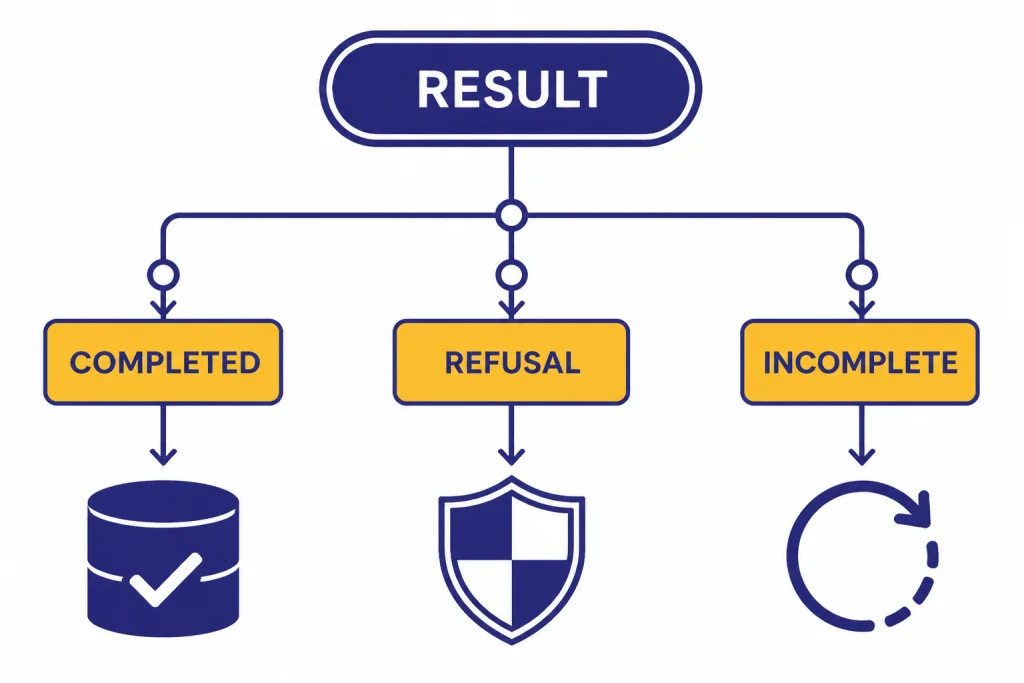
Structured outputs can still produce non-happy paths. OpenAI’s docs explain that safety refusals may not follow your supplied schema and are exposed through a refusal field or refusal content depending on the API shape.[1] Your parser should branch before assuming a parsed object exists.
- Completed structured object: Parse it, validate it, and continue.
- Refusal: Show an appropriate message or route to a human workflow.
- Incomplete response: Retry only when safe, or ask the user for a smaller request.
- Schema error: Fix the schema. Do not retry the same invalid schema.
- Application validation failure: Return a recoverable error, ask for clarification, or run a narrower extraction pass.
Here is a concrete defensive pattern for the Responses API. It checks for an incomplete response and refusal content before parsing output_text. The exact object helpers can vary by SDK version, so keep this branch logic even if you wrap it in your own response adapter.
import json
from openai import OpenAI

client = OpenAI()

response = client.responses.create(
    model="gpt-5.5",
    input="Classify this support message: I want instructions for committing fraud.",
    text={
        "format": {
            "type": "json_schema",
            "name": "ticket_classification",
            "strict": True,
            "schema": {
                "type": "object",
                "properties": {
                    "category": {"type": "string", "enum": ["billing", "bug", "other"]},
                    "safe_to_process": {"type": "boolean"},
                    "reason": {"type": ["string", "null"]}
                },
                "required": ["category", "safe_to_process", "reason"],
                "additionalProperties": False
            }
        }
    }
)

if response.status == "incomplete":
    reason = getattr(response.incomplete_details, "reason", "unknown")
    raise RuntimeError(f"Response incomplete: {reason}")

for item in response.output:
    for content in getattr(item, "content", []):
        if getattr(content, "type", None) == "refusal":
            # Refusals are safety responses and may not match your schema.
            print({"kind": "refusal", "message": content.refusal})
            break
    else:
        continue
    break
else:
    data = json.loads(response.output_text)
    # Now run your normal application validation and business-rule checks.
    print({"kind": "parsed", "data": data})
When streaming, remember that partial data is not the final object. OpenAI says streaming lets you process responses as they are generated and recommends relying on SDKs for streaming structured outputs.[6] Use streaming to improve perceived latency, but commit the result only after the final parsed response is complete. Streaming also complicates moderation because partial completions can be harder to evaluate, a risk OpenAI notes in its streaming guide.[6]
For API failures unrelated to schema design, such as authentication, rate limits, invalid requests, or server errors, use normal retry and observability practices. Our OpenAI API errors reference covers common failure classes and recovery steps.
Cost, latency, and model choice
Structured outputs do not remove token costs. Your schema, instructions, user input, and generated JSON all contribute to usage. If you add long descriptions to every field, you may improve reliability but increase prompt size. Track both accuracy and cost before standardizing on a schema. For pricing estimates, use our OpenAI API cost calculator or model-by-model OpenAI API pricing guide.
As of May 2026, use the GPT-5.x lineup rather than treating gpt-4o-2024-08-06 as the default. For demanding extraction, messy documents, or high-value decisions, start evaluations with gpt-5.5 or gpt-5.5-pro. For simple classification, routing, and normalized field extraction, test smaller GPT-5.x models to reduce latency and cost. Keep the older gpt-4o-2024-08-06 numbers in this guide as a historical launch snapshot, not a current pricing recommendation.[7]
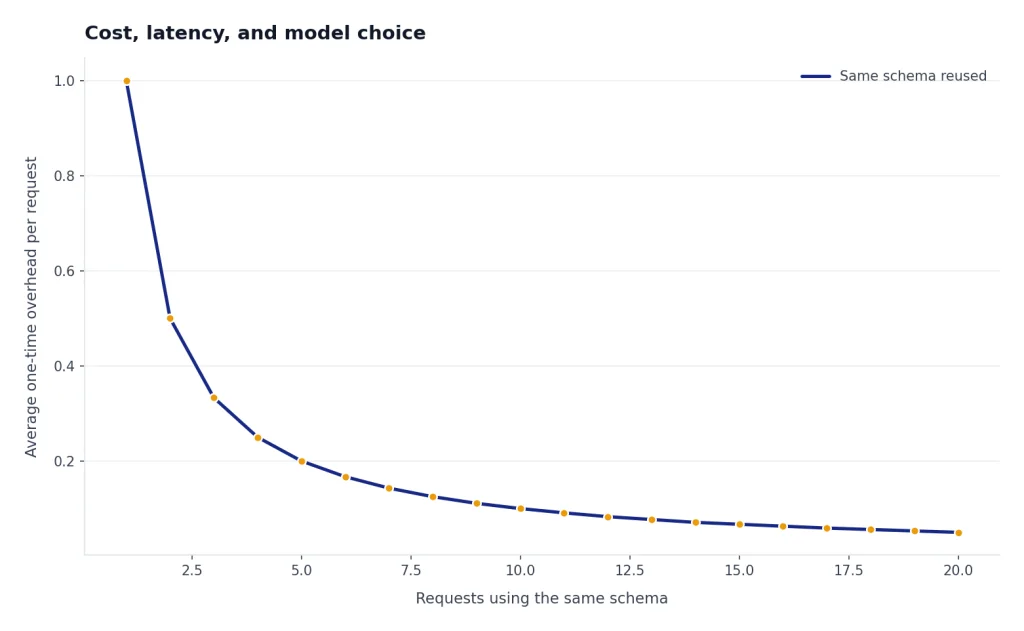
Latency depends on model choice, schema complexity, output length, and whether the schema needs processing. OpenAI’s structured output docs note that the first request with a new schema can have additional latency while the API processes the schema, while later requests with the same schema generally avoid that one-time processing path.[1] If your application is latency-sensitive, test cold and warm paths separately.
Model choice should follow task difficulty. Simple extraction and routing often work well with smaller models. Harder reasoning, messy input, or high-value decisions may need a stronger model plus human review. Compare model behavior on your own examples, not just general benchmarks. If you are deciding across the broader model lineup, start with our all GPT models compared side by side reference.
The safest rollout plan is incremental. Start with a narrow schema, evaluate against known examples, log refusals and validation failures, then expand. Structured outputs are most valuable when they make your integration boring: predictable keys, predictable types, and predictable failure handling.
Frequently asked questions
Are structured outputs the same as JSON mode?
No. JSON mode is designed to return valid JSON, but it does not guarantee that the result follows your schema. Structured outputs are the stronger option when the model and API path support them because they enforce supported JSON Schema rules.[1]
Do structured outputs guarantee correct answers?
No. They guarantee structure, not truth. A response can contain the required fields and still choose the wrong category, extract the wrong date, or infer something not supported by the input. Keep validation, tests, and review paths for important workflows.
When should I use function calling instead?
Use function calling when the model should ask your system to do something, such as search a database, create a record, or call an internal service. Use structured response output when the model’s final answer should be typed data for your application. Strict function calling uses structured outputs to make tool arguments follow the function schema.[4]
Can fields be optional?
Structured outputs require all fields to be listed as required. To represent optional data, define the field as nullable, such as ["string", "null"], and include a status or reason field when absence matters.[1] This makes missing information explicit instead of relying on omitted keys.
Can I use all JSON Schema validation keywords?
No. Structured outputs use a supported subset. Do not assume keywords such as pattern, format, minimum, maxItems, or uniqueItems will be enforced by the model output layer. Keep those checks in your application validator and treat unsupported schema keywords as schema-design errors, not retryable model failures.[1]
Can I stream structured outputs?
Yes. OpenAI documents streaming support for structured outputs and recommends using the SDK helpers for this path.[6] Treat streamed pieces as provisional until the final response is complete and parsed.
What should I do when the model refuses?
Check for the refusal path before parsing the object. OpenAI notes that refusals may not follow the schema because they are safety responses.[1] Your app should show a safe message, ask for a different input, or route the case to a human workflow depending on the product.