

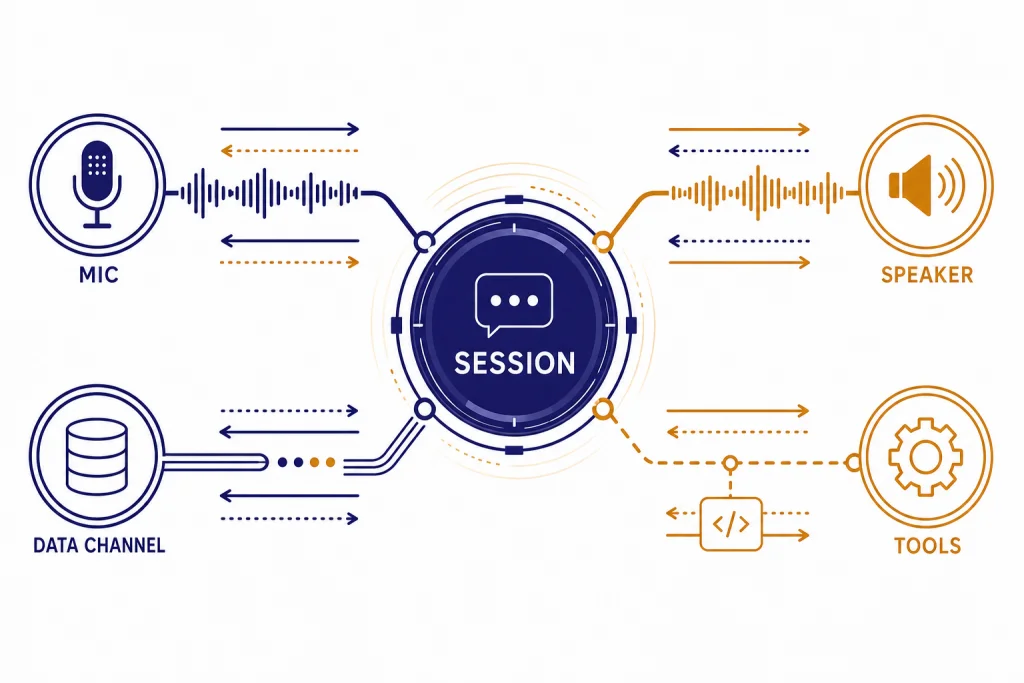
The OpenAI Realtime API is the low-latency API for building voice agents and streaming multimodal apps that need live audio, text, and event updates. It supports speech-to-speech conversations, text and audio output, image input on current realtime models, and realtime transcription workflows.[1] For browser voice apps, OpenAI recommends WebRTC; for server-to-server systems, WebSockets are usually the better fit.[2][3] The main production model is gpt-realtime, with gpt-realtime-mini available as a lower-cost option.[7][8] This guide explains the architecture, connection choices, streaming event flow, pricing, and production guardrails.
What the Realtime API is
The Realtime API is OpenAI’s interface for applications where the model and user exchange information continuously instead of waiting for a full request and full response. The most common use case is a voice agent that listens, reasons, calls tools, and speaks back with low perceived delay.
OpenAI made the Realtime API generally available on August 28, 2025, alongside the gpt-realtime model and production features such as remote MCP server support, image input, and SIP phone calling support.[10] That matters because the current Realtime API is not just a speech-to-text wrapper. It can process audio directly, preserve tone and timing cues, and return speech without forcing you to stitch together separate transcription, text-generation, and text-to-speech services.
Use it when latency and live interaction shape the product. A customer support voice agent, language tutor, interview coach, call center assistant, or hands-free app can benefit from the realtime loop. If you only need a transcript after a file upload, the Whisper API or a standard transcription endpoint is usually simpler. If you only need text streamed into a web page, start with streaming responses with the OpenAI API before you add full realtime audio.
The Realtime API also fits into the broader OpenAI API stack. You may still use function calling for tool execution, structured outputs for downstream data reliability where supported by the model and endpoint, and OpenAI API best practices for production for authentication, observability, retries, and cost controls.
Transport options: WebRTC, WebSocket, and SIP
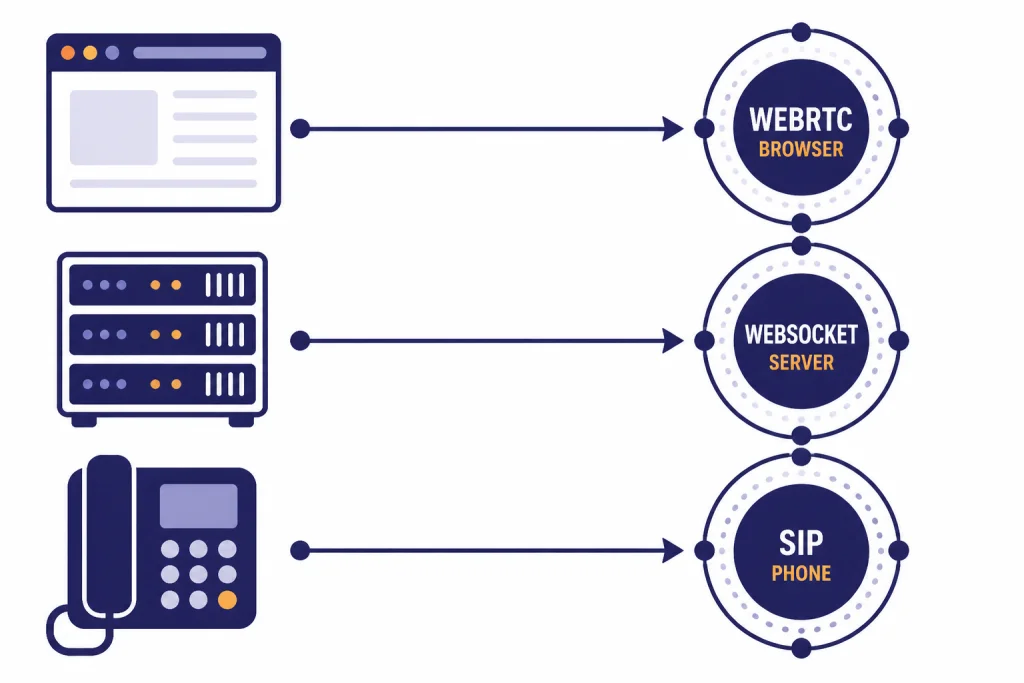
The first design decision is the transport. OpenAI documents WebRTC, WebSocket, and SIP as the primary ways to connect realtime sessions.[1] They are not interchangeable from an operations standpoint. Choose the transport based on where the audio capture happens and where your business logic runs.
| Transport | Best fit | Why it works | Tradeoff |
|---|---|---|---|
| WebRTC | Browser and mobile voice apps | It uses a peer connection for low-latency media and lets the browser handle audio streams. | You still need a trusted backend to create a session or mint a short-lived client secret. |
| WebSocket | Server-side agents and middleware | Your backend keeps the API key private and exchanges JSON events and audio chunks directly. | You handle more audio details yourself, including encoded audio chunks over the socket. |
| SIP | Phone-call agents | It connects realtime sessions to telephony workflows such as accepting, redirecting, or hanging up calls. | You need telephony infrastructure and webhook handling around the realtime session. |
For browser-based speech-to-speech applications, OpenAI recommends WebRTC over WebSockets for more consistent client performance.[2] The browser creates a peer connection, captures microphone audio, receives model audio as a remote stream, and uses a data channel for control events.
For backend applications, WebSockets are the cleaner default. OpenAI’s WebSocket guide describes a server-to-server integration where your backend connects to wss://api.openai.com/v1/realtime and authenticates with your standard API key.[3] This is the right pattern when you already own the audio pipeline, need server-side moderation, or want to hide all realtime session details from the client.
SIP is the specialized option for phone systems. OpenAI’s SIP guide shows realtime call control operations such as accepting, rejecting, redirecting, and hanging up calls, with a WebSocket connection available for monitoring and issuing events after the call is accepted.[11] Use it when the user experience starts as a normal phone call rather than inside your web or mobile app.
How a realtime session works
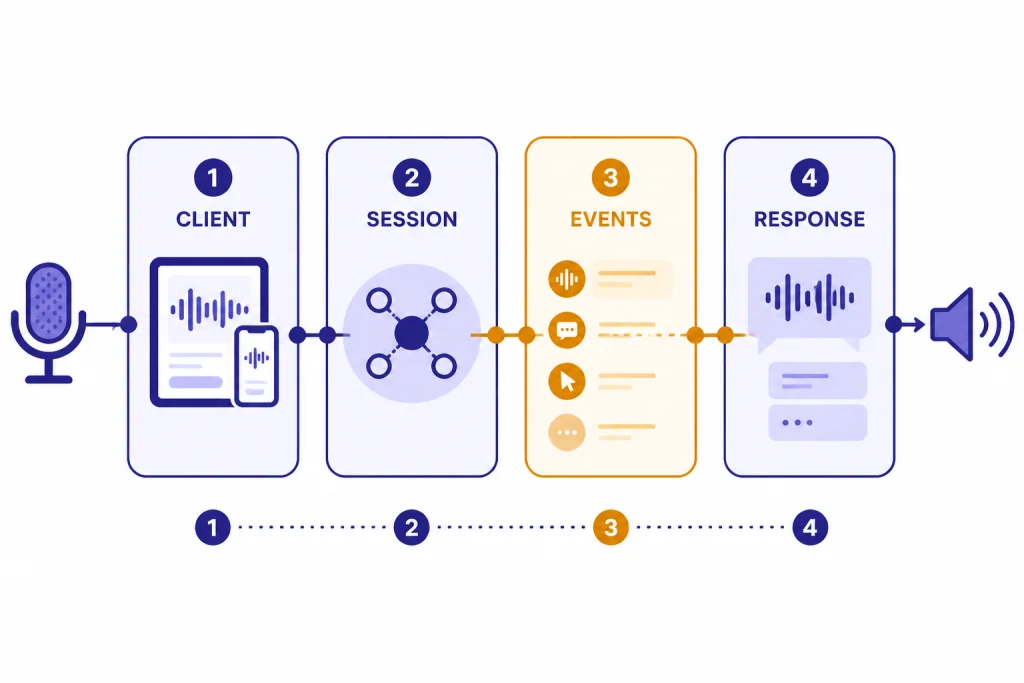
A realtime session is stateful. The model, instructions, voice, input settings, tools, and conversation items live inside the session. After the connection is established, your application sends client events and listens for server events. OpenAI describes Realtime sessions as conversations where items from previous turns become part of the input for later turns.[4]
A typical WebRTC browser flow looks like this. The client asks your backend to start a session. Your backend authenticates with OpenAI and returns the session setup material or a client secret. The browser establishes a peer connection. After that, the app sends events over a data channel while microphone and speaker audio move through WebRTC.
// Browser-side shape, simplified for readability
const pc = new RTCPeerConnection();
const stream = await navigator.mediaDevices.getUserMedia({ audio: true });
pc.addTrack(stream.getAudioTracks()[0]);

const events = pc.createDataChannel("oai-events");
events.onmessage = (message) => {
  const event = JSON.parse(message.data);
  console.log("realtime event", event.type);
};

// Your backend should create the session or client secret.
const session = await fetch("/api/realtime-session", { method: "POST" }).then(r => r.json());

// Then exchange SDP with OpenAI through your chosen pattern.
Do not put a standard OpenAI API key in browser code. If you connect from a client, use a server-controlled setup pattern. OpenAI’s WebRTC guide documents both a unified interface through your server and an ephemeral token pattern for client connections.[2] If you are still deciding how to manage keys, read our guide to whether ChatGPT Plus includes API access and our explanation of a free OpenAI API key.
The event model is the part most developers need to internalize. You update the session with a session.update client event. You add user content with conversation item events or audio buffer events. You trigger a model response with response.create, unless automatic turn detection does that for you. You listen for server events such as response deltas, completed items, errors, and rate-limit updates. If you have built with the Responses API, the mental model is similar, but the session stays open and audio is part of the live loop.
Voice streaming and turn detection
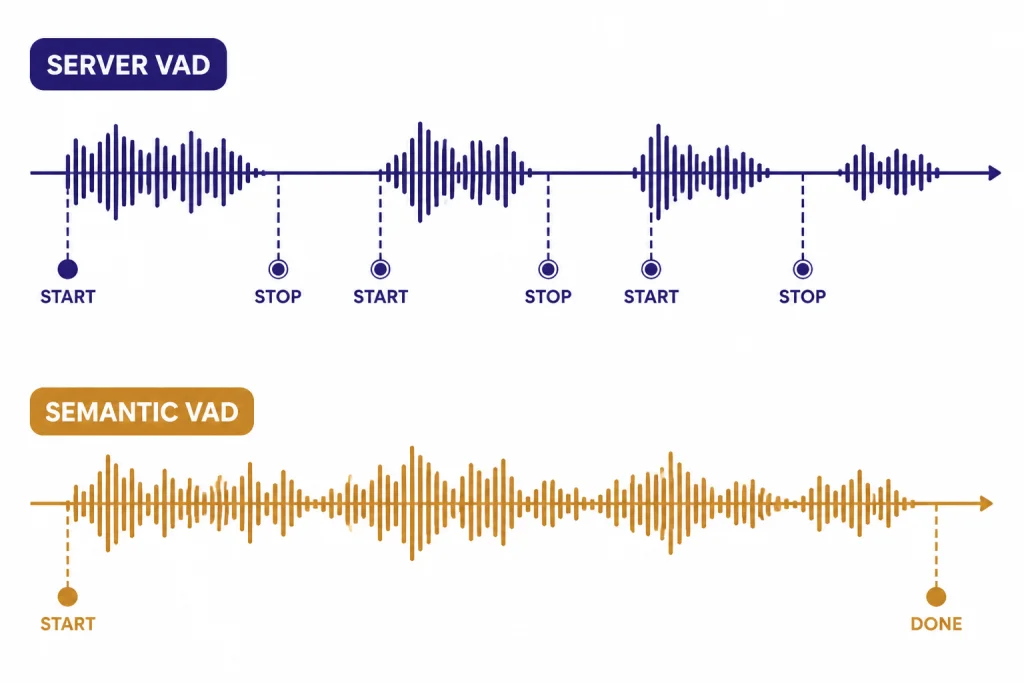
Voice agents fail when they interrupt too often, wait too long, or respond before they understand the user’s intent. Turn detection is therefore not a minor setting. It controls when the system decides a user has started and stopped speaking.
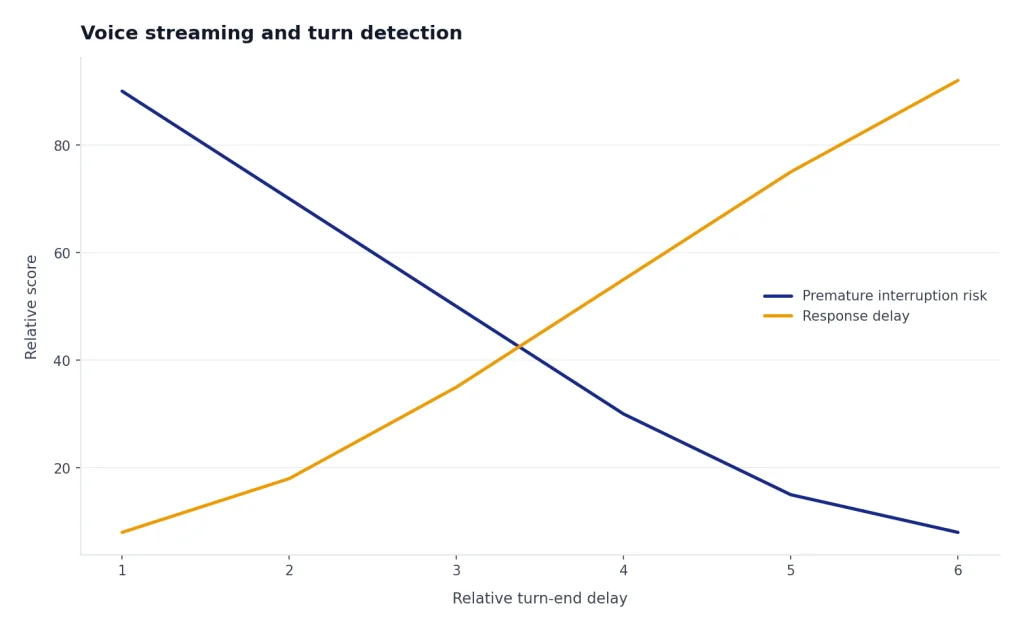
OpenAI says voice activity detection is enabled by default in speech-to-speech and transcription Realtime sessions, and it can be turned off.[5] With VAD enabled, the API emits input_audio_buffer.speech_started and input_audio_buffer.speech_stopped events so your interface can show listening state, pause animations, or prepare the next response.[5]
There are two documented VAD modes: server_vad, which chunks audio based on silence, and semantic_vad, which uses the content of the user’s speech to estimate whether the user has finished the utterance.[5] OpenAI documents server_vad as the default mode.[5] Use server VAD for predictable push-to-talk or simpler voice UX. Try semantic VAD when users speak in longer, less tidy sentences and you want to reduce premature interruptions.
If you disable VAD, you take control of the turn boundary. That can work well for push-to-talk, dictation review, or regulated workflows where the user must explicitly submit audio. It also means your app must commit the input audio and create the response at the right time. This is powerful, but it moves latency and UX responsibility back to your code.
Streaming is not only about audio playback. A production UI should react to event state. Show when the model is listening. Show when it is thinking or calling a tool. Let the user interrupt if your product allows barge-in. Log server errors and rate-limit events. Our OpenAI API errors guide is useful when you start turning event failures into user-facing recovery paths.
Models, pricing, and cost control
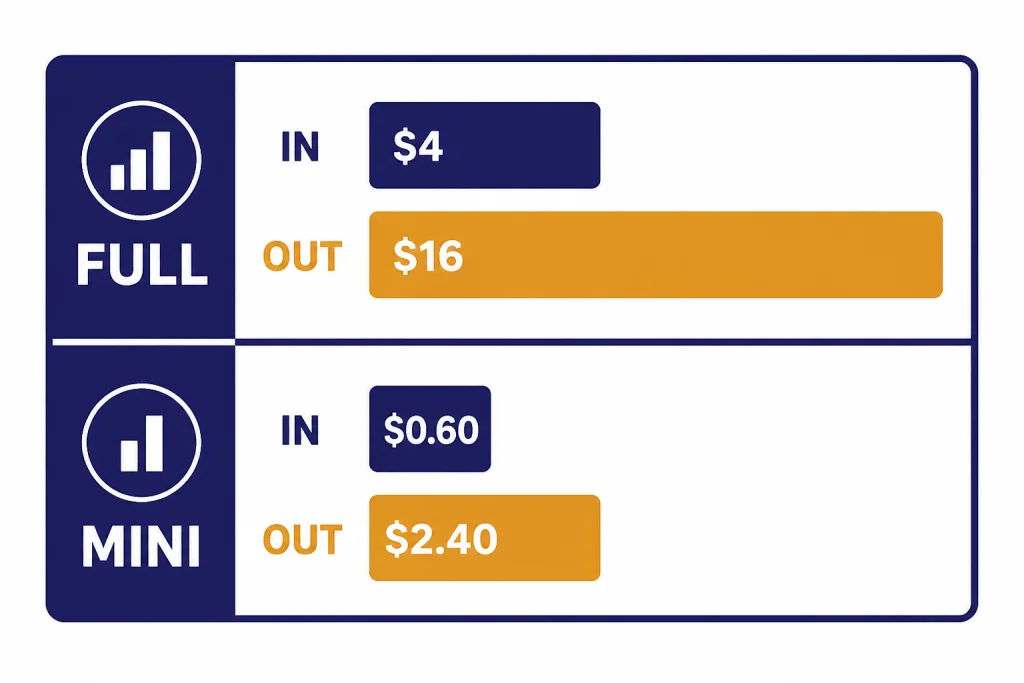
The main realtime model is gpt-realtime. OpenAI lists it as a general-availability realtime model that supports text, audio, and image input, with text and audio output, over WebRTC, WebSocket, or SIP connections.[7] OpenAI lists gpt-realtime with a 32,000-token context window and 4,096 maximum output tokens.[7] The lower-cost option is gpt-realtime-mini, which OpenAI describes as a cost-efficient version of GPT Realtime with the same 32,000-token context window and 4,096 maximum output tokens.[8]
| Model | Text input | Cached text input | Text output | Audio input | Audio output | Best use |
|---|---|---|---|---|---|---|
| gpt-realtime | $4.00 per 1M tokens[7] | $0.40 per 1M tokens[7] | $16.00 per 1M tokens[7] | $32.00 per 1M tokens[7] | $64.00 per 1M tokens[7] | Higher-quality production voice agents. |
| gpt-realtime-mini | $0.60 per 1M tokens[8] | $0.06 per 1M tokens[8] | $2.40 per 1M tokens[8] | OpenAI has not published an official figure for this on the retrieved model page. | OpenAI has not published an official figure for this on the retrieved model page. | Lower-cost realtime flows where quality is acceptable. |
OpenAI’s pricing page also lists gpt-realtime at $4.00 input, $0.40 cached input, and $16.00 output for text tokens, and lists gpt-realtime-mini at $0.60 input, $0.06 cached input, and $2.40 output for text tokens.[9] Check the official pricing page before launch, because model prices can change. For a broader comparison, use our OpenAI API pricing guide or estimate usage with the OpenAI API cost calculator.
Realtime costs grow over a conversation because later responses include more conversation context. OpenAI’s cost guide states that the full conversation is sent to the model for each response, and earlier items become input to later turns.[6] It also states that audio tokens in user messages are counted at 1 token per 100 ms of audio, while audio tokens in assistant messages are counted at 1 token per 50 ms of audio.[6]
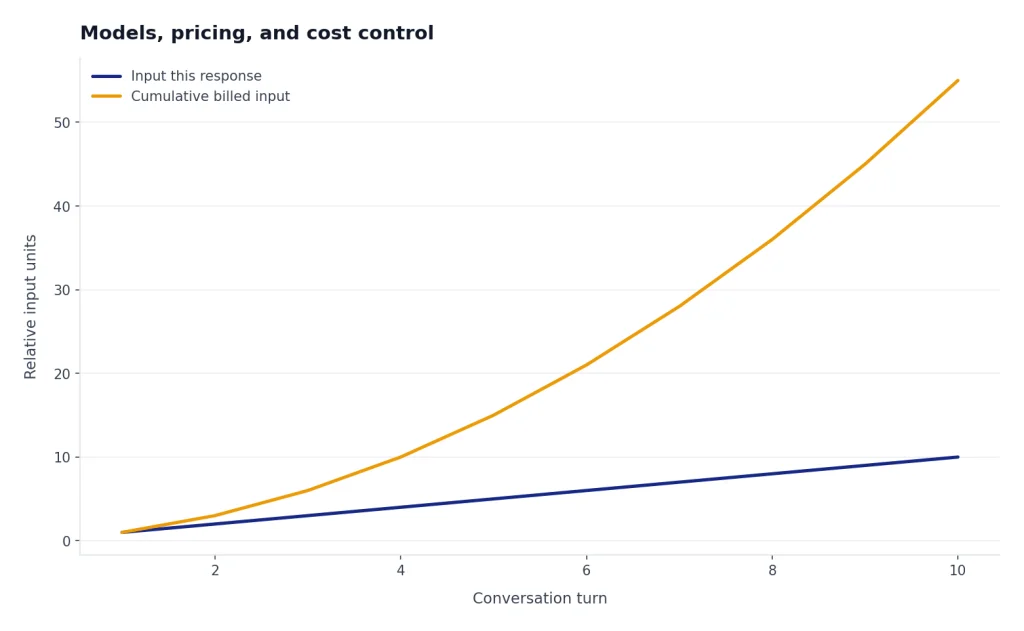
Cost control starts with product design. Keep instructions short. Avoid sending long policy text on every turn if you can place stable guidance in cached context. Summarize or truncate stale conversation items. Use gpt-realtime-mini for flows that do not require the strongest speech-to-speech behavior. Keep VAD on unless your UX requires manual turn control, because OpenAI notes that VAD filters empty input audio so it does not count as input tokens unless the client manually adds it as conversation input.[6]
Function calling and structured behavior
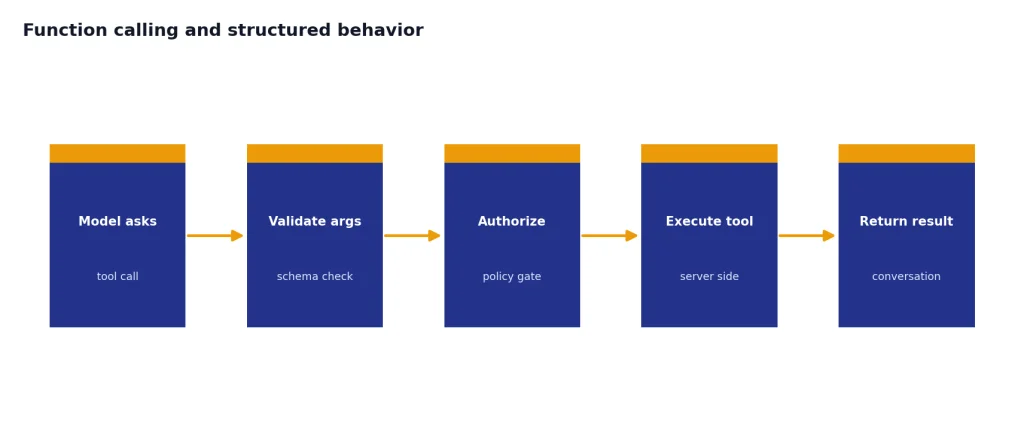
Voice agents need tools. A support agent may need to look up an order. A travel agent may need to check inventory. A tutoring agent may need to save progress. The Realtime API supports function calling so the model can ask your application to execute code and return the result into the conversation.[4]
The safe pattern is to keep tool names narrow and explicit. A tool called refund_order is easier to control than a tool called manage_customer. Validate every argument server-side. Treat the model’s function call as a request, not permission. For risky operations, return a confirmation step and require the user to approve before execution.
{
  "type": "session.update",
  "session": {
    "type": "realtime",
    "model": "gpt-realtime",
    "instructions": "You help customers check order status. Confirm before changing anything.",
    "tools": [
      {
        "type": "function",
        "name": "lookup_order",
        "description": "Return shipping status for one order ID.",
        "parameters": {
          "type": "object",
          "properties": {
            "order_id": { "type": "string" }
          },
          "required": ["order_id"]
        }
      }
    ]
  }
}
Do not rely on voice phrasing alone for correctness. If the model reads a confirmation aloud, also render a UI confirmation when possible. If the agent collects payment, account, health, or legal information, place validation and authorization outside the model. Pair the Realtime API with the OpenAI Moderation API where content safety checks are required, and review our function calling in OpenAI API guide before you expose production tools.
OpenAI’s current gpt-realtime model page lists function calling as supported and structured outputs as not supported for that model.[7] That does not mean you cannot produce structured data around a realtime session. It means you should not assume the same strict schema guarantees you may use elsewhere. If your workflow requires hard schema validation, route that step through a model and endpoint that supports it, then return the result to the realtime session.
Production checklist
Realtime voice systems need more than a working demo. They need latency budgets, recovery behavior, audit trails, and cost visibility. Use this checklist before you invite real users.
- Keep API keys server-side. Browser clients should receive only session-specific credentials or connect through your backend.
- Pick the transport by environment. Use WebRTC for client-side voice, WebSocket for backend agents, and SIP for phone calls.
- Design short prompts. Realtime prompts should state role, boundaries, escalation rules, and voice style without dumping your whole policy manual.
- Instrument event timing. Track microphone start, speech stop, response start, first audio, tool call start, tool call end, and response completion.
- Plan interruptions. Decide whether users can barge in while the model is speaking, and test that behavior under noisy audio.
- Validate tools server-side. Never execute a tool call only because the model supplied arguments.
- Log token usage. OpenAI says response token usage can be read from the
response.doneevent.[6] Store that data with session metadata. - Handle errors visibly. If the realtime connection fails, degrade to text chat, callback, or manual support instead of leaving the user in silence.
Testing should include bad microphones, silence, crosstalk, background noise, long pauses, accents, tool failures, and network drops. Voice agents feel personal, so a bad failure mode can damage trust faster than a slow text response. Build a fallback path early.
When not to use the Realtime API
The Realtime API is not the default answer for every audio app. It adds session state, connection handling, token budgeting, live interruption behavior, and more complex testing. If the product does not need live back-and-forth, a simpler endpoint may be better.
Use standard audio transcription when the user uploads a recording and waits for a transcript. Use the Responses API when the product is mainly text or multimodal request-response. Use the Batch API when latency does not matter and cost does; our OpenAI Batch API guide explains that pattern. Use the OpenAI Vision API for image understanding workflows that do not require a live voice session.
Also avoid realtime voice as the first version of a product if your team has not yet solved policy, escalation, and tool safety. A text-based agent is easier to inspect and correct. Once the business logic is stable, you can add a realtime voice layer with a smaller set of approved actions.
Frequently asked questions
Is the Realtime API only for voice?
No. Voice agents are the most visible use case, but the Realtime API also supports low-latency multimodal sessions. OpenAI documents speech-to-speech interactions, audio transcription, text input and output, and image input on current realtime models.[1][7]
Should I use WebRTC or WebSocket?
Use WebRTC when the user is in a browser or mobile client and you want low-latency audio handled by the client media stack. Use WebSocket when your backend owns the session and can safely keep the API key server-side. OpenAI recommends WebRTC for browser and mobile clients, and WebSockets for server-side realtime integrations.[2][3]
Does ChatGPT Plus include Realtime API usage?
No. ChatGPT subscriptions and OpenAI API billing are separate products. If you are building with the Realtime API, you need API access, API billing, and a server-side key management plan. See our guide to ChatGPT Plus API access for the longer explanation.
How is realtime audio billed?
OpenAI bills Realtime API responses by input and output tokens across modalities such as text, audio, and image.[6] For gpt-realtime, OpenAI lists audio input at $32.00 per 1M tokens and audio output at $64.00 per 1M tokens.[7] Always check the pricing page before production release because prices can change.[9]
Can the Realtime API call my tools?
Yes. Realtime models support function calling, where the model emits function-call arguments and your application executes the tool and returns the output.[4] Treat every tool call as untrusted input until your backend validates it.
Can I use structured outputs with gpt-realtime?
OpenAI’s retrieved gpt-realtime model page lists structured outputs as not supported for that model.[7] If you need strict schema guarantees, use a separate endpoint and model that supports structured outputs, then pass the validated result back into your realtime flow.