

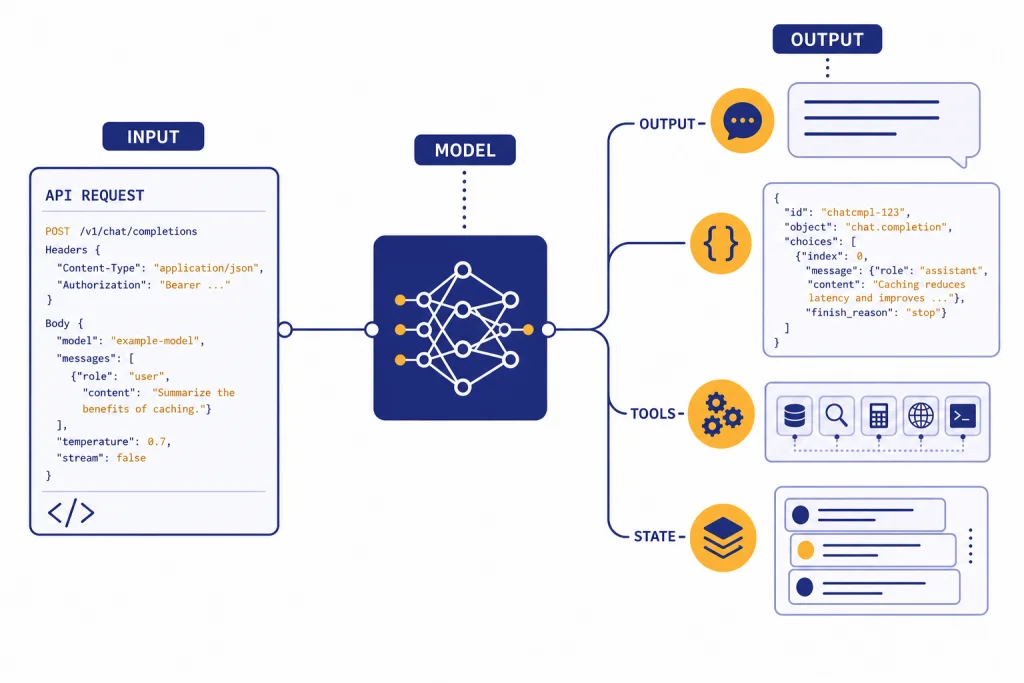
The OpenAI Responses API is the main OpenAI endpoint for generating model outputs, building multi-turn workflows, and giving models access to hosted tools such as web search, file search, Code Interpreter, image generation, computer use, and remote MCP servers. It replaces much of the orchestration that developers previously split across Chat Completions, Assistants, tool-calling loops, and separate retrieval layers. For a new API integration in 2026, start with the Responses API unless you have a specific reason to keep an older Chat Completions implementation. This guide explains the endpoint shape, shows practical examples, covers structured outputs and tools, and highlights pricing and migration details you should know before shipping.
What the Responses API is
The Responses API is OpenAI’s unified interface for model responses. OpenAI describes it as an advanced interface that supports text and image inputs, text outputs, stateful interactions, hosted tools, and function calling.[1] It is not only a text-completion endpoint. It is the API surface where OpenAI is putting newer agent-oriented features.
OpenAI introduced the Responses API on March 11, 2025 as part of its agent-building tools. The launch positioned it as a combination of Chat Completions simplicity and Assistants-style tool use.[7] OpenAI later added support for remote MCP servers, image generation, Code Interpreter, file search improvements, background mode, reasoning summaries, and encrypted reasoning items.[8]
Use it when you want one API call pattern for normal text generation, JSON output, image inputs, retrieval, web search, custom functions, or agent-like workflows. If you are still deciding which endpoint to build on, this article pairs well with our OpenAI API best practices for production and our broader OpenAI API pricing guide.
Endpoint and request shape
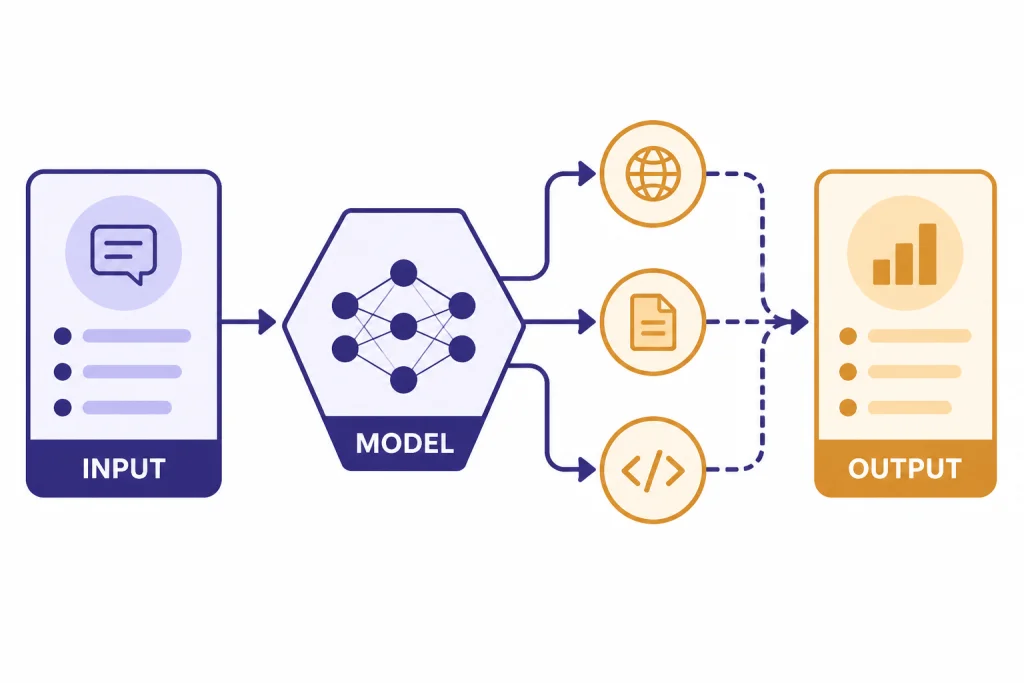
The core endpoint is POST /v1/responses. A basic request includes a model and an input. You can also pass top-level instructions, tool definitions, structured output settings, conversation state, streaming settings, and reasoning options.[1]
The most important conceptual change from Chat Completions is that Responses uses a broader item model. Inputs and outputs can include messages, tool calls, tool results, reasoning items, image inputs, file inputs, and other typed items. The API reference lists response items such as reasoning items, image generation calls, Code Interpreter calls, web search calls, and function call outputs.[1]
| Need | Responses API field or pattern | Why it matters |
|---|---|---|
| Plain text answer | model + input | Smallest useful request shape. |
| System-style behavior | instructions | Keeps developer instructions separate from user input. |
| Tool use | tools and tool_choice | Lets the model call hosted tools or your functions. |
| Structured JSON | text.format | Constrains the model’s final answer to a schema. |
| Follow-up turn | previous_response_id or managed conversation state | Avoids rebuilding full message arrays for simple threads. |
| Long-running task | background | Runs work asynchronously when latency may be high. |
For most applications, the output you display is response.output_text. OpenAI highlighted that helper at launch as a simpler way to access the model’s text output.[7] Keep the full response object in logs during development, because tool calls and structured outputs are easier to debug when you can inspect the typed output items.
Basic examples
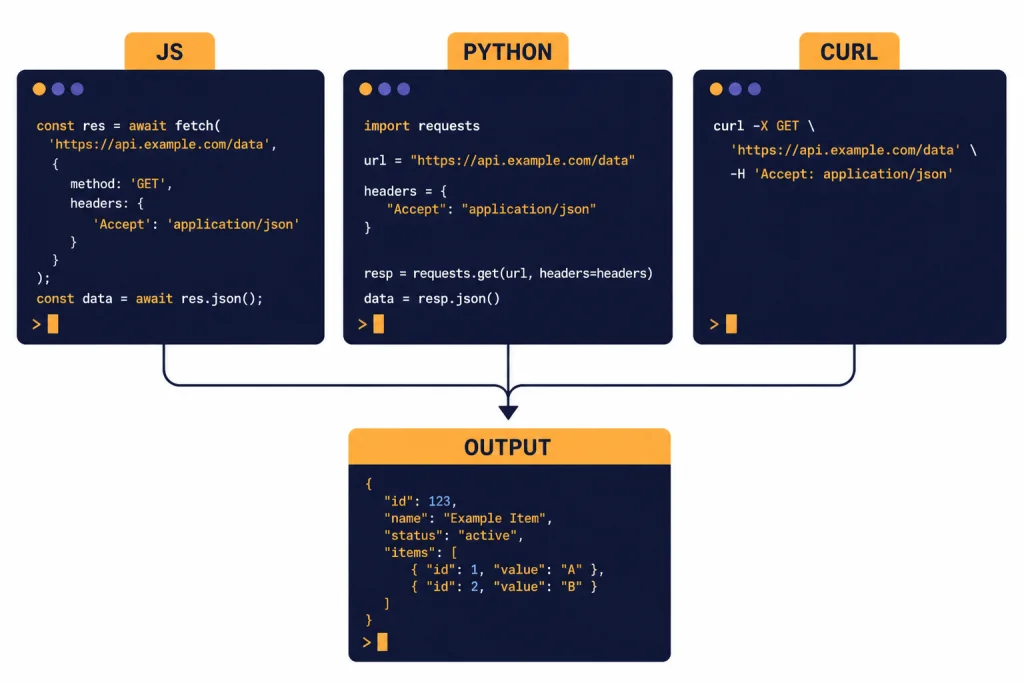
The examples below use the same request idea in JavaScript, Python, and cURL. The model name shown here follows OpenAI’s current documentation examples for the Responses API.[2] Swap in the model your account and use case require, then test cost and latency with real prompts.
JavaScript
import OpenAI from "openai";

const client = new OpenAI({
  apiKey: process.env.OPENAI_API_KEY,
});

const response = await client.responses.create({
  model: "gpt-5",
  instructions: "You write concise API documentation for developers.",
  input: "Explain what a webhook retry policy is in two paragraphs."
});

console.log(response.output_text);
Python
from openai import OpenAI

client = OpenAI()

response = client.responses.create(
    model="gpt-5",
    instructions="You write concise API documentation for developers.",
    input="Explain what a webhook retry policy is in two paragraphs."
)

print(response.output_text)
cURL
curl https://api.openai.com/v1/responses
  -H "Content-Type: application/json"
  -H "Authorization: Bearer $OPENAI_API_KEY"
  -d '{
    "model": "gpt-5",
    "instructions": "You write concise API documentation for developers.",
    "input": "Explain what a webhook retry policy is in two paragraphs."
  }'
Do not expose your API key in browser code. Keep calls on your server, pass only the user input your app needs, and store the response ID only if you need follow-up turns, audit logs, or debugging. If you are still setting up credentials, see Free OpenAI API Key: Is It Possible in 2026? and Does ChatGPT Plus Include API Access?.
Multi-turn state
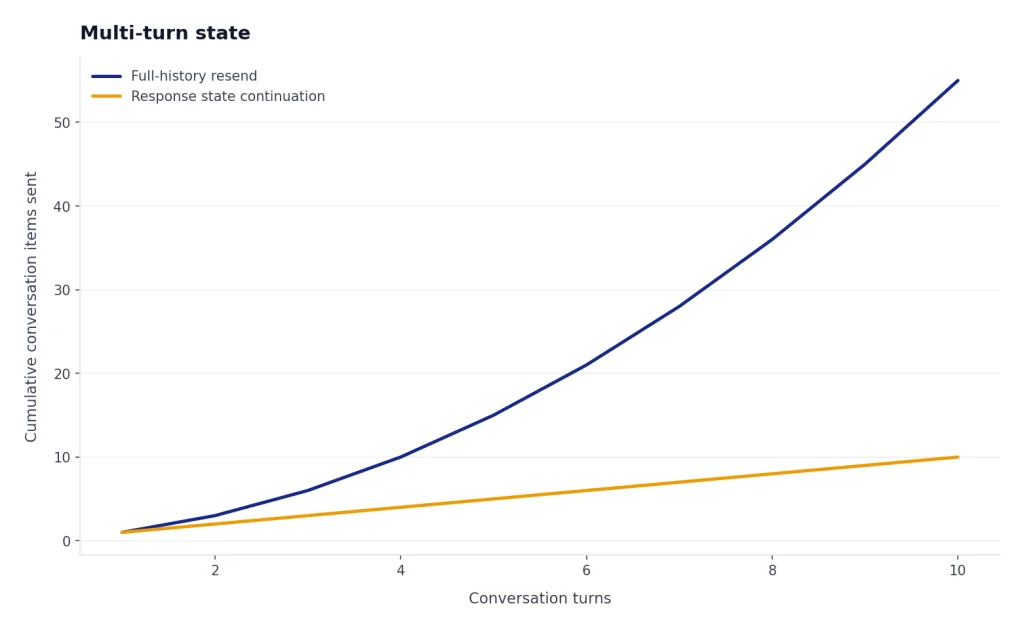
Chat Completions normally makes you manage the full message array yourself. OpenAI’s migration documentation contrasts that with Responses, where you can pass outputs from one response into another or use response state to continue a conversation.[2] This matters for chat apps, research workflows, coding agents, and support assistants that need context across turns.
A simple pattern is to store the response ID returned from the first call, then pass it as previous_response_id on the next call. That lets your application continue the interaction without resending the entire conversation every time. For compliance-sensitive systems, evaluate what state you store, what OpenAI stores, and whether you need stateless context management.
const first = await client.responses.create({
  model: "gpt-5",
  input: "Draft a short refund policy for a SaaS product."
});

const followup = await client.responses.create({
  model: "gpt-5",
  previous_response_id: first.id,
  input: "Now make it friendlier and add a 14-day trial note."
});

console.log(followup.output_text);
Keep your own durable record of user-visible messages even if you use response state. Product teams need that record for user history, moderation review, analytics, exports, and support. Response state is useful, but it should not be your only application database.
Tools and agent workflows
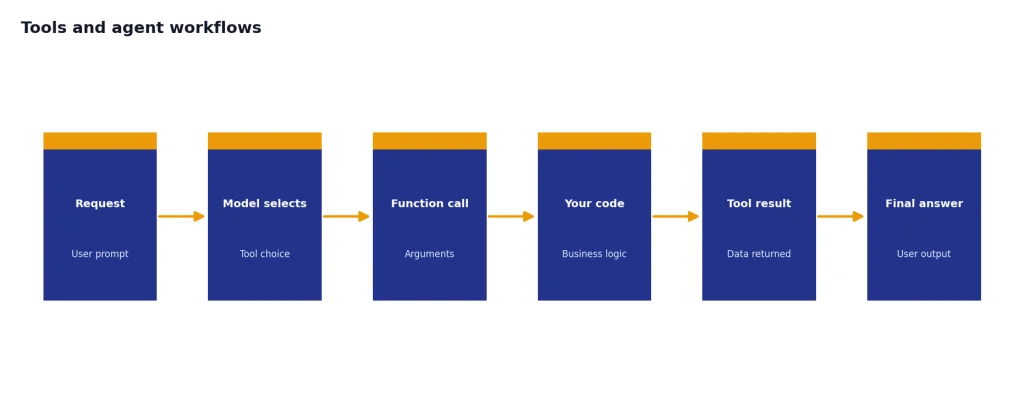
The Responses API can use hosted tools and custom tools through the tools parameter. OpenAI’s tools documentation lists function calling, web search, remote MCP servers, Skills, Shell, computer use, image generation, file search, and tool search as available tool categories in the platform.[4] The model can decide whether to use a configured tool based on the prompt unless you constrain that behavior with tool_choice.[4]
For web search, new Responses API integrations should use { "type": "web_search" }. OpenAI says the older web_search_preview tool remains for legacy integrations, but it lacks newer controls such as filters and external web access control.[5] Web search responses can include inline citations and a sources field, which is useful when your interface must show where retrieved information came from.[5]
const response = await client.responses.create({
  model: "gpt-5.5",
  tools: [
    { type: "web_search", search_context_size: "low" }
  ],
  input: "Find one current source about U.S. EV tax credit changes and summarize it."
});

console.log(response.output_text);
File search is best for private or app-specific documents. Upload files, attach them to vector stores, and let the file search tool retrieve relevant chunks. This can replace a custom retrieval pipeline for many support, policy, documentation, and internal knowledge-base applications. If your app depends heavily on image understanding, read our OpenAI Vision API guide as well.
Function calling remains the right choice when the model must call your own code, database, or business logic. Use hosted tools for OpenAI-managed capabilities, and use functions when your application owns the side effect. Our function calling in OpenAI API article covers that pattern in more detail.

Structured outputs
Structured Outputs let you force the final answer into a JSON Schema. In the Responses API, OpenAI’s migration guide says structured output settings moved from response_format to text.format.[2] OpenAI’s structured output documentation also distinguishes schema adherence from older JSON mode: JSON mode produces valid JSON, while Structured Outputs are designed to match your supplied schema.[6]
const response = await client.responses.create({
  model: "gpt-5",
  input: "Extract the company name, renewal date, and cancellation window from this note: Acme renews on June 30. Cancel at least 30 days before renewal.",
  text: {
    format: {
      type: "json_schema",
      name: "contract_terms",
      strict: true,
      schema: {
        type: "object",
        additionalProperties: false,
        properties: {
          company: { type: "string" },
          renewal_date: { type: "string" },
          cancellation_window_days: { type: "number" }
        },
        required: ["company", "renewal_date", "cancellation_window_days"]
      }
    }
  }
});

console.log(response.output_text);
Use Structured Outputs when your next step is a parser, database write, UI component, workflow engine, or validation rule. Use function calling when the model should choose an action and pass arguments to your code. If you need a deeper treatment of schemas, validation, and failure handling, see Structured Outputs with the OpenAI API.
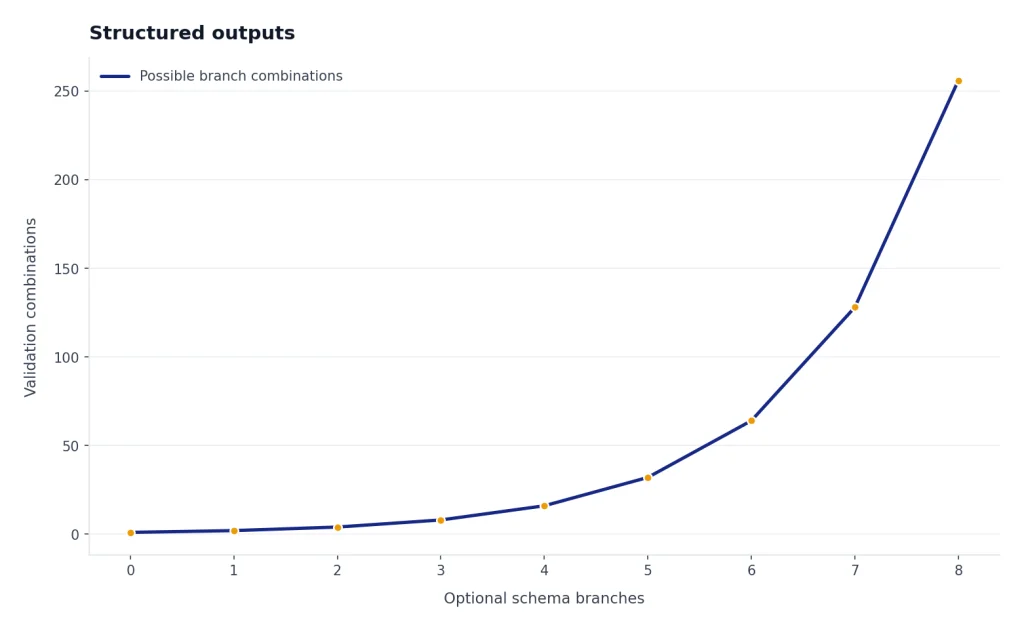
Keep schemas small at first. Add fields only when your application needs them. The more optional branches you add, the more testing you need across empty inputs, ambiguous inputs, adversarial inputs, and tool-call paths.
Streaming, background mode, and reasoning
Use streaming when users should see output as it arrives. This is usually the right choice for chat interfaces, writing tools, coding assistants, and long answers. For implementation details, see our separate guide to streaming responses with the OpenAI API.
Use background mode when a task may take longer than a normal request-response cycle. OpenAI added background mode to the Responses API to support long-running tasks asynchronously.[8] Good candidates include multi-step research, long document analysis, tool-heavy workflows, and jobs that should keep running even if the user closes the page.
Reasoning models can return reasoning-related items and summaries. The Responses API reference describes reasoning items as summaries of reasoning output and notes that encrypted reasoning content can be returned when reasoning.encrypted_content is included.[1] Treat these as operational artifacts, not user-facing explanations unless your product has a clear reason to display them.
For production systems, separate three things: the visible answer, the hidden workflow state, and the audit trail. Users need the answer. Your app may need state for continuity. Your team needs logs that are useful without storing unnecessary sensitive data.
Pricing and limits
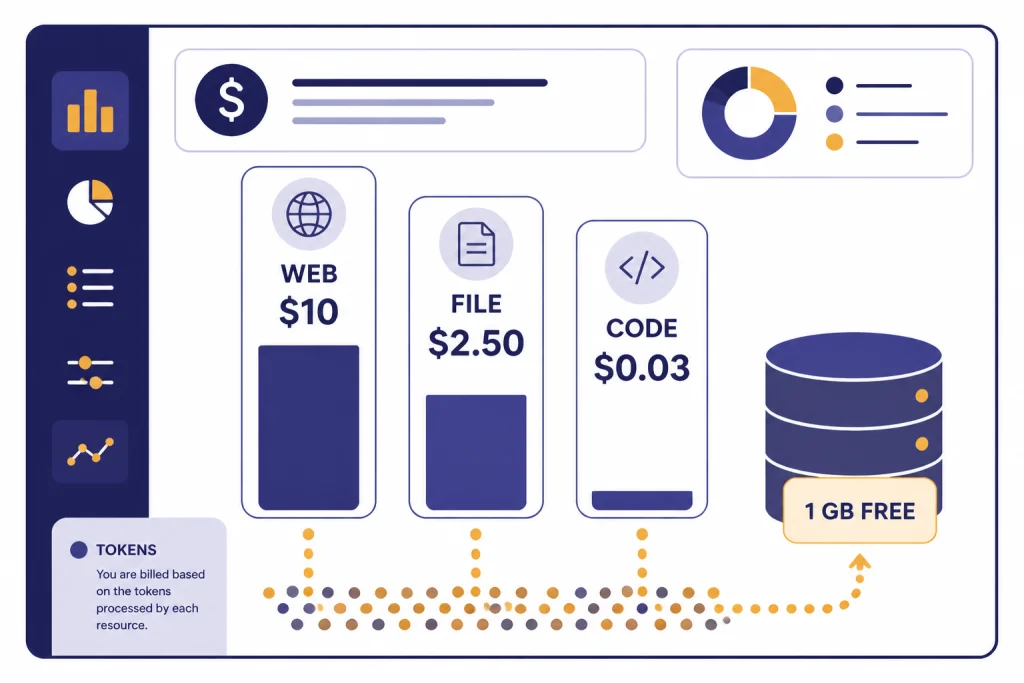
The Responses API is not priced as a separate API line item. OpenAI’s pricing documentation says Responses API, Chat Completions API, Realtime API, Batch API, and Assistants API are not priced separately; tokens are billed at the chosen model’s input and output rates.[3] Hosted tools can add their own charges.
| Cost area | Current published pricing detail | Planning note |
|---|---|---|
| Model tokens | Billed at the selected model’s input and output token rates.[3] | Measure real prompts and outputs, not toy prompts. |
| Web search | $10.00 per 1,000 calls for web search, plus search content tokens billed at model rates.[3] | Cache results when freshness is not required. |
| Web search preview for non-reasoning models | $25.00 per 1,000 calls, with search content tokens free.[3] | Use the non-preview tool for new Responses integrations when possible. |
| File search storage | $0.10 per GB per day, with 1 GB free.[3] | Delete stale vector stores and uploaded files. |
| File search tool calls | $2.50 per 1,000 calls.[3] | Batch document questions when product UX allows it. |
| Containers for Hosted Shell and Code Interpreter | 1 GB at $0.03, 4 GB at $0.12, 16 GB at $0.48, and 64 GB at $1.92 per 20-minute session per container.[3] | Avoid starting containers for tasks that simple model reasoning can handle. |
Web search has specific operational limits. OpenAI’s web search documentation says domain filtering in Responses can configure up to 100 allowed domains or up to 100 blocked domains.[5] It also says Responses API web search uses a 128k search context window, even when the underlying model has a larger context window.[5]
For cost planning, do not look only at model token rates. Add tool calls, retrieved content tokens, file storage, container sessions, retries, and background jobs. Our OpenAI API cost calculator, Batch API guide, and context window comparison can help estimate real workloads.
Migration guidance
OpenAI calls the Responses API a superset of Chat Completions and says Chat Completions will continue to be supported.[2] That means you do not need to migrate every stable workflow immediately. A reasonable approach is to move flows that benefit from hosted tools, reasoning features, structured outputs, or easier state management first.
The Assistants API has a clearer deadline. OpenAI’s migration documentation says the Assistants API was deprecated as of August 26, 2025 and has a sunset date of August 26, 2026.[2] If you still run Assistants-based Threads and Runs, plan a migration path now rather than waiting for the final month.
| Existing implementation | Move now if | Wait if |
|---|---|---|
| Chat Completions, plain text only | You want one endpoint for future tool use. | The workflow is stable, cheap, and well tested. |
| Chat Completions with manual tools | You want hosted web search, file search, or cleaner tool orchestration. | Your custom orchestrator is core product IP. |
| Assistants API | You need to prepare before the August 26, 2026 sunset date.[2] | Only short-term maintenance remains and migration risk is higher than sunset risk. |
| Custom RAG pipeline | File search meets your retrieval quality and governance needs. | You need custom indexing, ranking, permissions, or hybrid search. |
When migrating, test output shape, tool-call behavior, latency, token usage, and error handling. Do not only compare final answer quality. The surrounding workflow often changes more than the model response itself. If you hit failures, our OpenAI API Errors guide can help decode status codes and retry patterns.
Production checklist
- Choose the smallest model that meets quality needs. Test with real prompts, not only demos.
- Set clear instructions. Keep durable behavior in
instructionsrather than mixing it into user input. - Log typed output items during development. Tool calls, reasoning items, and structured outputs are easier to debug with the full object.
- Validate every structured output. A schema helps, but your application should still handle refusals, empty values, and downstream validation errors.
- Control tool use. Use
tool_choicewhen a tool must or must not run. - Budget for tools. Web search, file search, and containers can change the cost profile of an otherwise cheap model call.
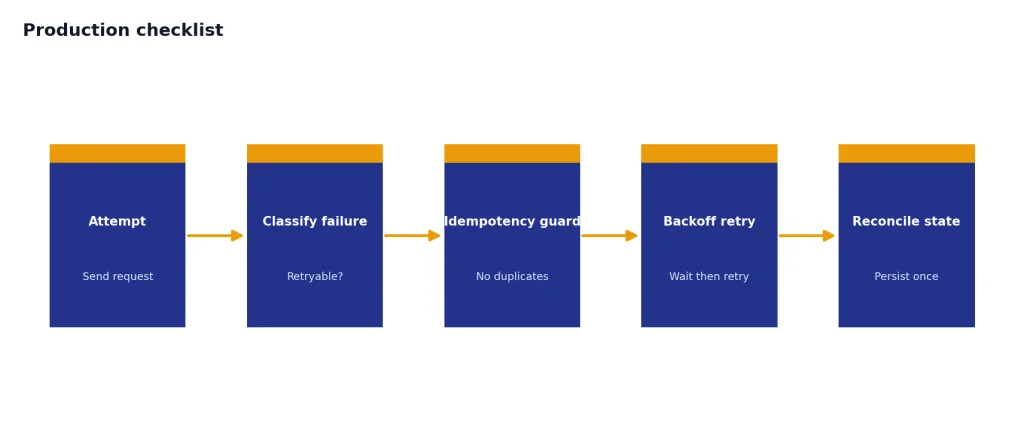
- Design for retries. Network errors, rate limits, and tool failures should not corrupt user state.
- Separate product history from API state. Store the user-visible conversation and business records in your own database.
- Review sensitive data paths. Decide what can be sent to the model, stored in files, logged, or used in tools.
The Responses API is a strong default for new OpenAI applications because it covers text generation, multimodal inputs, structured outputs, tools, and agent workflows through one interface. It does not remove the need for product design, security review, cost controls, and evaluation. It gives you a cleaner base to build those systems.
Frequently asked questions
Is the Responses API replacing Chat Completions?
Not immediately. OpenAI says the Responses API is a superset of Chat Completions and recommends it for newer features, but also says Chat Completions will continue to be supported.[2] For new projects, Responses is usually the safer default.
What endpoint does the Responses API use?
The main endpoint is POST /v1/responses.[1] You send a model, input, and optional settings such as instructions, tools, structured output format, state, or streaming options.
Can the Responses API search the web?
Yes. New Responses API integrations should use the hosted web_search tool, while web_search_preview remains available for legacy integrations.[5] If search must always happen, do not rely on automatic tool choice alone; configure tool choice accordingly.
Does the Responses API support JSON output?
Yes. Use text.format with json_schema for Structured Outputs in the Responses API.[2] Prefer Structured Outputs over older JSON mode when your application needs schema adherence.
Is the Responses API priced separately?
No separate Responses API fee is listed. OpenAI says tokens are billed at the chosen model’s input and output rates, while hosted tools can add tool-specific charges.[3] Always estimate both token usage and tool usage.
Should I migrate from the Assistants API?
Yes, if the application will still be active after the sunset window. OpenAI says the Assistants API was deprecated on August 26, 2025 and has a sunset date of August 26, 2026.[2] Start with one workflow, compare behavior, then migrate the rest in stages.