

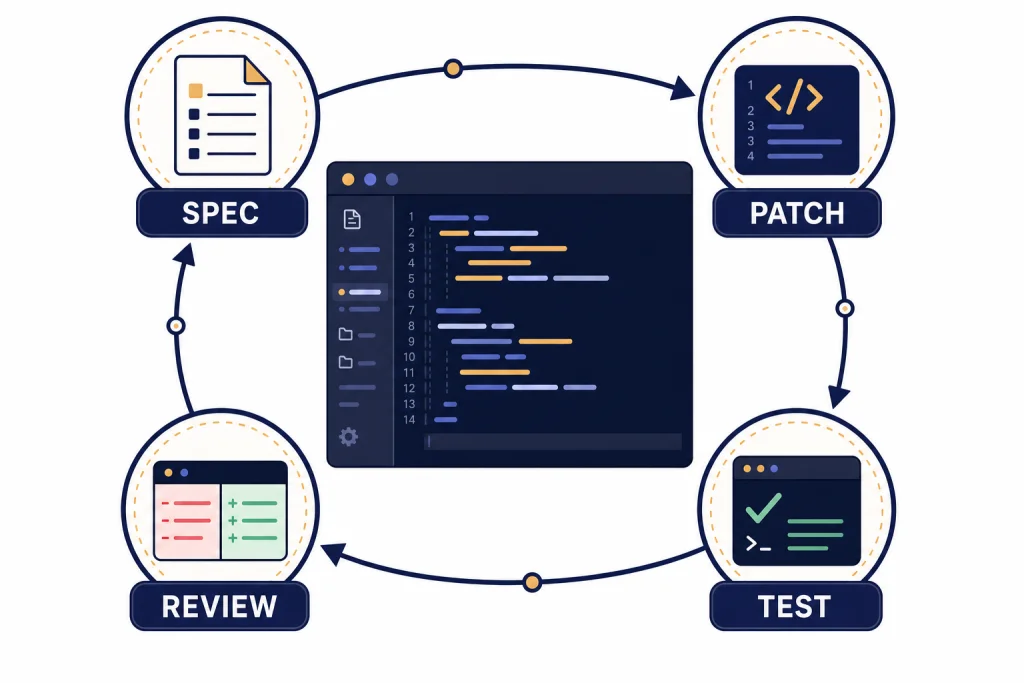
This ChatGPT tutorial for coding shows a practical workflow, not a bag of clever prompts. The goal is to use ChatGPT like a senior pair programmer: define the job, expose the right context, ask for a small plan, request narrow code changes, test the result, and review the diff before anything ships. ChatGPT can help you draft functions, explain unfamiliar code, debug stack traces, write tests, refactor safely, and prepare pull requests. It cannot replace source control, tests, security review, or your own understanding. The “10x” part is not magic speed; it is disciplined leverage: smaller decisions, faster feedback, and fewer unreviewable changes.
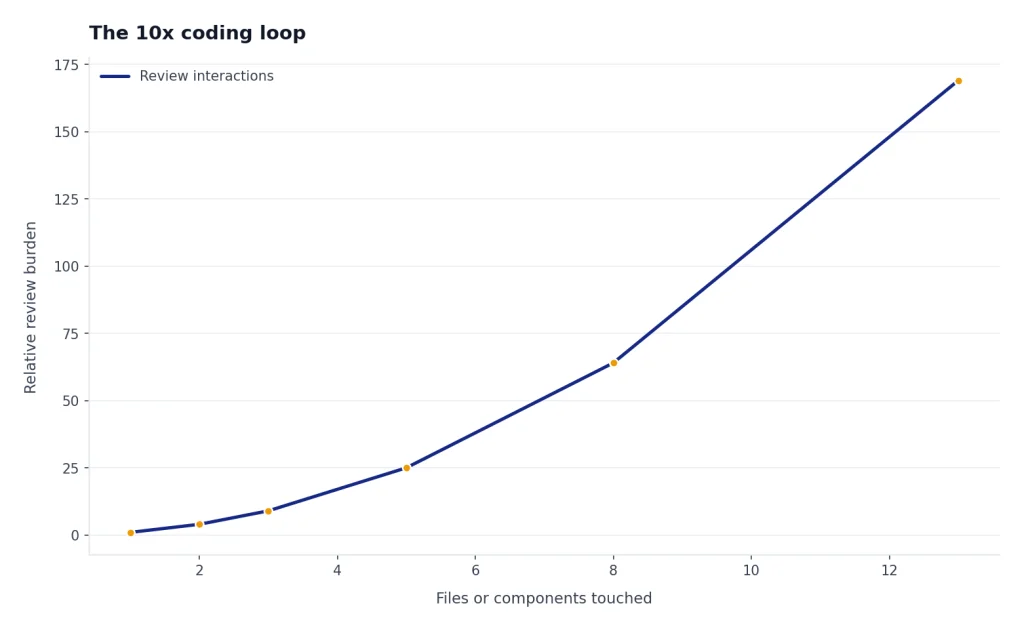
The 10x coding loop
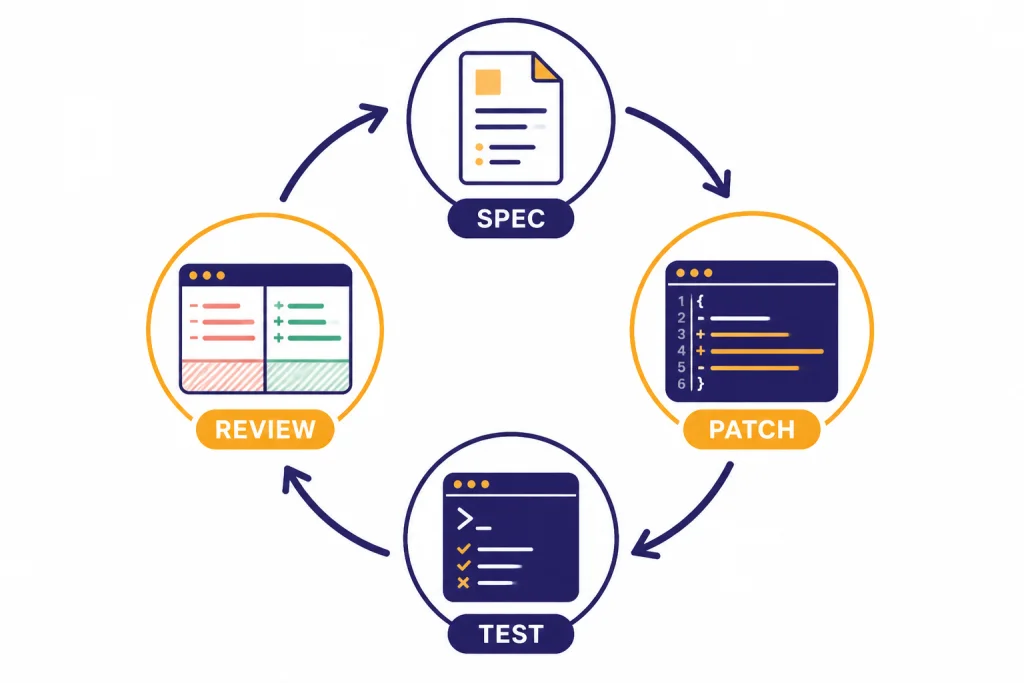
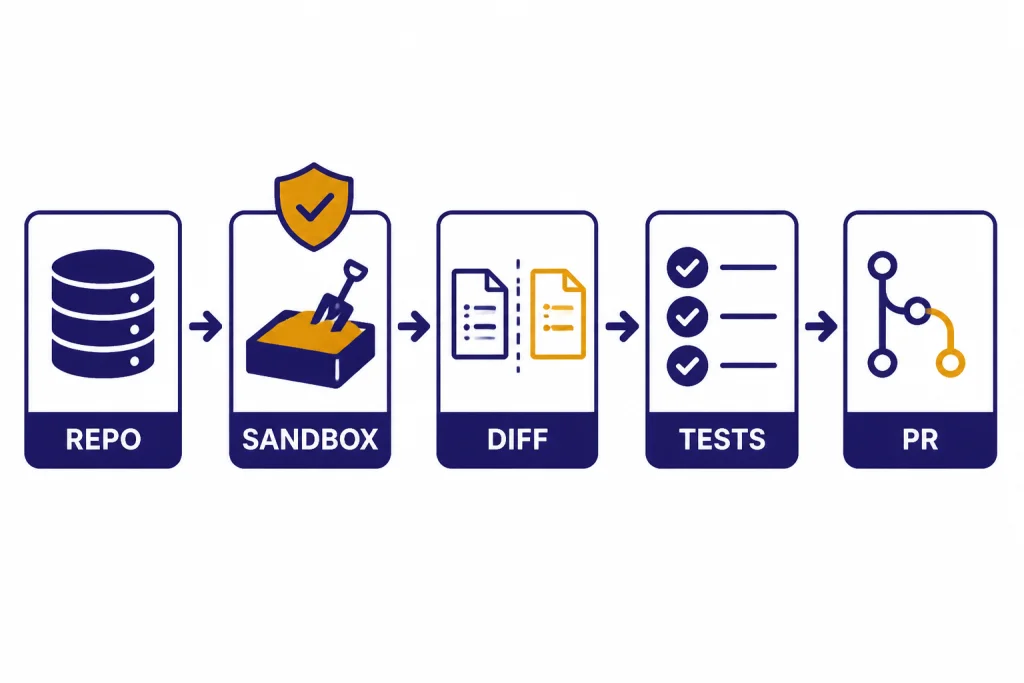
The best ChatGPT coding workflow is a loop: spec, patch, test, review. You do not ask ChatGPT to “build the app.” You ask it to solve one scoped problem, then you inspect the output like you would inspect a teammate’s pull request.
The loop starts with a short spec. State the user outcome, the files involved, the constraints, and the definition of done. Then ask for a plan before code. A plan gives you a chance to catch a wrong assumption while the cost is still low.
Next, ask for a small patch. Small means a single function, a single component, a single failing test, or a single migration step. If the change touches more than a few files, ask ChatGPT to split the work into phases. The point is not to make ChatGPT slower. The point is to make every answer reviewable.
Then run tests yourself. If tests fail, paste the exact command, the exact error, and the relevant code. Do not summarize the error from memory. ChatGPT performs better when it sees the real signal, including stack traces, failing assertions, package versions, and the command that produced the failure.
Finally, review the diff. Ask ChatGPT to review its own patch for edge cases, security risks, performance regressions, and missing tests. Then do your own review. A “10x” workflow is not blind trust. It is faster iteration with better checkpoints.
Here is what the loop looks like in practice. Instead of this broad request:
Can you improve our signup flow?Use a scoped version:
In SignupForm.tsx, the email field accepts "a@b" and lets the user continue. We already use zod in validation.ts. Please:
1. Add a failing test for invalid email domains.
2. Make the smallest validation change.
3. Do not change the component layout or API payload shape.
4. Show the diff and explain edge cases.
Illustrative result: a good answer should propose a test first, patch only the validation schema, and explicitly say it did not touch layout, analytics, or submission code. If it instead rewrites the form component, adds a new dependency, and changes error messages everywhere, reject the patch and narrow the task.
Prepare the context pack
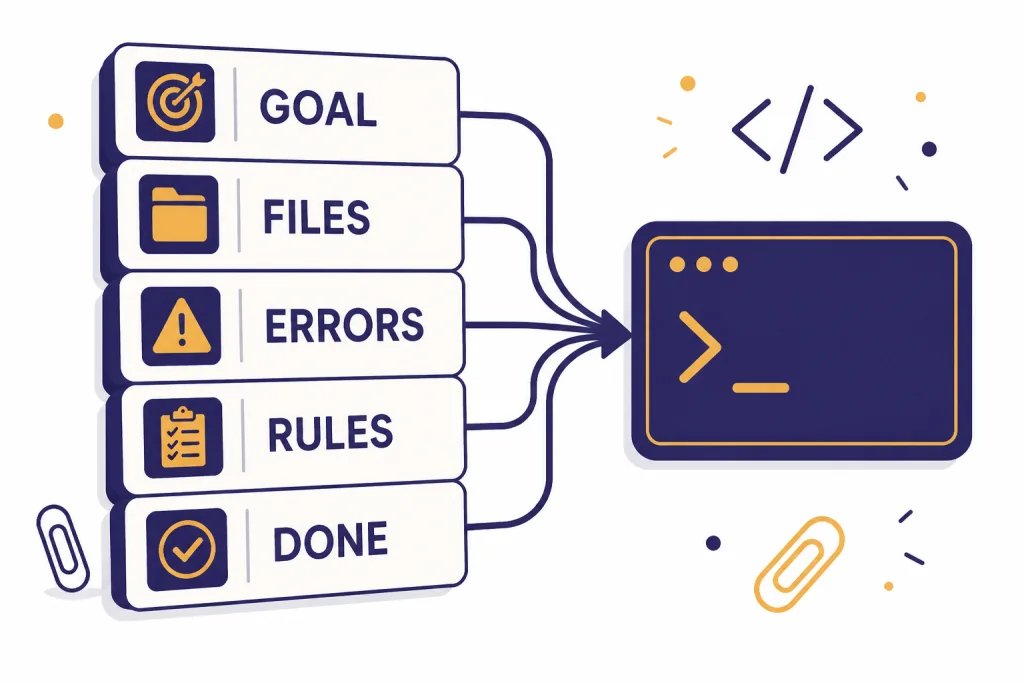
Most bad coding answers come from missing context. Before you ask for code, assemble a compact context pack. This pack should be short enough to fit in a prompt and precise enough to remove guesswork.
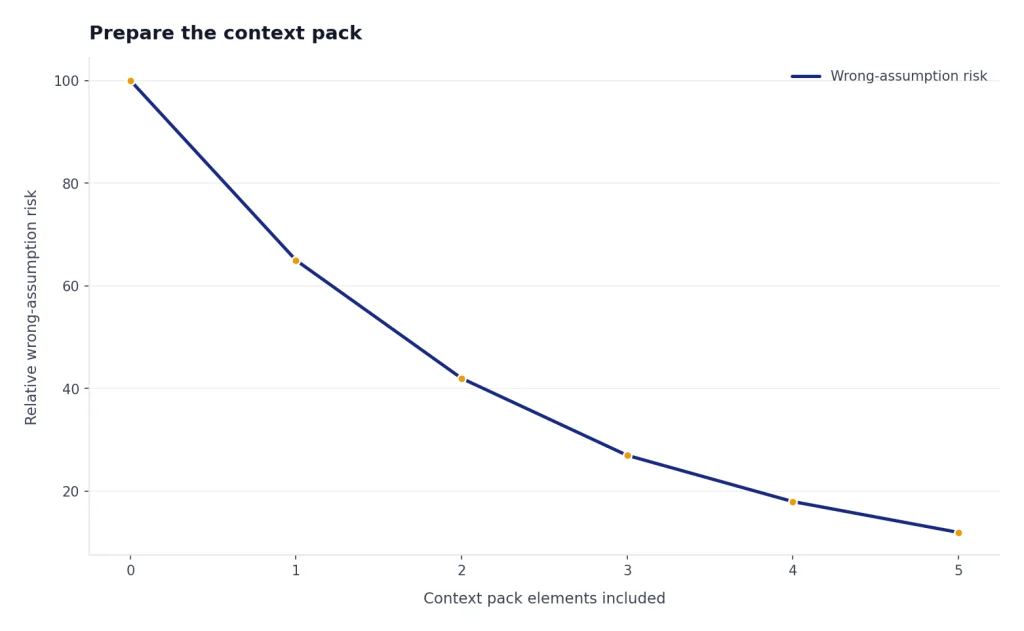
- Goal: what the user or system should do after the change.
- Current behavior: what happens now, including errors or confusing output.
- Relevant files: only the files needed to understand the change.
- Constraints: framework version, style rules, public API promises, database limitations, or security requirements.
- Definition of done: the tests that should pass and the observable behavior you expect.
Here is a reusable starter prompt:
You are my senior pair programmer. First, restate the problem in your own words. Then list assumptions and risks. Do not write code until you give a short implementation plan.

Goal:
[describe the user-visible outcome]

Current behavior:
[paste exact behavior or error]

Relevant code:
[paste the smallest useful files or functions]

Constraints:
[versions, style rules, performance limits, security rules]

Definition of done:
[tests, commands, acceptance criteria]
If you use ChatGPT often for the same stack, save a project brief. Include your language, framework, test runner, lint rules, formatting preferences, naming conventions, and “do not do” rules. For persistent preferences, see our ChatGPT memory workflow. For reusable instruction design, start with prompt engineering techniques that actually work.
A useful context pack is concrete, not long. For example:
Goal:
Show "No invoices yet" when the customer has zero invoices.

Current behavior:
The dashboard shows a blank white card. No console error.

Relevant files:
- app/dashboard/InvoiceCard.tsx
- app/api/invoices/route.ts
- tests/dashboard/invoice-card.test.tsx

Constraints:
Next.js app router. Do not change the API response shape. Use existing EmptyState component.

Definition of done:
npm test -- invoice-card passes, and the empty state appears only when invoices.length === 0.
That prompt gives ChatGPT enough boundaries to reason about the UI state without wandering into authentication, routing, or database schema changes.
Choose the right ChatGPT surface
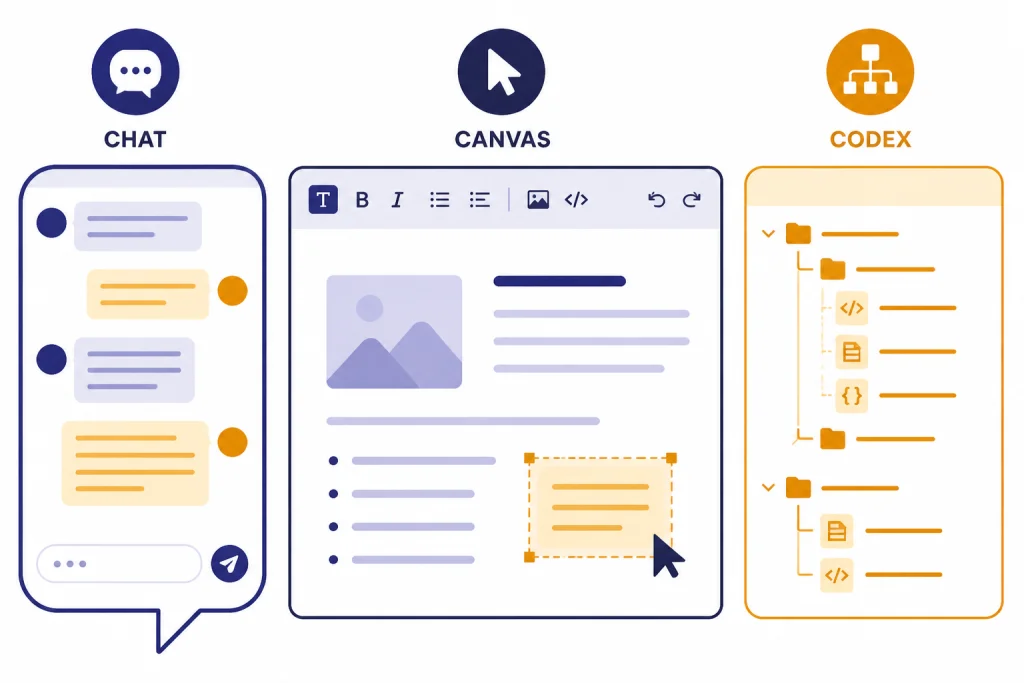
ChatGPT is not one coding interface. Use the surface that matches the job. A normal chat is good for explanation, design, and small snippets. Canvas is better when you want to iteratively edit a longer file or keep a document-like coding workspace. OpenAI says Canvas can help draft code and includes coding shortcuts such as reviewing code, adding logs, adding comments, fixing bugs, and porting code to languages such as JavaScript, Python, Java, TypeScript, C++, or PHP.[1] Canvas also supports executing Python code in the browser for Python code canvas files.[1]
Codex is different. OpenAI describes Codex as an AI coding agent that can help write, review, and ship code, either by pairing in local tools or by delegating work in the cloud.[2] Use it when repository context matters and you want an agent to inspect files, edit code, run commands, and produce a reviewable result.
| Surface | Best use | Good prompt shape | Main caution |
|---|---|---|---|
| Chat | Explain a concept, sketch an approach, draft a small function, review an error | “Given this function and failing test, explain the cause before suggesting a patch.” | It may miss project-wide constraints unless you provide them. |
| Canvas | Edit a longer file, compare versions, run small Python checks, refine a script | “Open a coding canvas and refactor this file without changing public behavior.” | Still review the final code outside ChatGPT before committing.[1] |
| Code Interpreter or data analysis | Analyze logs, inspect CSVs, prototype calculations, validate data transforms | “Load this sample data and find why this transformation loses rows.” | It is best for analysis and prototyping, not direct repo surgery. See our Code Interpreter tutorial. |
| Codex | Work across a repository, fix bugs, add tests, propose pull-request-ready changes | “Find the cause of this failing test, make the smallest safe change, and show the diff.” | Agentic work needs branch isolation, dependency setup, tests, and human review.[2] |
If your task mixes coding with data cleanup, read the data analysis tutorial. If your task is a multi-step autonomous workflow, compare this article with our Agent Mode guide.
Prompt patterns for coding
Good coding prompts are specific about the role, the scope, the output format, and the review standard. The following patterns work because they force ChatGPT to reason before editing and to expose uncertainty.
Ask for a plan before code
Before writing code, give me a 5-step plan. For each step, name the file you expect to change and the risk. If you need more context, ask for it instead of guessing.This prompt prevents the common failure mode where ChatGPT writes a plausible patch for the wrong architecture. If the plan names files that do not exist, you know to stop and correct it.
Constrain the patch
Make the smallest change that fixes the bug. Do not rename public functions. Do not introduce new dependencies. Preserve the current response shape. After the patch, explain why the change is minimal.Minimal patches are easier to review and easier to roll back. They also reduce the chance that ChatGPT “improves” unrelated code.
Ask for tests first
Write the failing test first. The test should reproduce this bug and fail against the current implementation. Do not modify production code until the test is clear.This is the fastest way to turn a vague debugging session into a concrete engineering task. If ChatGPT cannot write a failing test, it may not understand the bug.
Force a review checklist
Review your proposed change against this checklist: correctness, edge cases, security, performance, backwards compatibility, test coverage, and readability. Mark each item PASS, RISK, or NOT APPLICABLE.The labels are not magic. They create a structured second pass. You still decide whether the answer is right.
To make this less abstract, here is an illustrative before-and-after using a small JavaScript bug:
// Current code
export function applyDiscount(total, discountPercent) {
  if (!discountPercent) return total;
  return total - total * discountPercent;
}

// Bug: applyDiscount(100, 10) returns -900 instead of 90.
A weak prompt says, “Fix this.” A stronger prompt says:
Write the failing test first for applyDiscount(100, 10). Then make the smallest code change. Preserve the function name and arguments. Explain whether discountPercent is expected to be 10 or 0.10.Illustrative output you want: ChatGPT should notice the unit ambiguity, ask or state an assumption, add a test for 10 meaning ten percent, and patch the calculation to divide by 100. It should not silently change the API to accept decimals unless that is the project convention.
For larger tasks, add an explicit PR decomposition step. Ask ChatGPT to split the work into reviewable pull requests: one for tests or characterization, one for the implementation, one for cleanup if needed, and one for documentation only when behavior changes. This keeps “AI speed” from turning into a single oversized diff that nobody can safely review.
Decompose this work into the smallest reviewable PRs. For each PR, include:
- Purpose
- Files likely to change
- Tests to add or run
- Rollback risk
- What reviewers should focus on
Do not write code yet.
For more advanced prompt patterns, especially for multi-step tasks, use our advanced prompt engineering guide. If you want to package a repeatable coding assistant for your team, see the tutorial on building a custom GPT.
Debug with evidence
Debugging with ChatGPT works best when you act like an investigator. Do not ask, “Why is my app broken?” Ask it to analyze a specific failure. Provide the command, stack trace, expected behavior, actual behavior, and the smallest relevant code path.
Use this debugging prompt:
I need help debugging. Do not guess. Use only the evidence below.

Command I ran:
[paste command]

Expected result:
[paste expected result]

Actual result:
[paste output and stack trace]

Relevant code:
[paste functions, component, route, or test]

Please do three things:
1. Identify the most likely root cause.
2. List two alternative causes and how to rule them out.
3. Propose the smallest diagnostic step before any code change.
The key instruction is “diagnostic step before any code change.” It moves ChatGPT away from patching by intuition. Good diagnostic steps include adding one log line, running one targeted test, checking one environment variable, or comparing one data shape.
Here is a concrete debugging walkthrough. Suppose your test fails like this:
Command:
npm test -- invoice-total.test.ts

Failure:
Expected: "$12.30"
Received: "$12.3"

Relevant code:
export function formatMoney(amount) {
  return "$" + (Math.round(amount * 100) / 100).toString();
}
A useful ChatGPT answer should identify formatting, not arithmetic, as the likely root cause. The smallest patch is probably to use fixed decimal places after rounding:
// Illustrative patch
export function formatMoney(amount) {
  return "$" + (Math.round(amount * 100) / 100).toFixed(2);
}
The review question is then: does the codebase already use an internationalization library, locale-aware formatting, or a Money type? If yes, the “smallest” local patch may be wrong because it bypasses a project convention. This is why you ask for alternatives and how to rule them out.
When you paste logs, remove secrets first. Replace tokens, passwords, private URLs, customer IDs, and internal hostnames with placeholders. Keep structure intact. For example, replace sk-live-actual-token with REDACTED_API_KEY, not with a blank string that changes the error shape.
If you are debugging API usage, separate product usage from API billing. ChatGPT plan pages and API pricing are different surfaces. For API-specific cost planning, use our OpenAI API pricing comparison. OpenAI’s ChatGPT pricing page lists ChatGPT plan tiers such as Free, Plus, Pro, Business, and Enterprise, while API pricing is managed separately.[6]
Refactor with a safety rail
Refactoring is where ChatGPT can save hours or create subtle damage. The difference is whether you give it a safety rail. A safe refactor keeps behavior constant, improves one dimension, and proves the result with tests or examples.
Use this refactor prompt:
Refactor this code for readability only. Preserve behavior exactly. Do not change public names, return types, error messages, or side effects. First list the invariants you must preserve. Then propose a patch. After the patch, list tests or examples that would catch accidental behavior changes.For legacy code, ask ChatGPT to map the code before changing it. Have it identify inputs, outputs, side effects, external dependencies, and hidden assumptions. Then ask for a seam: a small boundary where tests can be added before the larger change.
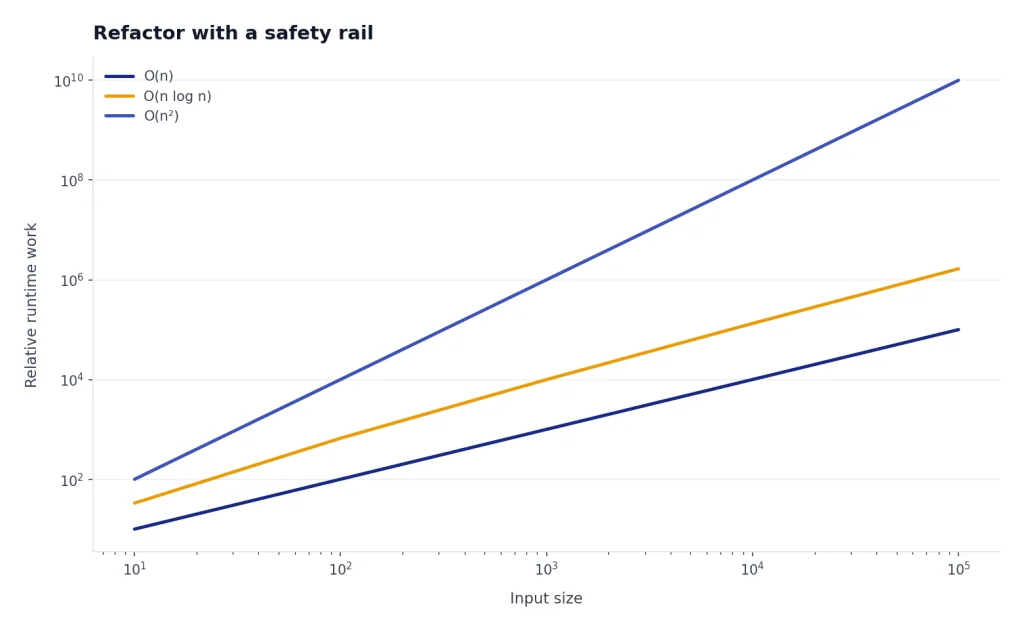
For performance work, require measurement. Ask ChatGPT for a benchmark plan before optimization. A useful prompt is: “Name the metric, the baseline command, the input size, and the success threshold before suggesting code changes.” Without a baseline, ChatGPT may replace clear code with complex code that does not matter.
A stronger test strategy is to ask for both characterization tests and target tests. Characterization tests capture what messy legacy code already does, even if it is ugly. Target tests describe the new behavior you actually want. Do not mix the two in one prompt.
Before refactoring, write characterization tests for the current behavior. Include edge cases for empty input, null-like input, duplicate records, and permission failures. Do not assert new desired behavior yet. After those tests pass, propose the smallest refactor that keeps them green.For code review, ask for a reviewer-facing summary, not just a patch explanation. A good review summary names the intent, the changed files, the risk areas, the tests run, and the parts intentionally left alone. This makes the AI-assisted work easier for humans to audit.
Prepare a pull request summary with:
- Problem
- Approach
- Files changed
- Tests run
- Known risks
- Rollback plan
- What reviewers should inspect carefully
For security-sensitive code, do not let ChatGPT be the final reviewer. It can create a checklist and find suspicious patterns, but you need established review processes, dependency scanning, secrets scanning, and human approval. This matters most for authentication, authorization, payments, cryptography, data deletion, and user-generated content.
Use Codex for repository work
Use Codex when the task needs repository awareness. OpenAI’s Codex article says the agent can perform tasks such as writing features, answering questions about a codebase, fixing bugs, and proposing pull requests for review, with tasks running in cloud sandbox environments preloaded with the repository.[3] OpenAI’s current Help Center article also says Codex can pair through terminal, IDE, or the Codex app, and can navigate a repo to edit files, run commands, and execute tests.[2]
A safe Codex workflow looks like this:
- Create or select a clean branch.
- Write a task prompt with acceptance criteria.
- Tell Codex what tests to run and what not to touch.
- Review the plan before letting the agent make broad changes.
- Inspect the diff file by file.
- Run tests locally or in CI.
- Ask for a second review focused on risks.
- Merge only after normal human review.
If you prefer terminal work, OpenAI’s Codex CLI getting-started page describes Codex CLI as an open-source command-line tool and gives npm install -g @openai/codex as the installation command.[4] OpenAI’s developer examples include repository tasks such as reviewing pull requests, catching regressions, tracing request flows, and finding relevant files in large codebases.[5]
Use strong task boundaries. “Improve the checkout flow” is too vague. “In the checkout package, find why the tax total is rounded differently between the cart page and receipt page. Add a failing test first. Do not change payment provider code. Run the existing checkout test suite and summarize the diff” is much better.
In real repositories, the gotchas are operational as much as intellectual:
- Flaky tests: if a test fails once and passes once, do not let the agent declare success. Ask it to identify whether the failure is related to its change, then rerun the narrow command and the relevant suite.
- Sandbox setup: cloud or local agent environments may lack private packages, environment variables, build tools, database fixtures, or services. Give setup commands and safe fake values; do not paste production secrets.
- Lockfile noise: generated package-lock, pnpm-lock, yarn.lock, poetry.lock, or snapshot changes can hide the real patch. Ask Codex to explain every generated file change and revert unrelated churn.
- Broad formatting changes: if the agent reformats untouched files, separate formatting into its own PR or reject the noise. Reviewers should see logic changes clearly.
- Migration risk: database migrations, background jobs, and one-way data transforms need rollback notes and human approval, even if tests pass.
A good Codex task prompt includes the same constraints you would put in a ticket:
Task:
Fix the checkout tax rounding mismatch between cart and receipt.

Boundaries:
- Work only in packages/checkout unless a test proves another file is required.
- Do not change payment provider code.
- Do not update dependencies unless you ask first.
- Avoid lockfile changes unless a dependency update is explicitly approved.

Test plan:
1. Add or update a failing test that reproduces the mismatch.
2. Run the checkout unit tests.
3. If a test is flaky, report the command and rerun result instead of hiding it.

Output:
Show the diff, tests run, remaining risks, and any files you intentionally did not change.
Codex is powerful, but it does not remove engineering responsibility. Treat its output like a pull request from a fast junior engineer who had a lot of context but may have missed business rules. Review naming, tests, migrations, error handling, accessibility, and rollback behavior. If the task is long-running or crosses tools, compare with our Agent Mode tutorial.
Know when not to use ChatGPT
Do not use ChatGPT as the only source of truth for framework APIs, security rules, licensing, or production incident response. Use official documentation, test results, and your organization’s policies. ChatGPT can help you read and apply those materials, but it should not invent them.
Do not paste proprietary code unless your plan, company policy, and data controls allow it. If you are unsure, ask your administrator. Use redacted excerpts, synthetic examples, or local tooling where appropriate. For sensitive work, prefer workflows that keep code in approved repositories and review systems.
Do not accept code you cannot explain. A good learning prompt is: “Explain this patch line by line, then quiz me on the parts that are most likely to break.” If you cannot answer the quiz, slow down. The goal is leverage, not dependency.
Do not skip version control. Commit before large AI-assisted edits. Use branches for experiments. Keep diffs small. If ChatGPT or Codex takes the code in the wrong direction, you should be able to revert cleanly.
The strongest ChatGPT coding habit is simple: make the model show its work, then make the code prove it works. That habit applies whether you are writing your first script, building an internal tool, or reviewing a multi-file change.
Frequently asked questions
Can ChatGPT write production-ready code?
ChatGPT can draft production-quality code in narrow cases, especially when you provide strong context, tests, and constraints. You should still review the code, run tests, check dependencies, and validate security-sensitive behavior. Treat it as a contributor, not as an automatic merge button.
What is the best first prompt for coding with ChatGPT?
Start with the goal, current behavior, relevant code, constraints, and definition of done. Ask ChatGPT to restate the problem and produce a plan before code. This reduces wrong assumptions and makes the answer easier to review.
Should I use Canvas or normal chat for coding?
Use normal chat for explanations, small snippets, design tradeoffs, and focused debugging. Use Canvas when you want an editable workspace for a longer file or an iterative coding draft. OpenAI’s Help Center says Canvas includes coding shortcuts and can execute Python code in supported code canvas files.[1]
When should I use Codex instead of ChatGPT chat?
Use Codex when the task needs repository context, file edits, command execution, tests, or a pull-request-style result. OpenAI describes Codex as an AI coding agent that can pair locally or complete delegated work in the cloud.[2] For a single explanation or a small function, normal chat is often faster.
How do I stop ChatGPT from changing too much code?
Ask for the smallest safe change and name what must not change. Require a plan first, then ask for a patch that preserves public names, return types, dependencies, and behavior outside the bug. If the answer is too broad, stop and ask it to split the work into smaller phases.
Is this tutorial enough for a beginner?
Yes, if you already know the basics of your programming language. If you are brand new to ChatGPT, start with what ChatGPT is, then return to this coding workflow. If you want a broader learning path, use Master ChatGPT in 7 Days.