


Last checked: May 4, 2026. ChatGPT plan limits change often, so treat the numbers below as a practical snapshot of OpenAI’s current public help and pricing pages, not a permanent guarantee.
The ChatGPT Free plan gives you real access to ChatGPT, but it is not unlimited. As of May 2026, the clearest published Free limit is the GPT-5.3 allowance: OpenAI says Free accounts can send up to 10 GPT-5.3 messages every 5 hours before chats switch to a mini fallback model until the limit resets.[1] Free users also get limited access to tools such as file uploads, data analysis, image generation, search, GPTs, projects, memory, and voice.[2][4] The exact tool caps are uneven. File uploads have published numbers, while some image, search, and data-analysis limits remain dynamic or unpublished.
Quick answer
The practical ChatGPT Free plan limit is not one universal daily number. It is a set of separate caps for messages, files, images, GPTs, projects, and advanced tools. The clearest published cap is the GPT-5.3 message limit: up to 10 GPT-5.3 messages every 5 hours on Free.[1] After that, ChatGPT can continue the chat with a mini fallback model until the reset window arrives.[1]
For most casual users, this means the Free plan works well for short drafting, simple explanations, light research, and occasional uploads. It becomes frustrating when you work in long sessions, revise repeatedly, upload files often, or depend on the strongest available model for every answer. If your main question is message volume, start with our ChatGPT message limit guide. If you are trying to stretch access without breaking rules or creating extra accounts, read our guide to manage ChatGPT message limits legitimately.
| Limit area | Free plan status in May 2026 | What to do when you hit it |
|---|---|---|
| GPT-5.3 messages | Up to 10 GPT-5.3 messages every 5 hours.[1] | Wait for reset or continue with the mini fallback model. |
| File uploads | Free users are limited to 3 file uploads per day.[3] | Combine files, remove unnecessary uploads, or wait. |
| File size | Files have a 512MB hard cap per file; images have a 20MB cap per image.[3] | Compress, split, or convert the file. |
| GPTs | Free users can discover and use GPTs, but GPT usage shares ChatGPT limits.[6] | Return after the message or tool cap resets. |
| Projects | Free users can create unlimited projects, with 5 files per project.[5] | Split work into projects or clean up files. |
| Image generation | Available, but limited; OpenAI has not published a fixed Free daily image number on the reviewed pages.[4][7] | Wait for the tool limit to reset. |

What the Free plan includes
The Free plan is no longer just a basic chatbot. OpenAI’s Free Tier FAQ says Free users can search the web, analyze data, upload images or files, discover and use GPTs, and create images in ChatGPT.[2] OpenAI’s pricing page also lists Free access to features such as search, projects, memory, canvas, voice, apps, Codex, limited data analysis, limited vision, limited file uploads, limited image generation, and limited deep research.[4]
The key word is limited. A feature can appear in the interface and still stop after a small amount of use. That is why a Free user may see the paperclip, image, GPT, or search tool in the composer but still hit a usage message quickly. Limits can also vary with demand. OpenAI says it may lower file upload limits during peak hours.[3]
The Free plan also has product exclusions. The pricing page lists GPT-5.5 Thinking and GPT-5.5 Pro as unavailable on Free, while GPT-5 Thinking Mini is available.[4] In ChatGPT, labels such as GPT-5.3 Instant, GPT-5 Thinking Mini, and GPT-5.5 Thinking are product-plan labels shown in the app; they should not be read as a promise that every underlying API model ID or capability is available on the Free plan. In plain English: Free gets limited access to strong ChatGPT models, then may fall back to a smaller or faster mini option when a cap is reached. It does not include the current top paid chat tiers such as GPT-5.5 Thinking or GPT-5.5 Pro.[4]
OpenAI’s pricing page also lists tasks, voice with video, company knowledge, record mode, creating and sharing GPTs, image generation with Thinking, and interactive tables and charts as unavailable on Free.[4] For a broader beginner explanation of what these features do, see what is ChatGPT?.
Message limits and model switching
The published Free message cap is up to 10 GPT-5.3 messages every 5 hours.[1] OpenAI describes GPT-5.3 as available to all ChatGPT tiers and says Free chats automatically use a mini version after the limit is reached.[1] That fallback matters. Hitting the limit does not always mean ChatGPT stops completely. It may mean you lose access to the stronger model until the reset and continue with a lower-capacity model in the same product surface.
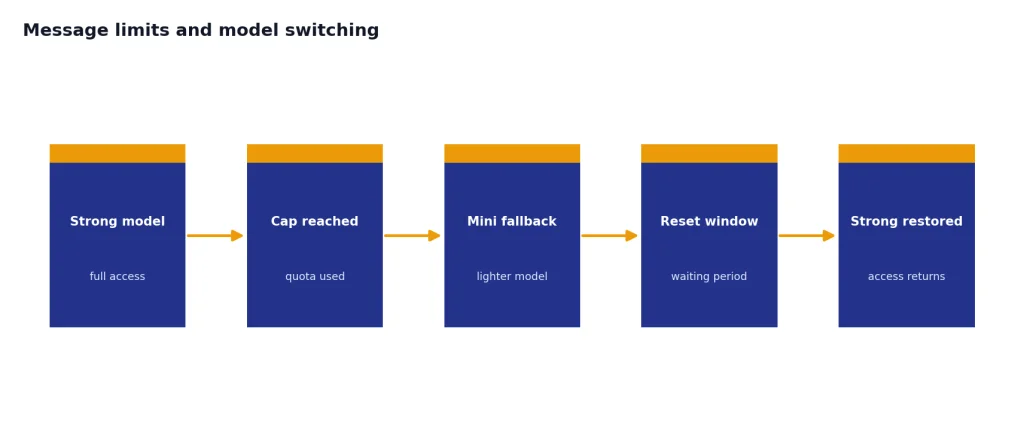
A five-hour window is not the same as a calendar day. If you use all GPT-5.3 messages in one sitting, you should expect to wait for that window to reset before the stronger model returns. OpenAI’s Free Tier FAQ also says Free users can use the flagship model only a limited number of times within a five-hour window and that ChatGPT will notify users when they reach the limit.[2] For daily planning, compare this with our ChatGPT daily limit explainer.
Message limits are easy to burn by accident. Follow-up prompts, regeneration attempts, edits that require a new answer, and repeated clarification questions can all consume your session faster than one carefully prepared prompt. If you are doing serious work on Free, write the task, constraints, source material, and desired output format in one prompt instead of sending them one at a time.
Do not confuse ChatGPT Free limits with OpenAI API limits. ChatGPT is the consumer web and app product. API rate limits, token limits, and pricing work differently. If you are building software instead of chatting in the interface, use our OpenAI API pricing guide and our ChatGPT rate limit breakdown.
Tool limits for files, images, GPTs, projects, and search
File uploads have the most concrete published Free cap. OpenAI says Free users are limited to 3 file uploads per day.[3] It also lists a 512MB hard limit per file, a 2M-token cap for text and document files, an approximately 50MB limit for CSV or spreadsheet files depending on row size, and a 20MB limit per image.[3] These limits apply separately from the model-message limit, so you can run out of upload capacity even if you still have messages left.
OpenAI also says users can upload up to 80 files every 3 hours, but that general rolling cap is not the Free cap; the same line states Free users are limited to 3 file uploads per day.[3] If uploads fail, failed attempts can sometimes count toward the upload-rate cap.[3] If uploads are central to your workflow, bookmark our ChatGPT file upload limit and ChatGPT image upload limit guides.
Projects add another layer. OpenAI’s Projects help article says users can create unlimited projects, but Free projects are limited to 5 files per project, while only 10 files can be uploaded at the same time.[5] A project is useful for keeping related chats and files together, but it does not erase the underlying upload and model limits.
GPTs share the same pool. OpenAI says Free users can discover and use GPTs as capacity permits, and that GPT rate limits are shared between GPTs and ChatGPT.[6] If you hit your text rate limit in ChatGPT, you will not be able to use GPTs until the rate limit resets.[6] OpenAI also says data analysis, file uploads, and search with GPTs have their own limits.[6]
Image generation is available on Free, but OpenAI does not publish a fixed Free daily image count on the pages reviewed for this article. The pricing page lists image generation as limited on Free, and the Images help article says ChatGPT Images is available on all tiers.[4][7] Treat image generation as a separate scarce tool, not as part of your text-message allowance. As of May 2026, OpenAI’s current image model lineup includes newer models such as GPT-image-2, but the Free ChatGPT plan page still describes access in product terms rather than promising a fixed image quota for every model.
Context and output limits
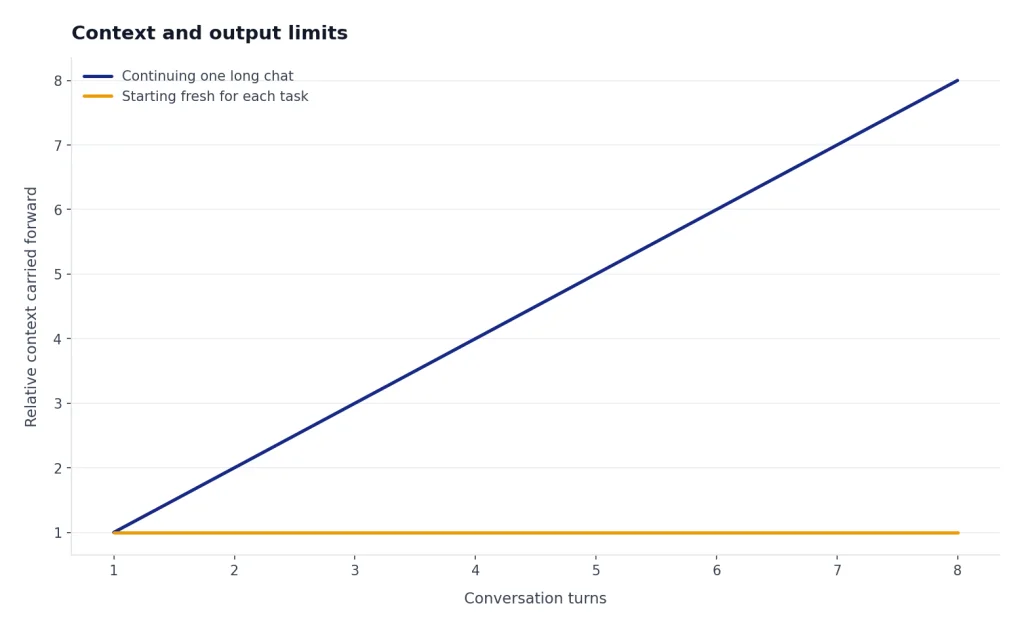
Context is the amount of conversation, files, and instructions a model can consider at once. It is not the same as a message limit. You can have messages left and still overwhelm a chat with a long pasted document, a large file, or a very long conversation. When that happens, ChatGPT may summarize, ignore older details, ask you to shorten the input, or produce a weaker answer.
OpenAI’s current public pages do not give one perfectly consistent Free context number. Its GPT-5.3 model article lists GPT-5.3 Instant on Free at 16K context.[1] Its pricing page lists the Free GPT Instant total context window at 27K and the Free GPT Instant input maximum as approximately 12 pages of text.[4] Because those official pages differ, the safest wording is that OpenAI has not published one stable, single Free context figure across all public pages. For model-by-model tracking, use our ChatGPT context window sizes by model guide.
Output length is a different constraint again. A Free plan user can ask for a long report, but the answer may stop, compress, or ask to continue. That behavior depends on the model, the current chat length, and the complexity of the task. For writing-specific limits, see our ChatGPT word limit, ChatGPT character limit per message, and ChatGPT token limit explainers.
Memory also affects perceived limits. Memory can make ChatGPT feel more persistent across chats, but it does not raise the Free message cap or file cap. OpenAI’s pricing page lists memory as available on Free and memory with past chats as limited on Free.[4] For storage and recall details, read the ChatGPT memory limit breakdown.
Free vs. paid limits
The Free plan is best understood as a trial-like everyday plan, not a professional quota. Paid plans mainly increase access, reduce interruptions, and unlock features that Free either does not have or only has in limited form. OpenAI’s pricing page lists Plus at $20 per month, Pro at $200 per month, and Business at $25 per user per month when billed annually.[4] OpenAI’s Plus help article also states that ChatGPT Plus provides enhanced access to the ChatGPT web app for $20 per month.[8]
The model gap is important. Free has GPT-5.3 Instant and GPT-5 Thinking Mini, but does not include GPT-5.5 Thinking or GPT-5.5 Pro according to the pricing page.[4] Plus expands access to GPT-5.3 Instant and GPT-5.5 Thinking, while Pro includes GPT-5.5 Pro access.[4] If you mainly need more model messages, compare Free with ChatGPT Plus message limit by model and ChatGPT Plus GPT-4o message limit for legacy context.
One common confusion is the pricing-page phrase that Plus messages and interactions are unlimited with an asterisk.[4] That does not mean every paid plan has infinite access to every model, tool, file upload, image generation request, or high-demand feature at all times. Paid accounts can still face abuse-prevention limits, capacity controls, model-specific caps, tool-specific quotas, temporary slowdowns, and feature exclusions. The practical difference is that Plus and Pro generally raise ceilings and unlock stronger model access; they do not remove every guardrail.
| Feature | Free | Plus | Why it matters |
|---|---|---|---|
| Monthly price | $0 per month.[4] | $20 per month.[4][8] | Free is enough for casual use; Plus is a predictable work expense. |
| Messages and interactions | Limited.[4] | Listed as unlimited with an asterisk on the pricing page.[4] | The asterisk still allows abuse, capacity, model-specific, and tool-specific restrictions. |
| GPT-5.3 Instant | Available.[4] | Expanded.[4] | Plus is better for long sessions with the main model. |
| GPT-5.5 Thinking | Not available.[4] | Expanded.[4] | Reasoning access matters for coding, planning, and dense analysis. |
| GPT-5.5 Pro | Not available.[4] | Not the main Plus tier; Pro plan access is listed separately.[4] | Heavy professional reasoning work may require Pro rather than Plus. |
| File uploads | Limited.[4] | Available.[4] | Heavy document work quickly outgrows Free. |
| Image generation | Limited.[4] | Available.[4] | Creative workflows need more consistent tool access. |
| Create and share GPTs | No.[4] | Yes.[4] | Free can use GPTs, but not build and share them. |

How to stay under the Free plan limits
The best Free-plan tactic is to spend fewer messages per task. Before you press send, include the goal, audience, constraints, source text, and desired format. Ask for a complete answer in one pass. If you need revisions, ask for a targeted change rather than regenerating the whole answer.
- Batch small questions. Put related questions in one prompt and ask ChatGPT to answer them in sections.
- Use shorter source material. Paste the relevant excerpt instead of a full document when you do not need full-file analysis.
- Compress files before upload. Stay under the 512MB file cap and the 20MB image cap.[3]
- Combine simple files. If you only get 3 Free uploads per day, do not spend one upload on a tiny note.[3]
- Start a new chat for a new task. Long chats can waste context on old details.
- Use the mini fallback for low-stakes work. Save GPT-5.3 messages for tasks where quality matters most.
- Keep project files tidy. Free projects have a 5-file-per-project limit.[5]
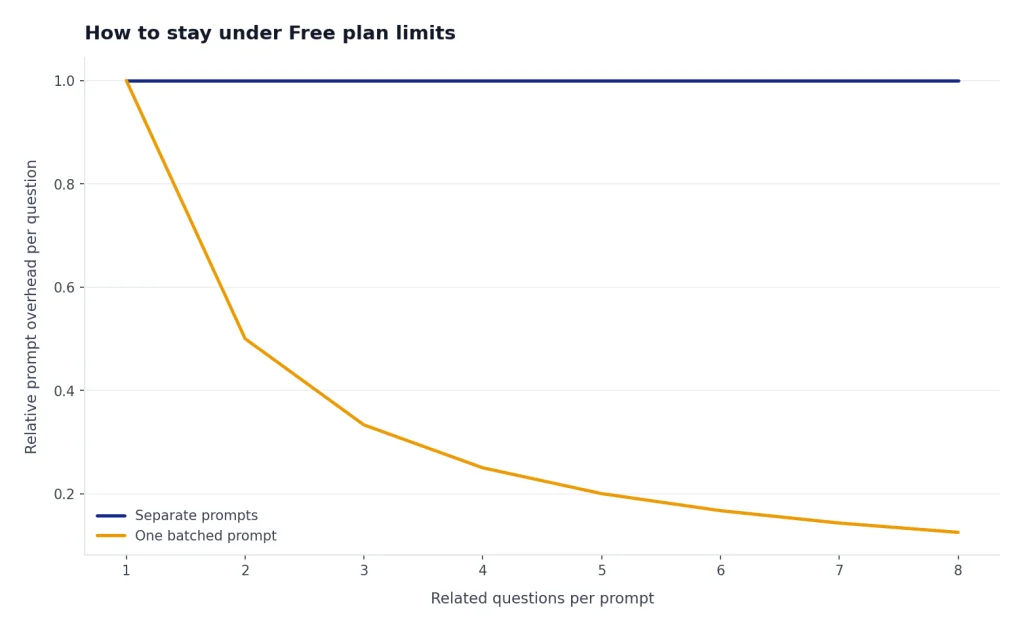
Example workflow: student study session. Instead of sending six separate prompts such as explain chapter 4, make a quiz, define terms, summarize notes, check my essay, and make flashcards, use one organized prompt:
Illustrative prompt: I’m studying for a biology quiz on cell respiration. Use the notes below. Give me: 1) a 150-word summary, 2) 10 key terms with definitions, 3) 5 multiple-choice questions with answers, and 4) 3 likely mistakes students make. Keep it concise so I can review quickly. Notes: [paste the relevant excerpt].
This spends one message on a complete study packet and saves follow-ups for the parts that actually need clarification.
Example workflow: office document review. If you only have a few uploads, combine related notes into one clean PDF or paste the important section instead of uploading three small files. Then ask for a structured result:
Illustrative prompt: Review this meeting transcript excerpt and produce: decisions made, open questions, owners, deadlines, and a short email I can send to the team. If anything is unclear, list it under Assumptions instead of asking me multiple follow-up questions.
That kind of prompt reduces upload waste, avoids extra clarification loops, and leaves your stronger-model messages for the final draft or analysis.
Do not treat every limit message as your fault. OpenAI says limits can be lowered during peak hours for file uploads.[3] The pricing page also describes Free response times as limited by bandwidth and availability.[4] If ChatGPT behaves differently from yesterday, the reason may be demand, a product change, or an incident. If uploads fail repeatedly, check whether the issue is a quota problem or a service problem; our ChatGPT file upload not working guide can help.
When the Free plan is enough, and when it is not
The Free plan is enough if you use ChatGPT occasionally, ask short questions, draft simple emails, summarize small snippets, or experiment with tools. It is also enough if you do not mind waiting for resets and can accept the mini fallback for lower-stakes work. For students, hobbyists, and light personal use, the Free plan can be useful without becoming a monthly bill.
The Free plan is not enough if ChatGPT is part of your workday. Upgrade pressure usually appears in four places: you hit the 10-message GPT-5.3 cap during active sessions, you need more than 3 file uploads per day, you rely on advanced reasoning, or you need more stable access during busy periods.[1][3] If that describes your workflow, compare the ChatGPT Plus price in 2026 with the time you lose waiting for resets.
Plus is not automatically worth it for everyone. If you only ask a few questions per week, Free is hard to beat. If you use ChatGPT for client work, coding, research, lesson planning, data cleanup, document review, or image-heavy workflows, the paid tier is easier to justify. For a fuller cost-benefit view, see is ChatGPT Plus worth it?.
Frequently asked questions
What is the ChatGPT Free message limit in 2026?
OpenAI says ChatGPT Free accounts can send up to 10 GPT-5.3 messages every 5 hours.[1] After that, chats automatically use a mini fallback model until the limit resets.[1] Other tools, such as files and image generation, have separate limits.
Does ChatGPT Free have a daily limit?
There is no single published daily message limit that covers everything on the Free plan. The GPT-5.3 message limit is published as a five-hour window, while file uploads have a daily cap. Free users are limited to 3 file uploads per day.[3]
How many files can I upload on ChatGPT Free?
OpenAI says Free users are limited to 3 file uploads per day.[3] Uploaded files also have size limits, including 512MB per file and 20MB per image.[3] Text and document files are capped at 2M tokens per file.[3]
Can Free users use GPTs?
Yes. OpenAI says Free users can discover and use GPTs, but GPT usage shares ChatGPT rate limits.[6] If you hit your ChatGPT text limit, you cannot keep using GPTs until the limit resets.[6] Free users cannot create and share GPTs according to OpenAI’s pricing page.[4]
Can Free users generate images?
Yes, but with limits. OpenAI’s pricing page lists image generation as limited on Free, and its Images help article says ChatGPT Images is available on all tiers.[4][7] OpenAI has not published a fixed Free daily image-generation number on the reviewed official pages.
Does upgrading reset Free plan limits?
OpenAI says that if you reach a Free tier rate limit, your usage rates reset when you upgrade to Plus, Pro, or Business.[2] That does not mean every paid plan is unlimited in every feature. It means the Free quota is replaced by the paid plan’s quota and access rules, which can still include abuse, capacity, model-specific, and tool-specific restrictions.
Is ChatGPT Free enough for work?
It depends on the work. Free is fine for light drafting, short explanations, and occasional research. It is usually too constrained for daily professional workflows that need many GPT-5.3 messages, frequent file uploads, advanced reasoning, or predictable availability.