


A ChatGPT rate limit is a usage control that can stop, slow, or redirect your requests when you send too many messages, use a high-demand model too often, upload too much, or exceed an API quota. In the ChatGPT web app, limits usually appear as message caps, model fallback, temporary unavailability, or tool restrictions. In the OpenAI API, limits are more technical and are measured by requests, tokens, images, usage tiers, and monthly spend.[3] The practical fix depends on where you hit the limit. ChatGPT users should wait for the reset, switch models, reduce tool-heavy prompts, or upgrade when appropriate. API developers should read response headers, pace traffic, batch work, and use exponential backoff.
Quick answer
The short version is simple. The ChatGPT app and the OpenAI API do not use one shared “ChatGPT rate limit.” They use different systems.
In ChatGPT, the limit is attached to your plan, model, workspace, and feature. As of May 1, 2026, OpenAI’s help article says ChatGPT Free accounts can send up to 10 GPT-5.3 messages every 5 hours.[1] It says ChatGPT Plus and ChatGPT Go users can send up to 160 GPT-5.3 messages every 3 hours.[1] It also says Plus and Business users can manually select GPT-5.5 Thinking with a usage limit of up to 3,000 messages per week.[1] Business and Pro are described as offering unlimited access to GPT-5 models, subject to abuse guardrails.[1]
That does not mean every interaction is unlimited. OpenAI’s pricing page labels Plus, Pro, Business, and Enterprise “messages and interactions” as Unlimited*, while the model-specific help page still lists concrete caps for GPT-5.3 and GPT-5.5 Thinking. Read those together: plan comparison pages describe broad access, while model help pages describe specific counters that can still affect what you see in the model picker.
In the API, the limit is not based on your ChatGPT subscription. It is based on your API organization and project.[3] OpenAI measures API rate limits by requests per minute, requests per day, tokens per minute, tokens per day, and images per minute.[3] OpenAI also applies monthly usage limits by tier.[3] If you are building with the API, see our separate OpenAI API pricing guide because price, monthly spend, and rate limit tier are related but not identical.

ChatGPT UI rate limits
The ChatGPT UI is the consumer and workspace product at ChatGPT.com and in the mobile or desktop apps. Its limits are user-facing. You may see a reset timer, a pop-up, a disabled model, slower responses, a fallback model, or a message asking you to try again later.
These limits are usually easier to understand than API rate limits, but they are also less visible. OpenAI does not expose every internal counter in a developer-style dashboard for normal ChatGPT users. You often learn you reached a limit only when ChatGPT tells you.
Current model-specific limits
OpenAI’s GPT-5.3 and GPT-5.5 help article is the most useful current reference for model-specific ChatGPT limits. It says GPT-5.3 is available to all ChatGPT tiers.[1] Paid tiers can use the model picker for GPT-5.3 Instant and GPT-5.5 Thinking.[1] GPT-5.5 Pro is limited to Pro, Business, Enterprise, and Edu plans.[1]
| Plan or model area | Limit OpenAI lists | What it means in practice |
|---|---|---|
| ChatGPT Free with GPT-5.3 | Up to 10 messages every 5 hours | After the counter is used, ChatGPT can switch the chat to a mini version until reset. |
| ChatGPT Plus and Go with GPT-5.3 | Up to 160 messages every 3 hours | Heavy users can still hit a model-specific counter even on a paid plan. |
| Plus or Business with manually selected GPT-5.5 Thinking | Up to 3,000 messages per week | The model may stop appearing as selectable after the weekly counter is reached. |
| Go with Thinking enabled from the tools menu | Up to 10 messages every 5 hours | Thinking is available through a narrower route and has a smaller counter. |
| Business and Pro GPT-5 access | Unlimited access, subject to abuse guardrails | OpenAI can still apply temporary restrictions for misuse, automation, credential sharing, or resale behavior. |
Why “unlimited” can still have limits
OpenAI’s pricing page uses “Unlimited*” for messages and interactions on several paid plans.[2] The asterisk matters. Unlimited access does not mean unlimited automation, unlimited resale, unlimited scraping, or guaranteed access to every model at every moment. The model-specific help article still lists counters for GPT-5.3 and GPT-5.5 Thinking, and it says Business and Pro access is subject to guardrails.[1]
This explains the most common confusion. A Plus user may think, “My plan says unlimited,” while ChatGPT says a specific model needs to reset. Both can be true if the broad plan has high or unlimited general interaction access while a specific model path has its own counter or fallback behavior. For a deeper plan-by-plan view, use our ChatGPT Plus message limit by model and ChatGPT message limit breakdowns.
Feature limits are separate
ChatGPT limits are not only message limits. File uploads, image generation, data analysis, voice, memory, context, and deep research can have separate access rules. OpenAI’s current pricing page describes Free as having limited messages and uploads, limited and slower image generation, limited deep research, and limited memory and context.[2] It describes Plus as adding expanded messages, uploads, image creation, deep research, agent mode, memory, context, projects, tasks, and custom GPTs.[2]
If your problem involves documents, read the ChatGPT file upload limit guide. If it involves pictures, use our ChatGPT image upload limit guide. If it involves memory or personalization, see the ChatGPT memory limit explanation.
OpenAI API rate limits
The OpenAI API rate limit is a developer limit. It applies to API calls made with API keys, not to normal ChatGPT messages in the browser. Buying ChatGPT Plus does not automatically give your API project the same limits as your ChatGPT account.
OpenAI’s API rate limit guide defines rate limits as restrictions on how often a user or client can access services in a time window.[3] The guide says OpenAI uses them to reduce abuse, keep access fair, and manage infrastructure load.[3]
The five API rate limit measurements
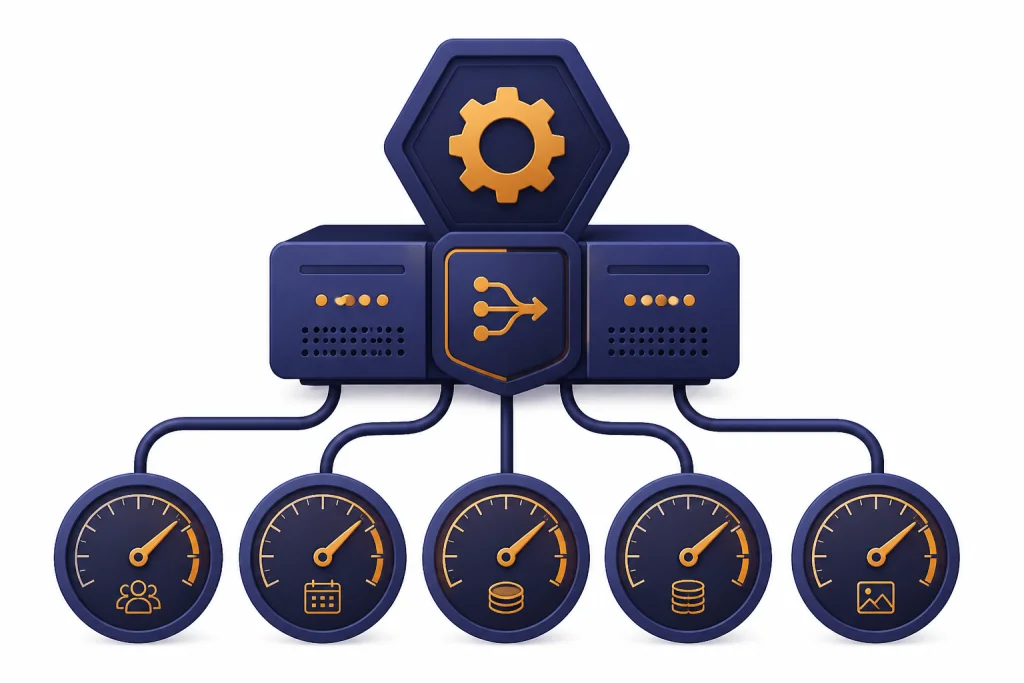
OpenAI lists five API rate limit measurements: RPM, RPD, TPM, TPD, and IPM.[3] These stand for requests per minute, requests per day, tokens per minute, tokens per day, and images per minute.[3] You can hit whichever one runs out first.
| API limit type | Meaning | Common way to hit it | Best fix |
|---|---|---|---|
| RPM | Requests per minute | Many small calls in a tight loop | Batch small jobs, add pacing, and reduce concurrency. |
| RPD | Requests per day | A job runs all day and uses the daily request pool | Schedule work, deduplicate calls, and move bulk jobs to batch processing where appropriate. |
| TPM | Tokens per minute | Large prompts, large outputs, or many concurrent long-context calls | Shorten input, cap output, split work, or use a model with a suitable limit. |
| TPD | Tokens per day | High-volume production usage over a full day | Monitor usage, cache repeated work, and request higher limits if justified. |
| IPM | Images per minute | Generating or processing many images at once | Queue image jobs and avoid bursty parallel requests. |
OpenAI also says API limits are defined at the organization and project level, not the individual user level.[3] Limits vary by model.[3] Some model families share limits.[3] That matters for teams because one busy service can consume capacity that another service expected to use.
Usage tiers and monthly usage limits
OpenAI’s API guide says organizations can view rate and usage limits in the limits section of account settings.[3] It also says organizations usually move automatically to higher usage tiers as API spend rises.[3] The guide lists monthly usage limits by tier: Free at $100 per month, Tier 1 at $100 per month after $5 paid, Tier 2 at $500 per month after $50 paid and 7 or more days since first successful payment, Tier 3 at $1,000 per month after $100 paid and 7 or more days, Tier 4 at $5,000 per month after $250 paid and 14 or more days, and Tier 5 at $200,000 per month after $1,000 paid and 30 or more days.[3]
Do not confuse these monthly usage limits with per-minute rate limits. A project can have money available but still send requests too fast. A project can also pace requests correctly but run out of monthly quota. Those are different failures.
Headers tell you what is happening
For API calls, OpenAI exposes rate limit details in HTTP response headers.[3] The API guide lists headers such as x-ratelimit-limit-requests, x-ratelimit-limit-tokens, x-ratelimit-remaining-requests, x-ratelimit-remaining-tokens, x-ratelimit-reset-requests, and x-ratelimit-reset-tokens.[3] Your application should log these fields around throttling events.
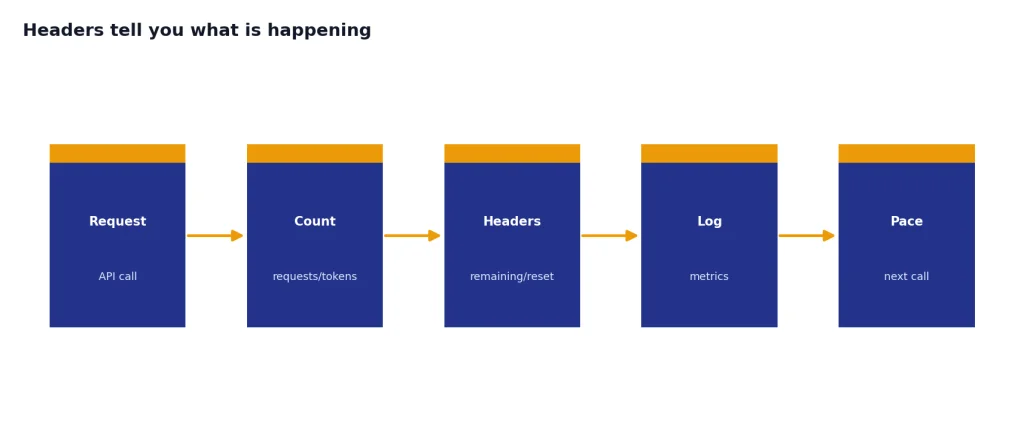
A good production dashboard tracks the model, project, endpoint, request count, input tokens, requested output tokens, actual output tokens, remaining request capacity, remaining token capacity, and reset times. Without that data, teams often guess wrong and buy more quota when the real problem is concurrency or prompt size.
Rate limit vs. token limit vs. context window
Many users say “rate limit” when they mean a different limit. The distinction matters because the fix changes.
| Limit | What it controls | Typical symptom | Where to learn more |
|---|---|---|---|
| Rate limit | How much you can send or receive within a time window | Try again later, model unavailable, 429 error, reset timer | This article |
| Message limit | How many ChatGPT messages you can send under a plan or model counter | You cannot continue with the same model until reset | ChatGPT daily limit |
| Token limit | How much text a model can process or produce | Input is too long, output stops early, API token budget is consumed | ChatGPT token limit |
| Context window | How much information the model can keep in the active conversation | ChatGPT forgets earlier details or asks you to shorten the conversation | ChatGPT context window |
| Character or word limit | The practical size of a prompt or response in human-readable units | Long text fails, truncates, or needs chunking | ChatGPT character limit |
A rate limit resets with time. A context or token limit does not reset in the same way. If the conversation is too large, waiting usually will not help. You need to shorten the chat, summarize earlier material, start a new thread, or use a model and plan with a larger context window. Our ChatGPT word limit guide explains the practical writing side of that problem.

What to do when you hit a rate limit
Start by identifying which product produced the limit. The ChatGPT web app and the API need different fixes.
If you are using ChatGPT in the browser or app
- Wait for the reset. If ChatGPT gives a reset time, that is usually the cleanest fix.
- Use the fallback model. Free and paid plans may continue with a mini or lower-demand model after a higher model counter is exhausted.
- Reduce tool-heavy requests. Browsing, file analysis, image generation, and deep research can consume separate or stricter limits than a plain text question.
- Split long work into fewer, better prompts. One well-scoped prompt often uses fewer messages than a series of corrections.
- Upgrade only if the plan matches the bottleneck. A paid plan can raise limits, but it does not remove every guardrail or model counter.
If your goal is to work around message caps without violating terms, use the methods in How to Bypass ChatGPT Message Limits Legitimately. The safe options are better prompting, waiting for reset, choosing a different model, using the API for developer workloads, or selecting the right paid plan. Do not share accounts, automate consumer ChatGPT, resell access, or scrape through the UI.
If you are using the API
- Read the error message. A 429 can mean too many requests, too many tokens, or current quota exceeded.
- Log response headers. The remaining and reset headers tell you whether requests or tokens are the limiting factor.
- Use exponential backoff with jitter. OpenAI recommends this for rate limit errors. Jitter prevents all workers from retrying at the same moment.
- Control concurrency. A queue with a fixed worker count is easier to manage than unbounded parallel calls.
- Batch small tasks. If RPM is the problem and TPM is available, grouping small tasks can improve throughput.
- Reduce requested output. Very high output caps can make the request appear larger for rate limit accounting.
- Request higher limits only after optimizing. Higher tiers help when your traffic is real and efficient, not when a retry loop is broken.
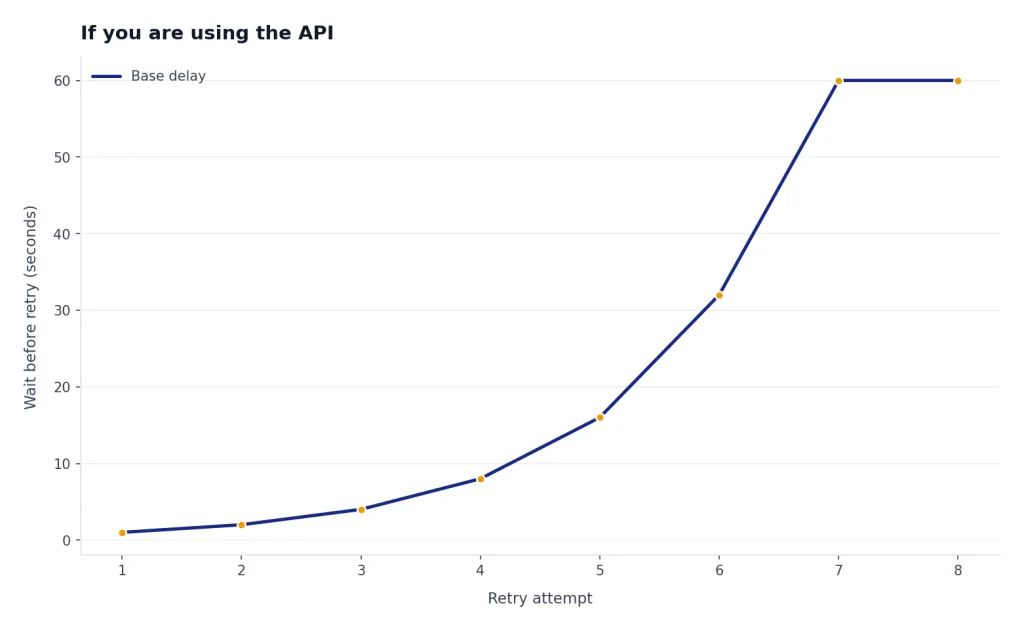
// Original example: simple retry shape for API clients.
// Use your SDK's current error classes and header accessors.
async function callWithBackoff(sendRequest, maxTries = 6) {
  let delayMs = 1000;

  for (let attempt = 1; attempt <= maxTries; attempt++) {
    try {
      return await sendRequest();
    } catch (err) {
      const isRateLimited = err.status === 429 || err.name === "RateLimitError";
      if (!isRateLimited || attempt === maxTries) throw err;

      const jitter = Math.floor(Math.random() * 500);
      await new Promise(resolve => setTimeout(resolve, delayMs + jitter));
      delayMs = Math.min(delayMs * 2, 60000);
    }
  }
}
The important detail is not the language. The important detail is behavior. Retry slowly, spread retries apart, stop after a maximum number of attempts, and avoid immediate loops. OpenAI’s 429 help article says unsuccessful requests count against your per-minute limit, so continuously resending the same request can make the problem worse.[4]

Troubleshooting the exact error
The fastest fix is to match the symptom to the system that produced it.
| Symptom | Likely cause | Best next step |
|---|---|---|
| ChatGPT says you reached a message limit | Plan or model counter is exhausted | Wait, use the fallback model, or move to a plan with higher limits. |
| A specific ChatGPT model is no longer selectable | Model-specific counter reached | Use another model until reset. Check whether the model has a weekly or hourly counter. |
| File analysis fails after several uploads | Upload, data analysis, or file processing limit | Reduce file count or size and check the ChatGPT Plus file upload limit explained guide. |
| API returns 429 Rate limit reached | Too many requests or tokens in a short period | Read headers, slow down, batch, and use exponential backoff. |
| API returns 429 current quota exceeded | Monthly usage limit or prepaid credits problem | Check API billing, usage, and limits page. |
| API returns 503 Slow Down | Traffic increased too abruptly on shared capacity | Drop back to the previous stable rate for at least 15 minutes, then ramp gradually.[5] |
| ChatGPT is broadly unavailable or unusually broken | Possible service incident, not your personal limit | Check the OpenAI status page and see our ChatGPT outages 2026 timeline. |
Do not assume every “try again later” message is a rate limit. Outages, overloaded models, network problems, account billing issues, browser extensions, VPNs, and workspace policy settings can create similar symptoms. If many users in the same organization see the same problem at the same time, check service status before changing your workflow.[6]
For ChatGPT users, the most efficient habit is to keep one demanding chat for the high-value work and use lower-demand models for drafts, rewrites, and quick questions. For API teams, the most efficient habit is to treat rate limits as a production constraint from day one. Add queues, metrics, caching, retries, and budget alerts before traffic grows.
Frequently asked questions
What is the ChatGPT rate limit?
The ChatGPT rate limit is the set of rules that controls how often you can use ChatGPT models and tools within a time window. In the UI, it usually appears as a message cap, model fallback, or temporary restriction. In the API, it is measured with request, token, image, and usage counters.[3]
Is the ChatGPT rate limit the same as the API rate limit?
No. ChatGPT app limits apply to the consumer or workspace interface. API limits apply to your OpenAI API organization and project, and they are independent of a normal ChatGPT subscription.[3]
Does ChatGPT Plus remove rate limits?
No. Plus generally gives higher access than Free, but OpenAI still lists model-specific counters and fallback behavior.[1] If you are deciding whether Plus is enough for your workload, compare your actual bottleneck with our ChatGPT free plan limits in 2026 and Plus-specific limit guides.
Why did I get a 429 error in the API?
A 429 usually means your API project sent too many requests or tokens in a short period, or that you exceeded quota.[5] OpenAI’s error guide distinguishes “Rate limit reached for requests” from “You exceeded your current quota.”[5] Read the error body and response headers before changing code.
How long do ChatGPT limits take to reset?
It depends on the model and plan. OpenAI’s current GPT-5.3 article lists examples such as 5-hour and 3-hour windows for GPT-5.3, and a weekly limit for manually selected GPT-5.5 Thinking on Plus and Business.[1] Other tools can have separate reset windows.
Can I bypass ChatGPT rate limits?
You should not bypass limits by automating the consumer UI, sharing credentials, reselling access, or scraping. Legitimate options include waiting, using a fallback model, improving prompts, upgrading plans, or using the API for developer workloads. If you use the API, build within the published rate limit system.