

The ChatGPT Atlas launch marks OpenAI’s first serious attempt to turn ChatGPT from a destination site into the browser layer itself. OpenAI introduced Atlas on October 21, 2025, as a macOS browser with ChatGPT built into the page, browser memory controls, and an agent mode that can take actions in the browser for eligible paid users.[1][2] As of this April 24, 2026 article, Atlas is most useful for people who already do research, writing, shopping, and work planning through ChatGPT. It is not yet a clean replacement for a mature browser in every workplace, especially where compliance, audit logs, accessibility, and prompt-injection risk matter.
ChatGPT Atlas has launched, but it is still early
ChatGPT Atlas is real, available, and strategically important. OpenAI launched it on October 21, 2025, positioning it as a browser with ChatGPT built in rather than a normal browser with an AI sidebar attached.[1][2]
The practical answer is more measured. Atlas is strongest when the task benefits from page context, memory, and handoff to an AI agent. It is weakest where users need long-established browser extension support, enterprise-grade controls, strict auditability, or a conservative security posture.

What changed with Atlas
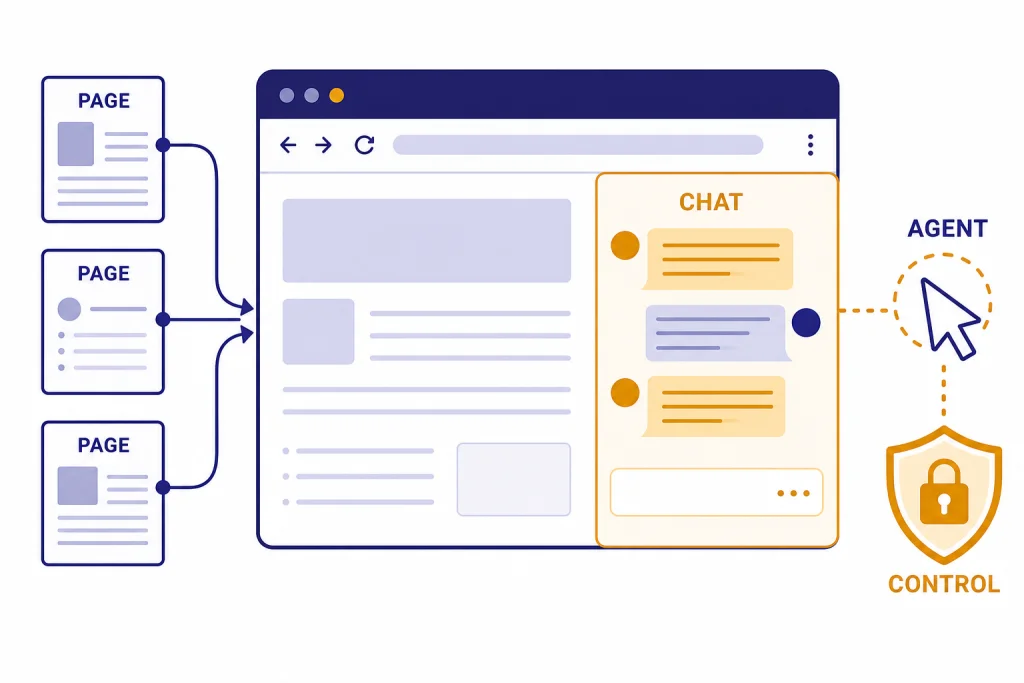
The important change is location. Before Atlas, many users copied a URL, screenshot, table, or paragraph into ChatGPT. Atlas moves ChatGPT into the browsing session, so the assistant can use the page you are viewing as context and respond without requiring that copy-and-paste loop.[1][8]
That sounds small until you consider the daily pattern. A user compares products, reads policy pages, revises a form response, checks a spreadsheet-like web app, or gathers sources across tabs. Atlas makes the page itself part of the working context. It also turns the new tab page into a place where the user can ask a question or enter a URL, then move between chat-style answers and web results.[1]
This is why Atlas is different from using ChatGPT in Chrome, Safari, Edge, or Firefox. The old pattern treats ChatGPT as another site. Atlas treats ChatGPT as a companion to the browser window. That companion can summarize, compare, rewrite, search, and in some cases act.
OpenAI also framed Atlas as part of a broader move toward agentic browsing. In the launch post, the company said Atlas is a step toward a future where much web use happens through agentic systems rather than manual clicking.[1] That fits the broader product arc we have seen across OpenAI’s recent launches, including model updates such as the gpt-5.3 release, creative tools such as the Sora 2 launch, and app-style integrations that make ChatGPT feel less like a chat box and more like a work surface.
The launch also changes the competitive map. Reuters described Atlas as a direct challenge to Google Chrome’s dominance, while noting that the browser is part of a crowded AI-browser field that also includes Perplexity’s Comet, Brave Browser, and Opera Neon.[2] The point is not that Atlas instantly replaces Chrome. The point is that OpenAI now controls one of the most valuable surfaces in computing: the place where people read, search, authenticate, shop, and work.
Availability, setup, and account access
Atlas started as a macOS-first browser. OpenAI’s launch page said Atlas was available worldwide on macOS for Free, Plus, Pro, and Go users, with Business in beta and Enterprise or Edu access available when enabled by an administrator.[1][2] OpenAI’s current getting-started documentation says Atlas supports Macs with Apple silicon running macOS 14.2 or later, and Softpedia’s listing independently shows the same macOS 14.2-or-later Apple silicon requirement.[3][11]
The setup flow is familiar. You download the installer, move Atlas into Applications, sign in with ChatGPT, and decide whether to import browser data such as bookmarks, saved passwords, and browsing history. OpenAI’s help article also says Atlas checks for updates automatically and can be set as the default browser inside its settings.[3]
OpenAI also offered a short adoption incentive. Users who make Atlas their default browser receive increased rate limits for the first 7 days, and Axios separately reported that the 7-day promotion applied to free and paid ChatGPT users before regular limits return.[3][12]
| User group | Atlas access | Agent mode at launch | Admin posture |
|---|---|---|---|
| Free, Plus, Pro, Go consumers | Worldwide macOS access at launch | Preview access limited to eligible paid tiers | User-controlled setup |
| Business workspaces | Beta access at launch; available by default in current enterprise help | Admin and plan settings can affect access | Workspace should pilot with low-risk data |
| Enterprise workspaces | Available when enabled by workspace owner | Enterprise admins can toggle Agent mode under permission settings | Off by default until enabled |
| Edu workspaces | Available when enabled by plan administrator at launch | Depends on administrator settings | Managed by institutional policy |
This access matrix matters because Atlas is not just another app icon. It touches web history, cookies, passwords, page content, and the user’s ChatGPT identity. Anyone deciding between Atlas and a normal browser should also compare the underlying ChatGPT plan, model access, and limits. Our all GPT models compared side by side guide and context window sizes for every GPT model are useful companion reads if you are trying to understand what the browser can do once the assistant begins reasoning over a larger task.

How agent mode works in Atlas
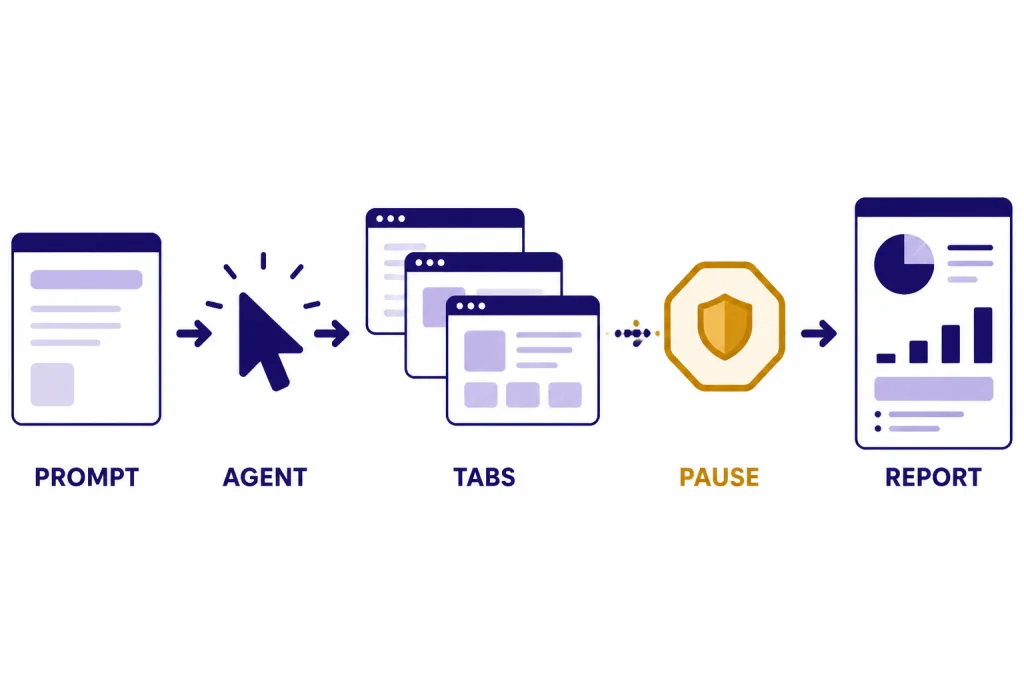
Agent mode is the feature that makes Atlas more than a convenient ChatGPT shell. OpenAI says Agent mode lets ChatGPT take actions in the browser, work in the current browsing session, and report back in the panel after the user describes a task.[6] In the launch materials, OpenAI gave examples such as gathering ingredients for a recipe, adding them to a cart, researching work documents, and compiling a competitive brief.[1]
The handoff is important. The user does not simply ask for an answer. The user delegates a web task. Atlas may open tabs, click through a site, use page context, and continue a workflow that began in the current tab. That is the behavior OpenAI wants users to associate with the browser: not search, then read, then copy, then ask, but delegate inside the page.
Agent mode also has boundaries. OpenAI says it cannot run code in the browser, download files, install extensions, or access other apps on the computer or local file system.[6][1] It can also pause on sensitive sites, such as financial institutions, so the user can watch the action.[6]
There is a logged-out mode as well. OpenAI says logged-out mode prevents the agent from using pre-existing cookies and from being logged into online accounts without specific approval.[6] This is one of the most important safety habits for early Atlas users. If you want the agent to research a public topic, use logged-out mode. If you want it to operate inside a private account, treat the session as higher risk and supervise it.
Agent mode is also where model quality matters. A browser agent needs to interpret messy pages, understand state, avoid wrong clicks, recover from errors, and know when to ask for permission. That is why Atlas should be considered alongside OpenAI’s broader model roadmap, including GPT-5.2 release notes and features, the GPT-5.1 update, and our running view of the most powerful GPT model. Better reasoning does not eliminate browser risk, but weaker reasoning makes the product less useful.
Privacy, memory, and security controls
Atlas raises a privacy question that normal browsers do not raise in the same way: how much of your browsing context should an AI assistant see, remember, and use later. OpenAI says browser memories are optional and can remember useful details from web browsing to personalize responses and suggestions.[5] Axios also noted that Atlas combines web and chatbot data in a way that expands privacy and security considerations.[8]
OpenAI’s privacy help page says browser memories contain facts and insights, not full page content. It also says web content is summarized on OpenAI servers when browser memories are enabled, that original web contents are deleted after summarization, and that privacy-filtered summaries are deleted within 7 days.[5] OpenAI has not published a corroborated independent figure for that 7-day retention detail, so users should treat the Help Center statement as OpenAI’s own documentation rather than an independently audited measurement.
The controls are useful, but they do not remove the core tradeoff. Atlas becomes more helpful when it sees and remembers more context. It also becomes more sensitive. If your browsing includes health records, financial dashboards, client documents, legal research, unreleased product plans, or internal systems, the decision is not “Atlas or no Atlas.” The better question is where Atlas should be allowed to see, remember, and act.
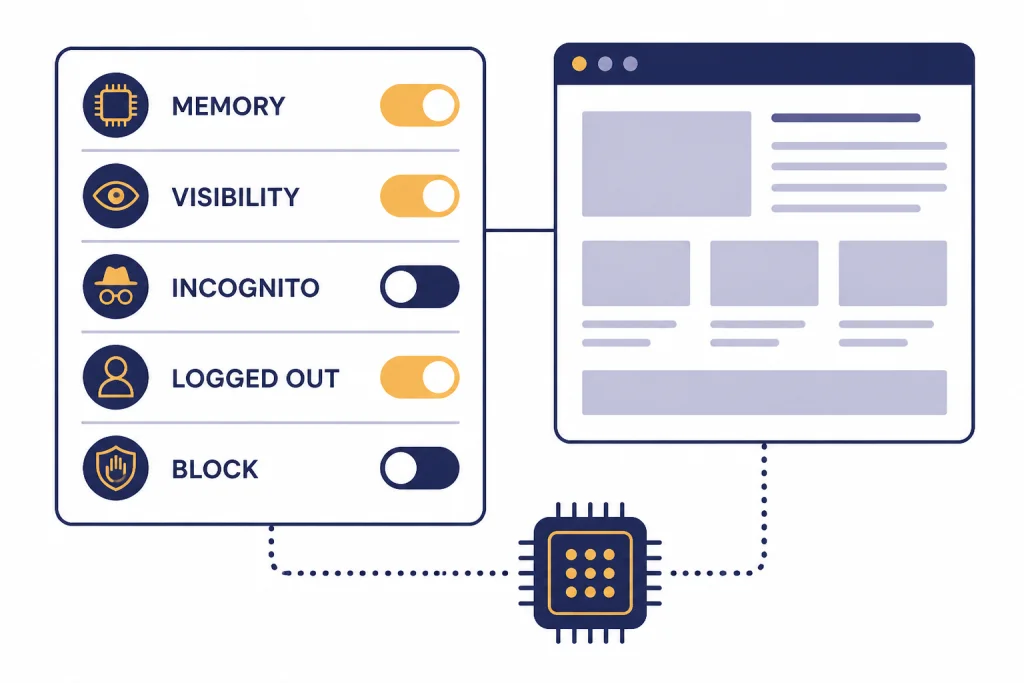
| Control or safeguard | What it does | Best use | Remaining limitation |
|---|---|---|---|
| Browser memories | Lets ChatGPT remember useful browsing details if enabled | Long-running research and shopping comparisons | More personalization means more sensitive context |
| Page visibility | Stops ChatGPT from seeing selected page contents | Banking, health, legal, and internal work pages | Users must manage visibility carefully |
| Incognito | Does not link the session to the ChatGPT account or save it in browser history | One-off browsing and sensitive searches | It does not make the user invisible to sites, employers, schools, or internet providers |
| Logged-out agent mode | Prevents the agent from using existing cookies unless approved | Public research and low-risk automation | Less useful for tasks that require account access |
| Agent action limits | Blocks code execution, downloads, extension installs, and local file access | Reducing high-impact browser-agent mistakes | Prompt injection and mistaken actions remain possible |
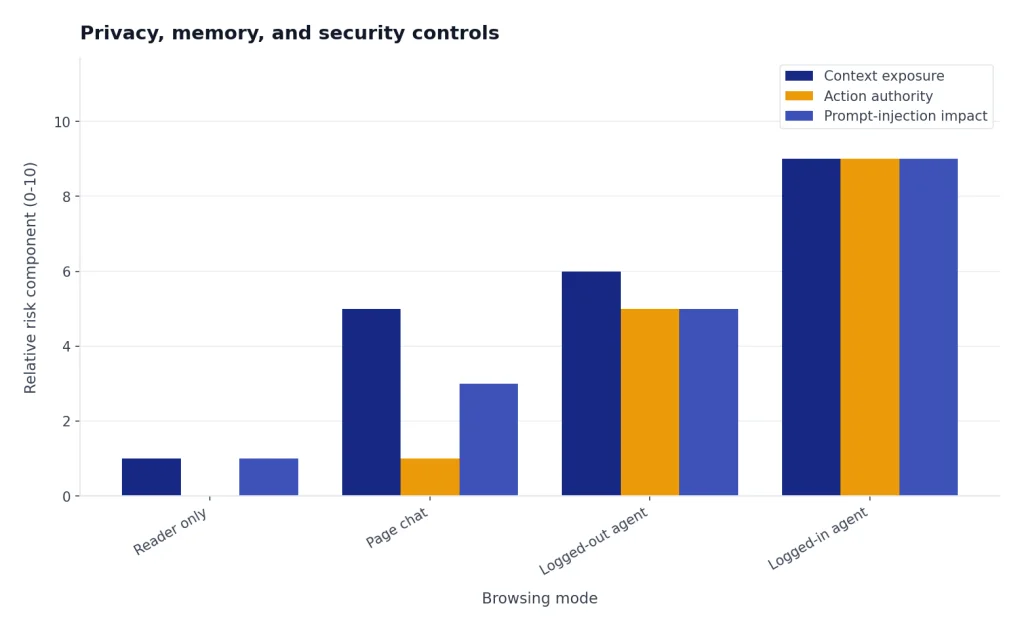
Security is the hardest part of the launch to evaluate. OpenAI explicitly warned that agents can be susceptible to hidden malicious instructions placed in webpages or email, and that safeguards will not stop every attack.[1] TechCrunch later reported that OpenAI views prompt injection as difficult to secure against in a foolproof way and that the company has been working with third parties to harden Atlas against these attacks.[9]
That is not a reason to dismiss Atlas. It is a reason to classify use cases. Summarizing a public article is low risk. Rewriting text in a public form is moderate risk. Letting an agent operate inside email, banking, admin dashboards, or customer systems is high risk. The difference is not the brand name of the browser. The difference is the combination of AI instruction-following, logged-in web context, and the ability to act.
Analysis: Atlas is a context layer, not just a browser
The best way to understand Atlas is to stop comparing it only to Chrome. Atlas is a context layer. It sits between the user, the web page, the user’s history, and the model. Its value comes from joining those pieces at the moment of work.
That creates a clear tradeoff pattern. I call it the context-control tradeoff. The more context Atlas can access, the more useful it becomes. The more control you withhold, the safer and more private it becomes, but the less differentiated it is from ChatGPT in a regular browser.
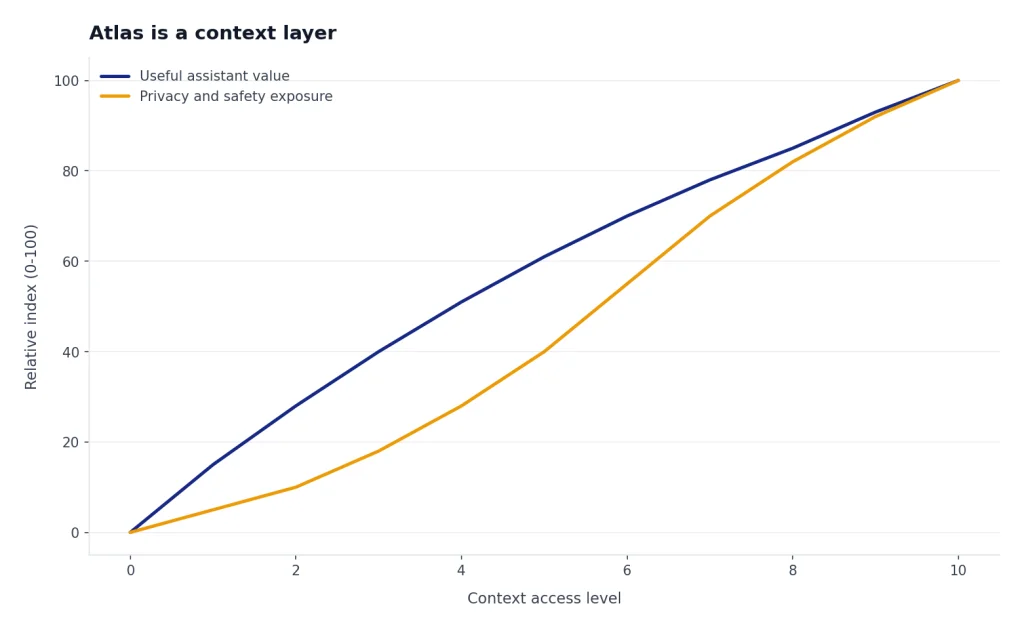
This pattern explains why early reactions can be so different. A student who wants page summaries, practice questions, and writing help may see immediate value. A security leader who sees an AI agent with access to logged-in browser sessions sees a new attack surface. A casual user may enjoy the sidebar but still prefer Safari, Chrome, or Firefox for daily browsing. A power user may want Atlas only for research sessions and keep a separate default browser for everything else.
The right decision is not binary. Use Atlas when the task benefits from current page context and the downside of a mistaken action is low. Avoid or restrict Atlas when the task involves irreversible actions, regulated data, legal privilege, financial accounts, production systems, or highly confidential internal materials.
OpenAI’s own enterprise documentation supports that cautious framing. It says Atlas for Business and Enterprise is early access and recommends caution with regulated, confidential, or production data.[7] That is unusually direct language for a product help page, and readers should take it seriously.
Atlas also fits OpenAI’s broader platform strategy. The company is not only shipping models. It is building surfaces where those models can work: browsers, video apps, coding tools, enterprise integrations, and ChatGPT itself. That makes the OpenAI and Microsoft partnership more relevant, not less, because distribution, infrastructure, and platform access will shape how fast these products mature.
Enterprise rollout decision framework
For teams, Atlas should begin as a pilot, not a default-browser migration. OpenAI says Business workspaces get Atlas by default, while Enterprise access is off by default until workspace owners enable it.[7] The same Help Center page says Atlas is not currently in scope for OpenAI SOC 2 or ISO attestations, does not emit Compliance API logs, and does not integrate with SIEM or eDiscovery.[7]
That does not make Atlas unusable in a company. It makes the rollout a governance question. A good pilot should define approved use cases, blocked data categories, required settings, and escalation paths. It should also separate consumer-style tasks from enterprise systems. Public research, competitive scans, draft cleanup, and low-risk vendor comparisons are reasonable early candidates. Customer records, regulated workflows, privileged legal work, and production operations should wait until controls are stronger and documented.
- Start with low-risk data. Treat the first rollout as an evaluation of behavior, not a productivity mandate.
- Disable or restrict agent mode where needed. Enterprise admins can control Agent access in permission settings.[7]
- Set memory rules. Decide whether browser memories are allowed, and document how employees should view, archive, or delete them.
- Use separate browsers for sensitive systems. Keep banking, payroll, health, legal, and production consoles outside Atlas until the organization has a stronger control model.
- Train users on prompt injection. The risk is not only bad prompts from users. It is also hidden instructions in pages or messages that the agent may read.
The compliance page is also a reminder that AI features and enterprise assurances do not always arrive together. A tool can be available before it is appropriate for every controlled environment. If your team needs pricing and usage planning across OpenAI services, our OpenAI API pricing guide and ChatGPT Plus price in 2026 article provide the broader cost context.
What has changed since launch
Atlas has not been static since launch. OpenAI’s release notes list a series of browser-specific updates, including extension fixes, vertical tabs, import improvements, multi-profile support, tab groups, saved prompts, smarter Ask ChatGPT suggestions, and multiple ChatGPT logins.[4]
The pattern is clear. The launch established the AI-native browser concept. The later releases filled in normal browser expectations: better tabs, imports, extensions, profiles, downloads, and developer tools. That matters because a browser cannot survive on AI novelty alone. It has to handle the boring parts of browsing reliably.
The release notes also show the product’s early rough edges. OpenAI listed fixes for memory over-use, crashes, blank results, extension prompts, tab behavior, and Agent mode persistence.[4] These are not surprising for a new browser, but they are relevant for users deciding whether to make Atlas their default today.
My read is that Atlas is moving from concept demo toward daily browser, but it is not equally mature for every user. If you are a ChatGPT-heavy researcher on a supported Mac, it is worth testing. If your browser is mission-critical infrastructure for regulated work, wait for stronger enterprise controls and clearer security maturity.
Frequently asked questions
When did ChatGPT Atlas launch?
OpenAI introduced ChatGPT Atlas on October 21, 2025.[1][2] The launch started on macOS and made Atlas available worldwide to Free, Plus, Pro, and Go users, with Business in beta and Enterprise or Edu access controlled by administrators.[1][2] The launch was important because it moved ChatGPT into the browser surface instead of leaving it as a separate tab.
Is ChatGPT Atlas available on Windows, iPhone, or Android?
At launch on October 21, 2025, OpenAI said Atlas was available worldwide on macOS and that Windows, iOS, and Android experiences were coming soon.[1][2] OpenAI’s current getting-started documentation describes Atlas as its macOS browser and lists Mac system requirements.[3] If you are not on a supported Mac, you should treat Atlas as unavailable for your main device unless OpenAI has since updated the platform list.
What Mac do I need to run ChatGPT Atlas?
OpenAI says ChatGPT Atlas supports Macs with Apple silicon running macOS 14.2 or later.[3][7] Softpedia’s app listing independently shows the same macOS 14.2-or-later Apple silicon requirement.[11] That means older Intel Macs are not the target platform in OpenAI’s current support language.
Does Atlas use my browsing data to train OpenAI models?
OpenAI says Atlas does not use the content you browse to train models by default, and users can opt in through an “include web browsing” data control.[1] The Atlas privacy page also says Business and Enterprise content is not used for training.[5] Axios separately reported the same default position: OpenAI says Atlas browsing data is not used for model training unless consumers opt in.[8]
Is Agent mode safe to use?
Agent mode is useful, but it is not risk-free. OpenAI says it cannot run code in the browser, download files, install extensions, or access other apps or the local file system.[6][1] OpenAI also warns that agents can be vulnerable to hidden malicious instructions in webpages or emails, and TechCrunch reported that OpenAI sees prompt injection as hard to secure against completely.[1][9] Use Agent mode first on low-risk tasks, and supervise it when logged into any account.
Should I make Atlas my default browser?
It depends on your risk profile and how much you already use ChatGPT. OpenAI says users who make Atlas their default browser get increased rate limits for the first 7 days, and Axios reported the same 7-day promotion before regular limits return.[3][12] That is a good reason to test Atlas for a week, not a reason to move every sensitive workflow into it immediately.
Can companies deploy Atlas safely?
Companies can pilot Atlas, but they should do it cautiously. OpenAI says Atlas for Business and Enterprise is early access and recommends caution for regulated, confidential, or production data.[7] The same page says Atlas is not currently in scope for OpenAI SOC 2 or ISO attestations and does not emit Compliance API logs or SIEM and eDiscovery feeds.[7] For many organizations, that means Atlas belongs in a low-risk pilot before it belongs in a standard desktop image.
What to watch next
The next test for Atlas is not whether people try it once. It is whether OpenAI can make the browser good enough at ordinary browsing, safe enough for supervised agent work, and controlled enough for business use. Watch the release notes for Windows and mobile availability, stronger enterprise controls, accessibility progress, extension policy improvements, and clearer evidence that prompt-injection defenses are improving.
For now, the smartest position is selective adoption. Use Atlas where page-aware ChatGPT assistance saves real time. Keep sensitive accounts, regulated work, and irreversible actions in a more conservative browser setup until the controls catch up with the ambition.