

This prompt engineering tutorial takes you from basic ChatGPT prompts to reliable, reusable prompting systems. A prompt is the input you give a language model, and prompt engineering is the process of designing and refining that input so the model’s response matches your goal.[1] You will learn a practical framework, a repeatable workflow, common prompt patterns, debugging methods, and copy-ready templates. The point is not to memorize magic phrases. The point is to state the job clearly, provide the right context, constrain the output, test the result, and save what works.
What prompt engineering means
Prompting is the act of giving ChatGPT an input. That input can be text, and OpenAI notes that prompts can also include other forms such as image or audio input.[1] Prompt engineering is the deliberate version of prompting. You decide the goal, provide useful context, set boundaries, request a format, and revise the wording until the answer is dependable.
OpenAI’s API documentation states that output quality often depends on how well you prompt the model.[3] OpenAI’s prompt engineering guidance also recommends putting instructions clearly, separating instructions from context, and being specific about the desired outcome, length, format, and style.[2] In practice, that means a good prompt is closer to a short creative brief than a search query.
If you are brand new, read what ChatGPT is first, then skim what GPT means. The rest of this tutorial assumes you already know how to open a chat and ask a basic question.
The six-part prompt framework
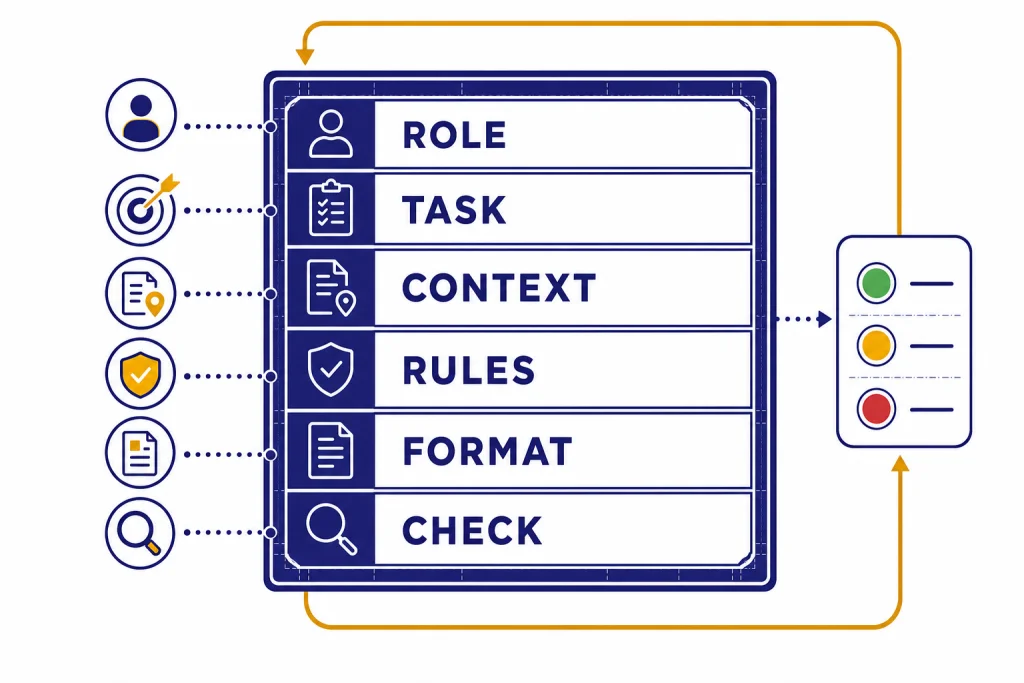
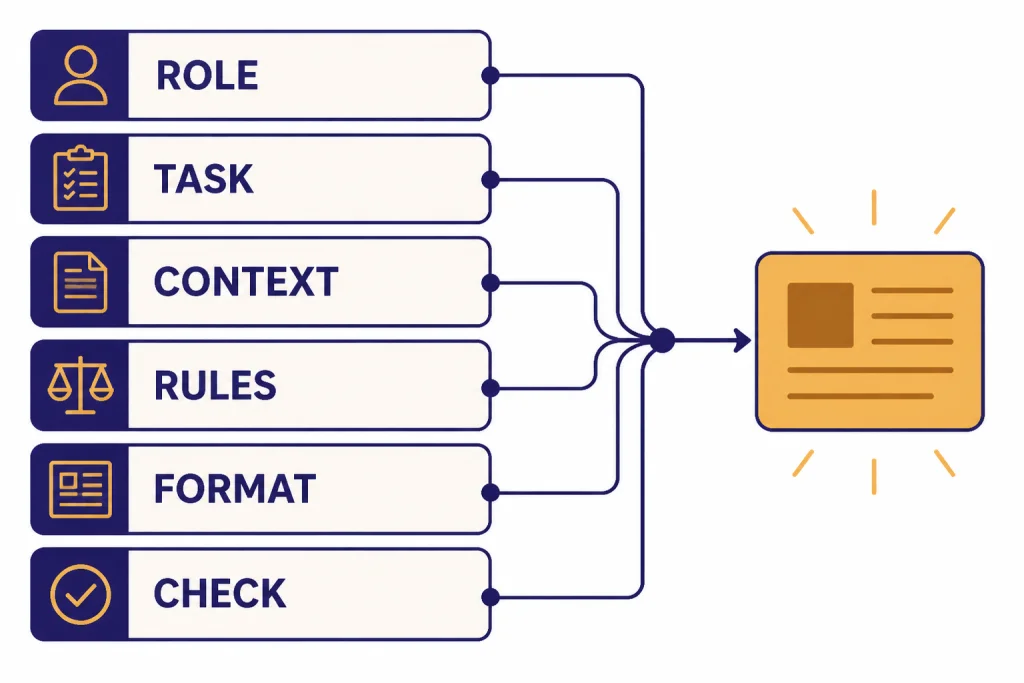
Use the same six-part structure for most serious prompts: role, task, context, rules, format, and check. You do not need all six parts every time. You do need to know which part is missing when the answer disappoints you.
- Role: Tell the model what lens to use, such as editor, tutor, analyst, or reviewer.
- Task: State the action. Use verbs like summarize, compare, extract, rewrite, classify, draft, plan, or critique.
- Context: Provide the facts, audience, constraints, source text, or business situation.
- Rules: Set boundaries. Say what to include, what to avoid, and what to do when information is missing.
- Format: Request bullets, a table, JSON, an email, a lesson plan, a checklist, or another concrete shape.
- Check: Ask for a self-review against a rubric, a list of assumptions, or a confidence note.
OpenAI’s API guidance describes prompt sections such as identity, instructions, examples, and context, and it recommends Markdown or XML-style boundaries to separate logical parts of a prompt.[4] That is the idea behind the framework below.
Role: You are a practical subject-matter editor.
Task: Explain [topic] to [audience].
Context: Use only the notes under <source>.
Rules:
- If the source does not answer, write: Not found in the source.
- Do not add outside facts.
- Keep the answer concise.
Format: Return a short summary, then a bullet list of key points.
Check: End with one sentence naming the biggest uncertainty.

<source>
[paste source]
</source>
This structure reduces guessing. The model no longer has to infer who it is helping, what success means, where the facts come from, or how the answer should look.
Build prompts with a zero-to-pro workflow
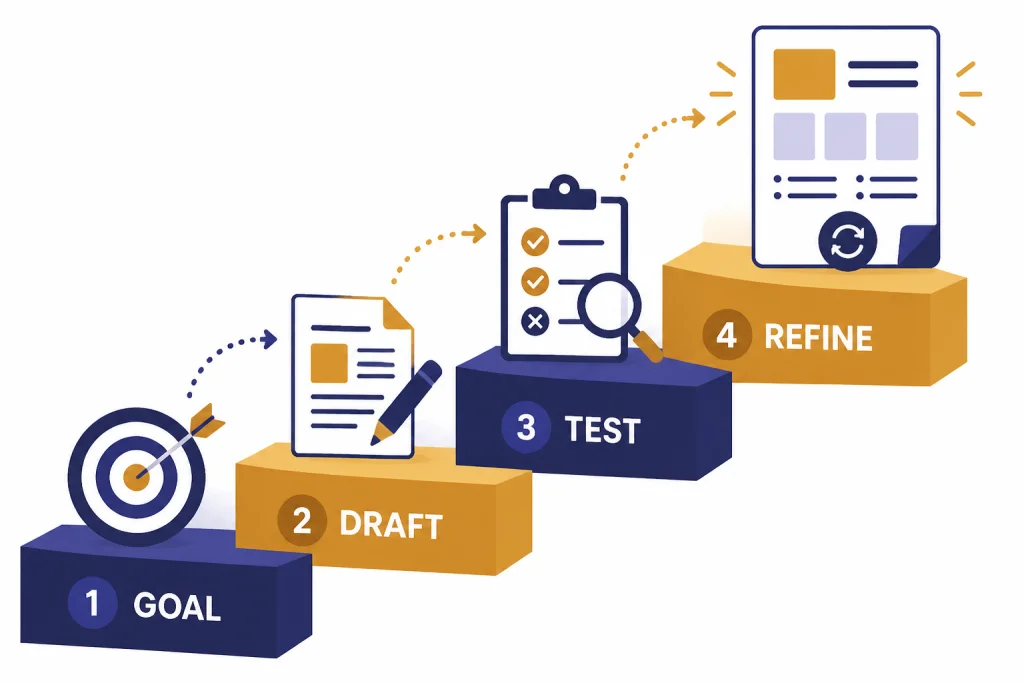
Do not start by asking for the perfect prompt. Start by defining the work. Anthropic’s prompt engineering overview advises setting success criteria and ways to test against them before tuning prompts.[7] OpenAI and Google both describe prompting as iterative work: draft, inspect the answer, refine, and repeat.[1][8]
Draft from the outcome backward
Write the answer you want in plain English before writing the prompt. Name the audience, the output format, and the quality bar. Then turn that description into instructions.
Test with real inputs
Run the prompt on inputs that resemble your actual work. A prompt that works on a clean sample may fail on a messy email, a long PDF, a vague client note, or a spreadsheet with missing labels. Save bad outputs. They tell you what rule or example to add.
Lock the prompt and reuse it
Once a prompt works, turn it into a template. Replace one-off details with placeholders. Store it where you can find it again. For a reusable library workflow, see our ChatGPT prompt generator guide. If you want a broader curriculum after this tutorial, use the prompt engineering course roadmap.
- Goal: What should the answer help you decide, publish, fix, or create?
- Input: What information will you paste, upload, or describe?
- Output: What shape should the answer take?
- Tests: What would make the answer clearly good or clearly bad?
- Version: What changed from the last working prompt?
Prompt patterns that solve common problems
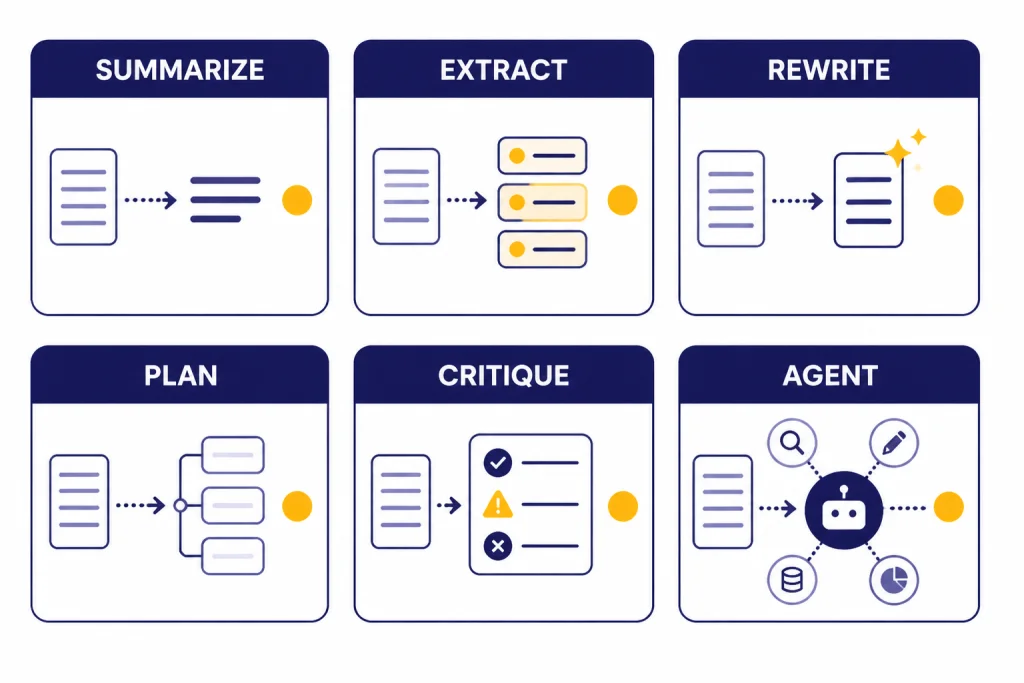
Prompt patterns are reusable shapes for common jobs. OpenAI describes few-shot learning as steering a model by including a handful of input and output examples, while Google’s prompt guidance also emphasizes examples for showing the pattern you want.[4][8] Use the table as a decision guide.
| Pattern | Use it when | Prompt skeleton | Watch for |
|---|---|---|---|
| Direct instruction | The task is simple and the format is obvious. | Summarize this for [audience] in [format]. | Too little context. |
| Few-shot examples | You need a specific style, label, or transformation. | Here are examples of input and ideal output. Now apply the same pattern. | Examples that contradict the rule. |
| Delimited context | You want answers grounded in pasted source material. | Use only the text inside <source>. | Context that is too broad or mixed with instructions. |
| Rubric-based critique | You need review, editing, grading, or QA. | Evaluate against this rubric, then suggest fixes. | Vague scoring criteria. |
| Prompt chain | The job has stages, such as research, outline, draft, revise. | First extract facts. Then group themes. Then draft. | Skipping validation between stages. |
| Clarify-first prompt | The request has missing requirements. | Ask up to three clarifying questions before answering. | Asking questions when the task is already clear. |
Specialized tasks benefit from specialized patterns. Use writing prompts for better content, coding prompts that behave like specs, and data analysis prompts for messy files when the task moves beyond a general chat answer.
Advanced upgrades that matter
Separate instructions from data
Put instructions outside the source material. Put source material inside clear boundaries. This prevents a pasted document, web excerpt, or customer email from being mistaken for the command. OpenAI’s Model Spec describes an instruction hierarchy in which higher-authority instructions override lower-authority instructions, and it treats quoted or untrusted data differently from instructions.[9]
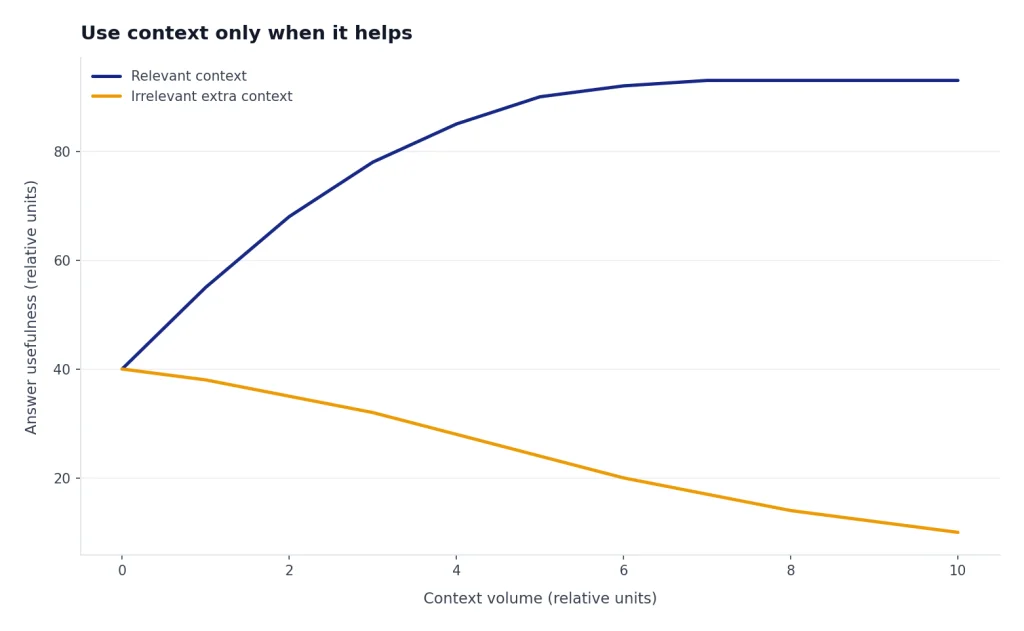
Use context only when it helps
More context is not always better. Add the facts the model needs, not every note you have. OpenAI describes adding relevant context to a prompt as a way to give the model access to data outside its training set or to constrain the answer to selected resources, a pattern often called retrieval-augmented generation.[4]
Prompt reasoning models differently
OpenAI distinguishes reasoning models from GPT models and says these families behave differently.[5] For reasoning models, OpenAI recommends straightforward prompts and says prompts that ask the model to reveal or perform chain-of-thought-style reasoning are unnecessary and can sometimes hurt performance.[5] Ask for a concise rationale, checks, assumptions, or final answer structure instead.
Turn prompts into workflows
A professional prompt often becomes a workflow. For source-heavy projects, use a research workflow instead of asking ChatGPT to guess. Our deep research tutorial shows how to structure that process. For deeper pattern work, read prompt engineering techniques that actually work and then the advanced prompt engineering playbook.
Debug and test prompts
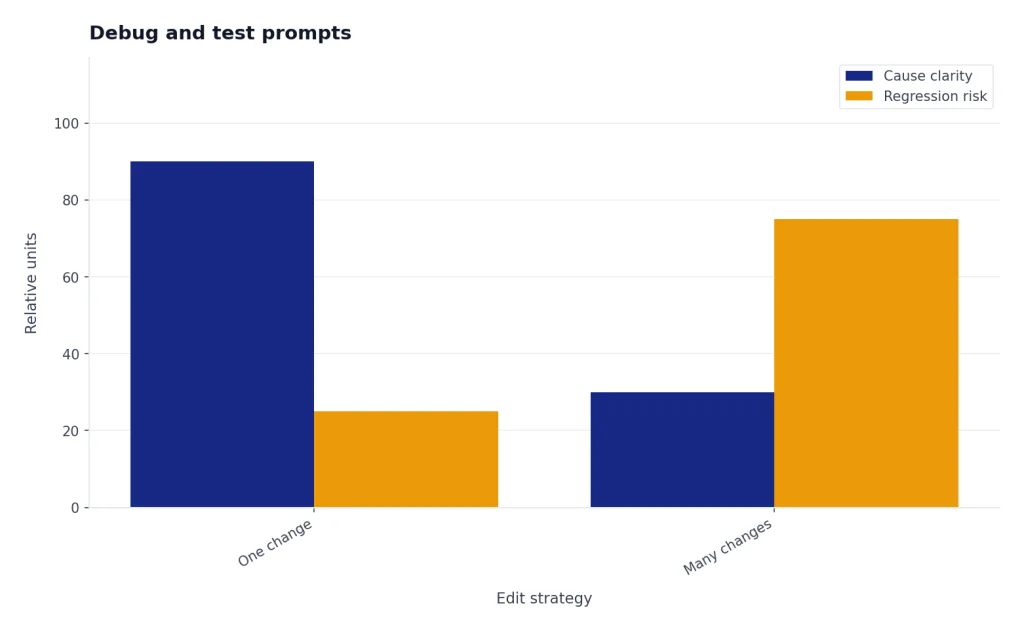
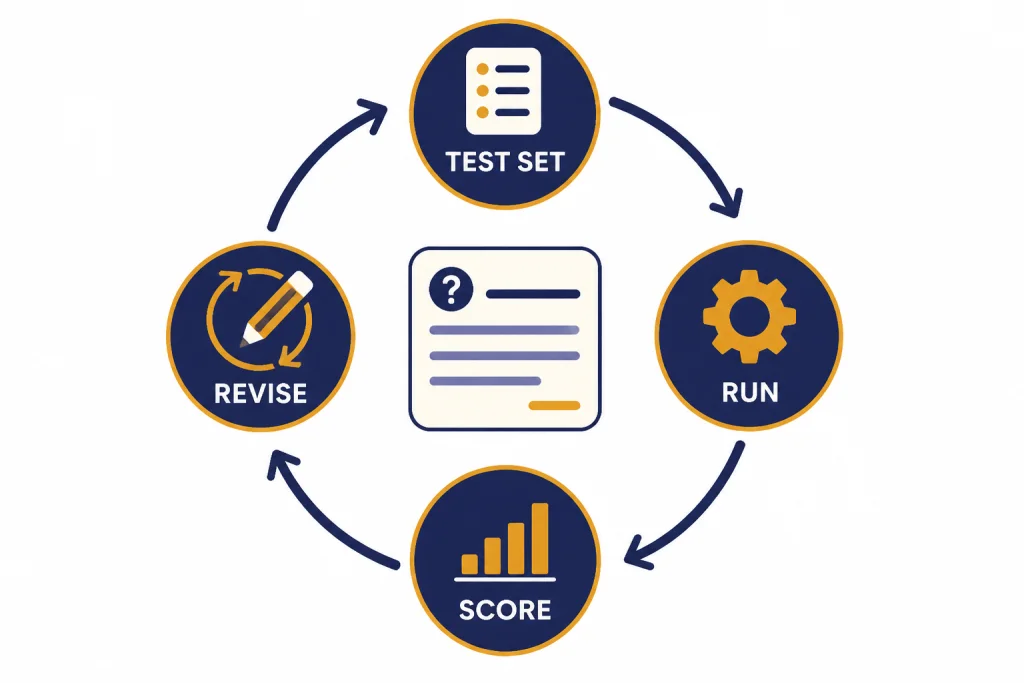
Debugging a prompt means changing one thing at a time and comparing outputs. OpenAI’s prompting documentation describes long-lived prompt objects with versioning, variables, and evals for comparing prompt behavior in API projects.[3] You can use the same discipline in ChatGPT with a simple test set and a notes document.
| Failure | Likely cause | Fix |
|---|---|---|
| The answer is too generic. | The prompt lacks audience, use case, or examples. | Add a concrete scenario and one ideal output sample. |
| The model invents details. | The prompt asks for facts without sources. | Provide source text and require Not found when absent. |
| The format drifts. | The output shape is implied, not specified. | Give a schema, table columns, or bullet count. |
| The answer is too long. | No verbosity limit exists. | Set a length target and ask for only decision-useful detail. |
| The answer misses edge cases. | The examples are too clean. | Add messy, borderline, and negative examples. |
Keep a small prompt lab. Store the prompt, the test input, the output, the score, and the change you made. If the new prompt improves one case but breaks another, do not ship it. Add a rule, add a better example, or split the job into smaller prompts.
Copy-ready prompt templates
Use these templates as starting points, not scripts to follow blindly. OpenAI’s prompt generation documentation says the Playground can generate prompts, functions, and schemas from a task description, using meta-prompts that incorporate prompt engineering best practices.[6] You can use the same idea manually by asking ChatGPT to improve a draft prompt.
General answer template
Role: You are a practical tutor.
Task: Explain [topic] to [audience].
Context: The reader already knows [known background] but struggles with [pain point].
Rules:
- Use plain English.
- Give one example.
- Avoid jargon unless you define it.
Format: Short explanation, example, checklist.
Source-grounded summary template
Task: Summarize the source for a busy decision-maker.
Rules:
- Use only the source.
- Separate facts from interpretation.
- If the answer is missing, write: Not found in the source.
Format:
1. Executive summary
2. Key facts
3. Open questions

<source>
[paste text]
</source>
Rewrite template
Role: You are an editor.
Task: Rewrite the draft for [audience].
Tone: [tone]
Rules:
- Preserve meaning.
- Cut repetition.
- Improve clarity.
- Do not add new claims.
Output: Revised draft, then a short list of the main edits.

<draft>
[paste draft]
</draft>
Critique template
Role: You are a skeptical reviewer.
Task: Critique the work against this rubric.
Rubric:
- Accuracy
- Completeness
- Clarity
- Evidence
- Actionability
Output: Table with issue, severity, evidence, and recommended fix.

<work>
[paste work]
</work>
Prompt improver template
Task: Improve this prompt.
Goal: Make the output more reliable for [use case].
Rules:
- Keep the original intent.
- Add missing context placeholders.
- Add output format requirements.
- Add a check step.
Output: Improved prompt only.

<prompt>
[paste prompt]
</prompt>
When not to prompt-engineer
Prompt engineering is powerful, but it is not the right fix for every failure. Anthropic’s overview notes that not every failing success criterion is best solved by prompt engineering, and that issues such as latency or cost may be better solved by selecting a different model.[7]
- Missing facts: Do not ask the model to invent knowledge. Provide sources or use a research workflow.
- High-risk decisions: Use expert review for legal, medical, financial, safety, and compliance work.
- Strict computation: Use a calculator, spreadsheet, code, or data tool when exact computation matters.
- Repeated production tasks: Consider retrieval, structured outputs, evals, or application logic instead of a longer prompt.
- Policy or safety boundaries: A prompt cannot override higher-priority rules. OpenAI’s Model Spec describes authority levels that constrain what models should follow.[9]
For factual work, the safer pattern is source first, prompt second. Google’s prompting guidance explicitly warns against relying on models to generate factual information without care.[8] A strong prompt can make the model more useful. It cannot make missing evidence appear.
Frequently asked questions
What is the first prompt engineering skill to learn?
Learn to specify the task and output format. Most weak prompts fail because they ask a broad question and leave the model to infer the audience, scope, and answer shape. Add role, task, context, rules, and format before trying advanced techniques.
Should I tell ChatGPT to think step by step?
Do not use that phrase as a universal habit. For reasoning models, OpenAI recommends simple, direct prompts and says chain-of-thought prompts are unnecessary and can sometimes hinder performance.[5] Ask for a brief rationale, assumptions, checks, or a final answer with evidence instead.
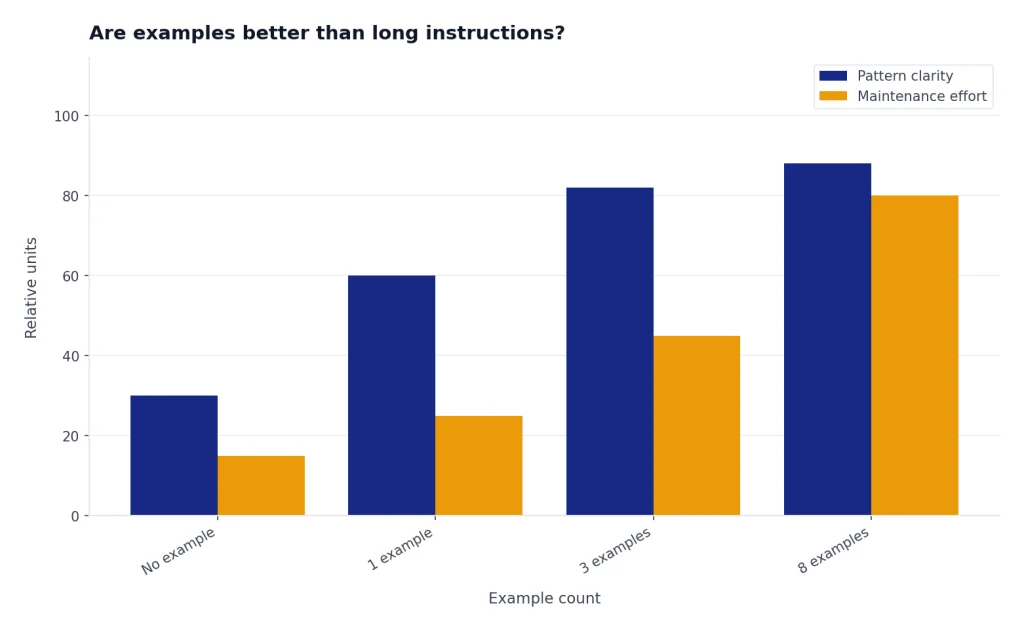
Are examples better than long instructions?
Examples are better when the desired pattern is hard to describe. OpenAI describes few-shot learning as steering the model with a handful of input and output examples.[4] Use examples for tone, classification, extraction, formatting, and edge cases.
How do I stop made-up facts?
Provide source material and tell the model to use only that source. Add a rule that says to write Not found when the source does not contain the answer. For important claims, verify with external sources or a dedicated research workflow.
Is prompt engineering still useful as models improve?
Yes. Better models reduce friction, but they still need task definition, context, constraints, and evaluation. Prompt engineering becomes less about tricks and more about clear communication, workflow design, and quality control.
Do I need to learn API prompting to use ChatGPT well?
No. ChatGPT users can apply the same core ideas without writing code. API concepts such as versioning, variables, and evals are useful mental models, but the beginner skill is still clear task design.