

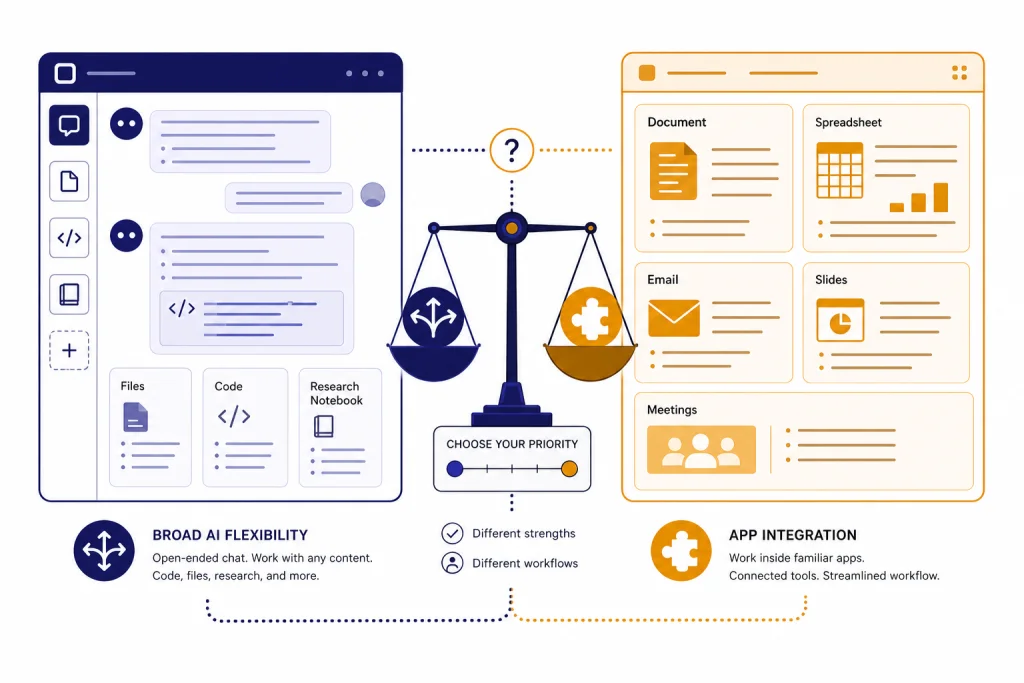
GPT is usually the better choice if you want a flexible AI assistant for writing, coding, analysis, research, brainstorming, or building workflows outside one software suite. Microsoft Copilot is better if your work already lives in Microsoft 365 and you want AI help inside Word, Excel, Outlook, Teams, PowerPoint, Edge, and Windows. The short version of GPT vs Copilot is simple: choose GPT for broader model control and open-ended problem solving; choose Copilot for Microsoft app integration and work-context convenience. Many teams will use both, but they should not buy both for the same job.
Quick verdict
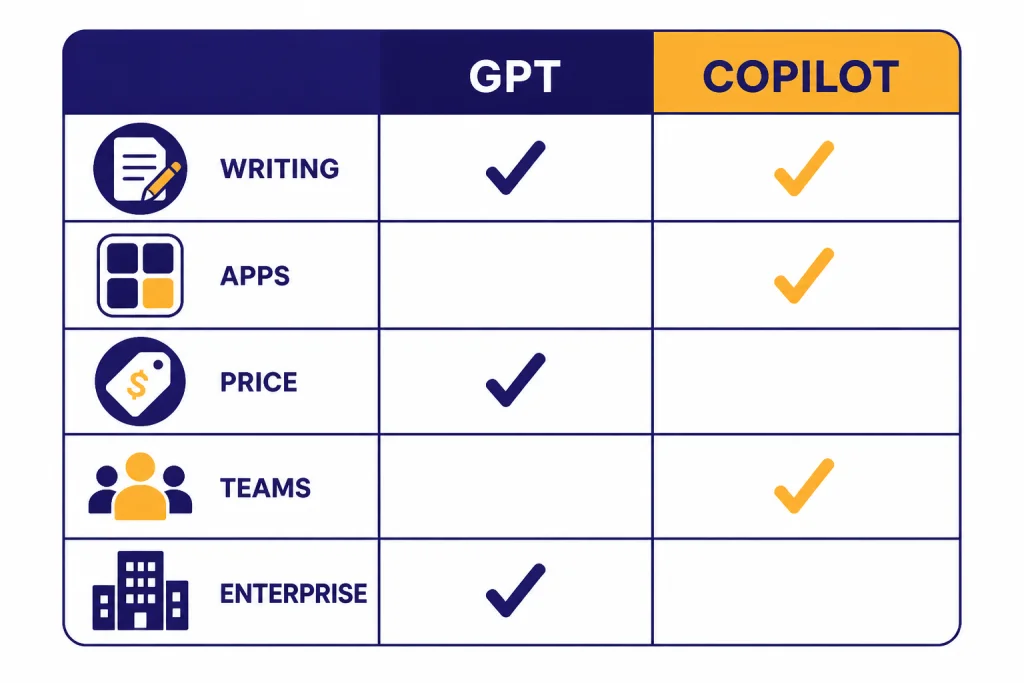
For most individual users, GPT in ChatGPT is the stronger general-purpose assistant. It gives you a direct conversation with OpenAI models, access to tools such as file uploads, image tools, voice, deep research, projects, tasks, and custom GPTs depending on plan, and fewer assumptions about where your work must happen.[1] If you compare paid personal tiers, ChatGPT Plus and Microsoft Copilot Pro both list at $20 per month.[2][5]
Microsoft Copilot wins when the task depends on Microsoft 365 context. It can sit inside Microsoft apps and use work data in Word, Excel, PowerPoint, Outlook, and Teams when licensed through Microsoft 365 Copilot.[7] That matters more than raw chat quality for people who spend the day in documents, spreadsheets, mailboxes, meetings, and SharePoint libraries.
The practical answer is not “which model is smarter.” Copilot can use OpenAI models as part of Microsoft’s system, but the experience is controlled by Microsoft’s product layer, permissions, app context, and automatic model routing.[9] GPT in ChatGPT gives you a more direct AI workspace. Copilot gives you a more embedded productivity assistant.
| Use case | Better pick | Why |
|---|---|---|
| General writing, brainstorming, coding, and analysis | GPT | More flexible chat workspace and stronger direct model access. |
| Working inside Word, Excel, Outlook, PowerPoint, and Teams | Microsoft Copilot | Built into Microsoft 365 apps and grounded in Microsoft work context with the right license.[7] |
| Solo paid assistant at the common $20 tier | Depends | ChatGPT Plus and Copilot Pro both list at $20 per month, so the deciding factor is workflow, not headline price.[2][5] |
| Small teams that need an AI workspace outside Microsoft 365 | GPT | ChatGPT Business adds a shared workspace, admin controls, connectors, and business privacy defaults.[1][4] |
| Companies standardized on Microsoft 365 | Microsoft Copilot | Microsoft 365 Copilot connects AI assistance to business data and productivity apps.[8] |
What each product is
GPT is the model family behind a direct AI workspace
In this comparison, “GPT” means using OpenAI’s GPT models through ChatGPT. ChatGPT plans include Free, Plus, Pro, Business, and Enterprise options, with OpenAI listing GPT-5 access across its pricing page.[1] If you need a fuller model-by-model view, see our all GPT models compared side by side and the GPT vs the o-Series breakdown.
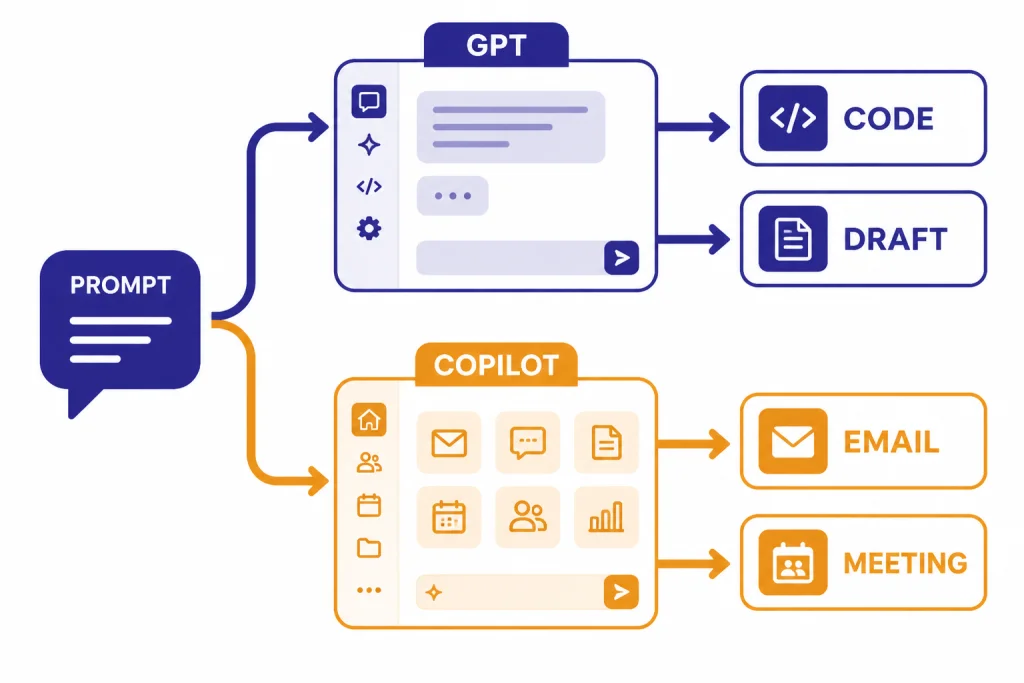
ChatGPT is best understood as a standalone AI workspace. You bring the task to the assistant. That task can be a blank page, a code problem, a dataset, a draft email, a PDF, a research question, a product plan, or a meeting outline. The value is that the same workspace can move across many job types without being tied to one vendor’s office suite.
That flexibility matters when your work crosses tools. A consultant may analyze CSV files, draft a client memo, write Python, create an internal policy, and turn the result into a presentation outline. A developer may use GPT for architecture notes, tests, regex, documentation, and error analysis. A student may use it for explanations, practice problems, and feedback on writing.
Microsoft Copilot is an AI layer across Microsoft products
Microsoft Copilot is not one single product experience. Microsoft offers a free consumer Copilot, Copilot Pro for individuals, Copilot in Microsoft 365 consumer subscriptions, Microsoft 365 Copilot Chat for eligible work accounts, and paid Microsoft 365 Copilot plans for business and enterprise users.[9][11]
That structure can be confusing, but the strategy is clear. Copilot is designed to appear where Microsoft users already work. It can answer web-grounded questions in a browser, draft and rewrite content in Office apps, summarize email, support meetings, and work with enterprise data when an organization has the right Microsoft 365 license.[7]
This is also why a simple “GPT vs Copilot” test can mislead you. If you paste the same prompt into ChatGPT and Copilot, ChatGPT may feel more direct. But if you ask Copilot to summarize a Teams meeting, pull context from Outlook, or help revise a Word document already open on your screen, Copilot is playing on its home field.
Feature comparison
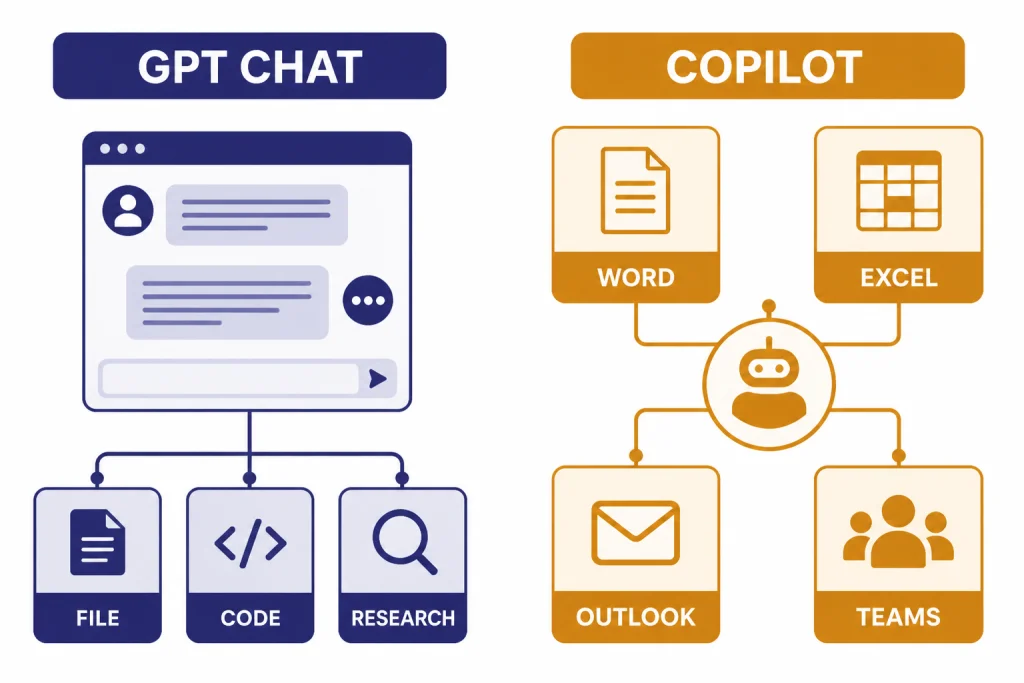
The main difference is product design. GPT in ChatGPT is a general AI workspace. Microsoft Copilot is an embedded assistant for Microsoft environments. Both can write, summarize, explain, brainstorm, and answer questions, but they expose those capabilities differently.
| Category | GPT in ChatGPT | Microsoft Copilot |
|---|---|---|
| Best default role | General-purpose AI assistant | Microsoft 365 productivity assistant |
| Model visibility | More direct exposure to OpenAI model options, depending on plan.[1] | Microsoft manages model selection and product behavior automatically.[9] |
| Office app integration | Works by copy-paste, file upload, connectors, or exports depending on plan. | Designed for Word, Excel, PowerPoint, Outlook, Teams, and related Microsoft services.[7] |
| Custom assistants | Custom GPTs are included in OpenAI’s ChatGPT plan matrix.[1] | Agents are available through Microsoft 365 Copilot and Copilot Studio options.[7] |
| Research and open-ended analysis | Strong fit, especially when you need iterative reasoning, files, drafts, and follow-up. | Good fit when research is tied to Microsoft work data, mail, meetings, and documents. |
| Business fit | Best when teams want a vendor-neutral AI workspace. | Best when teams already govern documents and identity through Microsoft 365. |
GPT also has an advantage for users who like to compare model behavior. If you are deciding between OpenAI model generations, our GPT-5 vs GPT-4o, GPT-4 vs GPT-5, and GPT-4o vs GPT-4 guides are better references than a Copilot comparison because Microsoft does not expose every underlying model choice in the same way.
Copilot has the advantage when the app itself is the work surface. If you are editing a Word document, building a slide deck, replying to an Outlook thread, or catching up on Teams activity, an assistant embedded in that context saves steps. You do not have to export, upload, paste, or explain as much.
For search-like tasks, the answer is more mixed. Copilot’s free and consumer experiences are strongly web-oriented, while ChatGPT includes web search on OpenAI’s pricing page for the Free plan and higher plans.[1] If your question is really about replacing a search engine, compare this article with our ChatGPT vs Google Search guide.
Pricing and plans
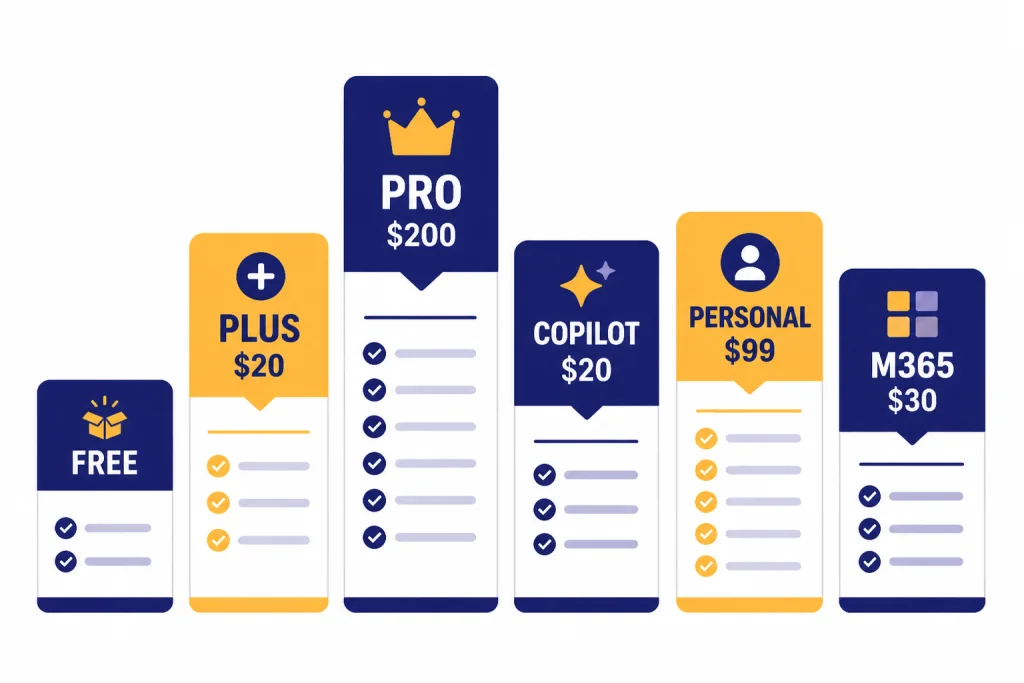
The headline personal price is a tie at the common paid tier. OpenAI says ChatGPT Plus is $20 per month, and Microsoft lists Copilot Pro at $20.00 per user per month.[2][5] The better buy depends on whether you want a direct AI workspace or tighter Microsoft app integration.
ChatGPT Pro is much more expensive. OpenAI introduced ChatGPT Pro as a $200 monthly plan, and OpenAI’s current Pro help materials continue to describe Pro as its high-usage plan for complex work.[3][10] That tier makes sense only if you use advanced OpenAI tools enough to justify the gap. Most people should compare Free, Plus, and business plans first; our ChatGPT Free vs Plus vs Pro guide covers that choice in more detail.
Microsoft’s pricing is more segmented. Copilot Pro is the individual add-on. Microsoft 365 Personal lists at $99.99 per year on Microsoft’s individual Copilot pricing page, while Microsoft 365 Copilot for enterprise is listed at $30.00 per user per month, paid yearly, and requires a qualifying Microsoft 365 plan.[6][8] Microsoft 365 Copilot Chat is available at no additional cost for eligible Microsoft 365 work accounts, but agents can involve metered pricing and other requirements.[7]
| Plan type | GPT / ChatGPT | Microsoft Copilot | Best reading of the price |
|---|---|---|---|
| Free | ChatGPT Free includes limited access to OpenAI’s flagship model and web search.[1] | Microsoft Copilot is available at no cost through copilot.com, apps, and Edge.[9] | Try both before paying. |
| Individual paid | ChatGPT Plus: $20 per month.[2] | Copilot Pro: $20.00 per user per month.[5] | Same headline price, different workflow. |
| High-usage individual | ChatGPT Pro: $200 monthly plan.[3] | No exact one-to-one Copilot equivalent. | GPT is the clearer option for heavy standalone AI use. |
| Small business | ChatGPT Business is listed in OpenAI’s business pricing matrix with admin and workspace features.[1] | Microsoft 365 Copilot Business is sold as an add-on to qualifying Microsoft 365 business plans.[7] | Choose based on where employees already work. |
| Enterprise | ChatGPT Enterprise uses custom pricing through OpenAI sales.[1] | Microsoft 365 Copilot enterprise lists at $30.00 per user per month, paid yearly.[8] | Microsoft is easier to map if you already license Microsoft 365. |
Workflows and integrations
The biggest Copilot advantage is context. In Microsoft 365 Copilot, the assistant can work inside apps such as Teams, Outlook, Word, PowerPoint, and Excel.[7] That means the prompt can be shorter because the document, email, spreadsheet, or meeting is already part of the task.
For example, a sales manager can ask Copilot to summarize a long email thread, draft a response, prepare talking points for a Teams meeting, and turn notes into a slide outline. The same work is possible with GPT, but it usually requires more handoff. You may need to copy text, upload files, remove sensitive details, or connect external sources.
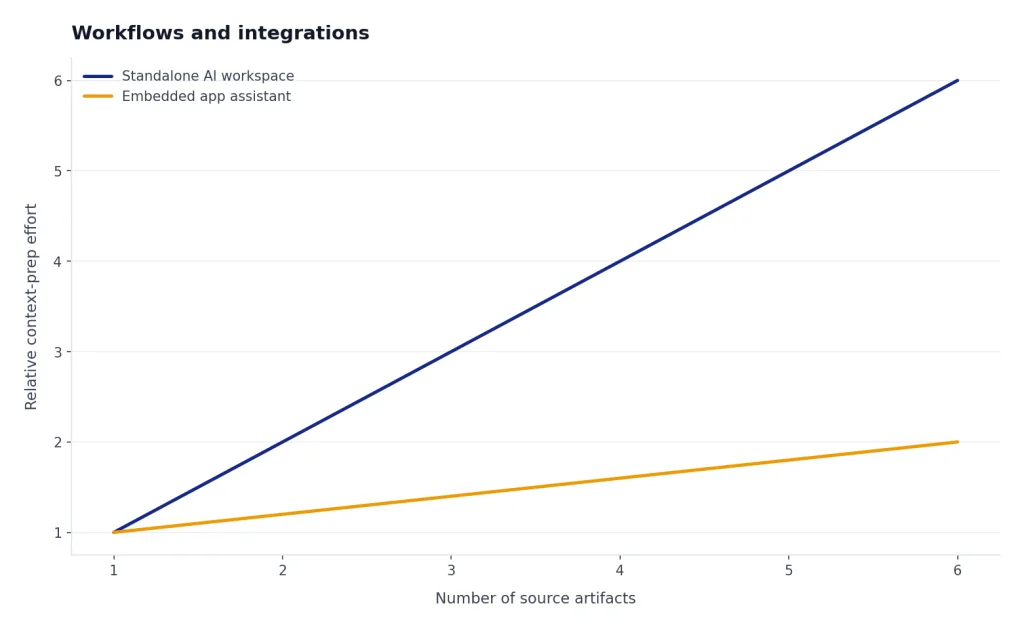
GPT’s advantage is that it is not limited to one productivity suite. It can help with code, product strategy, data interpretation, legal-style plain-English explanations, customer research, prompt design, study plans, scripts, and creative drafts. If your work spans Google Workspace, Notion, GitHub, Figma, Salesforce, local files, and plain text, a standalone AI workspace may feel less constrained.
This distinction also affects custom workflows. ChatGPT users can create and use custom GPTs under OpenAI’s plan structure.[1] Microsoft users can create and use agents through Microsoft 365 Copilot and Copilot Studio paths, but Microsoft notes that agent usage can be metered and may require Azure or prepaid capacity options.[7]
If you care about speed, model selection, and raw GPT behavior, start with GPT. If you care about app placement, identity, file permissions, and reducing copy-paste between Microsoft products, start with Copilot. For broader market context, see our best AI chatbot alternatives to ChatGPT and GPT vs Bing AI comparisons.
Privacy and admin controls
For business use, do not compare only chat quality. Compare data controls, identity, retention, permissions, audit needs, and how each product handles organizational content.
OpenAI says it does not train its models on ChatGPT Business, ChatGPT Enterprise, ChatGPT Edu, ChatGPT for Healthcare, ChatGPT for Teachers, or API inputs and outputs by default.[4] That is the key privacy distinction between personal ChatGPT workspaces and business OpenAI products. For paid OpenAI team decisions, compare ChatGPT Plus vs Team, ChatGPT Pro vs Team, and ChatGPT Team vs Enterprise.
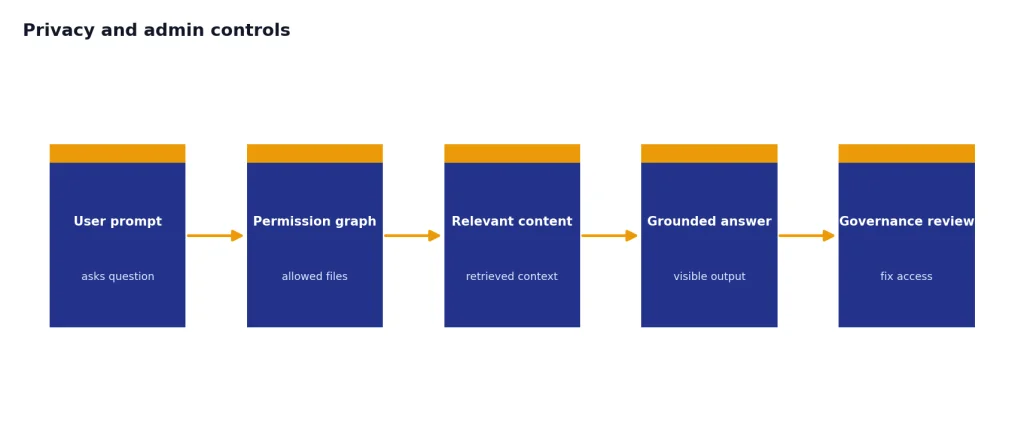
Microsoft says Microsoft 365 Copilot and Microsoft 365 Copilot Chat use enterprise data protection, and that prompts, responses, and data accessed through Microsoft Graph are not used to train foundation large language models.[12] This is a major reason Copilot is attractive to organizations already using Microsoft identity, compliance, and information governance.
The risk profile is different. GPT asks organizations to decide what data should enter an OpenAI workspace and which connectors or uploads are allowed. Copilot asks organizations to make sure Microsoft 365 permissions are clean, because AI can surface information that a user technically has access to but rarely saw before. In a poorly governed tenant, Copilot can expose messy permissions faster.
A practical rollout should include written guidance. Tell employees which tool to use for public research, confidential drafts, customer data, code, financial files, meeting summaries, and regulated information. Also decide who can create custom GPTs or agents, who reviews them, and when outputs need human verification.
Which one should you choose?
Choose GPT if you want flexibility
Choose GPT if your work is varied, exploratory, technical, or not centered on Microsoft 365. GPT is the better default for coding help, long-form writing, analysis, tutoring, model comparison, custom assistants, and general knowledge work. It is also the cleaner choice if you want to understand OpenAI models directly rather than through Microsoft’s application layer.
GPT is also better when the output matters more than the app. If you need a policy draft, a Python function, a product memo, a study guide, a prompt library, or a research synthesis, you can usually get there faster in a standalone AI workspace. If cost is the main concern, start with the free tier and move to Plus only when limits or features slow you down.
Choose Microsoft Copilot if Microsoft 365 is your operating system
Choose Copilot if your day is built around Outlook, Word, Excel, PowerPoint, Teams, OneDrive, and SharePoint. Copilot’s value is not just that it can answer prompts. Its value is that it can appear inside the tools where your work already lives.
Copilot is especially strong for meeting follow-up, email triage, document revision, spreadsheet assistance, and slide creation. It also fits organizations that already use Microsoft Entra identity, Microsoft 365 compliance tools, and Microsoft admin workflows. In that environment, Copilot may be easier for IT to justify than a separate AI workspace.
Use both only when they have separate jobs
Using both can make sense, but only with clear boundaries. A common split is GPT for deep thinking, drafting, coding, and open-ended analysis; Copilot for Microsoft 365 summaries, email, meetings, and document-specific work. Without that split, teams risk paying twice for overlapping chat features.
The cleanest buying rule is this: buy GPT when the assistant is the workspace, and buy Copilot when Microsoft 365 is the workspace. That rule explains most of the real-world difference better than benchmark scores or brand names.
Frequently asked questions
Is Copilot the same as GPT?
No. GPT refers to OpenAI’s model family and the direct ChatGPT experience in this comparison. Microsoft Copilot is Microsoft’s assistant layer across web, Windows, Edge, and Microsoft 365 products, and Microsoft manages the final product behavior and model routing.[9]
Does Microsoft Copilot use OpenAI models?
Microsoft says Copilot uses advanced large language models and Microsoft AI technologies, and some Microsoft materials refer to OpenAI models such as GPT-5 in Copilot experiences.[9] The important caveat is that Copilot is not just raw GPT in a different wrapper. Microsoft adds app context, permissions, grounding, safety systems, and interface choices.
Which is better for Excel?
Microsoft Copilot is usually better if you want help inside Excel itself, especially with Microsoft 365 Copilot. GPT can still explain formulas, clean CSV logic, write Python, and help reason about data. But Copilot has the app-level advantage when the spreadsheet is already in Microsoft 365.
Which is better for coding?
GPT is usually the better choice for general coding help in this comparison. It is more flexible for debugging, architecture discussions, test generation, documentation, and learning. Microsoft has developer-specific Copilot products, but that is a separate comparison from Microsoft Copilot for general productivity.
Which is cheaper, GPT or Copilot?
At the common individual paid tier, the headline price is the same: ChatGPT Plus is $20 per month, and Microsoft Copilot Pro is $20.00 per user per month.[2][5] The cheaper choice depends on what you would otherwise pay for. Copilot may require or work best with a Microsoft 365 subscription for app integration, while ChatGPT may require a higher plan if you need heavy usage.
Should a business buy ChatGPT Business or Microsoft 365 Copilot?
Buy ChatGPT Business if you want a shared AI workspace that works across many tools and job types. Buy Microsoft 365 Copilot if your employees spend most of their time in Microsoft 365 and you want AI integrated into those apps. Many businesses should pilot both with different teams before standardizing.