

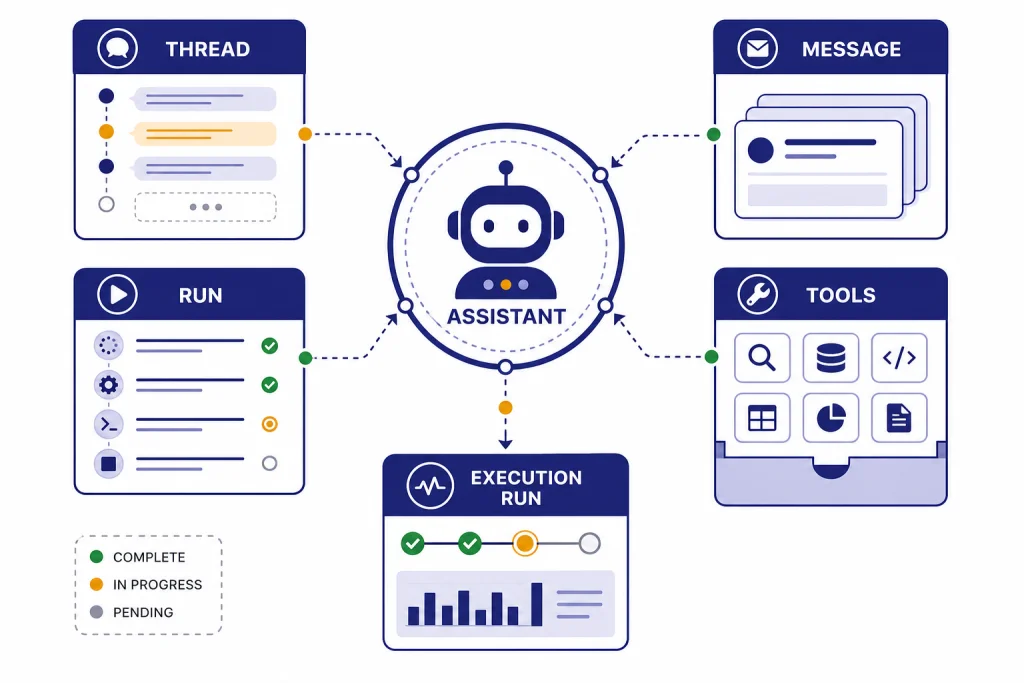
The OpenAI Assistants API is OpenAI’s older agent-building interface for creating persistent AI assistants inside your own app. It handles instructions, conversation history, tool access, file search, code execution, and function calling behind a set of assistant, thread, message, and run objects. As of this publication date, it is not the best starting point for most new builds because OpenAI has deprecated the Assistants API and says it will shut down on August 26, 2026.[6] Use it if you maintain an existing integration or need to understand legacy agent architecture. For new work, start with the Responses API and design with migration in mind.[8]
What the Assistants API does
The Assistants API lets developers create an AI assistant object with a model, instructions, optional tools, files, and metadata. Instead of sending a complete message history on every request, your app creates a thread, adds messages to it, and starts a run. OpenAI then manages the run state while the model reasons, calls tools, waits for tool outputs, and produces assistant messages.[1]
This design was useful because it gave developers a hosted structure for agent-like applications. A customer support bot could keep one thread per customer. A data analysis assistant could use Code Interpreter. A documentation assistant could use File Search. A workflow assistant could ask your backend to execute a function, then continue after your system returned the result.[2]
The tradeoff is that the Assistants API adds more stateful objects than simpler text-generation endpoints. You must manage assistant IDs, thread IDs, run status polling or streaming, tool-output submission, file lifecycle, and migration risk. If you are still choosing your architecture, compare it with the openai responses api before you commit.
How the Assistants API is organized
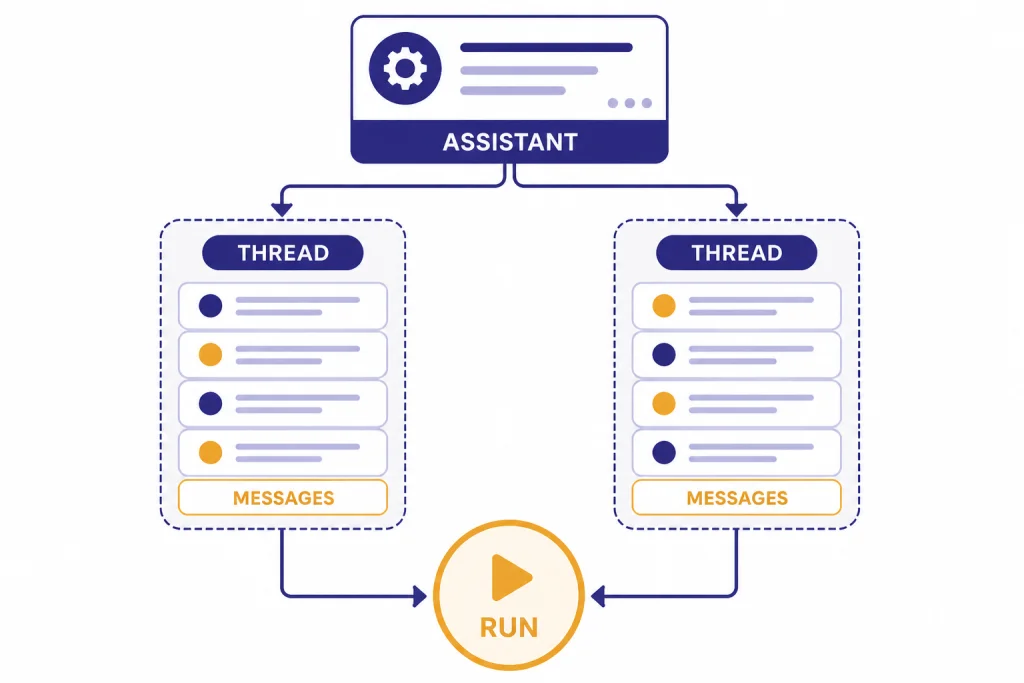
The Assistants API has a specific object model. The assistant is the reusable configuration. The thread is the conversation container. Messages are the user and assistant turns inside a thread. A run is the execution attempt that applies one assistant to one thread. Run steps expose the model and tool actions that happened during that run.[1]
Think of an assistant as a job description, not a person. It stores the model choice, instructions, tool definitions, and optional metadata. OpenAI’s API reference lists fields such as model, description, instructions, metadata, name, tools, and response_format on the assistant object.[3]
A thread should usually map to one user task or one continuing conversation. A run should usually map to one moment where the user expects the assistant to do work. This separation matters in production. You can reuse one assistant across many users, but each user should have separate threads unless you intentionally want shared context.
| Object | What it represents | Common mistake |
|---|---|---|
| Assistant | Reusable configuration with model, instructions, tools, and metadata.[3] | Creating a new assistant for every user message. |
| Thread | A conversation or task history that stores messages.[1] | Mixing unrelated customers or tenants in one thread. |
| Message | A user or assistant item inside the thread.[1] | Storing private app data in message text when metadata or your database is safer. |
| Run | An execution of one assistant against one thread.[1] | Assuming the run is always complete immediately. |
| Run step | A trace of model and tool activity during a run.[1] | Ignoring steps when debugging tool calls. |
This object model is the main reason the Assistants API feels different from plain chat completion. It gives you more hosted state, but it also gives you more lifecycle management.
Tools: File Search, Code Interpreter, and functions
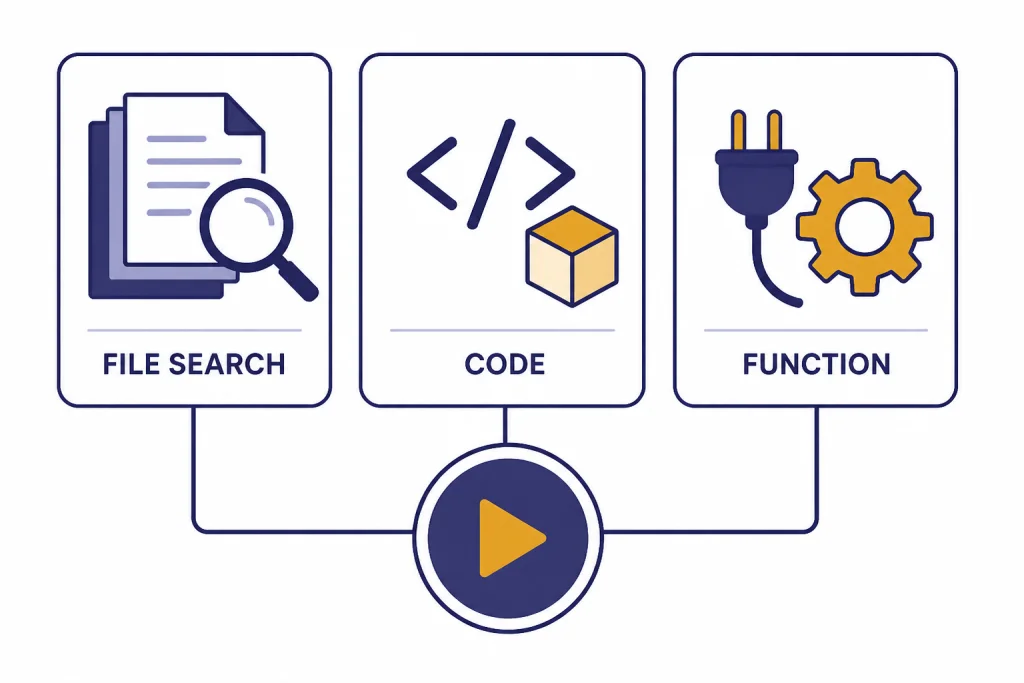
The Assistants API supports three tool categories: File Search, Code Interpreter, and Function Calling.[2] These tools are the reason many teams adopted the API. They let an assistant retrieve private knowledge, run code, or call your application logic while OpenAI manages the run loop.
File Search
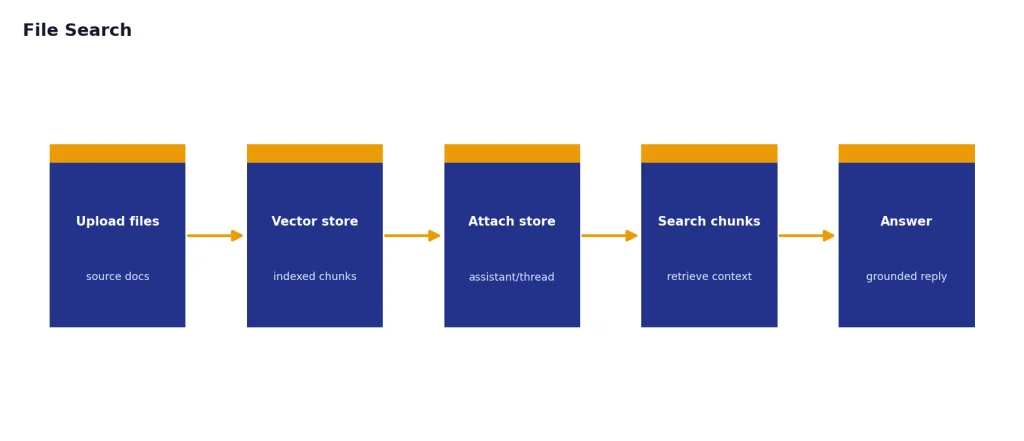
File Search is for retrieval-augmented generation. You upload files into a vector store, attach that store to an assistant or thread, and let the assistant search relevant chunks before answering. It is a good fit for help centers, policy documents, product manuals, and internal knowledge bases. If you need lower-level vector control, see our openai embeddings api guide instead.
Code Interpreter
Code Interpreter lets the assistant run Python-like analysis workflows in a managed container. OpenAI describes it as a tool for writing and running code, processing files, and handling diverse data tasks.[2] Use it for spreadsheet analysis, chart generation, CSV cleanup, or one-off calculations that would be brittle as pure natural language.
Function Calling
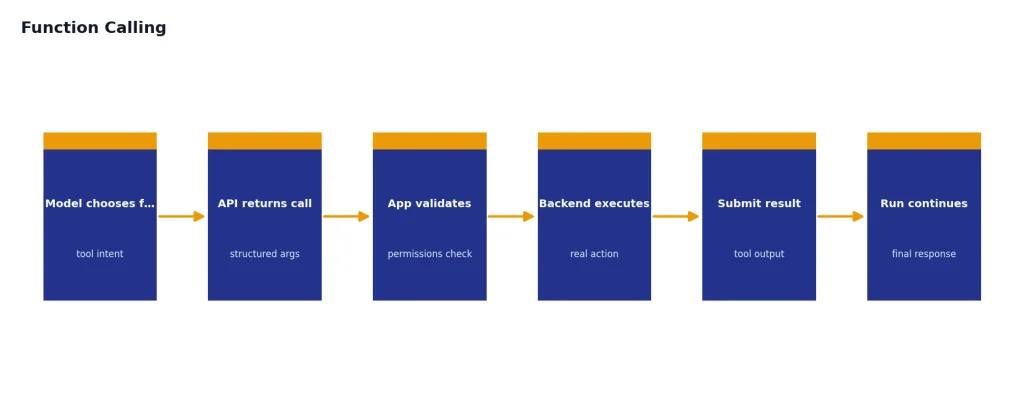
Function Calling lets you define functions that the model can choose to call. The model does not execute your backend action. It returns a structured function call request, your system runs the function, and your system submits the result back to the run. For a deeper implementation guide, use our function calling in OpenAI API explained article.
Use hosted tools when OpenAI can safely manage the execution environment. Use functions when the assistant needs your application’s private operations, such as checking an order, creating a ticket, updating a CRM record, or reserving an appointment.
Pricing, limits, and operational risks
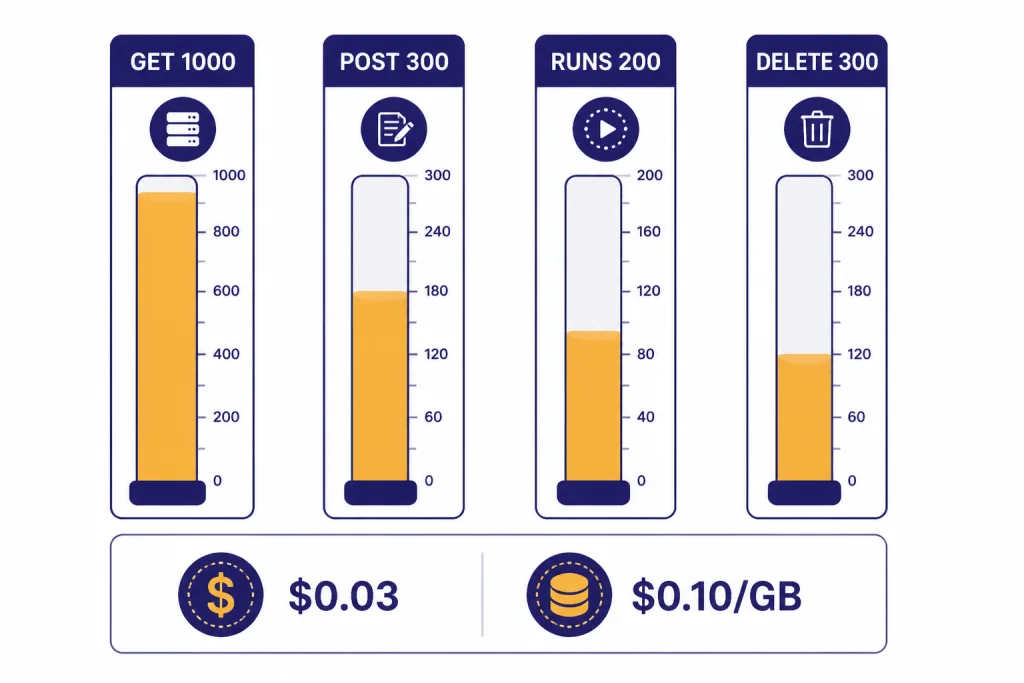
The Assistants API is billed through the underlying model tokens plus any paid tool usage. OpenAI’s pricing page lists Code Interpreter at $0.03 per default 1 GB container, File Search storage at $0.10 per GB per day with 1 GB free, and File Search tool calls for the Responses API at $2.50 per 1,000 calls.[5] OpenAI’s Help Center also lists Code Interpreter at $0.03 per session and File Search storage at $0.10 per GB per day with the first GB free.[4]
Rate limits are also different from many model endpoints. OpenAI says Assistants API rate limits are not tied to usage tier or model. The Help Center lists default limits of 1,000 GET requests per minute, 300 POST requests per minute, 200 POST requests per minute for run creation endpoints, and 300 DELETE requests per minute.[4]
| Planning item | Published figure | Why it matters |
|---|---|---|
| GET rate limit | 1,000 RPM.[4] | Status polling can consume this quickly if you poll every active run too often. |
| POST rate limit | 300 RPM.[4] | Message creation and other writes need queueing during traffic spikes. |
| Run creation limit | 200 RPM for /v1/threads/<thread_id>/runs and /v1/threads/runs.[4] | High-volume apps should avoid starting unnecessary runs. |
| DELETE rate limit | 300 requests per minute.[4] | Bulk cleanup jobs need throttling. |
| Code Interpreter | $0.03 per session in the Help Center; pricing also lists $0.03 per default 1 GB container.[4][5] | Concurrent threads can create separate sessions. |
| File Search storage | $0.10 per GB per day, with the first GB free.[4] | Unused vector stores can create recurring cost. |
Cost control starts with clear tenant boundaries. Track which user, workspace, or customer owns each thread and vector store. Delete stale files and test datasets. Log model, tokens, tool calls, and run status. For budgeting, pair this article with our openai api cost calculator and the broader openai api pricing reference.
Minimal Assistants API example
The basic flow is create an assistant, create a thread, add a user message, create a run, wait for completion, and read the assistant’s reply. OpenAI’s API reference shows the Assistants endpoint at /v1/assistants and describes creating an assistant with a model and instructions.[3]
The exact SDK method names can change, so treat this as a lifecycle sketch rather than a copy-paste production module. For new applications, write the same product flow against Responses first unless you have a specific legacy reason to use Assistants.
from openai import OpenAI
import time

client = OpenAI()

assistant = client.beta.assistants.create(
    name="Support triage assistant",
    instructions="Classify the customer issue and suggest the next support action.",
    model="gpt-4.1-mini"
)

thread = client.beta.threads.create()

client.beta.threads.messages.create(
    thread_id=thread.id,
    role="user",
    content="My invoice is wrong and I need help before renewal."
)

run = client.beta.threads.runs.create(
    thread_id=thread.id,
    assistant_id=assistant.id
)

while run.status not in ["completed", "failed", "cancelled", "expired"]:
    time.sleep(1)
    run = client.beta.threads.runs.retrieve(
        thread_id=thread.id,
        run_id=run.id
    )

messages = client.beta.threads.messages.list(thread_id=thread.id)
print(messages.data[0].content[0].text.value)
A production version needs timeouts, retries, structured logging, tenant checks, and tool-call handling. It should also stream progress where useful. See streaming responses with the OpenAI API if users need visible progress rather than a spinner.
Production design patterns
Start with the smallest useful assistant. Put durable business rules in your application, not only in the assistant instructions. Use instructions for behavior, tone, boundaries, and task framing. Use your backend for permissions, billing state, account identity, and irreversible actions.
Keep thread scope narrow. A thread for “customer support case 8124” is easier to audit than a thread for “everything this customer ever asked.” Narrow threads reduce accidental context bleed, make deletion easier, and help your team reproduce failures.
Prefer structured tool outputs. If your assistant calls a function named create_refund_request, return a clear object with status, ID, and next action. If your app expects JSON from the assistant, use the API’s response-format features carefully and test failure paths. Our structured outputs with the OpenAI API guide covers schema-first patterns that reduce parser errors.
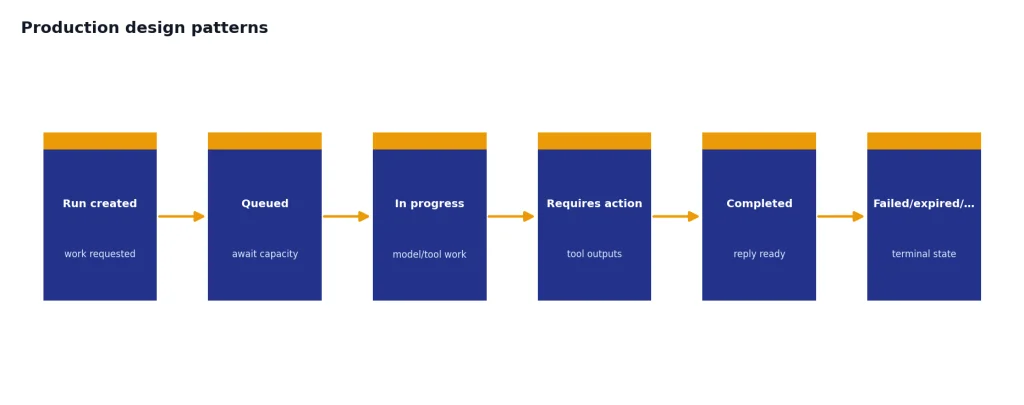
Build around failures. Runs can require action, fail, expire, or be cancelled. Tool calls can return invalid arguments. File Search can retrieve weak context. Your app should treat the model as an intelligent worker, not as the source of truth. For error codes, retries, and triage, keep OpenAI API Errors open during implementation. For release checklists, use openai api best practices for production.
Separate the ChatGPT subscription question from API access. ChatGPT Plus is not the same product surface as OpenAI API billing. If your team is still sorting that out, read Does ChatGPT Plus Include API Access? before you assign budgets.
Migration to the Responses API
OpenAI says the Responses API is the future direction for building agents on OpenAI and that the Assistants API is deprecated with a sunset date of August 26, 2026.[8] That means every Assistants API project needs a migration plan, even if it still works today.
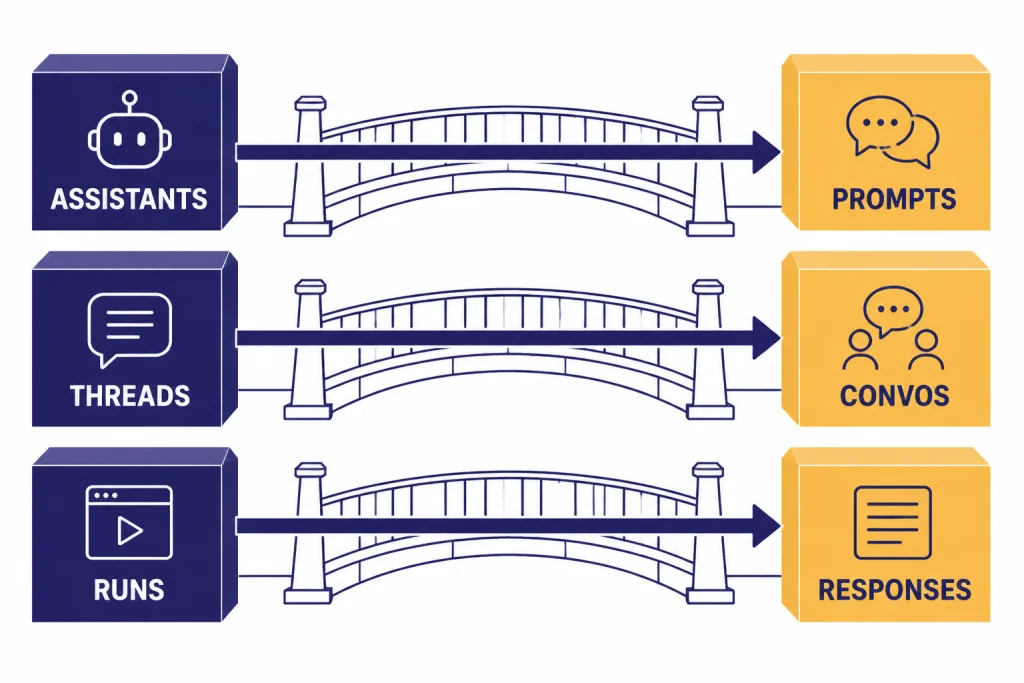
The migration is more than swapping endpoint names. OpenAI’s Assistants migration guide maps Assistants to Prompts, Threads to Conversations, and Runs to Responses.[6] That changes how you version assistant configuration, store conversation state, and manage tool loops.
| If you use this in Assistants | Plan for this in newer architecture | Practical migration step |
|---|---|---|
| Assistant | Prompt or reusable configuration.[6] | Export instructions, tools, and model settings into versioned config. |
| Thread | Conversation or app-managed state.[6] | Map each thread ID to your own conversation record before migration. |
| Run | Response.[6] | Rewrite status handling and tool-output loops around the Responses flow. |
| Hosted tools | Responses tools such as file search, web search, computer use, and function calling.[7] | Re-test every tool path instead of assuming behavior is identical. |
| Legacy polling code | Responses streaming or explicit response state handling.[7] | Replace tight polling loops with streaming or backoff-aware checks. |
If you maintain a live Assistants API app, freeze new feature work on the old interface unless it is necessary. Add migration telemetry first. Track which assistant IDs, tools, vector stores, and thread patterns are actually used. Then migrate one user flow at a time and compare output quality, latency, and cost.
Frequently asked questions
Is the Assistants API still available?
Yes, but it is deprecated. OpenAI says the Assistants API will shut down on August 26, 2026.[6] Existing teams should plan migration work now instead of waiting for the shutdown window.
Should I build a new agent with the Assistants API?
Usually no. OpenAI describes the Responses API as the future direction for agent-building and recommends migration to the newer interface.[8] Use Assistants only when you are maintaining an existing integration or studying legacy behavior.
What is the difference between an assistant and a thread?
An assistant is the reusable configuration: model, instructions, tools, and metadata. A thread is the conversation container that stores messages for a task or user interaction.[1] One assistant can be used across many threads.
Does Function Calling execute my code automatically?
No. The model can request a function call and provide arguments, but your application executes the function. Your backend should validate arguments, check permissions, run the action, and return the tool result to the API.
How much does Code Interpreter cost in the Assistants API?
OpenAI’s Help Center lists Code Interpreter at $0.03 per session, and its pricing page lists Code Interpreter at $0.03 for a default 1 GB container.[4][5] Concurrent use in separate threads can create separate billable sessions.
What should I migrate first?
Start with your assistant configurations, then map thread state, tool calls, and file search usage. The hardest part is usually not the first response. It is preserving behavior across long conversations, tool failures, and edge cases.