

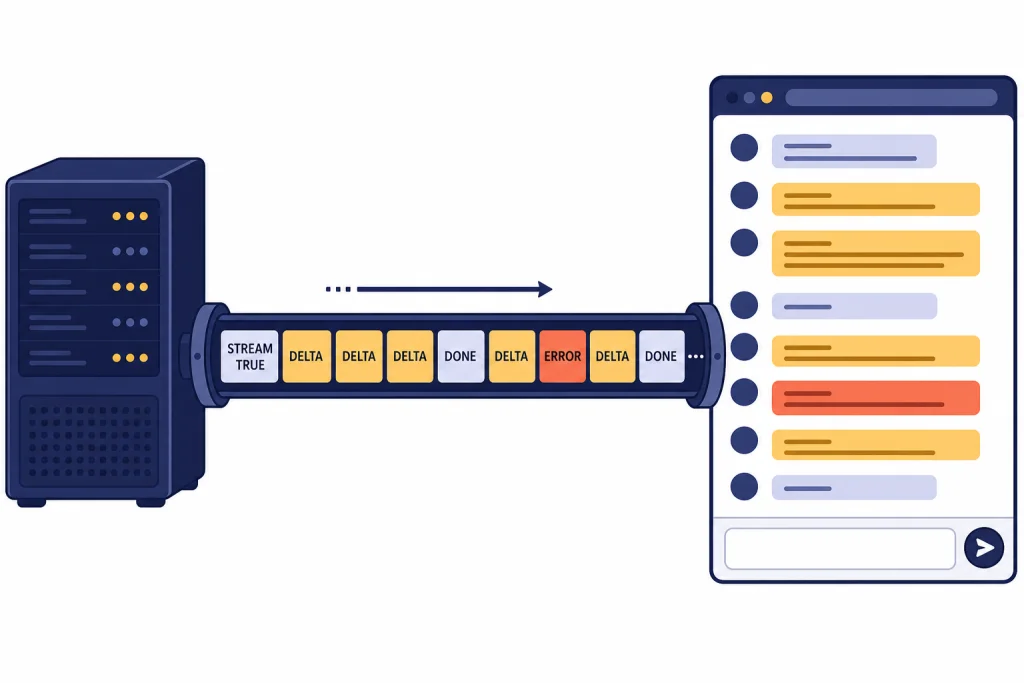
The OpenAI streaming API lets your app receive model output as it is generated instead of waiting for the full response. For chat-style interfaces, writing assistants, coding tools, and agent progress views, streaming usually feels faster because the first text or event can appear while the model is still working. The main tradeoff is operational complexity. You must read server-sent events, handle partial deltas, watch for completion and error events, and design moderation and retry behavior around incomplete output. Use the Responses API for new streaming work because OpenAI documents it as the interface designed around typed streaming events.[1]
What streaming API means in the OpenAI API
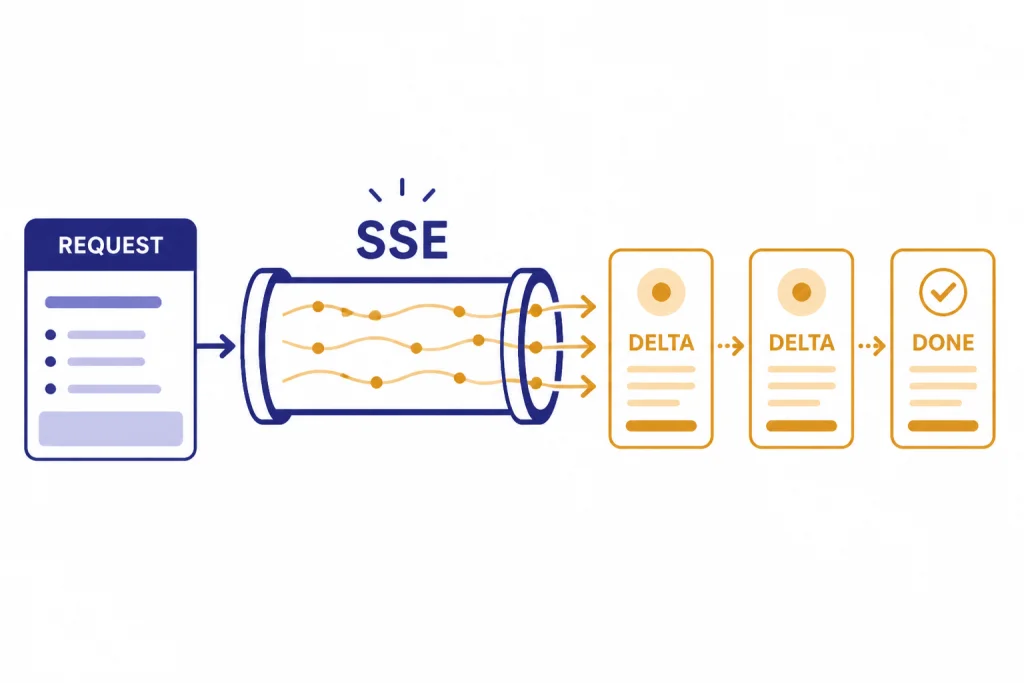
A streaming API response is an HTTP response that stays open while the model generates output. Instead of receiving one finished JSON body at the end, your application receives a sequence of server-sent events. OpenAI’s streaming guide says the Responses API streams model response data using server-sent events when you set stream to true.[1]
The practical effect is simple. A user can see the beginning of an answer, a progress event, or a tool-call argument before the full response is done. Your app can print text, update a progress panel, or begin assembling structured data without waiting for the final object.
Streaming does not make the model generate fewer tokens. It changes delivery. You still pay for the model work according to the applicable API pricing, and you should estimate cost before adding high-volume streaming features. If cost is the question, start with our OpenAI API pricing guide and the OpenAI API cost calculator.
When to use streaming
Use streaming when perceived latency matters. It is especially useful for long answers, chat interfaces, code generation, research summaries, and agent workflows where users benefit from seeing progress. It is less useful for short classification tasks, background jobs, and workflows that must validate the full output before showing anything.
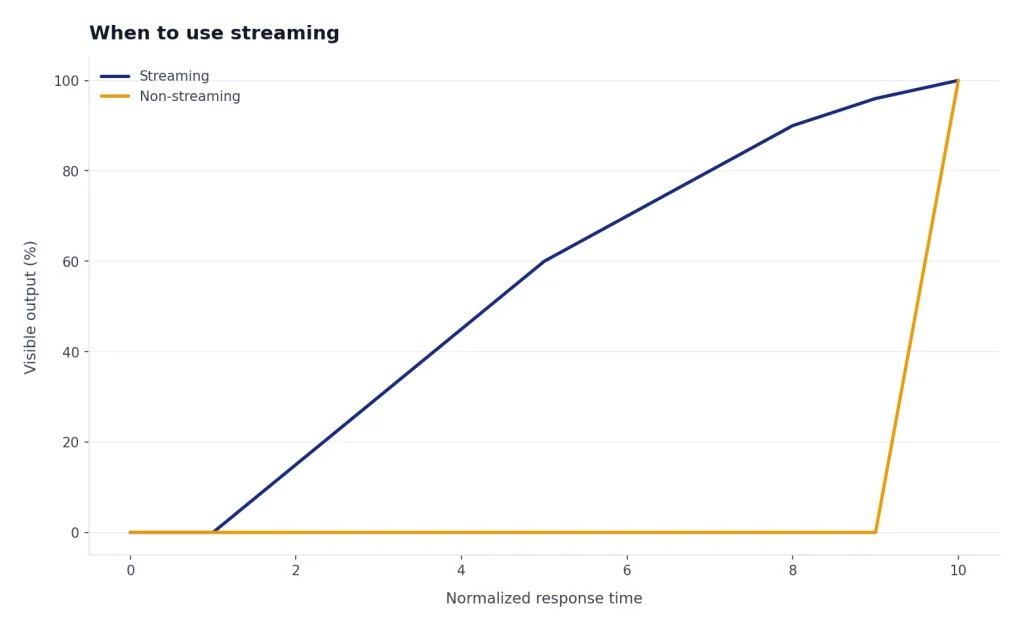
The best candidates share one trait: partial output is useful. A writing assistant can show paragraph text as it arrives. A coding assistant can display a draft function. A support bot can show that it has started responding. A data pipeline that only needs the final JSON object may not benefit as much.
| Use case | Streaming fit | Reason |
|---|---|---|
| Chat UI | Strong | Users can read while the answer is still being generated. |
| Code assistant | Strong | Large outputs feel more responsive when text appears incrementally. |
| Function-call preview | Medium | You can show progress, but you should execute only after arguments are complete. |
| Strict JSON ingestion | Medium | You can stream parsing, but downstream systems often need the final valid object. |
| Batch enrichment | Weak | Throughput matters more than immediate display. |
If your workload does not need immediate user-visible output, the OpenAI Batch API may be a better fit. If your app needs low-latency audio, voice, or bidirectional event exchange, compare this approach with the OpenAI Realtime API.
Basic Responses API streaming example
For new text streaming integrations, start with the Responses API. OpenAI’s streaming guide shows a Responses API request using model="gpt-5" and stream=True.[1] The same pattern applies in server-side JavaScript with an async event loop.
import OpenAI from "openai";

const client = new OpenAI();

const stream = await client.responses.create({
  model: "gpt-5",
  input: "Write a short product update for a changelog.",
  stream: true,
});

for await (const event of stream) {
  if (event.type === "response.output_text.delta") {
    process.stdout.write(event.delta);
  }

  if (event.type === "response.completed") {
    process.stdout.write("n");
  }
}
This example deliberately handles only text deltas and completion. A production implementation should also handle error events, connection interruptions, user cancellation, and incomplete responses. If you are still choosing an endpoint, read our OpenAI Responses API guide before building against older chat completion patterns.
Do not call the OpenAI API directly from a browser with a secret key. OpenAI’s API key safety guidance says requests should route through your own backend server, and it warns against exposing API keys in browser or mobile client code.[8] For web apps, your backend should call the OpenAI API, then relay safe stream updates to the browser.

How to read streaming events
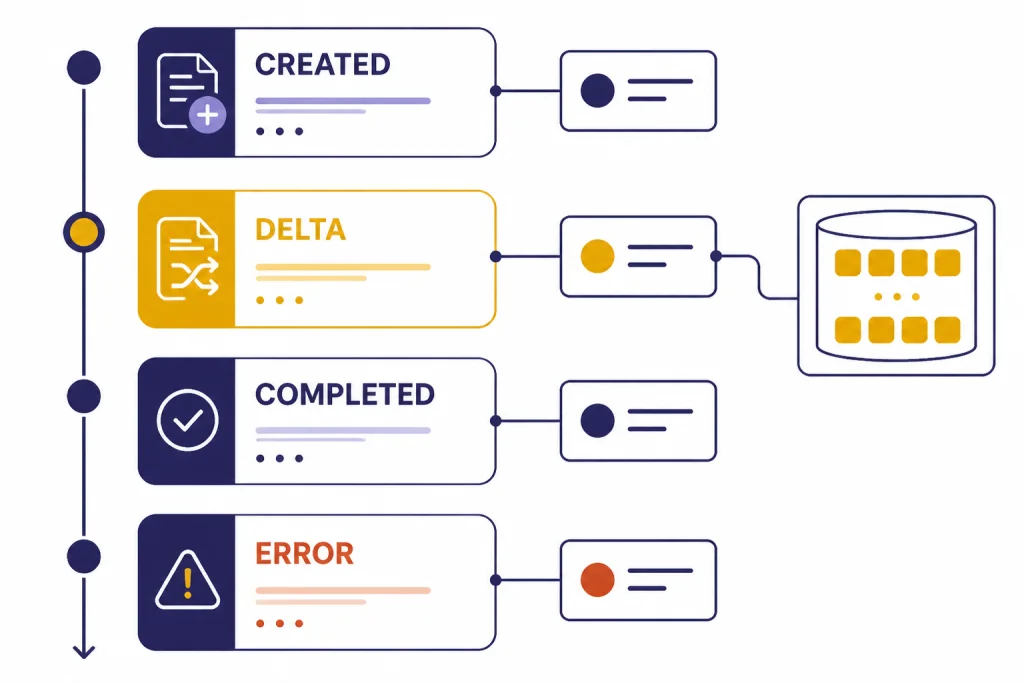
The Responses API does not only stream raw text. It emits typed events. OpenAI’s streaming reference says a Response created with stream set to true emits server-sent events as generation proceeds.[2] The streaming guide lists common text-streaming events including response.created, response.output_text.delta, response.completed, and error.[1]
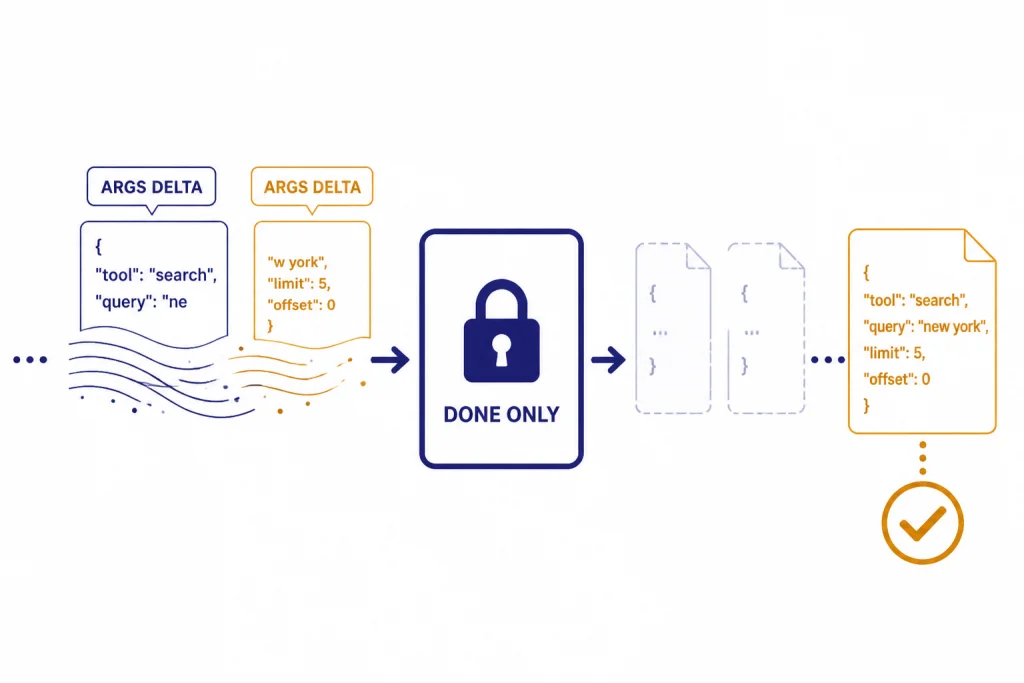
Treat deltas as fragments. A delta may contain part of a sentence, part of a JSON value, or part of a tool argument. Do not assume each event is a complete semantic unit. Append deltas to a buffer, render carefully, and wait for a done or completed event before committing output to durable storage.
| Event pattern | What your app should do |
|---|---|
response.created | Initialize UI state, allocate buffers, and record the response identifier if available. |
response.output_text.delta | Append the text fragment to the visible stream and to an internal buffer. |
response.completed | Finalize the UI, persist the completed answer, and unlock follow-up actions. |
error or response error event | Stop rendering, show a recoverable error state, and log request metadata for debugging. |
Streaming UIs should separate display state from final state. Display state can update on every delta. Final state should update only when the response completes successfully. This avoids saving half-answers as if they were verified final results.
For troubleshooting, pair streaming logs with the same error discipline you use for non-streaming calls. Our OpenAI API errors reference covers common failure modes and when to retry, revise the request, or escalate.
Streaming JSON and tool calls
Streaming becomes more delicate when the model is producing structured output or tool-call arguments. OpenAI’s Structured Outputs guide says streaming can process model responses or function-call arguments as they are generated, and it recommends relying on SDKs to handle streaming with Structured Outputs.[4] That recommendation matters because partial JSON is often invalid until the stream is complete.
For structured output, render progress without treating the current buffer as valid business data. You can show fields as they arrive, but validation should happen against the final parsed object. If your app depends on schemas, combine this article with our structured outputs with the OpenAI API walkthrough.
Function calls follow the same principle. OpenAI’s function calling guide says streaming can show which function is being called as the model fills arguments, and that streaming function calls use stream set to true with chunks containing delta objects.[5] Show the user that a tool call is forming, but wait for finalized arguments before executing your function.
let argsBuffer = "";

for await (const event of stream) {
  if (event.type === "response.function_call_arguments.delta") {
    argsBuffer += event.delta;
    showToolProgress(argsBuffer);
  }

  if (event.type === "response.function_call_arguments.done") {
    const args = JSON.parse(event.arguments);
    await runApprovedTool(args);
  }
}
The important rule is to execute tools on complete arguments, not on partial deltas. That is true for internal functions, external APIs, database writes, and any workflow with side effects. For deeper tool design, see our function calling in OpenAI API guide.
Production patterns for streamed responses
A good streaming implementation feels simple to the user and conservative behind the scenes. Build it as a state machine: pending, streaming, completed, failed, and cancelled. The UI can show text during streaming, but your application logic should know which state the response is in.
Use a backend relay
Keep API keys on the server. For browser clients, the backend should receive the user request, call the OpenAI API, and forward safe events to the client. This also gives you a place to enforce user quotas, redact logs, apply moderation, and normalize errors.
Plan for moderation
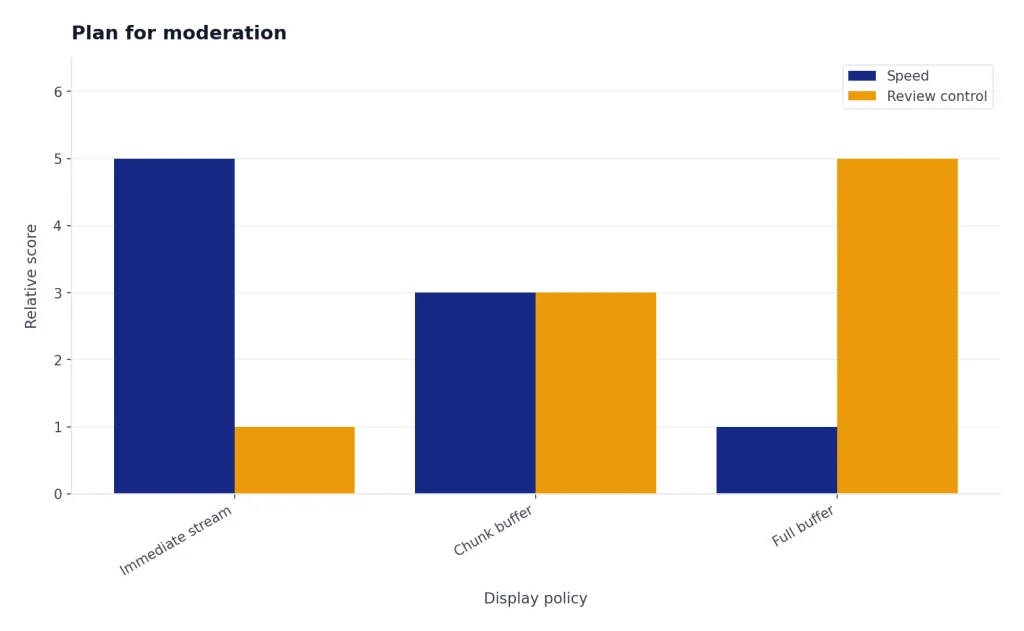
OpenAI’s streaming guide notes that streaming production output can make moderation harder because partial completions may be more difficult to evaluate.[1] If your product has safety requirements, consider buffering before display, applying post-completion review for sensitive actions, or using a separate safety layer before exposing generated text.
Handle rate limits and retries
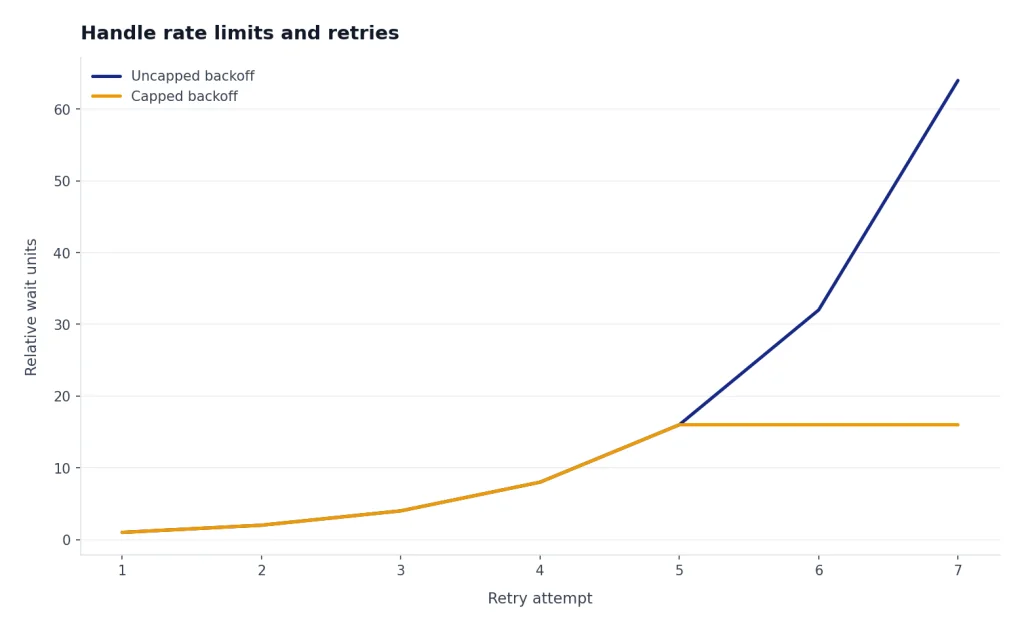
OpenAI’s rate-limit guide says limits can be measured by requests per minute, requests per day, tokens per minute, tokens per day, and images per minute.[6] The OpenAI Help Center says 429 errors are caused by reaching an organization rate limit and recommends exponential backoff rather than continuous retries.[9]
For streamed requests, retry behavior needs extra care. If the stream fails halfway through, a blind retry can produce duplicate user-visible text or repeat a side effect. Store a request identifier in your own system, distinguish display retries from tool execution retries, and make any side-effecting tools idempotent.
Respect cancellation
Users expect a stop button in streamed chat. Wire cancellation from the browser to your backend and from the backend to the upstream request. After cancellation, mark the local response as cancelled rather than completed, and avoid sending the partial answer into workflows that expect a final answer.
Log events without leaking data
Streaming logs can grow quickly. Log event types, timing, request IDs, completion state, and error categories. Avoid storing full user prompts or full generated output unless you have a clear retention policy and user permission. This is part of broader OpenAI API best practices for production.
Streaming versus alternatives
Streaming is one delivery pattern, not the default answer for every API workflow. The Responses API is the right starting point for many text and tool workflows because OpenAI describes it as its advanced interface for generating model responses, with support for text and image inputs, text outputs, stateful interactions, built-in tools, and function calling.[3]
Realtime is different. OpenAI describes the Realtime API as a low-latency multimodal API that supports speech-to-speech interactions and multimodal input and output.[7] Use Realtime for voice agents and bidirectional interactive sessions, not as a drop-in replacement for ordinary streamed text.
| Approach | Best for | Tradeoff |
|---|---|---|
| Non-streaming Responses API | Short answers, classifications, final-only JSON | Simpler code, but the user waits for the full result. |
| Streaming Responses API | Chat, long text, progress display, streamed tool arguments | Better perceived responsiveness, but more event handling. |
| Realtime API | Voice agents, multimodal low-latency sessions | More interactive, but uses a different connection model. |
| Batch API | Offline processing and large backfills | Good for throughput, not immediate user feedback. |
Model choice also matters. A streamed response from a slow or expensive model may still be the wrong product decision. Compare capabilities in our all GPT models compared side by side article and check context needs with our context window sizes for every GPT model reference.
Frequently asked questions
Does streaming reduce OpenAI API cost?
No. Streaming changes how output is delivered to your application. It does not by itself reduce the amount of model work or the number of generated tokens.
Should I use the Responses API or Chat Completions for streaming?
Use the Responses API for new streaming work unless you have a specific reason to maintain an older integration. OpenAI’s streaming guide says the Responses API uses semantic streaming events and is designed with streaming in mind.[1]
Can I stream JSON safely?
Yes, but treat partial JSON as display-only progress. Validate and use the final parsed object after the stream completes. SDK helpers are the safest starting point for structured streaming workflows.[4]
Can I expose a streaming OpenAI call directly from the browser?
Do not expose your secret API key in browser code. Route requests through your backend and stream sanitized events to the client. OpenAI’s key safety guidance warns against deploying keys in client-side environments.[8]
What should my app do if a stream fails midway?
Mark the response as failed or interrupted, and avoid treating the partial text as final. If you retry, design the UI so duplicate text is not appended. For side effects, use idempotent tool calls and execute only after arguments are complete.
Is streaming the same as the Realtime API?
No. Streaming Responses API calls are a good fit for incremental text and event delivery over ordinary request flows. The Realtime API is built for low-latency multimodal sessions, including speech-to-speech applications.[7]