


The ChatGPT memory limit is not a single number. OpenAI describes memory as two related systems: saved memories and Reference chat history. Saved memories are the durable facts ChatGPT can keep and reuse across chats, and that saved-memory space can become full. Reference chat history is broader. OpenAI says there is no storage limit for what ChatGPT can reference when that setting is on, but it also says ChatGPT does not retain every detail from past chats.[1] The practical limit is recall quality, not just storage. If you want ChatGPT to remember something reliably, store it as a concise saved memory, keep your memory list clean, and use Temporary Chat when you do not want a conversation to affect future replies.
The actual ChatGPT memory limit
The short answer is this: saved memories have a storage limit, but OpenAI has not published an official figure for the exact saved-memory capacity. OpenAI’s Memory FAQ says saved memories can reach capacity and that ChatGPT will not save new memories until you clear space.[1] That means a user-visible “memory full” state can happen even if your chats still exist and even if ChatGPT can still answer normally.
Reference chat history works differently. OpenAI says there is no storage limit for what ChatGPT can reference when Reference chat history is turned on.[1] That does not mean ChatGPT perfectly remembers every line you ever wrote. OpenAI also says ChatGPT does not remember every detail from past chats and recommends saved memories for information you want it to keep top-of-mind.[2]
So the useful way to think about the chatgpt memory limit is to separate storage from recall. Storage asks whether ChatGPT can save a fact at all. Recall asks whether ChatGPT will bring that fact into a future answer at the right time. Saved memories help with both, but they still compete for limited space. Chat history can help with personalization, but it is less deterministic.
| Memory surface | What it stores or references | Published storage limit | Best use | Main risk |
|---|---|---|---|---|
| Saved memories | Durable facts, preferences, goals, and instructions ChatGPT keeps separately from chat history | OpenAI has not published an official capacity figure; OpenAI says saved memory can become full | Stable facts ChatGPT should consistently use | Clutter, stale details, and “memory full” errors |
| Reference chat history | Relevant information inferred from prior conversations | OpenAI says there is no storage limit for what can be referenced | Personalization across ongoing work and repeated topics | Incomplete recall and changing relevance over time |
| Current chat context | The visible conversation and attached material the model can currently process | Controlled by the model’s context window, not memory | Detailed work inside one session | Older or excess material can fall out of scope |
This distinction also explains why memory does not replace other limits. ChatGPT can remember that you prefer concise answers, but that does not expand the chatgpt token limit, remove the chatgpt file upload limit, or change your chatgpt message limit. Memory is a personalization layer. It is not unlimited working space.

Memory is not the same as the context window
Many people use “memory” to mean several different things. In ChatGPT, memory usually means information carried across chats. The context window means the amount of information a model can consider inside the active request and conversation. They overlap in the final answer, but they are not the same limit.
A saved memory might say, “The user writes grant proposals for a public health nonprofit.” That compact fact can guide future answers. The context window might contain the full grant draft, the reviewer notes, and the current prompt. If the draft is too large, memory does not make the model process every word. For that, you need to manage the chatgpt context window, not the memory list.
The same applies to output size. A memory can tell ChatGPT that you prefer executive summaries, but it cannot force a model to generate unlimited text. If a response stops early or becomes compressed, check the chatgpt word limit and chatgpt character limit per message rather than assuming memory failed.
A clean memory list is still valuable. It reduces repetitive setup. It lets ChatGPT start closer to your preferred format. It can help the assistant adapt to your role, tone, interests, and recurring constraints. But it should hold compact, reusable facts rather than whole documents, transcripts, or project histories.
Good saved memories are short and reusable
Use saved memory for facts that will matter in many future chats. Examples include your writing style, your job function, your coding stack, your dietary restrictions, your preferred units, or a recurring project goal. Avoid saving long lists, one-time tasks, or information that changes weekly.
If you are working with a large source file, upload or paste the relevant section in the current chat instead. If you are hitting upload limits, see our ChatGPT Plus file upload limit explained article. If you are comparing access by plan, start with ChatGPT free plan limits in 2026.
What happens when saved memory storage is full
When saved memory storage is full, ChatGPT may continue answering, but it will stop adding new saved memories until you clear space. OpenAI says that once memory storage is full, ChatGPT will not save new memories until the user clears space.[1] This is a storage failure, not necessarily a model failure.
You may notice this in several ways. ChatGPT may tell you that memory is full. It may fail to save a new preference after you say “remember this.” It may continue to recall older stored facts but ignore new facts that should have been saved. It may also compress or merge memories if automatic memory management is available to your account.
OpenAI’s current public help text does not give a universal number of memory entries, characters, tokens, or megabytes. Treat any exact quota you see in forum posts as account-specific observation, not an official limit. The safest wording is simple: saved memories are limited; Reference chat history has no stated storage cap; and OpenAI has not published an official saved-memory capacity figure.
Symptoms that look like a memory limit
- ChatGPT says it cannot remember a new detail.
- The memory list shows too many small, outdated entries.
- New preferences do not appear in Manage memories.
- ChatGPT recalls old facts but misses a recently saved instruction.
- You must repeat project context in every new chat.
Not every recall failure is caused by full storage. The relevant memory might be poorly worded. It might conflict with another saved memory. You might be using Temporary Chat. Your workspace or project settings might restrict what can be referenced. The current task might also be too far away from the saved fact for ChatGPT to consider it relevant.

How ChatGPT decides what to recall
OpenAI describes saved memories as details that are part of the context ChatGPT uses to generate a response, and says they are considered in future responses unless deleted.[1] That wording matters. “Considered” does not mean “quoted every time.” ChatGPT still decides what is relevant to the current request.
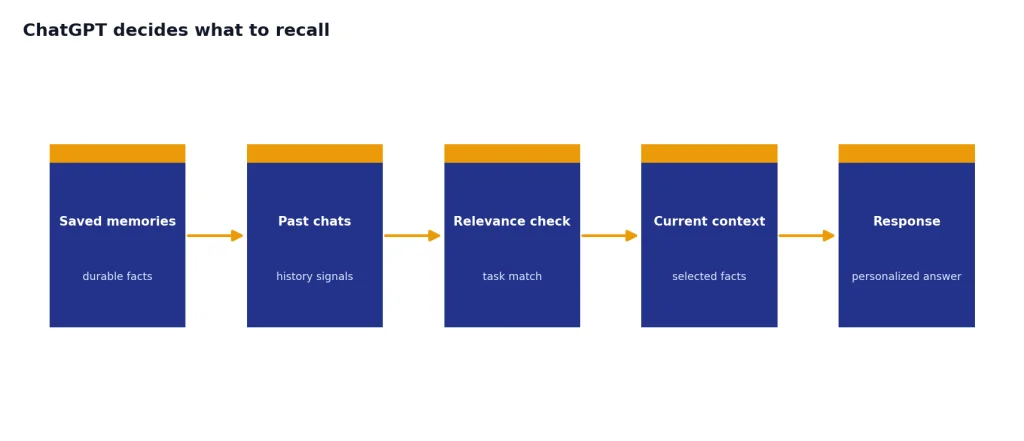
Reference chat history is more fluid. OpenAI says details from past chats can change over time as ChatGPT updates what is more helpful to remember.[1] This makes it useful for personalization, but less suitable for exact records. If you need exact continuity, keep a project brief, upload a source file, or paste a compact recap at the start of the chat.
Recall quality usually improves when memories are specific, current, and non-conflicting. “I prefer concise answers with bullets” is better than “I like good answers.” “Use AP style for news briefs” is better than “write professionally.” “My app uses Next.js and Postgres” is better than saving a long architecture discussion.
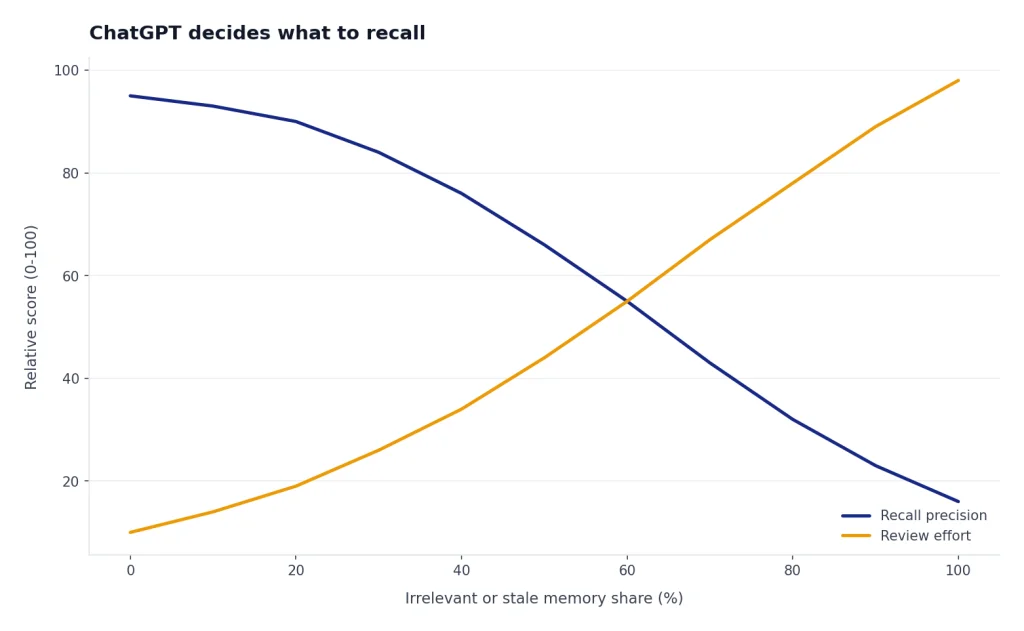
Recall quality gets worse when memory becomes a junk drawer. If you let ChatGPT save every temporary interest, abandoned project, and passing preference, it has more irrelevant material to sort through. That can make responses feel over-personalized or wrong. A smaller, sharper memory list is usually better than a larger one.
Saved memory works best as a profile, not an archive
A profile contains stable facts. An archive contains everything. ChatGPT memory should be closer to a profile. Use it to store the facts that should shape future answers, not the evidence and details that belong in a document, spreadsheet, or project note.

How to audit and clean up ChatGPT memory
You can ask ChatGPT what it remembers about you, and you can delete individual memories, clear saved memories, or turn memory off in settings.[1] OpenAI also says saved memories are stored separately from chat history, so deleting the original chat does not automatically delete a saved memory from that chat.[1]
Start with a direct audit prompt: “List the saved memories you are using for me. Group them into keep, update, merge, and delete.” Then compare the answer against the Manage memories panel. If a memory matters, rewrite it into one clean sentence. If it is stale, delete it. If several entries say the same thing, merge them.
A practical cleanup workflow
- Open Settings, then Personalization, then Manage memories.
- Search for outdated projects, old jobs, old preferences, and duplicate facts.
- Delete memories tied to one-time tasks.
- Merge related memories into one durable instruction.
- Ask ChatGPT to restate the final memory profile in plain English.
- Save a private backup of your key preferences outside ChatGPT.
A good memory cleanup reduces storage pressure and improves recall. It also makes it easier to spot when ChatGPT is relying on old assumptions. If you use ChatGPT heavily for work, review memory after major changes such as a new role, new client, new tech stack, or new writing style.
Do not use memory as your only copy of anything important. Save durable instructions in your own notes. Keep project requirements in documents. Use ChatGPT memory to reduce friction, not to replace records you control.

Privacy, deletion, and Temporary Chat
Memory is convenient because it persists. That is also why you should manage it deliberately. OpenAI says you can use Temporary Chat when you want a conversation that does not reference memories and does not create new memories.[1] OpenAI’s Temporary Chat FAQ also says Temporary Chats do not appear in history, are not used to improve models, and may be kept for safety purposes for up to 30 days.[4]
Turning saved memory off does not delete existing saved memories. OpenAI says you must delete saved memories directly, either by asking ChatGPT to forget them or by using Manage memories.[6] OpenAI also says that to fully remove something, you should delete both the saved memory and the chat where you originally shared it.[6]
Reference chat history has its own deletion behavior. OpenAI says turning off Reference chat history deletes information ChatGPT remembered from past chats, and that information is deleted from OpenAI systems within 30 days.[1] OpenAI’s Data Controls FAQ separately says Temporary Chats are deleted from systems after 30 days, while ordinary chats can still appear in history if you turn off training.[3]
Use Temporary Chat for sensitive brainstorming, one-off medical or legal research, confidential names, or anything you do not want woven into future personalization. If the topic is sensitive but recurring, consider saving a neutral preference instead of the sensitive detail itself. For example, save “Prefer conservative risk explanations” rather than a detailed personal situation.
Memory settings also do not solve every privacy question. Data controls, training settings, workspace policy, shared GPT actions, and enterprise retention rules can matter. If you use ChatGPT for regulated work, do not treat consumer memory controls as a compliance system.
How Projects change memory boundaries
Projects can narrow what ChatGPT draws from. OpenAI says project memory can keep ChatGPT focused by drawing context from conversations in the same project rather than from other projects.[7] This matters if your problem is not storage, but cross-contamination between clients, courses, writing projects, or coding work.
OpenAI describes project-only memory as a setting where previously saved memories are not referenced, chats can reference other conversations within the same project, and chats cannot reference conversations outside the project.[7] That gives you a cleaner boundary than ordinary memory, but it is not the same as deleting old memories. It changes what is referenced inside that project.
Use project-only memory when the work has a strong boundary. A fiction series, litigation support folder, enterprise sales account, or research project may benefit from memory that stays inside the project. Use default memory when your general preferences should still apply across workspaces.
Projects do not remove other limits. Long files still face upload constraints. Long chats still interact with context limits. High-volume use still interacts with message and rate limits. If you are troubleshooting throughput, compare this article with the chatgpt rate limit, ChatGPT daily limit, and ChatGPT Plus message limit by model guides.
Best practices for reliable memory
The best way to work within the ChatGPT memory limit is to keep memory boring, compact, and current. Save durable preferences. Delete stale facts. Use chat history for general personalization. Use the current chat or a project brief for detailed task context.
Write memories as rules ChatGPT can apply
Good memory: “When editing my writing, preserve my direct tone and avoid adding hype.” Bad memory: “I care a lot about quality and want things to sound better.” The first version gives ChatGPT an action. The second version is vague.
Prefer stable facts over temporary states
Save facts that remain true across many conversations. Do not save a deadline that expires next week unless it belongs in a recurring workflow. Temporary facts are better handled in the active chat, a calendar, a document, or a project note.
Check memory when answers drift
If ChatGPT starts giving odd recommendations, ask what memory it used. Then inspect the memory panel. A stale job title, old project, or outdated preference can quietly steer answers in the wrong direction.
Use explicit commands
Use plain commands such as “Remember that…” for durable preferences and “Forget that…” for stale ones. After saving, ask ChatGPT to confirm the exact saved wording. After deleting, check Manage memories rather than relying only on the chat response.
If you are comparing whether a paid plan is worth it for broader limits, memory should be only one factor. Also check model access, upload needs, and message caps. Our ChatGPT Plus GPT-4o message limit and is ChatGPT Plus worth it? honest 2026 verdict articles cover those tradeoffs from a limits and pricing angle.
Frequently asked questions
What is the ChatGPT memory limit?
Saved memories have a limit, but OpenAI has not published an official saved-memory capacity figure. OpenAI says saved memory can become full and that ChatGPT will not save new memories until you clear space.[1] Reference chat history is different because OpenAI says there is no storage limit for what it can reference when that setting is enabled.[1]
Does ChatGPT remember every past conversation?
No. OpenAI says ChatGPT can use past chats when Reference chat history is on, but it does not remember every detail from past conversations.[2] Use saved memories for durable facts you want ChatGPT to keep available across chats.
Why does ChatGPT say memory is full?
It means the saved-memory storage area has reached capacity. ChatGPT can still answer questions, but it may not add new saved memories until you delete or merge old ones. The fix is to open Manage memories and remove stale, duplicate, or one-time entries.
Does deleting a chat delete the memory from that chat?
Not by itself. OpenAI says saved memories are stored separately from chat history, and deleting a chat does not remove saved memory from that conversation.[1] To fully remove something, delete the saved memory and the original chat where you shared it.[6]
Does Temporary Chat use memory?
No. OpenAI says Temporary Chat starts with a blank slate, does not access memories, and does not create memories.[4] OpenAI also says Temporary Chats may be kept for safety purposes for up to 30 days and are not used to improve models.[4]
Is memory the same as the token limit?
No. Memory is persistent personalization across chats. The token limit controls how much text and other content a model can process in the active request and conversation. If ChatGPT forgets details inside a long chat, the issue may be context management rather than saved-memory storage.