

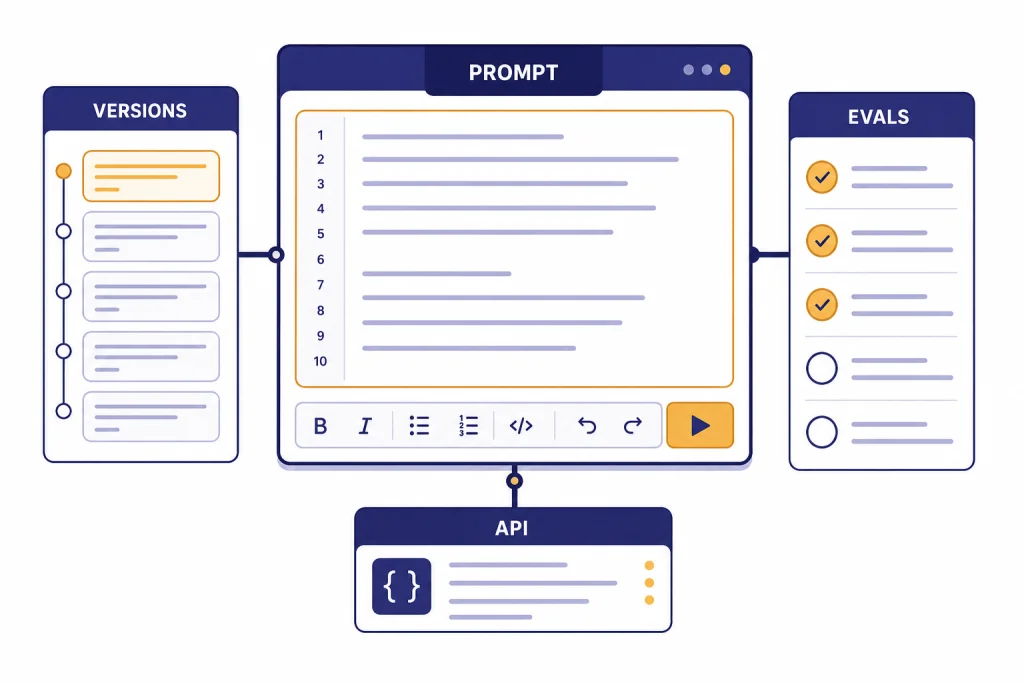
OpenAI Playground is not the friendliest way to chat with AI. It is the better place to design prompts, compare model behavior, test structured outputs, attach tools, and prepare work for the OpenAI API. That is why pros use it. In this OpenAI Playground review, the key finding is simple: Playground is worth using if your AI work must become a repeatable product workflow, not just a one-off conversation. Its biggest advantages are prompt versioning, variables, side-by-side testing, API-aligned settings, and direct links to evals. Its biggest drawbacks are cost visibility, setup friction, and a developer-first interface. Playground usage follows regular API usage and pricing rules.[4]
Verdict
OpenAI Playground is best for people who need control. It gives prompt writers, developers, product managers, data teams, and AI operations staff a workspace that behaves more like a production lab than a consumer chatbot. You can test a prompt, save it, create versions, add variables, compare outputs, and then call that same prompt from API workflows through a Prompt ID.[1]
That changes the job. In ChatGPT, the main question is whether the answer is useful right now. In Playground, the better question is whether the behavior can be repeated, measured, and shipped. That is the professional use case.
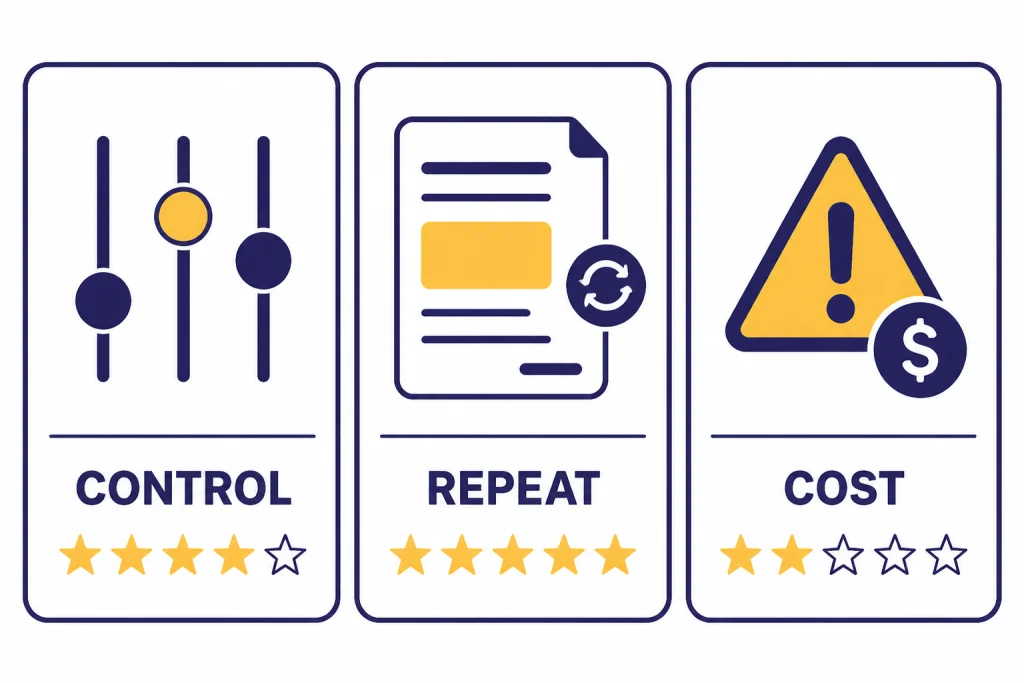
The product is not perfect. New users may find the interface less forgiving than ChatGPT. Billing is tied to API usage instead of a simple consumer subscription. Some features only make sense if you already understand tokens, models, tools, schemas, and evals. If you want a polished assistant for writing, research, voice, or everyday productivity, start with our broader ChatGPT review 2026, ChatGPT Plus review, or ChatGPT Team review.
Our verdict: OpenAI Playground is a strong professional tool, but it is not the best general AI app. Use it when the prompt is part of a system.
What OpenAI Playground is
OpenAI Playground is a browser-based workspace inside the OpenAI Platform for building and testing prompts against OpenAI models. OpenAI’s prompt documentation describes Playground as the place to fill out fields, add variables, create prompt versions, and use those prompts through the Responses API.[2]
The important distinction is that Playground is part of the API platform, not a separate ChatGPT plan. It is closer to a prompt IDE than a chatbot. A professional user can define a system instruction, add user input, test the same prompt on different models, tune output format, add tools, inspect behavior, and move the result into a product or internal workflow.
Playground also supports newer prompt management habits that are hard to maintain in ordinary chat threads. OpenAI’s Help Center says prompts are project-level, support version history with rollback, allow variables, can be published to a Prompt ID, support side-by-side comparison, and can be linked to manual eval runs.[1]
That is the core reason professionals care. A chat thread is informal. A Playground prompt can become a managed asset.
Why pros use Playground
Pros use Playground because small prompt changes create large downstream effects. A support classifier that misses one edge case can route tickets incorrectly. A sales summary prompt that changes tone can confuse a CRM workflow. A JSON extraction prompt that omits a field can break an integration.
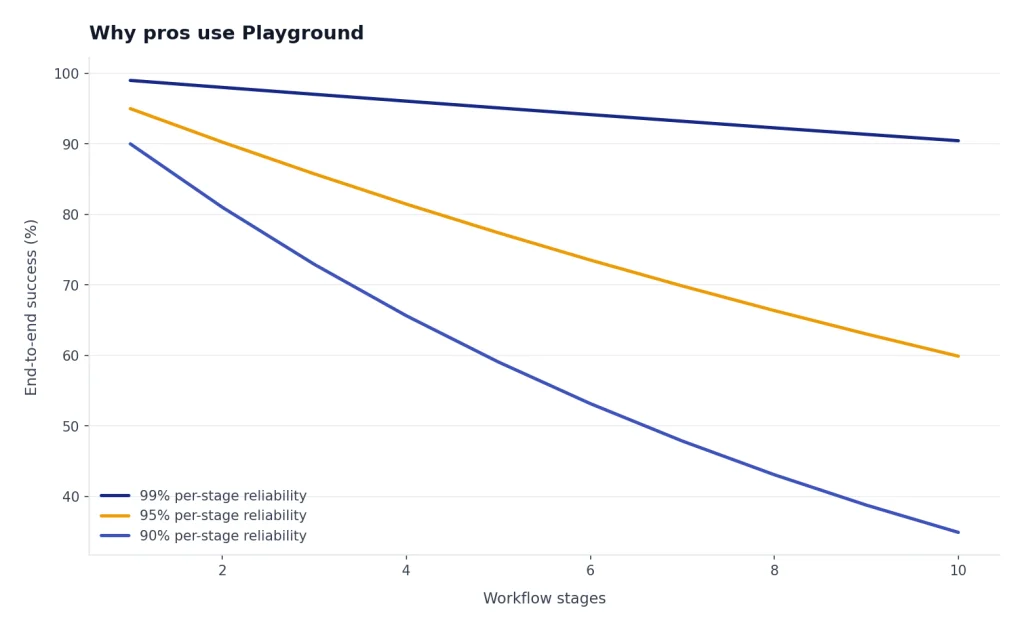
Playground gives teams a controlled place to test those changes before they reach users. It also helps separate static instructions from dynamic inputs. Variables let a team keep the core prompt stable while swapping in customer names, product types, document text, or task details.[1]
The professional advantage is not just better prompting. It is governance. A saved prompt can have a history. A published prompt can have an ID. A previous version can be restored. Two versions can be compared. An eval can catch regressions before the new version ships.[1]
That matters more as teams move from experimentation to operations. If you are only asking for a better email draft, ChatGPT is easier. If you are designing a customer-facing workflow, Playground is safer.
Features that matter most
Playground has many knobs, but only a few determine whether it is worth using. The strongest features are prompt management, model testing, structured outputs, tool configuration, and eval integration.
Prompt versions and rollback
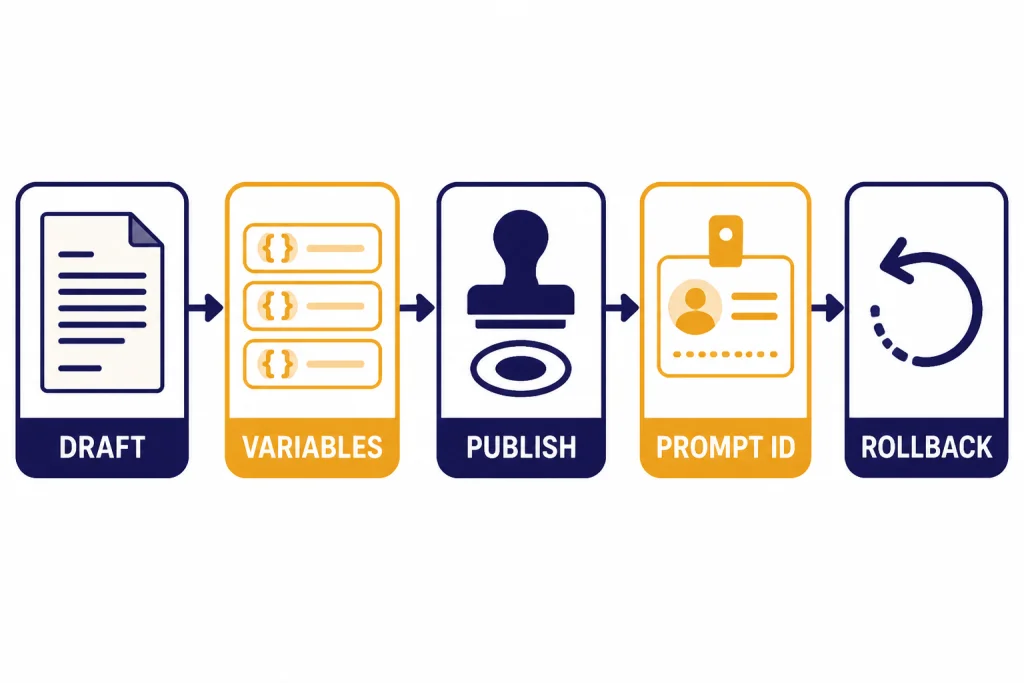
Versioning is the feature that makes Playground feel professional. OpenAI says publishing creates a version, and the same Prompt ID can point to the latest published version unless you pin a specific version.[1] This gives teams a simple release pattern: draft, test, publish, monitor, and roll back if needed.
Variables
Variables make prompts reusable. Instead of copying a whole instruction every time, you can place dynamic values into slots. OpenAI’s docs describe variables such as {{variable}} placeholders that can be passed into a prompt used by the Responses API.[2] For teams, this is the difference between a prompt note and a maintainable template.
Structured outputs
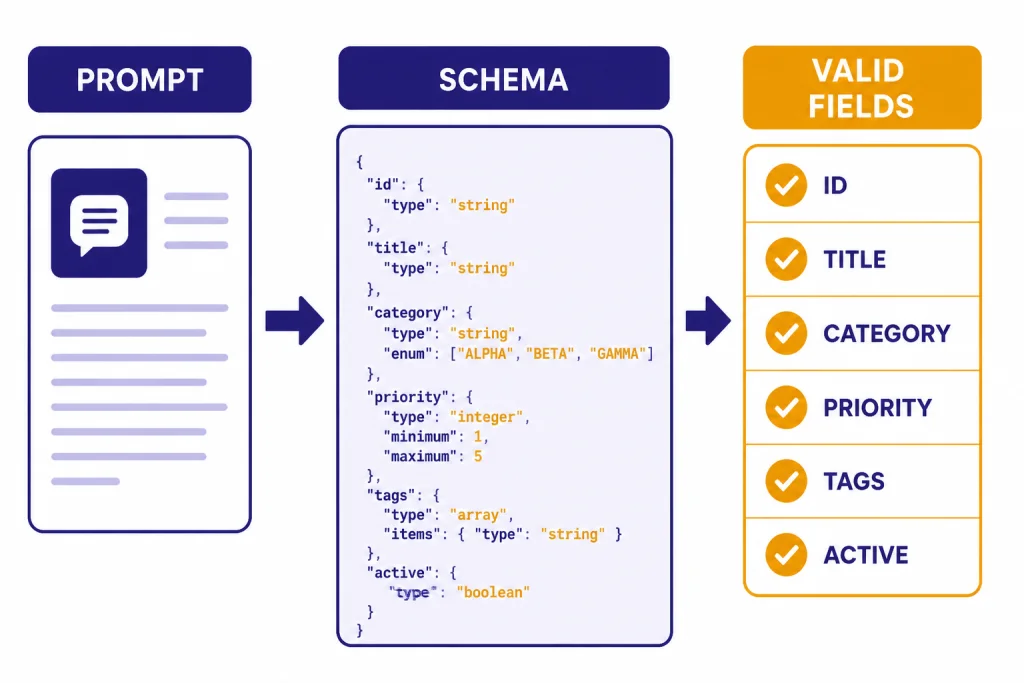
Structured Outputs are essential when the model response must feed software. OpenAI says Structured Outputs ensure the model generates responses that follow a supplied JSON Schema, rather than merely producing valid JSON.[8] That makes Playground useful for testing extractors, classifiers, routing decisions, and API response shapes.
Tools
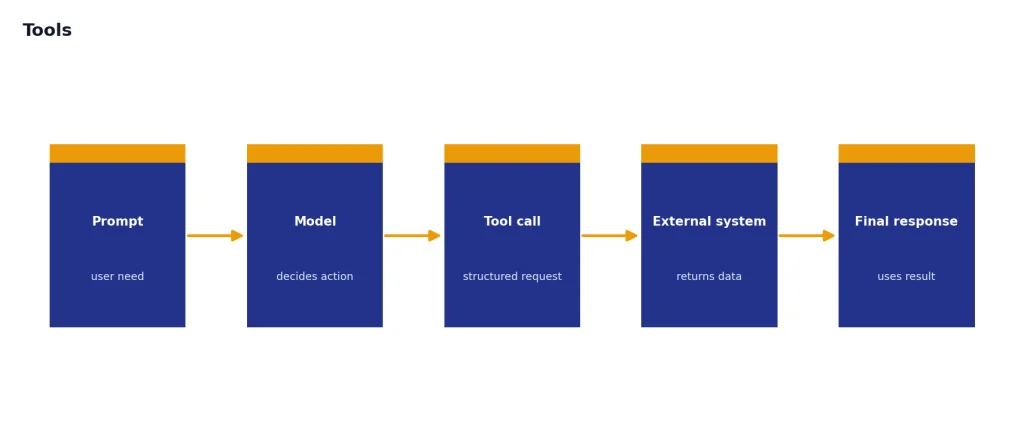
OpenAI’s platform tools can extend a model with capabilities such as web search, file search, function calling, and remote MCP servers.[7] Playground is useful because you can test tool behavior before embedding it in code. This is especially helpful for developers building retrieval workflows, agents, and internal assistants. For deeper model selection context, see our all GPT models compared side by side, GPT-4o review, and OpenAI o3 review.
Evals
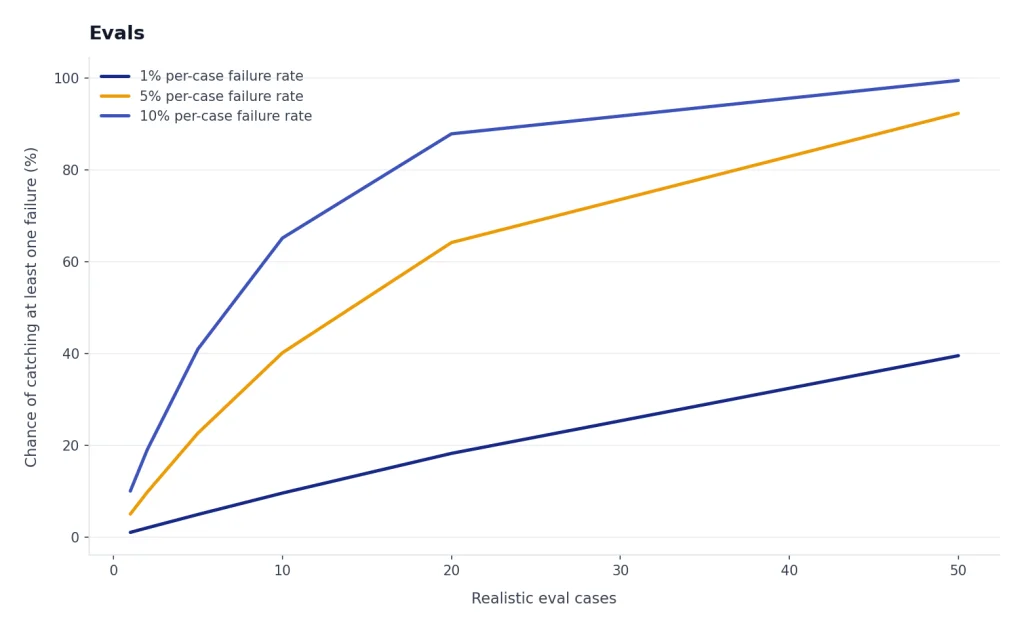
OpenAI describes datasets as a way to get started with evals and test prompts, and says evals help test model outputs against style and content criteria.[9] In practice, evals are where Playground becomes serious. A prompt that feels good in one manual test may fail on ten realistic cases. A prompt that passes a small dataset is more likely to behave consistently.
| Feature | Why it matters | Best professional use |
|---|---|---|
| Prompt versions | Preserves change history and supports rollback | Updating production prompts without losing a known-good version |
| Variables | Separates fixed instructions from changing inputs | Reusable support, sales, legal, and data extraction prompts |
| Side-by-side comparison | Shows output differences before publishing | Testing tone, completeness, format, and failure modes |
| Structured Outputs | Constrains responses to a schema | JSON extraction, classification, routing, and app integrations |
| Tools | Lets models call search, files, functions, or external systems | Retrieval workflows, agent prototypes, and internal copilots |
| Evals | Tests behavior against examples and criteria | Regression checks before a prompt reaches users |
Cost and billing
OpenAI Playground does not behave like a flat-fee ChatGPT subscription. OpenAI says Playground token usage is subject to the same usage rules and pricing as regular API usage, because Playground makes the same API calls you would make from a terminal or application.[4]
This is good for professionals and confusing for casual users. You pay for what you use, but the final cost depends on the model, input tokens, output tokens, cached tokens, reasoning tokens, and any tools you enable. OpenAI’s pricing page lists text token prices per 1 million tokens and separates input, cached input, and output pricing by model.[3] If you are comparing costs across models, our OpenAI API pricing guide is the better companion piece.
New API users should also understand prepaid billing. OpenAI says the minimum prepaid credit purchase is $5, the default purchase amount is $10, and purchased credits expire after 1 year and are non-refundable.[5] OpenAI also says auto recharge can add credits when your balance falls below a set threshold, with a minimum auto-recharge amount of $5.[5]
Cost control is therefore part of using Playground well. Start with cheaper models for prompt shape. Move to stronger models only when quality demands it. Watch output length. Avoid unnecessary tool calls. Track usage by project. OpenAI says organization owners or users with Usage Dashboard permission can view usage data, and the dashboard supports project filters and capability breakdowns.[6]
OpenAI Playground vs ChatGPT
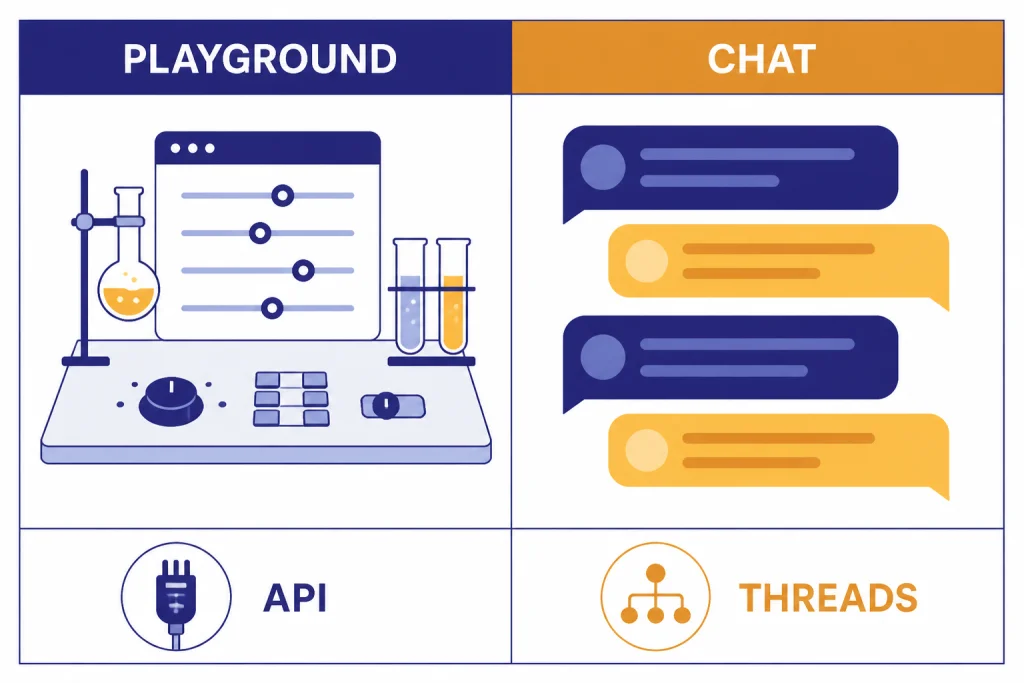
Playground and ChatGPT overlap, but they solve different problems. ChatGPT is better for direct interaction. Playground is better for designing the behavior behind an application or repeatable workflow.
The easiest way to decide is to ask what happens after the answer. If you read it and move on, ChatGPT is probably right. If the answer must follow a schema, be tested against examples, call a tool, or run inside software, Playground is probably right.
| Category | OpenAI Playground | ChatGPT |
|---|---|---|
| Primary job | Build, test, and manage API-ready prompts | Use an AI assistant directly |
| Best user | Developer, prompt engineer, product team, AI ops team | Writer, researcher, student, analyst, everyday user |
| Prompt management | Supports project-level prompts, versions, rollback, variables, and Prompt IDs | Relies more on chats, projects, custom instructions, or custom GPTs |
| Output control | Strong fit for JSON schemas and API response shapes | Better for natural conversation and polished answers |
| Billing model | API usage-based billing | Consumer or workspace subscription plans |
| Production readiness | Designed to move toward API workflows | Designed for interactive use |
If you like ChatGPT but want reusable assistants, read our ChatGPT Custom GPTs review and GPT Store review. If your work happens in writing drafts or editing documents, our ChatGPT Canvas review may be more relevant than Playground.
Who should use it
Use OpenAI Playground if you are building something repeatable. That includes internal support copilots, classification systems, extraction workflows, data-cleaning helpers, sales enablement tools, knowledge-base assistants, coding tools, and agent prototypes.
It is also a good fit for teams that need a shared prompt workflow. OpenAI says prompts are project-level rather than user-level, which matters when multiple people own the same AI behavior.[1] A prompt locked in one person’s chat history is fragile. A prompt attached to a project is easier to maintain.
Developers should use Playground before writing too much integration code. A few hours of prompt, schema, and tool testing can prevent days of downstream debugging. Product managers should use it to define expected behavior. Support and operations teams should use it to test real examples before asking engineering to ship a workflow.
Power users can benefit too, but only if they want API-style control. If you mainly need an assistant that speaks, browses, analyzes files, or works across apps, Playground may feel unnecessary. In that case, compare our ChatGPT Voice Mode review and ChatGPT Pro review instead.
Limitations
The first limitation is usability. Playground assumes you understand API concepts. Terms like tokens, schemas, tools, evals, and model parameters are normal in a developer workflow, but they are not beginner-friendly.
The second limitation is billing uncertainty. Usage-based pricing is efficient for small tests, but it requires attention. Long prompts, long outputs, stronger models, tool calls, and repeated tests can increase cost. OpenAI’s token explainer says token counts appear in API response metadata and are used for billing and usage tracking.[10]
The third limitation is that Playground does not replace product analytics. It can help test prompts, but you still need logging, user feedback, monitoring, and domain-specific evals once a workflow runs in production.
The fourth limitation is that model behavior changes as models improve. That is not unique to Playground, but it is more visible there. This is why versioning and evals matter. If a workflow is important, do not rely on a single good test. Create a small dataset of realistic cases and rerun it when you change prompts or models. For context planning, see our context window sizes for every GPT model.
Final recommendation
OpenAI Playground is worth using if you treat prompts as production assets. It is not the easiest OpenAI interface, and it is not meant to be. Its value comes from control, repeatability, API alignment, and testing discipline.
For professionals, the strongest workflow is simple: draft the prompt, add variables, test multiple realistic inputs, compare versions, constrain the output when software needs structure, attach tools only when needed, run evals, publish a Prompt ID, and monitor usage.
For casual users, ChatGPT is better. For builders, Playground is one of the most important parts of the OpenAI Platform. It turns prompting from an informal conversation into a managed development process.
Frequently asked questions
Is OpenAI Playground free?
OpenAI Playground is not priced like a separate free consumer app. OpenAI says token usage in Playground follows the same usage rules and pricing as regular API usage.[4] You should assume tests can generate API charges.
Is OpenAI Playground better than ChatGPT?
It is better for prompt development, API testing, structured outputs, and production workflows. ChatGPT is better for general conversation, writing, research, and everyday assistance. The better choice depends on whether you need an assistant or a controlled build environment.
Can non-developers use OpenAI Playground?
Yes, but the learning curve is real. Non-developers who manage support scripts, content systems, operations workflows, or AI assistants can benefit from it. They should learn tokens, model selection, variables, and basic JSON before using it heavily.
What is the biggest reason to use Playground?
The biggest reason is repeatability. Playground lets you manage prompts with versions, rollback, variables, Prompt IDs, comparisons, and eval links.[1] That makes it more suitable than chat threads for work that must be maintained over time.
Does Playground use the same models as the API?
Playground is part of the OpenAI Platform, and OpenAI’s docs position it as a place to build prompts that can be used through API workflows.[2] Available models can change, so check the current OpenAI model documentation before making a production choice.[11]
Should I use Playground for Custom GPTs?
Use Playground when you need API control, structured outputs, evals, or tool behavior testing. Use Custom GPTs when you want a ChatGPT-native assistant for people to use directly. If that is your goal, start with our guide to ChatGPT Custom GPTs.