

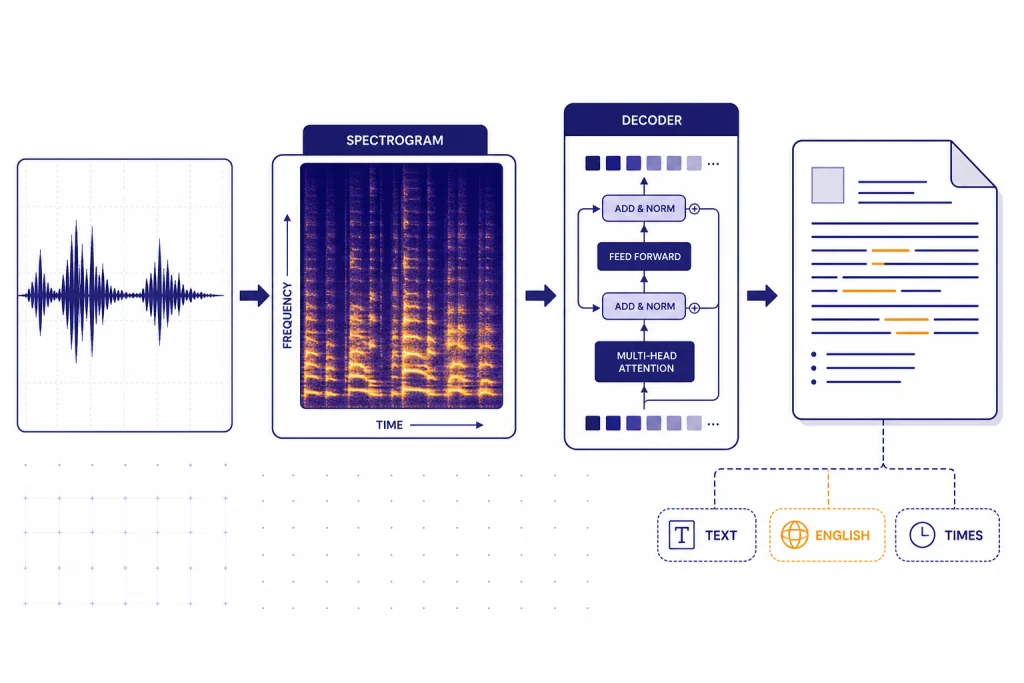
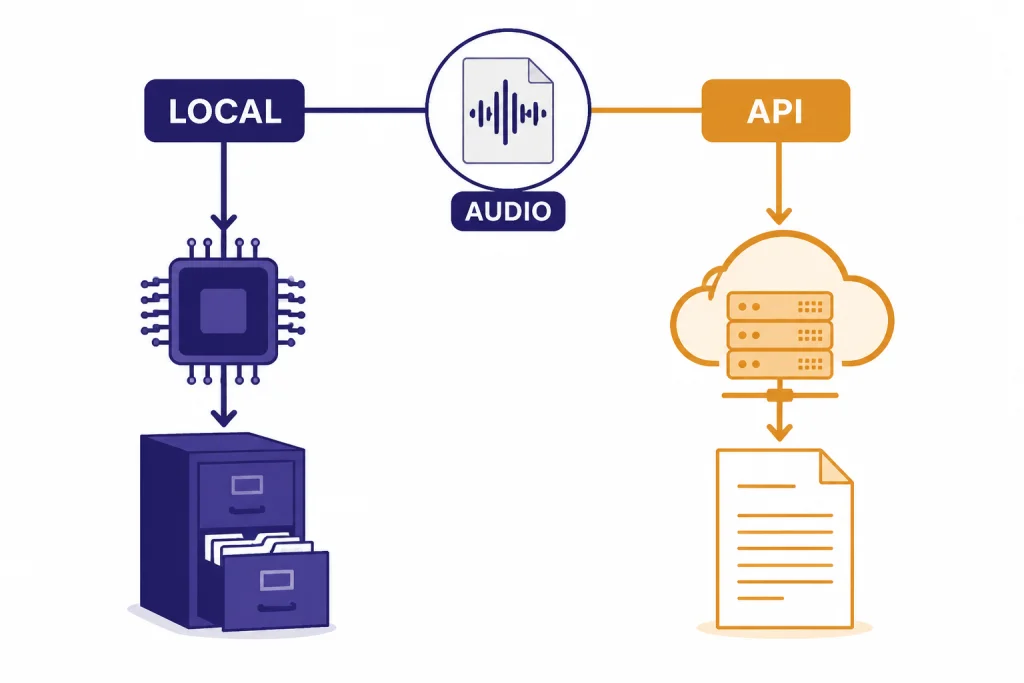
Whisper is OpenAI’s speech-to-text model family for automatic speech recognition, audio translation into English, and language identification. OpenAI released the original open-source Whisper models in September 2022 after training them on 680,000 hours of multilingual and multitask audio data.[1] Developers can run Whisper locally from OpenAI’s GitHub repository or use the hosted `whisper-1` model through the OpenAI Audio API.[2] In 2026, Whisper remains useful for transcription pipelines, captions, searchable audio archives, and multilingual speech workflows, but it is no longer the only OpenAI transcription choice. Newer GPT-4o transcription models add options for lower cost, better quality, and diarization in some API workflows.[5]
What Whisper is
Whisper is an automatic speech recognition model, often shortened to ASR. It converts spoken audio into written text. It can also translate supported speech into English and identify the language being spoken.[2] That makes it different from a general chat model. Whisper listens first. A GPT model can then summarize, classify, search, or rewrite the transcript.
OpenAI released Whisper as open-source models and inference code in September 2022.[1] The hosted API version followed with the `whisper-1` model, which OpenAI described as using the large-v2 model at launch.[7] That split still matters. “Whisper” can mean the open-source model family you run yourself. It can also mean OpenAI’s hosted `whisper-1` API model.
Use Whisper when the primary input is recorded speech. Use a general GPT model when the primary input is text or when the transcript needs reasoning after transcription. For a broader map of model families, see all GPT models compared side by side. For voice products built around speech interaction, see our ChatGPT Voice Mode review.
How Whisper works
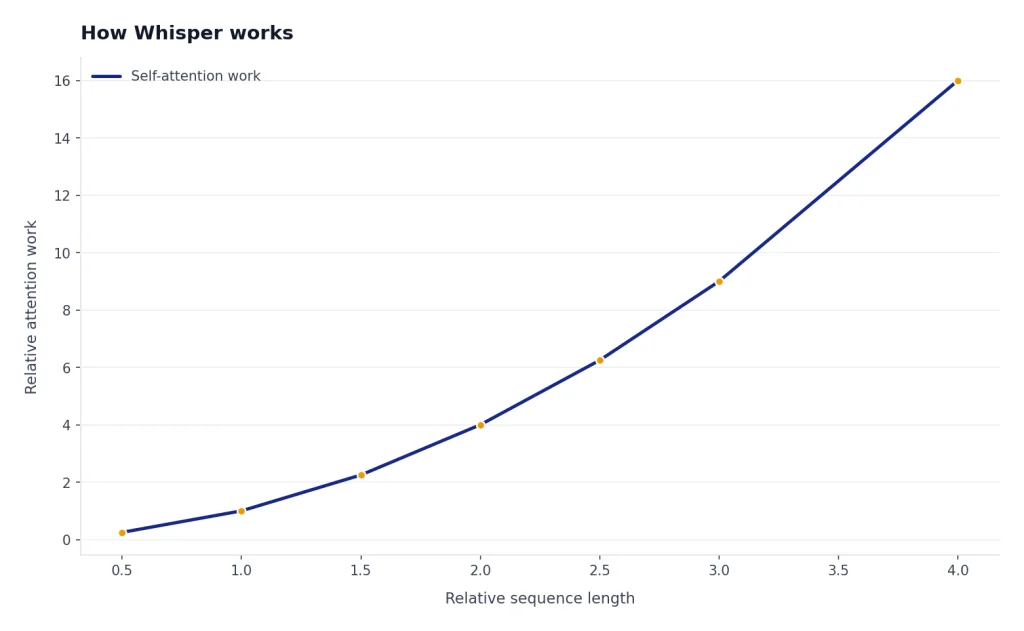
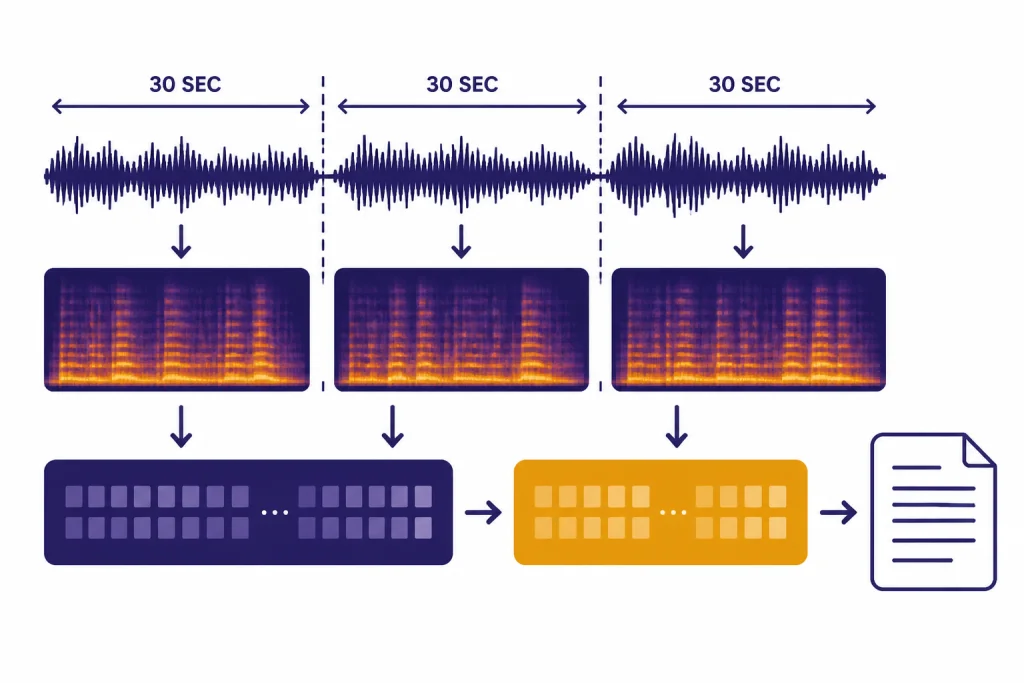
Whisper uses an encoder-decoder Transformer architecture. OpenAI’s original description says audio is split into 30-second chunks, converted into a log-Mel spectrogram, and passed through an encoder before a decoder predicts text and task tokens.[1] In practical terms, Whisper does not simply match sounds to words. It predicts a transcript while also using learned language patterns, which helps with noisy audio but can also create errors.
The model was trained on 680,000 hours of audio and transcripts collected from the internet.[3] OpenAI’s model card breaks that training mix into English audio with English transcripts, non-English audio with English transcripts, and non-English audio with matching non-English transcripts.[3] This is why Whisper is useful beyond English dictation. It learned transcription and translation together.
Whisper is also a multitask model. OpenAI’s repository describes it as handling multilingual speech recognition, speech translation, spoken language identification, and voice activity detection within one sequence-to-sequence setup.[2] In a production app, you still need surrounding logic. You may need file splitting, silence detection, confidence review, speaker labels from another tool, or a GPT model that turns raw transcript text into notes.
Whisper model options
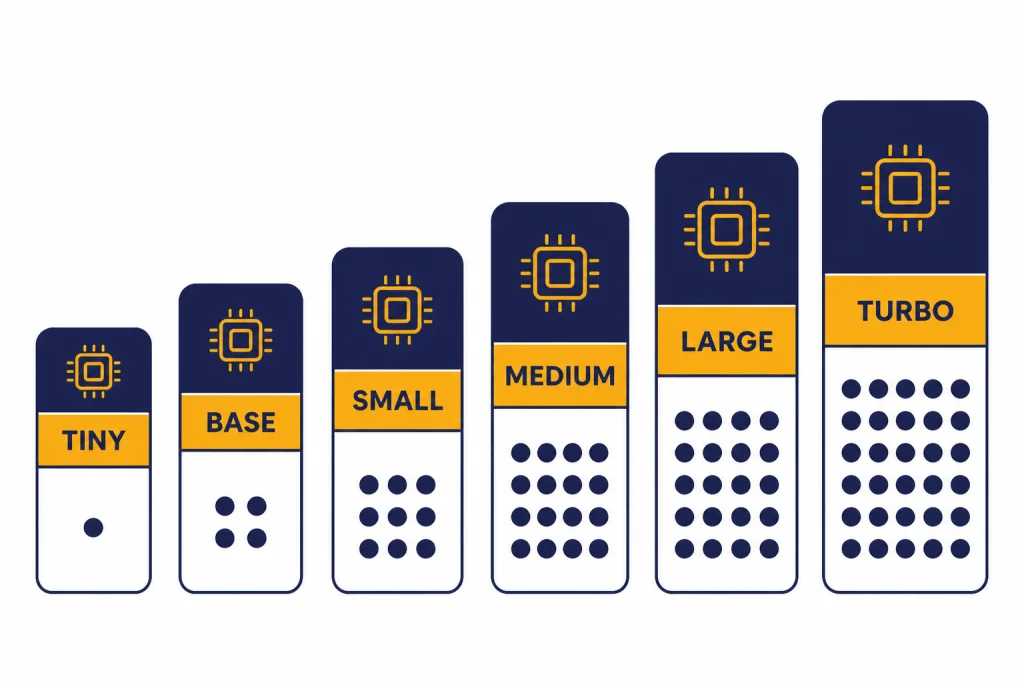
The open-source Whisper family includes multiple model sizes. OpenAI’s GitHub README lists six size classes: `tiny`, `base`, `small`, `medium`, `large`, and `turbo`.[2] The smaller models are faster and lighter. The larger models usually produce better transcripts, especially when audio is noisy, accented, or multilingual.
The model card and README disagree slightly on the `turbo` parameter count: the model card lists `turbo` at 798 million parameters, while the README lists it at 809 million parameters.[3][2] Because both are official OpenAI GitHub pages, treat `turbo` as roughly 800 million parameters rather than relying on a single exact number.
| Model size | Parameters | English-only version | Multilingual version | Typical role | Source |
|---|---|---|---|---|---|
| `tiny` | 39M | Yes | Yes | Fast tests and low-resource devices | [2] |
| `base` | 74M | Yes | Yes | Light dictation and rough transcripts | [2] |
| `small` | 244M | Yes | Yes | Balanced local transcription | [2] |
| `medium` | 769M | Yes | Yes | Higher local accuracy with more compute | [2] |
| `large` | 1550M | No | Yes | Best open-source Whisper quality | [2] |
| `turbo` | About 800M | No | Yes | Fast large-v3-style transcription | [2][3] |
For local use, the best starting point is usually `small` or `medium` if you have enough hardware. Use `tiny` or `base` when latency matters more than accuracy. Use `large` or `turbo` when transcript quality matters and you can afford the compute. If you care more about API latency across GPT models, compare this with our fastest GPT model guide.
API usage and limits
The hosted OpenAI path is the Audio API. OpenAI documents two speech-to-text endpoints: `transcriptions` and `translations`.[4] The `transcriptions` endpoint returns text in the source language. The `translations` endpoint transcribes supported input audio into English, and OpenAI’s speech-to-text guide says that endpoint supports only `whisper-1`.[4]
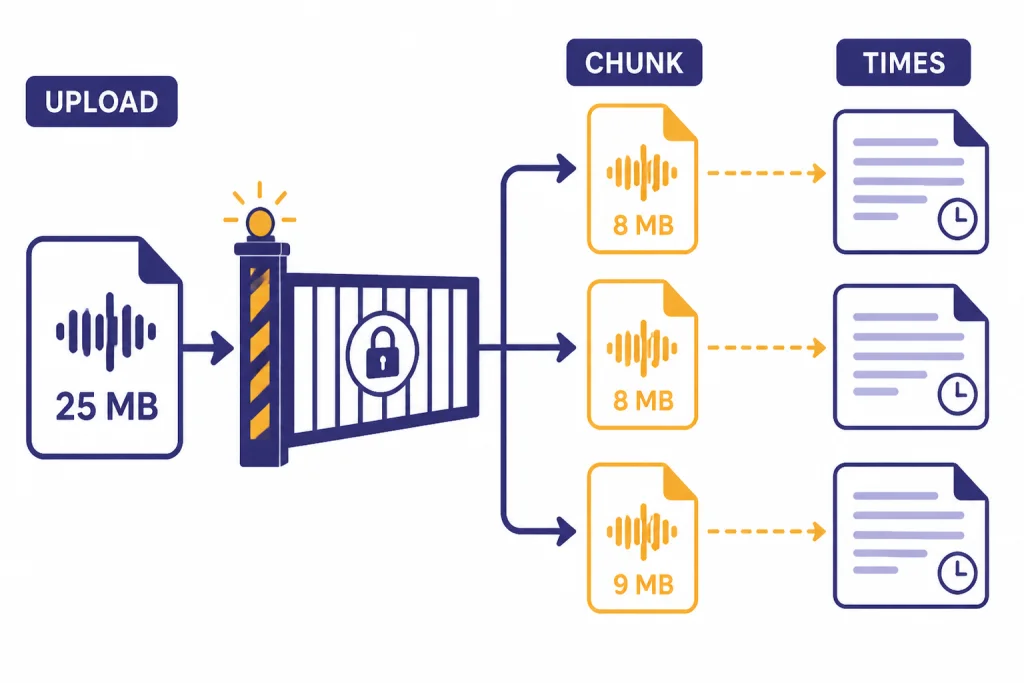
OpenAI lists these supported file types for audio uploads: `mp3`, `mp4`, `mpeg`, `mpga`, `m4a`, `wav`, and `webm`.[4] File uploads are limited to 25 MB by default, so longer recordings need compression or chunking.[4] Avoid cutting in the middle of a sentence when possible because the model can lose context at a hard boundary.
Whisper supports timestamps through the `timestamp_granularities[]` parameter when using `whisper-1`; OpenAI’s guide notes that this parameter is only supported for `whisper-1`.[4] The API can return segment-level or word-level timing when you request a structured response. This is useful for subtitles, video edits, transcript search, and audio review tools.
Do not assume `whisper-1` is the right model for real-time streaming. OpenAI’s Audio API FAQ states that streaming is not supported with `whisper-1`.[6] If you are building a live voice agent, compare the Realtime API and newer transcription models instead of forcing Whisper into a low-latency job. The OpenAI Playground review is useful if you want to test model behavior before building a full pipeline.
Whisper pricing
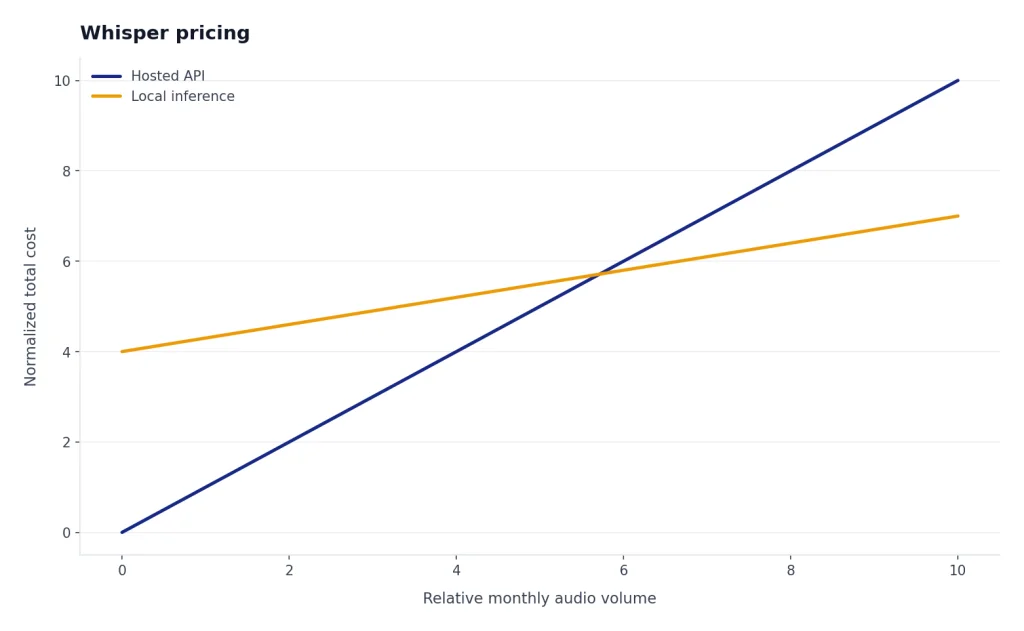
OpenAI’s API pricing page lists Whisper transcription at $0.006 per minute.[5] That is the hosted API price, not the cost of running open-source Whisper locally. Local usage does not bill per minute through OpenAI, but you pay through your own hardware, cloud GPU time, engineering effort, and maintenance.
The $0.006 per minute figure also matches OpenAI’s original Whisper API launch announcement, where OpenAI said it made large-v2 available through the API at $0.006 per minute.[7] For high-volume transcription, calculate both approaches. A few hours per month is usually simpler through the API. Large recurring workloads may justify local inference if your team can operate it reliably.
Pricing can also change by model choice. OpenAI’s pricing page lists `gpt-4o-transcribe` at an estimated $0.006 per minute and `gpt-4o-mini-transcribe` at an estimated $0.003 per minute.[5] If cost is your main constraint, compare transcription with the rest of your stack in our OpenAI API pricing and cheapest GPT model guides.
Best use cases
Whisper is strongest when you need dependable transcription from recorded speech and can tolerate some post-processing. It is especially useful when audio will be reviewed, searched, summarized, or edited after transcription.
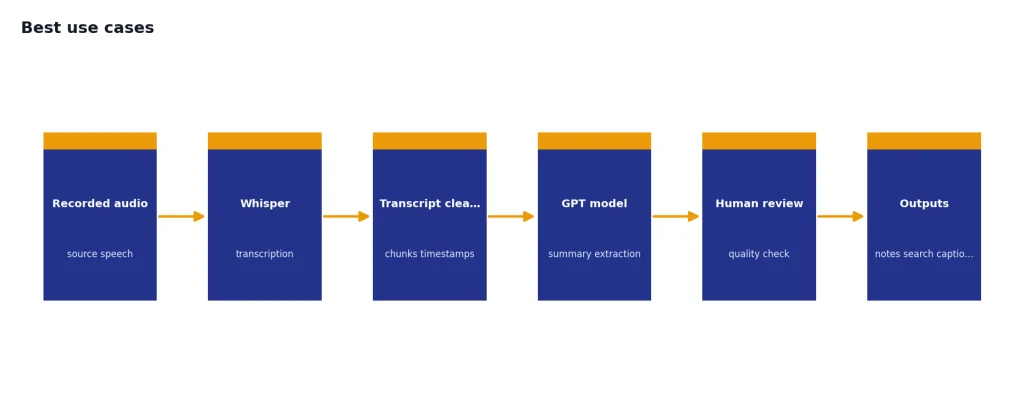
- Meeting and interview transcripts. Recordings can be transcribed, then summarized by a GPT model for action items and decisions.
- Podcast and video captions. Word-level or segment timestamps help align text with media for editing and accessibility.
- Searchable audio archives. Transcripts make calls, lectures, webinars, and field recordings easier to index.
- Multilingual intake. Whisper can transcribe supported languages and translate speech into English through the translations endpoint.[4]
- Developer prototypes. The open-source models make it possible to test ASR ideas without starting with a hosted API.
Whisper is not a writing model, coding model, image model, or reasoning model. A common production pattern is to transcribe with Whisper, then pass the transcript to a GPT model for summarization or extraction. If the next step is long transcript analysis, check context window sizes for every GPT model before choosing the text model.
Limitations and risks
Whisper can make transcription errors. OpenAI’s model card says predictions may include text that was not actually spoken in the audio, a hallucination risk tied to weakly supervised large-scale training.[3] This matters most in medical, legal, employment, finance, education, and public safety settings, where a wrong word can change the meaning of a record.
OpenAI’s model card also recommends against using Whisper in high-risk decision-making contexts and cautions against transcribing people without consent.[3] That is not a minor footnote. If your app stores sensitive recordings or produces records about people, you need consent, retention rules, human review, and clear audit trails.
Independent research has examined the hallucination problem. A Cornell Chronicle summary of the “Careless Whisper” work reported that researchers found roughly 1% of Whisper transcriptions contained entire hallucinated phrases, and it noted that longer pauses and silences may contribute to harmful hallucinations.[8] This does not mean every Whisper transcript is unreliable. It means high-stakes transcripts should not be treated as ground truth without review.
Accuracy also varies by language, accent, dialect, recording quality, background noise, and domain vocabulary. OpenAI’s speech-to-text guide says the underlying model was trained on 98 languages, but the API documentation only lists languages that exceeded a benchmark threshold of less than 50% word error rate.[4] Test on your actual audio before deploying.
Whisper vs newer OpenAI audio models
Whisper is still useful, but it now sits beside newer OpenAI audio models. OpenAI’s speech-to-text guide says the transcriptions endpoint supports `whisper-1`, `gpt-4o-mini-transcribe`, `gpt-4o-transcribe`, and `gpt-4o-transcribe-diarize`.[4] The right choice depends on whether you need open-source local inference, lower API cost, diarization, word timestamps, or translation into English.
| Need | Best fit | Why |
|---|---|---|
| Run locally without sending audio to an API | Open-source Whisper | OpenAI publishes model code and weights in the Whisper repository.[2] |
| Simple hosted transcription | `whisper-1` | It is stable, widely used, and priced at $0.006 per minute.[5] |
| Lower-cost hosted transcription | `gpt-4o-mini-transcribe` | OpenAI lists an estimated cost of $0.003 per minute.[5] |
| Speaker labels in the OpenAI transcription endpoint | `gpt-4o-transcribe-diarize` | OpenAI says this model adds speaker labels and timestamps for HTTP transcription requests.[4] |
| Translate supported speech into English | `whisper-1` translations endpoint | OpenAI says the translations endpoint supports only `whisper-1`.[4] |
If your workflow is voice conversation rather than transcript production, Whisper may be the wrong abstraction. Voice agents need low latency, turn detection, and audio output. In that case, compare the current Realtime and audio model options instead of using Whisper as a standalone recorder-to-text step. If your project combines speech, images, and text, our guides to GPT-4 Vision and DALL-E 3 can help separate model responsibilities.
Frequently asked questions
Is Whisper free?
The open-source Whisper models can be run locally without paying OpenAI per audio minute, but you still need hardware or cloud compute. The hosted OpenAI API is paid. OpenAI lists Whisper transcription at $0.006 per minute.[5]
Is `whisper-1` the same as open-source Whisper?
They are related but not identical as user experiences. Open-source Whisper is a family of downloadable models and inference code. `whisper-1` is OpenAI’s hosted API model for transcription and translation workflows.[4]
Can Whisper translate audio?
Yes. OpenAI’s translations endpoint accepts supported input audio and returns an English transcript. OpenAI’s current guide says this translations endpoint supports only `whisper-1`.[4]
Does Whisper support timestamps?
Yes, the hosted API can return timestamps when you request a structured format. OpenAI’s documentation says the `timestamp_granularities[]` parameter is only supported for `whisper-1`.[4]
Can Whisper identify speakers?
Do not rely on standard Whisper for speaker diarization. OpenAI’s docs now list `gpt-4o-transcribe-diarize` for speaker labels and timestamps in HTTP transcription requests.[4] For Whisper workflows, speaker labeling usually requires another diarization step.
What is the maximum Whisper API file size?
OpenAI’s speech-to-text documentation says file uploads are limited to 25 MB by default.[4] Longer files should be compressed or split into chunks. Avoid splitting mid-sentence when possible.