

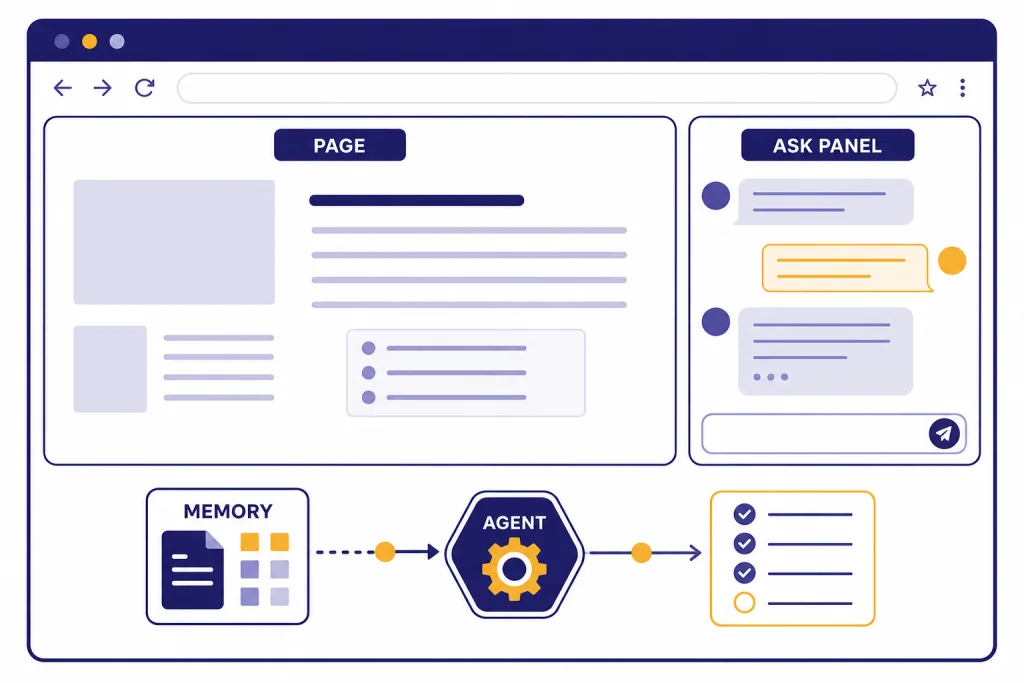
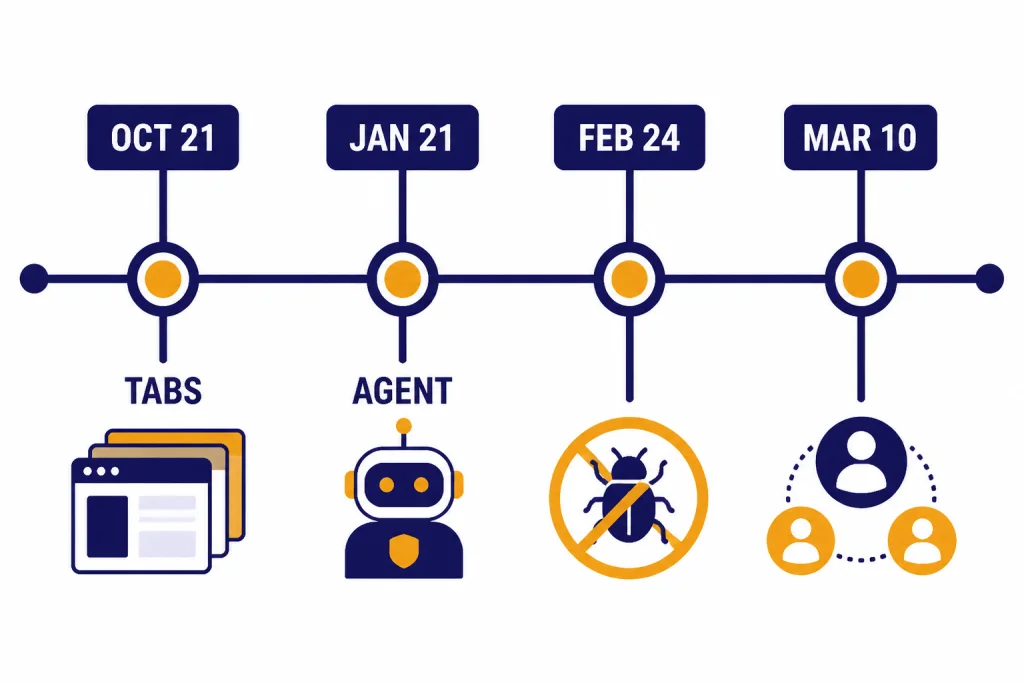
ChatGPT Atlas is OpenAI’s clearest attempt to turn ChatGPT from a website into the place where browsing happens. OpenAI launched the browser on October 21, 2025, with ChatGPT built into the page, a new-tab search box, an Ask ChatGPT sidebar, browser memories, and agent mode for selected paid and business users.[1] As of this March 21, 2026 review, Atlas remains a Mac-first product. It supports Apple silicon Macs running macOS 14.2 or later, while OpenAI’s launch materials still describe Windows, iOS, and Android experiences as coming later.[1][2] It is promising, useful for research, and not yet a universal Chrome or Safari replacement.
What ChatGPT Atlas is
ChatGPT Atlas is a browser, not a browser extension. OpenAI launched it on October 21, 2025, as a web browser with ChatGPT built into the browsing surface rather than parked in a separate tab.[1] It still feels familiar: pages load in tabs, the address bar accepts URLs, and browser data can be imported from another browser. The difference is that the assistant can use the page you are viewing as context when you ask for help.
That makes Atlas adjacent to ChatGPT Search, but not the same product. Search answers questions from the web. Atlas sits inside the browsing workflow after the page is already open, which matters for comparing listings, reading documentation, drafting in forms, and handing off a multi-step web task.
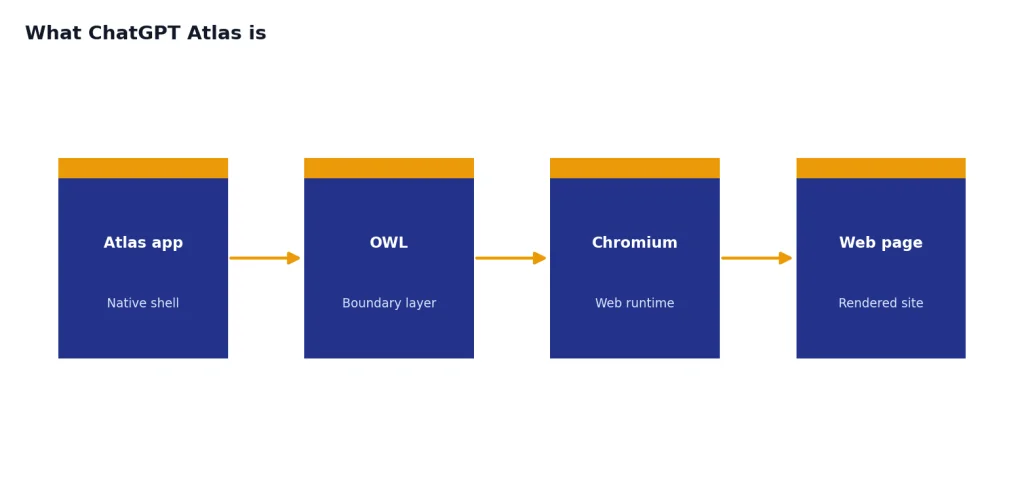
OpenAI also built Atlas differently from a simple Chromium skin. Its engineering post says Atlas uses a new layer called OWL, or OpenAI’s Web Layer, to separate the Atlas app from the Chromium runtime while still using Chromium as the web foundation.[8] That explains why Atlas can feel like a native Mac app while retaining a familiar browser core.
| Atlas piece | What it does | First-look value |
|---|---|---|
| New tab page | Accepts a question or a URL, with search links, image, video, and news tabs where available.[7] | Good for research starts, less necessary for simple URL entry. |
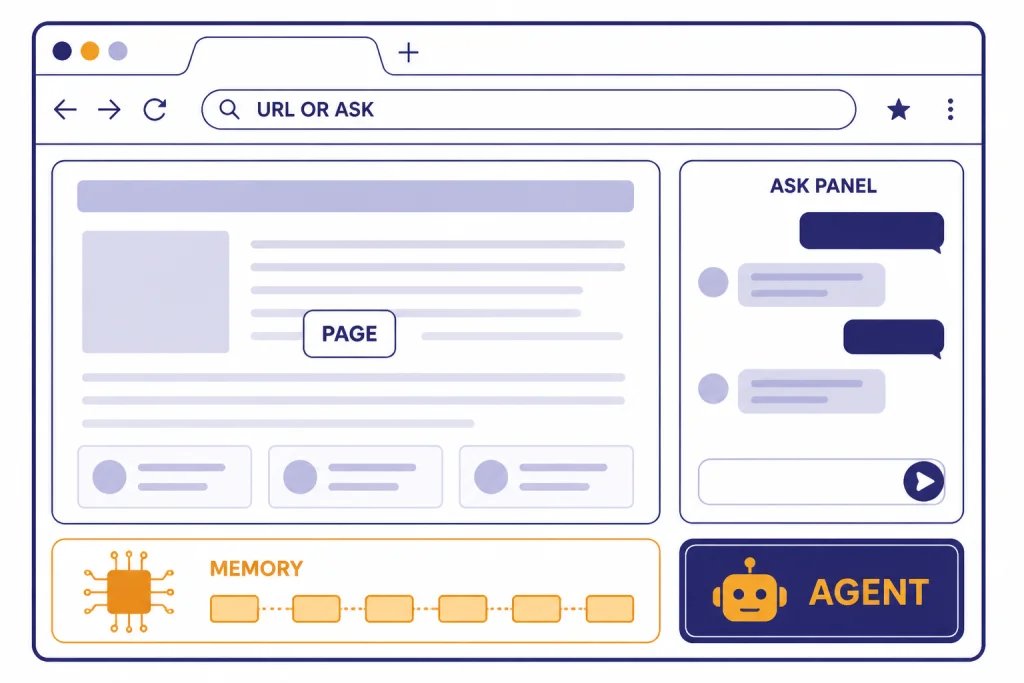
| Ask ChatGPT sidebar | Lets you ask, summarize, analyze, draft, or switch to Agent mode while staying on the page.[6] | The most useful everyday feature. |
| Inline writing help | Can help write or edit inside form fields or documents from the browsing context.[7] | Useful for email, forms, and comments. |
| Browser memories | Can remember useful details from browsing and use them later, subject to controls.[4] | Powerful, but should be reviewed carefully. |
| Agent Mode | Lets selected users ask ChatGPT to take actions in the browser.[1] | Promising for supervised chores, risky for sensitive flows. |
Our first-look verdict is straightforward. Atlas is best when the job requires both a webpage and a conversation. It is less compelling when you only need a fast, quiet browser.
Availability, setup, and requirements
OpenAI launched Atlas worldwide on macOS for Free, Plus, Pro, and Go users. It also made Atlas available in beta for Business, and available to Enterprise and Edu users if their plan administrator enabled it.[1] As of March 21, 2026, OpenAI’s Help Center still describes Atlas as its macOS browser.[2] If you are waiting on Windows, use ChatGPT Atlas for Windows for the current platform reality check.
The official requirement is narrow: Atlas supports Macs with Apple silicon, meaning M-series chips, running macOS 14.2 or later.[2] That excludes Intel Macs. It also means Atlas is not the answer for a mixed Windows, Android, and iPhone household yet.
- Download the Atlas installer as a .dmg file, open it, and drag Atlas into Applications.[2]
- Open Atlas from Applications or Spotlight, then approve the macOS permission prompts if they appear.[2]
- Import bookmarks and settings. OpenAI’s setup guide lists Safari, Chrome, Firefox, and an HTML export file as bookmark sources.[3]
- Choose whether to import passwords, history, site data, and extensions. Atlas can import saved passwords and history from Chrome, and its release notes later added more import options.[2][7]
You can set Atlas as the default browser inside Atlas settings. OpenAI says users who do this gain increased rate limits for the first 7 days, but OpenAI has not published an official figure for the exact increase.[2] Our advice is to run Atlas alongside your current browser for a week before making it default.
What works well in daily use
Page context saves the most friction
The sidebar is the reason to try Atlas. It lets you ask about the page, extract details, draft text, or move into Agent mode without leaving the current tab.[6] In normal ChatGPT, you often copy text, paste a link, upload a file, or explain what you are looking at. In Atlas, the browser can make the current page part of the conversation.
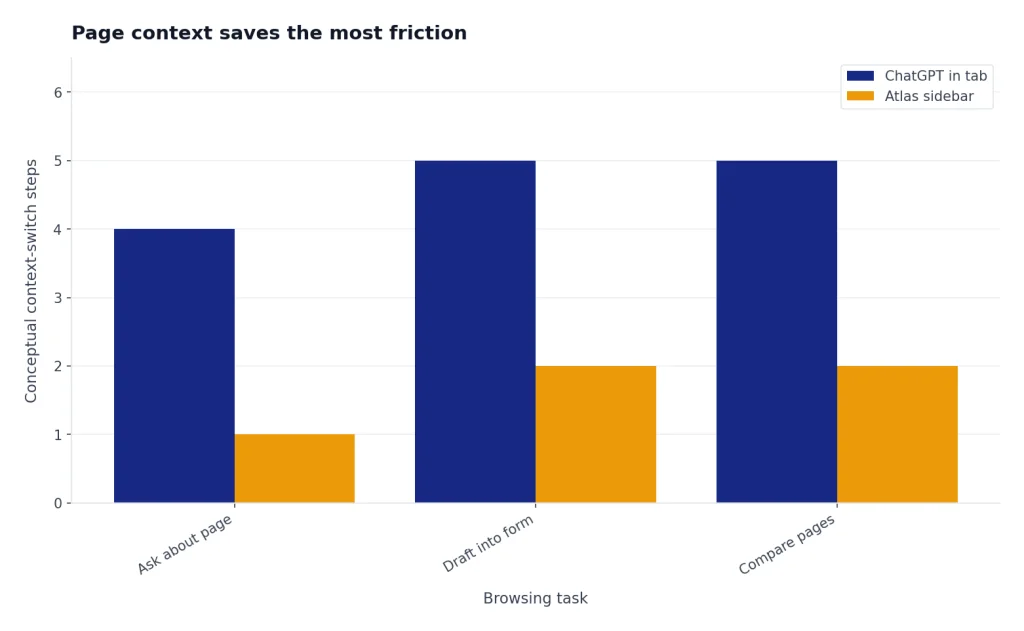
This helps with tasks such as summarizing a long policy page, comparing a product grid, turning a job listing into interview notes, or drafting a reply inside a web form. If your work depends more on documents than live pages, ChatGPT file upload may still be the cleaner path.
Search feels less bolted on than before
Atlas gives the new tab page two jobs: search the web or open a destination. OpenAI’s release notes say the page can show search links, images, videos, and news where available.[7] Later release notes added an Auto mode that can switch between ChatGPT and Google depending on the query.[7] That is a practical concession. Many users still want conventional links, not only AI answers.
Browser basics are catching up
The early release notes show a browser that is still filling in normal browser expectations. OpenAI added vertical tabs in November 2025, tab groups in January 2026, smarter tab search in February 2026, and multiple ChatGPT logins on March 10, 2026.[7] That cadence is encouraging, but it also shows why Atlas should be treated as a fast-moving first-generation product.
Where Atlas still feels unfinished
Atlas has three weak spots. First, it is not cross-platform. OpenAI’s launch post said Windows, iOS, and Android experiences were coming soon, but the official setup documentation still frames Atlas as a macOS browser for Apple silicon Macs.[1][2] That alone prevents it from becoming many people’s main browser.
Second, the release notes read like a product that is maturing in public. That is not a criticism by itself. Most browsers ship frequent fixes. But Atlas has had notable updates for tab behavior, search behavior, import flow, extension handling, memory use, Agent mode persistence, and multiple logins across the first several months.[7] If your browser setup is mission-critical, keep a proven primary browser installed.
Third, business deployment is not ready for every regulated environment. OpenAI’s enterprise guide says Atlas for Business and Enterprise is early access, recommends caution with regulated, confidential, or production data, and says Atlas is not currently in scope for OpenAI SOC 2 or ISO attestations.[9] The same page says Atlas is not yet fully compliant with WCAG accessibility standards and lacks several enterprise controls that security teams expect.[9]
Our review position: Atlas is credible enough for individual Mac users who already rely on ChatGPT. It is not yet a no-brainer for schools, enterprises, or users who need identical behavior across devices.
Privacy, memory, and data controls
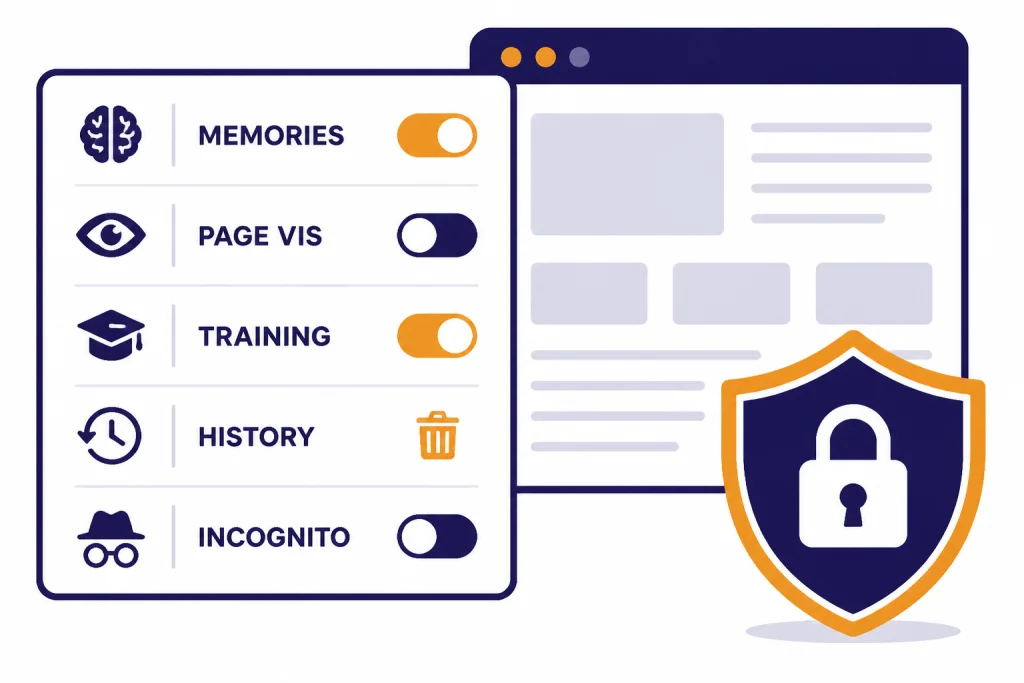
Atlas adds a privacy layer that normal browsers do not have: the assistant may be able to read the page, remember useful browsing context, and use that context later. OpenAI says Browser memories are separate from ChatGPT memories and cookies, and that users can manage each separately.[4] That distinction matters. Clearing cookies is not the same as archiving a Browser memory.
There is one setting readers should check immediately. OpenAI describes Browser memories as a user-controlled feature, but its web browsing settings page also says Browser memories are turned on by default for new users.[5] Treat that as a prompt to inspect Settings before using Atlas for banking, medical portals, confidential work, or anything you would not want summarized.
| Control | What OpenAI says | Our recommendation |
|---|---|---|
| Include web browsing | The training toggle is off by default, and is separate from the main ChatGPT training setting.[4] | Leave it off unless you intentionally want browsing content used to improve models. |
| Browser memories | They can be viewed, archived, disabled, or removed when related browsing history is deleted.[4] | Use for research workflows, not sensitive browsing. |
| Page visibility | Disabling visibility stops Atlas from reading that page and prevents new Browser memories for that site.[5] | Turn it off for financial, medical, legal, and employer systems. |
| Delete history | Deleting web history deletes associated Browser memories, though refresh may take time.[4] | Use it after one-off sensitive sessions. |
| Incognito | Incognito is not linked to your ChatGPT account and is not saved in browser history, but it does not make you invisible to the internet.[4] | Use it for separation, not anonymity. |
If Browser memories are enabled, OpenAI says web content is summarized on its servers, sensitive-data filters are applied, original web contents are deleted right after summarization, and privacy-filtered summaries are deleted within 7 days.[4] That is a meaningful control, but it is still processing. If you already use ChatGPT Memory, do not assume Atlas memories follow the same mental model. Pair memory settings with custom instructions only when you are comfortable with the personalization tradeoff.
For work accounts, OpenAI says Business and Enterprise content is not used for training.[4] That does not make Atlas automatically approved for every company. The enterprise page separately warns that some Atlas-specific data types may not be covered by Enterprise retention, storage, segregation, or deletion requirements.[9]
Agent mode review and risk controls
Agent mode is the headline feature. OpenAI says it lets ChatGPT take actions in the browser, use sites where you are already signed in, and continue tasks you started in a tab.[6] At launch, Atlas Agent mode was available in preview for Plus, Pro, and Business users.[1]
Our take is cautious. Agent mode is useful for supervised chores, such as collecting information from multiple pages, preparing a cart for review, or walking through repetitive pages. It should not be treated as an unsupervised employee, especially on sites that hold money, health data, legal records, or employer information.
| Task | Use Atlas Agent? | Safer setup |
|---|---|---|
| Summarize research across open pages | Yes | Keep page visibility on only for relevant sources. |
| Build a shopping cart | Maybe | Use a low-risk account and review every item before purchase. |
| Submit a banking or tax form | No | Do it yourself in a standard browser session. |
| Process confidential company data | Only with approval | Follow workspace policy and enterprise pilot guidance.[9] |
| Move data between web apps | Test first | Use dummy records before live production work. |
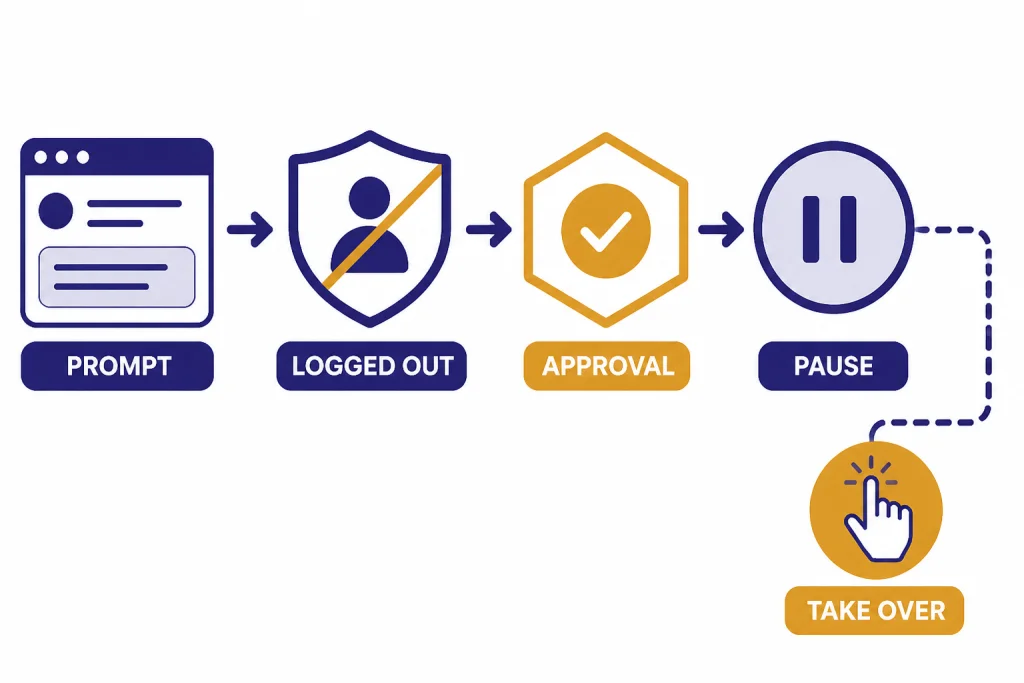
OpenAI lists several safeguards. Agent mode cannot run code in the browser, download files, install extensions, or access other apps on your computer or file system.[6] It also pauses so you can watch actions on certain sensitive sites, and logged-out mode prevents Agent mode from using pre-existing cookies or being logged into your online accounts without specific approval.[6]
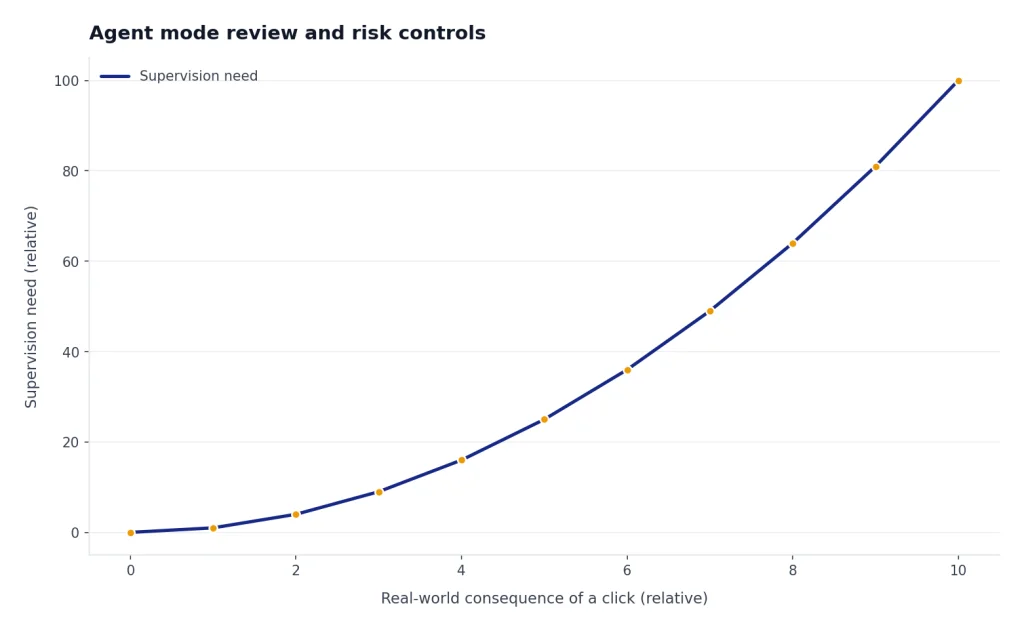
Those safeguards reduce risk, but do not erase it. OpenAI warns that agents can make mistakes and can be affected by hidden malicious instructions in webpages or emails.[1] If you are comparing Atlas to ChatGPT Operator or trying to automate reminders with scheduled ChatGPT Tasks, keep the same rule: the more real-world consequence a click has, the more human supervision you need.
Atlas vs ChatGPT app, Chrome, Safari, and Operator
The right comparison is not one browser against one chatbot. Atlas sits between a conventional browser, the ChatGPT app, and agentic computer-use tools. That middle position is why it can feel powerful one minute and unnecessary the next.
| Option | Best for | Strength | Limit |
|---|---|---|---|
| ChatGPT Atlas | Mac users who want page-aware help while browsing | Sidebar, Browser memories, and Agent mode live inside the browser.[1][6] | Mac-first, still maturing, and privacy settings require attention. |
| Chrome or Safari with ChatGPT in a tab | Users who want a proven browser and occasional AI help | Stable habits, mature extensions, and less assistant access to pages by default. | More copying, pasting, uploading, and context switching. |
| ChatGPT desktop or mobile apps | General chat, voice, documents, and cross-device use | Better when the browser itself is not the workspace. | Does not make the current webpage the center of the interface. |
| Computer-use or agent workflows | High-effort tasks that need step-by-step action | Can execute more of the workflow when carefully supervised. | Higher risk, more need for approvals, and more policy review. |
If you are choosing a day-to-day install, start with the best ChatGPT app for your device mix. Windows users may be better served by the ChatGPT Windows app until Atlas ships beyond macOS. Atlas is strongest when the browser page itself is the work surface.
Who should try it and who should wait
Try Atlas if you use an Apple silicon Mac, already ask ChatGPT for web research, and often bounce between pages and prompts. It is especially useful for students reviewing course pages, writers comparing sources, shoppers comparing long product pages, and professionals turning web research into notes. If the output belongs in a larger workspace, pair the browser session with ChatGPT Projects rather than leaving everything in loose chats.
Wait if you need Windows, iPhone, Android, Linux, full enterprise controls, strict accessibility guarantees, or a browser that has years of extension and profile polish behind it. Also wait if your main browsing involves medical portals, banking, legal work, or confidential employer systems and you do not want to manage page visibility and memory controls each time.
The safest first-week setup is conservative. Import bookmarks before importing passwords. Turn off page visibility on sensitive domains. Review Browser memories after a few sessions. Use Agent mode in logged-out mode for experiments. Keep Chrome, Safari, Firefox, or Edge installed as your fallback.
Final verdict: the ChatGPT Atlas browser is a serious first step toward an AI-native browser. It is already useful for page-aware research and supervised web chores. It is not mature enough to be the only browser most people should trust.
Frequently asked questions
Is ChatGPT Atlas available for Windows?
Not as of this March 21, 2026 review. OpenAI’s launch post said Windows, iOS, and Android experiences were coming soon, but the official setup documentation still describes Atlas as a macOS browser for Apple silicon Macs.[1][2] OpenAI has not published an official Windows release date.
Is Atlas just Chrome with ChatGPT added?
No, but it is Chromium-based. OpenAI’s setup guide says Atlas is built on Chromium, and its engineering post describes a custom OWL architecture that separates Atlas from the Chromium runtime.[3][8] In practice, that means it feels familiar as a browser while giving ChatGPT a deeper role in the interface.
Does Atlas train on everything I browse?
No. OpenAI says the Include web browsing training toggle is off by default and separate from the main ChatGPT training setting.[4] If you turn it on, browsing content can be used for model improvement subject to OpenAI’s controls, so review the setting before using Atlas heavily.
Should I use Browser memories?
Use them for low-risk research if personalization saves time. Avoid them, or disable page visibility, for financial, medical, legal, employer, or private family browsing. OpenAI says Browser memories are separate from ChatGPT memories and can be viewed, archived, or disabled.[4][5]
Can Agent mode complete purchases or submit forms?
Agent mode can take actions in the browser, but it should remain supervised. OpenAI says it can work in logged-in sessions, and also offers logged-out mode to reduce risk from existing cookies and account access.[6] Review carts, forms, and final submission steps yourself.
Is ChatGPT Atlas free?
OpenAI lists Atlas availability for Free, Plus, Pro, and Go users on macOS, so the browser is not limited to paid consumer plans.[1] Agent mode is different: OpenAI launched it in Atlas as a preview for Plus, Pro, and Business users.[1] OpenAI has not published a separate official standalone price for Atlas.