

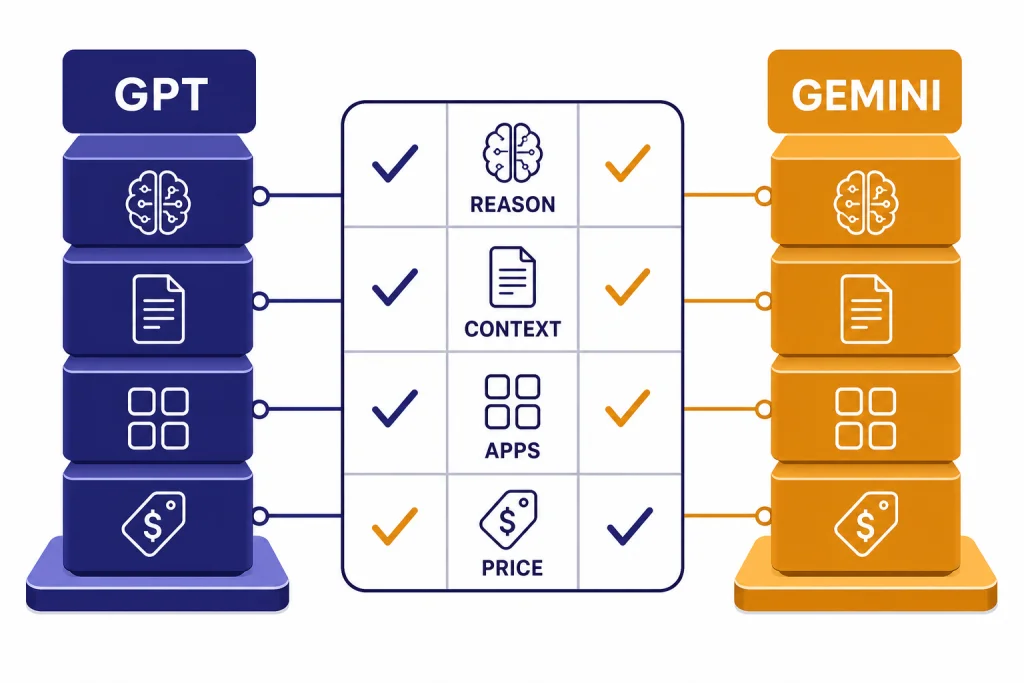
GPT and Gemini are both strong enough for daily work in 2026, but they are better for different workflows. As of this April 8, 2026 comparison, ChatGPT’s current public model path centers on GPT-5.3 Instant, GPT-5.4 Thinking, and GPT-5.4 Pro, while Google’s Gemini stack centers on Gemini 3.1 Pro and the broader Gemini 3 family.[1][6] Pick GPT if you want the stronger all-purpose writing, coding, and agentic workbench. Pick Gemini if your work lives in Google Search, Gmail, Docs, Drive, Photos, NotebookLM, or very long multimodal files. Paid everyday value is close: ChatGPT Plus is $20/month, while Google AI Pro is $19.99/month and includes 5 TB of Google One storage.[4][9]
Quick verdict
The short answer is that GPT is the safer default for most people who want one assistant for writing, code, research synthesis, file work, and custom workflows. Gemini is the better default if you already organize your life or company in Google products, or if your main pain point is reading huge files and connecting answers to Google’s ecosystem.
This is not a permanent ranking. The better choice depends on plan limits, your files, and the tools you already use. If you are comparing plans inside ChatGPT, start with our ChatGPT Free vs Plus vs Pro breakdown. If you are comparing the model families under the hood, keep our guide to all GPT models compared side by side open while you read.
| Use case | Better pick | Why |
|---|---|---|
| Everyday writing and analysis | GPT | ChatGPT’s Instant, Thinking, and Pro path gives a clean progression from fast answers to deeper reasoning.[1] |
| Google Workspace work | Gemini | Google AI Pro bundles Gemini with Gmail, Docs, Vids, NotebookLM, and Google One storage.[9] |
| Long files and multimodal context | Gemini or API GPT | Gemini 3.1 Pro Preview lists a 1,048,576-token input limit, while GPT-5.4 API lists a 1,050,000-token context window.[7][3] |
| Coding and agentic work | GPT for most teams | OpenAI positions GPT-5.4 for professional work, coding, tools, software environments, spreadsheets, presentations, and documents.[2] |
| Search-first answers | Depends | Use ChatGPT when you want a conversational research workspace. Use Gemini when you want answers close to Google Search and Google apps. See our ChatGPT vs Google Search guide for the separate search question. |
What GPT and Gemini mean in 2026
GPT is OpenAI’s model family. Gemini is Google’s model family. The consumer products built on top of them are ChatGPT and the Gemini app. That distinction matters because most users are choosing a product, not a raw model. The app layer controls memory, files, voice, connectors, images, search, and plan limits.
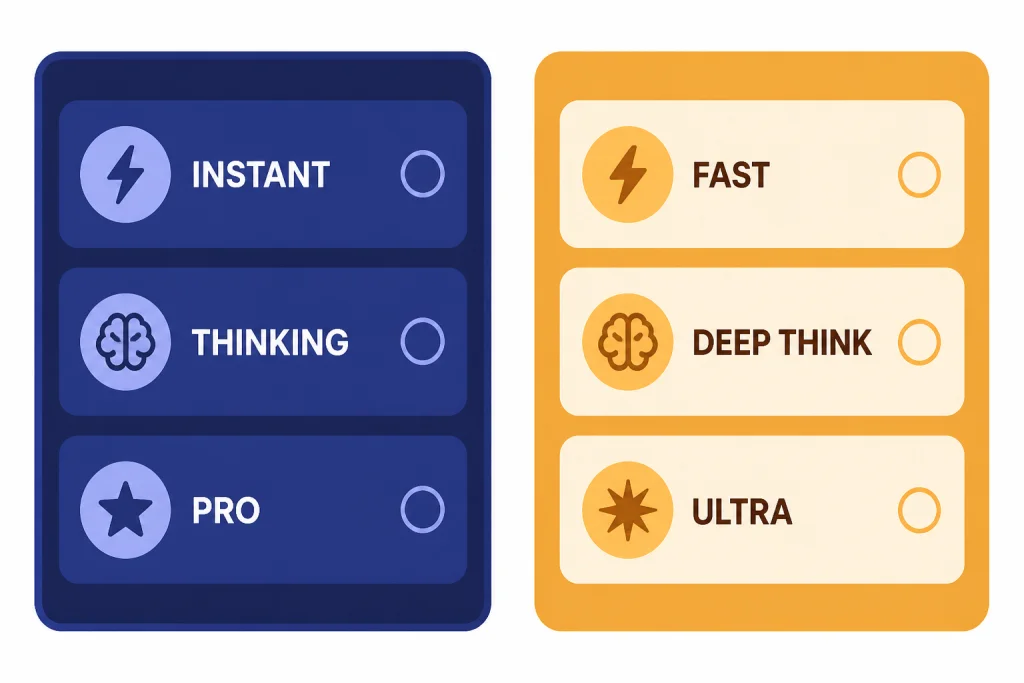
In ChatGPT, OpenAI describes GPT-5.3 Instant as the fast everyday workhorse, GPT-5.4 Thinking as the deeper reasoning option, and GPT-5.4 Pro as the highest-capability GPT-5.4 option for the hardest long-running workflows.[1] OpenAI also states that GPT-4o, GPT-4.1, GPT-4.1 mini, OpenAI o4-mini, and earlier GPT-5 Instant and Thinking options were retired from ChatGPT on February 13, 2026, so an old GPT-4o vs Gemini comparison is no longer the right frame for most current ChatGPT users.[1]
Google’s current Gemini app framing is similar. Google says the Gemini 3 family helps power Fast, Thinking, and Pro modes in Gemini Apps, with higher Thinking and Pro limits for paid Google AI plans.[8] Google released Gemini 3.1 Pro on February 19, 2026, and said it was rolling out to the Gemini API, Vertex AI, Gemini Enterprise, the Gemini app, and NotebookLM.[6]
If you want a beginner explanation of the underlying term, read what GPT means. If you want to understand how OpenAI’s reasoning line differs from the general GPT line, read GPT vs the o-Series.
Model quality: reasoning, writing, and coding
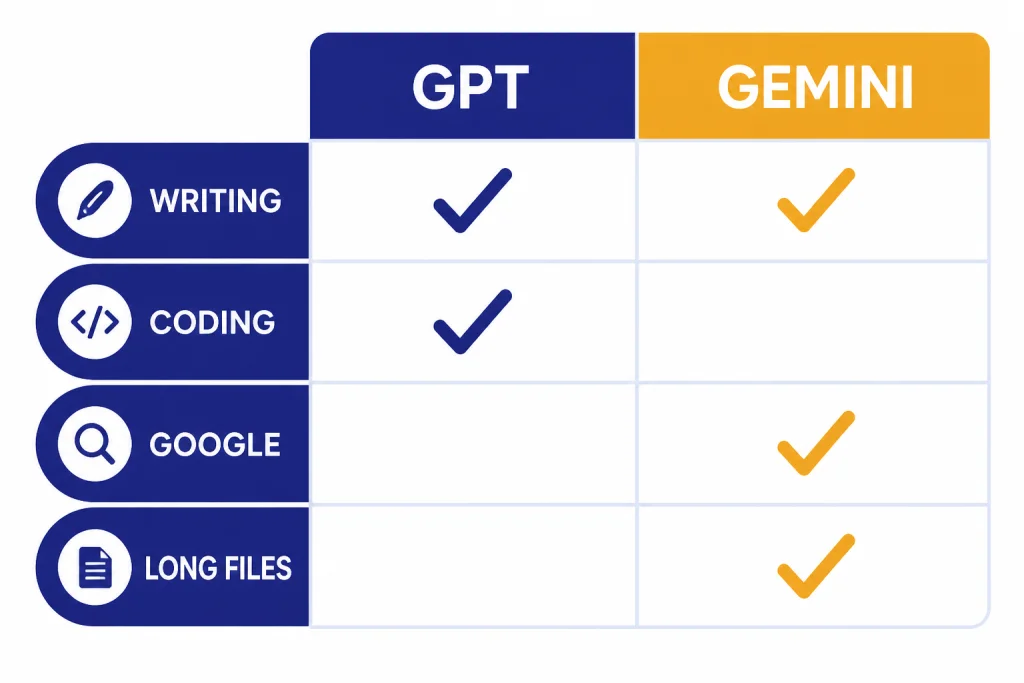
For general writing, GPT still feels like the more dependable default. It tends to produce cleaner drafts, better editing passes, and more controllable formats. That matters for emails, strategy memos, lesson plans, proposals, and article outlines. Gemini is often strong at structured explanations, especially when the task benefits from Google’s multimodal and search-adjacent context.
For reasoning, the gap depends on the problem. OpenAI says GPT-5.4 Thinking is stronger than earlier Thinking models at spreadsheet creation and editing, polished frontend code, hard math, document understanding, instruction following, image understanding, tool use, and research tasks that combine web information.[1] Google says Gemini 3.1 Pro is designed for complex tasks where a simple answer is not enough, and reports a verified 77.1% score on ARC-AGI-2, more than double Gemini 3 Pro’s reasoning performance on that benchmark.[6]
Those company benchmarks should not be treated as a final scoreboard. They use different test suites, release notes emphasize strengths, and real work often fails for mundane reasons: missing context, bad prompts, weak tool permissions, or an answer that is correct but not useful in your format.
Writing
Choose GPT if your main work is drafting, rewriting, editing, summarizing, or turning messy notes into polished output. It is especially useful when you need the same assistant to shift between terse executive language, code comments, support replies, and long-form explanation.
Coding
Choose GPT if your work includes code reviews, refactors, debugging, tests, spreadsheet automation, and agentic coding workflows. OpenAI says GPT-5.4 brings recent advances in reasoning, coding, and agentic workflows into one frontier model and incorporates coding capabilities from GPT-5.3-Codex.[2] For latency-sensitive GPT work, our fastest GPT model guide is the better follow-up.
Choose Gemini if your coding work is tightly connected to Google AI Studio, Vertex AI, Android Studio, Gemini CLI, or Google Antigravity. Google’s Gemini 3.1 Pro launch emphasized developer access across those surfaces and highlighted examples involving code-based animation, system synthesis, and interactive design.[6]
Context, files, and multimodal work
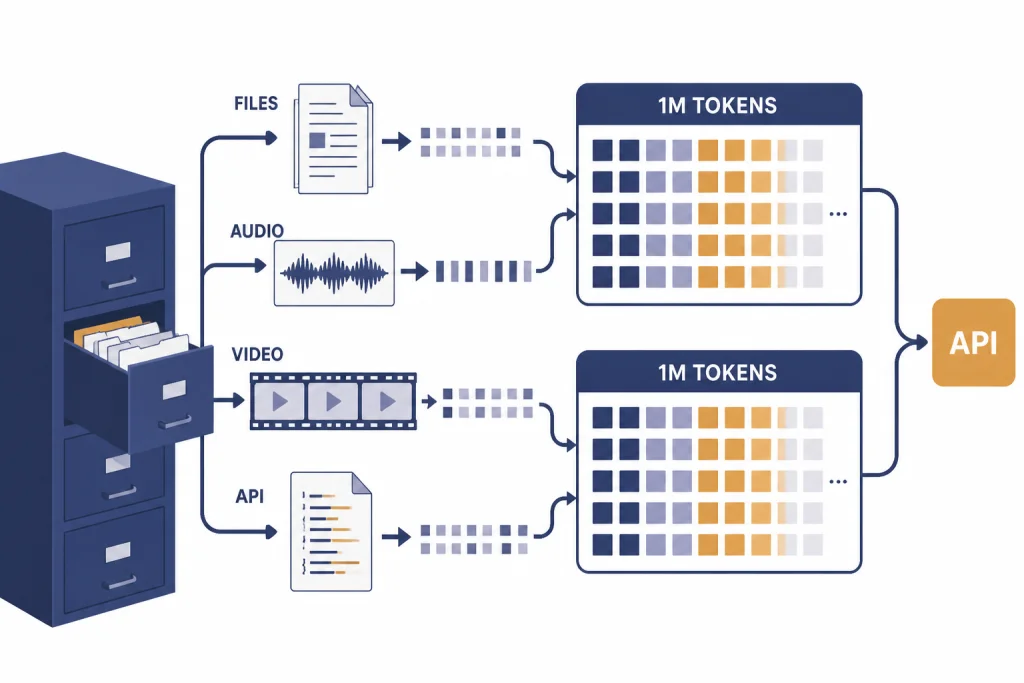
Context is one of Gemini’s clearest advantages in the consumer story. Google’s Gemini support page says a larger context window lets Gemini understand more at once and gives the example that a 1 million-token context window can cover up to 1,500 pages of text or 30,000 lines of code.[8] That is useful for legal packets, research archives, technical manuals, lecture transcripts, and large codebases.
For developers, the official API pages show both model families in the same million-token class. Do not copy those API numbers directly onto every consumer plan. OpenAI has not published an official figure for one universal ChatGPT context window by plan, and app limits can vary by plan, mode, and feature.
| Developer model | Published context or input limit | Published max output | Notes |
|---|---|---|---|
| GPT-5.4 API | 1,050,000 context window[3] | 128,000 max output tokens[3] | OpenAI lists $2.50 per 1M input tokens and $15.00 per 1M output tokens for GPT-5.4 text tokens.[3] |
| Gemini 3.1 Pro Preview API | 1,048,576 input token limit[7] | 65,536 output token limit[7] | Google lists text, image, video, audio, and PDF inputs, with text output.[7] |
For practical file work, Gemini is more attractive if your files already live in Drive, Gmail, Photos, and NotebookLM. GPT is more attractive if you need a flexible assistant across many file types, custom GPTs, apps, and coding tools. For a model-by-model context reference, use our context window comparison.
Search, apps, and agents
Gemini’s biggest structural advantage is that Google owns the surrounding workspace. Google AI Pro includes the Gemini app, Gemini in Gmail, Docs, Vids, and more, NotebookLM, and Google One storage.[9] For many users, that matters more than a small difference in answer style. The best AI is often the one that can see the calendar, inbox, document, and file you are already using.
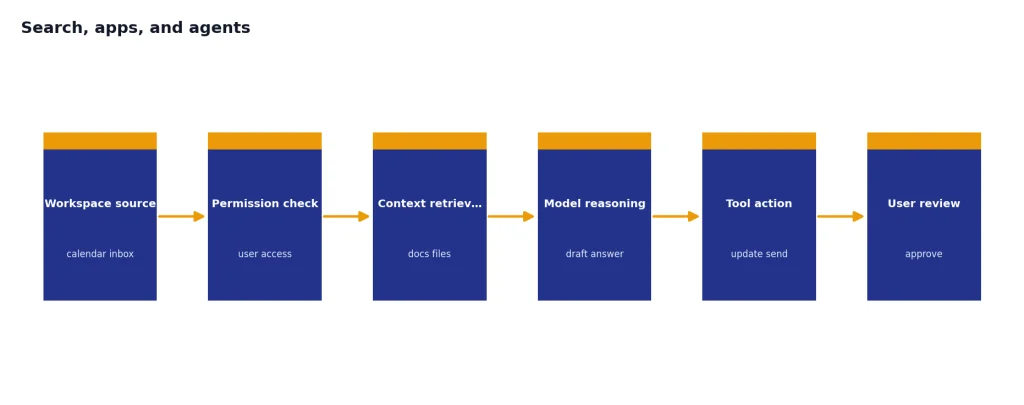
ChatGPT is not isolated from work apps. OpenAI’s April 8, 2026 release note says Outlook Email and Calendar apps for ChatGPT can work with delegated or shared Outlook mailboxes and calendars when the user has access.[11] OpenAI also recently unified Google Drive connectors in ChatGPT and added updates for Box, Notion, Linear, and Dropbox apps.[11] That makes ChatGPT stronger as a cross-vendor workspace, especially in mixed Microsoft, Google, Slack, GitHub, and Notion environments.
Agents are a separate question. Google AI Ultra includes higher limits and access to Deep Think and Gemini Agent in supported regions and languages.[9] ChatGPT’s advantage is breadth: custom GPTs, projects, apps, Codex, file workflows, and a model picker that makes it easy to move between fast and deeper reasoning modes.[1]
For video and creative ecosystems, compare the surrounding tools rather than only the chatbots. Our Sora vs Google Veo guide covers that separate media-model fight.
Pricing and plan value
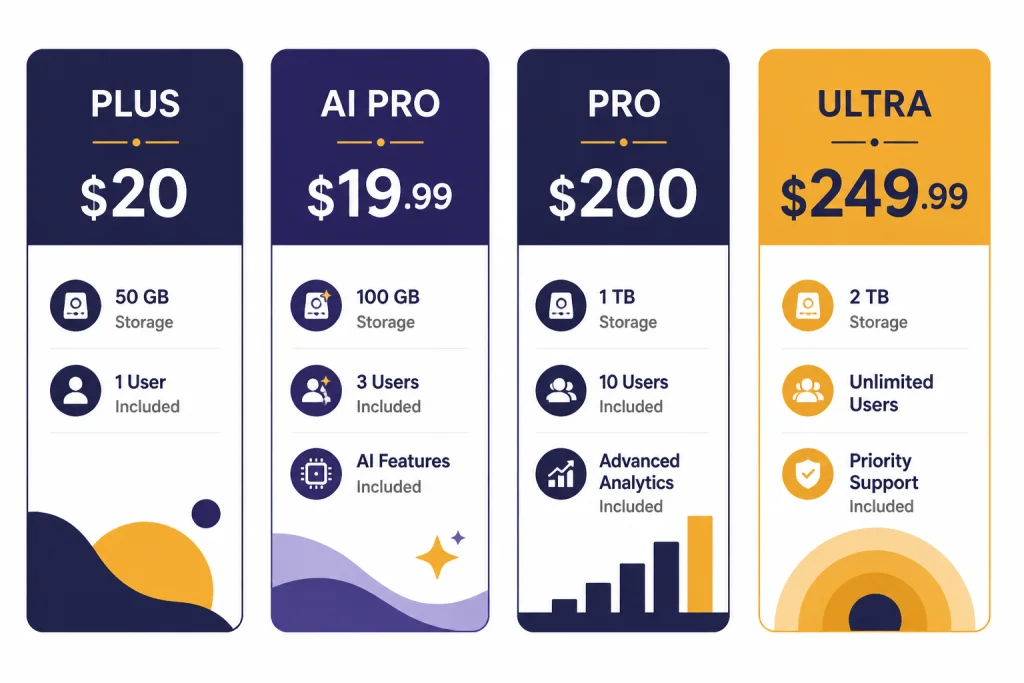
On price alone, the everyday paid tiers are almost tied. The difference is what the bundle includes. ChatGPT Plus is a better pure chatbot subscription if you mostly want writing, analysis, image generation, custom GPTs, projects, and coding help. Google AI Pro is a better bundle if you also value Google One storage and Google app integration.
| Plan | Published price | Best for | Important note |
|---|---|---|---|
| ChatGPT Plus | $20/month[4] | People who want expanded ChatGPT access for daily work | Strongest value if ChatGPT is your main AI workspace. |
| Google AI Pro | $19.99/month[9] | People who want Gemini plus Google One storage | Google’s plan page lists 5 TB of storage with Google AI Pro.[9] |
| ChatGPT Pro | $200/month[5] | Heavy users who need more access to OpenAI’s top tools | Best evaluated against your actual weekly usage, not only the model name. |
| Google AI Ultra | $249.99/month in the U.S. at launch[10] | Users who need Google’s highest AI limits and premium bundle | Google described Ultra as including highest usage limits, 30 TB of storage, YouTube Premium, and advanced Gemini access.[10] |
If you only want one personal AI subscription, start with the ecosystem you already use. If your documents are in Google Drive and your email is Gmail, Gemini’s bundle is hard to ignore. If your work spans many tools and you want the broadest general assistant, ChatGPT Plus remains the cleaner first purchase. Developers should compare app subscription pricing separately from API usage; our OpenAI API pricing guide covers that side.
Developer API comparison
For developers, GPT vs Gemini is less about the chat app and more about model behavior, latency, tooling, and billing. GPT-5.4’s API page lists hosted tool support such as web search, file search, image generation, code interpreter, hosted shell, computer use, MCP, and other tool capabilities.[3] Gemini 3.1 Pro Preview’s model page lists support for code execution, function calling, search grounding, structured outputs, thinking, URL context, Google Maps grounding, and other capabilities.[7]
Use OpenAI first if your product depends on polished text output, agentic code work, or a toolchain already built around OpenAI-compatible APIs. Use Gemini first if you need Google-native grounding, Vertex AI procurement, Android workflows, or large multimodal context from the start. Many serious teams will evaluate both.
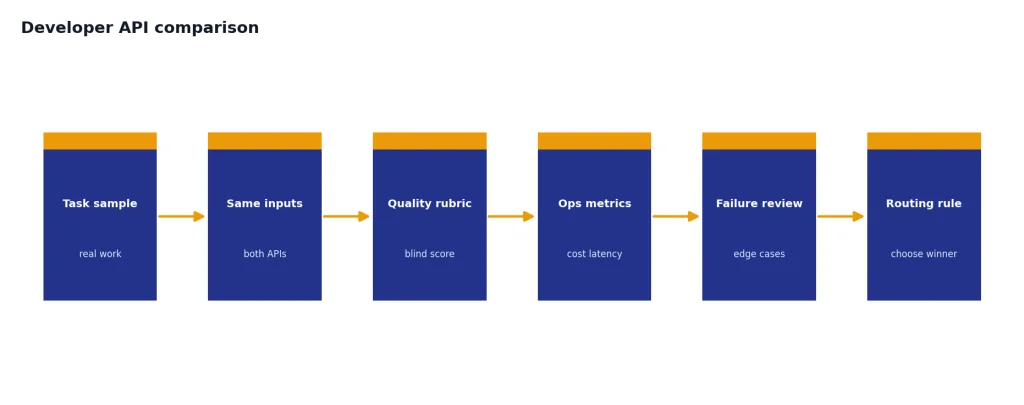
The best developer decision is to build a small benchmark from your own work. Include short prompts, long prompts, files, tool calls, failure cases, and cost per completed task. Do not benchmark only one impressive demo. The model that wins a 30-second test may not win a 30-day production workflow.
Which one should you choose?
Choose GPT if you want one assistant that can draft, edit, reason, code, summarize, use files, and fit into many non-Google workflows. It is the better first choice for consultants, writers, analysts, software teams, founders, and students who do not live entirely in Google Workspace.
Choose Gemini if you already pay for Google One, depend on Gmail and Drive, use NotebookLM, or want AI close to Google Search and Google Workspace. It is also a strong pick for long file review and multimodal study workflows.
- Students: Gemini is compelling if Google AI Pro is bundled or discounted through school. GPT is better if you need tutoring, writing feedback, and coding in one place.
- Writers and marketers: Start with GPT. It is easier to control voice, length, structure, and revision loops.
- Developers: Start with GPT if you want coding-agent depth. Test Gemini if your app needs very large multimodal context or Google Cloud deployment.
- Google Workspace teams: Start with Gemini, then add ChatGPT only where it clearly improves output quality or cross-tool work.
- Researchers: Use both if budget allows. Gemini can be excellent for long source packets. GPT can be excellent for synthesis, critique, and final writing.
If you are still undecided, compare the whole market, not only these two. Our guide to the best AI chatbot alternatives to ChatGPT is the next stop.
Frequently asked questions
Is GPT better than Gemini in 2026?
GPT is better for most people who want one general-purpose assistant for writing, coding, reasoning, and cross-tool work. Gemini is better for people who live in Google’s ecosystem or need long multimodal context. The right answer depends on workflow more than brand.
Which is cheaper, ChatGPT Plus or Google AI Pro?
ChatGPT Plus is $20/month, while Google AI Pro is $19.99/month in Google’s published plan page.[4][9] The practical value differs because Google AI Pro includes Google One storage, while ChatGPT Plus is focused on ChatGPT features. If you need storage, Gemini’s paid tier may be the better bundle.
Which has the bigger context window?
For developer APIs, both are in the million-token class: GPT-5.4 lists a 1,050,000 context window, and Gemini 3.1 Pro Preview lists a 1,048,576 input token limit.[3][7] For consumer apps, do not assume the API number always applies. OpenAI has not published an official figure for one universal ChatGPT context window by plan.
Is Gemini better if I use Gmail and Google Docs?
Yes, Gemini has a natural advantage if your work is already inside Google apps. Google AI Pro includes Gemini in Gmail, Docs, Vids, and more, plus NotebookLM and Google One storage.[9] ChatGPT can still be better for final drafting, coding, and mixed-tool work.
Should developers use the OpenAI API or the Gemini API?
Developers should test both on their own tasks. OpenAI’s GPT-5.4 API page emphasizes a broad tool surface and publishes token pricing for GPT-5.4.[3] Gemini 3.1 Pro Preview is attractive for large multimodal context, Google grounding, and Google Cloud deployment paths.[7]
Should I pay for both GPT and Gemini?
Pay for both only if you have distinct use cases. A common split is ChatGPT for writing, coding, and reasoning, with Gemini for Google Workspace, NotebookLM, and long files. If you are cost-sensitive, pay for the one connected to your daily work and keep the other on a free tier.