

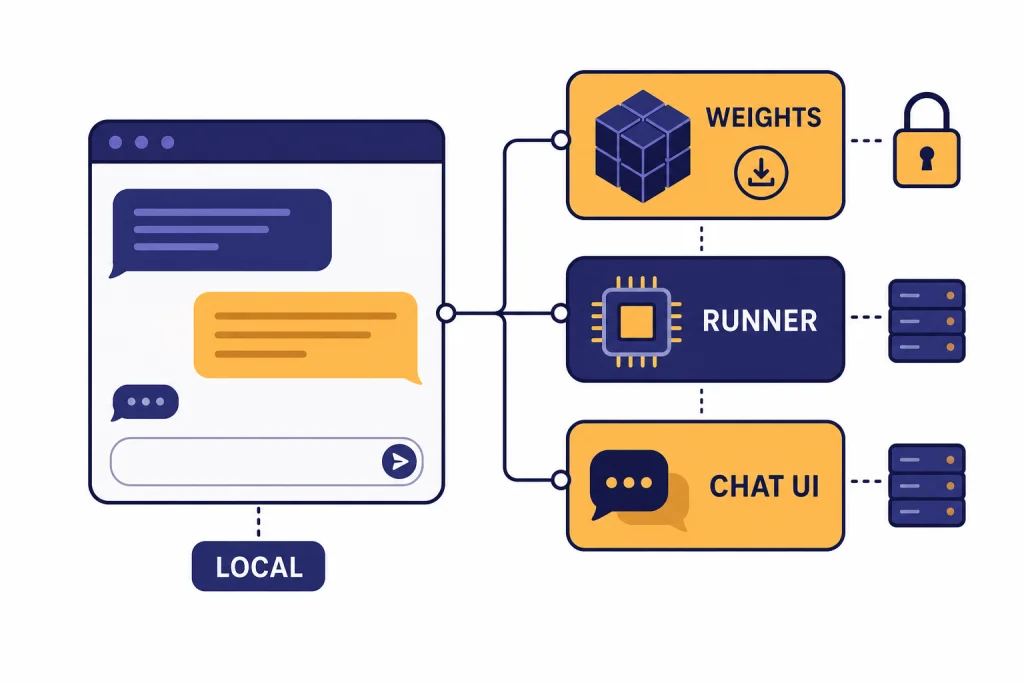
The best open source ChatGPT alternatives are not one product. They are a stack: an open-weight model, a local runner, and sometimes a browser-based chat interface. For most people in 2026, the strongest starting point is gpt-oss for OpenAI-style reasoning, Llama for multimodal assistant work, DeepSeek-R1 for step-by-step reasoning, Qwen3 for multilingual and coding flexibility, and Mistral Small for lightweight enterprise-friendly deployments. The important caveat is terminology. Many “open source AI” options are really open-weight models. You can download and run the weights, but you may not get the full training data or training code. This guide separates the practical choices from the licensing details.
Quick picks
If you want a ChatGPT-like experience without sending every prompt to a proprietary chat service, start with the model first and the interface second. The model determines reasoning quality, language coverage, context length, license terms, and hardware needs. The interface determines how pleasant it feels to use every day.
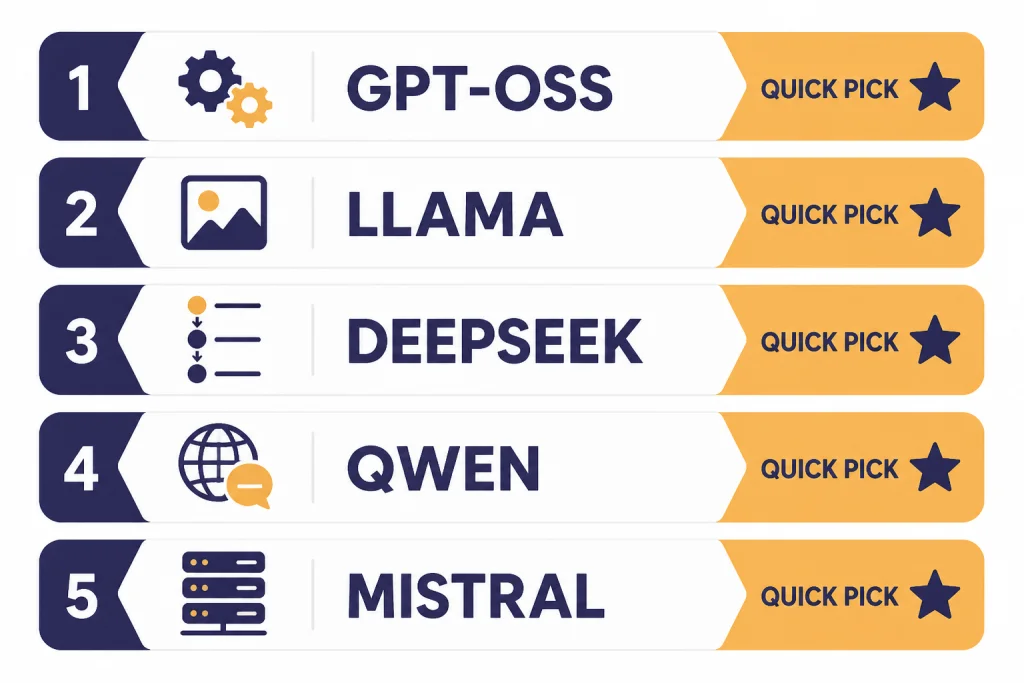
Best overall starting point: gpt-oss. OpenAI released gpt-oss-120b and gpt-oss-20b as open-weight language models under Apache 2.0, with gpt-oss-120b listed at 117B total parameters and a 128k context length, and gpt-oss-20b listed at 21B total parameters and a 128k context length.[2]
Best broad assistant model: Llama 4. Meta’s Llama 4 Scout and Llama 4 Maverick are natively multimodal open-weight models, with Scout listed at 109B total parameters and a 10M context length, and Maverick listed at 400B total parameters and a 1M context length.[3]
Best reasoning-first pick: DeepSeek-R1. The DeepSeek-R1 model card lists the main DeepSeek-R1 model at 671B total parameters, 37B activated parameters, and 128K context length, with the code repository and model weights under the MIT License.[4]
Best flexible open family: Qwen3. The Qwen team open-weighted Qwen3-235B-A22B, Qwen3-30B-A3B, and six dense models under Apache 2.0, with model sizes ranging from Qwen3-0.6B to Qwen3-235B-A22B.[5]
Best compact enterprise pick: Mistral Small 3.2. Mistral’s documentation lists Mistral Small 3.2 as released on June 20, 2025, with a 128k context window.[6] Mistral’s governance page classifies Mistral Small 3.2 as an Open Source GPAIM update.[7]
If you mainly want no-cost web tools, see our broader free ChatGPT alternatives that actually work. If you want the full market view beyond open models, use our best ChatGPT alternatives in 2026 guide.
Open source vs. open-weight
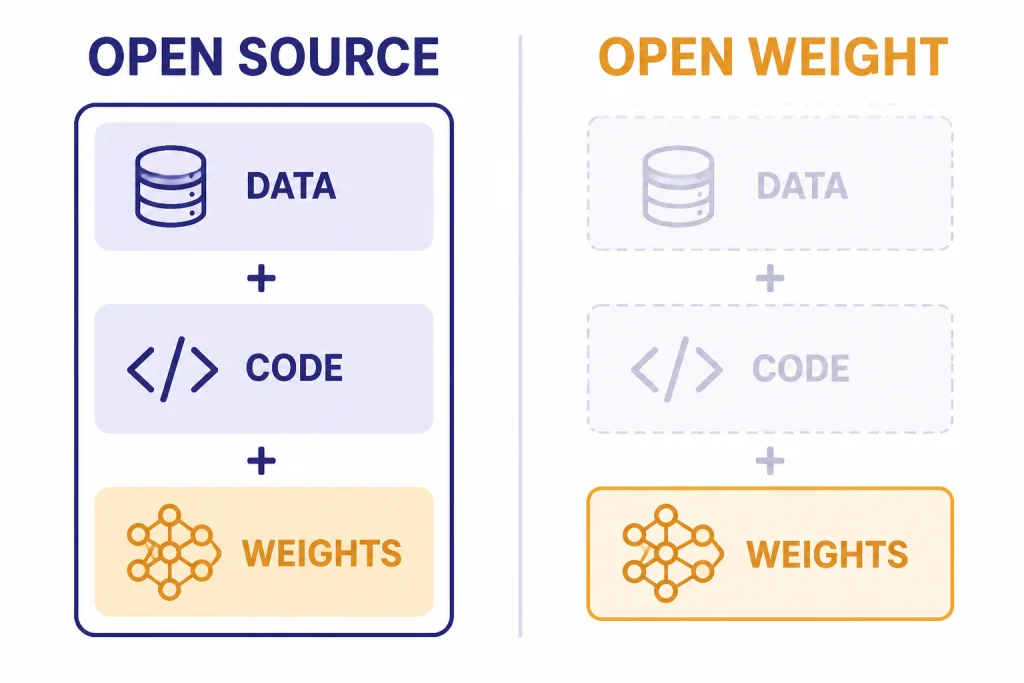
The phrase “open source ChatGPT alternative” gets used loosely. For software, open source usually means the source code can be inspected, modified, and redistributed under a recognized open license. For AI models, the situation is more complicated because a model is not only code. It also includes weights, architecture, inference code, training data information, and training process details.
The Open Source Initiative’s Open Source AI Definition says open source AI requires data information, complete source code used to train and run the system, and parameters such as weights or configuration settings under approved terms.[1] It also says “Open Source models” and “Open Source weights” must include the data information and code used to derive the parameters.[1]
That means many popular “open source” models are better described as open-weight. You can download the trained weights and run them yourself, but the full recipe may not be available. This still matters. Open weights let you self-host, fine-tune in some cases, reduce vendor lock-in, test prompts offline, and keep sensitive data out of a hosted chatbot. But open weights are not always the same as full open source under the strictest definition.
For a practical reader, the most useful distinction is simple: can you run it, can you modify it, can you use it commercially, and what does the license restrict? Read the license before building a business process around any model. A permissive license such as Apache 2.0 or MIT is easier to reason about than a custom community license, but even permissive models can have separate usage policies or inherited restrictions.
Best open source ChatGPT alternative models
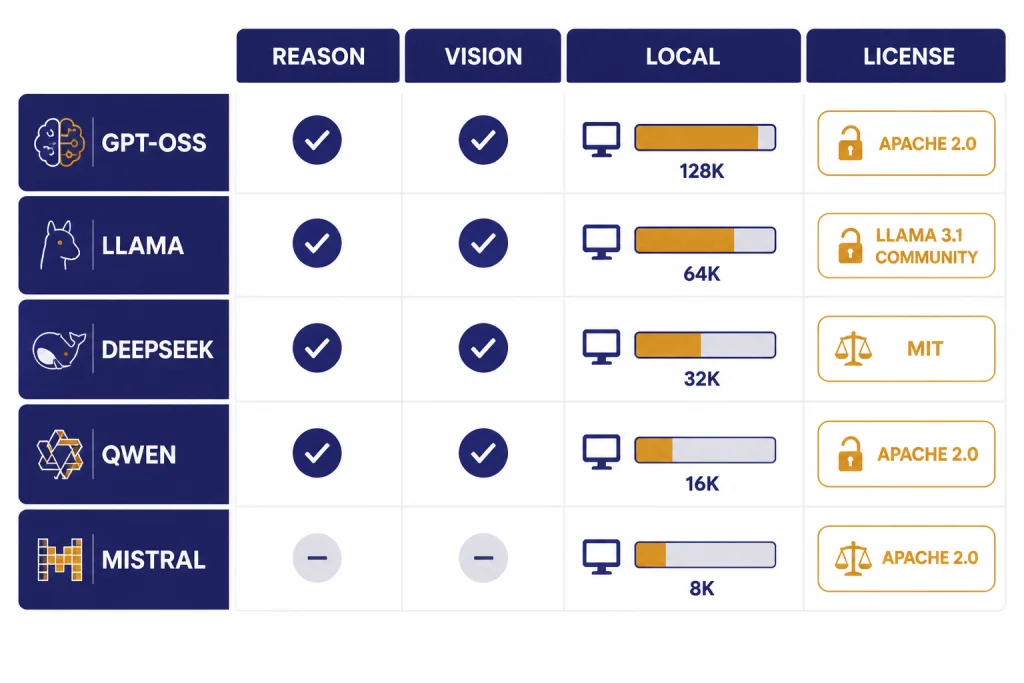
These are the model families most readers should evaluate first. The table focuses on practical fit, not only benchmark scores. A great local model is the one you can actually run, govern, and explain to your team.
| Model family | Best fit | Notable published facts | License posture |
|---|---|---|---|
| gpt-oss | Reasoning, agents, local OpenAI-style workflows | gpt-oss-120b is listed at 117B total parameters, 5.1B active parameters per token, and 128k context; gpt-oss-20b is listed at 21B total parameters, 3.6B active parameters per token, and 128k context.[2] | Apache 2.0, according to OpenAI.[2] |
| Llama 4 | General assistant work, multimodal prompts, long context experiments | Llama 4 Scout is listed with 109B total parameters and 10M context; Llama 4 Maverick is listed with 400B total parameters and 1M context.[3] | Custom Llama 4 Community License.[3] |
| DeepSeek-R1 | Math, coding, structured reasoning, distillation experiments | DeepSeek-R1 is listed at 671B total parameters, 37B activated parameters, and 128K context.[4] | MIT License for the code repository and model weights, according to the model card.[4] |
| Qwen3 | Multilingual work, coding, smaller local models, flexible deployments | Qwen3 includes Qwen3-235B-A22B, Qwen3-30B-A3B, and six dense models from Qwen3-0.6B through Qwen3-32B.[5] | Apache 2.0 for the open-weighted Qwen3 models listed in the release post.[5] |
| Mistral Small 3.2 | Compact assistant use, function calling, document tasks, European vendor preference | Mistral lists Mistral Small 3.2 with a 128k context window and a June 20, 2025 release date.[6] | Mistral classifies the family as Open Source GPAIM on its governance page.[7] |
gpt-oss
gpt-oss is the closest conceptual fit for people who like ChatGPT but want local control. It comes from OpenAI, uses OpenAI’s open-weight model line, and is designed for reasoning and tool-use workflows rather than casual completion only. OpenAI says gpt-oss-120b runs efficiently on a single 80 GB GPU, while gpt-oss-20b can run on edge devices with 16 GB of memory.[2]
Pick gpt-oss if you want a familiar reasoning style, a permissive license, and strong support across local tooling. Do not assume it is ChatGPT in a downloadable file. OpenAI says these are open-weight language models, not the same hosted ChatGPT product.[2] For hosted model pricing and API trade-offs, compare against our OpenAI API pricing guide.
Llama 4
Llama remains one of the most important open-weight ecosystems because of community support, derivatives, quantized builds, and tooling. Llama 4 Scout is the long-context option, while Llama 4 Maverick is the larger generalist option. Meta’s model card says both accept multilingual text and image inputs and output multilingual text and code.[3]
The license is the main caveat. Llama 4 uses a custom community license, not a plain Apache 2.0 or MIT license.[3] That does not make it unusable. It does mean teams should review the terms before using it in production.
DeepSeek-R1
DeepSeek-R1 is the model to test when your prompts require deliberate reasoning. It is especially relevant for math, code review, logic puzzles, and multi-step analysis. The model card also lists distilled checkpoints based on Qwen2.5 and Llama series models, including 1.5B, 7B, 8B, 14B, 32B, and 70B variants.[4]
The full DeepSeek-R1 model is large. Most individuals will use a hosted provider or a smaller distilled version. If your main task is programming, also compare these options with our best ChatGPT alternatives for coding.
Qwen3
Qwen3 is a strong family when you want choice. The release includes dense models for smaller deployments and mixture-of-experts models for higher-end systems. The Qwen team says the family supports switching between thinking and non-thinking modes, and its release post emphasizes reasoning, instruction following, agent capabilities, and multilingual support.[5]
Qwen3 is a good first test for multilingual teams, coding assistants, and users who want a range of model sizes. It also pairs well with local runners because there are small enough options for laptops and large enough options for servers.
Mistral Small 3.2
Mistral Small 3.2 is not the biggest option here, but it is a practical one. Mistral lists support for chat completions, function calling, agents and conversations, structured outputs, document Q&A, OCR-related features, and more on the model card.[6] That makes it attractive for workflow builders who care about predictability more than maximum model size.
Use Mistral Small 3.2 when you want a compact assistant with a clear vendor source and a 128k context window.[6] If your main use is writing, compare it with the models in our best ChatGPT alternatives for writing.
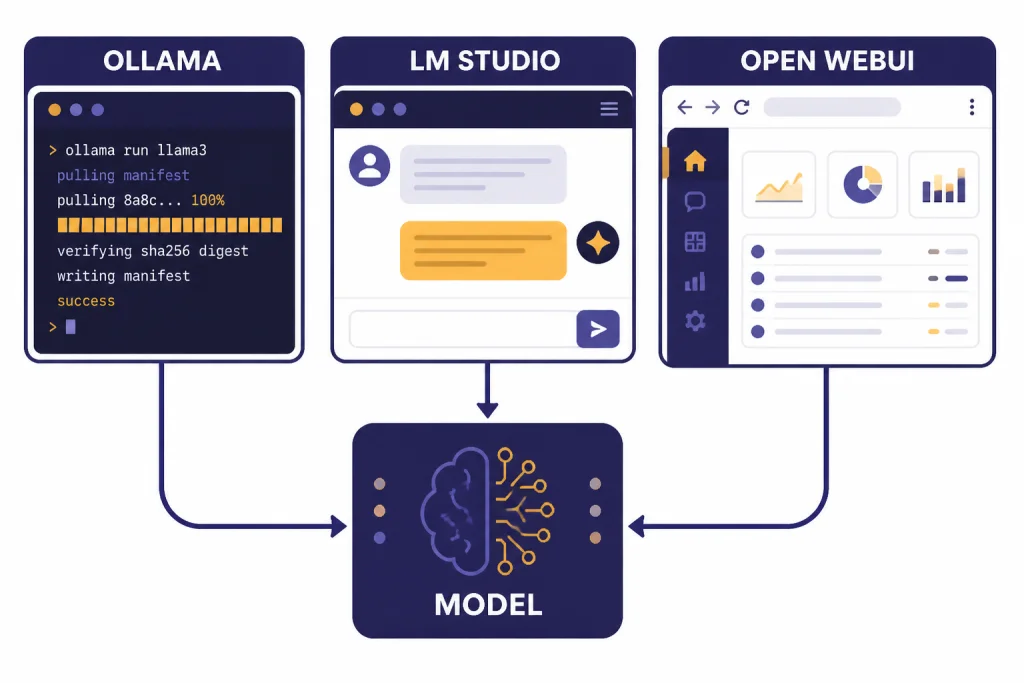
Best apps for running open models
A model alone is not a ChatGPT alternative. You also need a way to download it, run it, chat with it, and connect it to tools or documents. These are the practical app layers to consider.
| App or platform | Best for | Why it matters |
|---|---|---|
| Ollama | Developers and local model runners | Ollama provides a REST API for running and managing models and can run models from its library with commands such as ollama run gemma3.[8] |
| LM Studio | Desktop users who want a polished local app | LM Studio lets users download and run local LLMs, use a chat interface, serve local models on OpenAI-like endpoints, and chat with documents offline.[9] |
| Open WebUI | Teams that want a self-hosted ChatGPT-style interface | Open WebUI is a self-hosted AI platform designed to operate offline, with support for Ollama and OpenAI-compatible APIs.[10] |
Use Ollama if you are comfortable with a terminal and want a simple local model server. It is especially useful when you want to connect an app, script, agent, or coding tool to a local model endpoint.
Use LM Studio if you want a desktop experience. It is easier for non-developers because it combines model search, download, chat, local serving, and offline document chat in one app.[9]
Use Open WebUI if you want a browser interface for yourself or a small team. It supports local RAG, web search for RAG, role-based access control, and multiple model conversations according to its project page.[10]
Mobile is the weak spot for fully local open models. Phones can run small models, but the best ChatGPT-like experience still usually comes from cloud apps or a remote server you control. For phone-first options, see our apps like ChatGPT and best mobile alternatives to ChatGPT guides.
How to choose by use case
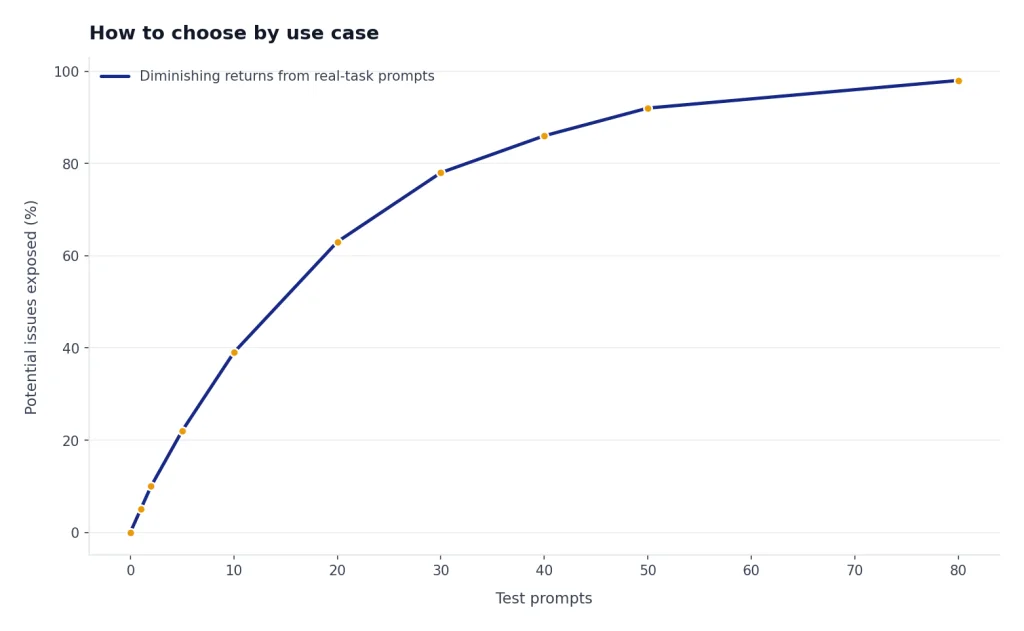
Do not pick an open model by popularity alone. Pick it by the work you need it to do.
- Private writing and brainstorming: Start with gpt-oss-20b, Qwen3 smaller dense models, or Mistral Small 3.2. You want fast response time and a model that follows style instructions consistently.
- Coding: Test DeepSeek-R1, Qwen3, and gpt-oss. Use small prompts from your real codebase, not synthetic demos. Watch for hallucinated APIs and bad refactors.
- Research and document review: Prioritize context length, retrieval quality, and citations in your app layer. Open WebUI’s local RAG features can help if you want a self-hosted document chat setup.[10] For web-native research tools, compare our best ChatGPT alternatives for research.
- Multilingual work: Test Qwen3 and Llama 4 first. Qwen’s release emphasizes support for more than 100 languages and dialects.[5] Meta lists 12 supported languages for Llama 4’s model card and notes broader pretraining coverage.[3]
- Image understanding: Test Llama 4 because the model card lists multilingual text and image as input modalities for Scout and Maverick.[3] If your priority is image generation rather than image understanding, compare dedicated tools in our DALL-E vs Stable Diffusion guide.
The best workflow is to build a small evaluation set. Include your real emails, tickets, snippets, policies, or study notes after removing sensitive data. Run each model against the same prompts. Score the answers for accuracy, usefulness, refusal behavior, formatting, latency, and cost.
Privacy, cost, and hardware trade-offs
Open source ChatGPT alternatives are appealing because they move control closer to you. That does not make them automatically easier or cheaper.
Privacy
Local inference can keep prompts, files, and outputs on your device or server. This is valuable for confidential drafts, client material, internal policies, and regulated workflows. It only works if the whole stack stays local. If you connect a hosted search tool, hosted vector database, telemetry-heavy app, or remote inference provider, your data may still leave your environment.
Cost
Local models can eliminate per-token API bills, but they replace them with hardware, electricity, setup time, and maintenance. A small model on a laptop may be effectively free after setup. A large model may require a GPU workstation or rented server. For many teams, the cheapest answer is hybrid: run small private tasks locally and use hosted frontier models when quality matters more than control.
Hardware
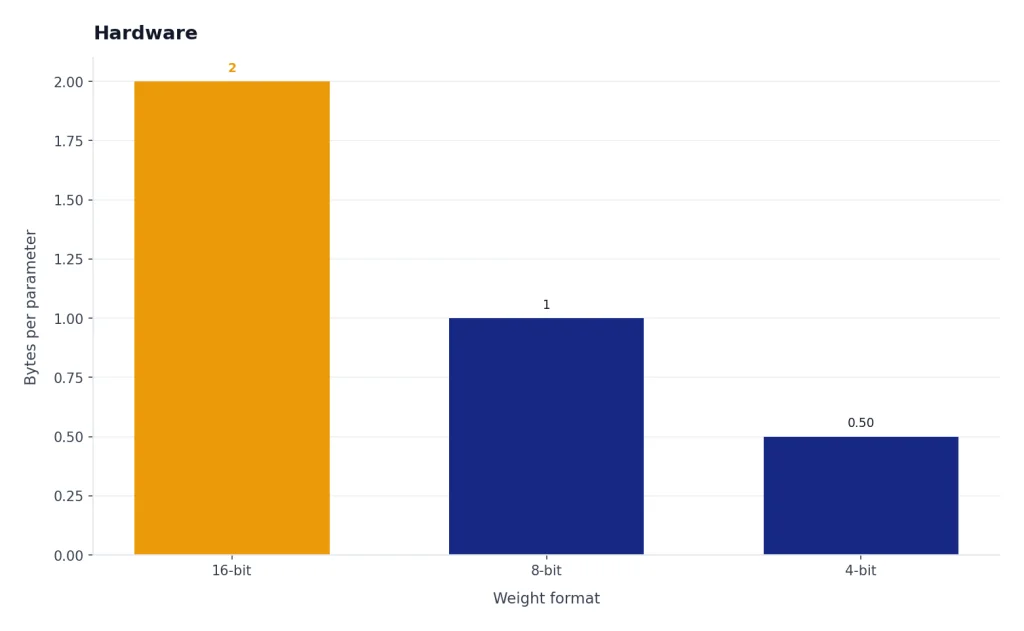
Model size matters. OpenAI says gpt-oss-120b can run on a single 80 GB GPU and gpt-oss-20b can run on devices with 16 GB of memory.[2] That does not mean every laptop will feel fast. Quantization, RAM, VRAM, CPU speed, disk speed, context length, and batch size all affect usability.
Quality
Closed hosted models still often win on convenience, multimodal polish, voice, image generation, browsing, memory, and app integrations. Open models win when you need control, inspection, local deployment, or customization. If you only need a general chatbot and do not care about self-hosting, compare the broader top 10 ChatGPT alternatives in 2026.
A simple setup path
If you are new to local AI, do not start with the largest model. Start with a small model and prove the workflow first.
- Pick a runner. Choose LM Studio if you want a desktop app. Choose Ollama if you want a developer-friendly local service. Choose Open WebUI if you want a self-hosted browser interface.
- Download one small model. Try gpt-oss-20b if your hardware can handle it, or a smaller Qwen3 model if you need something lighter. OpenAI lists gpt-oss-20b at 21B total parameters.[2] Qwen’s release includes smaller dense options such as Qwen3-0.6B, Qwen3-1.7B, Qwen3-4B, and Qwen3-8B.[5]
- Test real prompts. Use your own tasks. Ask for summaries, rewrites, code explanations, outlines, document Q&A, and structured outputs.
- Check privacy settings. Disable telemetry if the tool allows it. Avoid hosted plugins until you understand where data goes.
- Add retrieval only after chat works. Document chat adds complexity. Use local RAG after you are satisfied with basic model behavior.
- Upgrade slowly. Move from a small model to a larger one only when you know the smaller model fails for a task that matters.
Teams should also write a short policy. It should say which models are approved, which data may be entered, where logs live, how outputs are reviewed, and who maintains the system. Open models reduce vendor dependence, but they do not remove the need for governance.
When not to use an open source alternative
Open source ChatGPT alternatives are not always the right choice. Avoid them when your real requirement is convenience, not control.
- You need the best voice assistant experience. Local text models are not a direct replacement for polished voice products. See our ChatGPT Voice Mode review if voice is the priority.
- You need turnkey image or video generation. Text LLMs are not the same as dedicated media models. Use specialized tools for image generation and video generation.
- You cannot maintain infrastructure. A self-hosted system needs updates, monitoring, model storage, backups, and access control.
- You need guaranteed support. Community models and local tools may not provide the same support contracts as enterprise AI platforms.
- You cannot verify outputs. Local models hallucinate too. They still need human review for legal, medical, financial, academic, and operational decisions.
The safest rule is to use open models where control matters and hosted tools where reliability, support, and product polish matter more. Many users will end up with both.
Frequently asked questions
What is the best open source ChatGPT alternative?
For most users, the best starting point is gpt-oss because it comes from OpenAI, uses an Apache 2.0 license, and has two model sizes listed by OpenAI: gpt-oss-120b and gpt-oss-20b.[2] If you want multimodal image input, test Llama 4. If you want reasoning experiments, test DeepSeek-R1.
Are open source ChatGPT alternatives really open source?
Some are, but many are more accurately called open-weight models. The Open Source Initiative says open source AI should include data information, training and running code, and parameters under approved terms.[1] If a model only gives you weights, it may still be useful, but it is not necessarily fully open source.
Can I run a ChatGPT alternative on my laptop?
Yes, but choose the model carefully. OpenAI says gpt-oss-20b can run on devices with 16 GB of memory.[2] Smaller Qwen3 models may also be better for laptops because the Qwen3 family includes dense models down to Qwen3-0.6B.[5]
Is DeepSeek-R1 better than ChatGPT?
DeepSeek-R1 is a strong reasoning model, but “better” depends on the task. It is attractive for math, coding, and step-by-step reasoning, while hosted ChatGPT may still be better for product polish, voice, images, browsing, and integrations. Test both on your own prompts before switching.
What is the easiest app for local AI chat?
LM Studio is the easiest starting point for many desktop users because it combines model download, chat, local serving, and offline document chat in one app.[9] Ollama is better if you prefer a developer workflow and a local REST API.[8] Open WebUI is better when you want a self-hosted browser interface for multiple users.[10]
Do open source alternatives remove all privacy risk?
No. They reduce privacy risk only when the model, interface, document store, logs, and tools all run in your controlled environment. If you connect hosted search, hosted APIs, external plugins, or remote inference, data may still leave your device or server.