

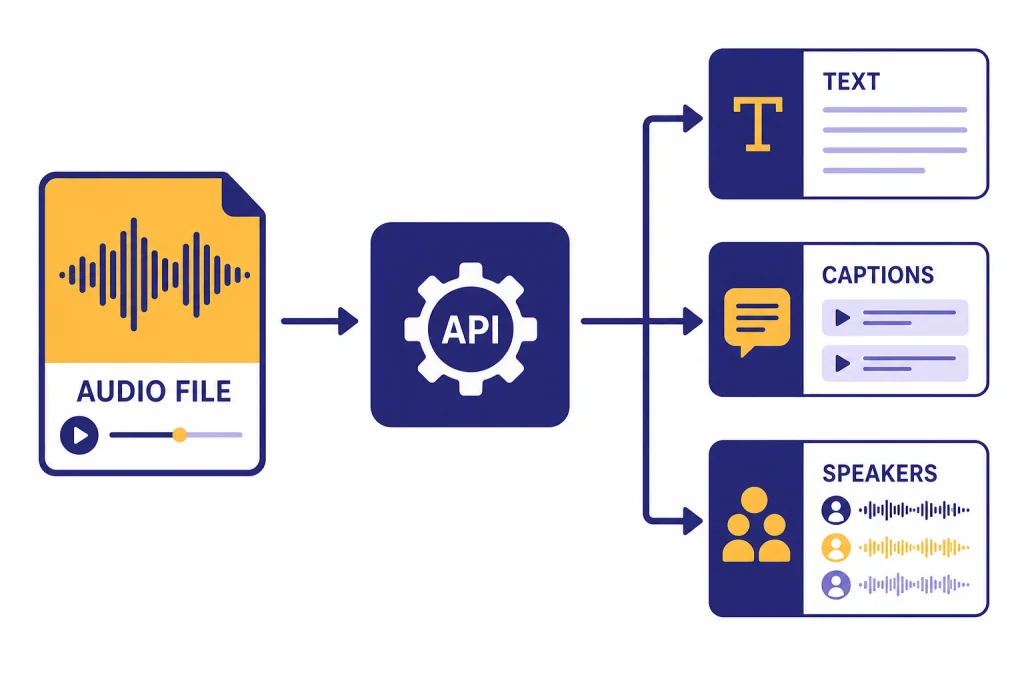
The Whisper API is OpenAI’s hosted speech-to-text option for transcribing audio files and translating non-English audio into English. In current OpenAI docs, “Whisper API” usually means the Audio API’s transcription and translation endpoints, especially the `whisper-1` model, alongside newer models such as `gpt-4o-transcribe`, `gpt-4o-mini-transcribe`, and `gpt-4o-transcribe-diarize`.[1] OpenAI lists `whisper-1` at `$0.006 / minute`; it lists `gpt-4o-transcribe` at an estimated `$0.006 / minute` and `gpt-4o-mini-transcribe` at an estimated `$0.003 / minute`.[2] This guide explains what to use, what it costs, and how to call it from Python, JavaScript, and curl.
What the Whisper API is today
The whisper api is best understood as a product name developers still use for OpenAI’s hosted speech-to-text workflow. The original API exposed the `whisper-1` model through `transcriptions` and `translations` endpoints. OpenAI’s current speech-to-text guide says the Audio API provides two speech-to-text endpoints: `transcriptions` and `translations`.[1]
The naming can be confusing because OpenAI now documents newer transcription models next to `whisper-1`. The transcription endpoint supports `whisper-1`, `gpt-4o-transcribe`, `gpt-4o-mini-transcribe`, and `gpt-4o-transcribe-diarize` in current API reference material.[3] If you searched for “Whisper API,” you probably want one of these three jobs:
- Transcribe audio in its original language. Use `/v1/audio/transcriptions`.
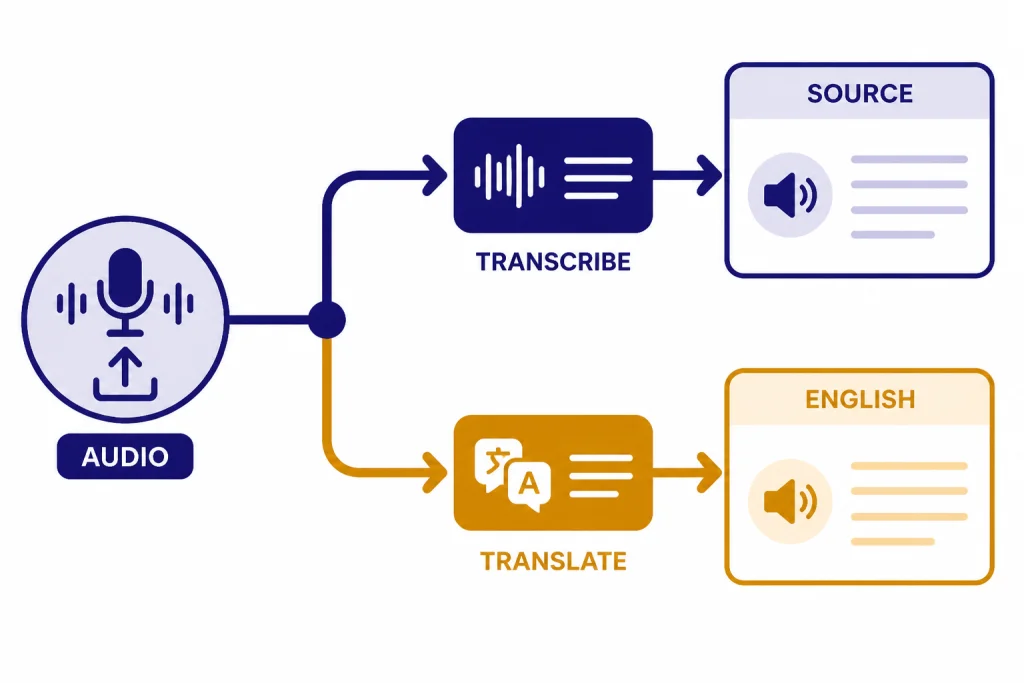
- Translate non-English audio into English text. Use `/v1/audio/translations`, which OpenAI documents as translation into English.[1]
- Add speaker labels to a transcript. Use `gpt-4o-transcribe-diarize` on the transcription endpoint.[8]
The OpenAI launch post for Whisper described the hosted model as a convenient way to use the open-source Whisper large-v2 model without running it yourself.[4] That remains the main benefit of the API. You send an audio file. OpenAI returns text. You do not manage GPUs, model weights, or decoding settings.
There are two important limits to keep in mind before writing code. OpenAI’s speech-to-text guide states that file uploads are limited to `25 MB` and lists supported file types as `mp3`, `mp4`, `mpeg`, `mpga`, `m4a`, `wav`, and `webm`.[1] The API reference also lists `flac` and `ogg` among accepted transcription upload formats.[3] Because the guide and reference are not worded identically, treat the API reference as the safer source when validating uploads in your own application.
Pricing and model choices
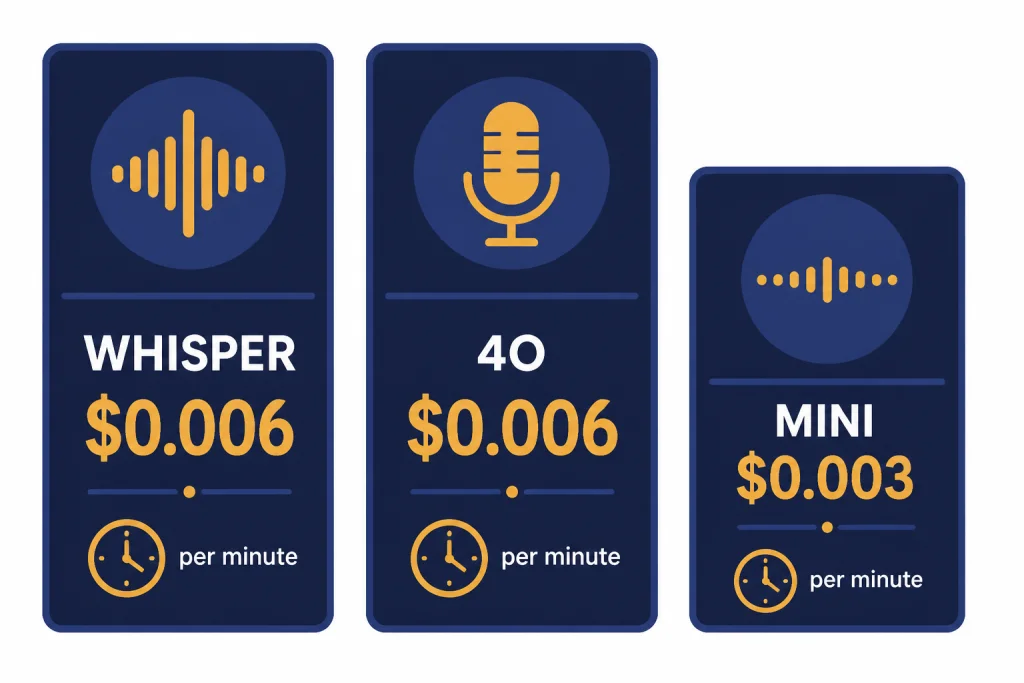
OpenAI prices speech-to-text models differently depending on the model. For `whisper-1`, pricing is duration-based at `$0.006 / minute`.[2] The original Whisper API launch post also listed the same `$0.006 / minute` price, which corroborates the current price for the original hosted Whisper line.[4]
The newer transcription models have token rates and an estimated per-minute cost. OpenAI’s pricing page lists `gpt-4o-transcribe` at `$2.50` input and `$10.00` output per `1M` tokens, with an estimated `$0.006 / minute` transcription cost.[2] It lists `gpt-4o-mini-transcribe` at `$1.25` input and `$5.00` output per `1M` tokens, with an estimated `$0.003 / minute` transcription cost.[2]
Use this table to pick a starting point. If you need a broader cost view across OpenAI models, compare this with our OpenAI API pricing guide or estimate your own workload with the OpenAI API cost calculator.
| Model | Best fit | Pricing signal | Important output support |
|---|---|---|---|
| `whisper-1` | Stable Whisper-style transcription, SRT/VTT captions, word timestamps | `$0.006 / minute`[2] | `json`, `text`, `srt`, `verbose_json`, `vtt`[1] |
| `gpt-4o-transcribe` | Higher-accuracy transcription when captions are not the main output | Estimated `$0.006 / minute`[2] | `json` or plain `text`[1] |
| `gpt-4o-mini-transcribe` | Lower-cost speech-to-text for volume workloads | Estimated `$0.003 / minute`[2] | `json` or plain `text`[1] |
| `gpt-4o-transcribe-diarize` | Meeting or interview transcripts that need speaker labels | Same token rates shown for `gpt-4o-transcribe-diarize` model docs: `$2.50` input and `$10.00` output per `1M` tokens[8] | `json`, `text`, and `diarized_json`[3] |
For a simple cost example, `1,000` audio minutes on `whisper-1` costs about `$6.00` before any other processing you add, because the listed price is `$0.006 / minute`.[2] The same `1,000` audio minutes on `gpt-4o-mini-transcribe` is about `$3.00` using OpenAI’s estimated `$0.003 / minute` figure.[2] These are transcription costs only. If you pass the transcript to another model for summaries, extraction, or moderation, budget for those calls separately.
Quick setup and first transcription
You need an OpenAI API key, a billing-enabled project, and an audio file in a supported format. If you are still setting up credentials, start with our guide to a free OpenAI API key. If you are coming from ChatGPT Plus, note that API usage is managed separately; our ChatGPT Plus API access guide explains the account split.
Install the official SDK for your language, set `OPENAI_API_KEY` in your environment, and call `audio.transcriptions.create`. The API reference documents `POST /audio/transcriptions` as the method that transcribes audio into the input language.[3]
Python: transcribe one file with whisper-1
from openai import OpenAI

client = OpenAI()

with open("meeting.mp3", "rb") as audio_file:
    transcript = client.audio.transcriptions.create(
        model="whisper-1",
        file=audio_file,
        response_format="text"
    )

print(transcript)
This is the smallest useful call for the original Whisper API path. Use `response_format=”text”` when your next step is to store, search, summarize, or display a plain transcript. Use `json` when you want a response object.
JavaScript: transcribe one file with gpt-4o-mini-transcribe
import fs from "fs";
import OpenAI from "openai";

const client = new OpenAI();

const transcript = await client.audio.transcriptions.create({
  model: "gpt-4o-mini-transcribe",
  file: fs.createReadStream("call-recording.m4a"),
  response_format: "text"
});

console.log(transcript);
This version starts with `gpt-4o-mini-transcribe` because OpenAI lists its estimated transcription cost at `$0.003 / minute`, which is lower than the `$0.006 / minute` estimate shown for `gpt-4o-transcribe`.[2] Use it when you want a cost-efficient default and do not need SRT, VTT, or word timestamp output.
curl: transcribe from a shell script
curl --request POST
  --url https://api.openai.com/v1/audio/transcriptions
  --header "Authorization: Bearer $OPENAI_API_KEY"
  --header "Content-Type: multipart/form-data"
  --form [email protected]
  --form model=whisper-1
  --form response_format=text
The curl form is useful for debugging because it removes SDK behavior from the equation. If this succeeds but your app fails, the problem is usually file handling, environment configuration, framework upload parsing, or an SDK wrapper. For broader API reliability patterns, see OpenAI API best practices for production.
Code samples for common jobs
Most Whisper API integrations need more than a raw transcript. They need a caption file, a translated transcript, a speaker-labeled record, or a downstream structured result. The following samples are starting points you can adapt.
Create captions with SRT
`whisper-1` supports `srt` and `vtt` outputs according to OpenAI’s speech-to-text guide.[1] That makes it the practical model choice when your goal is captions rather than only a transcript string.
from openai import OpenAI
from pathlib import Path

client = OpenAI()

with open("webinar.mp3", "rb") as audio_file:
    srt_text = client.audio.transcriptions.create(
        model="whisper-1",
        file=audio_file,
        response_format="srt"
    )

Path("webinar.srt").write_text(srt_text, encoding="utf-8")
Captions are sensitive to timing. Review the output before publishing, especially when the source has music, overlapping speakers, long silence, or domain-specific vocabulary.
Translate speech into English
The translations endpoint translates audio into English text, and OpenAI’s guide states that the translation endpoint supports only `whisper-1`.[1] Use it when the output language should be English rather than the language spoken in the file.
from openai import OpenAI

client = OpenAI()

with open("customer-message-spanish.mp3", "rb") as audio_file:
    english_text = client.audio.translations.create(
        model="whisper-1",
        file=audio_file,
        response_format="text"
    )

print(english_text)
Do not use translation when you need a faithful source-language transcript for legal review, research coding, or medical documentation. In those cases, transcribe in the original language and translate in a separate step so reviewers can inspect both texts.
Return a structured summary after transcription
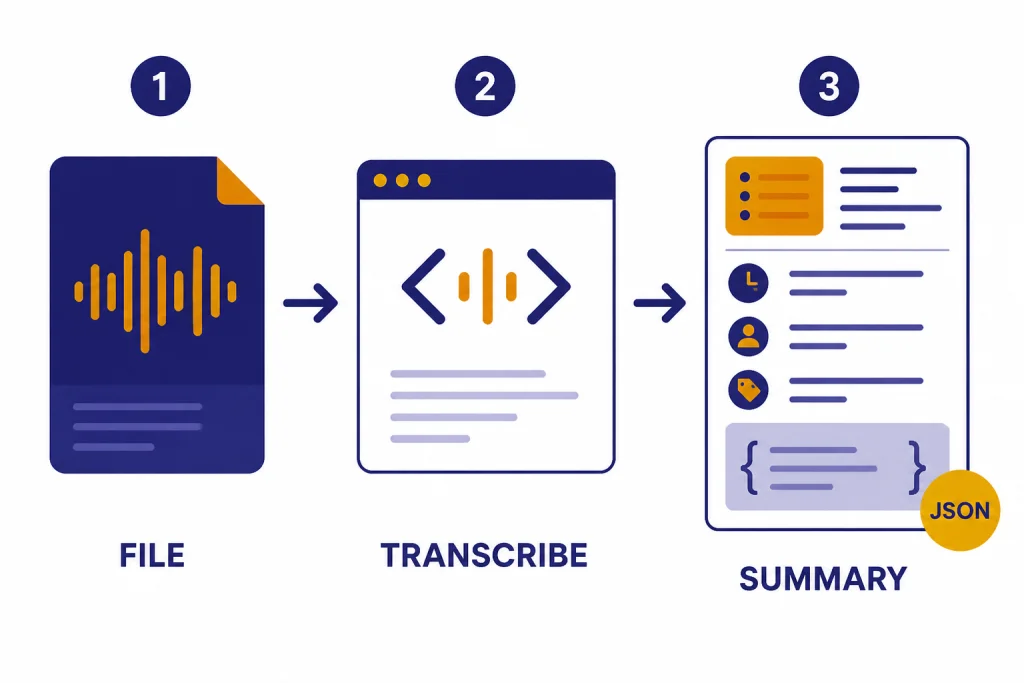
The transcription endpoint returns text. If your application needs action items, names, topics, or JSON fields, call a text model after transcription. The Responses API is the current general API surface for text generation, and structured outputs are useful when the next step must be machine-readable.
from openai import OpenAI

client = OpenAI()

with open("sales-call.mp3", "rb") as audio_file:
    transcript = client.audio.transcriptions.create(
        model="gpt-4o-mini-transcribe",
        file=audio_file,
        response_format="text"
    )

summary = client.responses.create(
    model="gpt-5-mini",
    input=(
        "Extract a concise call summary, customer objections, "
        "and next steps from this transcript:nn" + transcript
    )
)

print(summary.output_text)
This two-step pattern is often better than trying to force the transcription model to do everything. Keep speech recognition, summarization, classification, and moderation as separate stages. That makes errors easier to debug and costs easier to attribute.
Outputs, timestamps, and translation
The response format you choose determines how easy the transcript is to display, search, edit, or align with media. OpenAI’s speech-to-text guide says `whisper-1` supports `json`, `text`, `srt`, `verbose_json`, and `vtt`.[1] The API reference lists `diarized_json` as an additional output option for diarized responses and says `diarized_json` is required to receive speaker annotations with `gpt-4o-transcribe-diarize`.[3]
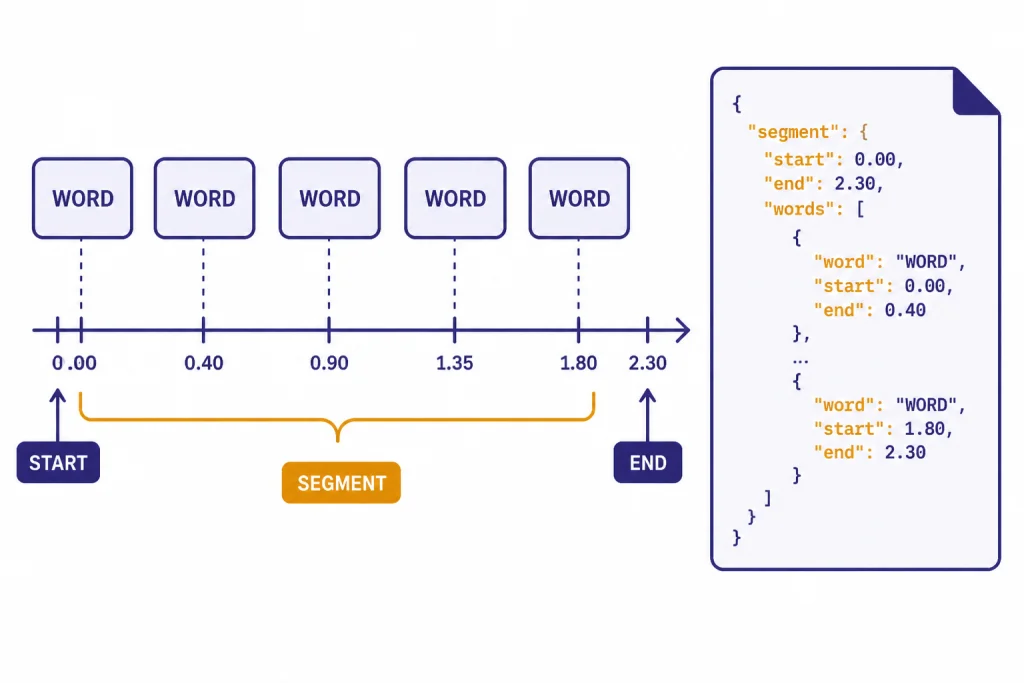
Use `text` for simple display, `json` for standard app logic, `srt` or `vtt` for captions, and `verbose_json` when you need timing details. The API reference states that `timestamp_granularities` can be `word` or `segment`, and that `response_format` must be `verbose_json` to use timestamp granularities.[3] OpenAI’s speech-to-text guide also states that `timestamp_granularities[]` is only supported for `whisper-1`.[1]
from openai import OpenAI

client = OpenAI()

with open("podcast-clip.mp3", "rb") as audio_file:
    result = client.audio.transcriptions.create(
        model="whisper-1",
        file=audio_file,
        response_format="verbose_json",
        timestamp_granularities=["word", "segment"]
    )

for word in result.words[:10]:
    print(word)
Word-level timestamps help with video editing, searchable playback, and highlight generation. Segment timestamps are lighter and usually enough for a transcript viewer. OpenAI’s API reference notes that segment timestamps do not add latency, while word timestamps incur additional latency.[3]
Prompts can also improve recognition of names, acronyms, and formatting preferences. OpenAI’s speech-to-text guide documents a `prompt` parameter and says `whisper-1` tries to match the prompt style, although its prompting system is more limited than other language models.[1] Keep prompts short and practical. Good prompt content includes product names, speaker names, spelling conventions, and punctuation style.
Long files and production use
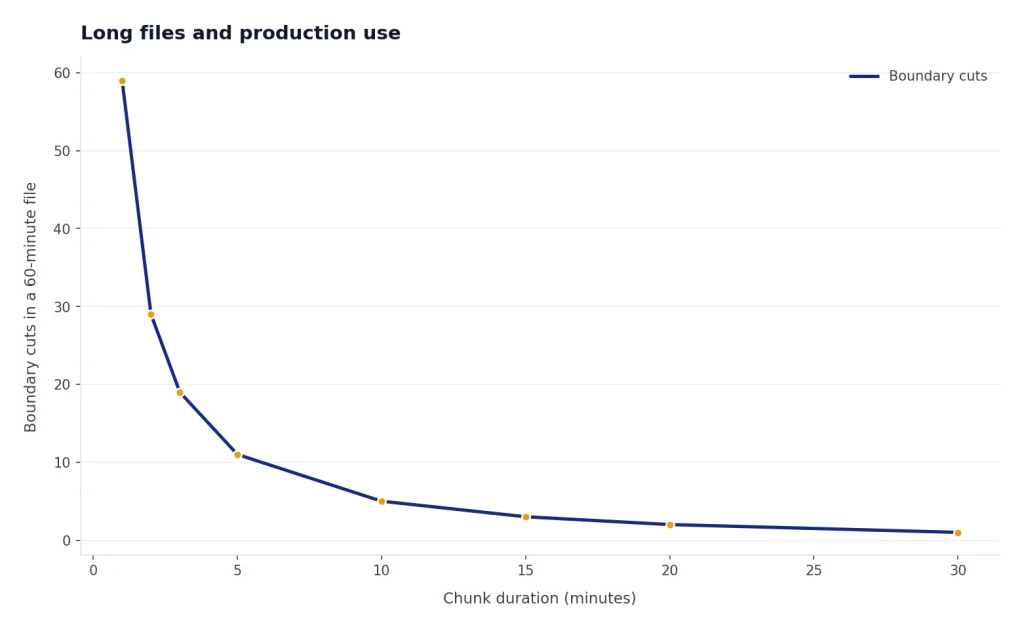
The main production issue with the Whisper API is not the first call. It is the first large batch of messy real audio. OpenAI’s guide says the Transcriptions API supports files under `25 MB` by default, and that larger files should be split into chunks of `25 MB` or less or compressed.[1] It also recommends avoiding cuts in the middle of a sentence because context can be lost.[1]
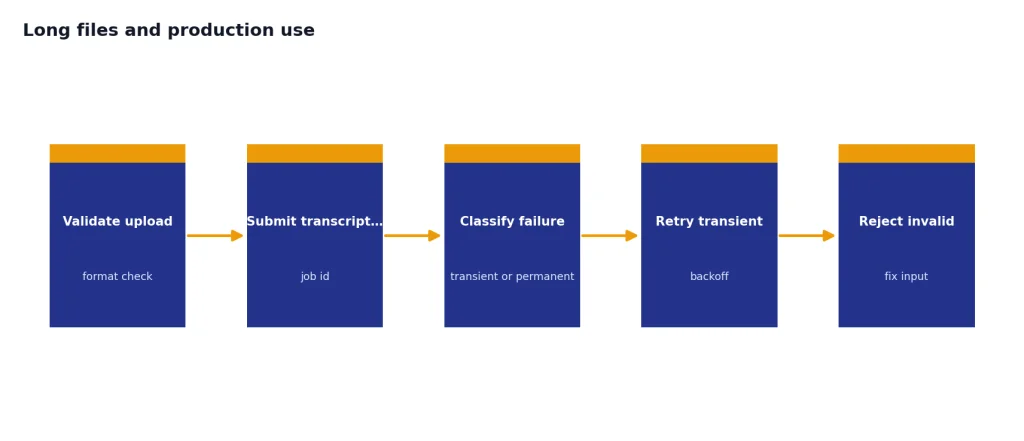
A practical long-file pipeline has four stages:
- Normalize the input. Convert unusual formats to a known upload format and check duration, size, and channel count.
- Split on silence. Prefer natural boundaries over fixed-size chunks when possible.
- Transcribe chunks. Process chunks with retries, job IDs, and stored intermediate results.
- Stitch and review. Combine text, reconcile timestamps, and send low-confidence or high-risk segments to a human review queue.
Errors are normal in a production audio pipeline. Uploads fail. Files are mislabeled. Users send video containers with unusual codecs. API calls can hit limits. Build retry logic for transient failures, but do not blindly retry invalid files. Our OpenAI API errors guide covers common error classes and retry patterns.
Streaming is a separate design choice. OpenAI’s speech-to-text guide describes streaming completed recordings through the Transcription API with `stream=True`, and it separately describes transcription of ongoing audio.[1] The Help Center notes that streaming is not supported with `whisper-1`.[1] If you need live voice interaction rather than file transcription, compare this workflow with the OpenAI Realtime API.
For sensitive products, add a safety layer after transcription. Speech-to-text models can mishear words, omit context, or produce text that looks more certain than the audio deserves. If users can upload harmful or policy-sensitive content, pair transcription with the OpenAI Moderation API and your own review rules.
When to use Whisper vs newer transcription models
Use `whisper-1` when you need mature Whisper behavior, direct caption formats, translation into English, or word timestamps. It is also a good default for teams that have older Whisper API code and want predictable output shapes. The model page describes Whisper as a general-purpose speech recognition model trained on a large dataset of diverse audio, with multilingual speech recognition, speech translation, and language identification capabilities.[5]
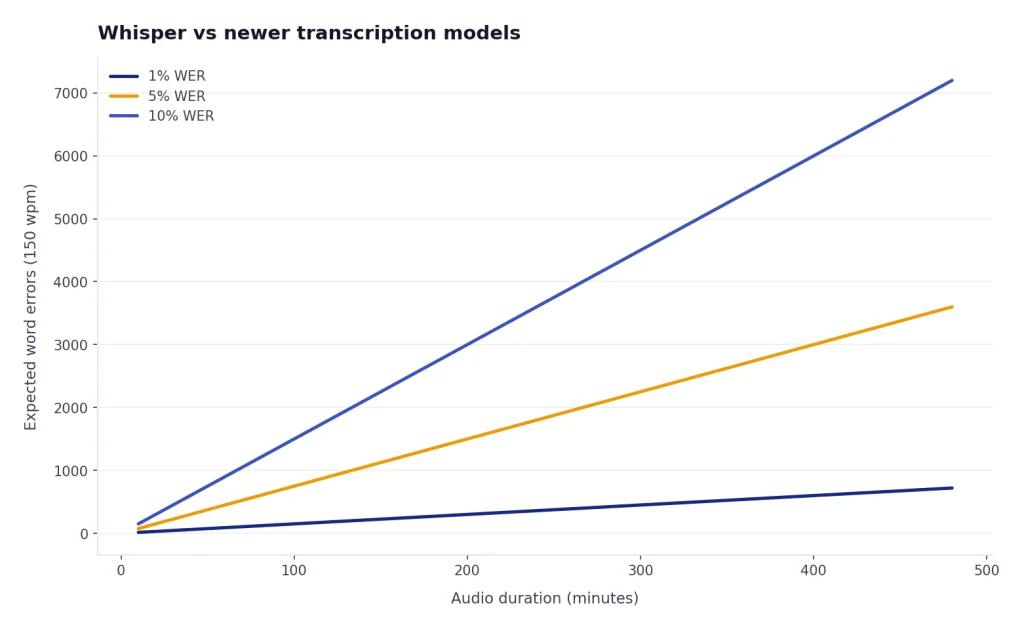
Use `gpt-4o-transcribe` when transcript accuracy matters more than caption-specific output. OpenAI’s model page says `gpt-4o-transcribe` offers improvements to word error rate, language recognition, and accuracy compared with original Whisper models.[6] OpenAI’s audio model announcement also says the newer speech-to-text models improve reliability in challenging conditions such as accents, noisy environments, and varying speech speeds.[9]
Use `gpt-4o-mini-transcribe` when cost and scale matter. OpenAI lists it with the lower estimated transcription cost of `$0.003 / minute`.[2] It is a strong first choice for large volumes of support calls, voice notes, internal meetings, or other cases where you can tolerate a review step for important outputs.
Use `gpt-4o-transcribe-diarize` when the transcript must identify who spoke when. OpenAI describes that model as automatic speech recognition with built-in speaker diarization, associating audio segments with different speakers in a conversation.[8] The API reference says `chunking_strategy` is required when using `gpt-4o-transcribe-diarize` for inputs longer than `30` seconds.[3]
The safest production approach is to test models on your own audio. Include clean samples, noisy samples, accented speakers, jargon-heavy recordings, and worst-case files. Track word error rate where you have reference transcripts, but also track business-specific errors: missed names, wrong numbers, bad timestamps, and speaker-label mistakes.
Frequently asked questions
Is the Whisper API still available?
Yes. OpenAI still documents `whisper-1` as an available transcription model and shows it on the Whisper model page.[5] Current docs also place it next to newer transcription models, so new projects should compare the whole speech-to-text model set before choosing.
How much does the Whisper API cost?
OpenAI lists `whisper-1` at `$0.006 / minute` for transcription.[2] For comparison, OpenAI lists `gpt-4o-mini-transcribe` at an estimated `$0.003 / minute` and `gpt-4o-transcribe` at an estimated `$0.006 / minute`.[2]
What is the maximum file size?
OpenAI’s speech-to-text guide says file uploads are limited to `25 MB`.[1] For larger recordings, split the file into chunks or compress it, and avoid cutting in the middle of a sentence when possible.[1]
Can Whisper produce SRT or VTT captions?
Yes. OpenAI’s guide says `whisper-1` supports `srt` and `vtt` outputs, along with `json`, `text`, and `verbose_json`.[1] The newer `gpt-4o-transcribe` and `gpt-4o-mini-transcribe` models support narrower output formats, so choose `whisper-1` when caption files are the main requirement.
Can the Whisper API translate audio?
Yes. The translations endpoint transcribes audio into English, and OpenAI’s guide says that endpoint supports only `whisper-1`.[1] Use transcription, not translation, if you need the original-language transcript.
Should I use Whisper or gpt-4o-transcribe?
Use `whisper-1` for captions, word timestamps, and the original Whisper API behavior. Use `gpt-4o-transcribe` when you want improved recognition quality, since OpenAI says it improves word error rate and language recognition compared with original Whisper models.[6] Test both on your own audio before migrating a production workflow.