

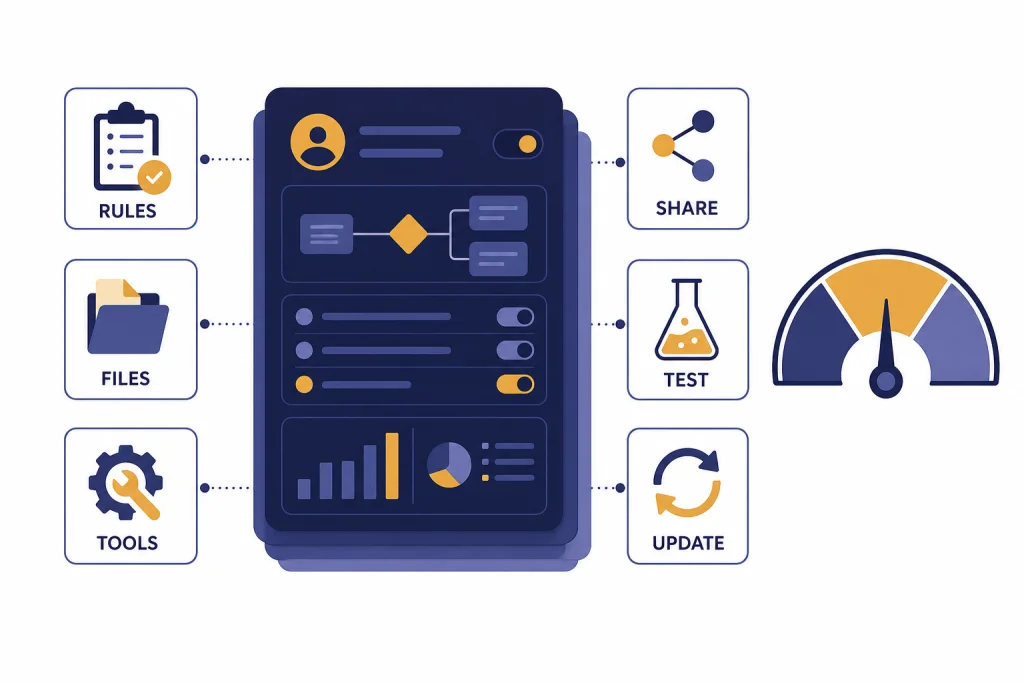
Custom GPTs are worth using when you repeat the same ChatGPT workflow often enough that saved instructions, uploaded reference files, and a focused interface save real time. They are not a magic app builder, and they are not the best choice for every automation project. In this ChatGPT Custom GPTs review, the strongest use cases are internal assistants, reusable writing workflows, support scripts, training tools, and document-based Q&A. The weakest use cases are public GPT Store discovery, sensitive third-party API workflows you cannot audit, and anything that needs a standalone app outside ChatGPT. The value is highest for Plus, Business, and Enterprise users who can turn one repeatable process into a maintained assistant.
Verdict: Custom GPTs are useful, but narrow
Custom GPTs are one of ChatGPT’s most practical features because they turn a repeated prompt pattern into a reusable assistant. The feature works best when the task has a stable process, a clear audience, and reference material that does not change every hour. A good Custom GPT can remember the workflow you would otherwise paste into every chat. It can also expose the right tools, conversation starters, and knowledge files in one place.
The feature is less impressive as a marketplace. The public GPT Store can be useful, but discovery quality varies. Many public GPTs are thin wrappers around a prompt, and you still need to judge whether the builder, instructions, and connected tools are trustworthy. For a deeper look at that side of the ecosystem, read our GPT Store review.
Our rating is strongest for private and team GPTs. They are easy to build, easy to revise, and useful for standardizing work. They are weaker for production software, regulated workflows, and public monetization. If you need an assistant inside your own website or product, the API is usually the better route. If you need a heavy automation worker, compare this review with our ChatGPT Agent review.
| Review area | Score | Plain-English verdict |
|---|---|---|
| Ease of building | Excellent | The no-code builder is approachable and fast. |
| Repeat workflow value | Excellent | Strong when instructions and files stay stable. |
| Accuracy control | Good | Better than raw prompting, but still needs testing. |
| Team governance | Good | Managed workspaces add useful controls. |
| Public discovery | Mixed | The store is convenient but uneven. |
| Standalone app potential | Poor | GPTs are designed for ChatGPT, not external embedding. |
What Custom GPTs are in 2026
Custom GPTs are configured versions of ChatGPT made for a specific purpose. OpenAI describes them as GPTs that can combine instructions, uploaded knowledge, and selected capabilities to create a more tailored ChatGPT experience.[1] OpenAI introduced GPTs on November 6, 2023, as no-code custom versions of ChatGPT that could combine instructions, extra knowledge, and skills.[7]
A Custom GPT can include instructions, conversation starters, knowledge files, capabilities, apps, and actions.[1] Instructions define behavior. Conversation starters help users begin. Knowledge files provide reference material. Capabilities let the GPT use features such as search, image generation, canvas, or data analysis when available. Apps and actions connect the GPT to outside services, but OpenAI states that a GPT can use either apps or actions, not both at the same time.[1]
Creating and editing GPTs requires a paid subscription, although signed-in users can interact with GPTs they can access.[1] OpenAI also states that building and editing GPTs is limited to the web experience; mobile apps can use GPTs but do not build them.[2] That distinction matters. Custom GPTs are a ChatGPT feature, not a general-purpose deployment platform.
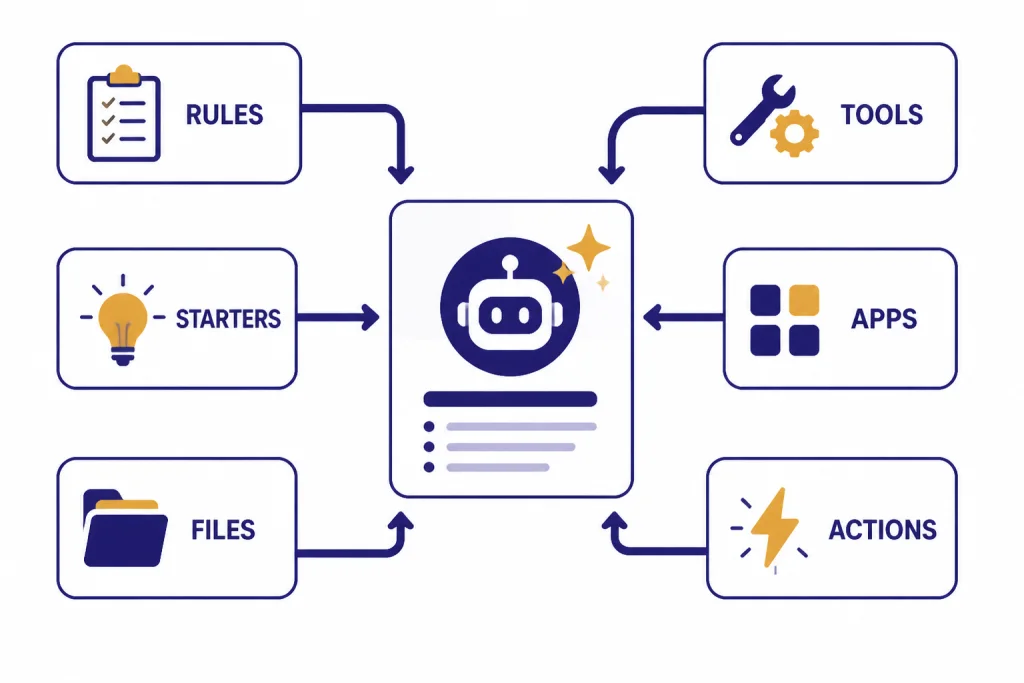
The best mental model is a reusable workspace around one job. A Custom GPT is not just a prompt. It is a prompt, a role, source material, starter tasks, allowed tools, sharing settings, and version management bundled into a single ChatGPT entry point.
The builder experience
The builder is the main reason Custom GPTs work for nontechnical users. You can build conversationally by describing what you want, or you can configure fields directly in the editor.[2] The conversational route is faster for a first draft. The configuration view is better for serious work because you can audit the name, description, instructions, conversation starters, knowledge, tools, actions, and model behavior more deliberately.
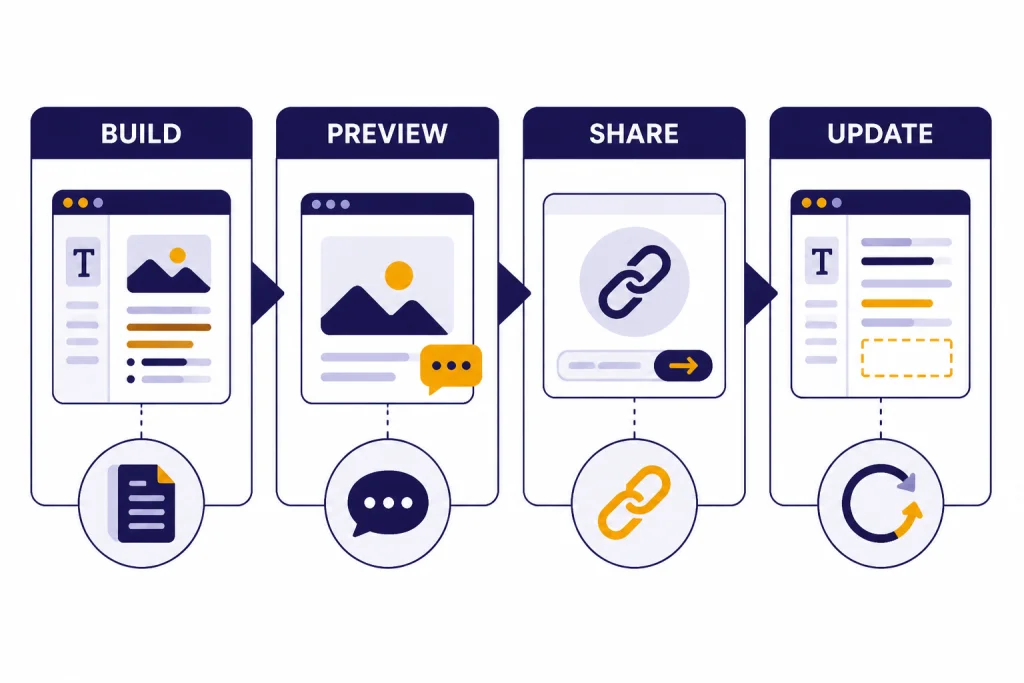
In practice, the first version of a GPT is rarely the final version. The workflow should be: define the job, write strict instructions, add only necessary files, test in preview, revise with examples, then share. OpenAI’s builder includes a Preview area for testing prompts before sharing or publishing.[2] It also supports draft changes and updating an existing GPT when you are ready to apply the new version.[2]
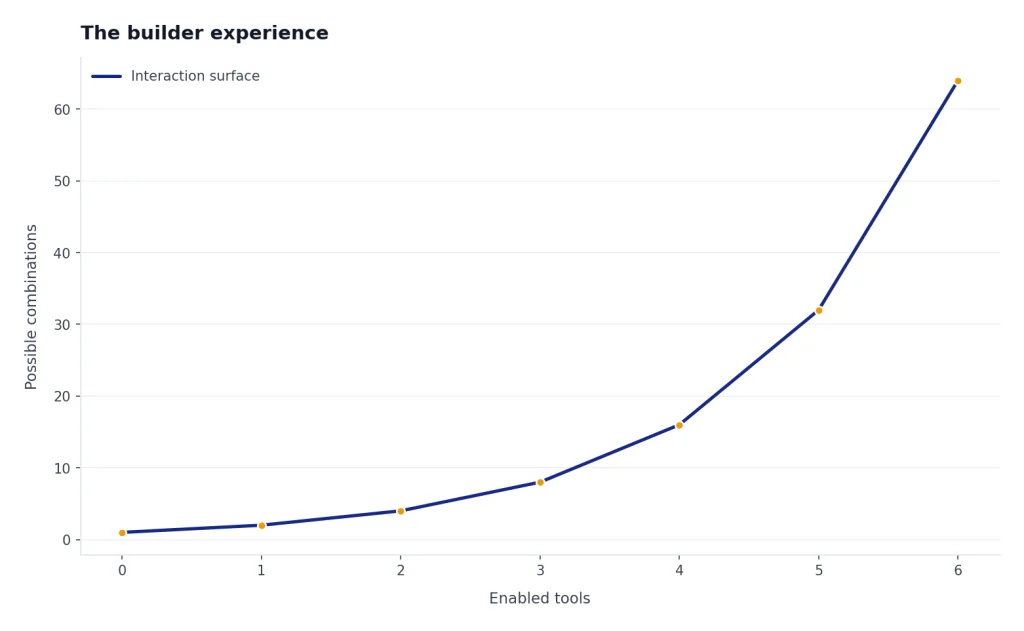
The most common mistake is overbuilding. Builders often add too many tools before the instructions are clear. A better approach is to write a narrow job statement. For example: “Turn raw customer interview notes into a structured insight memo for a product manager.” Then specify the sections, tone, assumptions, source-handling rules, and what the GPT should ask before answering.
The second mistake is treating knowledge files as behavior rules. OpenAI recommends using knowledge for reference material, not rules or tone; behavior guidance belongs in instructions.[2] That matches our testing. A policy PDF can help a GPT answer questions, but it should not be the only place where you define the assistant’s operating procedure.
Where Custom GPTs perform best
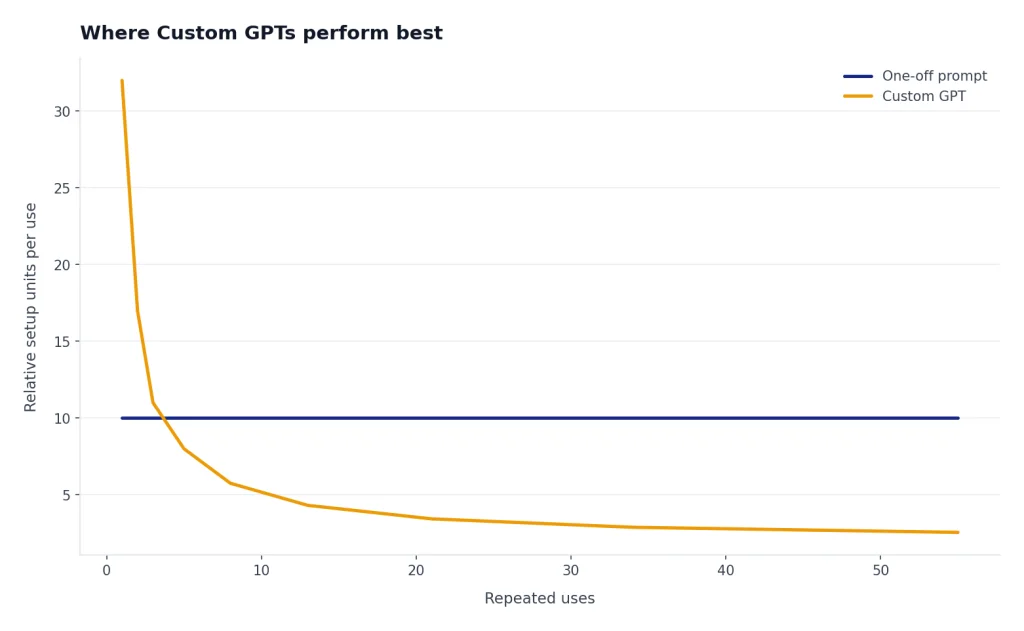
Custom GPTs shine when they reduce setup time. If you often start a chat by pasting the same context, audience, format, and examples, a GPT is probably worth building. The feature is especially useful for teams that want consistent outputs without forcing every employee to become a prompt engineer.
Internal knowledge assistants
A team can create a GPT for an employee handbook, customer support playbook, sales enablement guide, or onboarding curriculum. OpenAI says knowledge files are best for applications where context changes infrequently, such as employee handbooks, policy documents, and school curricula.[3] This is the cleanest Custom GPT use case because the user asks questions and the GPT answers from stable reference material.
Reusable writing and editing workflows
A GPT can enforce house style, turn messy notes into briefs, rewrite support replies, or produce structured drafts. It is not a replacement for editorial judgment, but it reduces repetitive setup. If your main work is long-form drafting, compare this with our ChatGPT Canvas review, because Canvas may be the better interface for revising a single document.
Training and tutoring tools
A Custom GPT can be a practice coach for a narrow skill. Good examples include a sales objection trainer, an interview simulator, a language drill assistant, or a code review tutor. The key is to define a rubric. Tell the GPT how to score answers, when to give hints, and when to move to the next exercise.
Lightweight data and file workflows
When Code Interpreter and Data Analysis are enabled, a GPT can help with spreadsheets, generated files, charts, and calculations. That can make a custom reporting helper useful for recurring analysis. If your work requires more control over models, parameters, and raw API behavior, our OpenAI Playground review is the better comparison.
The limits that matter
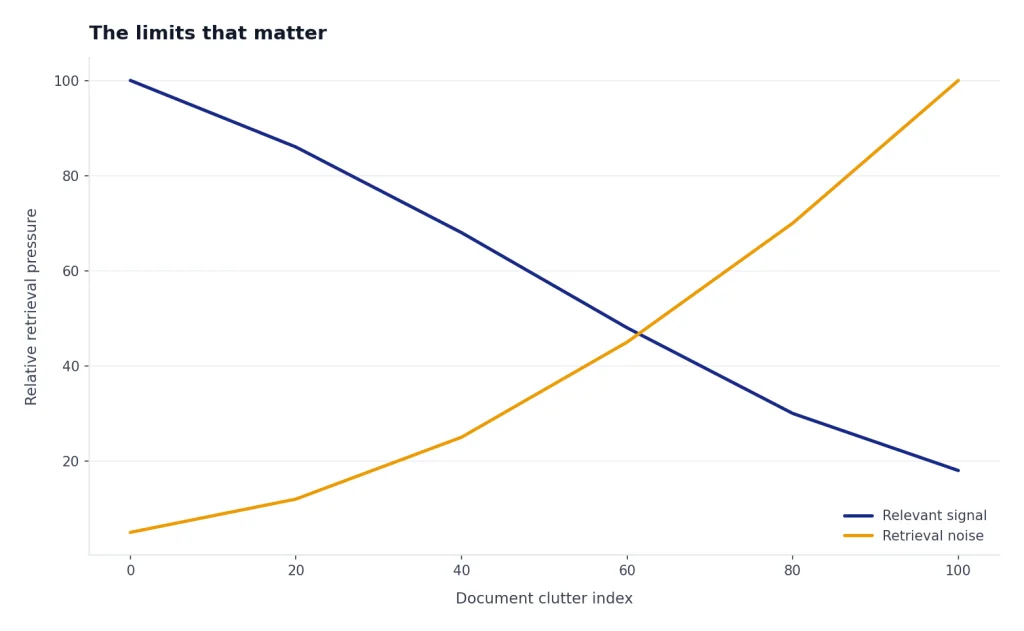
The biggest limitation is that a Custom GPT is still ChatGPT. It can misunderstand instructions, retrieve the wrong excerpt, overgeneralize from uploaded files, or act confidently when the source material is ambiguous. You should test it with adversarial prompts, edge cases, and real examples before sharing it with a team.
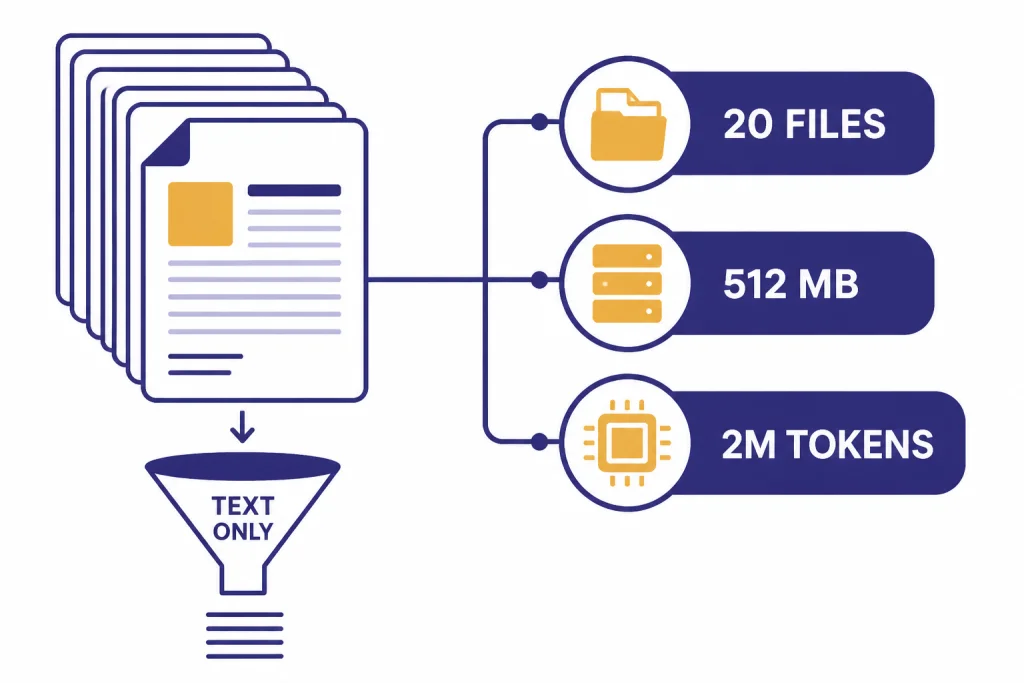
Knowledge has hard limits. OpenAI says builders can attach up to 20 files to a GPT, each file can be up to 512 MB, and each file can contain up to 2,000,000 tokens.[3] OpenAI’s creating-and-editing article also lists the 20-file and 512 MB limits for GPT knowledge files.[2] Those numbers are generous for many teams, but they do not remove the need for curation. A clean, text-forward handbook will usually work better than a folder full of dense slides, scans, and conflicting versions.
There are also product boundaries. OpenAI says GPTs are designed to work inside ChatGPT and are not a way to embed ChatGPT in an external website or application.[1] That rules out many customer-facing use cases. If you want an assistant inside a SaaS product, a support portal, or a mobile app, you should evaluate OpenAI’s API rather than trying to force a Custom GPT into a role it does not support.
Model availability can change. OpenAI states that GPT-4o, GPT-4.1, GPT-4.1 mini, OpenAI o4-mini, and GPT-5 Instant and Thinking were retired from ChatGPT on February 13, 2026, while Business, Enterprise, and Edu customers retained GPT-4o access within Custom GPTs until April 3, 2026.[2] That is a reminder that a Custom GPT is partly a configuration layer over a changing product. Builders should retest important GPTs after model changes.
Privacy, sharing, and workspace controls
Privacy is a strength only if you understand the boundaries. OpenAI says GPT builders cannot view individual conversations that users have with their GPTs.[6] That is important for public GPTs. A random GPT builder should not be able to read your chat history with that GPT.
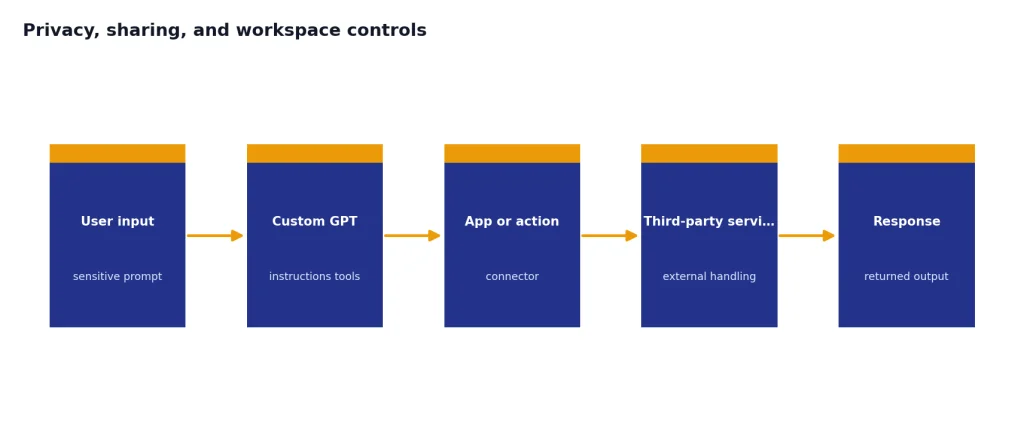
That does not mean every GPT interaction is low-risk. OpenAI says consumer conversations with GPTs may be used to improve its models unless the user opts out through data controls, while Business, Enterprise, and API data is not used for training by default.[6] OpenAI also says that when a GPT uses external APIs or apps, relevant parts of your input may be sent to the third-party service, and OpenAI does not audit or control how those services use or store the data.[6]
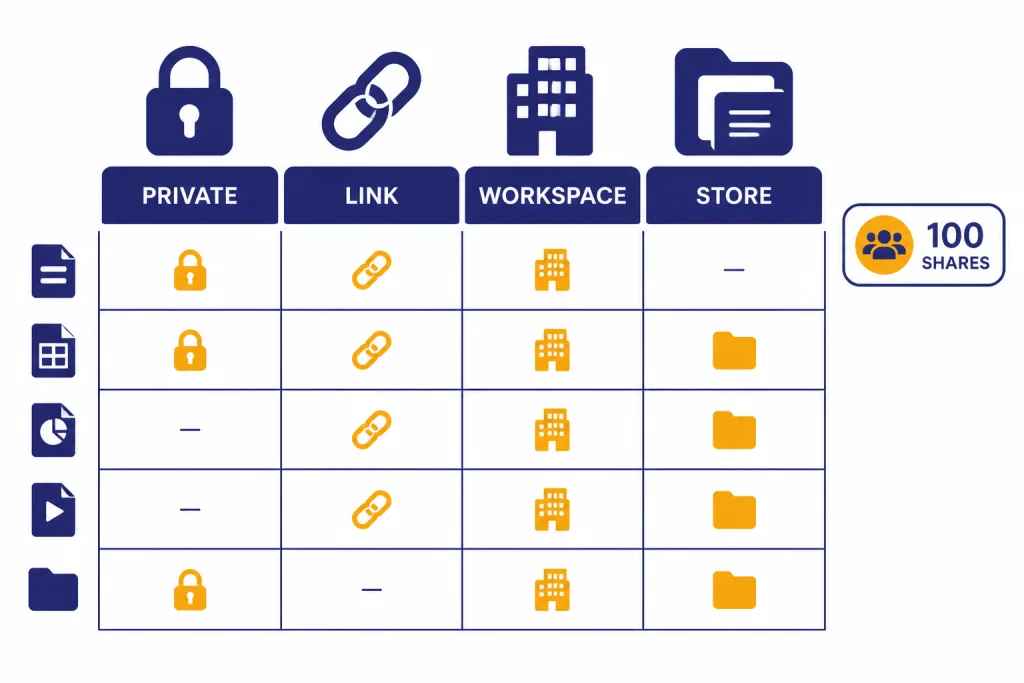
Sharing options are flexible. A GPT can be private, shared by link, shared in a workspace, shared with specific people in managed workspaces, or published to the GPT Store if eligible.[4] OpenAI says direct sharing with specific users or groups in managed workspaces supports up to 100 recipients, counting users and groups together.[4] Shared edit access is available for Team, Enterprise, and Edu plans, and OpenAI says it supports version control, edit history, ownership reassignment, and audit activity.[5]
For organizations, the governance story is the main reason to use a workspace plan. Enterprise owners can control whether GPTs can be shared, whether users can access third-party GPTs, and which apps or action domains are allowed in GPTs created in the workspace.[10] That matters more than the GPT Store itself. A well-governed internal GPT library can be valuable. An unmanaged pile of public GPTs can become confusing fast.
Custom GPTs compared with alternatives
Custom GPTs are not the only way to customize ChatGPT. In many cases, a saved prompt, a project, Canvas, the API, or an agent workflow may be the better tool. The decision depends on whether you need repeatability, collaboration, external deployment, or autonomous task completion.
| Option | Best for | Weakness | Choose it when |
|---|---|---|---|
| Custom GPT | Repeatable ChatGPT workflows | Limited to ChatGPT | You need reusable instructions, files, tools, and sharing. |
| Saved prompt | Simple personal routines | No file bundle or governance | The workflow is short and only for you. |
| Project | Long-running work with context | Less suited to a public assistant format | You want a workspace around a goal, not a reusable bot. |
| Canvas | Drafting and editing documents | Not an assistant directory | You are revising one piece of writing or code. |
| API assistant | Apps, websites, and production systems | Requires development work | You need custom UI, logs, controls, or external deployment. |
| ChatGPT Agent | Multi-step task execution | More complex and higher risk | You need action over a sequence of steps, not just guidance. |
If you are deciding between model choices rather than product surfaces, use our GPT models comparison. If the core question is whether the whole ChatGPT subscription is worth keeping, start with our ChatGPT review 2026. Custom GPTs are a feature inside that broader product, not a separate subscription.
Price and value
There is no separate Custom GPTs subscription. The cost depends on the ChatGPT plan you use. OpenAI lists ChatGPT Plus at $20/month, billed monthly, and its pricing page also lists custom GPT use under the $20 Plus tier.[8][9] Creating or editing GPTs requires a paid subscription, according to OpenAI’s GPTs documentation.[1]
For solo users, the value test is simple. If a Custom GPT saves you from rewriting a complex prompt several times a week, Plus can be easier to justify. If you only browse public GPTs occasionally, Custom GPTs alone probably do not justify paying. Read our ChatGPT Plus review and ChatGPT Plus price guide if the subscription decision is the main issue.
For heavy individual users, Custom GPTs are only one part of the decision. Pro-level value usually comes from higher usage, more advanced models, and advanced tools, not from GPT creation alone. Our ChatGPT Pro review covers that broader upgrade question.
For teams, the value is stronger. Shared GPTs can standardize support replies, research briefs, sales prep, compliance triage, and internal training. A manager can maintain one assistant instead of distributing prompt documents. If that assistant prevents inconsistent work across a team, the feature can matter more than it does for an individual. Compare the workspace tradeoffs in our ChatGPT Team review and ChatGPT Enterprise review.
Our recommendation
Build a Custom GPT when the workflow is repeated, the output format is known, the source material is stable, and the user group is clear. Do not build one just because a prompt is clever. A GPT should reduce decisions for the user. It should make the next action obvious.
The best first GPT is boring. Pick one recurring task with obvious before-and-after value. Examples include a customer email reviewer, meeting notes formatter, policy Q&A assistant, grant application checker, lesson-plan coach, or data-cleaning helper. Give it a narrow scope. Add a few excellent examples. Test it against messy inputs. Then share it with a small group before broader rollout.
Avoid Custom GPTs for sensitive data unless you understand your plan’s privacy rules and every connected app or action. Avoid public GPTs for tasks that require confidential documents. Avoid GPT Store publishing as a business strategy unless you already have distribution. OpenAI has tested builder monetization, but it has not made Custom GPT publishing a dependable business model for most creators.[6]
The final verdict: Custom GPTs are a strong productivity feature, not a standalone product platform. They are worth using for focused assistants inside ChatGPT. They are worth paying attention to in teams. They are not enough reason to upgrade by themselves unless you have repeat workflows that are already consuming time.
Frequently asked questions
Are ChatGPT Custom GPTs worth it?
Yes, if you use them for repeated workflows with stable instructions or reference files. They are less valuable if you only browse public GPTs occasionally. The best Custom GPTs replace a long setup prompt you would otherwise paste again and again.
Can free ChatGPT users create Custom GPTs?
No. OpenAI says creating and editing GPTs requires a paid subscription.[1] Free users can use GPTs they have access to, subject to sign-in, availability, and limits, but building is a paid-plan feature.
Can GPT builders see my chats?
OpenAI says GPT builders cannot view individual conversations that users have with their GPTs.[6] You should still be careful with GPTs that use external APIs or apps, because relevant parts of your input may be sent to third-party services.[6]
How many files can a Custom GPT use?
OpenAI says a GPT can have up to 20 attached knowledge files, with each file up to 512 MB and up to 2,000,000 tokens.[3] File quality matters as much as file quantity. Clean text documents usually work better than complex slides or poorly scanned PDFs.
Can I put a Custom GPT on my website?
No. OpenAI says GPTs are designed to work in ChatGPT and are not a way to embed ChatGPT in an external website or application.[1] Use the API if you need a customer-facing assistant in your own product or site.
Are Custom GPTs better than Projects?
They solve different problems. A Custom GPT is best when you want a reusable assistant for a defined task. A Project is better when you want to organize ongoing work, files, and context around a broader objective.