


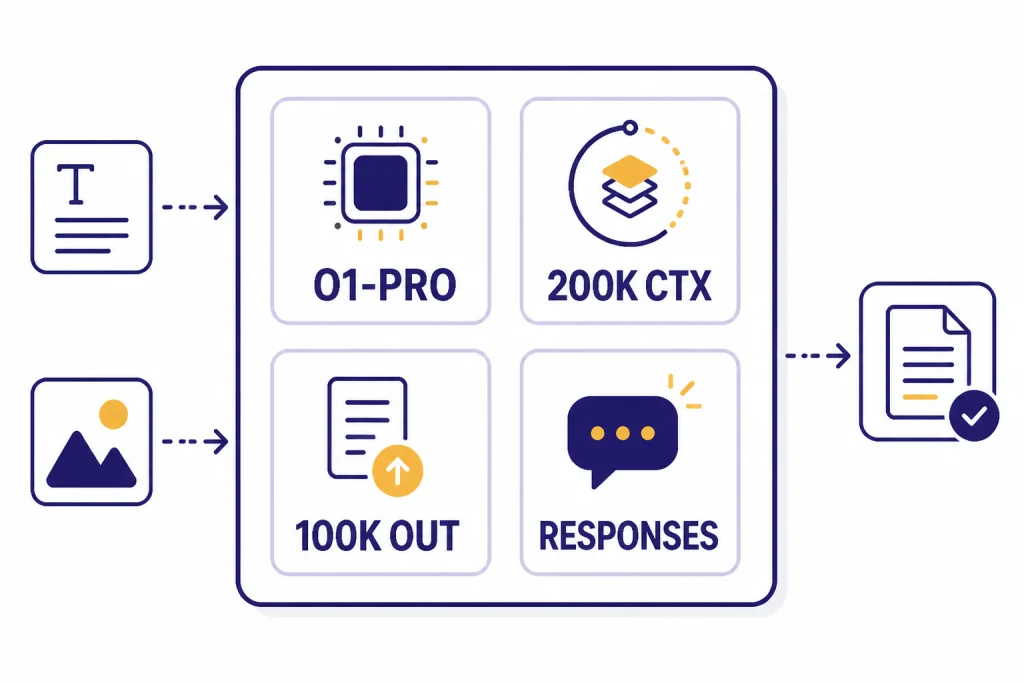
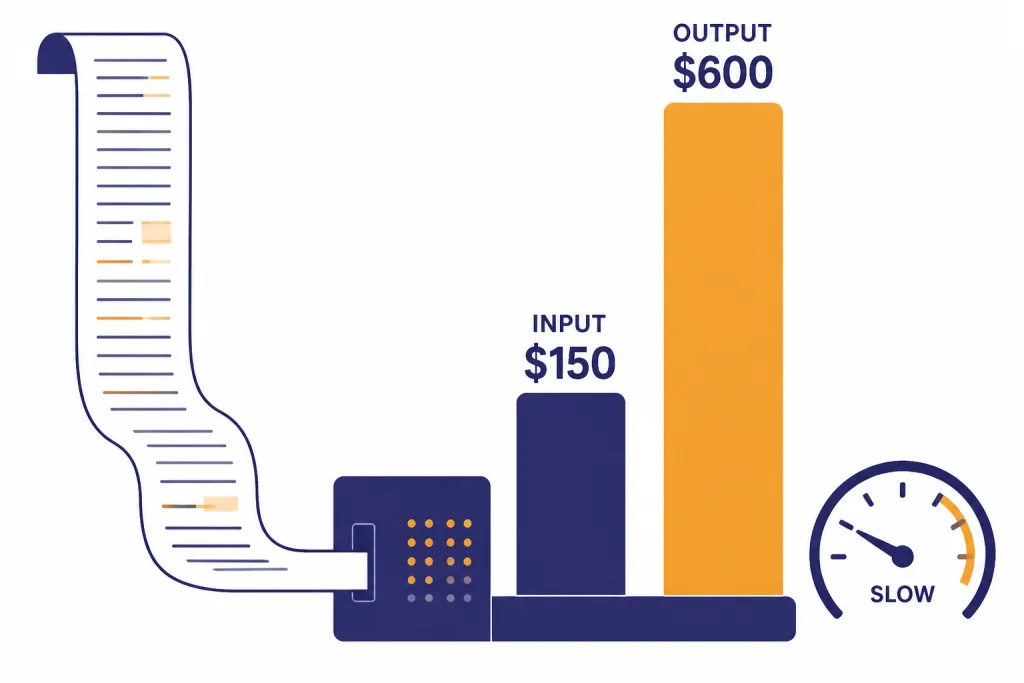
OpenAI o1-pro is the high-compute version of OpenAI o1 for tasks where a small improvement in reasoning reliability can justify much higher cost and slower turnaround. In the API, OpenAI lists o1-pro at $150 per 1M input tokens and $600 per 1M output tokens, with a 200,000-token context window and 100,000 max output tokens.[1] That makes it a specialist model, not a daily default. Use o1 pro for difficult math, legal analysis, scientific reasoning, code review, and decision support where a wrong answer is expensive. Use cheaper or newer models when speed, iteration, or routine drafting matters more.
What o1-pro is
OpenAI o1-pro is a reasoning model built from the o1 family. OpenAI describes it as a version of o1 that uses more compute to think harder and deliver more consistently better answers.[1] That wording matters. o1-pro is not positioned as a faster chat model, a creative writing model, or a cheap automation engine. It is a reliability tier for hard problems.
OpenAI first introduced o1 pro mode inside ChatGPT Pro, a $200 monthly plan announced on December 5, 2024.[2] The developer API version later made the same basic idea available programmatically. TechCrunch reported that OpenAI brought o1-pro to the API on March 19, 2025, and corroborated the $150 input and $600 output token pricing.[5]
The model accepts text and image input and returns text output. It supports reasoning tokens, function calling, and structured outputs, but OpenAI lists streaming as not supported.[1] If you are choosing models across a broader stack, keep this guide next to our all GPT models compared side by side and our context window reference.
When to use o1-pro
Use o1-pro when the task is difficult, bounded, and worth a slower answer. It is strongest when you can give it complete context, clear success criteria, and enough time to work through tradeoffs. It is weakest when you need fast back-and-forth, high-volume classification, or cheap drafts.
OpenAI’s ChatGPT Pro launch framed o1 pro mode around more reliable responses for difficult problems, especially data science, programming, and case law analysis.[2] Treat that as the core use case. o1 pro is best used as a senior reviewer, not as a typing assistant.
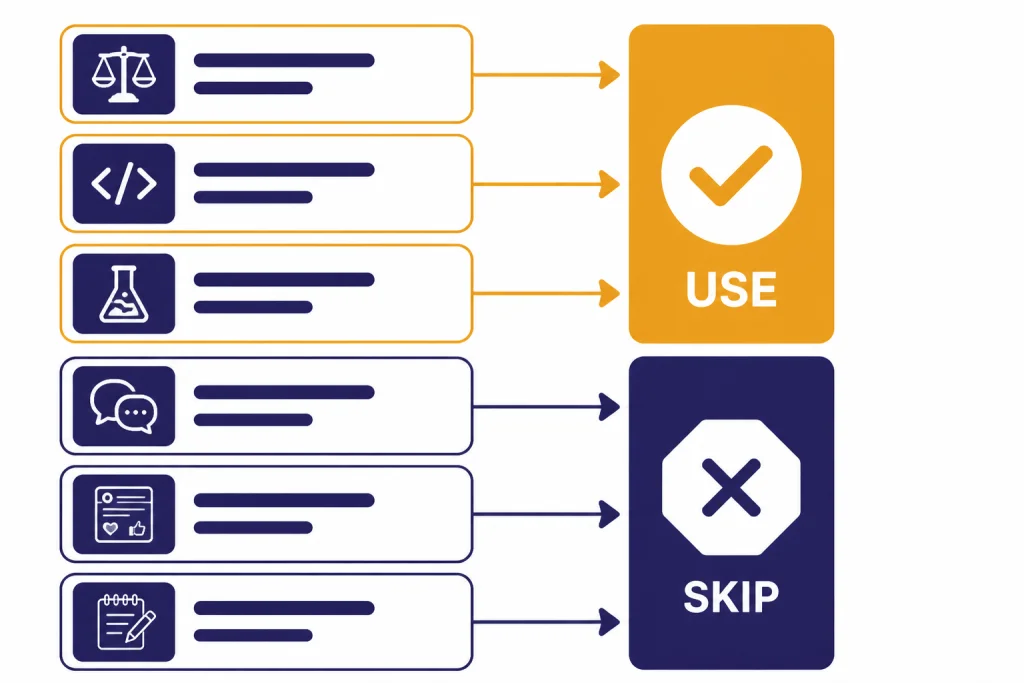
| Use case | Good fit for o1-pro? | Why |
|---|---|---|
| Auditing a complex legal argument | Yes | The task rewards careful reasoning and consistency. |
| Reviewing a subtle production bug | Yes | The cost of a missed edge case may be high. |
| Solving a difficult math or science problem | Yes | Reasoning depth matters more than response speed. |
| Generating 50 social posts | No | A cheaper, faster model is usually enough. |
| Summarizing routine meeting notes | No | The extra compute rarely changes the outcome. |
| Brainstorming slogans | No | Creative variety matters more than formal reasoning. |
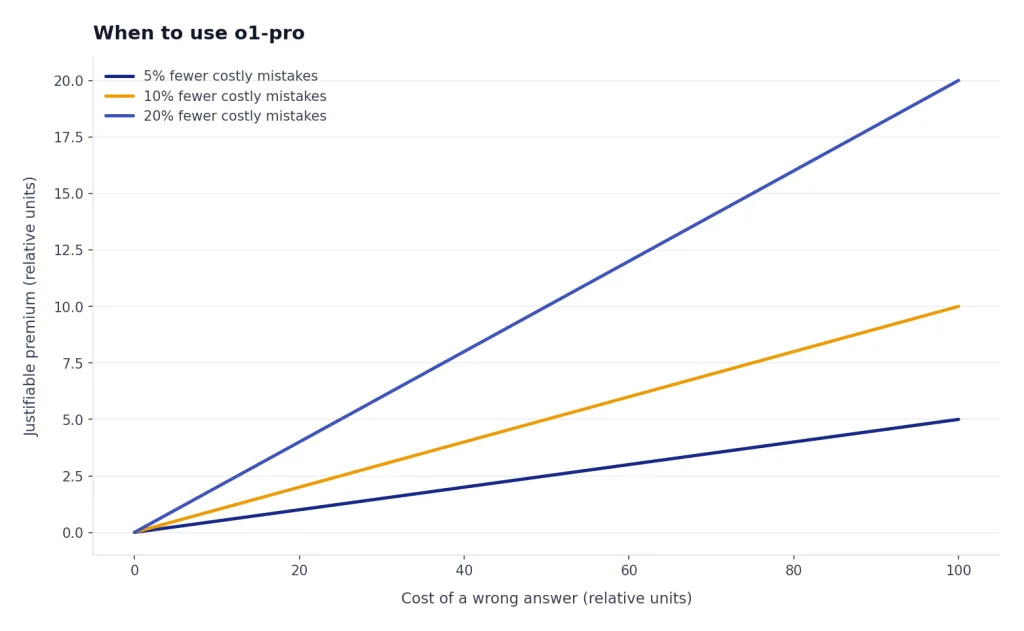
Good o1-pro tasks share three traits. The prompt has a correct or defensible answer. The answer depends on multiple constraints. A mistake would cost more than the model run. If one of those traits is missing, test a cheaper model first.
For coding, reserve o1-pro for architecture review, concurrency bugs, security-sensitive refactors, and failing tests that simpler models cannot resolve. For broader model selection, use our best GPT model for coding guide before committing to the most expensive reasoning tier.
When not to use o1-pro
Do not use o1-pro as your default model. Its price and speed profile make sense only when the marginal improvement matters. OpenAI lists o1-pro as the slowest speed tier on its model page.[1] That is a clear signal to avoid it for interactive workflows where the user expects quick iteration.
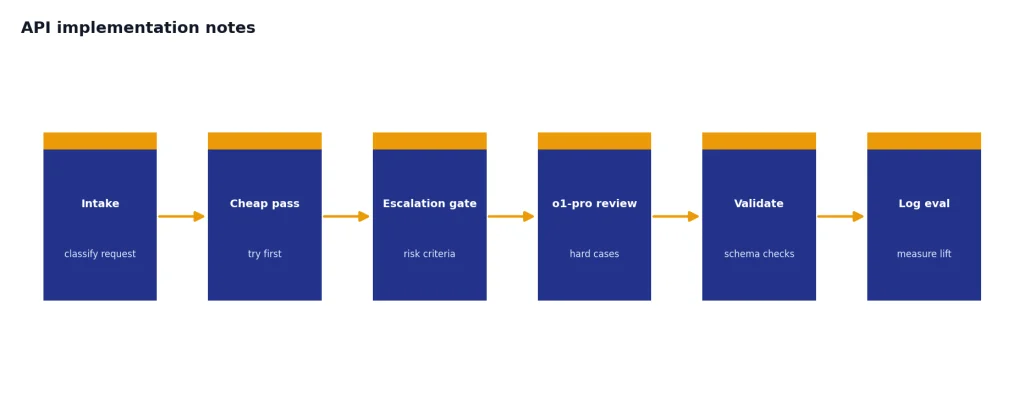
Avoid o1-pro for first drafts. Start with a cheaper model, then escalate only the hardest part. For example, ask a fast model to draft a contract memo, then ask o1-pro to find weak assumptions, missing exceptions, and internal contradictions. This pattern keeps cost down while still using the pro tier where it helps.
Avoid o1-pro for large batches unless you have already measured quality lift. A thousand routine calls can become expensive quickly at $150 per 1M input tokens and $600 per 1M output tokens.[1] If price is the constraint, compare your workload against our cheapest GPT model and OpenAI API pricing guides.
Avoid it when the task depends on current facts unless you provide the facts or connect retrieval. OpenAI lists the o1-pro knowledge cutoff as October 1, 2023.[1] That does not mean the model is useless for newer topics, but it does mean you should supply the relevant documents, database rows, or search results.
o1-pro vs. o1, o1-mini, and newer models
The o1 family is no longer the only reasoning option in OpenAI’s lineup. OpenAI’s model catalog lists newer reasoning and pro models, including o3-pro and o4-mini, alongside o1-pro.[1] That makes o1-pro a legacy high-compute choice in many stacks rather than the automatic top pick.
Still, o1-pro can remain useful when an existing workflow was tuned around it, when its long context is essential, or when regression risk matters more than adopting a newer model. For newer reasoning tiers, compare OpenAI o3-pro, OpenAI o3, and OpenAI o4-mini. For the base family, see our OpenAI o1 and OpenAI o1-mini guides.
| Model or tier | Best role | Why choose it instead of o1-pro |
|---|---|---|
| o1-pro | High-stakes reasoning review | Use when consistency matters enough to justify cost and latency. |
| o1 | General reasoning | Use when you need strong reasoning without the pro premium. |
| o1-mini | Lower-cost reasoning | Use when the problem is structured but budget matters. |
| o3-pro | Newer heavy reasoning | Test when you want a more current pro reasoning tier. |
| o4-mini | Fast reasoning at lower cost | Use when throughput and iteration speed matter. |
The practical rule is simple. If you are building a new application, benchmark o1-pro against newer reasoning models before standardizing on it. If you are maintaining an existing workflow that already passes evals with o1-pro, change only after running regression tests. Our most powerful GPT model and fastest GPT model comparisons can help frame that tradeoff.
Cost, latency, and limits
o1-pro’s API pricing is the main reason to be selective. OpenAI lists text token pricing at $150 per 1M input tokens and $600 per 1M output tokens.[1] TechCrunch reported the same pricing when covering the API launch.[5] This is far above normal high-volume model pricing.
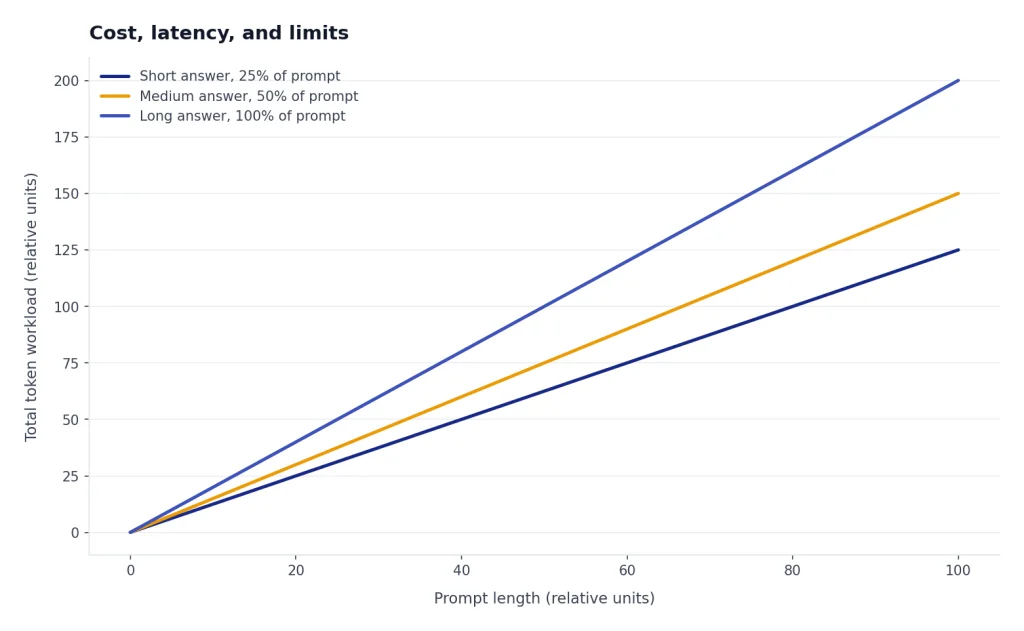
OpenAI lists a 200,000-token context window and 100,000 max output tokens for o1-pro.[1] Those large limits are useful for dense case files, codebases, research packets, and technical records. They also create cost risk. Long prompts and long answers are exactly where o1-pro becomes expensive.
OpenAI’s model page lists Tier 1 rate limits for o1-pro at 500 RPM and 30,000 TPM, with higher tiers scaling up to Tier 5 at 10,000 RPM and 30,000,000 TPM.[1] Do not design a production system around those numbers without checking your account dashboard. Rate limits can vary by organization, trust tier, and current platform policy.
In ChatGPT, OpenAI originally positioned ChatGPT Pro as a $200 monthly plan with access to o1 pro mode.[2] OpenAI’s current Help Center describes Pro tiers for people who rely on AI for high-stakes, complex work and states that unlimited access is still subject to terms and misuse guardrails.[3] In practice, treat ChatGPT Pro and API o1-pro as separate buying decisions. The subscription is for individual interactive use. The API is for controlled product or workflow integration.
How to prompt o1-pro
Prompt o1-pro like a careful expert reviewer. Give it the facts, the decision standard, the constraints, and the output format. Do not ask for hidden chain-of-thought. Ask for a concise rationale, assumptions, and confidence-limiting factors instead.
Use a review-first structure
A strong o1-pro prompt usually has four parts: context, task, standard, and output. For example: “Review this migration plan for data-loss risk. Assume a PostgreSQL production database with strict rollback requirements. Identify blocking issues, likely false assumptions, and a safer sequence. Return a table with severity, evidence, and recommended fix.”
Ask for adversarial checks
o1-pro is often worth using when you need the model to challenge a plan, not just complete a task. Ask it to list the strongest counterargument, the easiest way the answer could fail, and what evidence would change the conclusion. This turns the pro tier into a risk detector.
Keep routine work outside the pro call
Use a cheaper model to clean documents, extract obvious facts, and prepare a compact brief. Then send the brief and critical source excerpts to o1-pro. This reduces token cost and helps the model focus on the hard part. If your main use case is prose quality rather than reasoning, our best GPT model for writing guide is the better starting point.
API implementation notes
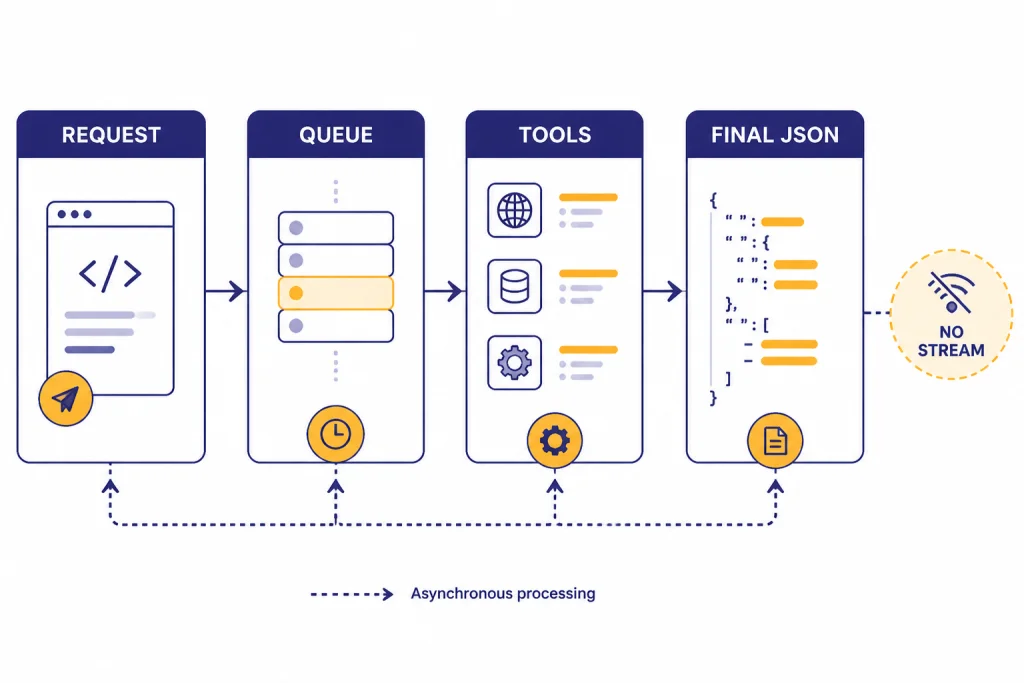
OpenAI lists o1-pro as available through the Responses API only.[1] The same model page lists function calling and structured outputs as supported, while streaming is not supported.[1] That combination suits asynchronous review jobs better than live typing interfaces.
Design your application around queued work. Show the user that the review is running, store the prompt and retrieved context, and return a final answer when complete. OpenAI’s Responses API has continued to add agent-oriented features, including built-in tools, background mode, reasoning summaries, and encrypted reasoning items for eligible customers.[4] Not every feature applies to every model in the same way, so test the exact o1-pro path you plan to ship.
For production use, build a model router. Start with a cheaper model. Escalate to o1-pro only when the request meets your criteria: high risk, failed cheaper attempt, long-context reasoning, or explicit user selection. Log the reason for escalation. Then evaluate whether the answer improved enough to justify the premium.
Structured outputs are especially useful with o1-pro because they make expensive answers easier to validate. Ask for a schema that separates conclusion, evidence, assumptions, risks, and next actions. Then run a cheaper validator or deterministic checks before showing the result to a user.
Bottom line
o1-pro is worth using when the question is hard, the context is substantial, and the cost of being wrong is high. It is not worth using for routine writing, high-volume extraction, casual chat, or rapid iteration. The best pattern is escalation: use faster and cheaper models first, then send the unresolved, high-stakes portion to o1-pro.
If you are a ChatGPT user, o1 pro mode makes the most sense for occasional expert-level review. If you are an API developer, o1-pro should sit behind routing, budget controls, retries, and evals. The model can be valuable, but only when the workflow is designed around its strengths.
Frequently asked questions
What is o1-pro?
o1-pro is OpenAI’s high-compute version of o1. OpenAI says it uses more compute to think harder and provide more consistently better answers.[1] It is best treated as a specialist reasoning tier.
How much does o1-pro cost in the API?
OpenAI lists o1-pro at $150 per 1M input tokens and $600 per 1M output tokens.[1] TechCrunch reported the same pricing when covering the API launch.[5] Always check the live pricing page before deploying because API pricing can change.
Is o1-pro the same as ChatGPT Pro?
No. ChatGPT Pro is a subscription plan, while o1-pro is a model or model mode. OpenAI introduced ChatGPT Pro as a $200 monthly plan that included o1 pro mode.[2] The API version is billed by tokens, not by the ChatGPT subscription.
Does o1-pro support images?
Yes, OpenAI lists o1-pro input as text and image, with text output.[1] That makes it suitable for visual reasoning tasks where the final answer is textual. It does not output images.
Does o1-pro support streaming?
OpenAI lists streaming as not supported for o1-pro.[1] Plan for a delayed final response rather than token-by-token display. For user experience, use a job status, progress message, or notification.
Should I still use o1-pro if newer reasoning models exist?
Use o1-pro if an existing workflow depends on it or if your evals show it wins on your specific task. For new systems, benchmark it against newer reasoning models before standardizing. The right answer depends on accuracy, latency, cost, and regression risk.