

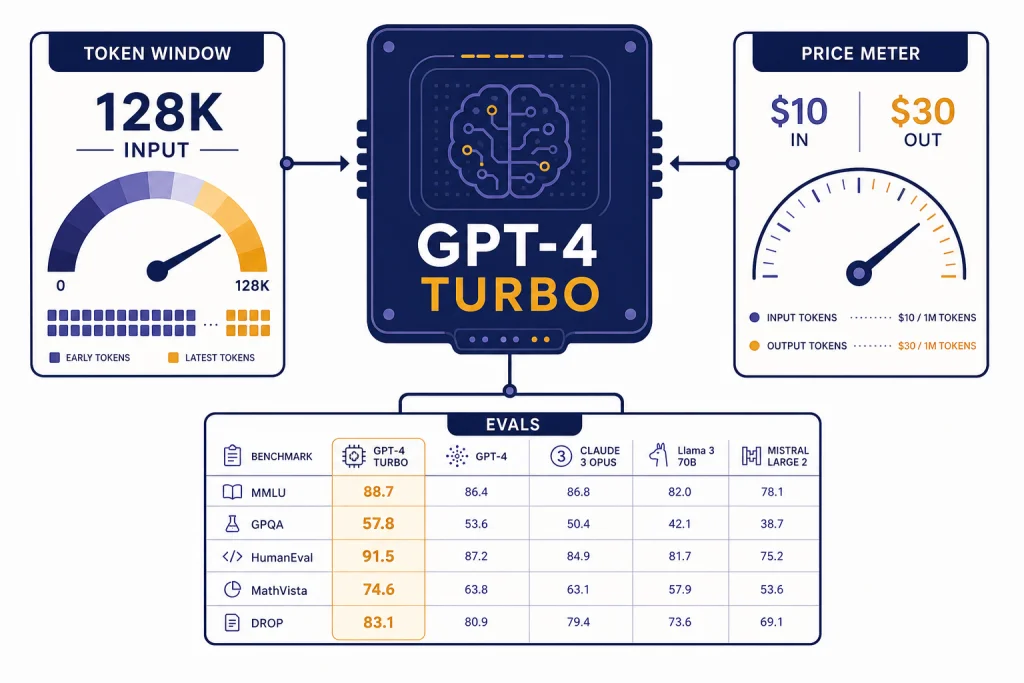
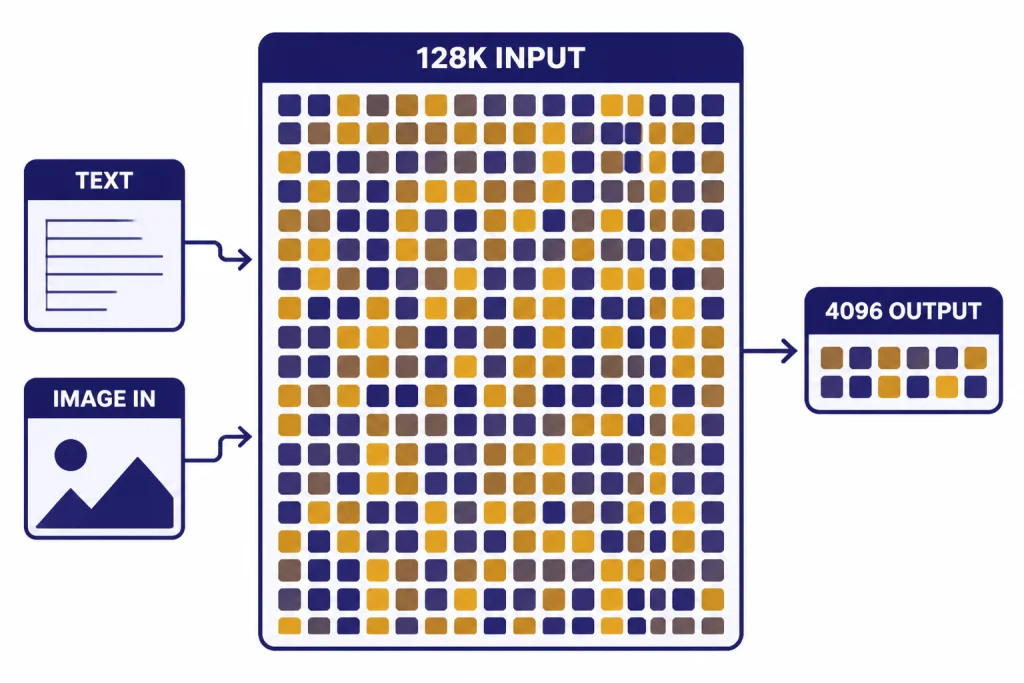
GPT-4 Turbo is an older high-intelligence OpenAI model built as a faster and cheaper successor to the original GPT-4. As of April 1, 2026, OpenAI’s model docs list it with a 128,000-token context window, 4,096-token max output, text and image input, and API pricing of $10.00 per 1M input tokens and $30.00 per 1M output tokens.[1] It is still useful for legacy API workloads that depend on the GPT-4 Turbo behavior, but OpenAI now recommends newer models such as GPT-4o for most projects.[1]
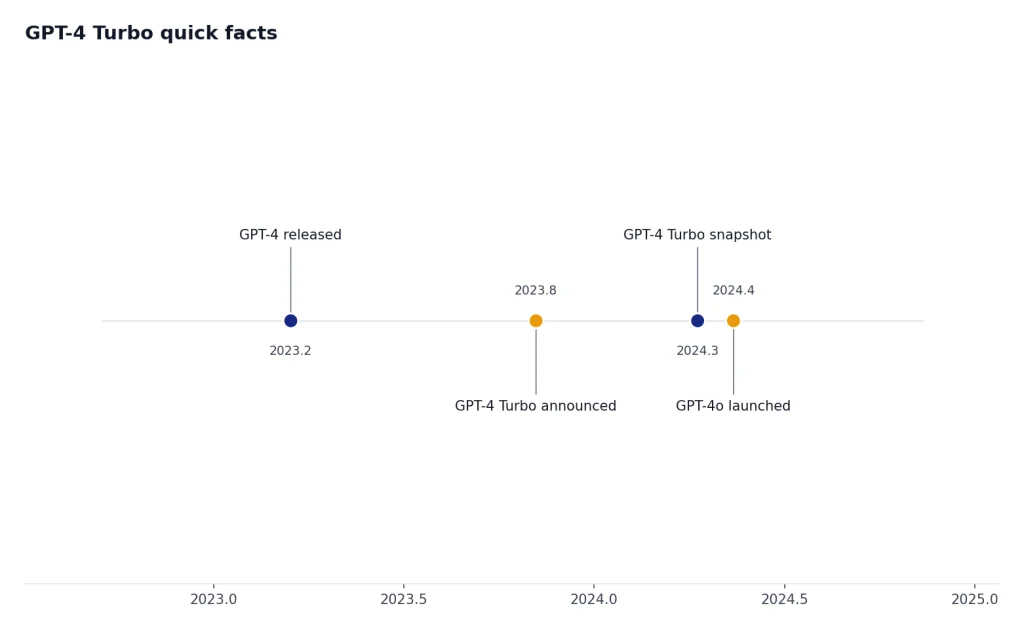
GPT-4 Turbo quick facts
GPT-4 Turbo was announced at OpenAI DevDay as the next generation of GPT-4, with a larger context window and lower token prices than the original GPT-4.[2] The current model documentation describes GPT-4 Turbo as an older high-intelligence model and says newer models, especially GPT-4o, are recommended for most new work.[1] If you are comparing the whole lineup, start with all GPT models compared side by side and then come back to this guide for the details specific to GPT-4 Turbo.
| Item | GPT-4 Turbo detail | What it means |
|---|---|---|
| Current alias | gpt-4-turbo, with gpt-4-turbo-2024-04-09 listed as the stable snapshot.[1] | Use the snapshot if you need more stable behavior across time. |
| Context window | 128,000 tokens.[1] | It can accept long documents and multi-file prompts, but it is no longer the largest OpenAI context window. |
| Max output | 4,096 tokens.[1] | Long input does not mean equally long output. Plan summaries and reports in sections. |
| Knowledge cutoff | December 1, 2023.[1] | Use retrieval, browsing, or supplied source material for anything after that date. |
| Modalities | Text input and output, plus image input. Audio and video are not supported.[1] | It can analyze images, but it is not an audio, video, or image-generation model. |
| API price | $10.00 per 1M input tokens and $30.00 per 1M output tokens.[1] | It is cheaper than original GPT-4, but much more expensive than newer mainstream alternatives. |
The short version: GPT-4 Turbo was a major upgrade in late 2023 and early 2024. By 2026, it is a legacy-compatible model rather than the best default. Its strongest reasons to stay in a stack are behavioral continuity, long-context compatibility, and existing evaluations that were built around its outputs.
Speed and latency benchmarks
OpenAI’s current GPT-4 Turbo model page rates speed qualitatively as “Medium,” but it does not publish an official tokens-per-second or time-to-first-token benchmark for GPT-4 Turbo.[1] That matters. Production latency depends on prompt length, output length, streaming, tools, region, request concurrency, and rate limits. A short customer-support answer and a 100,000-token legal review do not behave like the same workload.
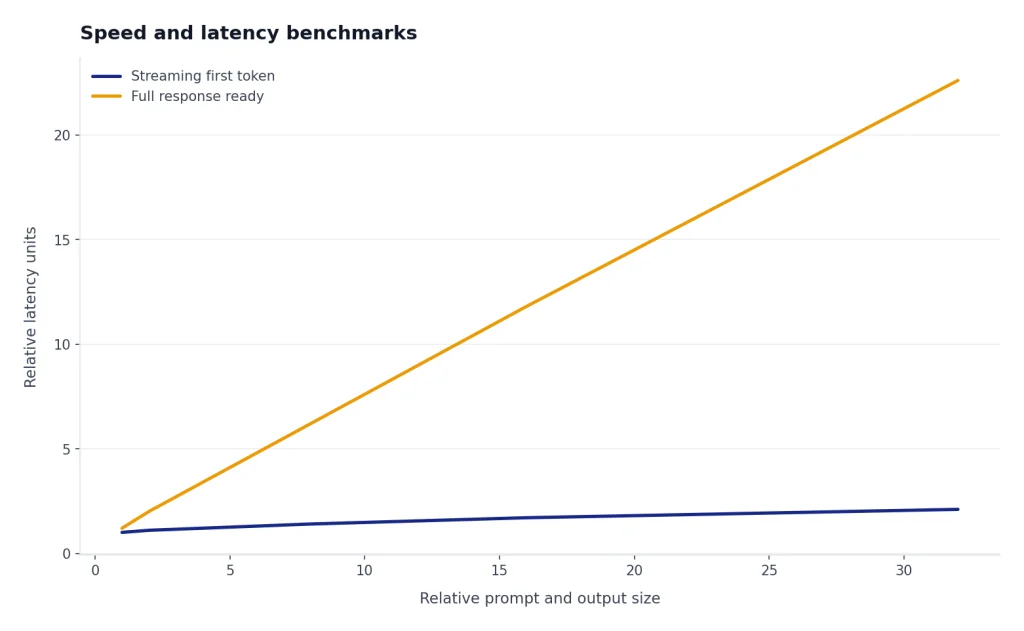
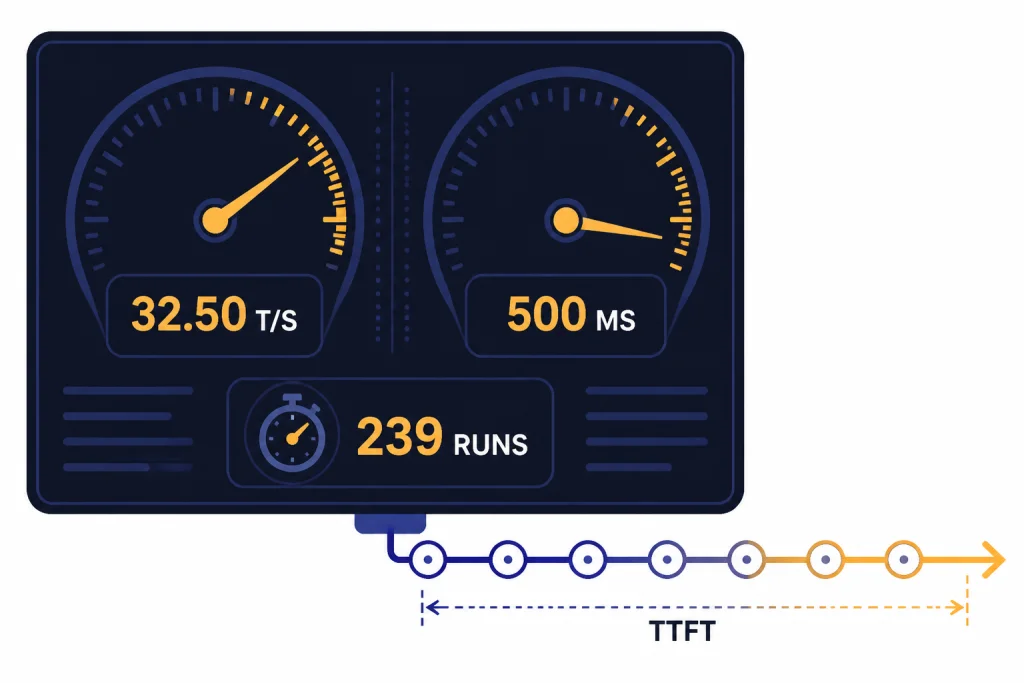
For a public third-party speed reference, LLM Benchmarks reported GPT-4 Turbo at 32.50 average tokens per second, 500.00 ms average time to first token, and 239 analyzed runs, with the last listed measurement on February 20, 2026.[4] Treat that as a useful external sample, not a guarantee. The same page also reports a wide spread between its minimum and maximum measured throughput, which is why you should benchmark your own prompts before committing to user-facing latency targets.[4]
For interactive apps, GPT-4 Turbo can feel responsive when responses are streamed and short. It can feel slow when the task forces large outputs, image analysis, or long-context reasoning over dense material. If raw response time is your top criterion, compare it against the fastest GPT model options instead of assuming the word “Turbo” still means fastest.
How to test GPT-4 Turbo speed in your own app
- Use real prompts, not synthetic one-sentence prompts.
- Separate time to first token from total completion time.
- Run tests with streaming on and streaming off.
- Measure short, medium, and long outputs separately.
- Repeat tests at the same concurrency level your app expects in production.
A practical rule is to benchmark by user journey. A coding assistant, document summarizer, report generator, and image-inspection workflow will have different latency profiles even when they call the same model.
GPT-4 Turbo pricing
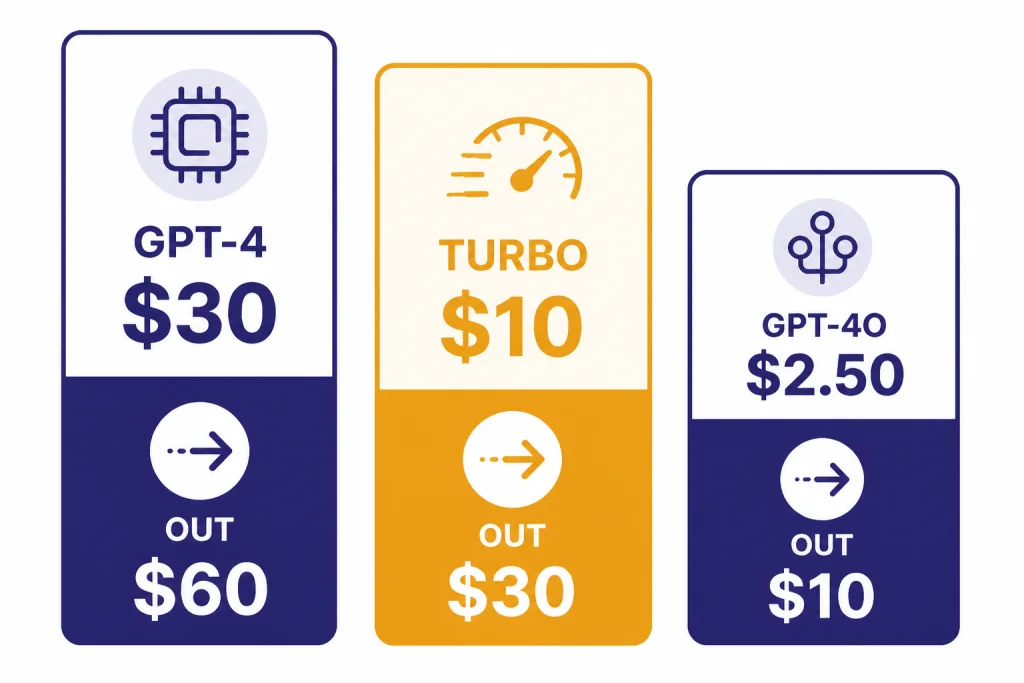
GPT-4 Turbo costs $10.00 per 1M input tokens and $30.00 per 1M output tokens in OpenAI’s model docs.[1] OpenAI’s original DevDay announcement described that pricing as 3x cheaper for input tokens and 2x cheaper for output tokens than GPT-4 at the time.[2] That was the main economic appeal of GPT-4 Turbo when it arrived: near-GPT-4 quality with a much larger context window and a lower bill.
| Model | Input price | Output price | Context window | Best reading of the price |
|---|---|---|---|---|
| GPT-4 | $30.00 per 1M tokens.[5] | $60.00 per 1M tokens.[5] | 8,192 tokens.[5] | Legacy GPT-4 behavior at the highest price in this comparison. |
| GPT-4 Turbo | $10.00 per 1M tokens.[1] | $30.00 per 1M tokens.[1] | 128,000 tokens.[1] | Lower than GPT-4, but no longer cheap by 2026 standards. |
| GPT-4o | $2.50 per 1M tokens.[6] | $10.00 per 1M tokens.[6] | 128,000 tokens.[6] | The better default for many multimodal text-and-image workloads. |
| GPT-4.1 | $2.00 per 1M tokens.[7] | $8.00 per 1M tokens.[7] | 1,047,576 tokens.[7] | A stronger fit for very long-context text and coding tasks. |
The price table explains why GPT-4 Turbo is no longer the obvious value pick. It is cheaper than original GPT-4, but GPT-4o and GPT-4.1 list lower token prices in OpenAI’s docs.[6][7] For a full cost-by-model view, use our OpenAI API pricing guide or the cheapest GPT model comparison.
Cost example
A GPT-4 Turbo request with 20,000 input tokens and 1,000 output tokens uses 0.02M input tokens and 0.001M output tokens. At $10.00 per 1M input tokens and $30.00 per 1M output tokens, that single request costs $0.23 before any other product-specific charges.[1] The same request pattern can become expensive fast if you send large context on every turn instead of caching, retrieval-filtering, or summarizing state.
Performance benchmarks
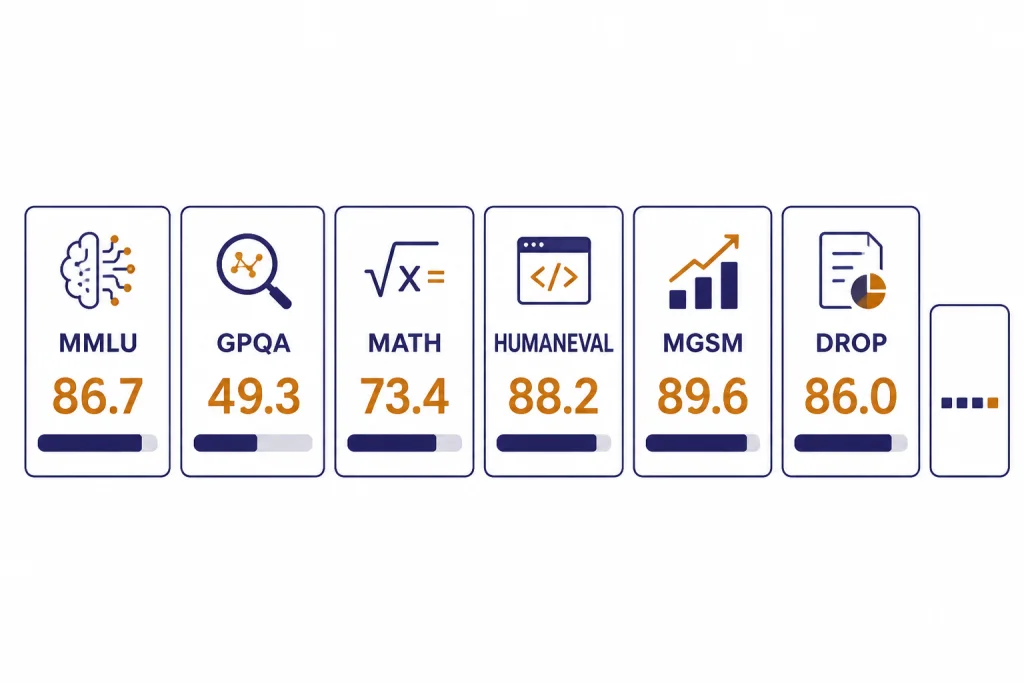
OpenAI’s simple-evals repository lists GPT-4 Turbo snapshot gpt-4-turbo-2024-04-09 with scores of 86.7 on MMLU, 49.3 on GPQA, 73.4 on MATH, 88.2 on HumanEval, 89.6 on MGSM, 86.0 on DROP, and 24.2 on SimpleQA.[3] The repository says the evaluations emphasize a zero-shot, chain-of-thought setting with simple instructions, and it publishes the table to make model accuracy numbers more transparent.[3]
| Benchmark | GPT-4 Turbo score | What the benchmark stresses |
|---|---|---|
| MMLU | 86.7.[3] | Broad academic and professional knowledge. |
| GPQA | 49.3.[3] | Difficult graduate-level question answering. |
| MATH | 73.4.[3] | Competition-style math problem solving. |
| HumanEval | 88.2.[3] | Python coding tasks and functional correctness. |
| MGSM | 89.6.[3] | Multilingual grade-school math reasoning. |
| DROP | 86.0.[3] | Reading comprehension with discrete reasoning. |
| SimpleQA | 24.2.[3] | Short factual answering. |
These scores are useful, but they are not a substitute for task-specific evaluation. A model can score well on HumanEval and still fail your framework, test style, codebase conventions, or security requirements. If your main workload is software development, compare GPT-4 Turbo with the best GPT model for coding rather than relying on a single coding benchmark.
The biggest practical lesson from the benchmark table is that GPT-4 Turbo remains capable, but no longer defines the frontier. OpenAI’s newer GPT-4o and GPT-4.1 docs position those models as more current defaults, with lower prices and broader feature support.[6][7] For pure writing quality, you should also compare against the best GPT model for writing, because benchmarks do not fully capture tone control, revision quality, or editorial consistency.
Capabilities and limits
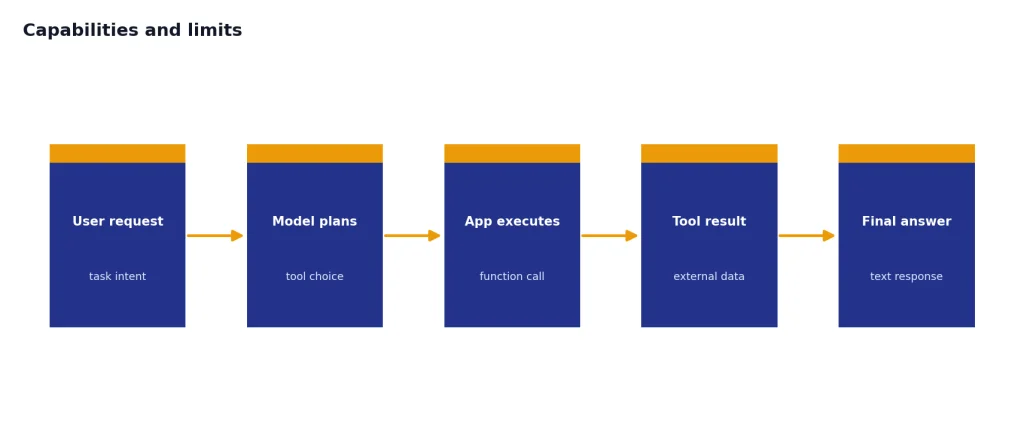
GPT-4 Turbo accepts text and image input and produces text output.[1] That makes it usable for document analysis, image description, form extraction, chart interpretation, screenshot review, and multimodal classification. For a deeper look at image-understanding workflows, see our GPT-4 Vision guide.
The model supports streaming and function calling, but OpenAI’s docs list Structured Outputs, fine-tuning, and predicted outputs as not supported for GPT-4 Turbo.[1] That distinction matters for newer API designs. If your application depends on strict schema adherence, fine-tuned behavior, or prediction acceleration, GPT-4 Turbo may force extra validation layers or a move to a newer model.
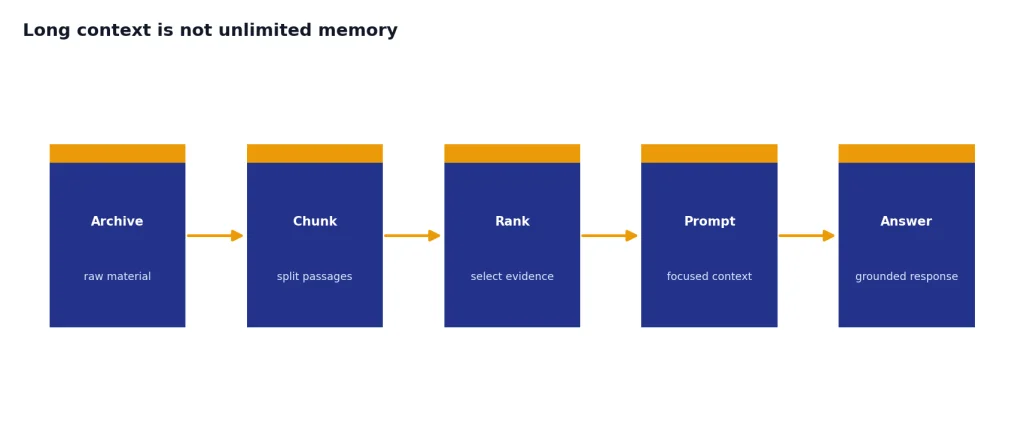
Long context is not unlimited memory
The 128,000-token context window is still large enough for many contracts, research packets, support histories, and code excerpts.[1] It does not mean every token receives equal attention, and it does not remove the need for retrieval design. For large archives, chunking and ranking usually produce better results than pasting everything into one prompt. Use our context window sizes for every GPT model reference when deciding whether GPT-4 Turbo’s window is enough.
Output length is a real ceiling
The 4,096-token max output cap is easy to hit in long reports, code generation, data extraction, and multi-section summaries.[1] If your task needs a 20-page answer, design a multi-step workflow. Ask for an outline first, then generate each section, then run a final consistency pass.
When GPT-4 Turbo still makes sense
Use GPT-4 Turbo when you already have tested prompts, accepted outputs, and regression evaluations around this model. Model migration has hidden costs. A cheaper model can become more expensive if it breaks your JSON parser, changes tone, misses edge cases, or requires months of re-testing.
- Legacy production systems. Keep GPT-4 Turbo if the system is stable and the migration risk is larger than the token savings.
- Long-context review workflows. It still supports a 128,000-token context window.[1]
- Text-plus-image input. It can inspect images and return text.[1]
- Behavioral consistency. Use the dated snapshot when you need repeatable model behavior across releases.[1]
- Known benchmark baselines. If your eval suite was created against
gpt-4-turbo-2024-04-09, keep it as a reference even after you adopt newer models.
Do not choose GPT-4 Turbo only because of its name. In 2026, “Turbo” is historical branding. It is not a guarantee that the model is the fastest, cheapest, or strongest option in OpenAI’s catalog.
Migration options
The most common migration path from GPT-4 Turbo is GPT-4o for general text-and-image work. OpenAI describes GPT-4o as a versatile high-intelligence flagship model that accepts text and image inputs and produces text outputs, and its listed API prices are lower than GPT-4 Turbo’s prices.[6] For very large context windows, GPT-4.1 is also worth testing because OpenAI lists a 1,047,576-token context window and lower token prices than GPT-4 Turbo.[7]
A safe migration plan has three steps. First, freeze a representative eval set from real prompts. Second, compare GPT-4 Turbo, GPT-4o, and GPT-4.1 on accuracy, latency, formatting, refusal behavior, and cost. Third, roll out the replacement to a small traffic slice before changing the default model.
Keep the old model available during the transition. A rollback switch is cheap insurance when model behavior affects customer-facing answers, code generation, contract review, medical triage routing, or financial analysis. If you need a broader capability ranking before you migrate, use our most powerful GPT model benchmark roundup.
Frequently asked questions
Is GPT-4 Turbo still available?
OpenAI’s model docs still list GPT-4 Turbo, including the gpt-4-turbo alias and gpt-4-turbo-2024-04-09 snapshot.[1] The same docs describe it as an older model and recommend using a newer model such as GPT-4o for most use cases.[1]
How much does GPT-4 Turbo cost?
GPT-4 Turbo costs $10.00 per 1M input tokens and $30.00 per 1M output tokens in OpenAI’s model documentation.[1] That is cheaper than original GPT-4, but more expensive than GPT-4o and GPT-4.1 according to the current model pages.[6][7]
What is the GPT-4 Turbo context window?
GPT-4 Turbo has a 128,000-token context window.[1] Its max output is 4,096 tokens, so you should not expect it to return an output as long as the input.[1]
Is GPT-4 Turbo faster than GPT-4?
OpenAI introduced GPT-4 Turbo as an optimized successor to GPT-4 and positioned it as cheaper than GPT-4 at launch.[2] Current docs rate GPT-4 Turbo speed as “Medium,” but OpenAI has not published an official tokens-per-second benchmark for it.[1]
Can GPT-4 Turbo analyze images?
Yes. OpenAI’s model docs list image input support for GPT-4 Turbo and text output support.[1] It does not support audio input, audio output, video input, or video output in that model listing.[1]
Should I use GPT-4 Turbo or GPT-4o?
Use GPT-4o for most new general-purpose text-and-image applications. OpenAI’s GPT-4 Turbo page says newer models like GPT-4o are recommended, and the GPT-4o model page lists lower input and output prices than GPT-4 Turbo.[1][6] Keep GPT-4 Turbo when you need compatibility with an existing production system.