

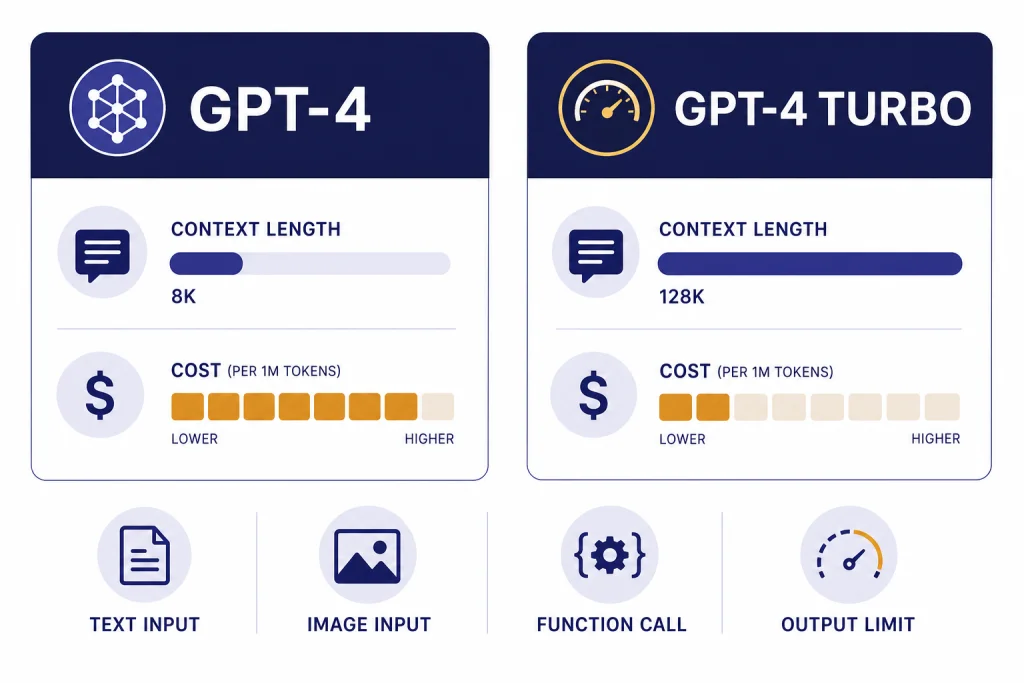
GPT-4 vs GPT-4 Turbo comes down to context, cost, and API behavior. GPT-4 is the older, steadier text model with an 8,192-token context window, 8,192 max output tokens, and $30 input / $60 output pricing per 1 million tokens.[1] GPT-4 Turbo is the later GPT-4 generation with a 128,000-token context window, image input, 4,096 max output tokens, and lower $10 input / $30 output pricing per 1 million tokens.[2] For most legacy GPT-4 API workloads, GPT-4 Turbo was the more practical choice. For new work, OpenAI itself recommends newer models instead of treating either as the default.[2]
Quick verdict
GPT-4 Turbo is not just “GPT-4, but faster.” It is a different production model line that OpenAI introduced after GPT-4 to lower API cost, expand context, and improve developer features. OpenAI described it at DevDay as more capable, cheaper, and able to support a 128K context window.[3] The current OpenAI model card describes GPT-4 Turbo as the next generation of GPT-4 and says it was designed to be a cheaper, better version of GPT-4.[2]
The practical answer is simple. Use GPT-4 Turbo only if you are maintaining an older workflow that depends on it. It gives you much more room for documents, system instructions, conversation history, and tool schemas. It also costs less per token than GPT-4. Use GPT-4 only if you have a legacy application that was tuned around its exact behavior, especially if you value its longer single-response limit more than Turbo’s larger prompt window.
If you are choosing a model for a new project, compare newer options first. Our GPT-4o vs GPT-4 guide explains the successor path for general ChatGPT-style work. Our GPT-4 vs GPT-5 comparison covers the bigger generational jump. For the broader model family, see all GPT models compared side by side.
Side-by-side differences
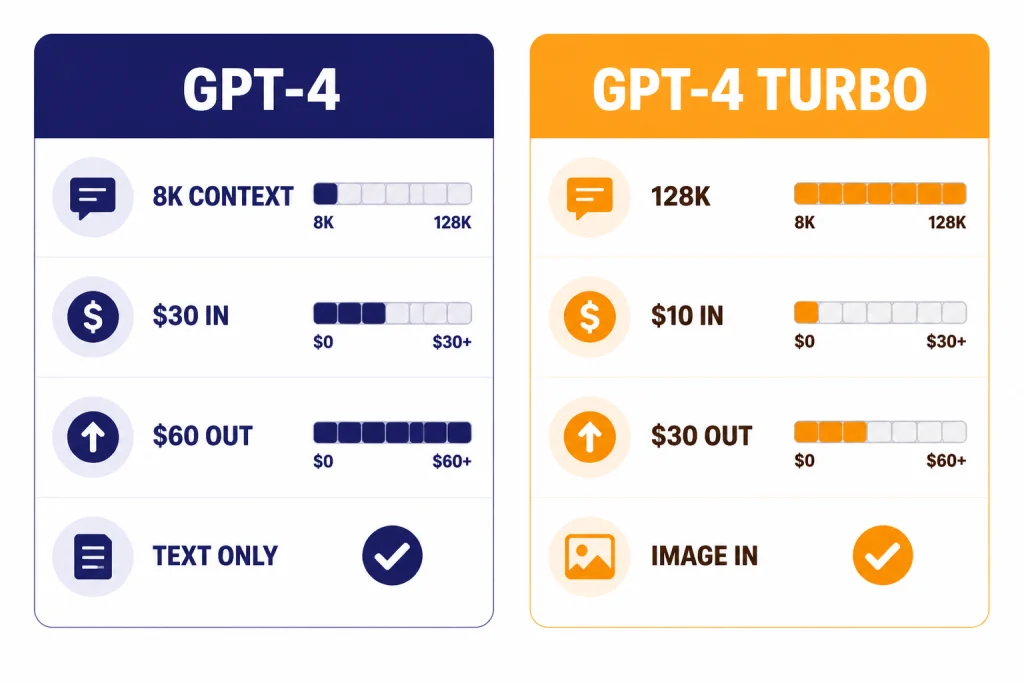
The biggest mistake in this comparison is treating “Turbo” as a minor speed label. It changed the economics and shape of GPT-4 API work. It made long-context prompts practical for many teams, added image input on the stable Turbo model, and reduced token prices. GPT-4 remained useful for legacy compatibility, but it was no longer the most efficient member of the GPT-4 family.
| Category | GPT-4 | GPT-4 Turbo | What it means |
|---|---|---|---|
| Current positioning | Older high-intelligence GPT model, usable in Chat Completions.[1] | Older high-intelligence GPT model; OpenAI recommends newer models such as GPT-4o instead.[2] | Both are legacy choices, not best default choices for new builds. |
| Context window | 8,192 tokens.[1] | 128,000 tokens.[2] | Turbo can hold far more prompt text, files, instructions, and conversation history. |
| Max output | 8,192 tokens.[1] | 4,096 tokens.[2] | GPT-4 can return a longer single answer, but Turbo can read much more before answering. |
| Text input price | $30 per 1 million tokens.[1] | $10 per 1 million tokens.[2] | Turbo input is one third the listed GPT-4 input price. |
| Text output price | $60 per 1 million tokens.[1] | $30 per 1 million tokens.[2] | Turbo output is half the listed GPT-4 output price. |
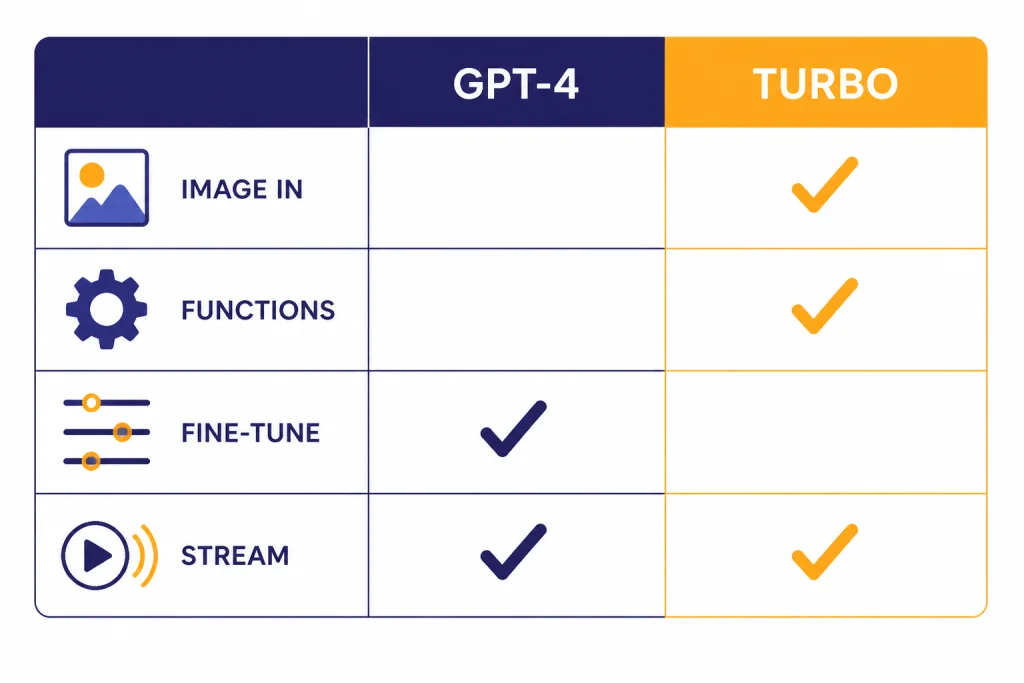
| Image input | Not supported on the current GPT-4 model card.[1] | Supported as input only.[2] | Turbo is the better legacy choice for image analysis. |
| Function calling | Not supported on the current GPT-4 model card.[1] | Supported.[2] | Turbo fits structured app workflows better. |
| Fine-tuning | Supported on the current GPT-4 model card.[1] | Not supported on the current GPT-4 Turbo model card.[2] | GPT-4 keeps one legacy advantage for teams that need model-specific fine-tuning. |
This table also explains why older “GPT-4 feels better” debates can become confused. A user may be comparing ChatGPT behavior, API snapshots, prompt design, context truncation, tool settings, or output length rather than the base model alone. In production, the most important differences are usually context, cost, tools, and compatibility.
Context window and long prompts
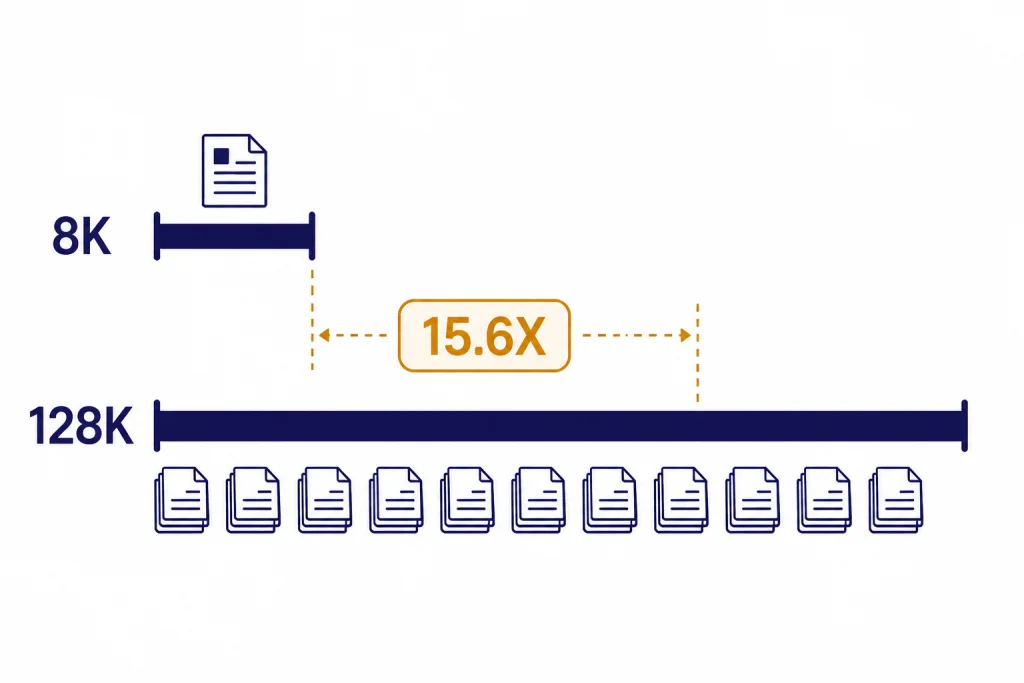
GPT-4 Turbo’s most visible advantage is context length. GPT-4 has an 8,192-token context window, while GPT-4 Turbo has a 128,000-token context window.[1][2] That is about 15.6 times more context capacity. In plain terms, Turbo can take in much larger source material before it has to ignore, summarize, retrieve, or truncate earlier content.
OpenAI’s DevDay announcement framed the 128K context window as enough to fit the equivalent of more than 300 pages of text in a single prompt.[3] That does not mean you should always paste hundreds of pages into a prompt. Long context increases cost and can make instructions harder to manage. It does mean GPT-4 Turbo was much better suited for workflows such as contract review, multi-file code analysis, long customer support histories, research notes, and internal documentation queries.
GPT-4’s smaller window can still work well when you control the prompt tightly. It is often enough for a precise task with a short system message, a few examples, and a moderate user request. It becomes limiting when you need the model to compare many documents, follow a long conversation, or keep a large schema in view. If context size is your main decision factor, see our context window comparison for a broader model-by-model view.
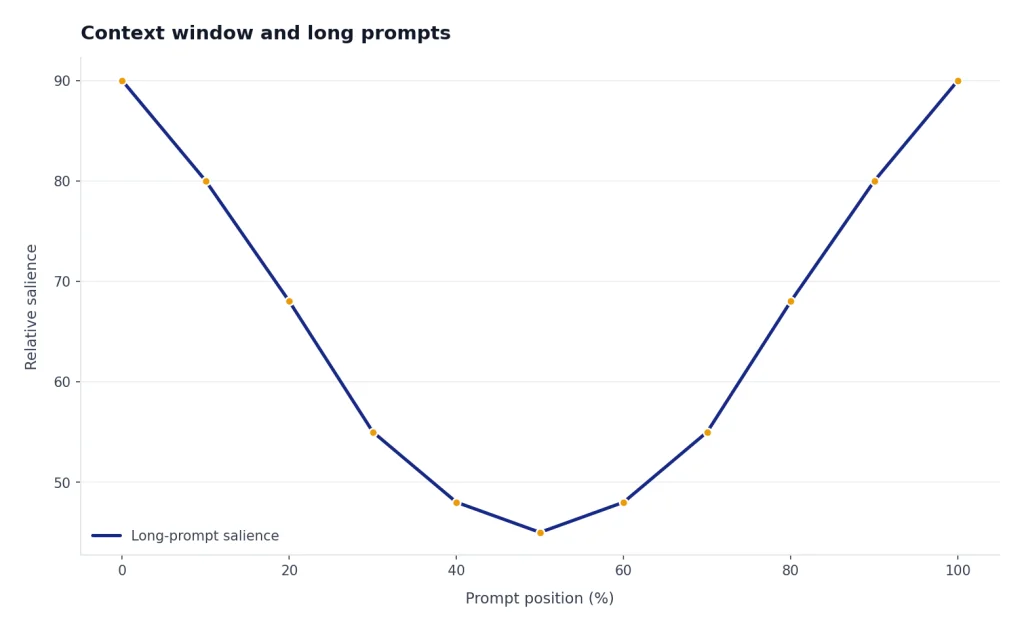
The key point is that context is not memory. A larger context window lets the model consider more tokens in one request. It does not guarantee perfect attention to every detail. Good long-context prompts still need section labels, explicit priorities, and clear instructions about what to ignore.
Pricing and output limits
GPT-4 Turbo was a cost reset for GPT-4-class API usage. GPT-4 is listed at $30 per 1 million input tokens and $60 per 1 million output tokens.[1] GPT-4 Turbo is listed at $10 per 1 million input tokens and $30 per 1 million output tokens.[2] OpenAI also described the DevDay pricing change as 3x cheaper for input tokens and 2x cheaper for output tokens compared with GPT-4.[3] Independent API pricing trackers have also listed GPT-4 Turbo at $10 input and $30 output per 1 million tokens, which matches OpenAI’s model card.[8]
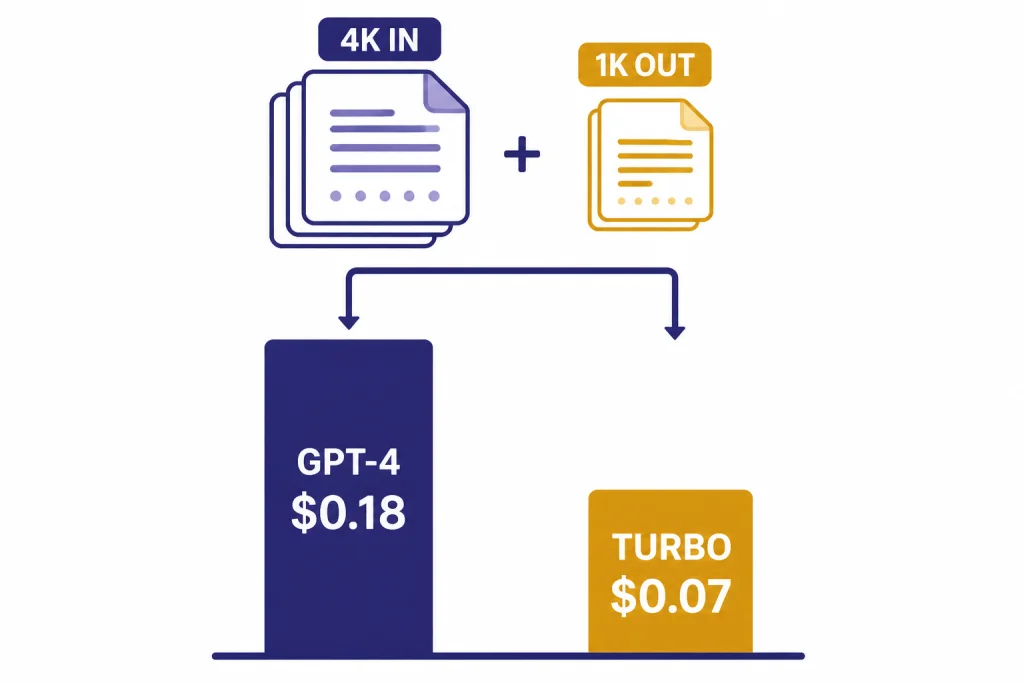
Here is a simple example. A request with 4,000 input tokens and 1,000 output tokens costs about $0.18 on GPT-4 at the listed rates, and about $0.07 on GPT-4 Turbo at the listed rates.[1][2] That gap grows when you send large prompts, because Turbo’s input price is much lower.
Output length cuts the other way. GPT-4 lists an 8,192-token max output, while GPT-4 Turbo lists a 4,096-token max output.[1][2] If your application needs one very long answer in a single response, GPT-4 has the larger output ceiling. If your application needs to read a long document and then produce a concise analysis, GPT-4 Turbo usually fits better.
For most software teams, the input side matters more than the output side. Retrieval-augmented generation, customer support assistants, code review bots, and internal knowledge tools often send far more input than output. Turbo’s lower input price made these use cases much easier to scale. For current model pricing across OpenAI’s lineup, use our OpenAI API pricing reference before making a production decision.
API features and modality support
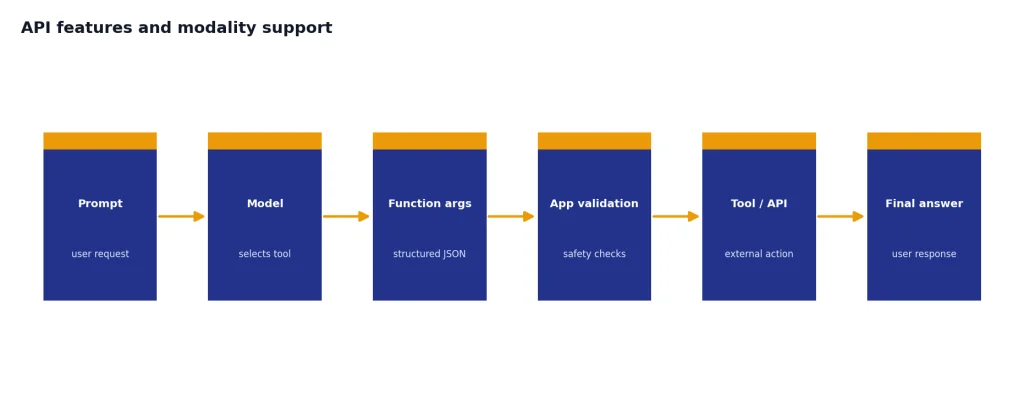
GPT-4 Turbo is the stronger legacy API model for app-style workflows. OpenAI’s current GPT-4 Turbo model card lists text and image input, text output, streaming support, and function calling support.[2] GPT-4’s current model card lists text input and output, streaming support, and fine-tuning support, but it does not list image input or function calling support for that model card.[1]
Function calling matters when the model needs to choose structured arguments for your app. It lets a model response become a safer bridge to search, database lookup, order status checks, workflow automation, or internal APIs. OpenAI’s DevDay post said GPT-4 Turbo improved function calling accuracy and could call multiple functions in a single message.[3] That made Turbo a better fit for agent-like product flows than the older GPT-4 model.
GPT-4 Turbo also gained a stable vision path. OpenAI said at DevDay that GPT-4 Turbo could accept images in the Chat Completions API through the preview vision model, with the main Turbo model planned to receive vision support as part of the stable release.[3] VentureBeat reported that GPT-4 Turbo with Vision became generally available through the API on April 9, 2024.[6] The current model card lists image input for GPT-4 Turbo.[2]
GPT-4 keeps a different kind of advantage: fine-tuning support on the current model card.[1] That matters if your team has already invested in a tuned GPT-4 workflow. It matters less if your app depends on long-context prompts, images, or structured tool calls.
If you mostly compare models inside a browser, API feature differences can be easy to miss. For hands-on testing, our OpenAI Playground review explains why developers often use Playground before they wire a model into production.
Quality and behavior differences
GPT-4 launched as a major step up in reasoning, instruction following, and benchmark performance. OpenAI said GPT-4 showed human-level performance on many professional and academic benchmarks and passed a simulated bar exam around the top 10% of test takers.[4] OpenAI also said the difference between GPT-3.5 and GPT-4 became clearer as task complexity rose, with GPT-4 being more reliable, creative, and able to handle more nuanced instructions.[4]
GPT-4 Turbo was introduced as the next generation of GPT-4, not as a small patch. OpenAI described the first Turbo preview as more capable and said it performed better than previous models on tasks that require careful instruction following, including specific output formats.[3] The current model card says it was designed to be a cheaper, better version of GPT-4.[2]
That does not mean every user preferred Turbo on every task. Model behavior includes tone, verbosity, refusal style, coding habits, and sensitivity to prompt wording. A team that tuned hundreds of prompts around GPT-4 could see regressions when moving to Turbo, even if Turbo was better on cost and context. That is why model migration should include task-specific evaluation rather than a blind replacement.
For reasoning-heavy work, remember that GPT models and reasoning models are different product lines. If your main use case is math, planning, hard coding, or multi-step analysis, read GPT vs the o-Series rather than limiting the decision to older GPT-4 variants. If your main use case is speed, our fastest GPT model benchmarks are more relevant than this legacy comparison.
Which model should you use
Choose GPT-4 Turbo if you are maintaining a legacy GPT-4-class API workflow and need long context, lower costs, image input, or function calling. It is the more practical option for long documents, app integrations, retrieval workflows, and multimodal analysis. It was designed to solve the most painful limitations of the original GPT-4 API: context size and cost.
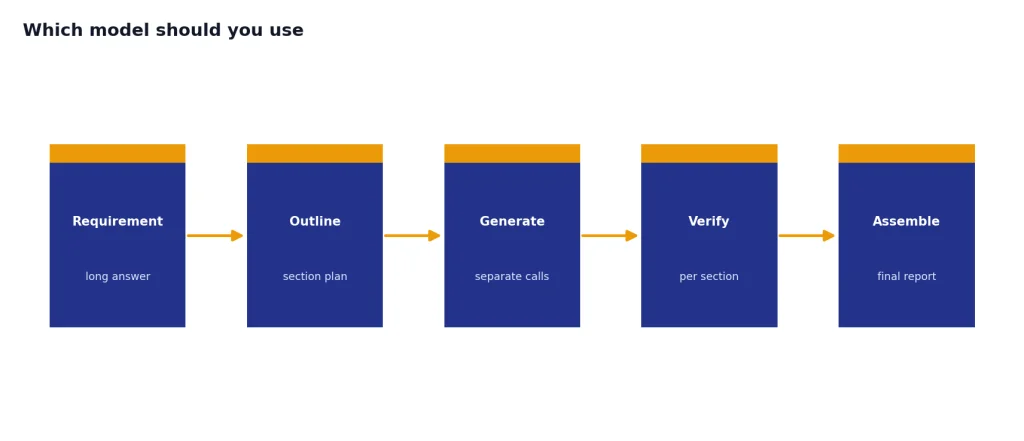
Choose GPT-4 only when compatibility is the point. Some applications depend on exact model behavior, a specific tuned setup, or a longer single-output ceiling. GPT-4’s listed 8,192-token max output is larger than GPT-4 Turbo’s listed 4,096-token max output.[1][2] That can matter for long-form generation, although many production systems are better served by chunking long outputs into sections.
Choose neither for a new app unless you have a clear reason. OpenAI’s GPT-4 Turbo model card says to use a newer model like GPT-4o today.[2] That recommendation matters. Legacy models can be stable for old systems, but they rarely offer the best combination of price, latency, context, and capability for new systems.
ChatGPT users should also separate model comparisons from plan comparisons. A paid ChatGPT plan may expose a different model picker, tool set, message cap, workspace control, or admin feature than the API. If you are deciding what to buy rather than what to call from code, start with ChatGPT Free vs Plus vs Pro or ChatGPT Plus vs Team.
Migration checklist
If you are moving from GPT-4 to GPT-4 Turbo, do not only change the model name. Treat the migration as a behavior and cost change. The expanded context window can tempt teams to paste more material into every request, but that can create noisy prompts and higher bills. The lower price gives you room to improve context, not a reason to remove prompt discipline.
- Audit prompt length. Identify how much of your current context is useful, repeated, stale, or better retrieved on demand.
- Retest output length. GPT-4 Turbo has a 4,096-token max output, while GPT-4 lists 8,192 tokens.[1][2] Split long reports into multiple calls if needed.
- Check structured output. If you use tool calls, JSON-like responses, or schemas, test the exact fields your app expects.
- Run side-by-side evals. Use your real support tickets, contracts, code files, or knowledge-base questions. Generic benchmarks will not catch your edge cases.
- Update budget estimates. Recalculate both input and output costs. Turbo is cheaper per token, but larger prompts can still raise total spend.
- Watch safety-sensitive tasks. OpenAI has warned that GPT-4 can still hallucinate and make reasoning errors, especially in high-stakes contexts.[4] Keep human review where the result matters.
A clean migration usually means smaller system prompts, better retrieval, clearer section boundaries, and stricter acceptance tests. Turbo gives you more room. It does not remove the need for prompt engineering, evaluation, or monitoring.
Frequently asked questions
Is GPT-4 Turbo better than GPT-4?
For most legacy API workloads, yes. GPT-4 Turbo has a much larger 128,000-token context window, lower listed token prices, image input, and function calling support.[2] GPT-4 may still be preferable for a legacy workflow that depends on its exact behavior, fine-tuning support, or 8,192-token max output.[1]
Why was it called GPT-4 Turbo?
OpenAI introduced GPT-4 Turbo as the next generation of GPT-4 at DevDay on November 6, 2023.[3] The “Turbo” name signaled a cheaper and more scalable GPT-4-class model rather than a simple speed setting. OpenAI described it as more capable, cheaper, and able to support a 128K context window.[3]
Does GPT-4 Turbo have a bigger context window?
Yes. GPT-4 Turbo has a 128,000-token context window, while GPT-4 has an 8,192-token context window.[1][2] That makes Turbo far better for long documents, long chats, and prompts that include large reference material.
Is GPT-4 Turbo cheaper than GPT-4?
Yes. GPT-4 is listed at $30 per 1 million input tokens and $60 per 1 million output tokens.[1] GPT-4 Turbo is listed at $10 per 1 million input tokens and $30 per 1 million output tokens.[2]
Can GPT-4 Turbo analyze images?
Yes, on the current OpenAI model card, GPT-4 Turbo supports text and image input and produces text output.[2] GPT-4’s current model card lists text input and output, with image input not supported for that model card.[1]
Should I use GPT-4 or GPT-4 Turbo in ChatGPT?
For normal ChatGPT use, this is mostly a legacy distinction. OpenAI announced that GPT-4 would be retired from ChatGPT and replaced by GPT-4o effective April 30, 2025.[7] If you are choosing a ChatGPT plan, compare plan features and current model access rather than assuming GPT-4 or GPT-4 Turbo is still the relevant picker.